
iPolloWork
iPolloWork — local-first AI agent workspace with Design and Video tools
Install with your AI
Paste into Claude Code, Cursor, or any agent — it reads the repo and wires the tool into your project.
Install and set up iPolloWork (git-clone project) into my current project.
Found on https://claudeers.com/ipollowork
Repo: https://github.com/Devin-AXIS/iPolloWork
Homepage/docs: —
Detected install method: git-clone → git clone https://github.com/Devin-AXIS/iPolloWork
Category: uncategorized. Platforms: cli, api, desktop, web.
Read the repo's README for exact setup and env vars, then install it and wire it into my project.

Claudeers Health Verdict:
active; community-verified: false. Confirm the source before running anything.
git clone https://github.com/Devin-AXIS/iPolloWork
// compatibility
| Platforms | cli, api, desktop, web |
|---|---|
| Operating systems | — |
| AI compatibility | claude |
| License | MIT |
| Pricing | open-source |
| Language | TypeScript |
iPolloWork
iPolloWork is a free, open-source desktop app (macOS, Windows, Linux) for doing work with AI agents on your own files — the open source alternative to Claude Cowork and Codex. Bring any of 50+ LLMs with your own provider keys, extend agents with skills, plugins, and MCP servers, and share complete setups with your team in one link.
Core Philosophy
- Local-first, cloud-ready: iPolloWork runs on your machine in one click. Send a message instantly.
- Composable: desktop app, Slack/Telegram connector, or server. Use what fits, no lock-in.
- Ejectable: iPolloWork is powered by OpenCode, so everything OpenCode can do works in iPolloWork, even without a UI yet.
- Sharing is caring: start solo on localhost, then explicitly opt into remote sharing when you need it.
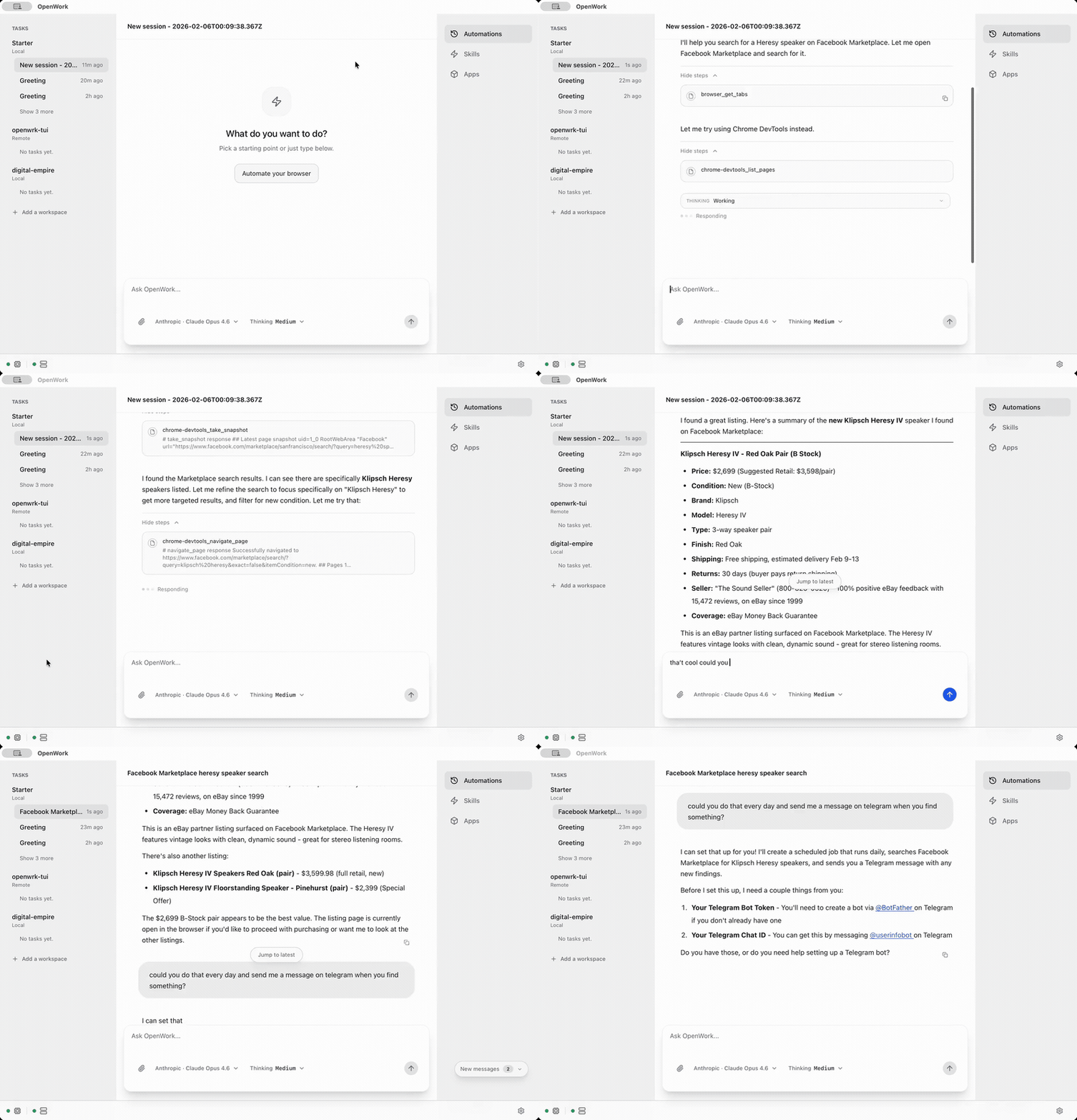
iPolloWork is designed around the idea that you can easily ship your agentic workflows for your team as a repeatable, productized process.
[!TIP]
Get enhanced capabilities including feature prioritization, SSO, SLA support, LTS versions, and more.
Alternate UIs
- iPolloWork Orchestrator (CLI host): run OpenCode + iPolloWork server without the desktop UI.
- install:
npm install -g ipollowork-orchestrator - run:
ipollowork start --workspace /path/to/workspace --approval auto - docs: apps/orchestrator/README.md
- install:
Quick start
- macOS and Linux downloads are available directly.
Code signing policy
Free code signing provided by SignPath.io, certificate by SignPath Foundation.
Why
Current CLI and GUIs for opencode are anchored around developers. That means a focus on file diffs, tool names, and hard to extend capabilities without relying on exposing some form of cli.
iPolloWork is designed to be:
- Extensible: skill and opencode plugins are installable modules.
- Auditable: show what happened, when, and why.
- Permissioned: access to privileged flows.
- Local/Remote: iPolloWork works locally as well as can connect to remote servers.
What’s Included
- Host mode: runs opencode locally on your computer
- Client mode: connect to an existing OpenCode server by URL.
- Sessions: create/select sessions and send prompts.
- Live streaming: SSE
/eventsubscription for realtime updates. - Execution plan: render OpenCode todos as a timeline.
- Permissions: surface permission requests and reply (allow once / always / deny).
- Templates: save and re-run common workflows (stored locally).
- Debug exports: copy or export the runtime debug report and developer log stream from Settings -> Debug when you need to file a bug.
- Skills manager:
- list installed
.opencode/skillsfolders - import a local skill folder into
.opencode/skills/<skill-name>
- list installed
Skill Manager
Works on local computer or servers
Build from Source
Requirements
- Node.js +
pnpm - Rust toolchain (for Tauri): install via
curl --proto '=https' --tlsv1.2 -sSf https://sh.rustup.rs | sh - Tauri CLI:
cargo install tauri-cli - OpenCode CLI installed and available on PATH:
opencode
Local Dev Prerequisites (Desktop)
Before running pnpm dev, ensure these are installed and active in your shell:
- Node + pnpm (repo uses
[email protected]) - Bun 1.3.9+ (
bun --version) - Rust toolchain (for Tauri), with Cargo from current
rustupstable (supportsCargo.lockv4) - Xcode Command Line Tools (macOS)
- On Linux, WebKitGTK 4.1 development packages so
pkg-configcan resolvewebkit2gtk-4.1andjavascriptcoregtk-4.1
One-minute sanity check
Run from repo root:
git checkout dev
git pull --ff-only origin dev
pnpm install --frozen-lockfile

which bun
bun --version
pnpm --filter @ipollowork/desktop exec tauri --version
Install
pnpm install
iPolloWork now lives in apps/app (UI) and apps/desktop (desktop shell).
Run (Desktop)
pnpm dev
pnpm dev now enables IPOLLOWORK_DEV_MODE=1 automatically, so desktop dev uses an isolated OpenCode state instead of your personal global config/auth/data.
Run (Web UI only)
pnpm dev:ui
All repo dev entrypoints now opt into the same dev-mode isolation so local testing uses the iPolloWork-managed OpenCode state consistently.
Arch Users:
sudo pacman -S --needed webkit2gtk-4.1
curl -fsSL https://opencode.ai/install | bash -s -- --version "$(node -e "const fs=require('fs'); const parsed=JSON.parse(fs.readFileSync('constants.json','utf8')); process.stdout.write(String(parsed.opencodeVersion||'').trim().replace(/^v/,''));")" --no-modify-path
Architecture (high-level)
- In Host mode, iPolloWork runs a local host stack and connects the UI to it.
- Default runtime:
ipollowork(installed fromipollowork-orchestrator), which orchestratesopencodeandipollowork-server. - Fallback runtime:
direct, where the desktop app spawnsopencode serve --hostname 127.0.0.1 --port <free-port>directly.
- Default runtime:
When you select a project folder, iPolloWork runs the host stack locally using that folder and connects the desktop UI. This lets you run agentic workflows, send prompts, and see progress entirely on your machine without a remote server.
- The UI uses
@opencode-ai/sdk/v2/clientto:- connect to the server
- list/create sessions
- send prompts
- subscribe to SSE events(Server-Sent Events are used to stream real-time updates from the server to the UI.)
- read todos and permission requests
Folder Picker
The folder picker uses the Tauri dialog plugin. Capability permissions are defined in:
apps/desktop/src-tauri/capabilities/default.json
OpenCode Plugins
Plugins are the native way to extend OpenCode. iPolloWork now manages them from the Skills tab by
reading and writing opencode.json.
- Project scope:
<workspace>/opencode.json - Global scope:
~/.config/opencode/opencode.json(or$XDG_CONFIG_HOME/opencode/opencode.json)
You can still edit opencode.json manually; iPolloWork uses the same format as the OpenCode CLI:
{
  "$schema": "https://opencode.ai/config.json",
  "plugin": ["opencode-wakatime"]
}
Useful Commands
pnpm dev
pnpm dev:ui
pnpm typecheck
pnpm build
pnpm build:ui
pnpm test:e2e
Troubleshooting
If you need to report a desktop or session bug, open Settings -> Debug and export both the runtime debug report and developer logs before filing an issue.
Linux / Wayland (Hyprland)
If iPolloWork crashes on launch with WebKitGTK errors like Failed to create GBM buffer, disable dmabuf or compositing before launch. Try one of the following environment flags.
WEBKIT_DISABLE_DMABUF_RENDERER=1 ipollowork
WEBKIT_DISABLE_COMPOSITING_MODE=1 ipollowork
Security Notes
- iPolloWork hides model reasoning and sensitive tool metadata by default.
- Host mode binds to
127.0.0.1by default.
Contributing
- Review
AGENTS.mdplusVISION.md,PRINCIPLES.md,PRODUCT.md, andARCHITECTURE.mdto understand the product goals before making changes. - Ensure Node.js,
pnpm, the Rust toolchain, andopencodeare installed before working inside the repo. - Run
pnpm installonce per checkout, then verify your change withpnpm typecheckpluspnpm test:e2e(or the targeted subset of scripts) before opening a PR. - Use
.github/pull_request_template.mdwhen opening PRs and include exact commands, outcomes, manual verification steps, and evidence. - If CI fails, classify failures in the PR body as either code-related regressions or external/environment/auth blockers.
- Add new PRDs to
apps/app/pr/<name>.mdfollowing the.opencode/skills/prd-conventions/SKILL.mdconventions described inAGENTS.md.
Community docs:
CODE_OF_CONDUCT.mdSECURITY.mdSUPPORT.mdTRIAGE.md
First contribution checklist:
- Run
pnpm installand baseline verification commands. - Confirm your change has a clear issue link and scope.
- Add/update tests for behavioral changes.
- Include commands run and outcomes in your PR.
- Add screenshots/video for user-facing flow changes.
Supported Languages
Translated READMEs: translated_readmes/, available in English, 简体中文, 繁體中文, 日本語.
The App is available in the following languages:
- English (
en) - French (
fr) - Spanish (
es) - Catalan (
ca) - Brazilian Portuguese (
pt-BR) - Japanese (
ja) - Simplified Chinese (
zh) - Thai (
th) - Vietnamese (
vi) - Russian (
ru)
For Teams & Businesses
License
MIT — see LICENSE.
// faq
What is iPolloWork?
iPolloWork — local-first AI agent workspace with Design and Video tools. It is open-source on GitHub.
Is iPolloWork free to use?
iPolloWork is open-source under the MIT license, so it is free to use.
What category does iPolloWork belong to?
iPolloWork is listed under uncategorized in the Claudeers registry of Claude-compatible tools.
// embed badge

[](https://claudeers.com/ipollowork)
// retro hit counter

[](https://claudeers.com/ipollowork)
// reviews
// guestbook
// related in Uncategorized / Others
 🔓
🔓Fair-code workflow automation platform with native AI capabilities. Combine visual building with custom code, self-host or cloud, 400+ integrations.
 🔓
🔓The agent engineering platform.
 🔓
🔓FULL Augment Code, Claude Code, Cluely, CodeBuddy, Comet, Cursor, Devin AI, Junie, Kiro, Leap.new, Lovable, Manus, NotionAI, Orchids.app, Perplexity, Poke, Q…
 🔓
🔓100+ AI Agent & RAG apps you can actually run — clone, customize, ship.