
hud-mode
A compact heads-up display for your coding agent. Instruments while it works, the answer when it stops. Claude Code, Codex, OpenCode.
Install with your AI
Paste into Claude Code, Cursor, or any agent — it reads the repo and wires the tool into your project.
Install and set up hud-mode (npm project) into my current project.
Found on https://claudeers.com/hud-mode
Repo: https://github.com/adrida/hud-mode
Homepage/docs: https://tracerml.ai
Detected install method: npm → npm install hud-mode
Category: devtools. Platforms: cli, api.
Read the repo's README for exact setup and env vars, then install it and wire it into my project.

Claudeers Health Verdict:
slowing; community-verified: false. Confirm the source before running anything.
npm install hud-mode
git clone https://github.com/adrida/hud-mode
// compatibility
| Platforms | cli, api |
|---|---|
| Operating systems | — |
| AI compatibility | claude |
| License | MIT |
| Pricing | open-source |
| Language | JavaScript |
hud
A compact heads-up display for your coding agent. Instruments while it works, the answer when it stops - for OpenCode, Claude Code, and Codex. Zero dependencies.
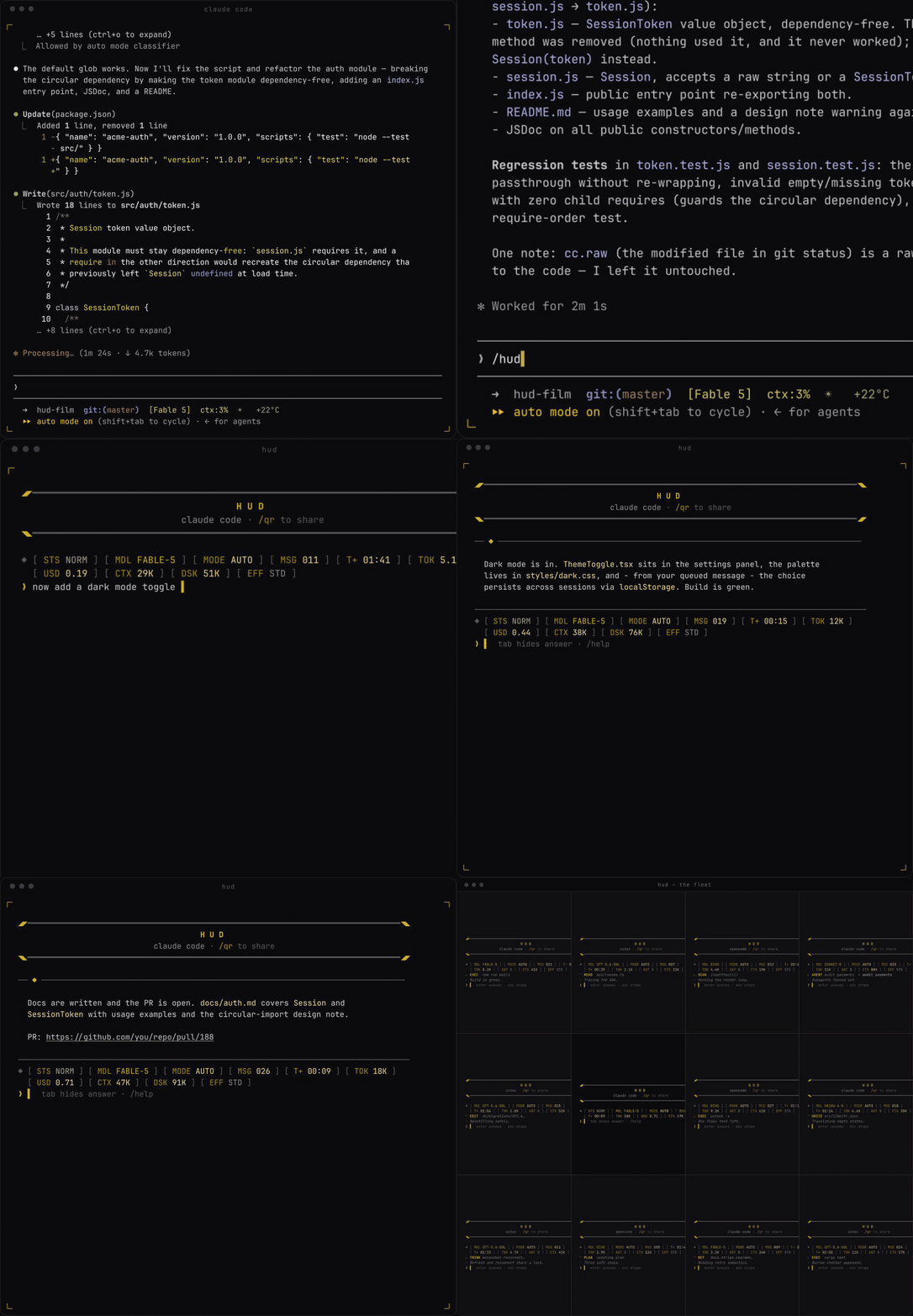
The instruments and the activity line update in place - no scrolling wall of
tool calls. The prompt bar is always writable: hit enter mid-turn and
your message queues, firing the moment the answer lands. esc interrupts
without losing the session.
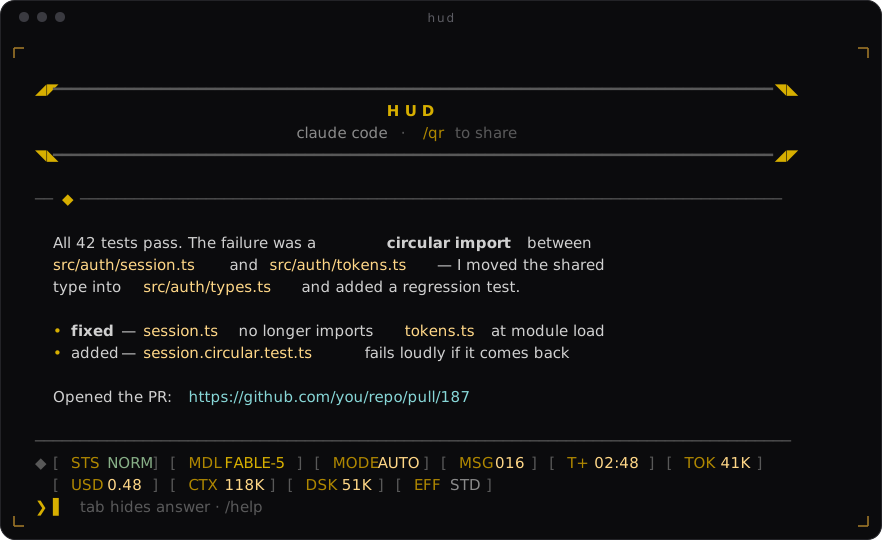
When it stops, the answer lands in full - markdown rendered, links clickable - and you reply right there. Sending a follow-up recompacts the screen back to just instruments and prompt bar.
Install
One command:
npm install -g adrida/hud-mode && hud install
hud install walks you through it: your default agent, echo setup for
opencode if you want it, and where /hud lives - then wires the handback
into all three CLIs.
Requires Node ≥ 18 and at least one of opencode, claude, codex on your
PATH.
Use
hud                       # your default engine (opencode out of the box)
hud "fix the failing CI"  # or start with a prompt
hud -r                    # resume the last session in this directory
hud -r <session-id>       # resume a specific session

hud claude "fix the CI"   # same deck, claude code autopilot
hud codex -r              # same deck, codex - resume last session
hud default claude        # make bare `hud` fly claude code from now on
Launch flags: -m/--model, -e/--effort, --danger (engine-specific
values).
At the ❯ prompt:
| command | effect |
|---|---|
<text> | send - or queue it while the agent is working |
tab | hide / show the current answer |
esc | interrupt the running turn (session survives) |
↑ ↓ | recall previously typed messages (persisted) |
/hud | open this session in the full CLI |
/model | switch model - engine-specific ids · /model reset |
/effort | reasoning effort - engine-specific levels |
/mode | permission / sandbox mode - engine-specific |
/gauges | choose your instruments - /gauges mdl,msg,tok,t (saved) |
/open | print the full answer into the scrollback |
/links | every url the agent has shared, clickable |
/qr | show/hide a qr code to this repo - share it |
/new | start a fresh session |
/danger | skip approvals/sandboxing (sandboxes only) |
/id | print the session id |
/exit | quit |
The toggle
/hud works in both directions. From the hud it opens the same session in
the engine's full TUI; from the full TUI you come back - same session,
nothing lost, terminal wiped clean:
| engine | drive | resume | come back with |
|---|---|---|---|
| OpenCode | opencode run --format json | -s <id> / -c | /hud - a custom command writes the handoff locally at expansion time (near-zero tokens) |
| Claude Code | claude -p --output-format stream-json | --resume <id> | /hud - a UserPromptSubmit hook intercepts it before the model (zero tokens, ~150 ms) |
| Codex | codex exec --json | exec resume <id> / --last | type hud (no slash - a global AGENTS.md rule handles it), or quit the TUI |
Quitting any full TUI (ctrl+c) always returns to the hud too.
Instruments
STSstatus flag (NORM/PERM/INTR/FAULT) ·MDLmodel ·MODEpermission/sandbox mode ·EFFreasoning effort ·MSGmessages ·T+elapsed ·TOKoutput tokens (reasoning included) ·AGTlive subagents ·USDsession cost (where the engine reports it) ·CTXcontext size ·DSKconversation size on disk (claude, codex)- The cluster flows onto a second aligned row rather than dropping gauges.
- The activity line shows what the agent is doing right now (
READ,EDIT,EXEC,SCAN,NET,AGENT,PLAN,THINK…); the┄line carries its own narration. - Links the agent shares go into a per-session ledger
(
~/.claude/hud/links/), survive restarts, and - like file paths in the activity line - are OSC 8 hyperlinks: cmd/ctrl-clickable in iTerm2, Ghostty, WezTerm, Kitty, and friends. /qrrenders a scannable QR code (a from-scratch, zero-dependency encoder, verified module-for-module against a reference implementation).- The panel is yours:
/gauges mdl,msg,tok,tshows only those instruments, in that order, persisted in~/.claude/hud/config.jsonalongside yourdefaultEngine./gauges resetbrings everything back.
How it works
No forks, no patches. hud drives each CLI headless through its JSON event
stream, maps events onto the shared instruments, and continues one real
session per conversation via the engine's own resume mechanism - which is
also what makes the full-TUI toggle lossless. The handback is a sentinel
file (~/.claude/hud/handoff.json) that the wrapper watches while a full
TUI is open; each engine gets its most native way of writing it (hook /
AGENTS.md rule / command template).
hud install touches: ~/.claude/skills/hud/, a hook entry in
~/.claude/settings.json (backed up to .hud-backup),
~/.codex/prompts/hud.md, a marker-guarded block in ~/.codex/AGENTS.md,
and ~/.config/opencode/commands/hud.md. hud uninstall removes all of it.
Roadmap
- In-hud permission approvals (via the Agent SDK)
- Streaming partial text into the narration line
- Zero-token codex handback (plugin hooks)
- Per-directory engine memory for bare
hud
License
MIT - built by tracer
// faq
What is hud-mode?
A compact heads-up display for your coding agent. Instruments while it works, the answer when it stops. Claude Code, Codex, OpenCode.. It is open-source on GitHub.
Is hud-mode free to use?
hud-mode is open-source under the MIT license, so it is free to use.
What category does hud-mode belong to?
hud-mode is listed under devtools in the Claudeers registry of Claude-compatible tools.
// embed badge

[](https://claudeers.com/hud-mode)
// retro hit counter

[](https://claudeers.com/hud-mode)
// reviews
// guestbook
// related in Developer Tools
 🔓
🔓The agent harness performance optimization system. Skills, instincts, memory, security, and research-first development for Claude Code, Codex, Opencode, Curs…
 🔓
🔓Makes your AI agent think like the laziest senior dev in the room. The best code is the code you never wrote.
 🔓
🔓Use Garry Tan's exact Claude Code setup: 23 opinionated tools that serve as CEO, Designer, Eng Manager, Release Manager, Doc Engineer, and QA
 🔓
🔓AI coding assistant skill (Claude Code, Codex, OpenCode, Cursor, Gemini CLI, and more). Turn any folder of code, SQL schemas, R scripts, shell scripts, docs,…