
httpstat
curl statistics made simple
Install with your AI
Paste into Claude Code, Cursor, or any agent — it reads the repo and wires the tool into your project.
⚠ Unverified source (community-unclaimed, low activity) — reveal the prompt
⚠ Unverified source (community-unclaimed, low activity). Inspect the repo before letting your agent install it.

Install and set up httpstat (pip project) into my current project.
Found on https://claudeers.com/httpstat
Repo: https://github.com/reorx/httpstat
Homepage/docs: —
Detected install method: pip → pip install httpstat
Category: devtools. Platforms: cli, api.
Read the repo's README for exact setup and env vars, then install it and wire it into my project.

Claudeers Health Verdict:
dormant; community-verified: false. Confirm the source before running anything.
pip install httpstat
git clone https://github.com/reorx/httpstat
// compatibility
| Platforms | cli, api |
|---|---|
| Operating systems | — |
| AI compatibility | claude |
| License | MIT |
| Pricing | open-source |
| Language | Python |
httpstat
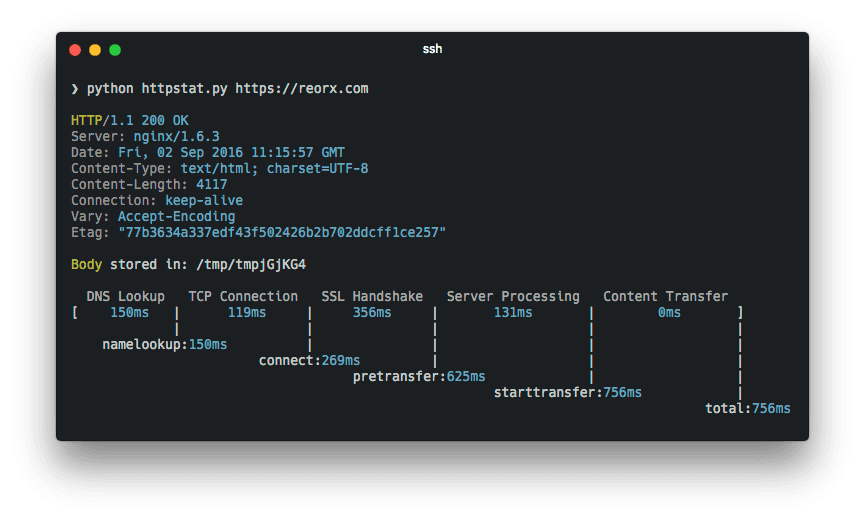
httpstat visualizes curl(1) statistics in a way of beauty and clarity.
It is a single file🌟 Python script that has no dependency👏 and is compatible with Python 3🍻.
Features
- Beautiful terminal output — timing breakdown of DNS, TCP, TLS, server processing, and content transfer
- Structured JSON output —
--format json/jsonlfor machine consumption with a stable v1 schema - SLO threshold checking —
--slo total=500,connect=100exits with code 4 on violation - Save results to file —
--save path.jsonfor multi-step workflows - NO_COLOR support — respects the NO_COLOR convention
- Agent skill — built-in skill for agent-assisted HTTP performance diagnostics
Installation
There are three ways to get httpstat:
-
Download the script directly:
wget https://raw.githubusercontent.com/reorx/httpstat/master/httpstat.py -
Through pip:
pip install httpstat -
Through homebrew (macOS only):
brew install httpstat
For Windows users, @davecheney's Go version is suggested. → download link
Skills
httpstat ships with an agent skill that teaches AI coding assistants (Claude Code, Cursor, etc.) how to use httpstat for HTTP performance diagnostics — automatic installation, bottleneck identification, and actionable fix suggestions.
Install the skill into your project:
npx skills add reorx/httpstat
Once installed, your agent will automatically use httpstat when you ask questions like "why is this API slow?" or "debug this endpoint's latency".
Usage
Simply:
python httpstat.py httpbin.org/get
If installed through pip or brew, you can use httpstat as a command:
httpstat httpbin.org/get
cURL Options
Because httpstat is a wrapper of cURL, you can pass any cURL supported option after the url (except for -w, -D, -o, -s, -S which are already used by httpstat):
httpstat httpbin.org/post -X POST --data-urlencode "a=b" -v
Structured Output
Use --format (-f) to get machine-readable output:
httpstat httpbin.org/get --format json
{
  "schema_version": 1,
  "url": "httpbin.org/get",
  "ok": true,
  "exit_code": 0,
  "response": {
    "status_line": "HTTP/2 200",
    "status_code": 200,
    "remote_ip": "...",
    "remote_port": "443",
    "headers": {"Content-Type": "application/json", "Server": "nginx", "...": "..."}
  },
  "timings_ms": {
    "dns": 5, "connect": 10, "tls": 15,
    "server": 50, "transfer": 20, "total": 100,
    "namelookup": 5, "initial_connect": 15,
    "pretransfer": 30, "starttransfer": 80
  },
  "speed": { "download_kbs": 1234.5, "upload_kbs": 0.0 },
  "slo": null
}
Use --format jsonl for compact single-line JSON (useful for log pipelines).
SLO Thresholds
Check response times against thresholds. Exits with code 4 on violation:
httpstat httpbin.org/get --slo total=500,connect=100,ttfb=200
Supported keys: total, connect, ttfb (time to first byte), dns, tls.
In pretty mode, violations are printed in red at the end of the output.
In JSON mode, violations appear in the slo field:
{
  "slo": {
    "pass": false,
    "violations": [
      { "key": "total", "threshold_ms": 500, "actual_ms": 823 }
    ]
  }
}
Save Results
Write structured JSON output to a file (works with any --format):
httpstat httpbin.org/get --save result.json
httpstat httpbin.org/get --format json --save result.json
Environment Variables
httpstat has a bunch of environment variables to control its behavior.
Here are some usage demos, you can also run httpstat --help to see full explanation.
-
HTTPSTAT_SHOW_BODYSet to
trueto show response body in the output, note that body length is limited to 1023 bytes, will be truncated if exceeds. Default isfalse. -
HTTPSTAT_SHOW_IPBy default httpstat shows remote and local IP/port address. Set to
falseto disable this feature. Default istrue. -
HTTPSTAT_SHOW_SPEEDSet to
trueto show download and upload speed. Default isfalse.HTTPSTAT_SHOW_SPEED=true httpstat http://cachefly.cachefly.net/10mb.test ... speed_download: 3193.3 KiB/s, speed_upload: 0.0 KiB/s -
HTTPSTAT_SAVE_BODYBy default httpstat stores body in a tmp file, set to
falseto disable this feature. Default istrue -
HTTPSTAT_CURL_BINIndicate the cURL bin path to use. Default is
curlfrom current shell $PATH.This exampe uses brew installed cURL to make HTTP2 request:
HTTPSTAT_CURL_BIN=/usr/local/Cellar/curl/7.50.3/bin/curl httpstat https://http2.akamai.com/ --http2

HTTP/2 200
...
cURL must be compiled with nghttp2 to enable http2 feature (#12).
-
HTTPSTAT_METRICS_ONLYIf set to
true, httpstat will only output metrics in json format, this is useful if you want to parse the data instead of reading it.Note: This is kept for backward compatibility. Prefer
--format jsoninstead. -
HTTPSTAT_DEBUGSet to
trueto see debugging logs. Default isfalse -
NO_COLORWhen set (to any value), disables all colored output. See no-color.org for the convention.
NO_COLOR=1 httpstat httpbin.org/get
For convenience, you can export these environments in your .zshrc or .bashrc,
example:
export HTTPSTAT_SHOW_IP=false
export HTTPSTAT_SHOW_SPEED=true
export HTTPSTAT_SAVE_BODY=false
Related Projects
Here are some implementations in various languages:
-
This is the Go alternative of httpstat, it's written in pure Go and relies no external programs. Choose it if you like solid binary executions (actually I do).
-
Go (library): tcnksm/go-httpstat
Other than being a cli tool, this project is used as library to help debugging latency of HTTP requests in Go code, very thoughtful and useful, see more in this article
-
Bash: b4b4r07/httpstat
This is what exactly I want to do at the very beginning, but gave up due to not confident in my bash skill, good job!
-
Node: yosuke-furukawa/httpstat
b4b4r07 mentioned this in his article, could be used as a HTTP client also.
-
The PHP implementation by @talhasch
Some code blocks in httpstat are copied from other projects of mine, have a look:
-
reorx/python-terminal-color Drop-in single file library for printing terminal color.
-
reorx/getenv Environment variable definition with type.
// faq
What is httpstat?
curl statistics made simple. It is open-source on GitHub.
Is httpstat free to use?
httpstat is open-source under the MIT license, so it is free to use.
What category does httpstat belong to?
httpstat is listed under devtools in the Claudeers registry of Claude-compatible tools.
// embed badge

[](https://claudeers.com/httpstat)
// retro hit counter

[](https://claudeers.com/httpstat)
// reviews
// guestbook
// related in Developer Tools
 🔓
🔓The agent harness performance optimization system. Skills, instincts, memory, security, and research-first development for Claude Code, Codex, Opencode, Curs…
 🔓
🔓Makes your AI agent think like the laziest senior dev in the room. The best code is the code you never wrote.
 🔓
🔓Use Garry Tan's exact Claude Code setup: 23 opinionated tools that serve as CEO, Designer, Eng Manager, Release Manager, Doc Engineer, and QA
 🔓
🔓AI coding assistant skill (Claude Code, Codex, OpenCode, Cursor, Gemini CLI, and more). Turn any folder of code, SQL schemas, R scripts, shell scripts, docs,…