
framewright
Agent skill + template: short videos made entirely from code. One HTML file, every frame a pure function of (frame, seed, width). Claude Code, Codex, Gemini…
Install with your AI
Paste into Claude Code, Cursor, or any agent — it reads the repo and wires the tool into your project.
Install and set up framewright (git-clone project) into my current project.
Found on https://claudeers.com/framewright
Repo: https://github.com/smwbev/framewright
Homepage/docs: —
Detected install method: git-clone → git clone https://github.com/smwbev/framewright
Category: skills. Platforms: cli, web.
Read the repo's README for exact setup and env vars, then install it and wire it into my project.

Claudeers Health Verdict:
unknown; community-verified: false. Confirm the source before running anything.
git clone https://github.com/smwbev/framewright
// compatibility
| Platforms | cli, web |
|---|---|
| Operating systems | — |
| AI compatibility | claude |
| License | MIT |
| Pricing | open-source |
| Language | HTML |
framewright
An agent skill and a project template for short videos made entirely from code.
One HTML file. Every frame is a pure function of (frame number, seed, width).
Rendered with headless Chrome, assembled with ffmpeg, scored by a script. No footage, no images, no CDN.
One world instead of separate scenes


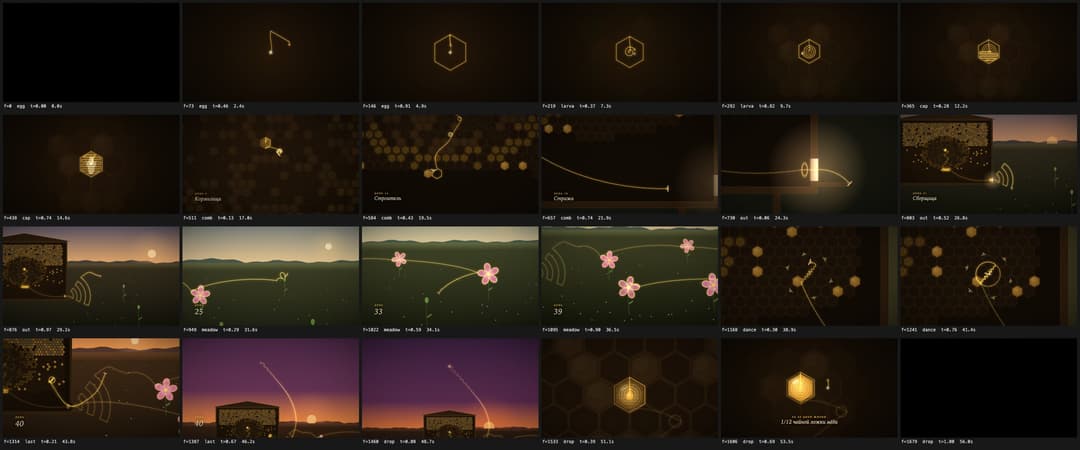
Left: the world demo that init.sh --world scaffolds, 8 seconds. Right: One line, the life of a worker bee in one take, 56 seconds, 1680 frames, one 57 KB HTML file, shown at 5× speed; titles in Russian. Full MP4 with sound: honeybee-sample.mp4 (13 MB).
When the story is one journey told without cuts, the scenes stop being separate pictures. Each
becomes a builder that adds its part to one world: a line that remembers when each of its points
was drawn, camera keys with even zooms and smooth following, light with bloom, titles. Every frame
is drawn from that world and is still a pure function of (frame, seed, width). The soundtrack reads
the line's speed and position on screen from the film. Start one with init.sh --world; the method
is in references/world.md.
Scenes joined by cuts
The other mode: separate scenes, each a picture of its own, cut on the beat. Here, a television that has nothing to show.

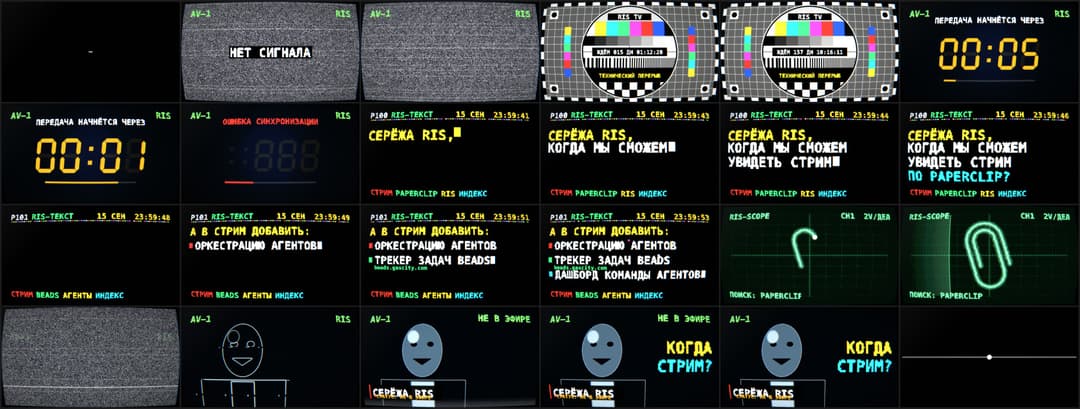
The RIS TV example: 40 seconds, 8 scenes, 1200 frames, one 45 KB HTML file. The portrait scene in the public example uses a synthetic placeholder. Full MP4 with sound: ris-tv-sample.mp4 (27 MB).
What it does
You describe the video you want. The agent runs a short interactive brief, proposes three concepts (a literal one, a metaphor, a genre parody), agrees a storyboard on a beat grid, then builds the video scene by scene, looking at rendered frames after every step. It renders the frames, synthesizes a soundtrack to the locked scene lengths, assembles the MP4 and checks the file. Photos become posterized polygons, never pixels. Every step has a visual checkpoint and a rule against guessing. Both modes above come out of the same workflow: a concept told in one take is built as one world.
| Step | What the agent does | What you see |
|---|---|---|
| 0 | checks node, ffmpeg, Chrome, python; offers to install what is missing | a short report |
| 1 | the brief: message, format, length, tone, style, assets, sound, deliverables | 8–11 questions with defaults |
| 2 | three concepts with palette, key scenes, ending, sound and risk | a table and a recommendation |
| 3 | storyboard in bars, scaffold from the skeleton, first frame | one "go" |
| 4 | one scene at a time, three frames per scene, a contact sheet every 2–3 scenes | contact sheets |
| 5 | photos traced into polygons, placeholders until files arrive | a portrait preview |
| 6 | full contact sheet, a determinism check, render in parallel tabs, encode, verify from the MP4 | a preview MP4 |
| 7 | soundtrack synthesized to the cue map, MP4 rebuilt | the final MP4 |
| 8 | variations on request: another seed, vertical cut, GIF, poster frame | files |
Before the full render a check renders sample frames of every scene in seven different orders
and demands identical pixels, scans the source for clocks and Math.random, and fails if the page
loads any file. The MP4 is encoded with the BT.709 matrix and tagged, so players show the colours
that were reviewed.
Quick start
Install the skill (recommended)
npx skills add smwbev/framewright -g
-g installs it for your user, so every project sees it; without -g it goes into the current
project only. The installer asks which agents to install it for (Claude Code, Codex, Gemini CLI,
Cursor, OpenCode and others); -a claude-code picks one without asking.
Then open your agent in an empty folder and describe the video, for example: "a 20-second deadpan video asking Anna when the release ships, retro TV style". The agent loads the skill, starts with the brief and sets up the project itself.
Update the skill
npx skills update framewright -g     # installed with -g
npx skills update framewright        # installed into a project: run it inside that project
npx skills list -g                   # what is installed, where, and for which agents
The installer remembers where the skill came from and fetches the latest version from GitHub; the
changes are listed on the releases page. Videos
you already started keep their own copy of scripts/, so an update never changes them behind
your back. To give an older project the new scripts, copy the scripts/ folder of the installed
skill (npx skills list -g shows where it is) over the project's scripts/, and leave its
index.html alone.
Or work inside a clone
git clone https://github.com/smwbev/framewright my-video
cd my-video
npm install
claude        # or: codex, gemini, cursor, opencode ...
The agent picks up AGENTS.md and the skill from the clone. Update it with git pull.
Other ways
Gemini CLI has its own installer:
gemini skills install https://github.com/smwbev/framewright --path .agents/skills/framewright --consent.
It has no update command: run gemini skills uninstall framewright and install again. You can
also copy .agents/skills/framewright into a project by hand (Claude Code reads .claude/skills/)
and copy it again to update.
Supported agents
npx skills add puts the skill where each agent looks for it. Inside a clone of this repository
they find it like this:
| Agent | How it picks the skill up |
|---|---|
| Claude Code | .claude/skills/framewright (symlink to the skill); CLAUDE.md imports AGENTS.md; invoke with /framewright |
| OpenAI Codex | reads AGENTS.md and .agents/skills/ natively; $framewright |
| Gemini CLI | .gemini/settings.json points at AGENTS.md; skills from .agents/skills/ |
| Cursor | AGENTS.md and .agents/skills/ natively |
| GitHub Copilot coding agent | AGENTS.md and .agents/skills/ natively |
| OpenCode, Amp, Zed, Warp, Factory, Cline, Roo, Windsurf | AGENTS.md; most read .agents/skills/ too |
| anything else | point it at .agents/skills/framewright/SKILL.md |
The skill follows the Agent Skills specification: SKILL.md with
frontmatter, references/ loaded on demand, scripts/ and assets/.
Requirements
Node 20+, npm, ffmpeg with libx264, Chrome via Puppeteer (installed by npm install).
Python 3 with numpy, scipy and Pillow only if a photo will be traced. macOS and Linux;
Windows through WSL. The agent checks all of this itself before it starts and asks before
installing anything. In a clone you can run the check by hand:
bash .agents/skills/framewright/scripts/doctor.sh            # report
bash .agents/skills/framewright/scripts/doctor.sh --install  # install what is missing, asks first
Repository layout
AGENTS.md                      entry point for agents
CLAUDE.md, GEMINI.md           one-line imports of AGENTS.md
.gemini/settings.json          Gemini CLI reads AGENTS.md
.agents/skills/framewright/
  SKILL.md                     the workflow
  references/                  questionnaire and concept generator, styles, engine guide, one-world films, audio, photo, troubleshooting
  scripts/                     doctor, init, look, check, render, build, make, export-curves, trace, inject, portrait
  assets/                      skeleton.html, world.html, audio-template.mjs, storyboard.md
.claude/skills/framewright     symlink for Claude Code
examples/ris-tv/               a finished video in scenes: index.html, audio.mjs, previews
examples/honeybee/             a finished one-take film built as one world: index.html, audio.mjs, previews
examples/world-demo/           a preview of the demo that init.sh --world scaffolds
Examples
examples/honeybee is "One line", a complete 56-second film in one take: a golden line draws a
worker bee's life from an egg in a cell to the comb, the hive, a meadow, the waggle dance and a
last flight at sunset, and its last point falls back into the comb as a drop of honey. It is the
one-world method at full scale, with a soundtrack driven by the line. npm run example:honeybee
writes its contact sheet; the full render is described in its README.
examples/world-demo shows the eight-second demo that init.sh --world scaffolds as a starting
point for a film of your own.
examples/ris-tv is a complete 40-second video in the retro TV style, made of scenes joined by
cuts: the set powers on, snow and NO SIGNAL, a test card with a day counter, a countdown that
breaks, two teletext pages with the question, an oscilloscope tracing a paperclip, a portrait
that locks in, and the tube switching off. Render a contact sheet of it:
npm install
npm run example        # writes shots/example-sheet.png
Or render the whole thing: HTML=examples/ris-tv/index.html node .agents/skills/framewright/scripts/render.mjs frames 7 1920 5,
then cd examples/ris-tv && node audio.mjs ../../track.wav, then bash .agents/skills/framewright/scripts/build.sh out.mp4.
Making videos by hand
The skill is also a manual. references/guide.md explains the engine, the helpers, the
timing grid and the review protocol; references/styles.md catalogues twelve visual systems
with post-processing recipes; references/world.md covers films made as one continuous world;
references/audio.md and references/photo.md cover sound and portraits.
assets/skeleton.html and assets/world.html are working starting points: open one in a
browser for a live preview, add ?f=30&w=1200 for a single frame, ?grid=24 for a contact sheet.
License
MIT. Videos you make with it are yours.
// faq
What is framewright?
Agent skill + template: short videos made entirely from code. One HTML file, every frame a pure function of (frame, seed, width). Claude Code, Codex, Gemini CLI, Cursor.. It is open-source on GitHub.
Is framewright free to use?
framewright is open-source under the MIT license, so it is free to use.
What category does framewright belong to?
framewright is listed under skills in the Claudeers registry of Claude-compatible tools.
// embed badge

[](https://claudeers.com/framewright)
// retro hit counter

[](https://claudeers.com/framewright)
// reviews
// guestbook
// related in Claude Skills
 🔓
🔓An agentic skills framework & software development methodology that works.
 🔓
🔓 🔓
🔓💫 Toolkit to help you get started with Spec-Driven Development
 🔓
🔓AI coding assistant skill (Claude Code, Codex, OpenCode, Cursor, Gemini CLI, and more). Turn any folder of code, SQL schemas, R scripts, shell scripts, docs,…