
free-my-arch
Interactive disk cleanup skill for Claude Code on Arch Linux. Scans package caches, dev junk, Docker leftovers and oversized files, then cleans only what you…
Install with your AI
Paste into Claude Code, Cursor, or any agent — it reads the repo and wires the tool into your project.
Install and set up free-my-arch (claude-skill project) into my current project.
Found on https://claudeers.com/free-my-arch
Repo: https://github.com/debba/free-my-arch
Homepage/docs: —
Detected install method: claude-skill → # copy this skill into .claude/skills/free-my-arch/
Category: skills. Platforms: cli, web.
Read the repo's README for exact setup and env vars, then install it and wire it into my project.

Claudeers Health Verdict:
slowing; community-verified: false. Confirm the source before running anything.
# copy the skill dir into your project:
# .claude/skills/free-my-arch/   (or ~/.claude/skills/free-my-arch/ for all projects)
git clone https://github.com/debba/free-my-arch
// compatibility
| Platforms | cli, web |
|---|---|
| Operating systems | — |
| AI compatibility | claude |
| License | MIT |
| Pricing | open-source |
| Language | Shell |
free-my-arch
Disk cleanup for Arch Linux, packaged as a Claude Code skill.
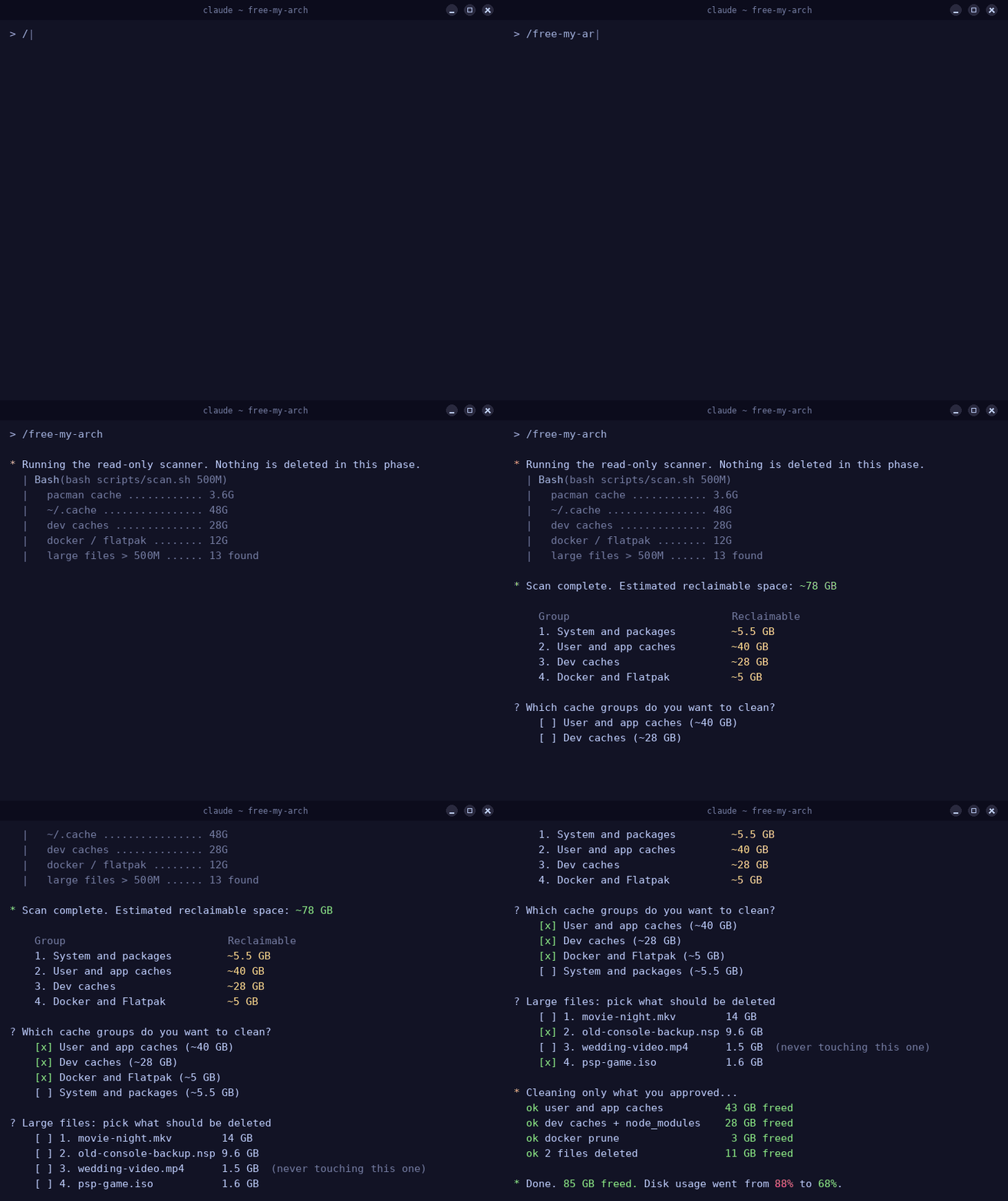
It scans the usual suspects (package caches, AUR build leftovers, dev caches, Docker junk, oversized files sitting in your home) and walks you through cleaning them up. Caches are confirmed as groups, personal files are picked one by one. Nothing is ever deleted without your explicit approval.
Why
My root partition hit 88% and most of that space turned out to be garbage: 14 GB of yay build cache, 18 GB of npm cache, node_modules for projects I had not touched in months, a pile of dangling Docker images. Cleaning that by hand means remembering a dozen different commands and their gotchas. This skill remembers them for you, shows you the numbers first, and asks before running any of them.
How it works
The skill follows four strict phases:
- Scan. A bundled shell script measures every category. It is strictly read-only and needs no root.
- Report. You get a summary table with the reclaimable space per group, plus a numbered list of large personal files.
- Confirm. Cache groups are approved with a single multi-select prompt. Large files are selected individually, so you never bulk-delete personal data by accident.
- Clean. Only what you approved gets removed. A final report shows disk usage before and after.
What it scans
| Group | Contents |
|---|---|
| System and packages | pacman cache (pruned with paccache, one version is kept), orphan packages, systemd journal, coredumps |
| User and app caches | ~/.cache top offenders, thumbnails, trash, browser caches (cache directories only, profiles are never touched) |
| Dev caches | pip, npm (including _npx), pnpm, yarn, cargo registry, Go module cache, composer, plus node_modules of projects untouched for 30 or more days |
| Docker and Flatpak | stopped containers, dangling images, build cache, unused Flatpak runtimes |
| Large files | files above a size threshold in your home, 500M by default |
A few things get extra care:
- Docker volumes are never part of a group clean. If unused volumes exist they get their own explicit confirmation, because volumes hold real data.
- Orphan packages are listed in full before removal. If the list contains something that looks load-bearing (a running Docker daemon, compilers, your AUR helper), the skill points it out instead of silently removing it.
- Files living under hidden directories (Thunderbird mail stores, VM images, model weights) are flagged as
APP-DATAand kept out of the normal selection. Deleting those can break the owning application, so they are only surfaced with a warning.
Install
Clone into your Claude Code skills directory:
git clone https://github.com/debba/free-my-arch ~/.claude/skills/free-my-arch
That's it. Claude Code picks it up automatically.
Usage
/free-my-arch        # default threshold for large files: 500M
/free-my-arch 1G     # only report personal files above 1 GB
You can also just ask in plain language ("my disk is full, help me clean it up") and Claude will reach for the skill on its own.
Requirements
- Arch Linux or a derivative
- Claude Code
- Optional:
pacman-contribfor precise pacman cache estimates.dockerandflatpakare detected and skipped when absent.
Safety rules baked into the skill
- The scan phase never deletes anything, no exceptions
- Configs, dotfiles, browser profiles,
/etcand the pacman database are off limits rmis never run on a glob or an unchecked variablesudois only used for the system group, and only after you confirmed that group- Answering "none" at any prompt simply skips that category
Repository layout
SKILL.md                    the skill definition Claude follows
scripts/scan.sh             the read-only scanner
references/categories.md    cleanup commands per category, with safety notes
License
// faq
What is free-my-arch?
Interactive disk cleanup skill for Claude Code on Arch Linux. Scans package caches, dev junk, Docker leftovers and oversized files, then cleans only what you approve.. It is open-source on GitHub.
Is free-my-arch free to use?
free-my-arch is open-source under the MIT license, so it is free to use.
What category does free-my-arch belong to?
free-my-arch is listed under skills in the Claudeers registry of Claude-compatible tools.
// embed badge

[](https://claudeers.com/free-my-arch)
// retro hit counter

[](https://claudeers.com/free-my-arch)
// reviews
// guestbook
// related in Claude Skills
 🔓
🔓An agentic skills framework & software development methodology that works.
 🔓
🔓 🔓
🔓💫 Toolkit to help you get started with Spec-Driven Development
 🔓
🔓AI coding assistant skill (Claude Code, Codex, OpenCode, Cursor, Gemini CLI, and more). Turn any folder of code, SQL schemas, R scripts, shell scripts, docs,…