
embo
Specification driven agentic development framework for Claude code (RLM + claude-mem) as a plugin
Install with your AI
Paste into Claude Code, Cursor, or any agent — it reads the repo and wires the tool into your project.
Install and set up embo (claude-plugin project) into my current project.
Found on https://claudeers.com/embo
Repo: https://github.com/povesma/embo
Homepage/docs: —
Detected install method: claude-plugin → /plugin install embo@povesma/embo
Category: plugins. Platforms: cli, api.
Read the repo's README for exact setup and env vars, then install it and wire it into my project.

Claudeers Health Verdict:
active; community-verified: false. Confirm the source before running anything.
/plugin marketplace add povesma/embo
/plugin install embo@povesma/embo
git clone https://github.com/povesma/embo
// compatibility
| Platforms | cli, api |
|---|---|
| Operating systems | — |
| AI compatibility | claude |
| License | — |
| Pricing | open-source |
| Language | Shell |
embo
A spec-driven Claude Code workflow —
/embo:prd → /embo:tech-design → /embo:tasks → /embo:impl,
backed by a persistent codebase index (RLM) and cross-session memory
(claude-mem).
TL;DR
- Category: spec-driven development workflow for Claude Code
- Principles: a replayable docs tree and session idempotency — see Principles
- Differentiator: the only framework with both persistent codebase indexing and cross-session memory
- Install: two plugins, inside Claude Code — (1)
/plugin install embo@embo, (2) install the claude-mem plugin. See Install below.- First session:
/embo:init->/embo:start->/embo:prd- Compare to alternatives: Comparison
- Why this exists: Why | full evidence: docs/WHY.md
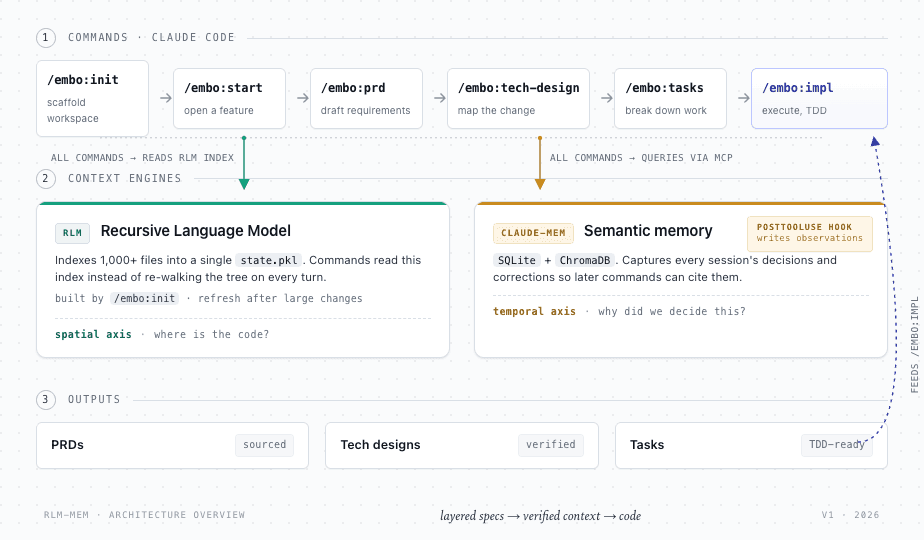
Source prompt: assets/diagrams/architecture-overview.prompt.md — regenerate via Claude Design.
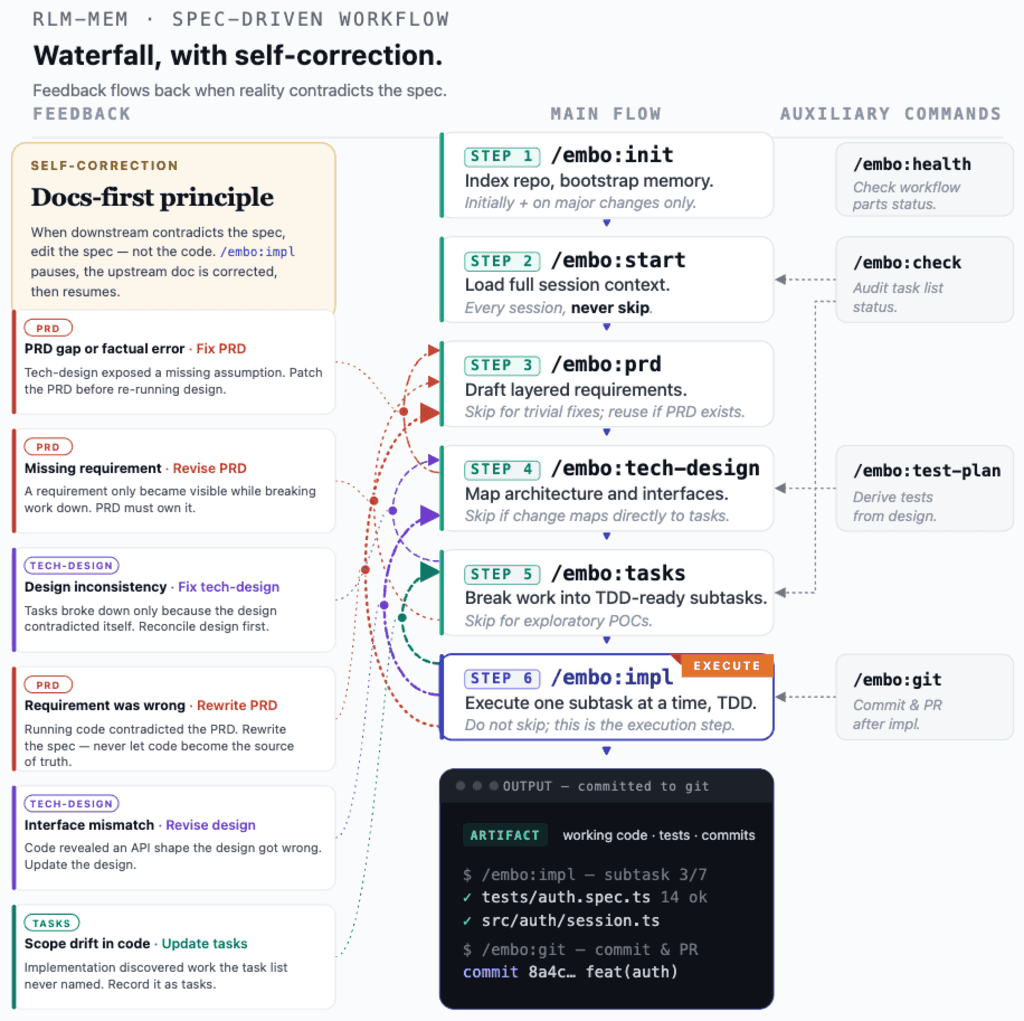
Source prompt: assets/diagrams/workflow-sequence.prompt.md — regenerate via Claude Design.
Install
embo installs as a Claude Code plugin. Steps 1–3 are typed
inside Claude Code (at the / prompt, not a terminal); Step 0 runs
once in a terminal to get the system dependencies.
Step 0 — Dependencies (one-shot, in a terminal)
embo needs Python 3.8–3.12 and Node.js 20+ present; claude-mem also needs bun and uv, and the hooks/statusline need jq. Get them all in one shot by cloning the repo and running the dependency installer (it installs nothing without asking, and skips anything already present):
git clone https://github.com/povesma/embo ~/embo
bash ~/embo/install.sh
It checks Python and Node (reporting the exact install command if either
is missing — it will not install a language runtime for you) and offers
to install jq, bun, and uv. Bun is meant to be auto-installed by
claude-mem but often is not, which is why this step installs it directly.
Add the printed PATH lines to your shell profile when done.
[!NOTE] On Windows, use the PowerShell equivalent (requires PowerShell 7 —
pwsh):pwsh -ExecutionPolicy Bypass -File .\install.ps1. Same two modes (-Standalonefor a manual install). See Reference §Windows for details.
Step 1 — Install embo (inside Claude Code)
/plugin marketplace add povesma/embo
/plugin install embo@embo
This registers all /embo:* commands, agents, and hooks. Read
install <plugin-name>@<marketplace-name> — both are embo.
[!TIP] To try a specific branch before it merges, add the marketplace with a
#refsuffix:/plugin marketplace add povesma/embo#some-branch. To develop locally, point the marketplace at a working copy:/plugin marketplace add /path/to/embo.
[!NOTE] Prefer to install without the plugin system? (e.g. you cloned embo to tweak it.) Run the same script with
--standaloneto copy embo into~/.claude/directly:bash ~/embo/install.sh --standalone. This is a parallel path — use it instead of Step 1, not alongside. The plugin and a standalone install register the same hooks and commands and would collide. Remove a standalone install withbash ~/embo/uninstall.sh. You still need claude-mem (Step 2).
Step 2 — Install the claude-mem plugin (inside Claude Code) — REQUIRED
/plugin marketplace add thedotmack/claude-mem
/plugin install claude-mem
[!WARNING] Install the plugin named exactly
claude-mem, from thethedotmack/claude-memmarketplace. claude-mem is MANDATORY — embo verifies it at runtime and its commands fail with a clear error without it. (It is a separate plugin, not a bundled dependency.) When the/pluginmenu lists unrelated plugins (frontend-design,figma, …), do not pick those.
Step 3 — Verify (inside Claude Code)
/embo:health
Must report RLM, claude-mem, and the capture hook as operational.
Step 4 — Enable the status line (optional, inside Claude Code)
/embo:statusline
A plugin cannot register a status line itself, so this one command sets it up (path, git branch, model, context %, claude-mem freshness, time). Restart Claude Code to see it. Details: Reference §Statusline.
First session (inside Claude Code, in any of your code repos)
/embo:init    # one-time: index the repo + bootstrap memory
/embo:start   # every session: load context
/embo:prd     # plan a feature spec-first
[!NOTE] Upgrading from the old
cp-into-~/.claude/install? The plugin and your old files both register the same hooks (they fire twice) and both define/dev:*vs/embo:*commands. Clean up once — see Migrating from a manual install.
Full per-platform details, the manual (no-plugin) install, and dependency versions are under Reference.
Migrating from a manual install
If you installed embo by copying files into ~/.claude/ (the old way),
remove that manual install before installing the plugin. If you skip
this, the old files and the plugin both register the same hooks (they
fire twice) and both define commands (/dev:* shadowing /embo:*).
The clean path is: uninstall the old install, then install the plugin.
- Clone the repo if you do not already have it (the uninstaller
ships in it):
git clone https://github.com/povesma/embo ~/embo - Remove the old manual install in one shot. It deletes files, so
it confirms each one and backs up
settings.jsonfirst:This removes the oldbash ~/embo/uninstall.sh/dev:*commands,rlm_repl.pyand its permission rule, the embo hook files, and the duplicate hook registrations. It keeps~/.claude/profiles/and~/.claude/active-profile.yaml(the plugin reads them) and does not touch claude-mem. - Install the plugin — follow Install from Step 0
(dependencies) onward, then
/reload-plugins. - Verify:
/embo:health— RLM, claude-mem, and capture hook all green, and one[embo-capture]marker per Bash command (not two).
Comparison
How embo positions against other Claude Code workflow plugins.
Snapshot 2026-09-04; sources for every cell are in
tasks/017-.../comparison-data.md.
| Project | Spec phases | Code navigation | X-session memory | TDD | Profiles | Agent model | Worktrees |
|---|---|---|---|---|---|---|---|
| embo (this) | yes | index (RLM) | yes | yes | yes (4) | focused (1+5 test) | no |
| GitHub Spec-Kit | yes | grep-only | no | partial | partial | delegates to host | yes |
| Superpowers | yes | grep-only | yes | yes | no | focused (~14) | yes |
| BMAD-METHOD | yes | none | optional | no | yes | roles (~20, plan-only) | no |
| Oh-My-ClaudeCode | partial | LSP+AST | yes | partial | yes | swarm (~16) | yes |
| claude-code-workflows | yes | grep-only | no | yes | partial | roles (~25) | no |
| Pimzino/spec-workflow | yes | grep-only | no | partial | no | focused (main+sub) | no |
| claude-workflow-template | yes | grep-only | partial | partial | partial | roles (~few) | yes |
Legend: yes = built-in · partial / optional = partial or
optional · no / none = absent. Code navigation: how the tool
locates code — a persistent index, live LSP+AST lookups, plain
grep, or none. Agent model: the shape of the agent roster
(a focused set, a large swarm, role-based, or a single agent) —
not a quality score; more agents is not inherently better.
Explicit spec phases (PRD → design → tasks) are now table stakes — every serious tool here has them, including GitHub's Spec-Kit. What separates tools is context depth versus parallelism.
Pick embo if: you want both spatial (where is code?) and temporal (why did we decide this in February?) context auto-loaded into every spec, design, and impl. No other tool here — not even Spec-Kit — has both a persistent codebase index and cross-session memory. embo is the deep-context, single-track choice.
Pick something else if:
- you need git-worktree isolation for parallel agents — Spec-Kit, Superpowers, or OMC (embo runs its agents in one working tree)
- you want maximum agent throughput / parallel swarms — OMC or shinpr
- you rely on LSP/AST "go-to-definition" navigation rather than a text index — OMC
- you want self-looping verification (audit-fix-retry until a
pass signal) — OMC (
ralph) or shinpr's quality gates - you want the largest ecosystem and broadest agent support — GitHub Spec-Kit
Pairs well with: ponytail — a plugin that pushes the agent to write less code (a YAGNI check re-injected each turn, plus review/audit/debt commands). It governs code volume; embo governs workflow, so the two compose without overlap. Install it inside Claude Code:
/plugin marketplace add DietrichGebert/ponytail
/plugin install ponytail
Then review and trust its hooks in /hooks (it runs two Node.js
lifecycle hooks, so node must be on your PATH).
Why this exists
Three measurable failures of unstructured ("vibe") AI coding, each from peer-reviewed or industry-leader sources:
- AI tooling slowed experienced developers by 19% in a controlled RCT - overhead of prompting and reviewing outweighs the generation speed-up (METR study, 2025)
- Failed agent attempts cost 4x more than successful ones due to the Token Snowball Effect - ~8.8M tokens / 658s burned on a single failed loop (SWE-Effi, 2025)
- Spec-driven workflows recover the loss: TDFlow scored 88.8% on SWE-bench Lite when given human-written tests - a 27.8 pp absolute improvement over the next best baseline (TDFlow, 2025)
embo is the smallest framework that delivers both halves:
enforced decomposition
(/embo:prd → /embo:tech-design → /embo:tasks → /embo:impl)
to dodge Token Snowball, and persistent memory (RLM index +
claude-mem) so the structure compounds across sessions instead
of resetting to zero every morning.
-> Full evidence and citations: docs/WHY.md
Principles
Two invariants shape every embo command:
- Replayable docs tree. The docs tree — the per-task planning
documents under
tasks/(PRD, tech-design, task list) — describes the product's current state. The maintained intention (a goal, not a guarantee): replaying all PRDs from scratch would rebuild the same product. A change to an existing feature therefore amends the docs that cover it — a separate new doc is justified only when no amendment keeps the replay equivalent (the FOLD-FIRST rule, enforced with a per-action checklist). - Session idempotency. Nothing important may exist only in a
conversation: decisions, findings, and progress land in the docs
tree (PRD / tech-design / tasks), so the next session resumes from
the docs, not from memory of the chat.
/embo:wrapupenforces this at session end by detecting untracked information and proposing the doc updates.
Available Commands
| Phase | Command | Purpose |
|---|---|---|
| Discovery | /embo:init | Index repo + bootstrap claude-mem (one-time) |
| Discovery | /embo:start | Load session context (every session) |
| Discovery | /embo:health | Verify dependencies |
| Planning | /embo:prd | Generate PRD with codebase + memory awareness |
| Planning | /embo:tech-design | Architecture design grounded in real code |
| Planning | /embo:test-plan | Map stories to verification methods |
| Planning | /embo:tasks | Break tech-design into TDD-ready subtasks |
| Planning | /embo:check | Audit task completion status |
| Development | /embo:impl | Implement subtasks one at a time, evidence-gated |
| Development | /embo:git | Commit/PR messages, styles, and one-shot deliver |
| Development | /embo:wrapup | Session-end idempotency check: untracked work to docs, evidence compacted, uncommitted changes surfaced |
| Research | /embo:research:examine | Independent two-pass critique of a decision or doc → reconciled recommendation |
| Research | /embo:research:verify | Prove a chosen approach meets its acceptance criteria before building |
| Design | /embo:visual-impl | Implement a Figma node to code, gated by a numeric diff + independent visual-QA judge (experimental) |
| Config | /embo:profile | Switch workflow profile (quality / fast / minimal / research) |
Full per-command reference under Reference.
Delegation prompts
embo pushes the agent to hand work to a subagent when that beats doing it in the main conversation — for exploration that would read many files, an unbiased critique of something written this session, an independent proof of a risky approach, several independent tasks at once, or a noisy troubleshooting loop. You will see two things:
- A
Delegation:line before bulk exploration — the agent states whether it is delegating and why, before it starts reading, so the choice is visible while it still saves context. - A subagent offer via a choice prompt — at planning approval
gates (
/embo:prd,/embo:tech-design,/embo:tasks), during/embo:impldiscovery, and in troubleshooting/delivery loops, the agent offers to spawn a subagent. You approve or decline; declining a given kind of offer silences it for the rest of the session. Nothing is ever spawned without your approval.
The agent never delegates a small, targeted lookup or work that
needs the running conversation's context — the offer appears only
where a subagent genuinely pays off. To tune this, edit RULE:DELEGATE
in plugin/commands/start.md.
Rapid delivery: /embo:git deliver
For a small change or hotfix, /embo:git deliver runs the whole
stage → commit → push → (open PR) → (merge) cycle after one approval,
instead of a separate prompt per git command. The plan's mode selects
how far the cycle runs:
push— stage + commit + push.pr— the above +gh pr create.pr-merge— the above +gh pr merge --squash.release— the above +git tag vX.Y.Zon the merge commit +gh release create. The plan addsversion:and arelease-notes:block; the version manifests and CHANGELOG are edited by you and listed as files,embo-deliverwrites no source files itself.
How it works: the command builds a delivery plan (exact files, commit
message, target branch, mode) and writes it to a uniquely-named
tmp/git-<timestamp>.txt (kept as a record, never reused). The file-write
approval dialog is the single gate: it shows the complete plan — every
file by name, the verbatim commit message, the target branch and mode —
so you review the delivery right in the dialog. Approve the write and the
bundled embo-deliver executable runs the whole cycle; reject it and
nothing happens. Files are always staged by explicit name — never
git add -A or git commit -a — so a plan you approve can never sweep in
an unrelated file. Plans that include a merge carry a leading
"merge is irreversible" comment, visible in the same dialog.
One-time opt-in (required). Add to your ~/.claude/settings.json (or
project .claude/settings.json) permissions.allow list:
"Bash(embo-deliver *)"
This authorizes the executor's git writes to run without per-command
prompts after you approve the plan file. The plan-write approval
remains the single gate — nothing is committed, pushed, or merged before
it. A delivery then costs exactly one interaction. Merge (pr-merge
mode) only happens when the approved plan explicitly includes it.
Zero-click opt-in (NOT recommended). Additionally allowing
"Write(tmp/git-*.txt)"
makes the plan write silent — deliveries then run with no approval at all after you ask for one. Only add this if you consciously want unattended delivery; there is no way for the agent to warn you at delivery time that the gate is gone.
Behavioral rule reminders
embo's primary mechanism for rule compliance is per-rule conclusion
checklists: each behavioral rule in plugin/commands/start.md carries
a <!-- CHECKLIST:<RULE> --> block with an explicit one-line artifact the
model must emit before taking the governed action. The
behavioral-reminder.sh UserPromptSubmit hook extracts every checklist
block from start.md at runtime and injects them verbatim into the
assistant's context before each response.
How it works:
- Rule text declares the requirement and the artifact format
(e.g.
Objection-check: <hold | concede | partly> — <reason>) - Checklist block is injected unconditionally on every turn — not gated on keywords — so the model sees the artifact format regardless of prompt wording
- Stop-hook measurement (
tasks/047-*/prototype/conclusion-probe.sh, registered in repo.claude/settings.local.json) logs each artifact emission to.claude/embo_state/conclusion-probe.logfor observability
Adding a new rule: write the rule prose and its CHECKLIST block in
start.md. The hook auto-injects it with zero code change — the
genericity test (behavioral-reminder.test.sh) proves this.
Rules for subagents. A SubagentStart hook (subagent-rules.sh)
adds a short instruction block to every subagent Claude Code spawns,
shipped or ad hoc. The block tells the subagent to: make routine
choices itself instead of stopping, check documentation before stating
facts about tools or APIs, and never delete, force-push, or merge —
report such actions back instead. The WITHSTAND-CRITICISM and
AVOID-APPROVAL checklists are included verbatim from start.md; the
rules that need a human answer are left out. In a manual (non-plugin)
install the shipped agents also edit files without a permission prompt
(permissionMode: acceptEdits); plugin installs ignore this field.
Turn the injection off with SUBAGENT_RULES_DISABLED=1.
Test subagents
Five specialised agents run in isolated contexts during
/embo:impl to prevent implementation bias:
- test-backend (Haiku) - writes & runs unit/integration tests; auto-detects pytest/vitest/jest/go/cargo/phpunit
- test-review (Sonnet) - adversarial gap analysis, read-only
- test-e2e-planner / -generator / -healer (Sonnet, forked from Playwright) - Playwright MCP required
Full agent reference in docs/REFERENCE.md.
Reference
Depth on every feature — prerequisites, the manual (no-plugin) install, hooks and the capture wrapper, statusline, profiles, test subagents, RLM tuning, performance/cost, and Docker — lives in docs/REFERENCE.md.
Common errors: TROUBLESHOOTING.md.
TODO / ideas
- Pluggable task-tracker backends. The docs tree lives as files
under
tasks/today, and those files double as the task tracker. The same workflow could run against other backends — agent context layers (e.g. Reqode), requirements platforms (Jama Connect), spec-as-source tools (Tessl, Specmatic), or API-first trackers (Linear; Jira fits worst — its backlog appends tickets where the docs tree amends specs) — with the file tree as one implementation among several.
Contributing
Contributions welcome. Areas: language support, performance, new command workflows, docs. Built on claude_code_RLM by Brainqub3, extended for code repos + claude-mem.
License
MIT — see LICENSE. Extends the MIT-licensed claude_code_RLM; same open-source spirit. Built on the RLM Paper (Zhang, Kraska, Khattab, MIT CSAIL).
// faq
What is embo?
Specification driven agentic development framework for Claude code (RLM + claude-mem) as a plugin. It is open-source on GitHub.
Is embo free to use?
embo is open-source, so it is free to use.
What category does embo belong to?
embo is listed under plugins in the Claudeers registry of Claude-compatible tools.
// embed badge

[](https://claudeers.com/embo)
// retro hit counter

[](https://claudeers.com/embo)
// reviews
// guestbook
// related in Claude Plugins
 🔓
🔓A single CLAUDE.md file to improve Claude Code behavior, derived from Andrej Karpathy's observations on LLM coding pitfalls.
 🔓
🔓Claude Code is an agentic coding tool that lives in your terminal, understands your codebase, and helps you code faster by executing routine tasks, explainin…
 🔓
🔓"CLI-Anything: Making ALL Software Agent-Native" -- CLI-Hub: https://clianything.cc/
🔓financial-services — a Claude ecosystem project on GitHub.