
easy-agent
Production-ready open source terminal coding agent with readable, layered code: permission rules, OS sandboxing, MCP, skills, sub-agents, and Anthropic, Open…
Install with your AI
Paste into Claude Code, Cursor, or any agent — it reads the repo and wires the tool into your project.
Install and set up easy-agent (npm project) into my current project.
Found on https://claudeers.com/easy-agent
Repo: https://github.com/ConardLi/easy-agent
Homepage/docs: —
Detected install method: npm → npm install eagent
Category: uncategorized. Platforms: cli, api, web.
Read the repo's README for exact setup and env vars, then install it and wire it into my project.

Claudeers Health Verdict:
unknown; community-verified: false. Confirm the source before running anything.
npm install eagent
git clone https://github.com/ConardLi/easy-agent
// compatibility
| Platforms | cli, api, web |
|---|---|
| Operating systems | — |
| AI compatibility | claude |
| License | MIT |
| Pricing | open-source |
| Language | TypeScript |
Easy Agent
A terminal coding agent that reads your code, edits files, and runs commands under permission rules you control.
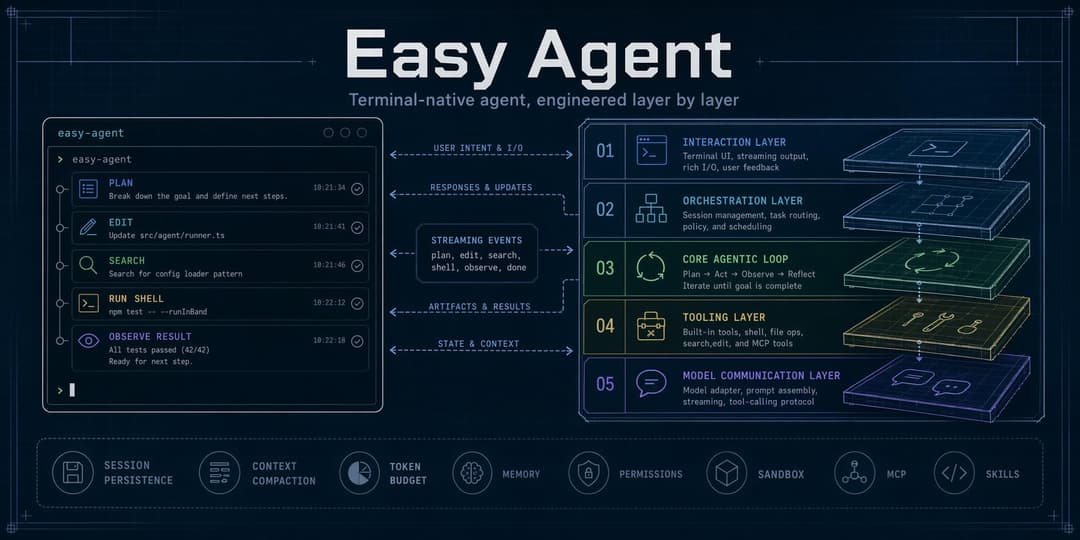
Easy Agent (eagent) runs in your terminal next to your repository. Describe a task and it plans the work, reads and changes files, runs tests or shell commands, and reports back. Every action that can change your machine goes through permission rules, workspace trust, and an optional OS-level sandbox. It works with Anthropic, OpenAI-compatible, Gemini, and local models.
The code is written to be read as well as run. Model communication, the agentic loop, tools, permissions, context management, and each extension system live in separate layers. The documents linked below explain how the security-relevant parts behave and why, and the learning path walks through the layers in order with code snapshots, which helps if you want to build or customize an agent of your own.
中文文档:README.zh-CN.md
What you can use it for
- Find your way around an unfamiliar codebase: ask where something is handled, how a flow works, or what a change would touch.
- Make multi-file changes, review the diff, and undo them with
/rewindif they are wrong. - Run builds and tests, read the failures, and iterate on a fix.
- Plan a change first in read-only Plan Mode, then carry it out.
- Script it: pipe input into
eagent -pand read text, JSON, or NDJSON output in CI or shell scripts. - Connect your own tools through MCP servers, skills, custom agents, hooks, and plugins.
Install
Requirements: Node.js 22 or newer, npm, and credentials for at least one supported model provider.
npm install -g --ignore-scripts eagent
eagent --version
Or try it without installing:
npx --yes eagent@latest
On macOS and Linux an installer is also available. It checks Node.js, installs the same npm package with --ignore-scripts, and verifies that eagent is on PATH. It does not install Node.js or run package lifecycle scripts.
curl -fsSL https://raw.githubusercontent.com/ConardLi/easy-agent/main/install.sh | sh
The package installs two commands, eagent and the long alias easy-agent.
Quick start
export ANTHROPIC_AUTH_TOKEN="your-token"
cd your-project
eagent
On first use in a folder, Easy Agent asks whether you trust it. Then type a request, for example explain how requests are authenticated in this repo. Type /help for commands; press Ctrl+D to exit.
Core capabilities
- File and code tools: Read, Write, Edit, MultiEdit, Glob, Grep, Bash, and PowerShell on Windows
- Web and external tools: WebFetch, WebSearch, MCP tools and resources
- Safe execution: allow/ask/deny rules, Plan Mode, Auto Mode, workspace trust, hooks, controlled subprocesses, private local data, and fail-closed shell sandboxing on macOS and Linux
- Long-running work: TodoWrite, persistent task graphs, sub-agents, background runs, Git worktree isolation, and Agent Teams
- Context and continuity: durable persistence, resume, compaction, token budgets, project memory (
AGENTS.md/AGENT.md), file checkpoints, and rewind - Extensibility: skills, custom agents, slash commands, output styles, hooks, MCP servers, plugins, and static marketplaces
- Interfaces: interactive terminal UI, headless text/JSON/NDJSON output, images and screenshots, and multiple model protocols
Supported platforms
| Platform | Status | Shell tool | Shell sandbox |
|---|---|---|---|
| macOS | Supported | Bash | Seatbelt; needs rg |
| Linux, WSL2 | Supported | Bash | bubblewrap; needs bubblewrap, socat, rg, and unprivileged user namespaces |
| Windows | Supported without sandbox | PowerShell | Not available; an enabled fail-closed sandbox blocks PowerShell |
- Node.js 22 or newer is required on every platform. Older versions exit with an explanatory message.
- The
install.shinstaller supports macOS and Linux. On Windows, install with npm. - On Windows, local data relies on the user profile's ACLs instead of POSIX
0600/0700modes./doctorreports this. - Clipboard image paste needs
pngpasteorosascripton macOS andxcliporxselon Linux.
See Sandbox security for per-platform setup, including the Ubuntu AppArmor restriction on user namespaces.
Security model
Easy Agent assumes the model can make mistakes and that a repository you open may be hostile. Several independent layers limit what a session can do:
- Permission rules. Tool calls that change files, run commands, or reach the network are checked against allow, ask, and deny rules. Deny rules always win. In the default mode anything not allowed is asked; Bash commands that are proven read-only can run without a prompt (analysis rules).
- Permission modes.
defaultasks before risky actions.plan(--plan) allows only read-only tools.auto(--auto) lets a classifier approve safe calls, block risky ones, and fall back to a prompt when unsure. Headless runs (-p) deny calls that would prompt unless you pass--dangerously-skip-permissions; deny rules still apply. - Workspace trust. Project settings,
.env, project MCP servers, hooks, plugins, and model profiles are ignored until you trust the folder. Trust is stored in your home directory, so a repository cannot mark itself trusted, and project files cannot replace credentials inherited from your shell (details). - Path boundaries. File tools resolve real paths and refuse to follow symbolic links out of the workspace and its allowed directories (details).
- Shell sandbox. When
sandbox.enabledis set, Bash runs inside an OS sandbox with an allow-only write policy and proxy-filtered network. If the sandbox cannot start, the command is blocked rather than run unsandboxed (details). - Local data. Sessions, settings, trust state, and logs are private to your account. Stream debug logging is off unless you enable it and redacts credentials when on (details).
Easy Agent sends no analytics or telemetry. Network requests go to the model provider you configure, to MCP servers and plugin sources you add, and to WebFetch/WebSearch targets when those tools are allowed. /doctor probes the configured provider endpoint for reachability.
Configuration
Settings are JSON files merged in this order, from lowest to highest priority:
- User:
~/.easy-agent/settings.json - Project:
<project>/.easy-agent/settings.json(shared, applied once the folder is trusted) - Local:
<project>/.easy-agent/settings.local.json(personal, applied once the folder is trusted) - Command line:
--settings <file>,--model,--permission-mode, and similar flags - Managed policy:
/Library/Application Support/EasyAgent/managed-settings.jsonon macOS,/etc/easy-agent/managed-settings.jsonon Linux,%PROGRAMDATA%\EasyAgent\managed-settings.jsonon Windows
A project .env is applied after project and local settings, only for a trusted folder. Feature switches are described in Configuration and feature controls.
For a raw Anthropic model name, environment variables are enough:
export ANTHROPIC_AUTH_TOKEN="your-token"
export ANTHROPIC_MODEL="claude-sonnet-4-20250514" # optional
eagent
Named Anthropic, OpenAI-compatible, Gemini, and local profiles go in settings.json:
{
  "defaultModel": "gpt",
  "models": {
    "gpt": {
      "protocol": "openai-chat",
      "model": "gpt-5.1",
      "baseURL": "https://api.openai.com/v1",
      "apiKey": "${OPENAI_API_KEY}"
    },
    "gemini": {
      "protocol": "gemini",
      "model": "gemini-2.5-pro",
      "apiKey": "${GEMINI_API_KEY}"
    },
    "ollama": {
      "protocol": "openai-chat",
      "model": "qwen2.5-coder",
      "baseURL": "http://localhost:11434/v1"
    }
  }
}
Select a profile with eagent --model gpt or /model gpt inside the REPL.
| Environment variable | Purpose |
|---|---|
ANTHROPIC_AUTH_TOKEN | Anthropic API token or compatible gateway token |
ANTHROPIC_BASE_URL | Optional Anthropic-compatible endpoint |
ANTHROPIC_MODEL | Default raw Anthropic model name |
OPENAI_API_KEY | Referenced by OpenAI-compatible profiles |
GEMINI_API_KEY | Referenced by Gemini profiles |
WEB_SEARCH_API_KEY | Optional WebSearch provider key |
Run /config list, /model list, or /doctor to inspect the effective setup. Credential values are always redacted.
Where data is stored
| Location | Contents |
|---|---|
~/.easy-agent/settings.json | User settings |
~/.easy-agent/state.json | Workspace trust decisions and machine-level state |
~/.easy-agent/AGENT.md | User-wide memory loaded into every session |
~/.easy-agent/projects/ | Session transcripts (JSONL) and per-project memory |
~/.easy-agent/file-history/ | File checkpoints used by /rewind |
~/.easy-agent/tasks/, plans/, teams/ | Task graphs, Plan Mode plans, Agent Team state |
~/.easy-agent/skills/, agents/, commands/, output-styles/ | User extensions |
~/.easy-agent/plugins/, mcp/ | Installed plugins, MCP OAuth tokens and artifacts |
~/.easy-agent/stream-debug.log | Only when EASY_AGENT_DEBUG_STREAM=1 is set |
<project>/.easy-agent/ | Project settings, local settings, and project extensions |
<project>/AGENTS.md, <project>/AGENT.md | Project memory you write or create with /init; both load when present, AGENTS.md first |
<git root>/.easy-agent/worktrees/ | Git worktrees for isolated sub-agents |
On macOS and Linux, ~/.easy-agent is created with mode 0700 and sensitive files with 0600. Removing the npm package keeps this directory; delete it yourself to remove all data.
Common usage
eagent                         # interactive REPL
eagent --model gpt             # select a model profile
eagent --plan                  # read-only planning mode
eagent --auto                  # classifier-assisted permission mode
eagent --resume                # resume the latest session
eagent --resume <session-id>   # resume a specific session
eagent -p "summarize this repo"                 # headless text output
eagent --trust-project-config -p "summarize this repo" # allow reviewed project config once
eagent -p "list the tools" --output-format json # machine-readable output
git diff | eagent -p "review this patch"         # combine stdin and a prompt
Structured JSON and NDJSON messages follow the versioned headless output schema. Unknown cost is reported as null, not as a measured zero.
Run eagent --help for every startup option. Useful REPL commands include:
| Command | Purpose |
|---|---|
/help | List commands and shortcuts |
/model, /mode, /think, /effort | Control model and reasoning behavior |
/config, /status, /doctor, /context | Inspect configuration and runtime health |
/resume, /history, /export, /copy | Work with sessions and output |
/rewind, /diff | Inspect or restore file changes |
/permissions | Inspect permission rules |
/skills, /agents, /hooks, /mcp | Inspect extension registries |
/plugin, /marketplace | Install and manage plugins |
/memory | Inspect or edit project memory |
Upgrade and uninstall
Upgrade the global package, or re-run the installer:
npm install -g --ignore-scripts eagent@latest
Remove it with:
npm uninstall -g eagent
User configuration and sessions under ~/.easy-agent/ are intentionally preserved when the npm package is removed.
Troubleshooting
- Run
eagent --versionand confirm Node.js withnode --version. - Run
/doctorinside Easy Agent to inspect credentials, settings, MCP, plugins, sandbox support, and writable paths. - Run
/statusand/config listto verify the active model and configuration sources. - If a global install succeeds but
eagentis not found, add the npm global bin directory associated withnpm prefix -gtoPATH, then open a new shell. - Report reproducible problems through GitHub Issues.
Never include API keys, .env contents, or private prompts in an issue.
Architecture
Easy Agent keeps five runtime layers separate:
Terminal UI
    ↓
QueryEngine (multi-turn orchestration)
    ↓
Agentic Loop (reason → tool → observe)
    ↓
Tools and permission enforcement
    ↓
Provider API and streaming adapters
The npm package ships a single readable ESM bundle with a source map (paths only, no embedded sources), so stack traces in bug reports point at real source lines. Licenses of bundled third-party code are in dist/THIRD_PARTY_LICENSES.txt. The version-pinned @anthropic-ai/sandbox-runtime dependency supplies the platform helpers for process isolation.
Development
git clone https://github.com/ConardLi/easy-agent.git
cd easy-agent
npm install
npm run dev
npm run verify:production is the offline pull-request gate and npm run verify:release is the full release gate. See Testing and Releasing.
If you want to study how the agent was built step by step, the learning path lists the development milestones and their code snapshots.
Contributing
The project is still evolving quickly and is not accepting external pull requests yet. Issues with clear reproduction steps are welcome.
License
MIT. Bundled third-party packages keep their own licenses; see dist/THIRD_PARTY_LICENSES.txt in the installed package.
// faq
What is easy-agent?
Production-ready open source terminal coding agent with readable, layered code: permission rules, OS sandboxing, MCP, skills, sub-agents, and Anthropic, OpenAI-compatible, Gemini, or local models.. It is open-source on GitHub.
Is easy-agent free to use?
easy-agent is open-source under the MIT license, so it is free to use.
What category does easy-agent belong to?
easy-agent is listed under uncategorized in the Claudeers registry of Claude-compatible tools.
// embed badge

[](https://claudeers.com/easy-agent)
// retro hit counter

[](https://claudeers.com/easy-agent)
// reviews
// guestbook
// related in Uncategorized / Others
 🔓
🔓Fair-code workflow automation platform with native AI capabilities. Combine visual building with custom code, self-host or cloud, 400+ integrations.
 🔓
🔓The agent engineering platform.
 🔓
🔓FULL Augment Code, Claude Code, Cluely, CodeBuddy, Comet, Cursor, Devin AI, Junie, Kiro, Leap.new, Lovable, Manus, NotionAI, Orchids.app, Perplexity, Poke, Q…
 🔓
🔓100+ AI Agent & RAG apps you can actually run — clone, customize, ship.