
dsh-memory
融合 Claude Code 的 Auto Memory 与 Codex 的 Session 记忆整理,为 DeepSeek Harness 提供简单、透明、上下文友好的长期记忆。Claude Code-inspired Auto Memory meets Codex-inspired Session conso…
Install with your AI
Paste into Claude Code, Cursor, or any agent — it reads the repo and wires the tool into your project.
Install and set up dsh-memory (npm project) into my current project.
Found on https://claudeers.com/dsh-memory
Repo: https://github.com/hr98w/dsh-memory
Homepage/docs: —
Detected install method: npm → npm install @hr98w/dsh-memory
Category: devtools. Platforms: api, web.
Read the repo's README for exact setup and env vars, then install it and wire it into my project.

Claudeers Health Verdict:
active; community-verified: false. Confirm the source before running anything.
npm install @hr98w/dsh-memory
git clone https://github.com/hr98w/dsh-memory
// compatibility
| Platforms | api, web |
|---|---|
| Operating systems | — |
| AI compatibility | claude |
| License | MIT |
| Pricing | open-source |
| Language | TypeScript |

dsh-memory
融合 Claude Code 的 Auto Memory 与 Codex 的 Session 记忆整理,为 DeepSeek Harness 提供简单、透明、上下文友好的长期记忆。
中文 · English
让记忆延续到下一次对话
普通 Session 结束后,Agent 很容易忘记用户偏好、项目约束和已经验证过的经验。dsh-memory 把这些长期信息保存在用户本机的 Markdown 文件中,并在后续请求中只提供 Global 记忆和当前 Workspace 的记忆索引。
它不依赖外部记忆数据库或专用记忆服务,也不把所有历史对话塞回上下文:Agent 先看到小型索引,再使用 DSH 已有的文件搜索工具按需读取少量详细记忆。
评测
仓库内置与插件发布代码隔离的 LoCoMo-10 评测,可对比无记忆 baseline、仅在线记忆、在线记忆加 Session 整理三种模式。评测文档提供 conv-26 和全部 10 个 sample 的可复制命令、环境变量、Judge、Score 与交互式结果报告。
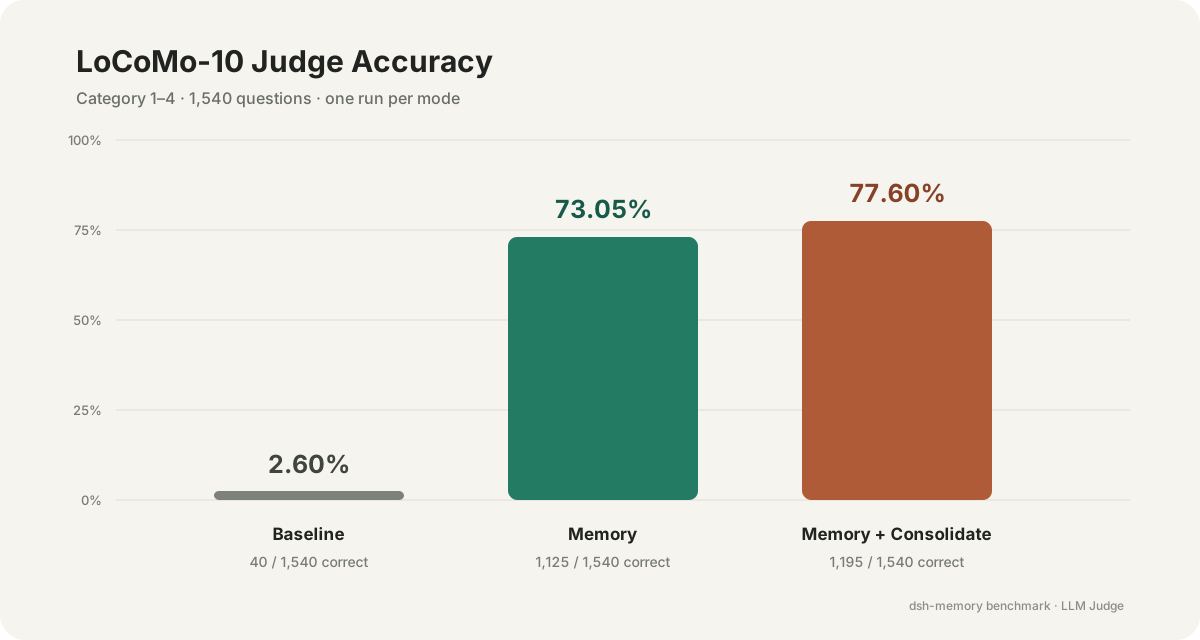
本次保留的完整结果中,Baseline 为 2.60%,Memory 为 73.05%,Memory + Consolidate 为 77.60%。完整结果、实验限制和逐题回答请查看交互式报告。
Baseline 不提供历史对话;两种记忆模式先读取历史形成记忆。每种模式保留一组完整结果,并非多次独立实验的平均值;这不是与完整上下文或其他记忆系统的横向比较。实验复盘记录了设置、观察和局限。
设计灵感:Claude Code × Codex
dsh-memory 没有引入向量数据库或独立记忆服务,而是组合了两类已经在 Coding Agent 中得到应用的简单机制:
| 灵感来源 | 借鉴的思路 | dsh-memory 的实现 |
|---|---|---|
| Claude Code | 用精简的 MEMORY.md 作为索引,详细 Markdown 由 Agent 按需读取 | 自动提供 Global 记忆与当前 Workspace 索引,详细记忆通过 DSH 文件工具渐进式披露 |
| Codex | 从符合条件的历史 Session 中提取并整理可复用记忆 | 筛选已结束且稳定的 DSH Session,由独立、受限的整理 Agent 提出记忆变化 |
dsh-memory 融合了这两种思路:以 Markdown 分层保存和按需披露记忆,并从历史 Session 中持续提炼可复用的信息。
核心能力
| 能力 | 说明 |
|---|---|
| 本地 Markdown | 权威记忆保存在 $DSH_HOME/memory,用户可以直接阅读和备份 |
| Global / Workspace 隔离 | Global 保存跨项目偏好;项目事实只进入当前 Workspace |
| Claude Code 式渐进披露 | 先提供 Global 记忆与当前 Workspace 索引,详细 Markdown 只在相关时按需打开 |
| 安全写入 | Agent 与 Web UI 使用同一套写入机制,检测到并发修改时拒绝直接覆盖 |
| Codex 式 Session 整理 | 从已结束且稳定的历史 Session 中筛选证据,再由独立整理 Agent 更新 Global 与来源 Workspace 记忆 |
| 可观察性 | 每次整理保存结果记录;可选 Debug 日志记录阶段和错误链,但不复制对话正文或凭据 |
| 双语界面 | Memory 页面跟随 DSH Web 的中文或英文 locale |
工作方式
Agent 请求
  └─ Global 记忆 + 当前 Workspace 的 MEMORY.md
       └─ Agent 按需搜索详细 Markdown

已结束的 DSH Session
  └─ 用户手动触发整理
       └─ 独立的整理 Agent 可多轮检查并提出 Global / 来源 Workspace 记忆变化
            └─ Host 校验证据、记忆归属和数据版本
                 └─ MemoryStore 原子写入并保存结果
模型只负责提出记忆变化;记忆归属、内容校验、版本检查和最终写入均由确定性的 Host 代码负责。
界面
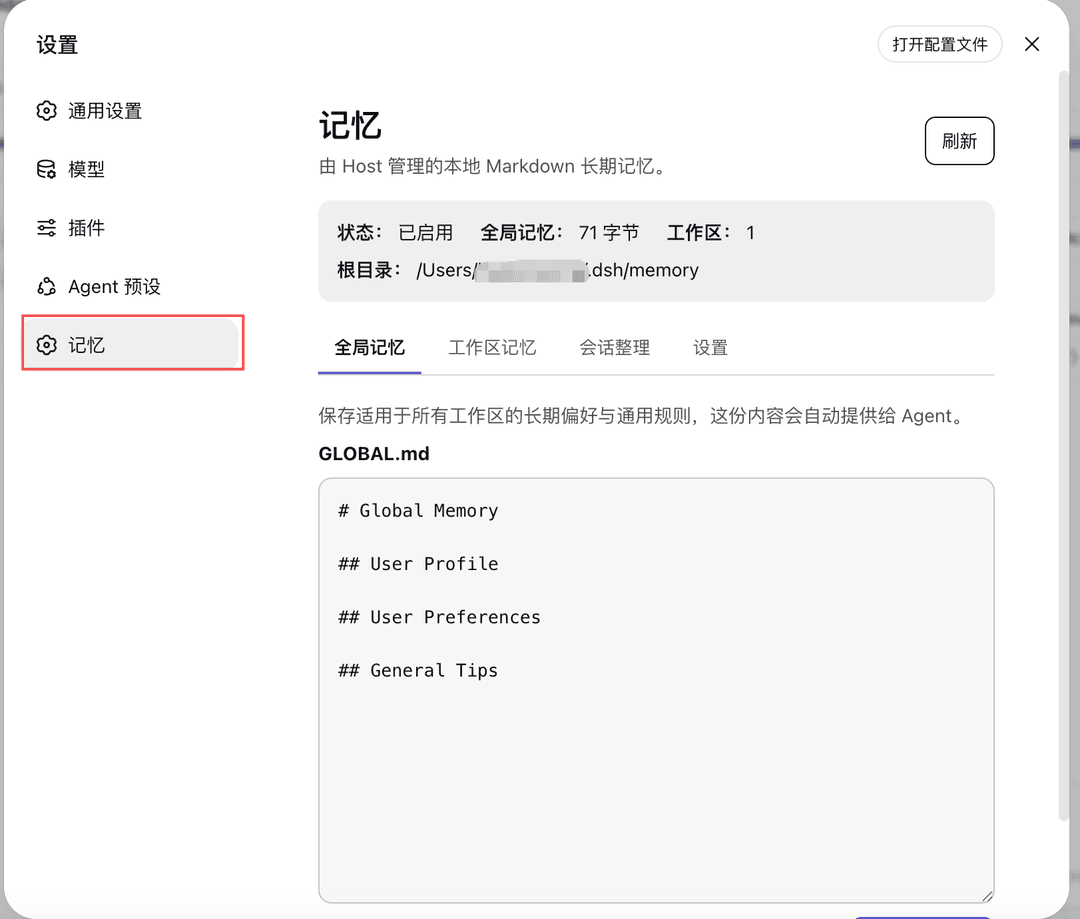
Memory 会作为 DSH Settings 中的独立栏目出现:
| 页面 | 用途 |
|---|---|
| 全局记忆 | 查看和编辑自动提供给所有 Workspace 的 GLOBAL.md |
| 工作区记忆 | 浏览、创建、修改和删除当前项目的详细记忆 |
| 会话整理 | 按 Workspace 浏览稳定 Session,触发整理并查看最近结果 |
| 设置 | 从 DSH 已激活的文本模型中选择整理模型,并按需开启 Debug 日志 |
安装
环境要求
- 已安装 DeepSeek Harness,并且
dsh web可以正常启动。 - 从源码构建还需要 Node.js
^22.19.0 || >=24.0.0和 pnpm。
npm 安装
通过 npm 安装:
dsh plugin --profile web add @hr98w/dsh-memory
安装完成后请完全重启 dsh web。
插件已适配新版 DSH 的 Web RPC 与 Session persistence 接口;更新插件后也需重启 Web,不能只刷新页面。
从源码安装
克隆仓库后,在仓库根目录执行:
pnpm install
pnpm run build
dsh plugin --profile web add .
然后完全重启 dsh web。Bundle 层和 Host ESM 入口在启动时加载,仅刷新浏览器不会应用 Host 代码变化。
开始使用
先体验一次跨会话记忆:在测试 Workspace 中告诉 Agent:“记住,这个项目的发布检查代号是松果,每次发布前先提醒我检查回滚方案。”确认 memory_update 成功后,新建同一 Workspace 的 Session,问:“这个项目发布前有什么约定?”检查回答是否沿用了约定,并在“工作区记忆”中查看对应 Markdown。项目约定不要放入 Global。
在线记忆使用当前 Agent 的模型;下面的独立模型设置只用于手动 Session 整理。
- 在 DSH 的 Models 页面配置并激活至少一个文本模型;API key 始终由 DSH 管理。
- 打开“设置 → 记忆 → 设置”,选择 Session 整理使用的模型。
- 在“全局记忆”保存跨项目偏好,在“工作区记忆”管理项目事实和约束。
- 在“会话整理”中选择一个已经结束且稳定的 Session,点击整理。
- 整理完成后检查结果;如需排错,可在设置页开启 Debug 后重新触发。
数据与隐私
默认数据布局:
$DSH_HOME/memory/
├── GLOBAL.md
├── settings.yml
├── consolidator-workspace/             # 内部整理 Session 的专属 cwd
├── debug/<review-id>/attempt-<n>.jsonl # 仅在用户开启 Debug 后写入
├── reviews/<review-id>.md
└── workspaces/<workspace-key>/
    ├── MEMORY.md                        # 自动生成的索引
    └── <memory-name>.md                 # 权威详细记忆
- Web 管理接口只允许本机访问;
- Web 的记忆写入请求不会提交记忆根目录、绝对路径、cwd 或内部 Workspace key;页面顶部仅为本机诊断显示 Host 返回的记忆根目录;
- Debug 默认关闭,不记录对话证据、记忆正文、模型提议正文或 API key;
MEMORY.md是可重建索引,详细 Markdown 文件才是 Workspace 权威数据。
当前并发保护限于同一个 MemoryStore 实例。请让一个 DSH 进程负责同一 $DSH_HOME 的记忆写入;多个独立进程共享目录并发写入仍可能覆盖彼此的修改。
“本地优先”指权威记忆保存在本机,并不表示所有模型处理都离线完成。正常 Agent 请求会把当前可见的记忆上下文发送给该 Agent 使用的模型;手动 Session 整理会把筛选后的对话内容、Global 记忆和当前 Workspace 记忆发送给设置页选择的模型服务商。请根据所用服务商的隐私政策决定是否启用相关功能。
安全问题请查看 SECURITY.md。
开发与验证
pnpm run typecheck
pnpm run test
pnpm run build
pnpm run check
提交代码前运行 pnpm run check。不同改动对应的人工验证方式见 docs/development.md。贡献流程见 CONTRIBUTING.md。
文档
- 架构:已实现组件和 Host/Browser 请求流;
- 设计:稳定产品规则与第一版边界;
- Session 整理设计:完整流程、状态机和数据契约;
- 路线图:已完成里程碑与后续方向;
- 开发指南:命令、验证矩阵和发布步骤;
- LoCoMo-10 评测:隔离运行、Judge、Score 与成本统计;
- 决策记录:非平凡架构、行为和协议选择。
License
MIT © 2026 hr98w
// faq
What is dsh-memory?
融合 Claude Code 的 Auto Memory 与 Codex 的 Session 记忆整理,为 DeepSeek Harness 提供简单、透明、上下文友好的长期记忆。Claude Code-inspired Auto Memory meets Codex-inspired Session consolidation, bringing simple, transparent, and context-efficient long-term memory to DeepSeek Harness.. It is open-source on GitHub.
Is dsh-memory free to use?
dsh-memory is open-source under the MIT license, so it is free to use.
What category does dsh-memory belong to?
dsh-memory is listed under devtools in the Claudeers registry of Claude-compatible tools.
// embed badge

[](https://claudeers.com/dsh-memory)
// retro hit counter

[](https://claudeers.com/dsh-memory)
// reviews
// guestbook
// related in Developer Tools
 🔓
🔓The agent harness performance optimization system. Skills, instincts, memory, security, and research-first development for Claude Code, Codex, Opencode, Curs…
 🔓
🔓Makes your AI agent think like the laziest senior dev in the room. The best code is the code you never wrote.
 🔓
🔓Use Garry Tan's exact Claude Code setup: 23 opinionated tools that serve as CEO, Designer, Eng Manager, Release Manager, Doc Engineer, and QA
 🔓
🔓AI coding assistant skill (Claude Code, Codex, OpenCode, Cursor, Gemini CLI, and more). Turn any folder of code, SQL schemas, R scripts, shell scripts, docs,…