
dsh-code
Claude-Code-style TUI bundle for DeepSeek Harness. 充分结合 DSH 的核心机制与Codex CLI 、Claude Code 的优秀机制,打造的 DSH-Code.
Install with your AI
Paste into Claude Code, Cursor, or any agent — it reads the repo and wires the tool into your project.
Install and set up dsh-code (npm project) into my current project.
Found on https://claudeers.com/dsh-code
Repo: https://github.com/UNLINEARITY/dsh-code
Homepage/docs: —
Detected install method: npm → npm install dsh-code
Category: devtools. Platforms: cli, web.
Read the repo's README for exact setup and env vars, then install it and wire it into my project.

Claudeers Health Verdict:
active; community-verified: false. Confirm the source before running anything.
npm install dsh-code
git clone https://github.com/UNLINEARITY/dsh-code
// compatibility
| Platforms | cli, web |
|---|---|
| Operating systems | — |
| AI compatibility | claude |
| License | MIT |
| Pricing | open-source |
| Language | TypeScript |
DSH-Code
English | 中文
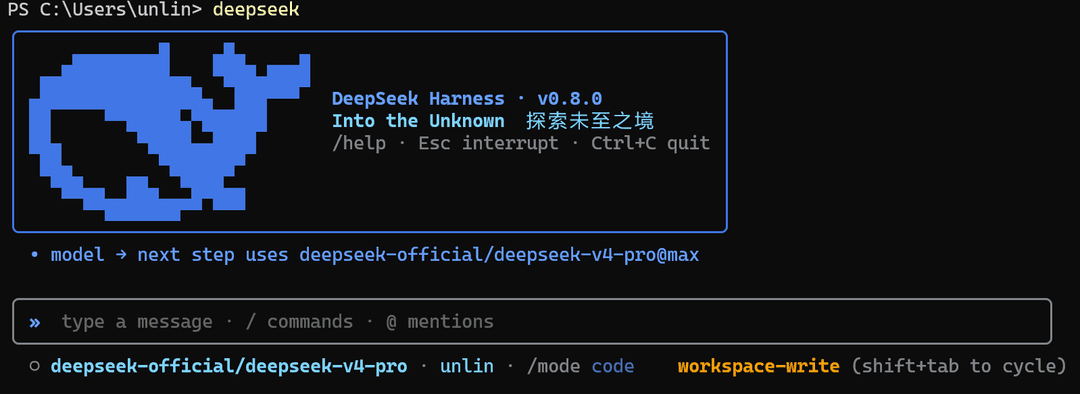
DSH-Code 是 DeepSeek Harness(dsh)的终端编码界面。 它以树外 bundle 的形式组合在官方 @deepseek-ai/dsh-base 之上,与 Harness Web UI 使用同一套 Agent、Session、工具、命令、技能、权限、sandbox、上下文压缩与插件服务。
DSH-Code 没有另外实现一套 Agent loop,而是在 DSH 运行时上增加面向编码工作的 TUI。会话处理参考 Codex CLI,终端交互参考 Claude Code。
一、项目概览
DeepSeek Harness 将模型、工具、存储、策略和界面作为插件,通过 Cordis 注册。持久化会话事件记录恢复对话与运行状态所需的信息。
DSH-Code 保留这套结构,并补充适合编码任务的终端工作流。
| 参考项目 | DSH-Code 使用的机制 |
|---|---|
| DeepSeek Harness | 插件组合、作用域服务、Agent Preset、持久会话、工具、技能、策略、sandbox 与委派 |
| Codex CLI | 会话导航、有界浮层、历史检查、稳定底部布局与缩放处理 |
| Claude Code | 斜杠命令发现、思考折叠、审批、提问与 turn steering |
界面采用开发者熟悉的终端操作方式,运行行为仍由 DSH 服务和配置决定。
二、快速开始
需要 Node ^22.19 || >=24、预览版 dsh CLI,以及 DEEPSEEK_API_KEY。
npm install -g @deepseek-ai/dsh dsh-code
npm install -g pnpm
dsh plugin --profile cli add [email protected]
提示:pnpm 会忽略发布不足 24 小时的包,因此发布首日请使用精确版本
[email protected];24 小时后可省略版本号。npm 安装不受此限制。
可用的启动指令:
deepseek
dsh --profile cli
dsh-code
dsh --profile cli、deepseek 与 dsh-code 是并列的启动命令。deepseek 与 dsh-code 都是 dsh --profile cli 的全局别名,后续参数会原样转发,例如 deepseek --resume abc123。
DeepSeek Harness 目前仍处于 developer preview,可能出现破坏兼容性的变化;DSH-Code 会持续跟随其插件接口演进。
安装、原生模块和插件加载问题,请查看常见问题与排障。
三、终端交互
基础
DSH-Code 在整个进程中只保留一个 Ink owner。/new 和 /resume 替换的是活动 Agent,而不是终端本身。若 Agent 忙碌,切换会等待当前 turn 自然结束;最新请求优先,目标加载失败也不会破坏当前会话。
所有动态内容都受到明确的视口约束。流式输出、思考过程、审批、问题、/help、/model、/mode、/resume、/plugin 与 Ctrl+O 使用统一的终端预算。输入框始终紧贴状态栏上方;终端宽度稳定后,界面会根据保存的会话记录重新绘制一次。
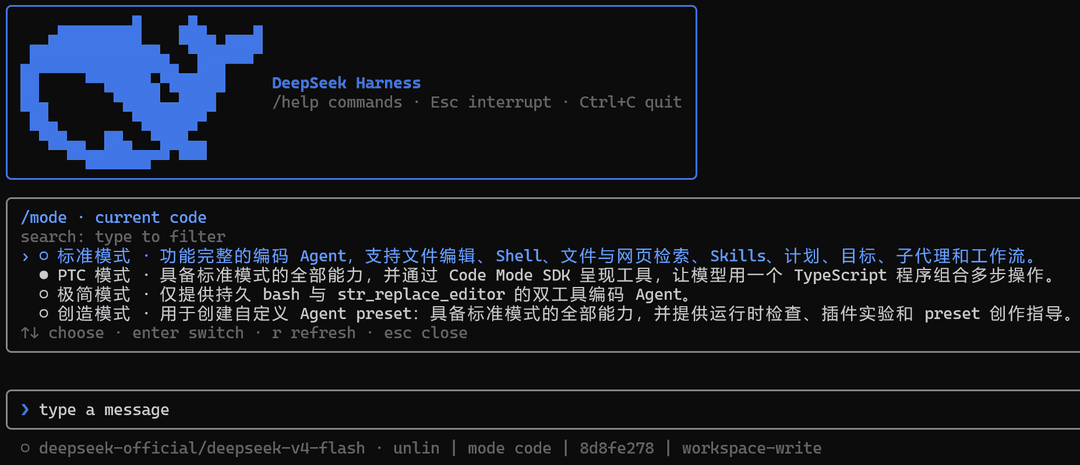
在第一次 turn 之前使用 /mode,查看或选择当前会话的 Agent Preset。
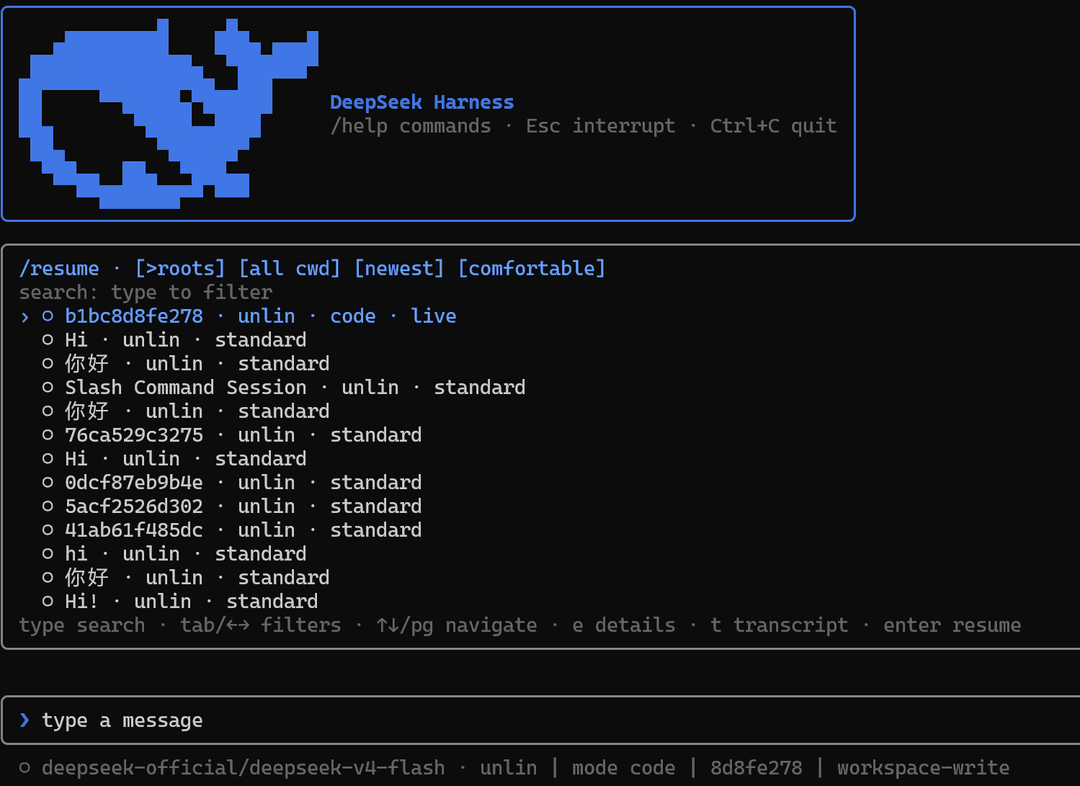
使用 /resume 搜索持久会话,无需重新启动 TUI。
常用命令
dsh --profile cli                    # 新建 standard 会话
dsh --profile cli --mode code        # 使用 Agent Preset 启动
dsh --profile cli --continue         # 恢复当前目录最新会话
dsh --profile cli --resume abc123    # 按 id 或唯一前缀恢复持久会话
dsh --profile cli --session my-id    # 使用指定 id 新建会话
进入 TUI 后:
| 操作 | 用途 |
|---|---|
/new [preset] | 不重启终端,创建并进入另一个会话 |
/resume [id|前缀] | 搜索根会话或全部对话,并按 cwd、排序和密度筛选 |
/mode [preset] | 检查或选择空会话的 Agent 组合 |
/model | 在实时 LLM 注册表提供的模型间切换 |
/plugin [query] | 检查 loader 条目、启用状态、模块身份和 fiber 阶段 |
/permission <name> | 切换权限预设;Shift+Tab 可循环切换 |
/help | 浏览本地命令、Harness 命令、技能和快捷键 |
Ctrl+O | 打开独占历史详情视图,切换条目并滚动完整内容 |
Ctrl+R | 折叠或展开模型思考过程 |
@ | 引用工作区文件或持久会话的有界快照 |
Esc / Ctrl+C | 关闭最上层界面或中断当前 turn |
四、功能
1. Agent 与扩展
- 每会话 Agent Preset:组合工具、提示词、技能、上下文压缩、plan mode 与委派能力
- 从共享 Harness 注册表实时发现斜杠命令和用户技能
- 通过
/plugin只读诊断 Cordis loader - 从实时 LLM 注册表路由模型,并按持久会话恢复选择
- 支持 plan、goal、todo、权限、sandbox、subagent 与运行中 steering
2. 会话与上下文
/new、/resume、--continue与显式 session id,且无需重新挂载 Ink- Codex 风格可搜索恢复面板,支持根/全部对话、cwd、排序和密度筛选
- 裸启动延迟到首次真实输入才创建会话,未输入即退出零残留
- 全局输入历史:Up/Down 跨会话召回,
/history搜索面板回填输入框 - 标题快照按需折叠,完整转录仅在显式请求时加载并支持全量滚动
- subagent 对话只读检查,以及通过
@注入有界会话引用 - Markdown 导出、持久标题、上下文占用、缓存、token、TTFT 与耗时指标
3. 审批与交互
- sandbox 升级与 hook
ask决策的一次性工具审批条 - 结构化
ask_user_question与 plan review 菜单,支持多选和自定义答案 - 在下一个 step 边界进行 turn steering,并提供明确的中断语义
- Agent mode、plan、权限 preset、goal 与 sandbox 状态相互独立
4. 终端渲染
- 已落定历史只追加,流式可变区域严格有界
- 思考折叠、终端 Markdown、紧凑工具摘要与完整结构化详情
- 双行状态栏:mode 与 context 在第二行,context 为蓝色进度条,全蓝强调
- 运行中提交即时显示为普通提示词行,Delete 取消排队消息,busy 使用 web StateDot 八点追逐动画
- 回复与输入框光标对齐,欢迎头字标提亮
- Ctrl+O 独占历史检查,支持切换条目与完整纵向滚动
- CJK/控制字符宽度安全、短终端主动降级、缩放防抖重放
- 固定底部顺序:内容或面板 → notice → 输入框 → 状态栏
五、DSH-Code 如何接入 DSH
1. 运行时组合
DSH-Code 读取 Harness 的实时注册表,不在本地维护另一套副本。模型适配器、工具 provider、技能来源、命令、权限策略、持久化后端、sandbox 和 subagent provider 都可以通过 DSH composition 添加或替换。
/plugin 提供当前 Cordis loader 状态的只读视图。
2. 会话级 Agent Preset
Host 持有共享基础设施——注册表、持久化、会话查询、权限和 sandbox 策略;每个会话则获得一个隔离的 Agent scope,并由 Agent Preset 进行组合:
standard——功能完整的通用编码 Agentcode——面向 Code Mode / PTC 的多操作工作流minimal——只保留持久 shell 和str_replace_editorcordis——完整 Agent,加上运行时检查与 Preset 编写指导- 用户预设——自行定义工具、提示词段落、技能、上下文压缩、plan mode 与 subagent 行为
在第一次 turn 之前使用 /mode,或通过 --mode <preset> 直接启动。选中的 preset 会写入会话,并在恢复时还原。
3. 会话记录与恢复
提示词、流式 chunk、工具调用与结果、模型选择、plan 状态、权限、标题和 preset 选择都由持久 Session 事件投影得到。会话恢复、导出、历史检查、上下文统计和终端重放使用同一份记录。
React state 只保存输入草稿、光标、当前面板、选中项和滚动位置等临时界面状态。
dsh profile
└─ Host plane:注册表 · 持久化 · 查询 · 权限 · sandbox
   ├─ Agent 会话 A + preset code
   ├─ Agent 会话 B + preset minimal
   └─ DSH-Code TUI
      持久事件 → 纯投影 → 只追加的历史转录
                         └→ 有界面板 → 输入框 → 状态栏
六、开发
pnpm install
pnpm test
pnpm typecheck
pnpm build
pnpm run gen:whale   # 从 vendored Logo 路径重新生成 src/whale-glyph.ts
鲸鱼字形由 scripts/fish-logo.ts 中 vendored 的 DeepSeek FishLogo 几何数据生成(来源:DeepSeek Harness,MIT)。
1. 源码开发安装
本地 checkout 可使用:
dsh plugin --profile cli add file:C:/path/to/dsh-code
GitHub 安装可用于源码开发:
dsh plugin --profile cli add github:unlinearity/dsh-code
Git 包会在安装阶段构建。若 pnpm 要求添加 allowBuilds,请把它输出的完整条目复制到 ~/.dsh/profiles/cli/pnpm-workspace.yaml,再重新执行命令。该键包含 Git URL 与 commit,不能只写 dsh-code。
2. 参考
- 运行时服务、事件、插件作用域和持久化模型遵循 DeepSeek Harness。
- 会话导航、浮层尺寸、scrollback、底部布局与缩放处理参考 Codex CLI。
- 斜杠发现、turn steering、思考折叠、审批和提问流程参考 Claude Code。
DSH-Code 是独立的 MIT 社区项目,与 OpenAI 或 Anthropic 无隶属关系。
社区:
- Linux DO:学 AI,上 L 站!
- Deepseek harness: DSH 官方网站
许可
MIT。vendored FishLogo 几何数据来自 DeepSeek Harness(MIT)。
// faq
What is dsh-code?
Claude-Code-style TUI bundle for DeepSeek Harness. 充分结合 DSH 的核心机制与Codex CLI 、Claude Code 的优秀机制,打造的 DSH-Code.. It is open-source on GitHub.
Is dsh-code free to use?
dsh-code is open-source under the MIT license, so it is free to use.
What category does dsh-code belong to?
dsh-code is listed under devtools in the Claudeers registry of Claude-compatible tools.
// embed badge

[](https://claudeers.com/dsh-code)
// retro hit counter

[](https://claudeers.com/dsh-code)
// reviews
// guestbook
// related in Developer Tools
 🔓
🔓The agent harness performance optimization system. Skills, instincts, memory, security, and research-first development for Claude Code, Codex, Opencode, Curs…
 🔓
🔓Makes your AI agent think like the laziest senior dev in the room. The best code is the code you never wrote.
 🔓
🔓Use Garry Tan's exact Claude Code setup: 23 opinionated tools that serve as CEO, Designer, Eng Manager, Release Manager, Doc Engineer, and QA
 🔓
🔓AI coding assistant skill (Claude Code, Codex, OpenCode, Cursor, Gemini CLI, and more). Turn any folder of code, SQL schemas, R scripts, shell scripts, docs,…