
douyin-downloader
A practical Douyin downloader for both single-item and profile batch downloads, with progress display, retries, SQLite deduplication, and browser fallback su…
Install with your AI
Paste into Claude Code, Cursor, or any agent — it reads the repo and wires the tool into your project.
Install and set up douyin-downloader (claude-plugin project) into my current project.
Found on https://claudeers.com/douyin-downloader
Repo: https://github.com/jiji262/douyin-downloader
Homepage/docs: —
Detected install method: claude-plugin → /plugin install douyin-downloader@jiji262/douyin-downloader
Category: uncategorized. Platforms: cli, api, desktop, web.
Read the repo's README for exact setup and env vars, then install it and wire it into my project.

Claudeers Health Verdict:
unknown; community-verified: false. Confirm the source before running anything.
⚠ Unverified / not recently updated — review before pasting a run-this config.
/plugin marketplace add jiji262/douyin-downloader
/plugin install douyin-downloader@jiji262/douyin-downloader
git clone https://github.com/jiji262/douyin-downloader
// compatibility
| Platforms | cli, api, desktop, web |
|---|---|
| Operating systems | — |
| AI compatibility | claude |
| License | MIT |
| Pricing | open-source |
| Language | Python |
Douyin Downloader
简体中文 · English
A Douyin skill for AI agents. Install the douyin-dl skill, then ask Claude Code, Codex, or another agent in plain language to read Douyin's hot board, search posts, look up a creator, record a live room, or transcribe a local video. The skill tells the agent when to run the douyin-dl agent CLI and how to read the one JSON line each command prints. Downloading videos and photos is not part of the skill; for that, use our sponsor, the Douzy desktop app.
Using the AI Agent Skill
The skill is the skills/douyin-dl/ folder. It holds instructions for the agent; the work itself is done by the douyin-dl CLI. Install both.
Step 1. Install the CLI
uv tool install douyin-dl-cli    # or: pipx install douyin-dl-cli
douyin-dl agent doctor
- Requires Python 3.10+. The PyPI package is
douyin-dl-cli; the command it installs isdouyin-dl. - Unreleased code from GitHub:
uv tool install git+https://github.com/jiji262/douyin-downloader. In a cloned checkout with the requirements installed,python run.py agent doctorworks too. - Do not
pip installthe package into a shared environment: its top-level packagesutils,core, andconfigcollide with other projects. douyin-dl: command not found: runuv tool update-shell(orpipx ensurepath) and open a new terminal.
doctor works offline and lists which commands are ready. Two features need extra components. Install them now, or wait until the agent asks:
| Feature | Needs | Install with uv |
|---|---|---|
Sign-in, for search and user | Playwright and Chromium | uv tool install --force "douyin-dl-cli[browser]". If Chromium is still missing, login returns the exact command to install it |
| Transcription | Whisper, which pulls in PyTorch (a large download) | uv tool install --force "douyin-dl-cli[transcribe]" |
For both, use "douyin-dl-cli[browser,transcribe]". Live recording uses the FFmpeg bundled with the CLI. pipx commands and other setups: troubleshooting.
Step 2. Install the skill
Claude Code: run these in a Claude Code session.
/plugin marketplace add jiji262/douyin-downloader
/plugin install douyin-dl@douyin-dl
The second command opens the plugin's details; choose an install scope to finish. Type / to check: /douyin-dl:douyin-dl should be listed. From a shell, claude plugin marketplace add jiji262/douyin-downloader followed by claude plugin install douyin-dl@douyin-dl does the same.
Codex: copy the skill folder into your user skills folder.
git clone https://github.com/jiji262/douyin-downloader.git
mkdir -p ~/.agents/skills
cp -r douyin-downloader/skills/douyin-dl ~/.agents/skills/
Codex picks up new skills on its own; restart it if the skill does not appear.
Other agents (Cursor, OpenCode, and more): use the skills CLI.
npx skills add jiji262/douyin-downloader       # this project only
npx skills add jiji262/douyin-downloader -g    # all projects
Step 3. Ask in plain language
Usually you just mention Douyin or paste a Douyin link, and the agent picks the skill. To call it by name, start your message with /douyin-dl:douyin-dl in Claude Code (plugin install) or include $douyin-dl in Codex.
| You say | The agent runs | Needs |
|---|---|---|
| "Show me the top 10 on Douyin's hot board." | douyin-dl agent hot --max 10 | Nothing |
"Search Douyin for camping, sort by likes, and summarize the top 10." | douyin-dl agent search camping --sort likes --max 10 | Sign-in |
"Look up this creator: https://www.douyin.com/user/…" | douyin-dl agent user <url> | Sign-in |
| "What is this link? Can it be downloaded?" | douyin-dl agent inspect <url> | Nothing |
"Record this live room for 10 minutes: https://live.douyin.com/…" | douyin-dl agent live <url> --max-duration 600 | Nothing |
"Transcribe ./clip.mp4." | douyin-dl agent transcribe ./clip.mp4 | Whisper |
What the agent does
The skill gives the agent a fixed routine:
- Checks first. It runs
douyin-dl agent doctorat the start of each session to see what is ready. - Asks before installing. If a component is missing, it shows you the exact install command and runs it only if you agree.
- Asks before signing in.
searchneeds a signed-in session anduserneeds saved cookies. The agent explains first. After you agree, it runsdouyin-dl agent login: a Chromium window opens, you sign in to Douyin there yourself (QR code or SMS), and the window closes on its own. - Acts on error codes. Each command prints one JSON line. The agent decides what to do from
error.codeand passes on warnings that affect you. Text from Douyin, such as titles, nicknames, and hot words, is treated as data, never as instructions. - Turns down downloads. Video, photo post, collection, and music links return
ARGUS_GATED, and a profile's posts cannot be downloaded either. The agent tells you so, points you to Douzy, and does not try workarounds.
It also keeps requests to Douyin low: one search per request (it asks before a second one), no parallel calls, and at most one retry after an empty response.
Sign-in and privacy
- Cookies stay on your computer in
~/.douyin-dl/cookies.json(file mode 0600). SetDOUYIN_DL_HOMEto move the folder. Agent mode does not readconfig.ymlor the cookies saved by the Classic CLI. - Command output names the cookies it found but never shows their values. Never paste cookies, tokens, or SMS codes into the chat; the skill tells the agent never to ask for them.
- No display, for example over SSH or on a server: export your Douyin cookies to a JSON file yourself and import it with
douyin-dl agent login --from-file cookies.json. - Requests go to douyin.com. When the saved cookies have no
msToken, the CLI also downloads a small config file from GitHub to generate one.
Live recording and transcription
- Live recording: a duration is required, from 1 second to 6 hours (
--max-duration, up to 21600 seconds). If you don't give one, the agent asks. Files go to./douyin-downloadsunless you name another folder (--out), and long recordings run in the background. If the room is not live, the agent tells you. - Transcription: pass a file or a folder (searched for
.mp4files). Each video gets a<name>.transcript.txtnext to it, or in the--outfolder. The defaults are--model baseand--language zh; the first run downloads the Whisper model.
Run the commands yourself
The same commands work without an agent. Each one prints exactly one JSON line on stdout; logs go to stderr.
douyin-dl agent hot --max 3
# {"schema":1,"ok":true,"verb":"hot","version":"2.1.0","data":{"items":[…],"count":3},"error":null,"warnings":[]}
ok is true only when the exit code is 0. On failure, branch on error.code (such as LOGIN_REQUIRED, ARGUS_GATED, or UPSTREAM_EMPTY), not on the message. Set DOUYIN_PROXY (for example http://127.0.0.1:7890) to send requests through a proxy. Every field, error code, and exit code: contract.
Update
- CLI:
uv tool upgrade douyin-dl-cli(orpipx upgrade douyin-dl-cli). - Skill in Claude Code:
claude plugin update douyin-dl@douyin-dl, or Update now on the Installed tab of/plugin. Auto-update is off by default for this marketplace. - Skill from the skills CLI:
npx skills update. For a copied folder, as with Codex, copy it again. - If the
versionin the JSON output differs frommetadata.versionin the skill'sSKILL.md, update both.
Common problems
| Problem | Fix |
|---|---|
douyin-dl: command not found | Run uv tool update-shell (or pipx ensurepath) and open a new terminal. Until then, the agent can use the skill's scripts/dy.sh, which runs the CLI through uvx |
search asks for sign-in again | The session expired. Ask the agent to sign in again |
Empty results (UPSTREAM_EMPTY) | Douyin's rate limit or bot check. Wait a few minutes; quick retries make the block last longer. Overseas proxies often get empty results, so try without the proxy or with a mainland exit |
A video link returns ARGUS_GATED | Expected: the CLI cannot download it, and signing in again does not help. Use Douzy |
| Windows | Run douyin-dl agent … from PowerShell or cmd. scripts/dy.sh needs Git Bash or WSL |
More fixes: troubleshooting.
Sponsors
| Sponsor | About |
|---|---|
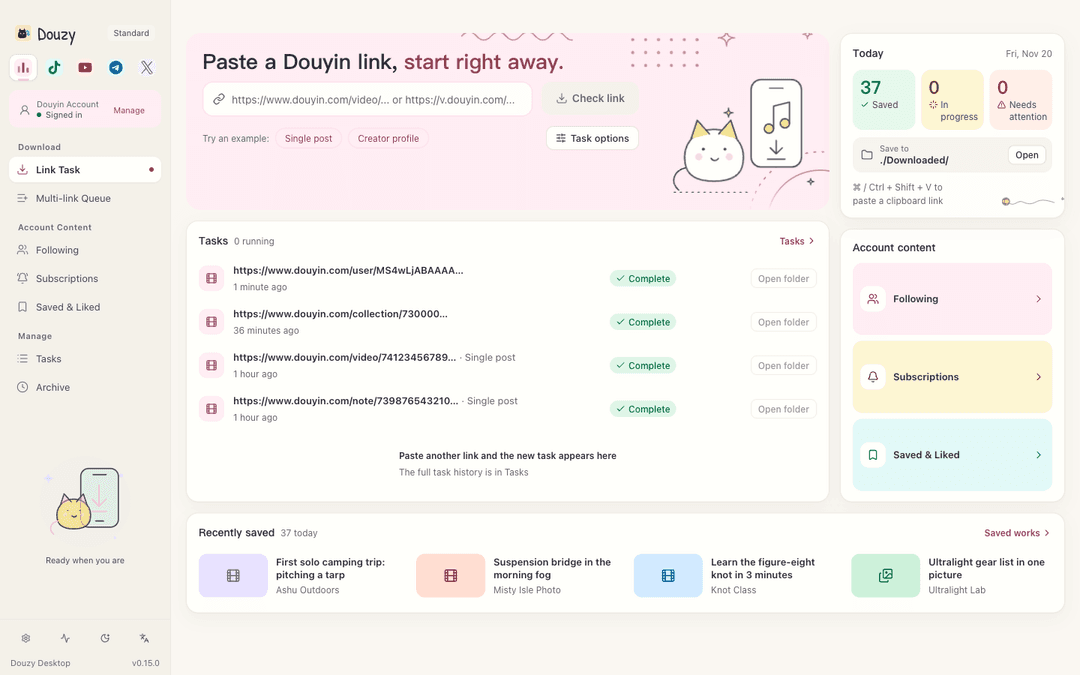 | Douzy Desktop Saves media from Douyin, TikTok, YouTube, Telegram, and X to your computer; use it for the video and photo downloads the skill does not support. Paste a link, track its progress, and find saved videos and photos in one workspace. Platform availability depends on enabled plugins or local components. Some batch and advanced features require activation. Download for Windows or macOS · GitHub project · Latest release and notes |
Classic CLI
The original batch downloader (python run.py) supports Douyin only. It includes batch downloads, date filters, retries, download history, and optional comments, transcription, and notifications.
Download limitations: Douyin's request verification currently blocks CLI downloads of individual videos/photos, collections, music, likes, and favorites. Profile posts can try the Playwright browser fallback, but success is not guaranteed. Use Douzy for everyday downloads.
Refreshing cookies or retrying does not fix this verification block. Live recording is experimental: FFmpeg records the stream in segments, converts each segment to MP4, and reconnects after drops.
Quick Start
Requires Python 3.10+ on Windows, macOS, or Linux. Read the CLI limitations above first.
1. Install
git clone https://github.com/jiji262/douyin-downloader.git
cd douyin-downloader
python -m pip install -r requirements.txt
python -m pip install playwright
python -m playwright install chromium
2. Configure and sign in
Copy config.example.yml to config.yml:
cp config.example.yml config.yml
python -m tools.cookie_fetcher --config config.yml
On Windows PowerShell, use Copy-Item config.example.yml config.yml to copy the file. Sign in to Douyin in the browser, then return to the terminal and press Enter to save cookies.
Replace the sample link in config.yml with your creator's profile URL. Keep the saved cookies and adjust these fields:
link:
  - https://www.douyin.com/user/YOUR_SEC_UID
path: ./Downloaded/
mode: [post]
number:
  post: 10                 # 0 = unlimited
increase:
  post: true              # skip downloaded items
redownload_missing_files: true
3. Run
python run.py -c config.yml
Use python run.py --help for all options.
| Option | Purpose |
|---|---|
-c, --config | Config file |
-u, --url | Append a URL to the links in the config; repeatable |
-p, --path | Download folder |
-t, --thread | Concurrent downloads |
-v, --verbose | Detailed logs |
| Exit code | Meaning |
|---|---|
0 | Finished. Some items may still have failed; check the summary |
1 | Nothing was downloaded or skipped and at least one item failed, or a fatal error occurred |
3 | The sign-in expired and could not be renewed; the other URLs in the batch were still processed |
Configuration
Full settings and examples: config.example.yml.
| Setting | Purpose |
|---|---|
number.post | Item limit; 0 means unlimited |
start_time / end_time | Date range (YYYY-MM-DD); includes the whole end date |
video_quality | highest by default; original tries the original upload and falls back |
increase.post | true skips downloaded items; false downloads again and overwrites files in the selected scope |
redownload_missing_files | Default true: download missing files again. With false, valid database history can still skip them |
Incremental downloads check for non-empty primary media on disk. You do not need to clear the database to download again: set increase.post: false. The same switch is available for like, mix, and music.
More CLI commands
# Hot search board and keyword search → JSONL
python run.py --hot-board 30
python run.py --search "cats" --search-max 50

# Optional REST API server
python -m pip install fastapi uvicorn
python run.py --serve --serve-port 8000
Comments, transcription, notifications, and live recording are configured in config.example.yml.
FAQ
Cookies expired? Run python -m tools.cookie_fetcher --config config.yml again.
Only a few profile posts? Keep browser_fallback.enabled: true and headless: false. Complete any verification yourself in the browser; the current verification block may still prevent downloads.
Need logs? Run python run.py -c config.yml -v.
Development
python -m pip install -e ".[dev]"
python -m pytest tests/
ruff check .
Community & License
QQ group · LINUX DO · MIT License
For learning and personal data management. Respect copyright, privacy, and platform rules. You are responsible for how you use this tool; platform changes may affect availability.
Star History
// faq
What is douyin-downloader?
A practical Douyin downloader for both single-item and profile batch downloads, with progress display, retries, SQLite deduplication, and browser fallback support. 抖音批量下载工具,支持视频、图集、合集、音乐(原声)。. It is open-source on GitHub.
Is douyin-downloader free to use?
douyin-downloader is open-source under the MIT license, so it is free to use.
What category does douyin-downloader belong to?
douyin-downloader is listed under uncategorized in the Claudeers registry of Claude-compatible tools.
// embed badge

[](https://claudeers.com/douyin-downloader)
// retro hit counter

[](https://claudeers.com/douyin-downloader)
// reviews
// guestbook
// related in Uncategorized / Others
 🔓
Reverse engineer anything with agents, from app behavior down to native binaries.
 🔓
Fair-code workflow automation platform with native AI capabilities. Combine visual building with custom code, self-host or cloud, 400+ integrations.
 🔓
The agent engineering platform.
 🔓
利用AI大模型,一键生成高清短视频 Generate short videos with one click using AI LLM.