
Dive
Dive is an open-source MCP Host Desktop Application that seamlessly integrates with any LLMs supporting function calling capabilities. ✨
Install with your AI
Paste into Claude Code, Cursor, or any agent — it reads the repo and wires the tool into your project.
Install and set up Dive (git-clone project) into my current project.
Found on https://claudeers.com/dive-2
Repo: https://github.com/OpenAgentPlatform/Dive
Homepage/docs: —
Detected install method: git-clone → git clone https://github.com/OpenAgentPlatform/Dive
Category: mcp-servers. Platforms: cli, api, desktop, web.
Read the repo's README for exact setup and env vars, then install it and wire it into my project.

Claudeers Health Verdict:
slowing; community-verified: false. Confirm the source before running anything.
git clone https://github.com/OpenAgentPlatform/Dive
// compatibility
| Platforms | cli, api, desktop, web |
|---|---|
| Operating systems | — |
| AI compatibility | claude |
| License | MIT |
| Pricing | open-source |
| Language | TypeScript |

Dive AI Agent
Dive is an open-source MCP Host Desktop Application that seamlessly integrates with any LLMs supporting function calling capabilities. ✨
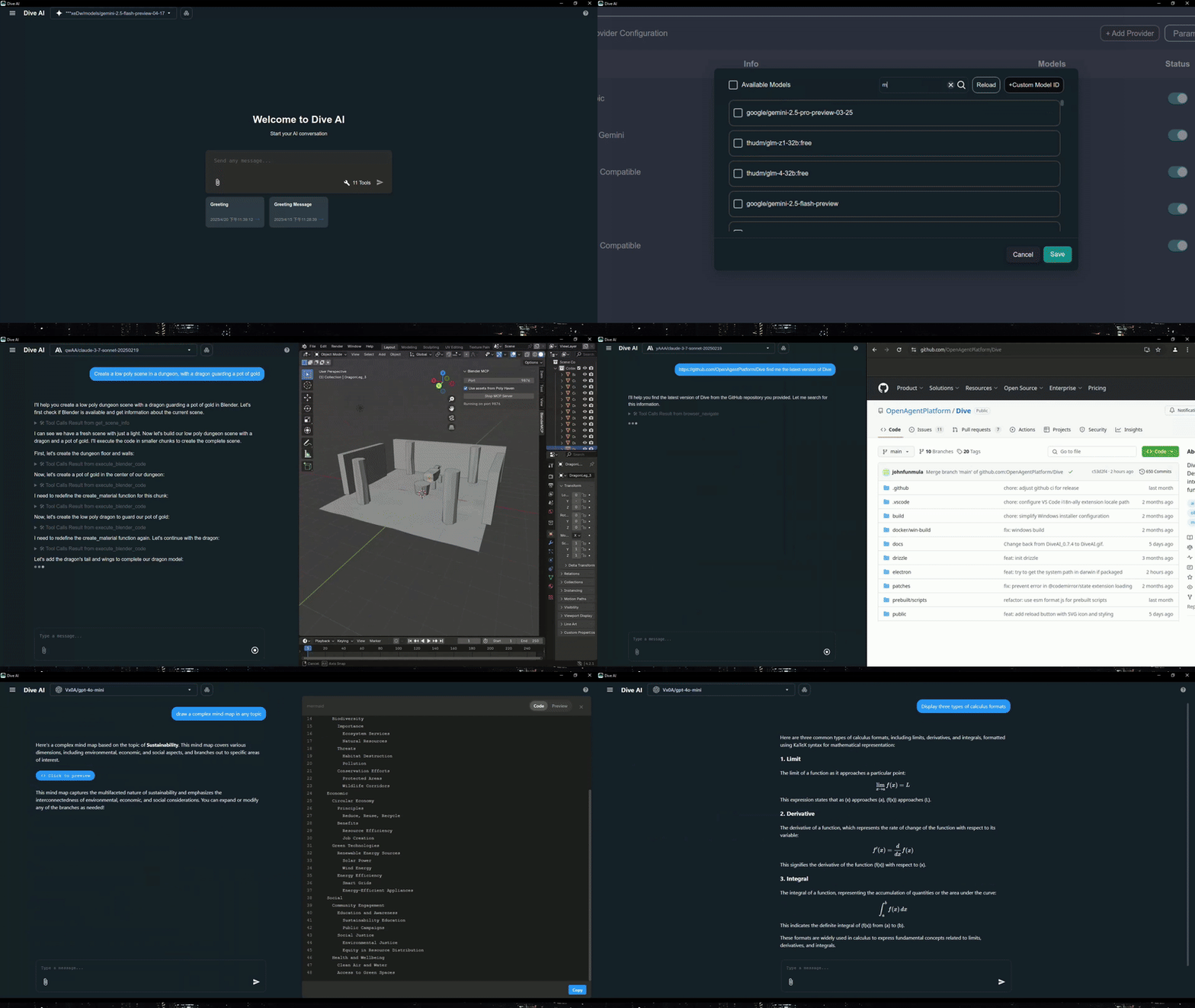
Features 🎯
- 🌐 Universal LLM Support: Compatible with ChatGPT, Anthropic, Ollama and OpenAI-compatible models
- 💻 Cross-Platform: Available for Windows, MacOS, and Linux
- 🔄 Model Context Protocol: Enabling seamless MCP AI agent integration on both stdio and SSE mode
- ☁️ OAP Cloud Integration: One-click access to managed MCP servers via OAPHub.ai - eliminates complex local deployments
- 🏗️ Dual Architecture: Modern Tauri version alongside traditional Electron version for optimal performance
- 🌍 Multi-Language Support: Supports 24+ languages including English, Traditional Chinese, Simplified Chinese, Spanish, Japanese, Korean, German, French, Italian, Portuguese, Russian, Thai, Vietnamese, Filipino, Indonesian, Polish, Turkish, Ukrainian, Swedish, Norwegian, Finnish, and Lao
- ⚙️ Advanced API Management: Multiple API keys and model switching support with
model_settings.json - 🛠️ Granular Tool Control: Enable/disable individual MCP tools for precise customization
- 💡 Custom Instructions: Personalized system prompts for tailored AI behavior
- ⌨️ Keyboard Shortcuts: Comprehensive hotkey support for efficient navigation and operations (rename, settings, reload, new chat, etc.)
- 📝 Chat Draft Saving: Automatically saves chat input drafts to prevent data loss
- 🔄 Auto-Update Mechanism: Automatically checks for and installs the latest application updates
- 🔐 MCP Server Authentication: Added support for MCP server authentication
⚠️ Note: This feature is currently unstable and may require frequent re-authorization
- 🛠️ Built-in Local Tools: Pre-configured tools available out of the box - Fetch (web requests), File Manager (read/write files), and Bash (command execution)
- 🤖 MCP Server Installer Agent: Intelligent agent that helps you install and configure MCP servers automatically
- 🔔 Multiple Elicitation Support: Handle multiple MCP elicitation requests simultaneously in the UI
- 📁 @ File Path Search: Extended @ keyword in chat input to search file paths
Recent updates(2026/02/26) - v0.14.0+ 🎉
- 🛠️ Skills & Slash Commands: Support skills and more slash commands
- 🔍 Chat History Search: Support chat history search
Platform Availability
| Platform | Electron | Tauri |
|---|---|---|
| Windows | ✅ | ✅ |
| macOS | ✅ | 🔜 |
| Linux | ✅ | ✅ |
Migration Note: Existing local MCP/LLM configurations remain fully supported. OAP integration is additive and does not affect current workflows.
Download and Install ⬇️
Get the latest version of Dive:
Windows users: 🪟
Choose between two architectures:
- Tauri Version (Recommended): Smaller installer (<30MB), modern architecture
- Electron Version: Traditional architecture, fully stable
- Python and Node.js environments will be downloaded automatically after launching
MacOS users: 🍎
- Electron Version: Download the .dmg version
- You need to install Python and Node.js (with npx uvx) environments yourself
- Follow the installation prompts to complete setup
Linux users: 🐧
Choose between two architectures:
- Tauri Version: Modern architecture with smaller installer size
- Electron Version (Recommended): Traditional architecture with .AppImage format
- You need to install Python and Node.js (with npx uvx) environments yourself
- For Ubuntu/Debian users:
- You may need to add
--no-sandboxparameter - Or modify system settings to allow sandbox
- Run
chmod +xto make the AppImage executable
- You may need to add
- For Arch users:
- If you are using Arch Linux, you can install dive using an AUR helper. For example:
paru -S dive-ai
- If you are using Arch Linux, you can install dive using an AUR helper. For example:
MCP Setup Options
For more detailed instructions, please see MCP Servers Setup.
The easiest way to get started! Access enterprise-grade MCP tools instantly:
- Sign up at OAPHub.ai
- Connect to Dive using one-click deep links or configuration files
- Enjoy managed MCP servers with zero setup - no Python, Docker, or complex dependencies required
Benefits:
- ✅ Zero configuration needed
- ✅ Cross-platform compatibility
- ✅ Enterprise-grade reliability
- ✅ Automatic updates and maintenance
Build 🛠️
See BUILD.md for more details.
Contributing 🤝
We welcome contributions from the community! Here's how you can help:
Development Setup
- Fork the repository
- Clone your fork:
git clone https://github.com/YOUR_USERNAME/Dive.git - Install dependencies:
npm install - Start development:
npm run dev(Electron) orcargo tauri dev(Tauri) - Make your changes and test thoroughly
- Submit a pull request
License 📄
Dive is open-source software licensed under the MIT License.
Connect With Us 🌐
- 💬 Join our Discord
- 🐦 Follow us on Twitter/X Reddit Thread
- ⭐ Star us on GitHub
- 🐛 Report issues on our Issue Tracker
// faq
What is Dive?
Dive is an open-source MCP Host Desktop Application that seamlessly integrates with any LLMs supporting function calling capabilities. ✨. It is open-source on GitHub.
Is Dive free to use?
Dive is open-source under the MIT license, so it is free to use.
What category does Dive belong to?
Dive is listed under mcp-servers in the Claudeers registry of Claude-compatible tools.
// embed badge

[](https://claudeers.com/dive-2)
// retro hit counter

[](https://claudeers.com/dive-2)
// reviews
// guestbook
// related in MCP Servers
 🔓
🔓f.k.a. Awesome ChatGPT Prompts. Share, discover, and collect prompts from the community. Free and open source — self-host for your organization with complete…
 🔓
🔓A cross-platform desktop All-in-One assistant for Claude Code, Codex, OpenCode, OpenClaw, Gemini CLI & Hermes Agent. Only official website: ccswitch.io
 🔓
🔓🪨 why use many token when few token do trick — Claude Code skill that cuts 65% of tokens by talking like caveman
 🔓
🔓An open-source AI agent that brings the power of Gemini directly into your terminal.