
Decepticon
Autonomous Hacking Agent for Red Team
Install with your AI
Paste into Claude Code, Cursor, or any agent — it reads the repo and wires the tool into your project.
Install and set up Decepticon (git-clone project) into my current project.
Found on https://claudeers.com/decepticon
Repo: https://github.com/BitterSecurity/Decepticon
Homepage/docs: https://decepticon.red
Detected install method: git-clone → git clone https://github.com/BitterSecurity/Decepticon
Category: uncategorized. Platforms: cli, api, web.
Read the repo's README for exact setup and env vars, then install it and wire it into my project.

Claudeers Health Verdict:
active; community-verified: false. Confirm the source before running anything.
git clone https://github.com/BitterSecurity/Decepticon
// compatibility
| Platforms | cli, api, web |
|---|---|
| Operating systems | — |
| AI compatibility | claude |
| License | Apache-2.0 |
| Pricing | open-source |
| Language | Python |

Decepticon — Autonomous Red Team Agent
"Another AI hacker? Let us guess — it runs nmap and writes a report."
Commercial product demo
☁️ Don't want to self-host? Decepticon is live in the cloud.
Skip the Docker setup — run autonomous red-team engagements right from your browser.
Open-source CLI demo
Install
Prerequisites: Docker and Docker Compose v2. Supported on macOS (Apple Silicon + Intel), Linux (amd64 + arm64), and Windows (amd64 + arm64) — native via PowerShell or via WSL2 (Ubuntu / Kali).
macOS / Linux / WSL2
curl -fsSL https://decepticon.red/install | bash
decepticon onboard   # Interactive setup wizard (provider, API key, model profile)
decepticon           # Start the core stack and drop into the terminal CLI
The default start brings up the core management plane (LiteLLM, PostgreSQL, Neo4j, Skillogy, LangGraph, sandbox) and launches the terminal CLI. Specialist workloads (BloodHound CE, Sliver C2, REA/Ghidra, …) and the web dashboard come up on demand — the orchestrator spawns specialists via ops_start("ad") etc., and you bring up the dashboard from inside the CLI with /web (see Web Dashboard).
Windows (PowerShell, native)
irm https://decepticon.red/install.ps1 | iex
decepticon onboard
decepticon
→ Quick start · Full setup walkthrough
Inside the interactive CLI
Type / to browse commands, select with Up/Down, then press Enter. Tab completes
the selected command; aliases also appear in help and autocomplete.
| Command | Use |
|---|---|
/help, /shortcuts | Discover commands or keyboard shortcuts |
/model, /status | Choose a configured model or inspect session connections |
/plan | Enter optional Plan mode, then send your planning message |
/mode red, /mode blue | Return to Red or select Blue investigation |
/new | Start a fresh conversation in the same engagement and mode when idle |
/sessions, /resume | Browse saved conversations or continue paused work |
/version (/about), /pwd (/cwd) | Check the running version and workspace paths |
/quit, /exit | Leave the chat; services and server work keep running |
Enter sends; Shift+Enter, Alt+Enter or Ctrl+J adds a line. Up/Down recalls input
history at the first/last input row; Ctrl+R searches it. Esc closes focused UI
first, then pauses active work; /resume continues it. Ctrl+A moves to the start
of the current line. Use /queue to review waiting messages before /new.
/new preserves saved conversations and terminal scrollback; it does not create
another engagement or change target authorization. /plan and /new take no
arguments. In the web terminal, use the dashboard's mode controls.
The new shortcuts and slash conveniences above describe current main, including
unreleased changes. A source merge does not update installed images. See
version history, the complete CLI reference
and upgrade behavior.
Use from Claude Code or Codex
After starting Decepticon, register its MCP server in your coding agent:
claude mcp add --scope user decepticon -- decepticon mcp serve
codex mcp add decepticon -- decepticon mcp serve
Use the command for the coding agent you have installed, then run
decepticon skill install to add the operator guide to both agents. See the
external agent guide for the Agent Skill,
tool workflow, and source installation path.
Use as a library (pip)
Building on top of the agents — a product, a research integration, or a custom orchestrator? Install the SDK from PyPI:
pip install decepticon              # core SDK
pip install "decepticon[neo4j]"     # + the knowledge-graph attack-chain tools
decepticon is a client SDK: it ships the agent factories, middleware, tools, and skills, and routes LLM calls and sandbox execution to runtime services over HTTP (DECEPTICON_LLM__PROXY_URL, SANDBOX_URL). Running agents still needs those services — use the Docker stack above, or point the URLs at your own equivalents. See Decepticon as a library for the factory override surface, declarative PluginBundle plugins, and the safety gate.
💖 Support Decepticon
We're building Decepticon toward an Offensive Vaccine for the AI-driven threat landscape. If you believe in autonomous red teaming as a path to stronger defense, consider supporting the project.
Benchmark

| Benchmark | Difficulty | Pass Rate |
|---|---|---|
| XBOW validation-benchmarks | Easy (Level 1) | 45 / 45 (100 %) |
| XBOW validation-benchmarks | Medium (Level 2) | 50 / 51 (98.0 %) |
| XBOW validation-benchmarks | Hard (Level 3) | 7 / 8 (87.5 %) |
| XBOW validation-benchmarks | All levels | 102 / 104 (98.08 %) |
- Full per-challenge index, attack-class matrix, and LangSmith traces
- Comparison vs other AI pentest agents (Strix, PentestGPT, MAPTA, Cyber-AutoAgent, XBOW commercial, …)
What is Decepticon?
The "AI + hacking" space is full of demos that run nmap and print a report. That's not what this is.
Decepticon is a professional autonomous Red Team agent. It executes realistic attack chains — reconnaissance, exploitation, privilege escalation, lateral movement, C2 — the way a real adversary would, not the way a scanner does.
Every Red engagement starts with an operator-approved target and RoE. Optional Plan mode adds Soundwave's discussion and seven planning documents alongside the read-only RoE. The execution orchestrator owns OPPLAN; Plan is not required for Red.
→ Engagement workflow deep dive
Why Decepticon?
Real kill chains, not checkbox scans. Decepticon reads an OPPLAN and pursues objectives through whatever path opens up — pivoting, adapting, chaining techniques.
Interactive shells, actually. Real offensive tools are interactive (msfconsole, sliver-client, evil-winrm). Decepticon runs every command inside persistent tmux sessions with automatic prompt detection — so when a tool drops into an interactive prompt, the agent sends follow-up commands without workarounds.
Hardened sandbox isolation. All commands run inside a Kali Linux sandbox on a dedicated operational network (sandbox-net), separate from the management plane (decepticon-net). LangGraph drives the sandbox via the Docker socket. → Architecture
Offense serves defense. The planned Offensive Vaccine loop will turn findings into defense improvements through an attack → defend → verify cycle.
Architecture
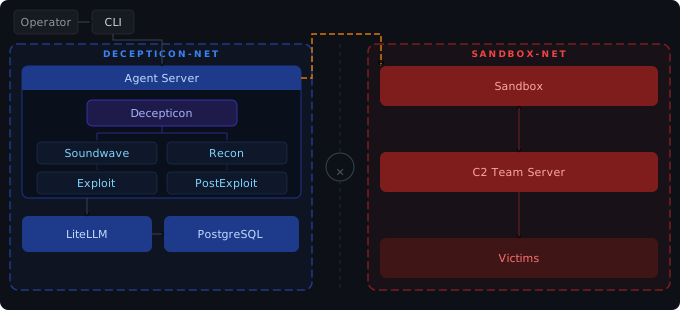
Two-network design. The always-on management plane (LiteLLM, PostgreSQL, Skillogy, LangGraph) and the always-on sandbox plane stay up across the whole engagement; everything else is dynamic-spawn — the Web dashboard comes up on /web from the CLI, and specialist workloads (BloodHound CE, Sliver C2, REA/Ghidra, …) come up only when the orchestrator calls ops_start(...) (see ADR-0006). Networks: management on decepticon-net; sandbox + C2 server + targets on sandbox-net. Neo4j is dual-homed so the agent (on management) can persist findings written from inside the sandbox.
→ Architecture deep dive · Knowledge graph
Agents
16 specialist agents organized by kill chain phase, with a fresh context window per objective — no accumulated noise.
Orchestration · Reconnaissance · Exploitation · Post-Exploitation · Vulnerability Research · Domain Specialists (AD, Cloud, Smart Contracts, Reversing, Analyst).
→ Full agent roster and middleware stack
Models & Providers
Tier-based, credentials-aware fallback chain. You declare which credentials you have in priority order; Decepticon builds the primary→fallback chain at every tier from there.
| Profile | Tier per agent | Use case |
|---|---|---|
| eco (default) | Per-agent (HIGH for orchestrator/exploiter/patcher/analyst, MID for execution, LOW for recon/soundwave) | Production |
| max | Every agent on HIGH | High-value targets |
| test | Every agent on LOW | Development / CI |
Tier-mapped providers: Anthropic, OpenAI, Google Gemini, MiniMax, DeepSeek, xAI, Mistral, OpenRouter, Nvidia NIM, Ollama (local). Subscription OAuth: Claude Max/Pro/Team, ChatGPT Pro/Plus/Team, Gemini Advanced, Copilot Pro, SuperGrok, Perplexity Pro.
Configure via decepticon onboard. → Full model reference & fallback examples
Documentation
| Topic | Doc |
|---|---|
| Installation and first engagement | Getting Started |
| Complete setup, OAuth, providers, dashboard | Setup Guide |
| All CLI commands and keyboard shortcuts | CLI Reference |
All make targets | Makefile Reference |
| Agent roster and middleware | Agents |
| REA/Ghidra reverse engineering | REA Reversing |
| Local defensive monitoring | Blue Cell |
| Model profiles and fallback chain | Models |
| Skill system and format spec | Skills |
| Web dashboard features and setup | Web Dashboard |
| Extending capabilities, skills, workflows and clients | Extension contract |
| System architecture and network isolation | Architecture |
| Neo4j knowledge graph | Knowledge Graph |
| End-to-end engagement workflow | Engagement Workflow |
| Offensive Vaccine loop | Offensive Vaccine |
| Release history | Changelog |
| Contributing to Decepticon | Contributing |
Contributing
git clone https://github.com/BitterSecurity/Decepticon.git
cd Decepticon
make dogfood  # Full OSS UX (launcher → onboard → CLI) on local code
make dev      # Backend hot-reload (compose watch) — daily dev loop
Community
Join the Discord — ask questions, share engagement logs, discuss techniques.
Disclaimer
Do not use this project on any system or network without explicit written authorization from the system owner. Unauthorized access to computer systems is illegal. You are solely responsible for your actions. The authors and contributors assume no liability for misuse.
License
Acknowledgements
Thanks to the maintainers and contributors of the projects Decepticon builds on, integrates, and learns from.
| Project | Role in Decepticon |
|---|---|
| REA and Ghidra | Optional reverse engineering workload and evidence-backed binary analysis. Integration details. |
| Deep Agents and LangGraph | Agent harness, orchestration, streaming and persistent execution state. |
| LiteLLM | Model gateway and provider routing. |
| insane-search | Upstream engine adapted for sandbox web access. Adaptation notice. |
| Playwright | Browser automation for web investigation. |
| Caddy and Fluent Bit | Local Blue sensor ingress and log collection. Blue Cell architecture. |
| Ink, Bubble Tea and Huh | Interactive CLI rendering and launcher forms. |
| PayloadsAllTheThings, h4cker and Awesome-Hacking | Security knowledge and learning references. Attribution details. |
| XBOW validation benchmarks | Evaluation tasks used by the benchmark integration. Results and methodology. |
For CLI interaction design, we also studied Claude Code, Codex CLI and Gemini CLI. The CLI reference review records the resulting choices.
Upstream licenses and attribution notices remain applicable; see third-party licenses and the notices alongside adapted code.
// faq
What is Decepticon?
Autonomous Hacking Agent for Red Team. It is open-source on GitHub.
Is Decepticon free to use?
Decepticon is open-source under the Apache-2.0 license, so it is free to use.
What category does Decepticon belong to?
Decepticon is listed under uncategorized in the Claudeers registry of Claude-compatible tools.
// embed badge

[](https://claudeers.com/decepticon)
// retro hit counter

[](https://claudeers.com/decepticon)
// reviews
// guestbook
// related in Uncategorized / Others
 🔓
Reverse engineer anything with agents, from app behavior down to native binaries.
 🔓
Fair-code workflow automation platform with native AI capabilities. Combine visual building with custom code, self-host or cloud, 400+ integrations.
 🔓
The agent engineering platform.
 🔓
100+ AI Agent & RAG apps you can actually run — clone, customize, ship.
// built by
1 of its contributors also build on official projects — claude-code, claude-cookbooks, claude-plugins-official
→ see how Decepticon connects across the ecosystem