
databasement
Self-hosted database backup manager with a web UI. Schedule, backup, and restore MySQL, PostgreSQL, MariaDB, Microsoft SQL Server, MongoDB, SQLite & Redis to…
Install with your AI
Paste into Claude Code, Cursor, or any agent — it reads the repo and wires the tool into your project.
Install and set up databasement (git-clone project) into my current project.
Found on https://claudeers.com/databasement
Repo: https://github.com/David-Crty/databasement
Homepage/docs: https://david-crty.github.io/databasement/
Detected install method: git-clone → git clone https://github.com/David-Crty/databasement
Category: uncategorized. Platforms: cli, api, web.
Read the repo's README for exact setup and env vars, then install it and wire it into my project.

Claudeers Health Verdict:
unknown; community-verified: false. Confirm the source before running anything.
git clone https://github.com/David-Crty/databasement
// compatibility
| Platforms | cli, api, web |
|---|---|
| Operating systems | — |
| AI compatibility | claude |
| License | MIT |
| Pricing | open-source |
| Language | PHP |
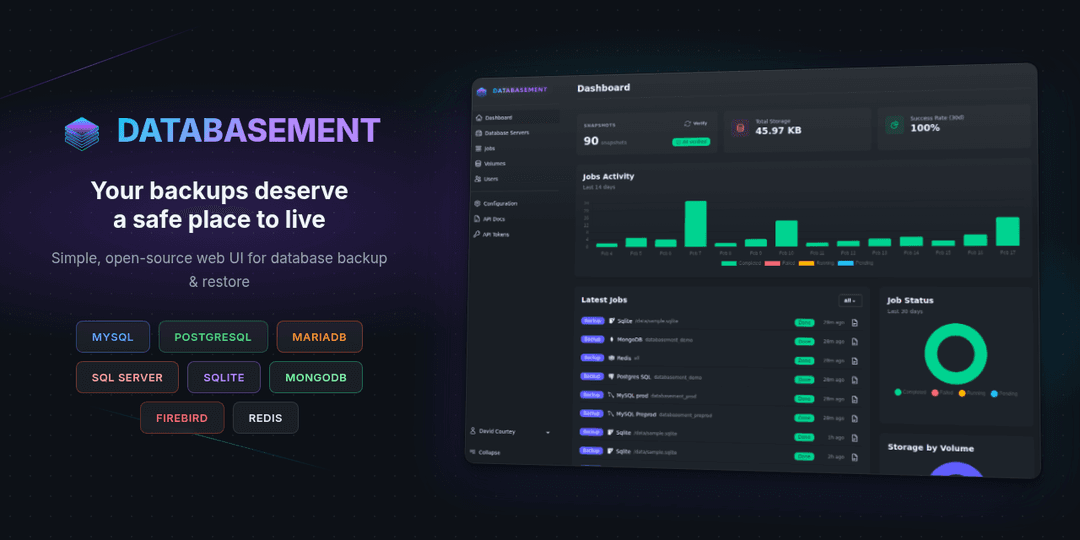
A modern, self-hosted database backup management application for MySQL, PostgreSQL, MariaDB, Microsoft SQL Server, MongoDB, SQLite, Firebird, and Redis.
Live Demo · Documentation · llms.txt · Report Bug or Request Feature
Features
- Multi-database support - Manage MySQL, PostgreSQL, MariaDB, Microsoft SQL Server, MongoDB, SQLite, Firebird, and Redis/Valkey servers from a single interface
- SSH tunnel support - Connect to databases in private networks through a bastion/jump server with password or key-based authentication
- Remote agents - Back up databases in firewalled or isolated networks with no inbound port: a lightweight agent connects out over HTTPS, dumps locally, and uploads to your storage
- Automated backups - Schedule recurring backups on daily or weekly intervals. Flexible retention policies: simple time-based (days) or GFS (grandfather-father-son)
- Multiple compression options - gzip, zstd (20-40% better compression), or encrypted (AES-256 for sensitive data)
- Cross-server restore - Restore snapshots from production to staging, or between any compatible servers
- Scheduled restores - Refresh a target database on a recurring schedule (e.g. nightly prod → staging) by replaying the latest completed snapshot
- Built-in data browser - Open Adminer in-app to inspect MySQL, PostgreSQL, and SQLite servers (admin-enabled, role-gated)
- Flexible storage - Store backups locally, on S3-compatible storage (AWS S3, MinIO, etc.), Azure Blob Storage, Samba/SMB shares, or remote servers via SFTP/FTP
- Real-time monitoring - Track backup and restore progress with detailed job logs
- Failure notifications - Get alerted via Email, Slack, Discord, Telegram, Pushover, Gotify, or Webhook when jobs fail
- Team ready - Multi-tenant organizations with isolated workspaces, role-based access control, OAuth/SSO login (Google, GitHub, GitLab, OpenID Connect), and optional two-factor authentication
- Automation - REST API and MCP server for scripting, CI/CD, and AI assistant integration
- Simple deployment - Single Docker container with built-in web server, queue worker, and scheduler
Try it out! Explore the live demo to see Databasement in action before installing.
Self-Hosting
Databasement is designed to be self-hosted. We provide several deployment options:
| Method | Description | Guide |
|---|---|---|
| Docker | Single container deployment | View Guide |
| Docker Compose | Multi-container setup with external database | View Guide |
| Kubernetes + Helm | For Kubernetes clusters | View Guide |
| Native Ubuntu | Traditional installation without Docker | View Guide |
Quick Start
# Run the container
docker run -d \
  --name databasement \
  -p 2226:2226 \
  -e DB_CONNECTION=sqlite \
  -e DB_DATABASE=/data/database.sqlite \
  -e ENABLE_QUEUE_WORKER=true \
  -v ./databasement-data:/data \
  davidcrty/databasement:1
Open http://localhost:2226 and create your first admin account.
Note: The container automatically handles volume permissions. You can use
PUIDandPGIDenvironment variables to match your system's user/group IDs.
For production deployments, see our configuration guide for environment variables and best practices.
Supported Database Versions
| Engine | Supported Versions | CLI Tool | Restore |
|---|---|---|---|
| MySQL | 5.5, 5.6, 5.7, 8.x, 9.x, 26.x | mysqldump | Yes |
| MariaDB | 5.x, 10.x, 11.x, 12.x | mariadb-dump / mysqldump | Yes |
| PostgreSQL | 12, 13, 14, 15, 16, 17, 18 | pg_dump v16 / v18 | Yes |
| SQL Server | 2017, 2019, 2022, Azure SQL | sqlpackage (.dacpac) | Yes |
| MongoDB | 4.2, 4.4, 5.0, 6.0, 7.0, 8.0 | mongodump / mongorestore | Yes |
| SQLite | 3.x | sqlite3 .backup | Yes |
| Firebird | 3.x, 4.x, 5.x | gbak v5 | Yes |
| Redis | 2.8+ | redis-cli --rdb | No |
| Valkey | 7.2+ | redis-cli --rdb | No |
See the Database Servers documentation for version-specific backup and restore details.
Automation
Databasement can be managed programmatically through its REST API and MCP server, enabling integration with scripts, CI/CD pipelines, and AI assistants.
- REST API - Full API for managing servers, backups, and restores. See the API documentation.
- MCP Server - Connect AI assistants (Claude Code, Cursor, VS Code Copilot, etc.) to manage backups through natural language. See the MCP documentation.
Documentation
Full documentation is available at david-crty.github.io/databasement.
For LLMs and AI assistants, the documentation is also published in the llmstxt.org format:
- llms.txt — index of all documentation pages
- llms-full.txt — full documentation content in a single file
Issues & Feature Requests
Found a bug? Please open an issue with reproduction steps.
Have an idea for a new feature? Start a discussion first so we can evaluate together whether it fits the project scope.
Contributing
Contributions are welcome! Before submitting a pull request, please:
- Check existing issues and discussions to avoid duplicates
- For significant changes, open an issue first to discuss the approach
- Follow the development guide for setup instructions
Small fixes (typos, documentation improvements) can be submitted directly as PRs.
AI agent files come from Laravel Boost. The Boost section of CLAUDE.md and the skills in .claude/skills/ are regenerated by composer update (php artisan boost:update), so don't edit them by hand. Custom skills live in .ai/skills/ and custom guidelines in .ai/guidelines/; Boost links them into .claude/skills/ on the next update.
Security
If you discover a security vulnerability, please report it responsibly. See SECURITY.md for details.
License
Databasement is open-source software licensed under the MIT License.
// faq
What is databasement?
Self-hosted database backup manager with a web UI. Schedule, backup, and restore MySQL, PostgreSQL, MariaDB, Microsoft SQL Server, MongoDB, SQLite & Redis to S3, SFTP, Samba or local storage. SSH Tunnel support.. It is open-source on GitHub.
Is databasement free to use?
databasement is open-source under the MIT license, so it is free to use.
What category does databasement belong to?
databasement is listed under uncategorized in the Claudeers registry of Claude-compatible tools.
// embed badge

[](https://claudeers.com/databasement)
// retro hit counter

[](https://claudeers.com/databasement)
// reviews
// guestbook
// related in Uncategorized / Others
 🔓
🔓Fair-code workflow automation platform with native AI capabilities. Combine visual building with custom code, self-host or cloud, 400+ integrations.
 🔓
🔓The agent engineering platform.
 🔓
🔓FULL Augment Code, Claude Code, Cluely, CodeBuddy, Comet, Cursor, Devin AI, Junie, Kiro, Leap.new, Lovable, Manus, NotionAI, Orchids.app, Perplexity, Poke, Q…
 🔓
🔓100+ AI Agent & RAG apps you can actually run — clone, customize, ship.