
cosmos
NVIDIA Cosmos is an open platform of world models, datasets, and tools that enables developers to build Physical AI for robots, autonomous vehicles, smart in…
Install with your AI
Paste into Claude Code, Cursor, or any agent — it reads the repo and wires the tool into your project.
Install and set up cosmos (release-binary project) into my current project.
Found on https://claudeers.com/cosmos
Repo: https://github.com/NVIDIA/cosmos
Homepage/docs: https://www.nvidia.com/en-us/ai/cosmos/
Detected install method: release-binary → inspect the README
Category: uncategorized. Platforms: cli, api, web, mobile.
Read the repo's README for exact setup and env vars, then install it and wire it into my project.

Claudeers Health Verdict:
active; community-verified: false. Confirm the source before running anything.
Grab the latest release asset from GitHub.
# download a build from https://github.com/NVIDIA/cosmos/releases
git clone https://github.com/NVIDIA/cosmos
// compatibility
| Platforms | cli, api, web, mobile |
|---|---|
| Operating systems | — |
| AI compatibility | claude |
| License | NOASSERTION |
| Pricing | open-source |
| Language | Jupyter Notebook |
Cosmos
Website | Framework | Agent Skills | Models
Introduction
NVIDIA Cosmos is an open platform of world models, datasets, and tools that enables developers to build Physical AI for robots, autonomous vehicles, smart infrastructure, and more.
Cosmos 3
Cosmos 3 is our newest model family [Models] [Report] [Website]. It is a suite of omnimodal world models designed to jointly process and generate language, images, video, audio, and action sequences within a unified Mixture-of-Transformers architecture. By supporting highly flexible input-output configurations, it seamlessly unifies critical modalities for Physical AI — effectively subsuming vision-language models, video generators, world simulators, and world-action models into a single framework.
Cosmos 3 exposes two runtime surfaces:
| Surface | Inputs | Outputs | Use Cases |
|---|---|---|---|
| Reasoner | Text, vision | Text | World understanding, grounding, physical reasoning, task planning, action forecasting, embodied agent reasoning, and autonomous system decision making |
| Generator | Text, vision, sound, action | Vision, sound, action | World generation, world simulation, future prediction, synthetic data generation, policy learning, and robot training |
Key Capabilities
- World understanding: Analyze videos and images for captions, temporal events, next actions, spatial grounding, physical plausibility, and causal outcomes.
- World generation: Produce images, videos, synchronized sound, and action-conditioned rollouts from text, image, video, or action inputs.
- Action modeling: Predict policy actions, inverse dynamics, and forward dynamics for robotics, camera motion, egocentric motion, and autonomous-driving settings.
- Research and production paths: Use Diffusers and Transformers for Python-first development, vLLM-Omni, vLLM, or SGLang for OpenAI-compatible serving, and NIM containers for turnkey Reasoner serving or Generator deployment for text-to-video and image-to-video generation.
- Post-training recipes: Adapt vision, action, and reasoner workflows with Cosmos Framework training recipes and task-specific evaluation [Coming Soon].
Model Architecture
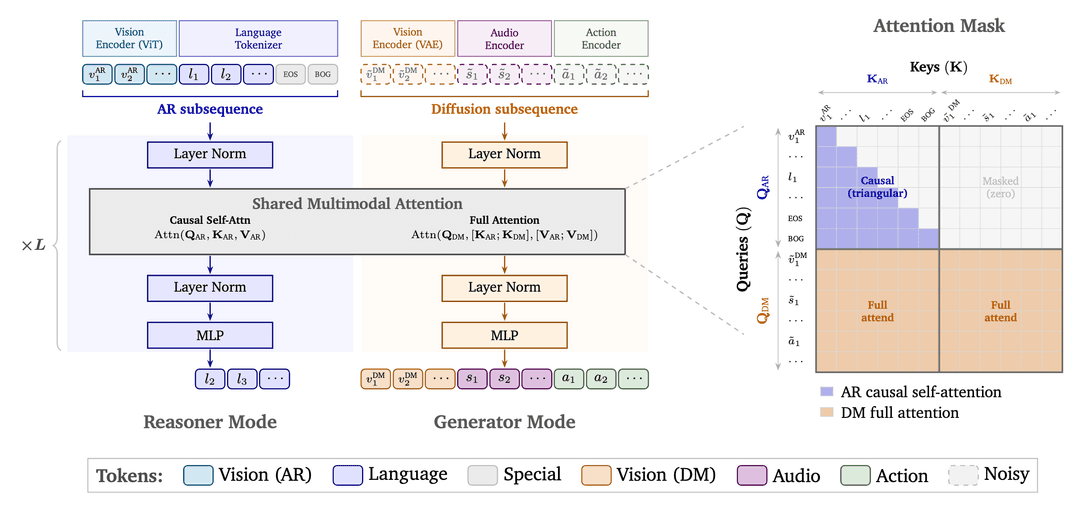
Cosmos 3 is an omnimodal world model built on a unified Mixture-of-Transformers (MoT) architecture that combines an autoregressive (AR) transformer for reasoning with a diffusion transformer (DM) for multimodal generation. In Reasoner Mode, language and visual understanding tokens are processed through causal self-attention, enabling next-token prediction for tasks such as perception, planning, and world reasoning. In Generator Mode, noisy image, video, audio, and action tokens are denoised through full attention, allowing the model to jointly generate coherent multimodal outputs. Both modes share the same transformer architecture, multimodal attention layers, and a unified 3D multi-dimensional rotary position embedding (mRoPE) representation that encodes spatial and temporal structure across modalities, enabling consistent reasoning over images, videos, audio streams, and action trajectories.
Model Family
| Model | Size | Primary Capability |
|---|---|---|
| Cosmos3-Nano | 16B | Compact omnimodal world model for multimodal understanding, world simulation, future prediction, action reasoning, and Physical AI. |
| Cosmos3-Super | 64B | Frontier-scale omnimodal world model for advanced multimodal understanding, world simulation, future prediction, action reasoning, and Physical AI. |
| Cosmos3-Super-Text2Image | 64B | High-fidelity text-to-image generation. |
| Cosmos3-Super-Image2Video | 64B | Temporally coherent image-to-video generation. |
| Cosmos3-Nano-Policy-DROID | 16B | Vision-language robot policy for DROID manipulation and control. |
Supported Generation Settings
| Setting | Supported values |
|---|---|
| Resolution tiers | 256p, 480p, 720p, default=480p |
| Aspect ratios | 16:9, 4:3, 1:1, 3:4, 9:16, default=16:9 |
| Frame rates | 10, 16, 24, and 30 FPS, default=24 |
| Frame count | 5 to 300 frames, default=189 |
| Precision | BF16 tested |
| Operating system | Linux |
| GPU architectures | NVIDIA Ampere, Hopper, and Blackwell |
Input and Output
| Spec | Value |
|---|---|
| Input types | Text, text + image, text + video, text + image + action |
| Input formats | Text string, JPG/PNG/JPEG/WEBP image, MP4 video, JSON action array |
| Vision conditioning | 720p uses 1280x720, 480p uses 832x480, and 256p uses 320x192. Video conditioning uses 5 frames at the matching resolution. |
| Action conditioning | Supported action dimensions depend on the embodiment, including camera motion (9D), autonomous vehicle (9D), egocentric motion (57D), single-arm robot (10D, DROID/UR/Fractal/Bridge/UMI), dual-arm robot (20D, dual DROID arms), humanoid robot (29D, AgiBot). |
| Output types | Image, video, sound, action state, text |
| Output formats | JPG image, MP4 video, AAC sound stream muxed into MP4, JSON action values, text string |
| Prompt length | Fewer than 300 words is recommended for world-generation prompts |
| Sound output | Stereo AAC at 48 kHz when generated with video |
Use Cases
Generator
Generator examples produce non-text outputs conditioned by text, vision, and action inputs.
| Workflow | Inputs | Outputs | What it demonstrates |
|---|---|---|---|
| Text-to-image | Text | Vision | Robotics laboratory scene generation from a text prompt |
| Text-to-video | Text | Vision | Industrial video generation from a dense scene description |
| Text-to-video with sound | Text | Vision, sound | Synchronized visual and audio generation |
| Image-to-video | Text, image | Vision | Robot manipulation animation from a starting image and prompt |
| Image-to-video with sound | Text, image | Vision, sound | Image-conditioned motion with synchronized audio |
| Video-to-video | Text, video | Vision | Prompt-guided transformation of a robot manipulation video |
| Video-to-video with sound | Text, video, sound | Vision, sound | Prompt-guided transformation of a robot manipulation video |
| Forward dynamics | Text, vision, action | Vision | Future-state rollout from action and visual context |
| Action policy | Text, vision | Action, vision | Action trajectories and rollout video from context |
Generator prompt upsampling expands short scene descriptions into dense structured prompts. The current examples use these sampling defaults:
| Parameter | Value |
|---|---|
max_tokens | 20000 |
temperature | 0.7 |
top_p | 0.8 |
top_k | 20 |
repetition_penalty | 1.0 |
presence_penalty | 1.5 |
seed | 3407 |
Reasoner
Reasoner examples produce text outputs from text and vision inputs. It follows Qwen3-VL-compatible message conventions for image and video inputs.
| Workflow | Inputs | Outputs | What it demonstrates |
|---|---|---|---|
| Caption | Video | Text | Detailed video captioning |
| Temporal localization | Video, query | Text or JSON | Event detection, timestamp query, and interval question answering |
| Embodied reasoning | Video, question | Text | Next-action prediction for robotics and assisted-task settings |
| Common-sense reasoning | Video, question | Text | Physical common-sense judgment with visible context |
| 2D grounding | Image, prompt | JSON boxes | Bounding-box localization from an image prompt |
| Describe anything | Image, marked subjects | JSON or text | Attribute captioning for marked subjects |
| Action CoT | Image or video, prompt | Text or JSON | Trajectory prediction and driving-scene chain-of-thought |
| Physical Plausibility Analysis | Video, prompt | Label | Physical plausibility classification |
| Situation Understanding | Video, question | Text | Situation understanding and likely-next-action prediction |
Reasoner examples use the following sampling settings:
| Parameter | Without reasoning | With reasoning |
|---|---|---|
top_p | 0.8 | 0.95 |
top_k | 20 | 20 |
repetition_penalty | 1.0 | 1.0 |
presence_penalty | 1.5 | 0.0 |
temperature | 0.7 | 0.6 |
Use this basic message shape for text + vision requests:
[
  {
    "role": "system",
    "content": [{"type": "text", "text": "You are a helpful assistant."}]
  },
  {
    "role": "user",
    "content": [
      {"type": "video_url", "video_url": "https://example.com/video.mp4"},
      {"type": "text", "text": "List the notable events with approximate timestamps."}
    ]
  }
]
For explicit reasoning, append this format instruction to the user prompt:
Answer the question using the following format:

<think>
Your reasoning.
</think>

Write your final answer immediately after the </think> tag.
Quickstart
Before running examples, create a Hugging Face access token and then authenticate locally:
uvx hf@latest auth login
Set HF_HOME if you want to use a shared cache or a disk with more space. NIM
examples use an NGC API key (NGC_API_KEY) instead of Hugging Face
authentication.
Generator requires the Guardrail. Request access to the gated
nvidia/Cosmos-1.0-Guardrail
HF repository for Hugging Face based Generator paths. To disable the guardrail,
set enable_safety_checker=False (Diffusers), guardrails: false (vLLM-Omni
extra_params/extra_args), or --no-guardrails (Cosmos Framework).
Generator with Diffusers
Expand Diffusers Generator setup, example, and modes
Use HuggingFace Diffusers for Cosmos 3 Generator research, training, and model development. This path loads the full Cosmos 3 checkpoint, including the reasoner path, diffusion generation path, and media tokenizers.
uv venv --python 3.13 --seed --managed-python
source .venv/bin/activate
uv pip install --torch-backend=auto \
  "diffusers @ git+https://github.com/huggingface/diffusers.git" \
  accelerate \
  av \
  cosmos_guardrail \
  huggingface_hub \
  imageio \
  imageio-ffmpeg \
  torch \
  torchvision \
  transformers
--torch-backend=auto lets uv detect your NVIDIA driver and install a matching CUDA build of torch/torchvision. Without it, uv pulls the newest CUDA wheel (currently cu130), which fails on pre-CUDA-13 drivers with The NVIDIA driver on your system is too old and torch.cuda.is_available() returns False. Pin an explicit backend instead if you prefer, e.g. --torch-backend=cu128 for a CUDA 12.8 driver.
A text-to-video run takes a while: the first run downloads Cosmos3-Nano, and diffusion is compute-heavy, running through every inference step before producing output. Long step times are expected, not a hang.
import torch
from diffusers import Cosmos3OmniPipeline
from diffusers.schedulers.scheduling_unipc_multistep import UniPCMultistepScheduler
from diffusers.utils import export_to_video

pipe = Cosmos3OmniPipeline.from_pretrained(
    "nvidia/Cosmos3-Nano",
    torch_dtype=torch.bfloat16,
    device_map="cuda",
)
pipe.scheduler = UniPCMultistepScheduler.from_config(pipe.scheduler.config, flow_shift=10.0)

result = pipe(
    prompt="A mobile robot navigates a warehouse aisle and stops at a shelf.",
    negative_prompt="",
    image=None,
    num_frames=189,
    height=720,
    width=1280,
    fps=24,
    num_inference_steps=35,
    guidance_scale=6.0,
    enable_sound=False,
    add_resolution_template=False,
    add_duration_template=False,
    generator=torch.Generator(device="cuda").manual_seed(1234),
)

export_to_video(result.video, "cosmos3_t2v.mp4", fps=24, macro_block_size=1)
Diffusers modes:
| Mode | Use |
|---|---|
text-to-image | Single-frame image generation with num_frames=1; returns a PIL image |
text-to-video | Video generation; 189 frames is about 7.9 seconds at 24 FPS |
image-to-video | Video generation conditioned on an input image |
text-to-video-with-sound | Video generation with sound for checkpoints that include sound modules |
See the Cosmos 3 Diffusers documentation for runnable examples of each mode.
Generator with vLLM-Omni
Expand vLLM-Omni Generator setup, endpoints, and request reference
Use vLLM-Omni for Generator production inference behind an OpenAI-compatible API. This integration loads the full Cosmos 3 checkpoint, including the Qwen3-VL-based reasoner path and the diffusion generation path. For understanding-only tasks that return text, use Reasoner with vLLM instead, which loads only the reasoner.
Compatibility status: Cosmos 3 Generator support has landed in vllm-project/vllm-omni
main: text-to-image, text-to-video, and image-to-video (#3454) and video-with-sound (#4073) are merged; action (policy / forward-dynamics) is in review (#4102) and video-to-video is planned. Thevllm/vllm-omni:cosmos3Docker image remains the easiest all-in-one build. For current setup and per-modality usage, see the maintained recipes: Cosmos3-Nano and Cosmos3-Super.
Start the server from the Docker image (all modalities). Mount any directory that contains local media or action files you want the server to read.
docker run --runtime nvidia --gpus all \
  -v ~/.cache/huggingface:/root/.cache/huggingface \
  -v "$(pwd):/workspace" \
  -p 8000:8000 \
  --ipc=host \
  vllm/vllm-omni:cosmos3 \
  vllm serve nvidia/Cosmos3-Nano \
  --omni \
  --model-class-name Cosmos3OmniDiffusersPipeline \
  --allowed-local-media-path / \
  --port 8000 \
  --init-timeout 1800
Cosmos3 checkpoints can exceed the default server init timeout; use
--init-timeout 1800 on every vllm serve command in this section.
vLLM-Omni prints Application startup complete. when the API is ready.
For nvidia/Cosmos3-Super (the larger 64B model), split weights across GPUs and optionally offload layers to reduce peak memory: --tensor-parallel-size splits model weights across multiple GPUs, and --enable-layerwise-offload offloads transformer blocks between CPU and GPU with a latency tradeoff and extra CPU RAM use. For example, on four GPUs, add --tensor-parallel-size 4 --enable-layerwise-offload --init-timeout 1800 to the vllm serve command.
Additional parallelism options:
| Option | Use |
|---|---|
--cfg-parallel-size 2 | Runs the positive and negative CFG branches in parallel on two GPUs. Set CFG strength with the request-level guidance_scale; do not use true_cfg_scale. |
--ulysses-degree 2 | Enables Ulysses sequence parallelism, splitting the sequence dimension across GPUs. |
When combining parallelism options, ensure the server has enough GPUs for the product of the enabled degrees (tensor_parallel_size × cfg_parallel_size × ulysses_degree).
To install vLLM-Omni from main instead of using the Docker image (text-to-image, text-to-video, image-to-video, and video-with-sound are merged there; see the Cosmos3-Nano and Cosmos3-Super recipes for per-modality usage), create a venv and install, choosing the CUDA build that matches your driver:
uv venv --python 3.13 --seed --managed-python
source .venv/bin/activate
# CUDA 13 driver:
uv pip install --torch-backend=cu130 \
  "vllm-omni @ git+https://github.com/vllm-project/vllm-omni.git@main"
# CUDA 12.8 driver:
# uv pip install --torch-backend=cu128 \
#   "vllm-omni @ git+https://github.com/vllm-project/vllm-omni.git@main"
Then run vllm serve nvidia/Cosmos3-Nano --omni --model-class-name Cosmos3OmniDiffusersPipeline --allowed-local-media-path / --port 8000 --init-timeout 1800 directly, without the docker run ... vllm/vllm-omni:cosmos3 wrapper.
Vision endpoints:
| Mode | Endpoint | Notes |
|---|---|---|
| Text to image | POST /v1/images/generations | Returns a base64-encoded PNG |
| Text to video | POST /v1/videos/sync | Blocks and returns the MP4 bytes directly |
| Image to video | POST /v1/videos/sync | Upload the conditioning image with input_reference |
| Video to video | POST /v1/videos/sync | Upload a source video and choose which frames stay as clean conditioning |
| Video with sound | POST /v1/videos/sync | Add generate_sound=true to produce a soundtrack alongside the video |
Action modes use Cosmos 3 as a world model: they condition on an embodiment (domain_name) and exchange video and action sequences. Policy and inverse dynamics return a predicted action chunk, so send those through the asynchronous POST /v1/videos job and read the action data from the completed result; forward dynamics returns only video and can use synchronous POST /v1/videos/sync.
| Mode | action_mode | Input | Output |
|---|---|---|---|
| Policy | policy | Image + instruction | Video + predicted action chunk |
| Inverse dynamics | inverse_dynamics | Video + instruction | Video + predicted action chunk |
| Forward dynamics | forward_dynamics | Image + action chunk | Video |
Pass embodiment settings through extra_params: action_mode, domain_name (for example bridge_orig_lerobot, av, or camera_pose), raw_action_dim, and action_chunk_size. Forward dynamics also takes an action_path pointing at an action file the server can read, so start the server with --allowed-local-media-path covering that file (for Docker, mount the file and pass the container-visible path). For the full set of robot, autonomous-vehicle, and camera-pose variants, see the Cosmos 3 vLLM-Omni recipes.
Example video request:
curl -sS -X POST http://localhost:8000/v1/videos/sync \
  --form-string "prompt=A small warehouse robot moves a blue box across a clean floor." \
  --form-string "negative_prompt=blurry, distorted, low quality" \
  --form-string "size=1280x720" \
  --form-string "num_frames=189" \
  --form-string "fps=24" \
  --form-string "num_inference_steps=35" \
  --form-string "guidance_scale=6.0" \
  --form-string "flow_shift=10.0" \
  --form-string "seed=0" \
  --form-string 'extra_params={"use_resolution_template":false,"use_duration_template":false,"guardrails":true}' \
  -o cosmos3_t2v_output.mp4
Use --form-string for text fields (prompt, negative_prompt, extra_params) rather than -F: with -F, curl treats ; as a content-type separator and silently truncates any value that contains one.
Common request fields (the image endpoint follows the Image Generation API, and the video endpoints follow the Videos API):
| Field | Purpose |
|---|---|
prompt | Positive text prompt |
negative_prompt | Concepts or artifacts to avoid |
size | Output resolution as <width>x<height> |
num_frames, fps | Video length and frame rate (video endpoints only) |
num_inference_steps | Diffusion denoising steps |
guidance_scale | Classifier-free guidance scale (use this for Cosmos 3 CFG; do not use true_cfg_scale) |
flow_shift | Scheduler flow-shift value |
seed | Reproducibility seed |
max_sequence_length | Maximum number of prompt tokens kept for conditioning (Cosmos 3 default 512); longer prompts are truncated with a warning, shorter ones padded |
input_reference | Uploaded image or video for image-to-video, video-to-video, and action requests |
extra_params | JSON-encoded Cosmos 3-specific options: action settings (action_mode, domain_name, raw_action_dim, action_chunk_size, action_path), video-to-video conditioning (condition_frame_indexes_vision, condition_video_keep), prompt-template toggles (use_resolution_template, use_duration_template), and the per-request guardrails toggle |
extra_args | JSON object for Cosmos 3-specific image-endpoint options such as use_resolution_template |
Disabling guardrails: Cosmos 3 ships safety guardrails that screen prompts and blur faces in generated output. Disable them per request by adding guardrails: false to extra_params:
curl -sS -X POST http://localhost:8000/v1/videos/sync \
  --form-string "prompt=A small warehouse robot moves a blue box across a clean floor." \
  --form-string 'extra_params={"guardrails":false,"use_resolution_template":false,"use_duration_template":false}' \
  -o cosmos3_t2v.mp4
To disable guardrails server-wide so the guardrail models are never loaded (per-request overrides then cannot turn them back on), pass a deploy config — a future release replaces this with a dedicated --cosmos3-no-guardrails flag:
# no_guardrails.yaml
async_chunk: false
stages:
  - stage_id: 0
    max_num_seqs: 1
    enforce_eager: true
    trust_remote_code: true
    model_class_name: Cosmos3OmniDiffusersPipeline
    model_config:
      guardrails: false
      offload_guardrail_models: false
vllm serve nvidia/Cosmos3-Nano --omni \
  --model-class-name Cosmos3OmniDiffusersPipeline \
  --deploy-config no_guardrails.yaml \
  --port 8000 \
  --init-timeout 1800
References:
Generator with NIM
Use the prebuilt Cosmos3-Generator NIM for turnkey T2V/I2V video generation.
Use the Cosmos3-Generator NIM for turnkey Generator deployment through an NGC
container. This NIM serves Text2Video and Image2Video only. It does not
expose text-to-image, video-to-video, sound/audio generation, action modes, or
transfer controls; use Generator with vLLM-Omni or
Cosmos Framework for those broader Generator workflows.
The Generator NIM API differs from vLLM-Omni: send JSON requests to
POST /v1/infer, and decode the JSON response field b64_video to get the MP4
bytes. The NIM infers the mode automatically from request fields:
| Mode | Request shape | Response |
|---|---|---|
| Text2Video | non-empty prompt, no image | JSON with b64_video |
| Image2Video | image provided, optional prompt | JSON with b64_video |
Authenticate to NGC and launch the default Nano server:
export NGC_API_KEY=<your_key>
echo "$NGC_API_KEY" | docker login nvcr.io --username '$oauthtoken' --password-stdin

export LOCAL_NIM_CACHE="${LOCAL_NIM_CACHE:-$HOME/.cache/nim}"
mkdir -p "$LOCAL_NIM_CACHE"
chmod -R 777 "$LOCAL_NIM_CACHE" 2>/dev/null || true

docker run --runtime=nvidia --gpus all \
  --shm-size=32GB \
  --ulimit nofile=65536:65536 \
  -e NGC_API_KEY="$NGC_API_KEY" \
  -v "$LOCAL_NIM_CACHE:/opt/nim/.cache" \
  -p 8000:8000 \
  nvcr.io/nim/nvidia/cosmos3-generator:1.0.0
For the larger model, add -e NIM_MODEL_SIZE=super. The main launch-time knobs
are NIM_MODEL_SIZE=nano|super (default nano),
NIM_PRECISION=bf16|fp8|nvfp4 (default fp8; nvfp4 requires Blackwell),
NIM_PERF_PROFILE=latency|throughput (default latency), and advanced
NIM_TAGS_SELECTOR profile filters.
Wait for readiness:
curl -fsS http://127.0.0.1:8000/v1/health/ready
Send a Text2Video request and decode the MP4:
curl -sS -X POST http://127.0.0.1:8000/v1/infer \
  -H 'Accept: application/json' \
  -H 'Content-Type: application/json' \
  -d '{
    "prompt": "A humanoid robot walks through a futuristic warehouse, inspecting shelves of mechanical components.",
    "seed": 42,
    "guidance_scale": 6.0,
    "steps": 35,
    "resolution": "256",
    "num_output_frames": 25,
    "fps": 24.0
  }' | jq -r '.b64_video' | base64 -d > cosmos3_generator_nim_t2v.mp4
For Image2Video, provide image as raw base64, a data:image/...;base64,... URI,
or a public URL when URL inputs are enabled.
Request constraints include: guidance_scale in [1.0, 7.0], steps in
[1, 100], num_output_frames on the 4k+1 cadence (25, 29, 33, ...) with
per-tier caps (256 <= 397, 480 <= 297, 720 <= 197), and resolution keys
256, 480, 720 plus optional suffixes _16_9, _1_1, _9_16, _4_3, and
_3_4.
See the Generator NIM cookbook
for an end-to-end notebook that launches the container, polls readiness,
inspects service metadata, runs T2V and I2V, decodes b64_video, and previews
the generated MP4 files.
Generator with SGLang
Expand SGLang generator setup, endpoints, and request reference
Use SGLang Diffusion for native Cosmos 3 visual generation behind OpenAI-compatible image and video APIs. Cosmos 3 also includes video-with-sound and action/policy models; this SGLang section focuses on the currently supported text-to-image, text-to-video, and image-to-video generator serving paths.
Supported checkpoints:
| Model | Status | Notes |
|---|---|---|
nvidia/Cosmos3-Nano | Supported | Text-to-image, text-to-video, image-to-video |
nvidia/Cosmos3-Super | Supported | Use multiple GPUs for the 64B checkpoint |
nvidia/Cosmos3-Super-Text2Image | Supported | Text-to-image specialized checkpoint |
nvidia/Cosmos3-Super-Image2Video | Supported | Image-to-video specialized checkpoint |
nvidia/Cosmos3-Nano-Policy-DROID | Supported | Action/policy checkpoint |
Install SGLang from the main branch with diffusion extras:
git clone --branch main https://github.com/sgl-project/sglang.git
cd sglang
python -m venv .venv
source .venv/bin/activate
python -m pip install --upgrade pip
pip install -e "python[diffusion]"
pip install "cosmos-guardrail==0.3.1"
Version note: Cosmos 3 support in SGLang Diffusion currently requires the SGLang main branch. Switch to a stable SGLang release once Cosmos 3 support is included there.
Start a Nano server:
sglang serve --model-path nvidia/Cosmos3-Nano
For a video-specialized checkpoint, use Cosmos3-Super-Image2Video with multiple GPUs:
sglang serve \
  --model-path nvidia/Cosmos3-Super-Image2Video \
  --num-gpus 4
This is the performance-mode setup. If it runs out of memory, switch to SGLang Diffusion's memory preset:
sglang serve \
  --model-path nvidia/Cosmos3-Super-Image2Video \
  --num-gpus 4 \
  --performance-mode memory
Vision endpoints:
| Mode | Endpoint | Notes |
|---|---|---|
| Text to image | POST /v1/images/generations | Returns base64 by default for Cosmos 3 |
| Text to video | POST /v1/videos | Creates an async job; poll GET /v1/videos/{id} and download /content |
| Image to video | POST /v1/videos | Upload the conditioning image with input_reference |
| Video to Video | POST /v1/videos | Upload the conditioning video with video_reference and choose which frames stay as clean conditioning |
| Video with sound | POST /v1/videos | Add generate_sound=true to produce a soundtrack alongside the video |
Action modes use Cosmos 3 as a world model: they condition on an embodiment (domain_name) and exchange video and action sequences. Policy and inverse dynamics return a predicted action chunk, and read the action data from the completed result; forward dynamics returns only video.
| Mode | action_mode | Input | Output |
|---|---|---|---|
| Policy | policy | Image + instruction | Video + predicted action chunk |
| Inverse dynamics | inverse_dynamics | Video + instruction | Video + predicted action chunk |
| Forward dynamics | forward_dynamics | Image + action chunk | Video |
Pass embodiment settings through extra_params: action_mode, domain_name (for example bridge_orig_lerobot, av, or camera_pose), raw_action_dim, and optionally action_view_point. SGLang derives the action chunk length from num_frames - 1, so set num_frames to action_chunk_size + 1.
For forward dynamics, pass the action trajectory directly in extra_params["action"] as a JSON array of shape [action_chunk_size, raw_action_dim]. SGLang does not use action_path for HTTP requests, so no --allowed-local-media-path setup is needed for action files.
Text-to-video example:
# Submit an async video generation job and capture its ID.
job_id=$(curl -sS -X POST http://localhost:30000/v1/videos \
  --form-string "prompt=A small warehouse robot moves a blue box across a clean floor." \
  --form-string "negative_prompt=blurry, distorted, low quality" \
  --form-string "size=1280x720" \
  --form-string "num_frames=81" \
  --form-string "fps=24" \
  --form-string "num_inference_steps=35" \
  --form-string "guidance_scale=4.0" \
  --form-string "flow_shift=10.0" \
  --form-string "seed=42" \
  --form-string 'extra_params={"guardrails":true,"use_resolution_template":false,"use_duration_template":false}' \
  | jq -r .id)

# Poll until the job completes. Cosmos 3 video generation can take several minutes.
status=""
until [ "$status" = "completed" ]; do
  status=$(curl -sS "http://localhost:30000/v1/videos/${job_id}" | jq -r .status)
  [ "$status" = "failed" ] && exit 1
  sleep 5
done

# Download the completed MP4.
curl -sS -L "http://localhost:30000/v1/videos/${job_id}/content" \
  -o cosmos3_t2v_output.mp4
Text-to-image example:
curl -sS -X POST http://localhost:30000/v1/images/generations \
  -H "Content-Type: application/json" \
  -d '{
    "prompt": "A warehouse robot folds a blue cloth on a clean workbench.",
    "size": "1280x720",
    "n": 1,
    "num_inference_steps": 35,
    "guidance_scale": 6.0,
    "flow_shift": 10.0,
    "seed": 0,
    "extra_args": {
      "use_resolution_template": false,
      "guardrails": true
    }
  }'
Video-to-video-with-sound example:
job_id=$(curl -sS --fail-with-body -X POST "http://localhost:30000/v1/videos" \
  -H "Accept: application/json" \
  --form-string 'prompt=A small warehouse robot moves a blue box across a clean floor.' \
  --form-string 'negative_prompt=blurry, distorted, low quality' \
  --form-string 'size=1280x720' \
  --form-string 'num_frames=61' \
  --form-string 'fps=24' \
  --form-string 'num_inference_steps=30' \
  --form-string 'guidance_scale=4.0' \
  --form-string 'flow_shift=10.0' \
  --form-string 'seed=1234' \
  --form-string 'generate_sound=true' \
  --form-string 'extra_params={"use_resolution_template":false,"use_duration_template":false,"guardrails":true}' \
  -F 'video_reference=@/path/to/video.mp4;type=video/mp4' \
  | jq -r .id)

# Poll until the job completes. Cosmos 3 video generation can take several minutes.
status=""
until [ "$status" = "completed" ]; do
  status=$(curl -sS "http://localhost:30000/v1/videos/${job_id}" | jq -r .status)
  [ "$status" = "failed" ] && exit 1
  sleep 5
done

# Download the completed MP4.
curl -sS -L "http://localhost:30000/v1/videos/${job_id}/content" \
  -o cosmos3_v2vs_output.mp4
SGLang accepts Cosmos 3 request options including max_sequence_length, flow_shift, extra_params.guardrails, extra_params.use_resolution_template, and extra_params.use_duration_template. Guardrails are enabled by default when cosmos-guardrail is installed; set SGLANG_DISABLE_COSMOS3_GUARDRAILS=1 before starting the server to skip loading the guardrail models.
For complete serving instructions and request examples, see the Cosmos3 SGLang cookbook.
Reasoner with Transformers
Use Transformers for local Reasoner inference from Python.
Use Hugging Face Transformers for Python-first Reasoner inference. This path
loads only the Reasoner tower from the unified nvidia/Cosmos3-Nano or
nvidia/Cosmos3-Super checkpoint and returns text from text, image, or video
inputs. It does not load the Generator diffusion, audio, or action heads; use
Generator with Diffusers,
Generator with vLLM-Omni, or
Generator with NIM for supported non-text outputs.
Cosmos3 support first appears in the Transformers v5.11.0 release tag. Install
Transformers 5.11.0 or newer:
uv venv --python 3.13 --seed --managed-python
source .venv/bin/activate
uv pip install --torch-backend=auto \
  accelerate \
  av \
  pillow \
  "safetensors>=0.8.0" \
  torch \
  "torchvision==0.25.0" \
  "transformers>=5.11.0"
--torch-backend=auto lets uv pick a CUDA build that matches your driver. Pin
an explicit backend instead if needed, for example --torch-backend=cu128 for a
CUDA 12.8 driver.
Run an image reasoning request:
from pathlib import Path

import torch
from transformers import AutoProcessor, Cosmos3OmniForConditionalGeneration

model_id = "nvidia/Cosmos3-Nano"
image_path = Path("cookbooks/cosmos3/reasoner/assets/robot_153.jpg").resolve()

processor = AutoProcessor.from_pretrained(model_id)
model = Cosmos3OmniForConditionalGeneration.from_pretrained(
    model_id,
    dtype=torch.bfloat16,
    device_map="auto",
)

messages = [
    {
        "role": "user",
        "content": [
            {"type": "image", "path": str(image_path)},
            {"type": "text", "text": "Caption the image in detail."},
        ],
    }
]

inputs = processor.apply_chat_template(
    messages,
    tokenize=True,
    add_generation_prompt=True,
    return_dict=True,
    return_tensors="pt",
).to(model.device, torch.bfloat16)

generated_ids = model.generate(**inputs, do_sample=False, max_new_tokens=512)
generated_ids_trimmed = [
    out_ids[len(in_ids) :] for in_ids, out_ids in zip(inputs.input_ids, generated_ids)
]
output = processor.batch_decode(
    generated_ids_trimmed,
    skip_special_tokens=True,
    clean_up_tokenization_spaces=False,
)
print(output[0])
For video reasoning, use a video content block and pass a frame sampling rate to
apply_chat_template:
messages = [
    {
        "role": "user",
        "content": [
            {"type": "video", "path": "cookbooks/cosmos3/reasoner/assets/video_caption.mp4"},
            {"type": "text", "text": "Describe the notable events in this video."},
        ],
    }
]

inputs = processor.apply_chat_template(
    messages,
    fps=2,
    tokenize=True,
    add_generation_prompt=True,
    return_dict=True,
    return_tensors="pt",
).to(model.device, torch.bfloat16)
Then reuse the model.generate and batch_decode block from the image example.
For nvidia/Cosmos3-Super, change model_id to nvidia/Cosmos3-Super.
device_map="auto" can shard the model across multiple GPUs when Accelerate is
installed. For an OpenAI-compatible server, use
Reasoner with vLLM or Reasoner with NIM.
Reasoner with vLLM
Expand vLLM Reasoner setup, server launch, and configuration
Use vLLM for Reasoner production inference behind an OpenAI-compatible chat-completions API. This path loads only the reasoner; for generation tasks that return images or video, use Generator with vLLM-Omni, or Generator with NIM for turnkey T2V/I2V video generation only.
uv venv --python 3.13 --seed --managed-python
source .venv/bin/activate
uv pip install --torch-backend=auto "vllm>=0.23.0"
Or use vllm/vllm-openai:v0.23.0 docker image.
vllm serve nvidia/Cosmos3-Nano \
  --async-scheduling \
  --allowed-local-media-path / \
  --port 8000
For notebook launch commands (Cosmos3-Super on four GPUs, media-path defaults, and full flag sets), see cookbooks/cosmos3/README.md — Start the server.
If your vLLM build reports that DeepGEMM is unavailable, disable it before starting the server:
export VLLM_USE_DEEP_GEMM=0
Configuration notes:
| Option | Use |
|---|---|
--tensor-parallel-size | Number of GPUs used for tensor parallel inference |
--mm-encoder-tp-mode data | Data parallelism for the visual encoder in multimodal workloads |
--media-io-kwargs '{"video": {"num_frames": -1}}' | Allows the processor to consider all available frames before downstream frame sampling |
--allowed-local-media-path | Required when requests pass local file:// media paths |
Reasoner with NIM
Expand NIM Reasoner setup, container launch, and request reference
Use the Cosmos 3 Reasoner NIM for the fastest path to a production-grade, OpenAI-compatible Reasoner endpoint. NIM ships a prebuilt, optimized container so you skip the vLLM dependency and CUDA-pairing setup above; it serves text outputs from text, image, and video inputs.
You can try it interactively in your browser on the cosmos3-nano-reasoner build page — that playground is powered by this same NIM. See the Cosmos Reason 3 NIM API reference for the full request reference.
The container serves two sizes, selected with NIM_MODEL_SIZE:
NIM_MODEL_SIZE | Served model name |
|---|---|
nano (default) | nvidia/cosmos3-nano-reasoner |
super | nvidia/cosmos3-super-reasoner |
Launch the NIM container (Nano shown; set -e NIM_MODEL_SIZE=super for Super). NGC_API_KEY must be set in your environment first — generate one from NGC and log Docker in to nvcr.io once (docker login nvcr.io, username $oauthtoken, password = your key).
export CONTAINER_NAME="nvidia-cosmos3-reasoner"
export IMG_NAME="nvcr.io/nim/nvidia/cosmos3-reasoner:1.7.0"
export LOCAL_NIM_CACHE=~/.cache/nim
mkdir -p "$LOCAL_NIM_CACHE"

docker run -it --rm --name=$CONTAINER_NAME \
  --runtime=nvidia \
  --gpus all \
  --shm-size=32GB \
  -e NGC_API_KEY=$NGC_API_KEY \
  -e NIM_MODEL_SIZE=nano \
  -v "$LOCAL_NIM_CACHE:/opt/nim/.cache" \
  -u $(id -u) \
  -p 8000:8000 \
  $IMG_NAME
The OpenAI-compatible API is then available at http://127.0.0.1:8000/v1. Query it with curl:
IMAGE_DATA_URI="data:image/jpeg;base64,$(base64 -w 0 cookbooks/cosmos3/reasoner/assets/robot_153.jpg)"

curl -X POST 'http://127.0.0.1:8000/v1/chat/completions' \
  -H 'Accept: application/json' \
  -H 'Content-Type: application/json' \
  --data-binary @- <<JSON
{
    "model": "nvidia/cosmos3-nano-reasoner",
    "messages": [
      {"role": "system", "content": "You are a helpful assistant."},
      {"role": "user", "content": [
        {"type": "image_url", "image_url": {"url": "$IMAGE_DATA_URI"}},
        {"type": "text", "text": "Describe what is happening in this image in one sentence."}
      ]}
    ],
    "max_tokens": 256,
    "stream": false
  }
JSON
Or with the OpenAI Python client:
from openai import OpenAI

# The container exposes the OpenAI-compatible API locally; the api_key is unused.
client = OpenAI(base_url="http://127.0.0.1:8000/v1", api_key="not-used")

response = client.chat.completions.create(
    model="nvidia/cosmos3-nano-reasoner",
    messages=[
        {"role": "system", "content": "You are a helpful assistant."},
        {
            "role": "user",
            "content": [
                {"type": "video_url", "video_url": {"url": "https://download.samplelib.com/mp4/sample-5s.mp4"}},
                {"type": "text", "text": "List the notable events with approximate timestamps."},
            ],
        },
    ],
    max_tokens=256,
    stream=False,
    extra_body={"media_io_kwargs": {"video": {"fps": 4.0}}},
)
print(response.choices[0].message.content)
Inputs and request notes:
| Item | Notes |
|---|---|
| Images | JPG/JPEG/PNG, passed as a public URL or base64 data URI via image_url |
| Videos | MP4, passed as a public URL, base64, or pre-decoded video_frames via video_url |
extra_body.media_io_kwargs | Controls video frame sampling, e.g. {"video": {"fps": 4.0}} or {"video": {"num_frames": 16}} |
extra_body.mm_processor_kwargs | Per-image resize bounds, e.g. {"size": {"shortest_edge": 1568, "longest_edge": 262144}} (defaults: shortest_edge=3136, longest_edge=12845056) |
| Explicit reasoning | Append Answer the question in the following format: <think>\nyour reasoning\n</think>\n\n<answer>\nyour answer\n</answer>. to the user prompt |
References:
Troubleshooting
Which CUDA version should I use?
CUDA 13 (recommended) or 12.8. Your system CUDA and PyTorch's CUDA major version must match — check with nvidia-smi and python -c "import torch; print(torch.version.cuda)".
Which base container should I use?
NVIDIA NGC PyTorch: nvcr.io/nvidia/pytorch:25.09-py3 for CUDA 13, or nvcr.io/nvidia/pytorch:25.06-py3 for CUDA 12.
torch.cuda.is_available() is False ("The NVIDIA driver on your system is too old")
The installed torch is newer CUDA than your driver — uv pip install torch defaults to CUDA 13 (cu130). Install a matching build: uv pip install --torch-backend=auto torch torchvision (or pin, e.g. --torch-backend=cu128). For uv sync notebooks use COSMOS3_UV_GROUP=cu128-train; for vLLM, use a vLLM 0.23.0 or newer wheel that matches your CUDA backend.
Import fails with libxcb.so.1: cannot open shared object file
On headless servers and minimal containers, importing or running a pipeline can fail with libxcb.so.1: cannot open shared object file (or another missing graphics library), because a dependency links against system X11/graphics libraries that are not installed. Install them:
apt-get install -y libxcb1 libgl1 libglib2.0-0
uv errors on install or sync
The Cosmos Framework requires uv >= 0.11.3 (enforced via its pyproject.toml). Older versions fail to parse the project config (for example the [tool.uv.audit] section) and do not recognize newer --torch-backend values such as cu130 (you may see a value is required for '--torch-backend' or an accepted-values list that stops at cu129). Upgrade with uv self update (or reinstall from https://astral.sh/uv).
Choosing an Integration
| Goal | Use | Notes |
|---|---|---|
| Generator research or model development | Diffusers | Python-first path for inspecting and modifying generator behavior |
| Generator broader production/API serving | vLLM-Omni / SGLang | API path for image, video, sound, and action outputs |
| Generator turnkey deployment | NIM | Prebuilt NGC container for T2V/I2V video generation only; uses /v1/infer and returns JSON b64_video |
| Reasoner research or model development | Transformers | Python-first path for prompts, processors, and model behavior |
| Reasoner production inference | vLLM | OpenAI-compatible endpoint for text outputs from text and vision inputs |
| Reasoner turnkey deployment | NIM | Prebuilt, optimized OpenAI-compatible container — no vLLM/CUDA setup |
| Runnable setup, training, or evaluation | Cosmos Framework | Full workflow docs for setup, inference, omni-model training, and evaluation |
Examples
We are building examples that show Cosmos 3 capabilities end to end, including world generation, world understanding, captioning, temporal localization, grounding, and physical reasoning. Each example is a self-contained script or notebook you can run from this repository.
| Example | Surface | Workflows demonstrated | Open | nbviewer |
|---|---|---|---|---|
| Generator (audiovisual) with Diffusers | Generator | Text-to-image, plus text-to-video and image-to-video each with or without synchronized sound, via Cosmos3OmniPipeline. | Notebook |  |
| Generator (audiovisual) with Cosmos Framework | Generator | Text-to-image, plus text-to-video and image-to-video each with sound on or off, through the cosmos_framework.scripts.inference entrypoint. | Notebook | |
| Generator (audiovisual) with vLLM-Omni | Generator | Text-to-image, plus text-to-video and image-to-video each with sound on or off, against an OpenAI-compatible vLLM-Omni server. | Notebook | |
| Generator (audiovisual) with NIM | Generator | Text2Video and Image2Video only, against the prebuilt Cosmos3-Generator NIM; requests use POST /v1/infer and decode JSON b64_video responses. | Notebook | |
| Generator (audiovisual) with SGLang | Generator | Text-to-image, plus text-to-video and image-to-video each with sound on or off, against an OpenAI-compatible SGLang server. | Notebook | |
| Forward dynamics with Cosmos Framework | Generator | Forward dynamics: action-conditioned future-observation prediction for AV, DROID, and UMI, through the cosmos_framework.scripts.inference entrypoint. | Notebook | |
| Forward dynamics with vLLM-Omni | Generator | Forward dynamics: action-conditioned future-observation prediction for AV, DROID, and UMI, against an OpenAI-compatible vLLM-Omni server. | Notebook | |
// faq
What is cosmos?
NVIDIA Cosmos is an open platform of world models, datasets, and tools that enables developers to build Physical AI for robots, autonomous vehicles, smart infrastructure, and more.. It is open-source on GitHub.
Is cosmos free to use?
cosmos is open-source under the NOASSERTION license, so it is free to use.
What category does cosmos belong to?
cosmos is listed under uncategorized in the Claudeers registry of Claude-compatible tools.
// embed badge

[](https://claudeers.com/cosmos)
// retro hit counter

[](https://claudeers.com/cosmos)
// reviews
// guestbook
// related in Uncategorized / Others
 🔓
🔓Fair-code workflow automation platform with native AI capabilities. Combine visual building with custom code, self-host or cloud, 400+ integrations.
 🔓
🔓The agent engineering platform.
 🔓
🔓FULL Augment Code, Claude Code, Cluely, CodeBuddy, Comet, Cursor, Devin AI, Junie, Kiro, Leap.new, Lovable, Manus, NotionAI, Orchids.app, Perplexity, Poke, Q…
 🔓
🔓100+ AI Agent & RAG apps you can actually run — clone, customize, ship.