
copy-buttons
Claude Code copy buttons: copy a reply, a code block or a table with one click
Install with your AI
Paste into Claude Code, Cursor, or any agent — it reads the repo and wires the tool into your project.
Install and set up copy-buttons (claude-plugin project) into my current project.
Found on https://claudeers.com/copy-buttons
Repo: https://github.com/leonasdev/copy-buttons
Homepage/docs: —
Detected install method: claude-plugin → /plugin install copy-buttons@leonasdev/copy-buttons
Category: plugins. Platforms: cli, api, desktop.
Read the repo's README for exact setup and env vars, then install it and wire it into my project.

Claudeers Health Verdict:
unknown; community-verified: false. Confirm the source before running anything.
⚠ Unverified / not recently updated — review before pasting a run-this config.
/plugin marketplace add leonasdev/copy-buttons
/plugin install copy-buttons@leonasdev/copy-buttons
git clone https://github.com/leonasdev/copy-buttons
// compatibility
| Platforms | cli, api, desktop |
|---|---|
| Operating systems | — |
| AI compatibility | claude |
| License | MIT |
| Pricing | open-source |
| Language | TypeScript |
 copy-buttons
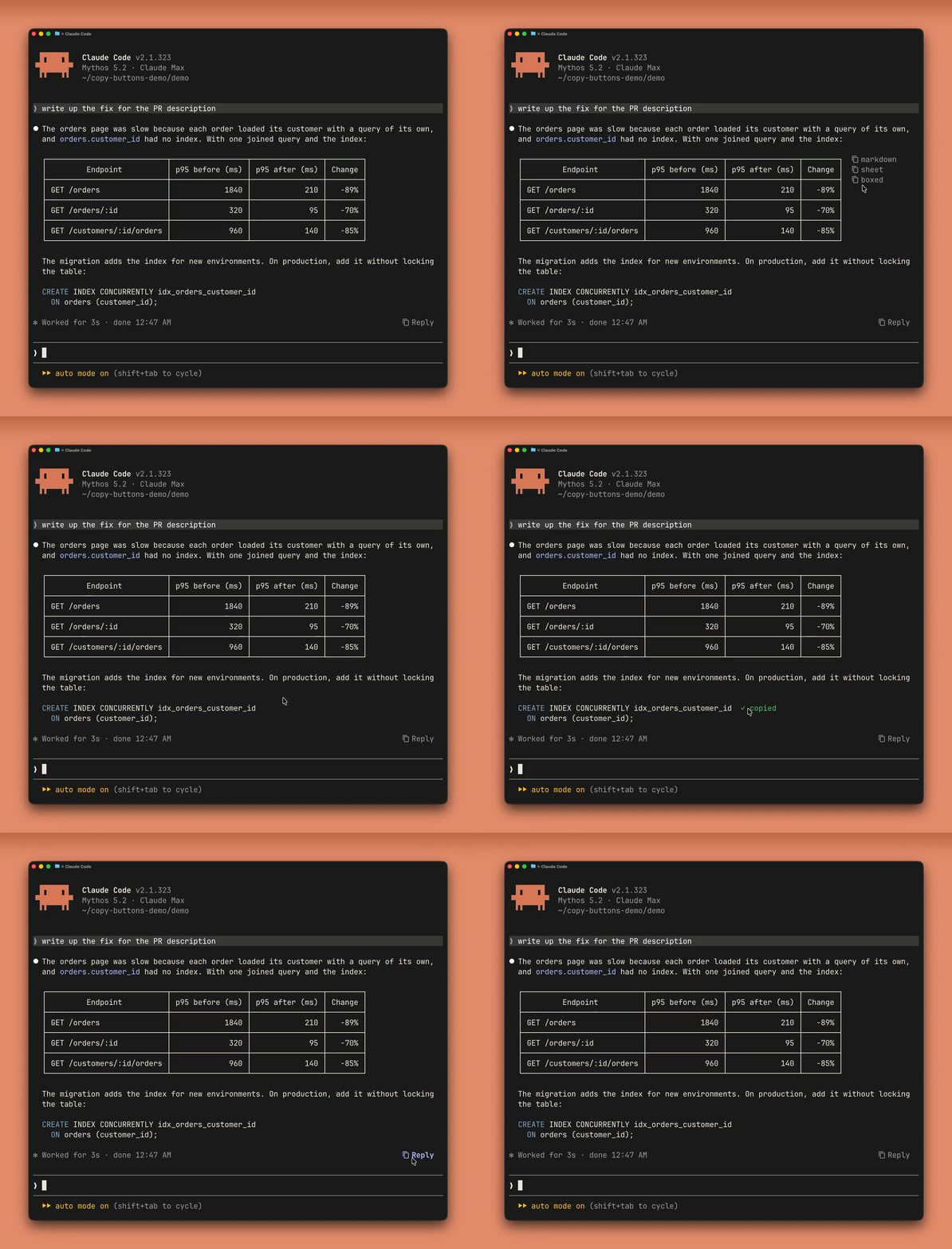
One-click copy buttons for Claude Code: on each code block and table while the pointer is over it, and at the end of every answer.
- A table:
markdowncopies it as Claude wrote it,sheetas rows to paste into Excel or Google Sheets,boxedwith its borders as drawn. - A code block:
copycopies just its code. - A reply:
Replycopies the Markdown Claude wrote. Click again for the text as shown on screen.
Install
/plugin install copy-buttons --marketplace leonasdev/copy-buttons
Answer y to add the marketplace, then pick a scope (user scope makes it work in every session).
[!NOTE] Updates are not automatic for a marketplace you add yourself. Turn them on once:
/plugin, the Marketplaces tab,copy-buttons, Enable auto-update. Or update by hand with/plugin marketplace update copy-buttons, then/reload-plugins.
Settings
Set them when installing, or later in /config.
| Setting | Options (default first) | What it does |
|---|---|---|
| Icon style | standard, nerd-font | The icon before each button: ⧉, or the Nerd Font copy icon, which needs a Nerd Font. |
| Default Reply copy format | markdown, rendered | What the first click on Reply copies. The second click copies the other. |
| Code & table buttons | hover, always, end-of-answer | Where a code block's or table's buttons show: on it while the pointer is over it, on it all the time, or only at the end of the answer. |
Troubleshooting
The buttons vanished or moved after a Claude Code update
A new Claude Code can change how it draws an answer. Update the plugin: /plugin marketplace update copy-buttons, then /reload-plugins. If that does not fix it, please open an issue.
No buttons appear
The buttons need Claude Code's fullscreen mode: add "tui": "fullscreen" to ~/.claude/settings.json and restart (without it, a tip says so once per session). In a long session they can take about a second to appear after Claude Code starts.
Some answers have no buttons
Only a turn's final answer gets buttons, not the text Claude writes between tool calls.
Nothing shows when the pointer is over a code block or table
Your terminal reports clicks but not pointer motion, so Claude Code never sees the pointer over it. Set Code & table buttons to end-of-answer in /config: each one's button then stays at the end of the answer, where a click is enough.
A code block or table has no button of its own
Its button is at the end of the answer instead when the plugin cannot follow how Claude Code draws the answer (a mermaid diagram, say, or a Claude Code update changing how it draws), or for a moment after the answer is first drawn. It is named by its file or language, or table; a table's copies its markdown first, then spreadsheet rows on a second click, and it boxed on a third. An empty code block has no button at all.
Selecting a code block with the mouse copies the button too
While a block's button is on screen (with the pointer over it, or all the time with always), a selection that takes in the button's row takes in its text. Start the selection from outside the block, or use the button. The same goes for a table.
It says copied, but nothing pastes
Over SSH, copying reaches your computer's clipboard through OSC 52, and some terminals drop it without telling Claude Code. Allow OSC 52 (clipboard access) in your terminal's settings; in tmux, set -g set-clipboard on. Some terminals also limit how much text OSC 52 may carry.
The icon shows as a box or a question mark
The nerd-font icon needs a Nerd Font in your terminal. Install one, or set Icon style back to standard in /config.
Excel changes my numbers
Excel guesses each cell's format when pasting: 007 becomes 7, 1/2 becomes a date. Format the target cells as text first.
Known limitations
Tested with Claude Code 2.1.318 to 2.1.325. The plugin relies on how Claude Code draws answers and writes transcripts, and on a plugin API still in early access; a later update can break it. Please open an issue if one does.
- An answer with a
mermaiddiagram: its code blocks and tables have their buttons at the end of the answer, not on them. - A narrow window: a block's or table's button can cover the end of its first row while the pointer is over it.
- tmux with Devanagari (Hindi) text: a block's buttons and flash can look a row off.
- The Claude desktop app: the plugin does nothing there; the app has its own copy buttons.
Development
- How it works: docs/how-it-works.md.
- The checks, CI and releasing: docs/development.md.
Credits
Markdown is parsed with marked v15.0.12 (MIT), bundled in hooks/vendor/ with its license.
License
// faq
What is copy-buttons?
Claude Code copy buttons: copy a reply, a code block or a table with one click. It is open-source on GitHub.
Is copy-buttons free to use?
copy-buttons is open-source under the MIT license, so it is free to use.
What category does copy-buttons belong to?
copy-buttons is listed under plugins in the Claudeers registry of Claude-compatible tools.
// embed badge

[](https://claudeers.com/copy-buttons)
// retro hit counter

[](https://claudeers.com/copy-buttons)
// reviews
// guestbook
// related in Claude Plugins
 🔓
A single CLAUDE.md file to improve Claude Code behavior, derived from Andrej Karpathy's observations on LLM coding pitfalls.
 🔓
Claude Code is an agentic coding tool that lives in your terminal, understands your codebase, and helps you code faster by executing routine tasks, explainin…
 🔓
"CLI-Anything: Making ALL Software Agent-Native" -- CLI-Hub: https://clianything.cc/
🔓financial-services — a Claude ecosystem project on GitHub.