
ContextSaver
Stop Claude Code from wasting tokens doing useless shit, in realtime.
Install with your AI
Paste into Claude Code, Cursor, or any agent — it reads the repo and wires the tool into your project.
Install and set up ContextSaver (claude-plugin project) into my current project.
Found on https://claudeers.com/contextsaver
Repo: https://github.com/AlmogBaku/ContextSaver
Homepage/docs: —
Detected install method: claude-plugin → /plugin install contextsaver@AlmogBaku/ContextSaver
Category: plugins. Platforms: cli, api, desktop, mobile.
Read the repo's README for exact setup and env vars, then install it and wire it into my project.

Claudeers Health Verdict:
active; community-verified: false. Confirm the source before running anything.
/plugin marketplace add AlmogBaku/ContextSaver
/plugin install contextsaver@AlmogBaku/ContextSaver
git clone https://github.com/AlmogBaku/ContextSaver
// compatibility
| Platforms | cli, api, desktop, mobile |
|---|---|
| Operating systems | — |
| AI compatibility | claude |
| License | MIT |
| Pricing | open-source |
| Language | TypeScript |
 ContextSaver
Stop Claude Code from wasting tokens doing useless shit, in realtime.
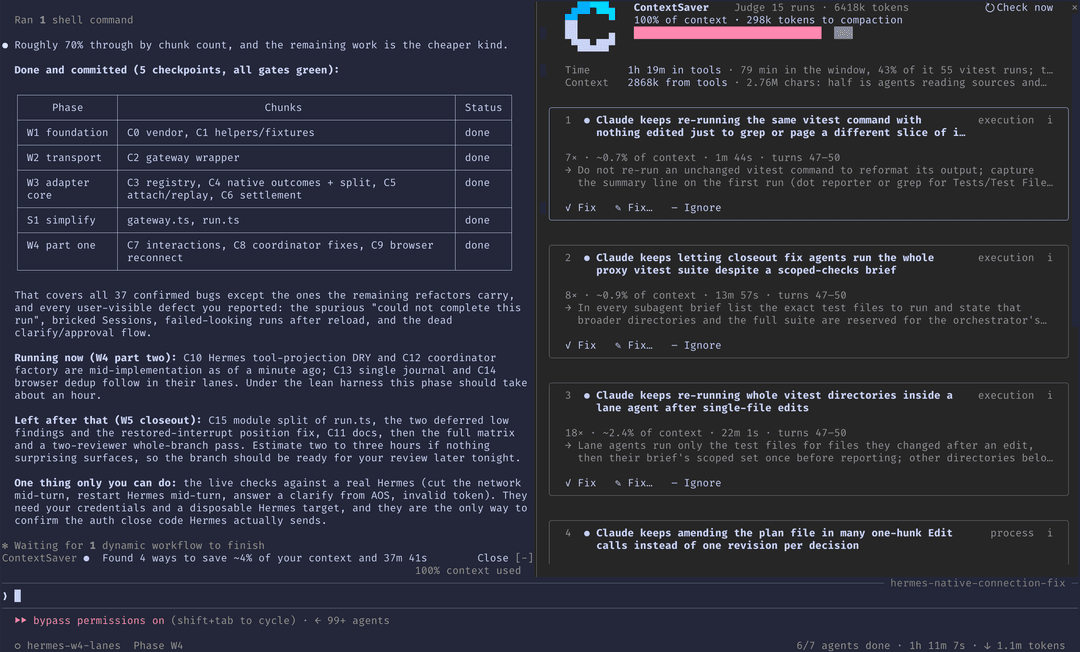
A Claude Code plugin that catches Claude repeating wasteful behaviour in your session and lets you stop it with one click. Things like running the full test suite after every one-line edit, reading the same file for the fourth time, or dumping a 2,000-line log into the context to find one traceback.
Features
- It names the behaviour, not the big output. "Claude keeps running the whole suite after every one-file edit — 3×, ~9% of context, 3m 12s." The calls behind the claim are one keypress away.
- Nothing to configure. No thresholds, no rules to tune. The plugin gathers the evidence and the model decides what was waste, so it catches things nobody wrote a rule for.
- It works mid-turn. Long agentic turns are checked while they run, and your fix reaches Claude on its next tool result, then rides every prompt after it, so it survives compaction.
- It shows where your session went. One line each for time and context, and a plain sentence on what those minutes and tokens actually bought.
- It stays quiet. A single occurrence is never a finding. A wrong card costs you more than a missed one.
- Fixes outlive the session. Turn a decision into a CLAUDE.md rule, a skill, an agent brief or a
permission rule, written only when you click
Write. - It never touches your work. No tool denied, no output trimmed, no error hidden. If a hook throws, your session carries on as if the plugin weren't there.
Install
[!NOTE] Needs Claude Code 2.1.273 or newer. ContextSaver is a Claude Mod, built on function hooks, which are early access — so enable the flag first.
export CLAUDE_CODE_ENABLE_FUNCTION_HOOKS=1 # your shell, or ~/.claude/settings.json under "env"
Then, in Claude Code:
/plugin marketplace add AlmogBaku/ContextSaver
/plugin install contextsaver@contextsaver
That is the whole setup: no config, no API key, no dependencies, no build step. Installing mid-session works too — the plugin reads what already happened out of the transcript and checks it right away, without waiting for your next prompt.
Usage
- Work as usual. One line sits above your prompt and stays quiet until something repeats.
- A card appears in the pane beside your transcript: what Claude keeps doing, how often, what it has
cost you in context and minutes, and what to do instead. Press
ifor the calls behind it. - Choose.
Fixsends the suggested fix,Fix…lets you reword it first,Ignoredrops it for the session. - Claude changes course in the turn already running, and the pane credits what you saved — or tells you the instruction was ignored.
- Keep what worked. Each decision is offered as a CLAUDE.md rule, a skill, an agent brief or a
permission rule:
Writesaves it,Tryuses it for this session only,Skipdrops it.
[!TIP] The pane docks beside your transcript in a wide terminal and sits above the prompt otherwise.
/savertoggles it at any width,ctrl+x tabmoves the keyboard into it,Tabcycles the buttons,Enterpresses, andEschands the keys back.
Commands
| Command | What it does |
|---|---|
/saver | Show or hide the pane. |
/saver check | Check now, instead of waiting for the next automatic check. |
/saver fix <n> | Send card n's suggested fix. |
/saver fix [n] <text> | Send your own instruction instead. Without a number: the open card, else card 1. |
/saver ignore <n> | Drop card n for the rest of the session. |
/saver debug | Print the session state: ledger, findings, decisions, what the audit cost, savings. |
/saver reset | Clear this session's ledger and decisions. Learned patterns survive. |
How it works
Every tool call becomes a row in a session ledger: what ran, how long it took, how much it added to your context, which files it touched. About every 30k tokens and three turns — or every 40 calls and five minutes inside a long turn — a background fork of your session's model reads the transcript and that ledger, then answers three questions: what has already repeated and wasted something, where the time and context went, and what is going in circles. Whatever it finds becomes a card, with the costs computed from the ledger rather than guessed by the model.
Fix and Fix… send instructions; they never block a tool. The text arrives on Claude's next tool
result and is attached to every later prompt for the rest of the session.
The architecture, the judge's prompt and the design brief are in docs/SPEC.md; the
product spec is docs/PRD.md.
Notes and limits
[!IMPORTANT] The audit runs on your session's model, so a session on Opus pays Opus for it. It keeps itself to a few percent of the session's tokens, and
/saver debugshows exactly what it spent.
- Early access. Function hooks are new and the API underneath can still change. Every module is tested and the main flow is verified live, but expect rough edges.
- Short sessions stay quiet. Under ~15 tool calls or 5 turns, only behaviour seen three or more times is reported.
- Durations are wall time. They include the time a permission prompt spent waiting for you, and the model is told as much.
- Terminal and desktop only. On mobile surfaces the plugin keeps its ledger and draws nothing.
Development
git clone https://github.com/AlmogBaku/ContextSaver && cd ContextSaver
./scripts/check.sh                                          # validate --strict, typecheck, tests
CLAUDE_CODE_ENABLE_FUNCTION_HOOKS=1 claude --plugin-dir .    # run Claude Code with this folder loaded
All logic is pure functions over a single State in hooks/core/. hooks/register.ts is the only file
that touches events, and every hook falls back to next(e) on any path it does not own. hooks/ui.tsx
renders two view models and never reads State. With CONTEXTSAVER_DEBUG=1, /saver demo fills the
pane with sample cards, so the drawing can be worked on without waiting for a real finding.
Under --plugin-dir, editing a file hot-reloads the plugin and resets session state. Learned patterns
persist in the plugin store.
License
MIT © Almog Baku. See LICENSE.
// faq
What is ContextSaver?
Stop Claude Code from wasting tokens doing useless shit, in realtime.. It is open-source on GitHub.
Is ContextSaver free to use?
ContextSaver is open-source under the MIT license, so it is free to use.
What category does ContextSaver belong to?
ContextSaver is listed under plugins in the Claudeers registry of Claude-compatible tools.
// embed badge

[](https://claudeers.com/contextsaver)
// retro hit counter

[](https://claudeers.com/contextsaver)
// reviews
// guestbook
// related in Claude Plugins
 🔓
🔓A single CLAUDE.md file to improve Claude Code behavior, derived from Andrej Karpathy's observations on LLM coding pitfalls.
 🔓
🔓Claude Code is an agentic coding tool that lives in your terminal, understands your codebase, and helps you code faster by executing routine tasks, explainin…
 🔓
🔓"CLI-Anything: Making ALL Software Agent-Native" -- CLI-Hub: https://clianything.cc/
🔓financial-services — a Claude ecosystem project on GitHub.