
color-correct
🎨 AI colorist skill for Claude Code — 9 named looks reverse-engineered from great creators. Pick a look, see the menu, or let AI decide.
Install with your AI
Paste into Claude Code, Cursor, or any agent — it reads the repo and wires the tool into your project.
Install and set up color-correct (claude-skill project) into my current project.
Found on https://claudeers.com/color-correct
Repo: https://github.com/louisedesadeleer/color-correct
Homepage/docs: —
Detected install method: claude-skill → # copy this skill into .claude/skills/color-correct/
Category: other. Platforms: cli.
Read the repo's README for exact setup and env vars, then install it and wire it into my project.

Claudeers Health Verdict:
slowing; community-verified: false. Confirm the source before running anything.
# copy the skill dir into your project:
# .claude/skills/color-correct/   (or ~/.claude/skills/color-correct/ for all projects)
git clone https://github.com/louisedesadeleer/color-correct
// compatibility
| Platforms | cli |
|---|---|
| Operating systems | — |
| AI compatibility | claude |
| License | — |
| Pricing | open-source |
| Language | Python |
🖍️ color-correct
An AI colorist skill for Claude Code — your agent looks at your footage, diagnoses it, grades it, and shows you a before/after before rendering. Nine named looks reverse-engineered from creators with great color. ffmpeg-based, non-destructive.
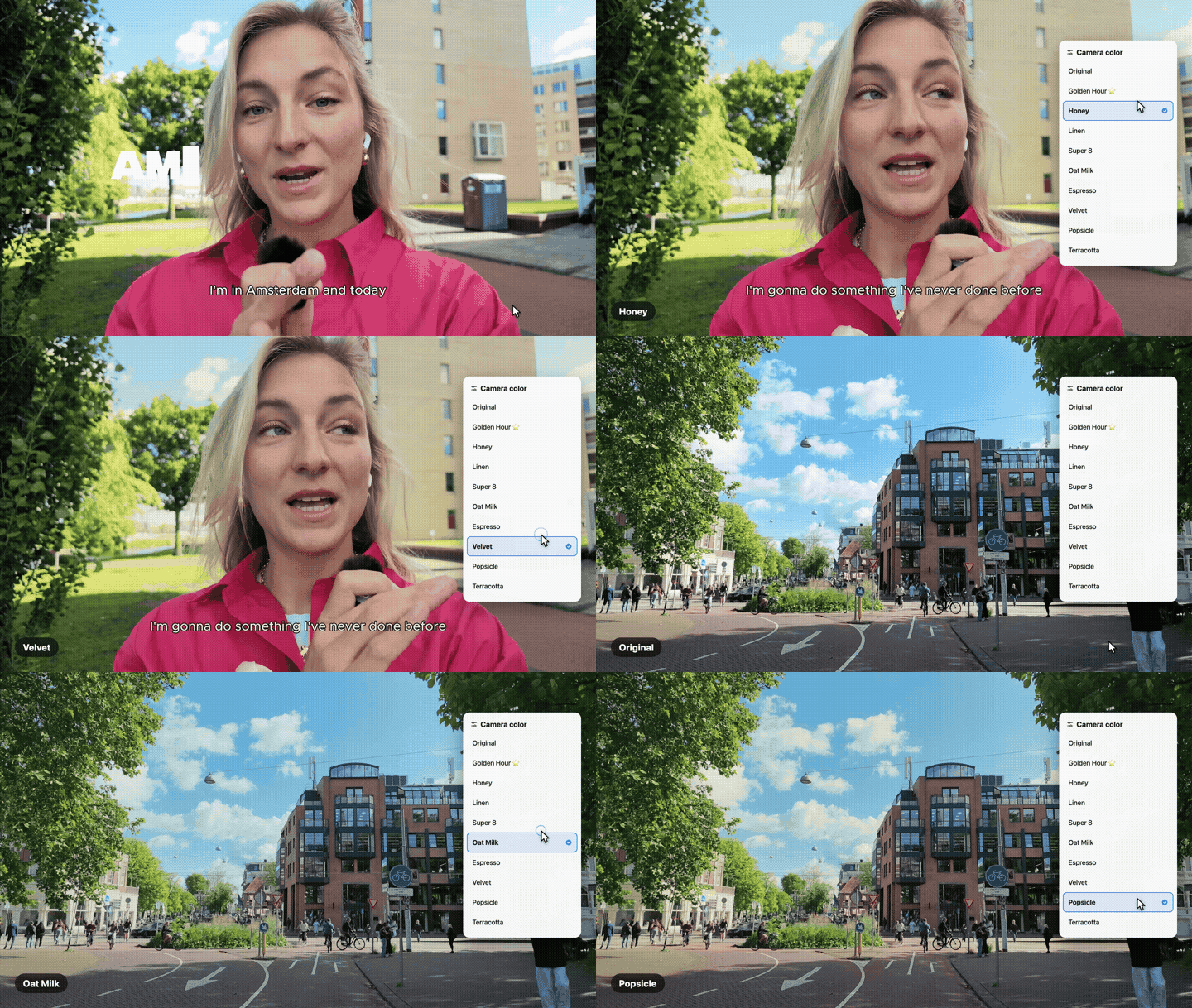
What it does
- Pick a look — "apply Oat Milk to this clip"
- See the menu — "show me all the looks on this video" → labeled 3×3 contact sheet on your own footage
- Let AI decide — "make this look good" → it diagnoses (talking head vs b-roll vs screen recording), fixes casts/exposure first, picks a fitting look, and shows a side-by-side before committing
- Steal any look — "make my footage look like [creator]" → consensus fingerprinting across multiple videos separates the grade from the scenery
The nine looks
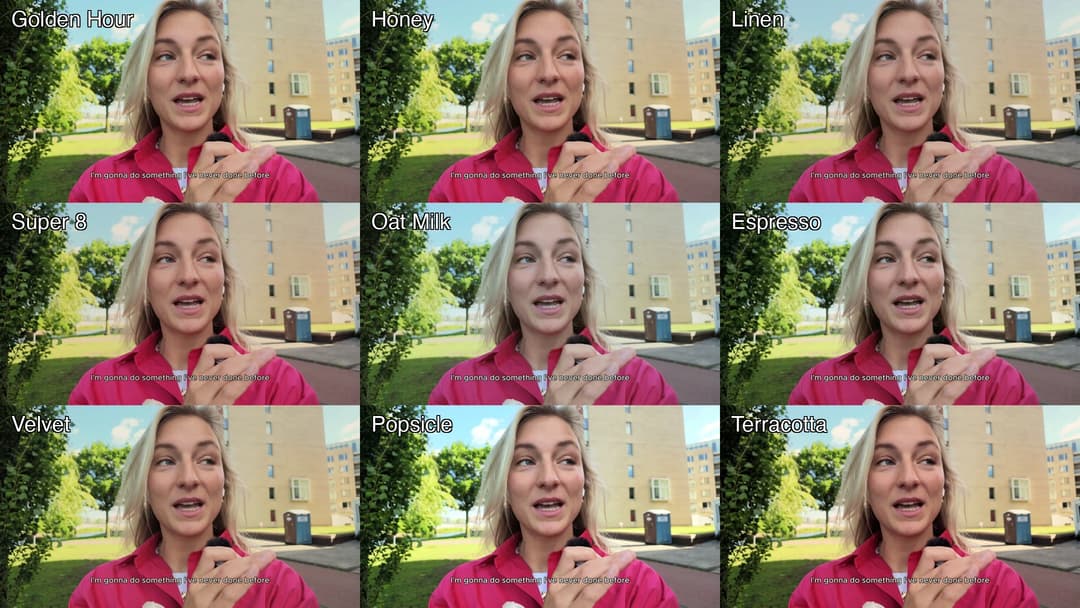
| Look | Character |
|---|---|
| Golden Hour | filmic warmth, rolled-off whites |
| Honey | soft warm matte |
| Linen | quiet Scandi softness |
| Super 8 | film-stock compression |
| Oat Milk | creamy editorial (warm shadows → cool milky highlights) |
| Espresso | dark & moody, warm skin |
| Velvet | lifted matte blacks |
| Popsicle | bright sunny pop |
| Terracotta | warm, contrasty, rich |
Every look ships at subtle strength by default — graded footage should look shot well, not filtered.
🧊 LUTs included — use the looks anywhere
Every look also ships as a standard .cube 3D LUT (36³), so you can use them without an agent — in Premiere, DaVinci Resolve, Final Cut, CapCut, or straight ffmpeg:
luts/subtle/   ← the shipping strength (start here)
luts/full/     ← full consensus strength (flat footage / "more")
ffmpeg -i in.mp4 -vf "lut3d=luts/subtle/golden-hour.cube" -c:a copy out.mp4
LUTs are generated from the exact same chains via scripts/gen_luts.sh (HALD-CLUT method, verified to match within ~1/255).
How the looks were made
Not vibes — measurement. For each reference creator we sampled ~18 frames across 3 different videos (different scenes, lighting, even climates), computed a per-frame grade fingerprint (luma percentiles, per-tonal-band color casts, saturation), and took the median + IQR. Tight IQR across all scenes = the actual grade; wide IQR = scenery, discarded.
The single-frame version of this gets it wrong in fascinating ways — one creator's "cool daylight look" turned out to be a blue sky, and their actual grade was warm. The consensus method (and that story) is documented in SKILL.md.
Looks studied from creators we admire: Elias & Kajsa, Benji Plant, Jonna Jinton, Meek Surf, Radhi Devlukia, Bryan Johnson, Enrico Tartarotti, David Dobrik, Paige Wassel. 💛 These are interpretations of their color character, derived from published videos — go watch them.
Install
git clone https://github.com/louisedesadeleer/color-correct.git
Then point your agent at it. In Claude Code, add to your CLAUDE.md:
#### /color-correct
Read: /path/to/color-correct/SKILL.md
Grade a video with Claude as the colorist — pick a named look, see the menu, or let AI decide.
Requirements: ffmpeg, python3 + Pillow/numpy (pip install pillow numpy), yt-dlp (only for Steal mode).
Usage
/color-correct path/to/video.mp4                     → AI decides
/color-correct path/to/video.mp4 apply Golden Hour   → one look
/color-correct path/to/video.mp4 menu                → 3×3 sheet of all looks on your frame
/color-correct video.mp4 --like <youtube-url>        → steal a new look
LUTs + agent: who does what
The LUTs are the deliverable. The agent is the colorist. They're layers, not rivals:
- A LUT is fixed math — maximum compatibility, same result everywhere. Perfect for distributing a look into any tool.
- But a LUT can't correct: apply Golden Hour to footage with a green webcam cast and you get a beautifully graded green cast. White balance and exposure are footage-dependent by definition — no file can contain that decision.
- The agent does everything a file can't: looks at your footage, fixes casts and exposure first, picks a look that fits the content, adapts the strength when a look fights your lighting, skips the screen-recording b-roll, and re-measures after grading to verify the numbers moved where predicted.
Use the LUTs alone and you get the looks. Use the agent and you get a colorist who happens to carry LUTs in their pocket.
Built by Louise de Sadeleer with Claude. Part of a series of AI video-editing skills.
// faq
What is color-correct?
🎨 AI colorist skill for Claude Code — 9 named looks reverse-engineered from great creators. Pick a look, see the menu, or let AI decide.. It is open-source on GitHub.
Is color-correct free to use?
color-correct is open-source, so it is free to use.
What category does color-correct belong to?
color-correct is listed under other in the Claudeers registry of Claude-compatible tools.
// embed badge

[](https://claudeers.com/color-correct)
// retro hit counter

[](https://claudeers.com/color-correct)
// reviews
// guestbook
// related in Other
 🔓
🔓 🔓
🔓Anti-AI-slop design skill for Claude Code, Cursor, and Codex.
 🔓
🔓Open source Ghostty-based macOS terminal with vertical tabs and notifications for AI coding agents. Built for multitasking, organization, and programmability.
 🔓
🔓Huashu Design · HTML-native design skill for Claude Code · Claude Code 里 HTML 原生的设计 skill · 高保真原型 / 幻灯片 / 动画 + 20 设计哲学 + 5 维评审 + MP4 导出 · Agent-agnostic