
code-light-ai
A system tray status light for Claude Code、Codex — monitor your AI coding agent without keeping the terminal visible.
Install with your AI
Paste into Claude Code, Cursor, or any agent — it reads the repo and wires the tool into your project.
Install and set up code-light-ai (git-clone project) into my current project.
Found on https://claudeers.com/code-light-ai
Repo: https://github.com/cuihp/code-light-ai
Homepage/docs: —
Detected install method: git-clone → git clone https://github.com/cuihp/code-light-ai
Category: devtools. Platforms: cli, desktop.
Read the repo's README for exact setup and env vars, then install it and wire it into my project.

Claudeers Health Verdict:
slowing; community-verified: false. Confirm the source before running anything.
git clone https://github.com/cuihp/code-light-ai
// compatibility
| Platforms | cli, desktop |
|---|---|
| Operating systems | — |
| AI compatibility | claude |
| License | — |
| Pricing | open-source |
| Language | Rust |
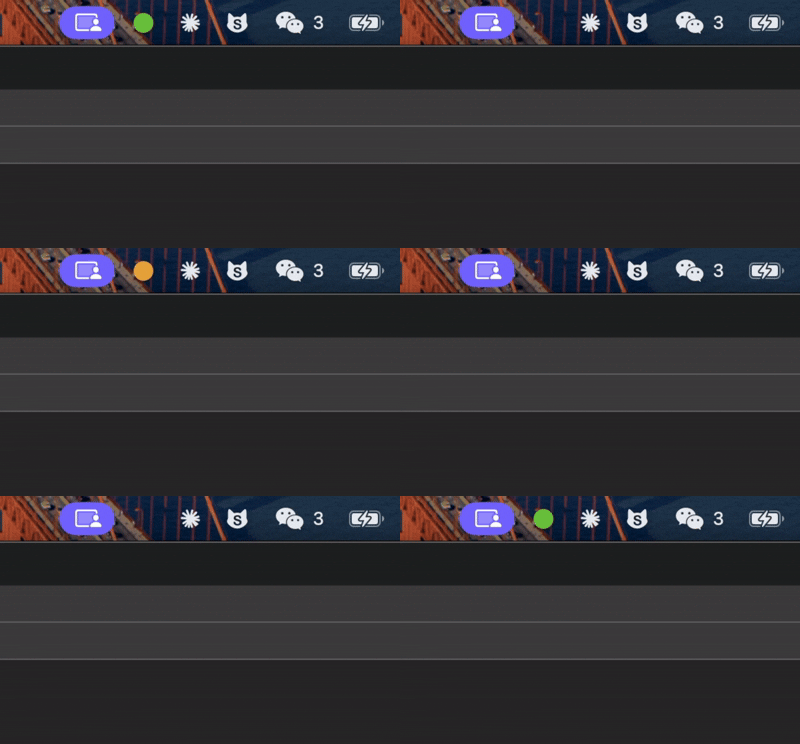
It shows a colored indicator in your system tray so you can tell at a glance what your AI agent is doing — without keeping the terminal visible.
Currently supports Claude Code and OpenAI Codex CLI.
Status Indicators
| Color | State | Description |
|---|---|---|
| Gray | Idle | No active sessions |
| Green (blinking) | Working | Agent is executing tool calls |
| Yellow (blinking) | Waiting | Agent is waiting for user confirmation |
| Red (blinking) | Error | An error has occurred |
| Blue | Completed | Task finished (displays for 10 seconds, then returns to idle) |
Active states blink every 500ms to catch your attention. The tray tooltip shows the current state, active session count, and last update time.
How It Works
Code Light uses a file-based polling mechanism:
- Shell hooks are registered as lifecycle hooks for Claude Code (
~/.claude/settings.json) and Codex (~/.codex/hooks.json) - Each hook writes a JSON state file to
~/.code-light/sessions/<session-id>.json - The tray app polls these files every second and updates the icon
Agent event → Hook script → ~/.code-light/sessions/*.json → Tray icon
Zero network ports, zero APIs, zero configuration — just files on disk.
Install
Prerequisites
- macOS 12+ / Linux / Windows 10+
- Claude Code CLI and/or Codex CLI installed
- Node.js 18+ and pnpm
- Rust toolchain
- Windows users need Git for Windows (provides bash)
Build from source
git clone https://github.com/cuihuapeng/code-light-ai.git
cd code-light-ai
pnpm install
pnpm tauri build
Built artifacts:
| Platform | Location |
|---|---|
| macOS | src-tauri/target/release/bundle/macos/Code Light.app |
| Linux | src-tauri/target/release/bundle/deb/code-light_*.deb |
| Windows | src-tauri/target/release/bundle/nsis/code-light_*.exe |
Usage
- Launch Code Light — a gray dot appears in your system tray
- Right-click the icon and select "Setup Claude Hooks" to register hooks for Claude Code, or "Setup Codex Hooks" for Codex CLI
- Start your AI agent in the terminal — the tray icon changes color as the agent works
That's it. On macOS the app runs as a pure menu bar accessory with no dock icon.
Note for Codex users: After setting up Codex hooks, run
/hooksin the Codex CLI and presstto trust all hooks before they can take effect.
macOS: "App is damaged" or "cannot be opened" error
If you build from source or download an unsigned build, macOS may block the app. To fix this:
xattr -cr /path/to/Code\ Light.app
Then open it by right-clicking the app and selecting Open → Open again in the dialog. You only need to do this once.
Multi-session support
If you run multiple sessions (Claude Code and/or Codex) in different terminals, Code Light tracks all of them simultaneously. The icon reflects the highest-priority state across all active sessions (Error > Waiting > Working > Completed > Idle).
Automatic cleanup
- Sessions with no activity for 5 minutes are automatically removed
- Sessions stuck in "waiting" for 30+ seconds are promoted to "working"
- Sessions stuck in "working" for 60+ seconds are auto-completed
- Completed sessions are cleaned up after the 10-second display window
Development
# Install dependencies
pnpm install

# Run in development mode
pnpm tauri dev

# Build for production
pnpm tauri build

# Lint Rust code
cd src-tauri && cargo clippy
Project Structure
code-light/
├── hooks/
│   ├── claude/                      # Claude Code hook scripts
│   │   ├── _helpers.sh              # Shared helpers (session ID from env, atomic write)
│   │   ├── pre-tool-use.sh          # → working
│   │   ├── post-tool-use.sh         # Placeholder
│   │   ├── post-tool-use-failure.sh # → error
│   │   ├── notification.sh          # → waiting (on permission prompts)
│   │   └── stop.sh                  # → completed
│   └── codex/                       # Codex CLI hook scripts
│       ├── _helpers.sh              # Shared helpers (session ID from stdin JSON)
│       ├── session_start.sh         # → working
│       ├── pre_tool_use.sh          # → working
│       ├── permission_request.sh    # → waiting
│       ├── post_tool_use.sh         # → working
│       ├── user_prompt_submit.sh    # → working
│       └── stop.sh                  # → completed
├── src-tauri/                       # Tauri v2 / Rust backend
│   ├── src/
│   │   ├── main.rs                  # Entry point
│   │   └── lib.rs                   # Tray icon, polling, blink, hook setup
│   ├── icons/status/                # Status indicator PNGs (gray, green, yellow, red, blue)
│   └── tauri.conf.json              # Tauri configuration
├── src/                             # Frontend (vestigial — no visible window)
├── package.json
└── vite.config.ts
Supported Agents & Events
| Event | Claude Code | Codex CLI |
|---|---|---|
| Session Start | - | working |
| Pre Tool Use | working | working |
| Permission / Notification | waiting | waiting |
| Post Tool Use | - | working |
| Tool Use Failure | error | - |
| User Prompt Submit | - | working |
| Stop | completed | completed |
Tech Stack
- Backend: Tauri v2 + Rust
- Frontend: Vite + TypeScript (minimal — the app has no visible window)
- Hooks: Bash scripts registered as lifecycle hooks
License
MIT
// faq
What is code-light-ai?
A system tray status light for Claude Code、Codex — monitor your AI coding agent without keeping the terminal visible.. It is open-source on GitHub.
Is code-light-ai free to use?
code-light-ai is open-source, so it is free to use.
What category does code-light-ai belong to?
code-light-ai is listed under automation in the Claudeers registry of Claude-compatible tools.
// embed badge

[](https://claudeers.com/code-light-ai)
// retro hit counter

[](https://claudeers.com/code-light-ai)
// reviews
// guestbook
// related in Developer Tools
 🔓
🔓The agent harness performance optimization system. Skills, instincts, memory, security, and research-first development for Claude Code, Codex, Opencode, Curs…
 🔓
🔓Makes your AI agent think like the laziest senior dev in the room. The best code is the code you never wrote.
 🔓
🔓Use Garry Tan's exact Claude Code setup: 23 opinionated tools that serve as CEO, Designer, Eng Manager, Release Manager, Doc Engineer, and QA
 🔓
🔓AI coding assistant skill (Claude Code, Codex, OpenCode, Cursor, Gemini CLI, and more). Turn any folder of code, SQL schemas, R scripts, shell scripts, docs,…