
code-cortex-loop
One-command AI code quality pipeline: review, security, tests, performance, simplify & cleanup. Health scores, CI gate. For Cursor, Claude Code, Qoder, Trae.
Install with your AI
Paste into Claude Code, Cursor, or any agent — it reads the repo and wires the tool into your project.
Install and set up code-cortex-loop (claude-plugin project) into my current project.
Found on https://claudeers.com/code-cortex-loop
Repo: https://github.com/whitequeen306/code-cortex-loop
Homepage/docs: —
Detected install method: claude-plugin → /plugin install code-cortex-loop@whitequeen306/code-cortex-loop
Category: devtools. Platforms: cli.
Read the repo's README for exact setup and env vars, then install it and wire it into my project.

Claudeers Health Verdict:
slowing; community-verified: false. Confirm the source before running anything.
/plugin marketplace add whitequeen306/code-cortex-loop
/plugin install code-cortex-loop@whitequeen306/code-cortex-loop
git clone https://github.com/whitequeen306/code-cortex-loop
// compatibility
| Platforms | cli |
|---|---|
| Operating systems | — |
| AI compatibility | claude |
| License | MIT |
| Pricing | open-source |
| Language | JavaScript |
CodeCortexLoop
一条命令,七位领域专家,可自我进化的 Playbook。
面向 AI 编码工具的「写完代码后」流水线:正确性 → 安全 → 测试 → 错误处理 → 性能 → 精简 → 清理 —— 配套健康分、HTML 看板、handoff 接力、双语 Playbook、基线棘轮与 CI 集成。

核心能力
| 能力 | 说明 |
|---|---|
| 七专家串行 | Orchestrator 调度 7 路独立专家(Cursor/Claude/OpenCode:Task;Qoder:Agent;Trae:SOLO 委派) |
| 健康分 0–100 | 七维打分 + 总分;Direct 模式输出 修复前 → 修复后 |
| 三种模式 | Report(只诊断)· Direct(修复+复验)· CI(门禁) |
| Playbook | 项目内学习修复模式(候选/已验证,防幻觉) |
| 零依赖脚本 | 看板、徽章、history、ci-gate 纯 Node,无 npm 依赖 |
一键安装
curl -fsSL https://raw.githubusercontent.com/whitequeen306/code-cortex-loop/main/scripts/install-remote.sh | bash -s cursor
Windows(PowerShell):
irm https://raw.githubusercontent.com/whitequeen306/code-cortex-loop/main/scripts/install-remote.ps1 | iex; Install-CodeCortexLoop -Tool cursor
将 cursor 换成 claude | qoder | trae | opencode | codex | all。安装后重启工具,在聊天里输入 /cortexloop。
本地 clone 安装:
git clone https://github.com/whitequeen306/code-cortex-loop.git
cd code-cortex-loop
.\scripts\install.ps1 -Tool cursor   # macOS/Linux: ./scripts/install.sh cursor
我适不适合用?(三个问题)
任意一条答 否 → 大概率不需要(这很正常):
| 问题 | 原因 |
|---|---|
| 你常用 Cursor、Claude Code、OpenCode、Qoder、Trae(SOLO) 或 Codex 吗? | Cursor/Claude/OpenCode:Task;Qoder:Agent;Trae:SOLO;Codex:显式 spawn |
| 改动量 ≥ 几百行 或是一个完整功能吗? | 改个 typo 用 linter 就够了 |
| 能接受每次 约 3–10 分钟 跑完整流程吗? | 见下方 性能预算;小 PR 用 /cortexloop-quick |
和现成方案比
| CodeCortexLoop | CodeRabbit / Copilot Review | SonarQube / Snyk | 自己写 Cursor rules | |
|---|---|---|---|---|
| 跑在哪 | AI IDE 会话里 | 托管 PR 机器人 | CI / 服务端 | 你的聊天 |
| 多领域审查 | 7 路专家串行 | 单次 review | 规则扫描 | 看你怎么 prompt |
| 项目内学习 | Playbook(候选/已验证) | 产品记忆 | 基线/issue | 手动维护 |
| 成本 | 你的模型 token | 订阅 | 授权/云 | 写规则的时间 |
| 适合谁 | 已习惯 Cursor/Claude/Qoder Agent 的开发者 | 零配置 PR review 的团队 | 合规/静态分析 | 爱折腾的人 |
不是 SaaS,是 harness + 零依赖脚本,让现有 AI 工具像一支有流程的审查团队。
怎么工作
flowchart LR
  pre["分析前查 Playbook"] --> orch["Orchestrator 指挥"]
  orch --> e1["专家1 正确性"]
  e1 --> e2["专家2 安全"]
  e2 --> e7["…专家7"]
  e7 --> score["汇总 + 健康分"]
  score --> out{"Report / Direct / CI"}
  out -->|Direct| fix["修复 + 复验"]
  fix --> reflect["反思 → Playbook"]
  reflect -.-> pre
- Orchestrator(主会话):定 scope、按序委派专家、汇总 handoff、打分;禁止自己 inline 做 pass 分析
- 领域专家(每 pass 一个独立子 agent):只负责本领域,写类别报告 + handoff JSON,供下游专家阅读
- Cursor / Claude Code / OpenCode:通过
Task工具启动(OpenCode 需配置permission.task) - Qoder:通过内置
Agent工具委派~/.qoder/agents/中的自定义智能体(阻塞、独立上下文) - Trae:在 SOLO 模式下由 SOLO Coder 按顺序委派
~/.trae/agents/中的 7 个自定义智能体
- Cursor / Claude Code / OpenCode:通过
- 分析串行、修复串行(Direct 模式下每组修复后跑测试)
七专家固定顺序
| 步 | Pass | 专家 | 类别报告 | Handoff |
|---|---|---|---|---|
| 1 | review | code-reviewer | 01-correctness.md | .cortexloop/handoff/01-correctness.json |
| 2 | security | security-auditor | 02-security.md | .cortexloop/handoff/02-security.json |
| 3 | tests | test-engineer | 05-tests.md | .cortexloop/handoff/03-tests.json |
| 4 | errorHandling | silent-failure-hunter | 06-error-handling.md | .cortexloop/handoff/04-error-handling.json |
| 5 | performance | performance-analyst | 03-performance.md | .cortexloop/handoff/05-performance.json |
| 6 | simplicity | code-simplifier | 04-simplicity.md | .cortexloop/handoff/06-simplicity.json |
| 7 | cleanup | cleanup-curator | 07-cleanup.md | .cortexloop/handoff/07-cleanup.json |
合约与边界:passes/README.md · Handoff Schema:schemas/pass-handoff.schema.json
三种工作模式
| 模式 | 触发 | 行为 |
|---|---|---|
| Report | /cortexloop 默认询问 | 写出报告 + 看板,停下等你确认再改代码 |
| Direct | 选择 Direct | 分组修复 → 每组跑测试 → 复验重跑七专家 → 输出修复前后得分 → 自动反思写入 Playbook |
| CI | /cortexloop --ci 或配置 ci.enabled | 无交互,写 report.json,跑 ci-gate,可选 PR 评论 |
命令一览
| 命令 | 用途 |
|---|---|
/cortexloop | 完整 7 pass;询问 Report / Direct 与范围 |
/cortexloop-quick | 3 pass:审查 + 安全 + 错误处理;适合小改动 |
/cortexloop-deep | 7 pass 整库深扫 |
/cortexloop-security | 安全 + 错误处理 + 依赖清理 |
/cortexloop-pre-pr | PR 前:近期改动,High+ 须清零 |
/cortexloop-baseline | 接受或对比技术债基线 |
/cortexloop-reflect | 手动复盘并写入 Playbook |
跑完会得到什么
| 产物 | 路径 | 说明 |
|---|---|---|
| 概览 | docs/cortexloop/00-summary.md | 人类可读总结 + 健康分 |
| 分类报告 | docs/cortexloop/01-*.md … 07-*.md | 各领域明细 |
| 机器报告 | docs/cortexloop/report.json | CI 门禁输入(须含 "generatedBy":"cortexloop") |
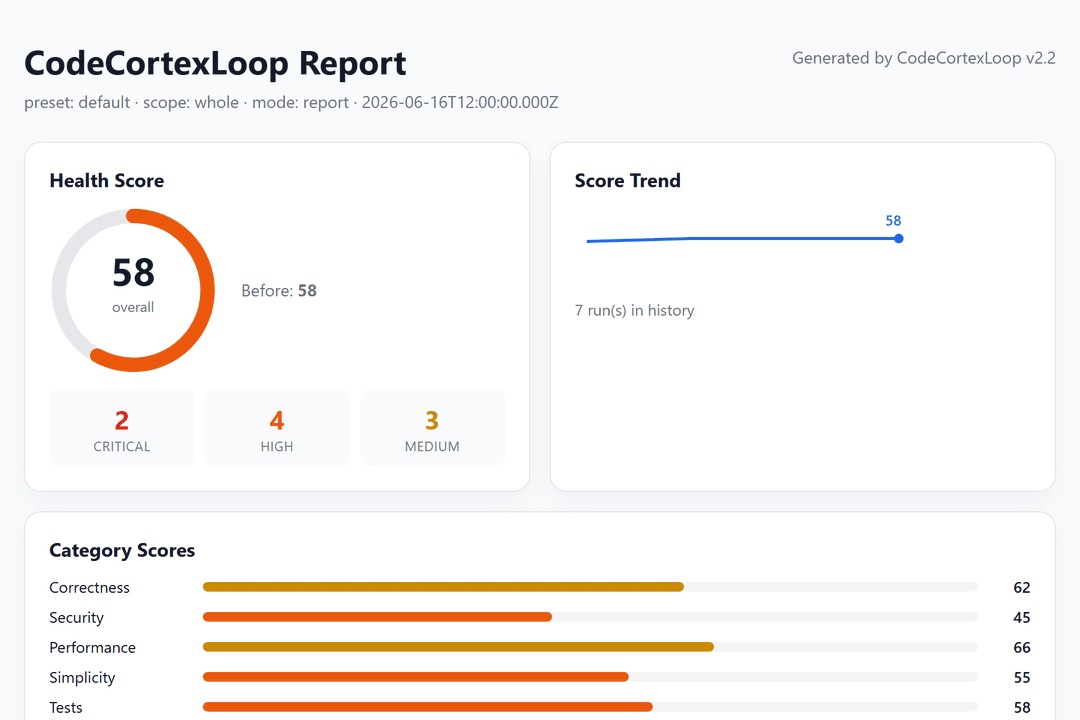
| HTML 看板 | docs/cortexloop/report.html | 浏览器直接打开,含分数环、类别条、问题表 |
| 运行统计 | docs/cortexloop/run-summary.md | pass 数、耗时、估算 token |
| Handoff | .cortexloop/handoff/*.json | 每 pass 结构化交接 |
| 趋势 / 徽章 | .cortexloop/history.json、.cortexloop/health-badge.svg | README 可嵌入徽章 |
| Playbook | .cortexloop/playbook.json | 英文,仅模型 query |
| Playbook 中文 | .cortexloop/playbook-zh.md | 人类阅读,模型不读 |
| 复盘 | docs/cortexloop/08-reflection.md | Direct 成功后自动生成 |
report.json 写出后自动跑后处理(badge、看板、历史、PR 评论体)。也可手动:
node scripts/validate-handoffs.mjs
node scripts/run-summary.mjs --out=docs/cortexloop/run-summary.md
node scripts/make-dashboard.mjs docs/cortexloop/report.json
健康分(0–100)
按未解决问题扣分,Direct 模式展示 修复前 → 修复后:
| 严重度 | 扣分 |
|---|---|
| Critical | -25 |
| High | -10 |
| Medium | -4 |
| Low | -1 |
每条计入分数的 finding 须含 Evidence + Confidence;低置信猜测不进计分,只进 Open Questions。
Playbook 自我进化
v2.2 核心:记忆是召回(去哪查),不是权威(该信什么) —— 命中只提示优先排查区,修法每次重新推导验证。
| 层级 | 含义 |
|---|---|
| verified | 多样且已验证,query 默认展示 |
| candidate | 未确认假设,禁止自动套用 |
| quarantined | 失败/过低置信,不展示 |
# 分析前(默认仅 verified)
node scripts/playbook.mjs query --category=security,errorHandling --lang=js --global-merge

# Direct 复验成功后
node scripts/playbook.mjs record .cortexloop/reflection.json

# CI/人工确认或负反馈
node scripts/playbook.mjs feedback --signature=<sig> --outcome=external_verified --evidence="ci: run 123"
详见 docs/GUIDE.md#自我进化learning-loop 与 rules/learning-loop.mdc。
工具支持
| 工具 | 安装参数 | 配置目录 | 子 agent |
|---|---|---|---|
| Cursor | cursor | ~/.cursor/ | ✅ Task 完整 |
| Claude Code | claude | ~/.claude/ | ✅ Task 完整 |
| OpenCode | opencode | ~/.config/opencode/ | ✅ Task(需 permission.task;见 adapters/opencode/) |
| Qoder | qoder | ~/.qoder/ | ✅ Agent 工具(需主会话启用 Agent;见 adapters/qoder/) |
| Trae | trae | ~/.trae/ | ⚡ SOLO 模式 + 自定义智能体(见 adapters/trae/) |
| Codex | codex | ~/.codex/ | ⚡ 显式 spawn + TOML 子 agent(见 adapters/codex/) |
未配置子 agent 或用户确认时才会退化为单会话 fallback。OpenCode 与 Cursor 共用 Task 流程。各工具差异:adapters/。
ZCode(智谱 Z.ai ADE)是独立产品,与 Trae 不同,当前未适配 CodeCortexLoop。
Qoder 快速上手
- 安装:
.\scripts\install-qoder.ps1(或./scripts/install.sh qoder),重启 Qoder - 确认
~/.qoder/agents/下有 7 个专家(code-reviewer.md等) - 在 Agent 模式聊天中运行
/cortexloop;主会话须启用 Agent 工具 - Bootstrap 应显示
✅ Qoder native subagent mode;orchestrator 按 pass 顺序委派 7 专家 - 若 Agent 工具不可用,可手动按顺序调用
/code-reviewer→ … →/cleanup-curator
Trae 快速上手(SOLO 模式)
- 安装:
.\scripts\install-trae.ps1(国内版目录为.trae-cn),重启 Trae - 切换到 SOLO 模式(左上角模式切换)
- 在 SOLO Coder 设置中启用 7 个自定义智能体(来自
~/.trae/agents/) - 运行
/cortexloop;Bootstrap 应显示✅ Trae partial subagent mode - SOLO Coder 按 pass 顺序委派专家;每步写 report + handoff JSON
普通 IDE 聊天(非 SOLO)会退化为单会话。详见 adapters/trae/README.md。
Codex 快速上手(显式 spawn)
- 安装:
.\scripts\install-codex.ps1(或./scripts/install.sh codex),重启 Codex - 将
~/.codex/codex.cortexloop.example.toml的[agents]合并进config.toml(max_depth = 1) - 确认
~/.codex/agents/下有 7 个.toml专家 - 合并
AGENTS.cortexloop.md到项目或用户的AGENTS.md - 运行
/prompts:cortexloop或明确要求:按 pass 顺序逐个 spawn 子 agent;Bootstrap 应显示✅ Codex partial subagent mode - CLI 可用
/agent查看子 agent 线程
Codex 不会自动 spawn——必须在 prompt 里写清顺序。详见 adapters/codex/README.md。
OpenCode 快速上手
- 安装:
.\scripts\install-opencode.ps1,重启 OpenCode - 将
~/.config/opencode/opencode.cortexloop.example.json中的permission.task合并进你的opencode.json - 确认
~/.config/opencode/agents/下 7 个专家含mode: subagent - 用 Build 主 agent 运行
/cortexloop→ Bootstrap 应显示 OpenCode Task 模式 - 若 Task 被权限拒绝,可手动
@code-reviewer→ … →@cleanup-curator
详见 adapters/opencode/README.md。
项目配置(可选)
cp cortexloop.config.example.json cortexloop.config.json
cp .cortexloopignore.example .cortexloopignore
cortexloop.config.json 可覆盖 preset、scope、启用哪些 pass、CI 阈值、Playbook 路径等。行内抑制:// cortexloop-ignore CL-001。
CI / GitHub Actions
第 1 步:你的 AI 工具产出 docs/cortexloop/report.json(例如 /cortexloop-pre-pr --ci)。
第 2 步:仓库根目录的复合 Action:
name: CodeCortexLoop
on: [pull_request]

jobs:
  gate:
    runs-on: ubuntu-latest
    permissions:
      contents: read
      pull-requests: write
    steps:
      - uses: actions/checkout@v4
      # - run: your-ai-cli /cortexloop-pre-pr --ci
      - uses: whitequeen306/[email protected]
        with:
          report-path: docs/cortexloop/report.json
          max-high: '0'
          comment: 'true'
老项目债太多?先 /cortexloop-baseline 接受基线,再 ci-gate --baseline 只拦新增 Critical/High。完整示例:.github/workflows/cortexloop-example.yml。
真实项目案例:LianYu-PC
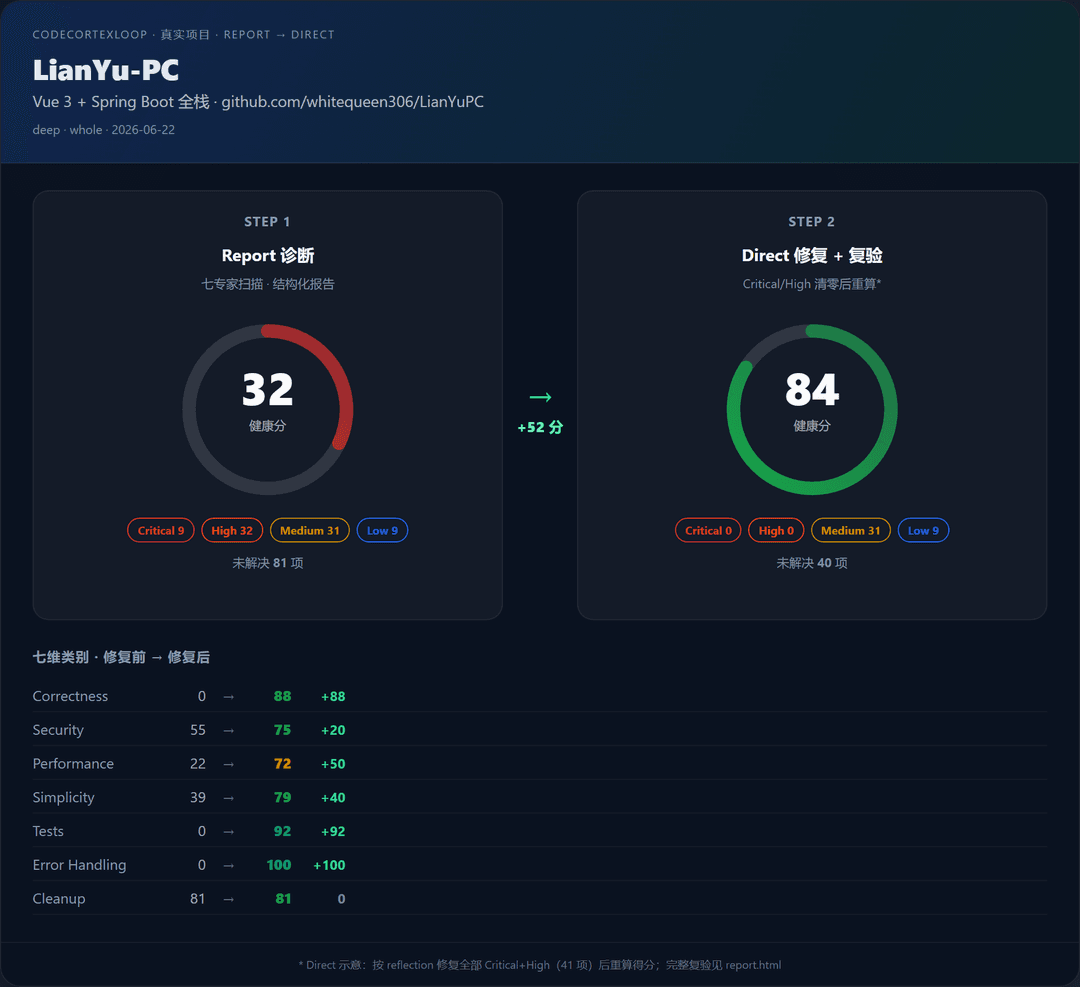
在 Vue 3 + Spring Boot 全栈项目上跑 /cortexloop-deep Report 模式(2026-06-22,整库扫描)。上图展示 Report 诊断 → Direct 修复示意 的先后对比;完整 81 条明细见标准看板。
| 阶段 | 健康分 | Critical / High / Medium / Low | 说明 |
|---|---|---|---|
| Report 诊断 | 32 | 9 / 32 / 31 / 9 | 真实扫描产物 |
| Direct 示意* | 84 | 0 / 0 / 31 / 9 | 按 reflection 清零 Critical+High(41 项)后重算 |
* Direct 右侧为示意得分(非完整七专家复验);LianYu-PC 原项目有 08-reflection.md 记录修复,完整复验待重跑。
典型发现: 验证码表达式泄露 · SSE 错误仍持久化 · 前端轮询静默失败 · 认证/SSE 核心路径零测试
| 链接 | 说明 |
|---|---|
| showcase.html | Report → Direct 对比看板(上图来源) |
| report.html | 标准看板(含全部 finding 表) |
| 00-summary.md | 人类可读摘要 |
| examples/lianyu-pc/ | 案例目录说明 |
产物为 Report 模式拷贝,不含 LianYu-PC 源码,未修改原项目。
想查看此项目: github.com/whitequeen306/LianYuPC
教学用 Demo
examples/demo-app/ — 故意写满 bug 的小项目,适合第一次试 /cortexloop。
性能预算
| 模式 | Pass 数 | 预估耗时* | 预估 token* |
|---|---|---|---|
/cortexloop-quick | 3 | ~2–4 分钟 | ~8万–15万 |
/cortexloop | 7 | ~5–12 分钟 | ~20万–45万 |
/cortexloop-deep | 7 + 整库 | ~10–25 分钟 | ~40万–90万 |
* 约 500 行 scope、Cursor/Claude;详细方法 →
后处理脚本(badge/看板/历史):中位数 ~416ms(实测,无 LLM)。
文档索引
| 文档 | 内容 |
|---|---|
| docs/GUIDE.md | 完整指南(中文):基线棘轮、后处理、适配器、致谢 |
| docs/PERFORMANCE.md | 性能预算与测量 |
| docs/LAUNCH-zh.md | 推广文案 |
| passes/README.md | 七专家合约 |
| CONTRIBUTING.md | 参与贡献 |
| CHANGELOG.md | 版本历史 |
可选:demo 动画 GIF
仓库结构
commands/     # /cortexloop 系列 slash command
passes/       # 七专家串行合约
agents/       # 领域专家 persona
skills/       # cortexloop-expert-core(公共)+ 各领域 depth skill + reflect
rules/        # workflow、learning-loop、refactor-safety …
scripts/      # ci-gate、playbook、看板、showcase、安装脚本(零 npm 依赖)
schemas/      # report、config、handoff JSON schema
examples/     # demo-app + lianyu-pc(真实大项目 Report)
action.yml    # GitHub 复合 Action
许可证
MIT —— 见 LICENSE
// faq
What is code-cortex-loop?
One-command AI code quality pipeline: review, security, tests, performance, simplify & cleanup. Health scores, CI gate. For Cursor, Claude Code, Qoder, Trae.. It is open-source on GitHub.
Is code-cortex-loop free to use?
code-cortex-loop is open-source under the MIT license, so it is free to use.
What category does code-cortex-loop belong to?
code-cortex-loop is listed under devops in the Claudeers registry of Claude-compatible tools.
// embed badge

[](https://claudeers.com/code-cortex-loop)
// retro hit counter

[](https://claudeers.com/code-cortex-loop)
// reviews
// guestbook
// related in Developer Tools
 🔓
🔓The agent harness performance optimization system. Skills, instincts, memory, security, and research-first development for Claude Code, Codex, Opencode, Curs…
 🔓
🔓Makes your AI agent think like the laziest senior dev in the room. The best code is the code you never wrote.
 🔓
🔓Use Garry Tan's exact Claude Code setup: 23 opinionated tools that serve as CEO, Designer, Eng Manager, Release Manager, Doc Engineer, and QA
 🔓
🔓AI coding assistant skill (Claude Code, Codex, OpenCode, Cursor, Gemini CLI, and more). Turn any folder of code, SQL schemas, R scripts, shell scripts, docs,…