
clawd-conduit
Full-lifecycle wiring between Claude Code and the Clawd on Desk pet — all 15 hook events, with permission prompts answered straight from the desktop
Install with your AI
Paste into Claude Code, Cursor, or any agent — it reads the repo and wires the tool into your project.
Install and set up clawd-conduit (git-clone project) into my current project.
Found on https://claudeers.com/clawd-conduit
Repo: https://github.com/ssssssanjiu/clawd-conduit
Homepage/docs: —
Detected install method: git-clone → git clone https://github.com/ssssssanjiu/clawd-conduit
Category: automation. Platforms: cli, api, desktop.
Read the repo's README for exact setup and env vars, then install it and wire it into my project.

Claudeers Health Verdict:
active; community-verified: false. Confirm the source before running anything.
git clone https://github.com/ssssssanjiu/clawd-conduit
// compatibility
| Platforms | cli, api, desktop |
|---|---|
| Operating systems | — |
| AI compatibility | claude |
| License | MIT |
| Pricing | open-source |
| Language | Shell |
clawd-conduit
Wire a desktop pet into what your Claude Code session is actually doing — all 15 hook events.
中文 · macOS · MIT
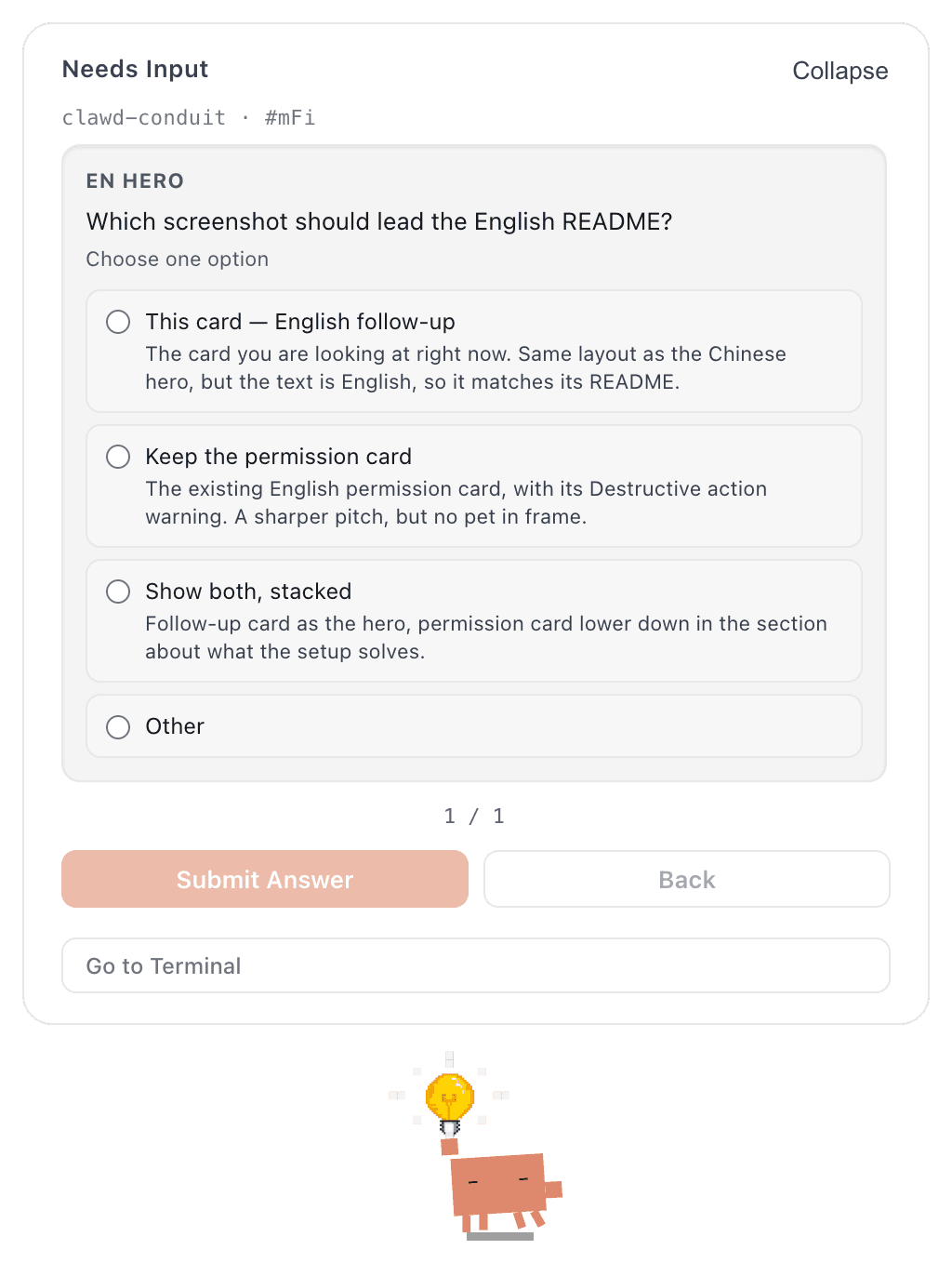
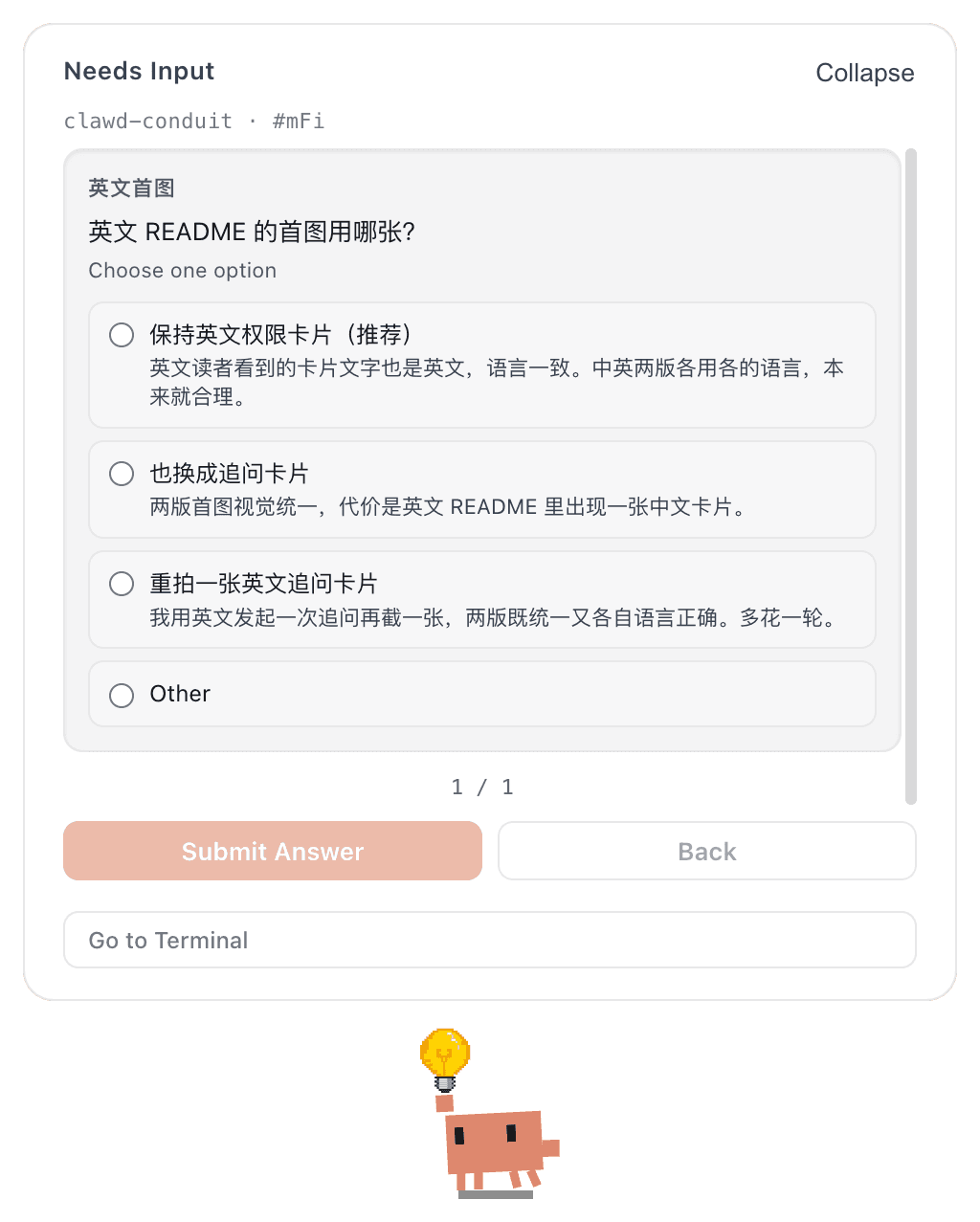
When Claude Code asks you to pick between options, the card lands on the desktop — and the
pet switches to its lightbulb "needs input" pose.
The card follows Clawd's own language setting; English and Chinese both shown
What this is
Clawd on Desk is a desktop pet that watches AI coding agents. It ships with Claude Code integration and works out of the box.
This repo is a complete wiring layer on top of it: all 15 Claude Code lifecycle hook events, plus a notification script, an idempotent install/uninstall toolchain, and the parameter trade-offs I settled on after three months of daily use.
The difference is granularity. With fewer events the pet roughly knows whether you're busy or idle. With all 15 it can tell you're running a tool, that a tool just failed, that subagents are running in parallel, that context is being compacted — or that it's blocked on a confirmation waiting for you.
That last one is the whole point.
The problem it actually solves
During long runs you leave the terminal — docs, messages, coffee. You come back and find it stopped three minutes ago waiting for you to click "allow."
This config cuts those three minutes to zero:
- Permission requests surface as a desktop card:
Cmd+Shift+Yto allow,Cmd+Shift+Nto deny — no window switching - The card never auto-dismisses (
permissionBubbleAutoCloseSeconds: 0). Auto-dismiss is the worst default here: you think you denied it, but it just timed out and fell back to the terminal prompt - Dock flash + sound on completion, so you catch it from another app
- Tool failures change the pet's state immediately — no scrolling back to find which step blew up
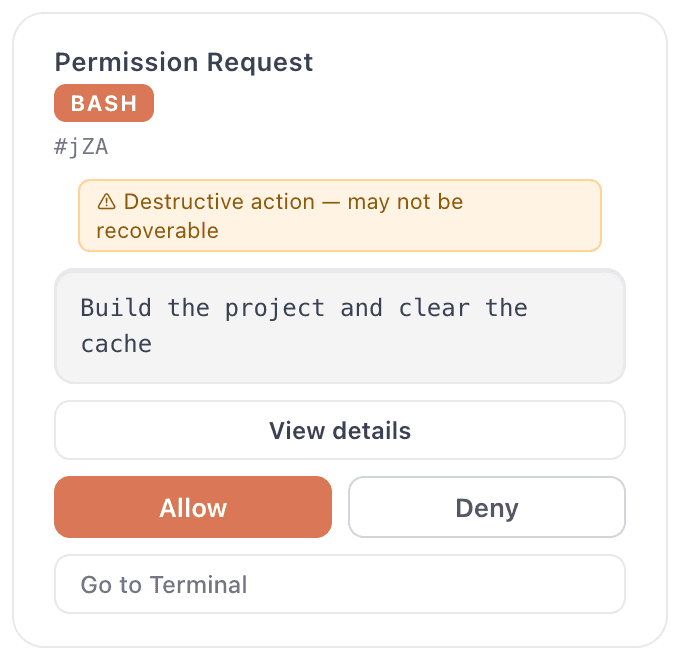
When the command contains rm -rf, the card raises a Destructive action warning on its own
How it works
Claude Code fires hooks at key points in a session's lifecycle. This config
forwards 14 of them as command hooks to Clawd's bundled clawd-hook.js,
and routes one more — the permission request — as an http hook straight to
Clawd's local port.
Claude Code                          Clawd on Desk
    │
    ├─ SessionStart ─┐
    ├─ PreToolUse  ──┤  command hook
    ├─ Stop        ──┼─→ clawd-hook.js ──→ POST 127.0.0.1:23333/state ──→ pet changes state
    ├─ … (14 total) ─┘        (async, 5s timeout, never blocks the session)
    │
    └─ PermissionRequest ─→ HTTP hook ──→ POST 127.0.0.1:23333/permission
                                              (blocking, 600s timeout)
                                                    │
                                          card pops ┴─→ you click Allow / Deny
                                                         └─→ decision returns, session continues
The two channels differ in whether they wait for you. State events are one-way broadcasts — fire and forget. A permission request has to stop and wait for a human decision, which is why it is the only blocking one.
Events and pet states
Taken from Clawd's clawd-hook.js (EVENT_TO_STATE) — not guesswork:
| Event | Pet state | When it fires |
|---|---|---|
SessionStart | idle | Session begins. This config also attaches open -ga to launch the app |
UserPromptSubmit | thinking | You hit enter |
PreToolUse | working | Before every tool call |
PostToolUse | working | Tool returned successfully |
PostToolUseFailure | error | Tool errored |
SubagentStart | juggling | A subagent starts — literally starts juggling |
SubagentStop | working | Subagent finished |
PreCompact | sweeping | Before context compaction, the pet starts sweeping |
PostCompact | thinking | Compaction done. Deliberately not attention — compacting isn't completion |
Stop | attention | Turn finished normally; it comes to get you |
StopFailure | error | Turn ended abnormally |
Notification | notification | Claude needs your attention |
Elicitation | notification | Claude asks you a question (the card in the hero shot) |
SessionEnd | sleeping | Session over, pet goes to sleep |
PermissionRequest | — | Goes through the HTTP channel and pops a card directly |

The four most distinguishable states. sweeping means context is being compacted,
attention means the turn ended and it came to get you, error literally smokes.
The rest (thinking/working/juggling) differ mostly in motion
and are hard to tell apart in a still frame
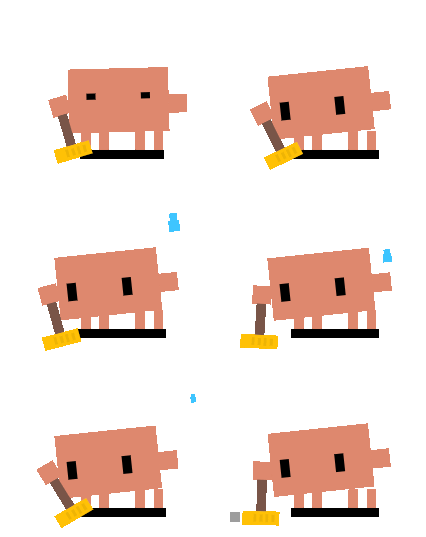
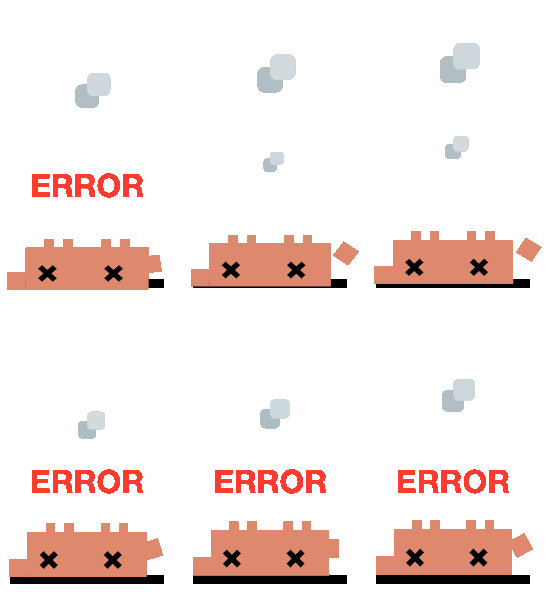
Left: sweeping, during context compaction. Right: error, after a tool
failure.
error is transient — it reverts to working after roughly a second,
so you have to be looking to catch it
One detail worth knowing: on some builds Claude Code reports subagent launches
only as PreToolUse(Task) without a native SubagentStart. Clawd handles this
by switching to juggling on the Task / Agent tool name — so parallel work
never goes unreported.
Why the template uses absolute paths
"command": "\"/opt/homebrew/bin/node\" \"/Applications/Clawd on Desk.app/…/clawd-hook.js\" Stop"
Hooks run in a non-login shell, where PATH may not include Homebrew. A bare
node becomes command-not-found — and because these are async: true, you never
see the error. The symptom is just a pet that quietly stops moving. install.sh
detects and fills both paths for you.
The path contains a space (Clawd on Desk.app), so every segment must be quoted.
Quick start
# 1. Install Clawd on Desk itself (not bundled or redistributed here)
#    https://github.com/rullerzhou-afk/clawd-on-desk/releases

# 2. Apply this config
git clone https://github.com/ssssssanjiu/clawd-conduit.git
cd clawd-conduit
bash install.sh
Start a new Claude Code session to pick it up.
What install.sh does
- Locate Clawd — checks
/Applications, then~/Applications, then falls back tomdfindon bundle idcom.clawd.on-desk. Fails loudly with a download link if it can't find it. - Locate node — checks
/opt/homebrew/bin/node,/usr/local/bin/node, thencommand -v node. - Back up — copies your
settings.jsontosettings.json.bak.<timestamp>. - Merge hook config — fills the placeholder template with real paths. Preserves your other hooks per event, replacing only entries this repo wrote itself.
- Install the notification script — copies it to
~/.claude/hooks/and attaches it toNotification(skippable). - Validate — runs
python3 -c "json.load(...)"to confirm the JSON it wrote is still parseable.
Safe to re-run. A second run replaces rather than appends; the occurrence
count of clawd-hook.js stays at exactly 14.
Verify it took
# 1. Are all 15 events wired?
python3 -c "import json;h=json.load(open('$HOME/.claude/settings.json'))['hooks'];\
print(len([k for k,v in h.items() if 'clawd' in json.dumps(v).lower() or '23333' in json.dumps(v)]),'events')"

# 2. Is Clawd's local service listening?
lsof -nP -iTCP:23333 -sTCP:LISTEN

# 3. Does the hook script path actually exist?
ls -l "/Applications/Clawd on Desk.app/Contents/Resources/app.asar.unpacked/hooks/clawd-hook.js"
The first should print 15 events; the second should show a Clawd on Desk
process. Once both check out, start a session and send any message — the pet
should go from idle to thinking.
Troubleshooting
The pet does nothing at all
Check three things, in order:
- Wrong node path. By far the most common cause. Hooks are
async, so failures are completely silent. Run one by hand to see the error:echo '{"session_id":"t","hook_event_name":"Stop"}' | \ /opt/homebrew/bin/node "/Applications/Clawd on Desk.app/Contents/Resources/app.asar.unpacked/hooks/clawd-hook.js" Stop - Clawd isn't running.
pgrep -f "Clawd on Desk"should print a PID. - Config wasn't reloaded. Hooks are read at session start — you need a new session; the current one won't hot-reload.
Permission cards don't appear
permissionBubblesEnabledmust betruein Clawd's settingshideBubblesmust befalse- Port 23333 must be listening (check #2 above)
- If you run Claude Code with
--dangerously-skip-permissions, or the action is already allowlisted, no permission request is generated at all — that's not a bug
Notification bubbles don't appear, but permission cards do
You probably set notificationBubbleAutoCloseSeconds to 0.
The two bubble kinds treat 0 in opposite ways. For permission bubbles 0
means "never auto-close." For notification bubbles it evaluates to
enabled: false — it turns the feature off. To make notification bubbles
linger, set it high (3600 is the cap), not to zero.
Details in docs/recommended-prefs.md.
My existing hooks disappeared after installing
This shouldn't happen — the merge preserves non-repo entries per event, and the uninstall round-trip is tested to restore the file exactly. If it does, recover from the backup the installer wrote:
ls -t ~/.claude/settings.json.bak.* | head -1 # most recent
Please also open an issue with the shape of your original config.
I also run Codex or another agent
No conflict. Clawd tracks sessions per agent, and this repo only writes the
Claude Code side (~/.claude/settings.json) — it never touches ~/.codex/ or
other agents' config.
Claude Code subagents request permissions too — turn on
subagentPermissionsEnabled in Clawd's settings, or subagent requests won't
raise a card and you'll appear to hang for no reason.
Compatibility
| Requirement | |
|---|---|
| OS | macOS (the notification script uses osascript; the hook config itself is portable but untested on Windows/Linux) |
| Clawd on Desk | Verified from v0.10.0; v1.0.0 is the current test version |
| Claude Code | Needs http-type hook support for PermissionRequest |
| node | Any version — only used to run Clawd's own bundled hook script |
| python3 | System python is fine (used by the installer and notification script) |
Keep
manageClaudeHooksAutomaticallyenabled in Clawd's settings — it repairs the app paths inside your hooks after a Clawd upgrade, so you don't have to re-runinstall.shevery time.
What's inside
├── install.sh                        # path detection + idempotent merge
├── uninstall.sh                      # clean removal, keeps your other hooks
├── settings/
│   └── clawd-hooks.template.json     # all 15 events, paths as placeholders
├── hooks/
│   └── notify-input-needed.py        # macOS banner + Glass sound
└── docs/
    ├── hook-events.md                # every event explained, and why absolute paths
    └── recommended-prefs.md          # the Clawd settings I actually run, with reasons
About the notification script
hooks/notify-input-needed.py, about 20 lines:
On a Claude Code Notification event it reads the event JSON from stdin, pulls
out the message, and fires a system banner with the Glass sound via osascript.
It complements Clawd's own bubble rather than replacing it: Clawd's bubble is on-screen and interactive; the system banner lands in Notification Center and reaches you inside fullscreen apps. Run both and you miss the least.
The reason it's needed: Clawd's "passive notification" bubbles serve only agents
without a decision channel, like Codex and Kimi (see passive-notify-entry.js).
Claude Code goes through the decision-carrying path, so the only cards you ever
see are permission cards and follow-up cards — pure state changes produce no
bubble at all. This script fills that gap.
Skip it with INSTALL_NOTIFY=0 bash install.sh.
Uninstall
bash uninstall.sh
Removes the hook config only; leaves the Clawd app untouched. Backs up first.
Round-trip tested: after uninstalling, settings.json is byte-for-byte
identical to what it was before installing.
Environment variables
| Variable | Default | Purpose |
|---|---|---|
CLAWD_APP | auto-detected | Path to Clawd.app |
NODE_BIN | auto-detected | Path to the node binary |
CLAUDE_SETTINGS | ~/.claude/settings.json | Point at a different settings file |
CLAUDE_HOOK_DIR | ~/.claude/hooks | Point at a different hooks dir |
INSTALL_NOTIFY | 1 | Set 0 to skip the notification script |
Upstream
The pet itself is Clawd on Desk (@rullerzhou-afk, AGPL-3.0-only). You need it installed before this config does anything. If you like it, go star the upstream repo.
This repository bundles and redistributes none of Clawd's code or binaries — only config templates, install scripts, and docs.
License
// faq
What is clawd-conduit?
Full-lifecycle wiring between Claude Code and the Clawd on Desk pet — all 15 hook events, with permission prompts answered straight from the desktop. It is open-source on GitHub.
Is clawd-conduit free to use?
clawd-conduit is open-source under the MIT license, so it is free to use.
What category does clawd-conduit belong to?
clawd-conduit is listed under automation in the Claudeers registry of Claude-compatible tools.
// embed badge

[](https://claudeers.com/clawd-conduit)
// retro hit counter

[](https://claudeers.com/clawd-conduit)
// reviews
// guestbook
// related in Automation & Workflows
 🔓
🔓 🔓
🔓The API to search, scrape, and interact with the web at scale. 🔥
 🔓
🔓🌐 Make websites accessible for AI agents. Automate tasks online with ease.
 🔓
🔓Taste-Skill - gives your AI good taste. stops the AI from generating boring, generic slop