
claudebigimage
在 Claude Code 中以大尺寸預覽貼上的圖片(fork 自 claude-image-view)
Install with your AI
Paste into Claude Code, Cursor, or any agent — it reads the repo and wires the tool into your project.
Install and set up claudebigimage (claude-plugin project) into my current project.
Found on https://claudeers.com/claudebigimage
Repo: https://github.com/joshhu/claudebigimage
Homepage/docs: —
Detected install method: claude-plugin → /plugin install claudebigimage@joshhu/claudebigimage
Category: plugins. Platforms: cli, api.
Read the repo's README for exact setup and env vars, then install it and wire it into my project.

Claudeers Health Verdict:
unknown; community-verified: false. Confirm the source before running anything.
⚠ Unverified / not recently updated — review before pasting a run-this config.
/plugin marketplace add joshhu/claudebigimage
/plugin install claudebigimage@joshhu/claudebigimage
git clone https://github.com/joshhu/claudebigimage
// compatibility
| Platforms | cli, api |
|---|---|
| Operating systems | — |
| AI compatibility | claude |
| License | MIT |
| Pricing | open-source |
| Language | TypeScript |
Claude Big Image
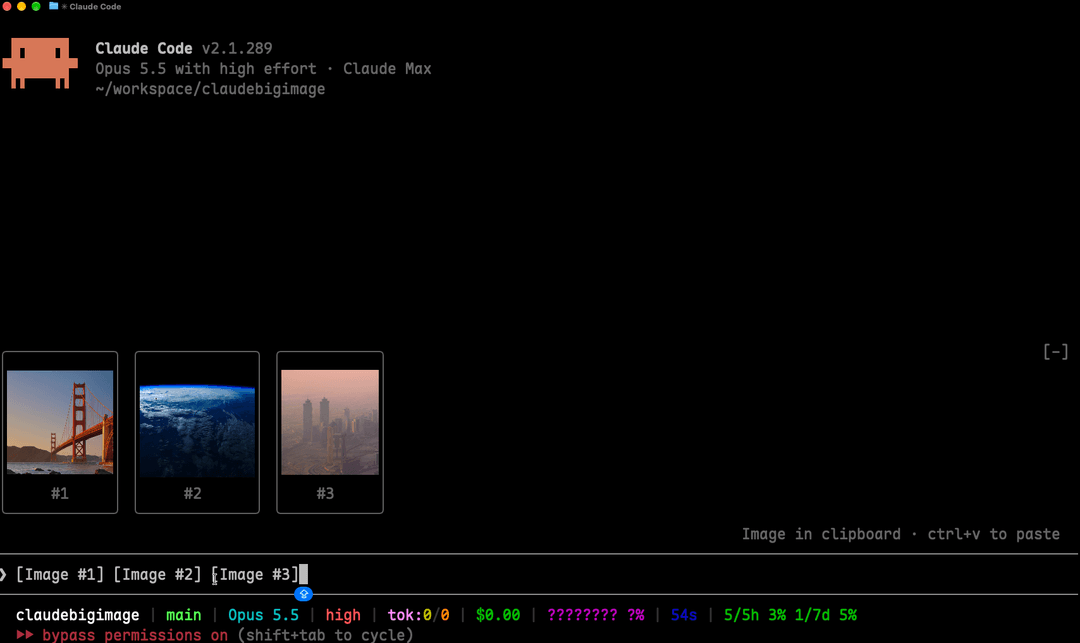
讓你在 Claude Code 貼上的圖片,直接以大尺寸預覽顯示在提示框上方,不再只有光禿禿的 [Image #1] 標籤或小小的縮圖。
本專案 fork 自 jarrodwatts/claude-image-view,把預覽放大(預設最大 20 列 × 80 欄,原版是 6 × 32),尺寸也可以自己設定,並加上可停靠在對話旁的大圖預覽 Pane。
安裝
在 Claude Code 裡執行:
/plugin marketplace add joshhu/claudebigimage
/plugin install image-view@claudebigimage
/reload-plugins
這樣就完成了。在提示框貼上圖片,預覽就會出現在輸入框上方。
如果你也裝了原版的 image-view@claude-image-view,請先停用,避免兩個同時畫圖。
想用終端機指令安裝?
claude plugin marketplace add joshhu/claudebigimage
claude plugin install image-view@claudebigimage
接著在 session 裡執行 /reload-plugins,或開一個新的 session。
使用起來的樣子
貼上一張或多張圖片,提示框上方會出現一排預覽,每張都標上對應的標籤編號:
╭────────────────────────╮ ╭────────────╮
│                        │ │            │
│      (screenshot)      │ │  (photo)   │
│                        │ │            │
│           #1           │ │     #2     │
╰────────────────────────╯ ╰────────────╯
❯ 為什麼這裡的標題沒對齊 [Image #1] vs [Image #2]
- 用 Pane 顯示大圖。 終端機夠寬(144 欄以上)時,貼上的圖片會自動在「Image preview」Pane 裡打開:全螢幕模式下停靠在對話旁邊、從頂到底整個高度都能用,否則放在提示框上方。每張圖預設最大 20 列高、80 欄寬(見設定)。
/image-view隨時打開。 終端機比較窄時,圖片會改顯示在提示框上方那一排;執行/image-view可以在任何寬度打開 Pane。手動關掉 Pane 後,要等你貼上不同的圖片才會再自動打開。- 一貼上就顯示。 不用再多按一個鍵。
- 保持原本比例。 寬的截圖維持寬的,手機直式截圖維持直的。
- 一定放得進畫面。 預覽會縮到剛好放得進提示框上方的空間(而且不超過終端機高度的三分之二),不會捲動或被切掉。
- 送出後自動清除。 提示送出(或刪掉標籤)之後,預覽和 Pane 都會消失。
設定
預覽的最大尺寸由兩個選項控制。可以在 /plugin 的設定選單修改,或寫在 ~/.claude/settings.json 的 pluginConfigs 底下:
| 選項 | 預設值 | 說明 |
|---|---|---|
maxHeight | 20 | 預覽最多幾列高(1–255)。 |
maxWidth | 80 | 預覽最多幾欄寬(4–255)。 |
預覽一定會縮到終端機放得下的大小,所以設大一點也沒關係。把 maxHeight 設成 6、maxWidth 設成 32,就是原版的小縮圖。
運作原理
Claude Code 會把每張貼上的圖片存到這個 session 的快取資料夾 <tmp>/<project>/<session>/images/<n>.png,並在提示框放一個 [Image #n] 標籤。Claude Big Image 是一個 mod:
- 每 200ms 讀一次提示框內容,找出
[Image #n]標籤。之所以用計時器輪詢,是因為貼上圖片不會觸發編輯事件。 - 對每個標籤找到快取的 PNG,從 PNG 檔頭讀出圖片尺寸。
- 用 Claude Code 的
Image元件把圖片畫在 Pane 裡;Pane 沒辦法顯示時,改畫在提示框上方。圖片檔由終端機自己讀取,圖片資料不會經過這個 mod。
安全性
Claude Big Image 只在本機運作,不發出任何網路請求,也不寫入任何檔案。它只會讀取提示框內容、列出 Claude Code 的暫存資料夾來找到目前 session 的圖片快取,以及讀取每張圖片開頭的幾個位元組。如果沒有設定 CLAUDE_CODE_TMPDIR,它會執行一次 id -u 來找出預設的暫存資料夾。
對這個 repo 執行 claude plugin validate,可以看到它掛了哪些事件、呼叫了哪些 API。
系統需求
其他終端機只會在每個框裡顯示 [Image #n] 文字,不會顯示圖片。Claude 桌面版本身就會預覽貼上的圖片,所以這個 mod 在那裡不會畫任何東西。
疑難排解
圖片還是很小。 終端機視窗太小,騰不出空間。全螢幕模式下,提示框上方的區域最多只有終端機高度的一半,25 列的視窗只剩大約 2 列給圖片。把視窗放大,或執行 /image-view 改用預覽 Pane 顯示(Pane 要 144 欄以上才會自動打開;用 /image-view 開過一次之後,110 欄以上就會自動打開)。
貼上之後什麼都沒出現。 執行 /plugin,確認分頁下方那行灰字有列出 image-view 是啟用中的 mod。沒有的話,執行 /reload-plugins。
框裡顯示「no preview」。 mod 找不到快取的圖片檔,可能是 Claude Code 改了貼上圖片的存放位置。請附上你的 Claude Code 版本開一個 issue。
框裡顯示 [Image #1] 文字而不是圖片。 你的終端機不支援 kitty 圖片協定,請參考系統需求。
在 agent view 或背景 session 裡,就算用 Ghostty 或 kitty 也只顯示 [Image #1] 文字。 Claude Code 會在背景 session 關閉終端機圖片。如果你是從支援 kitty 圖片協定的終端機連進去,可以在 ~/.claude/settings.json 的 env 區塊把它打開,再開一個新的 session:
"env": { "CLAUDE_CODE_FORCE_TERMINAL_IMAGES": "1" }
開發
git clone https://github.com/joshhu/claudebigimage
cd claudebigimage

# 不安裝,只在這次 session 載入
claude --plugin-dir .

# 檢查並執行測試
claude plugin validate .
claude plugin test .
Claude Code 第一次載入這個 mod 時,會把 API 型別寫進 .claude-plugin/types/,之後就可以用 tsc -p . 做型別檢查。
授權
MIT,詳見 LICENSE。本專案改自 Jarrod Watts 的 claude-image-view。
// faq
What is claudebigimage?
在 Claude Code 中以大尺寸預覽貼上的圖片(fork 自 claude-image-view). It is open-source on GitHub.
Is claudebigimage free to use?
claudebigimage is open-source under the MIT license, so it is free to use.
What category does claudebigimage belong to?
claudebigimage is listed under plugins in the Claudeers registry of Claude-compatible tools.
// embed badge

[](https://claudeers.com/claudebigimage)
// retro hit counter

[](https://claudeers.com/claudebigimage)
// reviews
// guestbook
// related in Claude Plugins
 🔓
🔓A single CLAUDE.md file to improve Claude Code behavior, derived from Andrej Karpathy's observations on LLM coding pitfalls.
 🔓
🔓Claude Code is an agentic coding tool that lives in your terminal, understands your codebase, and helps you code faster by executing routine tasks, explainin…
 🔓
🔓"CLI-Anything: Making ALL Software Agent-Native" -- CLI-Hub: https://clianything.cc/
🔓financial-services — a Claude ecosystem project on GitHub.