
claude-statusline
One bash script for the Claude Code statusline: dir, branch, model, context window, and 5h / 7d / Fable rate-limit bars.
Install with your AI
Paste into Claude Code, Cursor, or any agent — it reads the repo and wires the tool into your project.
Install and set up claude-statusline (git-clone project) into my current project.
Found on https://claudeers.com/claude-statusline
Repo: https://github.com/alp82/claude-statusline
Homepage/docs: https://alp82.github.io/claude-statusline/
Detected install method: git-clone → git clone https://github.com/alp82/claude-statusline
Category: other. Platforms: cli, api.
Read the repo's README for exact setup and env vars, then install it and wire it into my project.

Claudeers Health Verdict:
active; community-verified: false. Confirm the source before running anything.
git clone https://github.com/alp82/claude-statusline
// compatibility
| Platforms | cli, api |
|---|---|
| Operating systems | — |
| AI compatibility | claude |
| License | MIT |
| Pricing | open-source |
| Language | HTML |
claude-statusline
Are you spending faster than the clock?
One bash script. Every limit window is a race between two things: the tokens you spend, and the time you have left. The bar draws both. When your spend pulls ahead of the clock, drop an effort level. When it falls behind, you can afford to think harder. Your folder, branch, model and context window sit on the same line, under the prompt, while you work.

Install
Paste this into Claude Code. It installs the script, wires Claude Code up to it, and checks the result.
Install the statusline from https://github.com/alp82/claude-statusline for me.
Run: curl -fsSL https://alp82.github.io/claude-statusline/install.sh | bash
Then check that bash, jq and curl are present, confirm ~/.claude/settings.json
points statusLine at ~/.claude/statusline.sh, and tell me what to do next.
Claude reads the installer before it runs it, tells you what changed, and fixes anything missing. Re-paste it any time to upgrade.
Or run the installer yourself
Same script, no agent in the middle:
curl -fsSL https://alp82.github.io/claude-statusline/install.sh | bash
That drops statusline.sh into ~/.claude/, makes it executable, and points
settings.json at it. Anything it replaces is copied to <file>.bak first —
your own statusline.sh, a symlink to a clone, an existing settings.json.
Re-run it any time to upgrade. --no-settings installs the script only
(… | bash -s -- --no-settings); --help has the rest.
Or install it by hand
One file, nothing else:
curl -fsSL https://raw.githubusercontent.com/alp82/claude-statusline/main/statusline.sh \
  -o ~/.claude/statusline.sh
chmod +x ~/.claude/statusline.sh
Then point Claude Code at it yourself, in ~/.claude/settings.json:
{
  "statusLine": {
    "type": "command",
    "command": "~/.claude/statusline.sh"
  }
}
Uninstall
The same prompt in reverse:
Uninstall the statusline from https://github.com/alp82/claude-statusline for me.
Run: curl -fsSL https://alp82.github.io/claude-statusline/install.sh | bash -s -- --uninstall
Then confirm ~/.claude/statusline.sh is gone and ~/.claude/settings.json no longer
has a statusLine entry, and show me which .bak files it left behind.
Or run it yourself
curl -fsSL https://alp82.github.io/claude-statusline/install.sh | bash -s -- --uninstall
Deletes ~/.claude/statusline.sh, drops the statusLine entry from
settings.json and clears the cached usage numbers under ~/.claude/cache/ —
backing up the script and settings.json as .bak first. Everything else in
settings.json is left as it was, and if statusLine points at some other
statusline it is left alone. --no-settings removes the script only.
What it shows
Left to right:
-
dir ⎇ branch — the current directory's name, and the git branch you are on. In a linked git worktree the glyph becomes an amber
⎇+, so a worktree never looks like the main checkout:claude-statusline ⎇ main ← the main checkout claude-statusline-fix ⎇+ fix/bar ← a linked worktree -
★ Model — the active model's display name
-
Ctx — how full the context window is, 0–100%, and the token count in thousands
-
5h / 7d — your 5-hour and 7-day rate-limit windows: how much you have used, how much of the window has gone by, and
↻the time until it resets. The distance between the two halves is the number to read -
Fable — the same, for Fable's own weekly quota. It resets with the 7-day window, so it shows no
↻of its own
How to read it
Usage against time
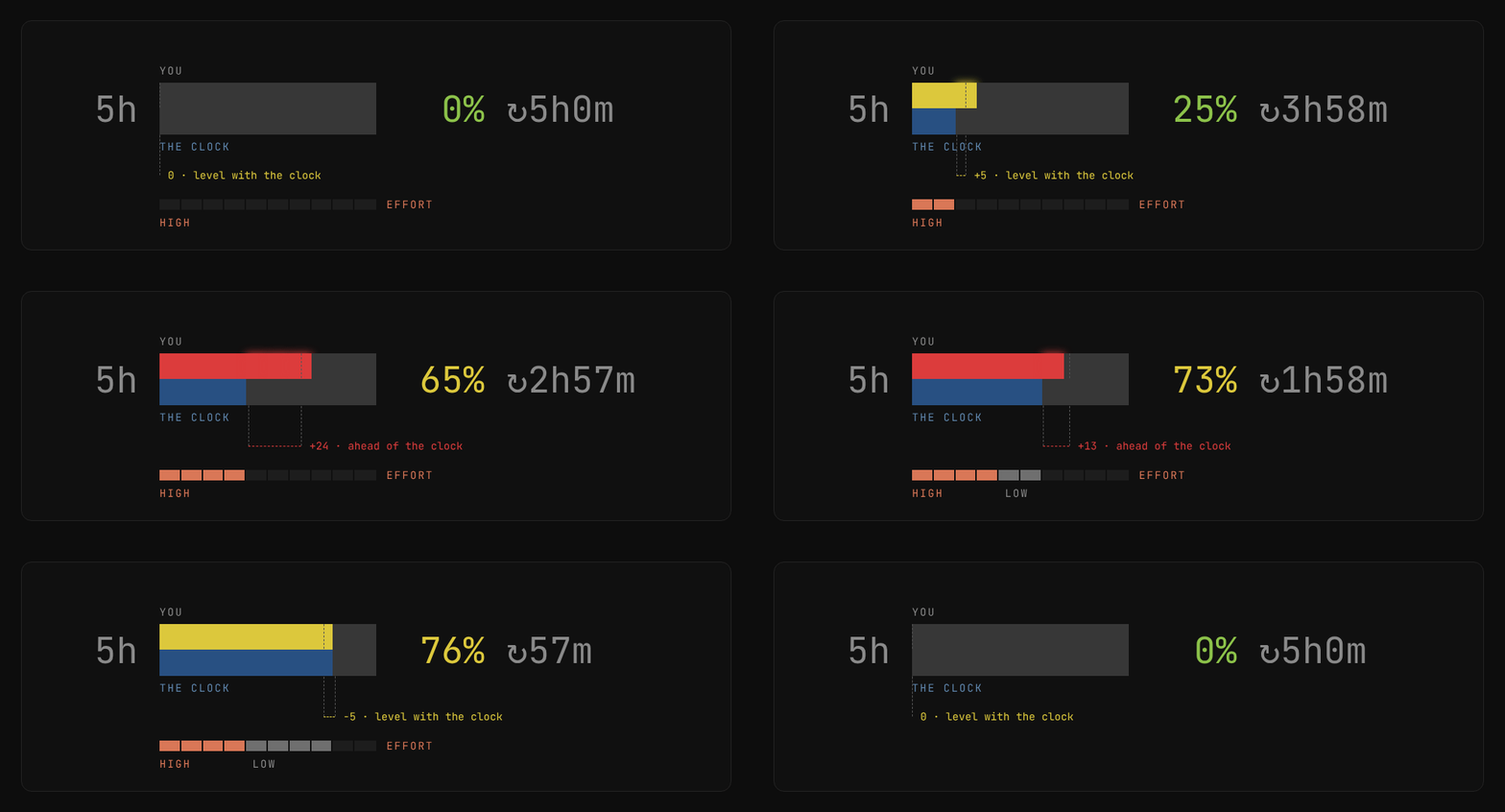
The top half of each cell is how much of the window you have used. The bottom half is how much of the window has gone by. The distance between the two is the number to read.
If the top reaches further right than the bottom, you are spending faster than the clock and you will run out before the window resets. Drop an effort level and the spend rate falls with it, which is what the loop above shows: high effort until the gap opens, then low, and the clock catches back up. If the bottom reaches further right, you are leaving quota you will not get back, so you can afford to think harder.
Colour follows usage: green under 50%, yellow 50–80%, red above 80%.
Context window

Turns yellow at 25% and red at 50% — sooner than the limit bars, because a full context window stops you working right away. The bar fills in eighths of a character, so it moves before the number does.
When a window resets
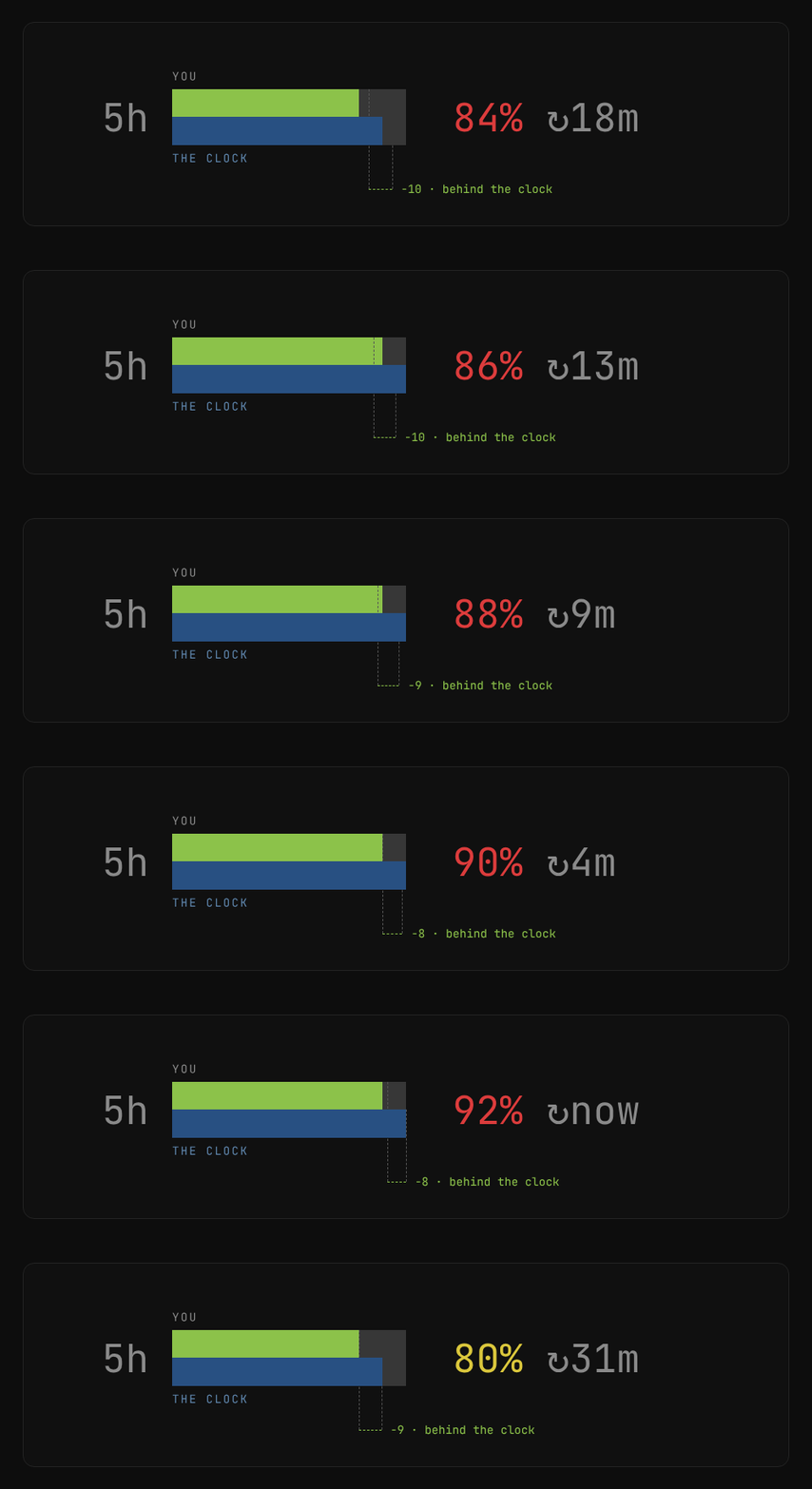
At the end of a 5-hour window both halves drop back to zero, the colour goes back to green, and the countdown starts again at 5h0m.
The Fable window

Fable has its own weekly quota. Spend it early and nothing gives it back before
the week is over, so the blue half is the useful one: it tells you how long the
wait is. The window resets with the 7-day one, which is why it shows no ↻.
Claude Code does not send this one. The script reads it from ~/.claude.json
and only asks the API for a fresh value in the background, at most every ten
minutes — so it stays out of the TUI's way.
On macOS that refresh needs the OAuth token from the Keychain, because Claude
Code stores it there instead of in ~/.claude/.credentials.json. The first read
can open a Keychain dialog. Click Always Allow once and it stops asking. To
skip the Keychain read altogether, set CLAUDE_STATUSLINE_NO_KEYCHAIN=1 — the
Fable bar then follows the CLI's own cache only.
Requirements
bashjq— parses the statusline JSON from stdincurl— only for refreshing the Fable weekly quota
How it works
Claude Code pipes a JSON blob to the script on stdin
(docs). Everything but the
Fable window comes straight from that payload. The Fable weekly quota isn't in
it, so the script reads the CLI's own cached copy from ~/.claude.json and only
hits /api/oauth/usage itself — in the background, throttled — when that copy
is stale.
License
MIT
// faq
What is claude-statusline?
One bash script for the Claude Code statusline: dir, branch, model, context window, and 5h / 7d / Fable rate-limit bars.. It is open-source on GitHub.
Is claude-statusline free to use?
claude-statusline is open-source under the MIT license, so it is free to use.
What category does claude-statusline belong to?
claude-statusline is listed under other in the Claudeers registry of Claude-compatible tools.
// embed badge

[](https://claudeers.com/claude-statusline)
// retro hit counter

[](https://claudeers.com/claude-statusline)
// reviews
// guestbook
// related in Other
 🔓
🔓 🔓
🔓Anti-AI-slop design skill for Claude Code, Cursor, and Codex.
 🔓
🔓Open source Ghostty-based macOS terminal with vertical tabs and notifications for AI coding agents. Built for multitasking, organization, and programmability.
 🔓
🔓Huashu Design · HTML-native design skill for Claude Code · Claude Code 里 HTML 原生的设计 skill · 高保真原型 / 幻灯片 / 动画 + 20 设计哲学 + 5 维评审 + MP4 导出 · Agent-agnostic