
claude-inbox
Claude Code 收件匣:agent 把要你決定的事放進網頁,你回答後答案自動回到 agent
Install with your AI
Paste into Claude Code, Cursor, or any agent — it reads the repo and wires the tool into your project.
Install and set up claude-inbox (claude-plugin project) into my current project.
Found on https://claudeers.com/claude-inbox
Repo: https://github.com/chenjackle45/claude-inbox
Homepage/docs: —
Detected install method: claude-plugin → /plugin install claude-inbox@chenjackle45/claude-inbox
Category: plugins. Platforms: api, mobile.
Read the repo's README for exact setup and env vars, then install it and wire it into my project.

Claudeers Health Verdict:
unknown; community-verified: false. Confirm the source before running anything.
⚠ Unverified / not recently updated — review before pasting a run-this config.
/plugin marketplace add chenjackle45/claude-inbox
/plugin install claude-inbox@chenjackle45/claude-inbox
git clone https://github.com/chenjackle45/claude-inbox
// compatibility
| Platforms | api, mobile |
|---|---|
| Operating systems | — |
| AI compatibility | claude |
| License | MIT |
| Pricing | open-source |
| Language | Python |
📥 收件匣
讓你的 agent 別再停在那邊等你回一句「好」
Claude Code 專用的「決定信箱」:agent 要你拍板的事,統一放進一個網頁。
你有空時一次看完、一次回答,答案自動回到 agent 手上。
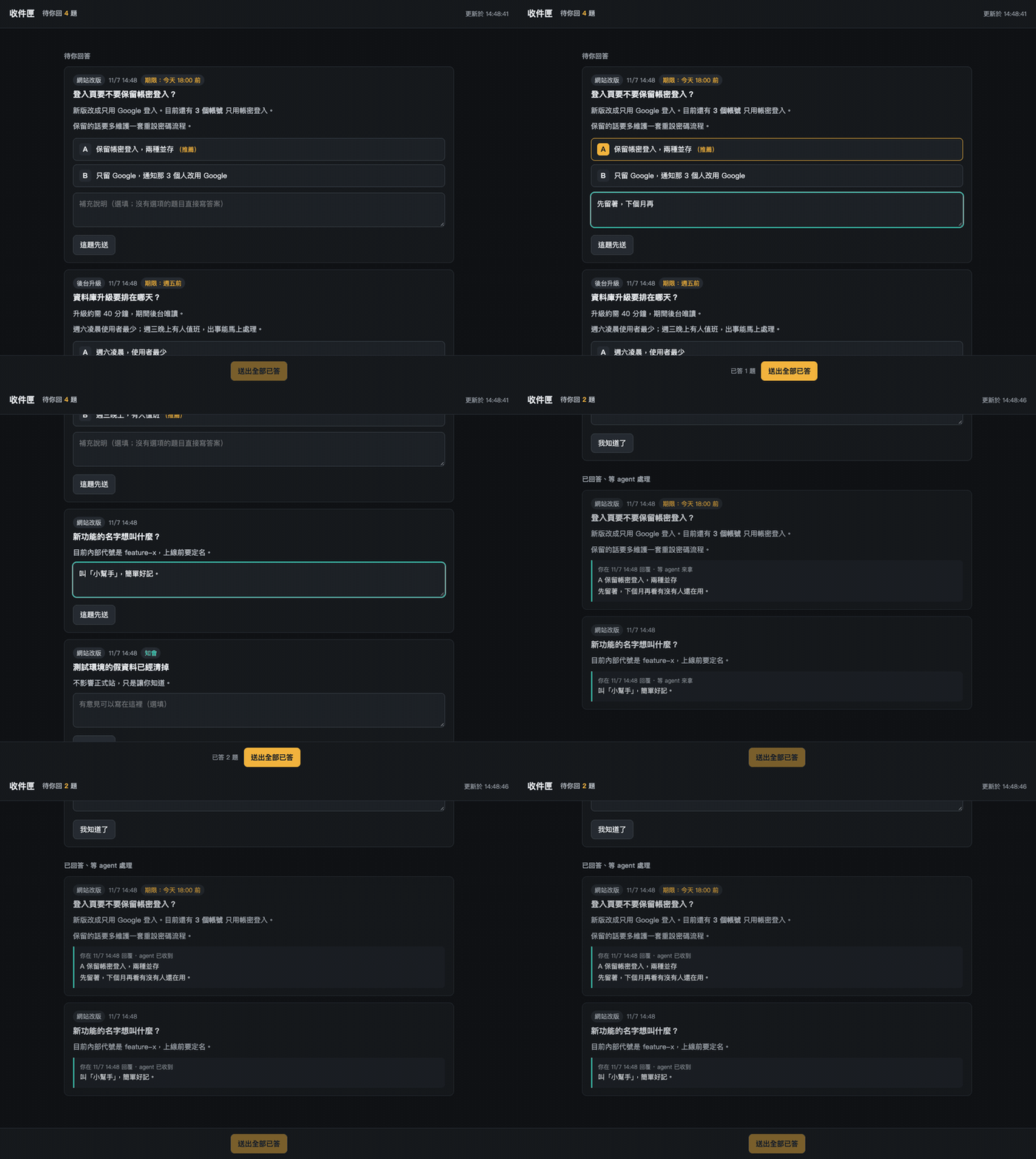
你是不是也遇過這些事?
- 讓 agent 跑起來就去吃飯,回來發現它 20 分鐘前就停在「要用 A 還是 B?」
- 同時開了三個對話,每一個都在問你問題,你得一個一個切過去回
- 答案打在對話裡,換個對話它就不知道,隔天又得再解釋一次
收件匣把「問你」這件事從對話裡拿出來。 agent 繼續做不需要你的部分,要你決定的事排隊放好,你方便的時候再處理。
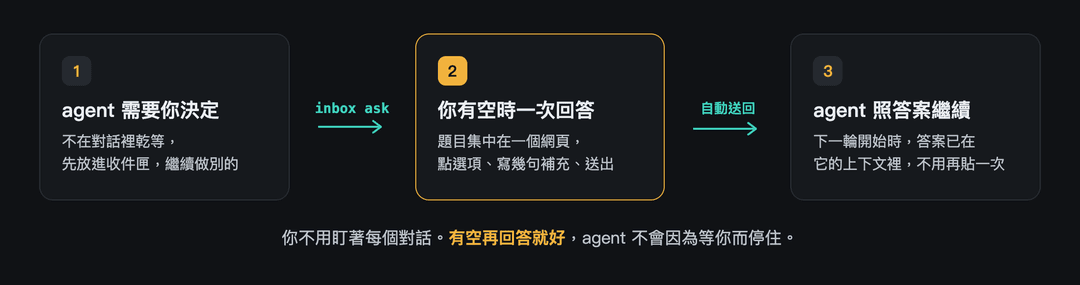
長這樣
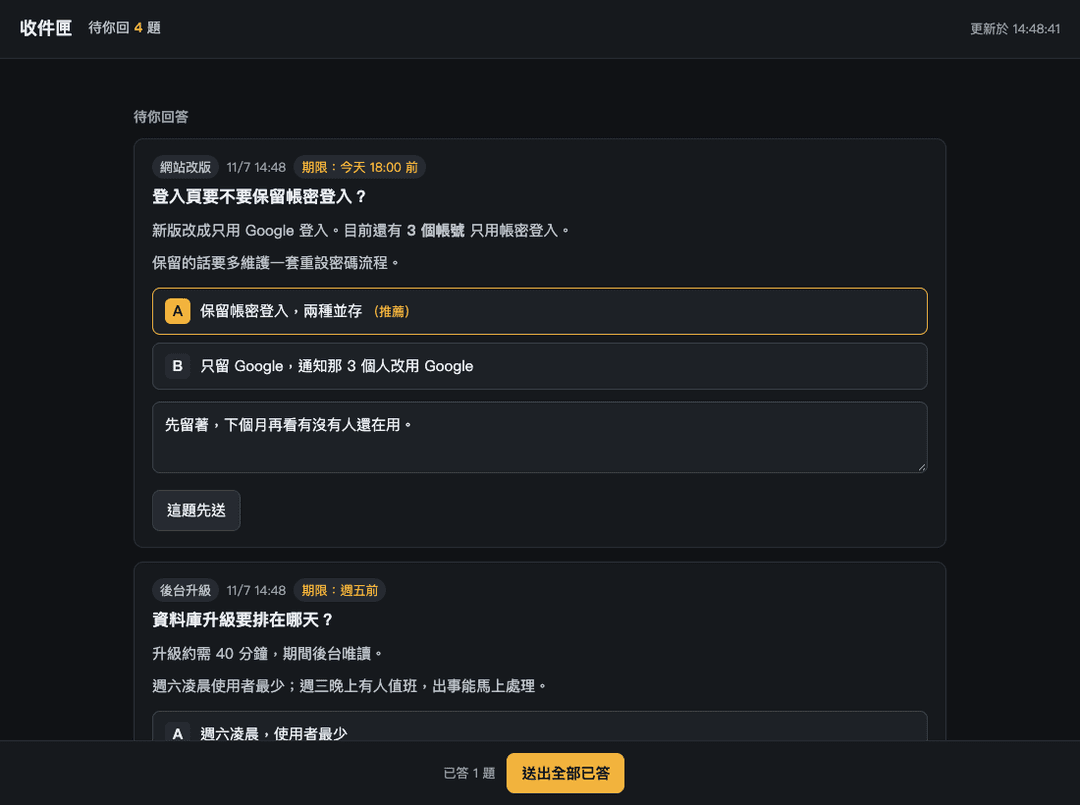
每一題都附上來源(哪個專案問的)、期限、推薦選項和一個補充欄。選好、寫幾句,按「送出全部已答」就好。
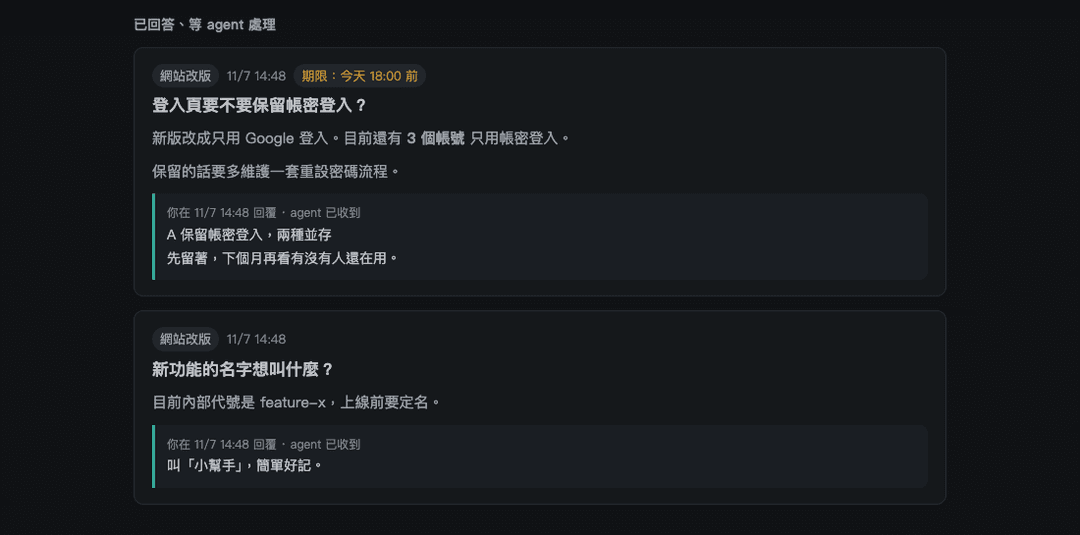
送出後看得到每題有沒有被 agent 收走 |
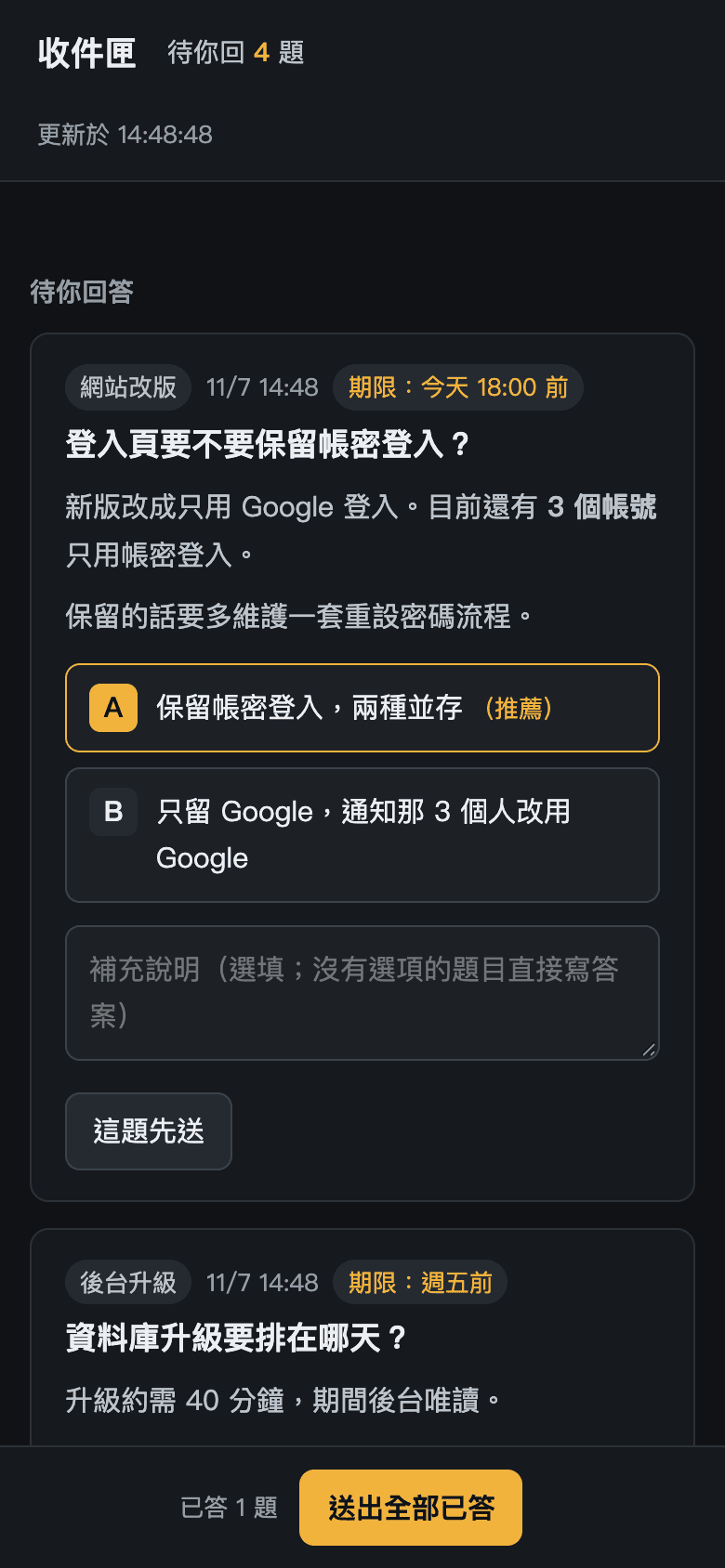
手機版(寬度 390 的實際畫面) |
為什麼好用
| 題目集中 | 所有對話的問題在同一個網頁,來源、期限、推薦選項一眼看完,不用切視窗 |
| 一次回完 | 逐題先送,或一次「送出全部已答」。草稿會自動保存,重新整理也不會掉 |
| 答案自動回去 | 用 Claude Code 的 hook:你送出後,agent 下一輪開始時答案就已經在它的上下文裡,不用你再貼 |
| 不叫 AI、不上雲 | 只用 Python 標準庫。題目就是 agent 寫的那一份,資料全部放在你自己的電腦 |
| 預設安全 | 只開在本機,所有操作都要 token;題目文字一律當純文字顯示,不會被執行 |
| 手機也能回 | 把位址改成你的 Tailscale 或內網位址,就能在手機上回答(見下方進階說明) |
30 秒開始
在 Claude Code 裡輸入:
/plugin marketplace add chenjackle45/claude-inbox
/plugin install inbox@claude-inbox
裝好後重開一次 Claude Code,然後對 agent 說:
有要我決定的事,就放進收件匣。
就這樣。agent 會自己用 inbox ask 出題,並印出網頁網址。想長期生效,把上面那句寫進專案的 CLAUDE.md。
你送出之後,agent 看到的是這樣:
收件匣:使用者回覆了 2 則。

【q-20261107-144835-480d】登入頁要不要保留帳密登入?
使用者選:A 保留帳密登入,兩種並存
補充:先留著,下個月再看有沒有人還在用。

照回覆繼續做;這件處理完可跑 inbox close <題號> 把它收起來。
想自己出一題試試看:
inbox ask --title "要不要上新版?" --option "A=上" --option "B=不上" --recommend A
inbox指令是給 agent 的 Bash 用的。你自己在終端機試的話,改用python3 <plugin 資料夾>/inbox/inbox.py,後面的參數一樣。
你已經有自己的開發規則?疊上去,不要換掉
收件匣不會動你的 CLAUDE.md、AGENTS.md 或任何現有流程。它只加三樣東西:一個 inbox 指令、一個網頁,和一個在每輪開始時把答案送進 agent 的 hook。
所以你原本的規則照舊:哪些事要先問你、哪些事 agent 可以自己決定,都沒有改變,只是「問你」的地方從對話換成收件匣。想讓 agent 這樣用,把下面這段貼進你的 CLAUDE.md:
## 收件匣
需要問我的事(照上面的規則本來就要問我的那些),一律用 `inbox ask` 放進收件匣,不要在對話裡停下來等。
不需要問我的事,照原本的規則自己決定,不要因為有收件匣就多問。
沒有自己的規則也沒關係,直接用預設就行。
🎁 附贈:總PM 模式
一個常駐的對話帶好幾條工作線、自己不寫程式,只負責派工、裁決、追進度,而你只看收件匣。輸入 /inbox:pm 就能看到完整的操作說明,包含狀態檔怎麼寫、什麼事該出題給你、哪些事一定要先問你。
這是給還沒有自己流程的人用的預設做法。你已經有自己的總PM、狀態檔或審查流程時,agent 會沿用你的,只補收件匣那一塊,不會另建一套。
不用 Claude Code 也能用(Codex 等其他 agent)
收件匣的核心是一支 Python 指令加一個網頁,不綁 Claude Code。plugin 只是 Claude Code 專用的打包。其他 agent 能在 shell 裡直接跑同一支指令:
git clone https://github.com/chenjackle45/claude-inbox
python3 claude-inbox/inbox/inbox.py ask --title "要不要上新版?" --option "A=上" --option "B=不上"
python3 claude-inbox/inbox/inbox.py wait --timeout 1800   # 有回覆時印出答案並結束
其他 agent 沒有 Claude Code 的 hook,答案不會自動出現在上下文,要靠它自己跑 wait 或 take 去拿。把下面這段貼進它的規則檔(例如 AGENTS.md),路徑換成你放的位置:
## 收件匣
需要問我的事,用下面的指令放進收件匣,不要在對話裡停下來等:
python3 /path/to/claude-inbox/inbox/inbox.py ask --title "..." --option "A=..." --option "B=..."
先做不受這題影響的工作。一定要等答案時,在背景跑 `... inbox.py wait --timeout 1800`。
處理完一題後跑 `... inbox.py close <題號>`。
兩個限制:
- 程式靠環境變數
CLAUDE_CODE_SESSION_ID認出題的對話。其他 agent 沒有它,題目會變成匿名,同一個專案資料夾裡的任何 agent 都拿得到答案。兩個 agent 同時在同一個專案出題時,可能拿到對方的答案。 - 這個用法還沒有拿 Codex 等實際跑過,是依程式行為寫的。
覺得有用?
按個 ⭐ Star 讓更多人看到,也歡迎開 Issue 告訴我哪裡卡住、哪裡想要更好。
進階:從手機看、資料放哪、答案送給哪個對話
從手機看
預設只開在本機。要用手機看,編輯 ~/.claude-inbox/config.json:
{ "host": "你的 Tailscale 或內網位址", "port": 7799 }
位址只支援 IPv4。token 不分本機或遠端,第一次使用時自動產生,寫進同一個檔(檔案權限 600,資料夾權限 700)。改位址或換 token 後都要重新啟動服務:inbox stop 再 inbox start。執行中的服務不會自動套用新設定,舊 token 在它重啟前仍然有效。用 inbox url 可以印出帶 token 的完整網址。
資料放哪
~/.claude-inbox/(可用環境變數 CLAUDE_INBOX_HOME 改):
| 檔 | 內容 |
|---|---|
questions/*.json | 題目,一題一檔 |
events.jsonl | 你的回答、送達紀錄、收起紀錄,只增不改 |
config.json | 位址、埠、token |
題目與答案都是明文,不要放密碼或金鑰。
答案送給哪個對話
答案送回出題的那個對話,不管它現在在哪個資料夾。那個對話 30 分鐘內沒來拿,同一個專案(同一個 git 根目錄)裡的其他對話也拿得到。每則答案只送出一次。
安全
- 只收
Host與Origin符合的請求,擋掉別的網頁偷打你的本機服務。 - 所有 API 都要 token,本機也一樣:答案會被放進 agent 的上下文,不能讓同一台機器上的其他程式隨便寫入。
- 頁面把題目文字當純文字顯示,只有網址會變成連結。
- 回答只在你的機器上流動,沒有任何外送。
需求
Python 3.9 以上。答案自動送回 agent 需要 Claude Code;其他 agent 的用法見上方。支援 macOS、Linux 與 WSL(原生 Windows 不支援)。沒有其他依賴。
開發
python3 -m unittest discover tests
授權
MIT
// faq
What is claude-inbox?
Claude Code 收件匣:agent 把要你決定的事放進網頁,你回答後答案自動回到 agent. It is open-source on GitHub.
Is claude-inbox free to use?
claude-inbox is open-source under the MIT license, so it is free to use.
What category does claude-inbox belong to?
claude-inbox is listed under plugins in the Claudeers registry of Claude-compatible tools.
// embed badge

[](https://claudeers.com/claude-inbox)
// retro hit counter

[](https://claudeers.com/claude-inbox)
// reviews
// guestbook
// related in Claude Plugins
 🔓
A single CLAUDE.md file to improve Claude Code behavior, derived from Andrej Karpathy's observations on LLM coding pitfalls.
 🔓
Claude Code is an agentic coding tool that lives in your terminal, understands your codebase, and helps you code faster by executing routine tasks, explainin…
 🔓
"CLI-Anything: Making ALL Software Agent-Native" -- CLI-Hub: https://clianything.cc/
🔓financial-services — a Claude ecosystem project on GitHub.