
claude-image-view
See the images you paste into Claude Code: thumbnails above the prompt instead of bare [Image #1] tags
Install with your AI
Paste into Claude Code, Cursor, or any agent — it reads the repo and wires the tool into your project.
Install and set up claude-image-view (claude-plugin project) into my current project.
Found on https://claudeers.com/claude-image-view
Repo: https://github.com/jarrodwatts/claude-image-view
Homepage/docs: —
Detected install method: claude-plugin → /plugin install claude-image-view@jarrodwatts/claude-image-view
Category: plugins. Platforms: cli, api, desktop.
Read the repo's README for exact setup and env vars, then install it and wire it into my project.

Claudeers Health Verdict:
unknown; community-verified: false. Confirm the source before running anything.
⚠ Unverified / not recently updated — review before pasting a run-this config.
/plugin marketplace add jarrodwatts/claude-image-view
/plugin install claude-image-view@jarrodwatts/claude-image-view
git clone https://github.com/jarrodwatts/claude-image-view
// compatibility
| Platforms | cli, api, desktop |
|---|---|
| Operating systems | — |
| AI compatibility | claude |
| License | MIT |
| Pricing | open-source |
| Language | TypeScript |
Claude Image View
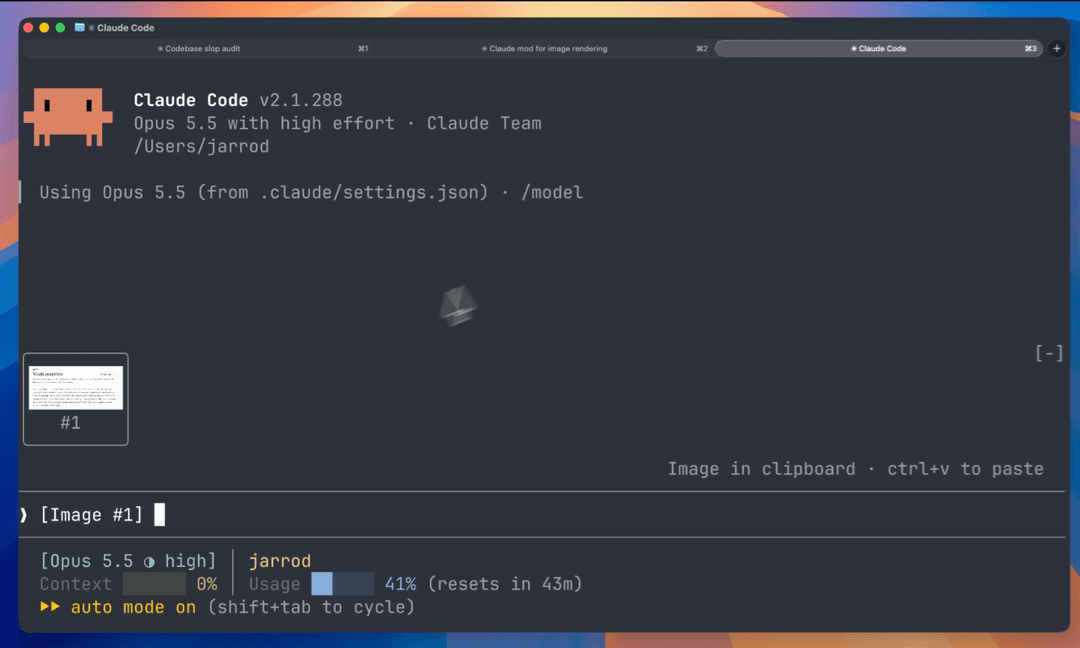
A Claude Code mod that shows the images you paste, so you see thumbnails above your prompt instead of bare [Image #1] tags.
Install
Inside Claude Code, run:
/plugin marketplace add jarrodwatts/claude-image-view
/plugin install image-view
/reload-plugins
That's it. Paste an image into the prompt and its thumbnail appears above the input.
Prefer the terminal?
claude plugin marketplace add jarrodwatts/claude-image-view
claude plugin install image-view@claude-image-view
Then run /reload-plugins inside a session, or start a new one.
What You See
Paste one or more images and a row of thumbnails sits above the prompt, each labelled with the number of its tag:
╭────────────────────────╮ ╭────────────╮
│                        │ │            │
│      (screenshot)      │ │  (photo)   │
│                        │ │            │
│           #1           │ │     #2     │
╰────────────────────────╯ ╰────────────╯
❯ why is the header misaligned here [Image #1] vs [Image #2]
- Thumbnails appear as soon as you paste. You don't have to type another key first.
- Thumbnails keep their shape. Wide screenshots stay wide and phone shots stay tall.
- Always fits on screen. Tiles shrink to fit the space above the prompt, so the row never scrolls or gets cut off.
- Clears on send. Once the prompt is sent (or the tags are deleted), the row goes away.
How It Works
Claude Code saves every pasted image to a cache folder for the session, as <tmp>/<project>/<session>/images/<n>.png, and puts an [Image #n] tag in the prompt. Claude Image View is a mod:
- Every 200ms it reads the prompt box and looks for
[Image #n]tags. It checks on a timer because pasting an image doesn't raise an edit event. - For each tag it finds the cached PNG and reads its size from the PNG header.
- It draws the thumbnails in the band above the prompt with Claude Code's
Imageelement. The terminal reads the file itself, so the image data never passes through the mod.
Security
Claude Image View is local-only. It makes no network requests and writes no files. It reads the prompt box, lists Claude Code's temp folder to find the current session's image cache, and reads the first bytes of each pasted image. If CLAUDE_CODE_TMPDIR isn't set, it runs id -u once to find the default temp folder.
Run claude plugin validate on the repo to see every event it hooks and every call it makes.
Requirements
- Claude Code v2.1.287 or later (mods support)
- macOS or Linux
- A terminal with the kitty graphics protocol, such as Ghostty or kitty
Other terminals show [Image #n] in each tile instead of the picture. The Claude Desktop app already previews pasted images, so the mod draws nothing there.
Troubleshooting
Nothing appears when I paste. Run /plugin and check the dim line under the tabs lists image-view as an active mod. If it isn't listed, run /reload-plugins.
The tile says "no preview". The mod couldn't find the cached file. Claude Code may have moved where it stores pasted images. Please open an issue with your Claude Code version.
The tile shows [Image #1] text instead of the picture. Your terminal doesn't support the kitty graphics protocol. See Requirements.
Development
git clone https://github.com/jarrodwatts/claude-image-view
cd claude-image-view

# Load it for one session without installing
claude --plugin-dir .

# Check it and run the tests
claude plugin validate .
claude plugin test .
Claude Code writes the API types into .claude-plugin/types/ the first time it loads the mod, and tsc -p . type-checks it from then on.
License
MIT. See LICENSE.
Star History
// faq
What is claude-image-view?
See the images you paste into Claude Code: thumbnails above the prompt instead of bare [Image #1] tags. It is open-source on GitHub.
Is claude-image-view free to use?
claude-image-view is open-source under the MIT license, so it is free to use.
What category does claude-image-view belong to?
claude-image-view is listed under plugins in the Claudeers registry of Claude-compatible tools.
// embed badge

[](https://claudeers.com/claude-image-view)
// retro hit counter

[](https://claudeers.com/claude-image-view)
// reviews
// guestbook
// related in Claude Plugins
 🔓
🔓A single CLAUDE.md file to improve Claude Code behavior, derived from Andrej Karpathy's observations on LLM coding pitfalls.
 🔓
🔓Claude Code is an agentic coding tool that lives in your terminal, understands your codebase, and helps you code faster by executing routine tasks, explainin…
 🔓
🔓"CLI-Anything: Making ALL Software Agent-Native" -- CLI-Hub: https://clianything.cc/
🔓financial-services — a Claude ecosystem project on GitHub.