
ccman
一个管理Claude Code + Codex API+GEMINI CLI + OPENCODE服务商配置的工具
Install with your AI
Paste into Claude Code, Cursor, or any agent — it reads the repo and wires the tool into your project.
Install and set up ccman (git-clone project) into my current project.
Found on https://claudeers.com/ccman
Repo: https://github.com/2ue/ccman
Homepage/docs: —
Detected install method: git-clone → git clone https://github.com/2ue/ccman
Category: devtools. Platforms: cli, api, desktop.
Read the repo's README for exact setup and env vars, then install it and wire it into my project.

Claudeers Health Verdict:
active; community-verified: false. Confirm the source before running anything.
git clone https://github.com/2ue/ccman
// compatibility
| Platforms | cli, api, desktop |
|---|---|
| Operating systems | — |
| AI compatibility | claude |
| License | — |
| Pricing | open-source |
| Language | TypeScript |
ccman
一个用于 Codex / Claude Code / Gemini CLI / OpenCode 的 API 服务商配置管理工具,支持 CLI + Desktop,并提供 MCP 服务器管理与 WebDAV 同步。
✨ 功能概览
- 一键切换服务商:Codex / Claude Code / Gemini CLI / OpenCode
- 内置预设模板:提供常用模板(Desktop 支持自定义预设)
- 安全写入:关键配置覆盖前自动备份(
.bak,权限600) - MCP 管理:集中管理 MCP 服务器(可在 Desktop 选择同步到 Claude/Gemini,Codex 暂不支持)
- WebDAV 同步:Codex / Claude / Gemini 配置备份、下载、合并
- 导入/导出:仅支持 Codex / Claude 配置
- Claude 历史清理:分析并清理
~/.claude.json
✅ 支持的工具与配置路径
| 工具 | 主要配置文件 | 说明 |
|---|---|---|
| Codex | ~/.codex/config.toml + ~/.codex/auth.json | auth.json 使用 OPENAI_API_KEY |
| Claude Code | ~/.claude/settings.json | 另有历史文件 ~/.claude.json |
| Gemini CLI | ~/.gemini/settings.json + ~/.gemini/.env | .env 使用 GOOGLE_GEMINI_BASE_URL / GEMINI_API_KEY / GOOGLE_API_KEY / GEMINI_MODEL |
| OpenCode | ~/.config/opencode/opencode.json | 写入 provider 配置与模型变体 |
| ccman | ~/.ccman/{codex,claude,gemini,opencode,mcp}.json + ~/.ccman/config.json | 保存服务商与 MCP 配置,WebDAV 同步配置存放在 config.json |
📦 内置预设
Claude Code
- Anthropic Official:
https://api.anthropic.com - GMN:
https://ai.gmncode.com - GMN1:
https://gmncode.cn
Codex
- OpenAI Official:
https://api.openai.com/v1 - GMN:
https://ai.gmncode.com - GMN1:
https://gmncode.cn
Gemini CLI
- Google Gemini (API Key):官方默认(无需设置 baseUrl)
- GMN:
https://ai.gmncode.com - GMN1:
https://gmncode.cn
OpenCode
- GMN:
https://ai.gmncode.com(npm:@ai-sdk/openai) - GMN1:
https://gmncode.cn(npm:@ai-sdk/openai)
🧭 CLI 使用速览
交互式入口
ccman
执行效果(主菜单):
$ ccman

? 请选择操作:
  ❯ 🔷 Claude 管理
    🔶 Codex 管理
    💎 Gemini 管理
    🧩 OpenCode 管理
    🔄 WebDAV 同步
    📦 预置服务商管理
    ❌ 退出
Codex / Claude / Gemini / OpenCode 服务商管理
ccman cx add|list|use|current|edit|remove|clone
ccman cc add|list|use|current|edit|remove|clone|clean:analyze|clean
ccman gm add|list|use|current|edit|remove|clone
ccman oc add|list|use|current|edit|remove|clone
常用命令支持参数模式,适合非交互执行:
ccman cx add --name work --base-url https://api.example.com --api-key sk-xxx --switch
ccman cc add --preset GMN --api-key sk-xxx --switch
ccman gm edit default --new-name personal --base-url '' --api-key ''
ccman oc remove old-provider --yes
交互式工具菜单(以 Codex 为例):
$ ccman cx

? 🔶 Codex 操作:
  ❯ ➕ 添加服务商
    🔄 切换服务商
    📋 列出所有服务商
    👁️  查看当前服务商
    ✏️  编辑服务商
    🔁 克隆服务商
    🗑️  删除服务商
    ⬅️  返回上级
下面补充每个命令的执行效果示例(交互式流程与输出与源码一致)。
Codex 命令执行效果
add
$ ccman cx add

📝 添加 Codex 服务商

? 选择配置来源:
  ❯ 📦 使用预置服务商
    ✏️  自定义配置

? 选择预置服务商:
  OpenAI Official - OpenAI 官方 API
  GMN - GMN 服务 (OpenAI/Codex 兼容)

使用预设: GMN - GMN 服务 (OpenAI/Codex 兼容)

? 服务商名称: GMN
? 描述(可选):
? API 地址: https://ai.gmncode.com
? API 密钥: ********

✅ 添加成功

  GMN [Codex]
  https://ai.gmncode.com

? 是否立即切换到此服务商? (Y(y) / N(n))
✅ 已切换到新服务商

配置已更新:
  - ~/.codex/config.toml
  - ~/.codex/auth.json
list
$ ccman cx list

📋 Codex 服务商 (2 个)

  ●  OpenAI Official [当前]
     https://api.openai.com/v1
     OpenAI 官方 API

  ○  GMN
     https://ai.gmncode.com
     GMN 服务 (OpenAI/Codex 兼容)
use
$ ccman cx use

? 选择要切换的服务商:
  OpenAI Official - https://api.openai.com/v1
  GMN - https://ai.gmncode.com

✅ 切换成功

  GMN [Codex]
  URL: https://ai.gmncode.com

配置已更新:
  - ~/.codex/config.toml
  - ~/.codex/auth.json
current
$ ccman cx current

📍 当前 Codex 服务商

  OpenAI Official
  ID: codex-1768916063885-openai1
  URL: https://api.openai.com/v1
  最后使用: 2026/1/20 21:34:24
edit
$ ccman cx edit

? 选择要编辑的服务商:
  OpenAI Official - https://api.openai.com/v1
  GMN - https://ai.gmncode.com

✏️  编辑服务商

提示: 留空则保持原值

? 服务商名称: GMN
? API 地址: https://ai.gmncode.com
? API 密钥 (留空保持不变): ********

✅ 编辑成功

  GMN [Codex]
  ID: codex-1768916065885-gmn001
  URL: https://ai.gmncode.com
clone
$ ccman cx clone

? 选择要克隆的服务商:
  OpenAI Official - https://api.openai.com/v1
  GMN - https://ai.gmncode.com

克隆自: OpenAI Official

? 服务商名称: OpenAI Official(副本)
? 描述(可选):
? API 地址: https://api.openai.com/v1
? API 密钥: ********

✅ 克隆成功

  OpenAI Official(副本) [Codex]
  ID: codex-1768916069999-copy01
  URL: https://api.openai.com/v1
remove
$ ccman cx remove

? 选择要删除的服务商:
  OpenAI Official - https://api.openai.com/v1
  GMN - https://ai.gmncode.com

? 确定删除 "GMN"? (Y(y) / N(n))

✅ 已删除: GMN
Claude Code 命令执行效果
add
$ ccman cc add

📝 添加 Claude Code 服务商

? 选择配置来源:
  ❯ 📦 使用预置服务商
    ✏️  自定义配置

? 选择预置服务商:
  Anthropic Official - Anthropic 官方 API

使用预设: Anthropic Official - Anthropic 官方 API

? 服务商名称: Anthropic Official
? 描述(可选):
? API 地址: https://api.anthropic.com
? API 密钥: ********

✅ 添加成功

  Anthropic Official [Claude Code]
  https://api.anthropic.com

? 是否立即切换到此服务商? (Y(y) / N(n))
✅ 已切换到新服务商

配置已更新:
  - ~/.claude/settings.json
list
$ ccman cc list

📋 Claude Code 服务商 (1 个)

  ●  Anthropic Official [当前]
     https://api.anthropic.com
     Anthropic 官方 API
use
$ ccman cc use

? 选择要切换的服务商:
  Anthropic Official - https://api.anthropic.com

✅ 切换成功

  Anthropic Official [Claude Code]
  URL: https://api.anthropic.com

配置已更新:
  - ~/.claude/settings.json
current
$ ccman cc current

📍 当前 Claude Code 服务商

  Anthropic Official
  ID: claude-1768916065885-anth01
  URL: https://api.anthropic.com
  最后使用: 2026/1/20 21:34:26
edit
$ ccman cc edit

? 选择要编辑的服务商:
  Anthropic Official - https://api.anthropic.com

✏️  编辑服务商

提示: 留空则保持原值

? 服务商名称: Anthropic Official
? API 地址: https://api.anthropic.com
? API 密钥 (留空保持不变): ********

✅ 编辑成功

  Anthropic Official [Claude Code]
  ID: claude-1768916065885-anth01
  URL: https://api.anthropic.com
clone
$ ccman cc clone

? 选择要克隆的服务商:
  Anthropic Official - https://api.anthropic.com

克隆自: Anthropic Official

? 服务商名称: Anthropic Official(副本)
? 描述(可选):
? API 地址: https://api.anthropic.com
? API 密钥: ********

✅ 克隆成功

  Anthropic Official(副本) [Claude Code]
  ID: claude-1768916072222-copy01
  URL: https://api.anthropic.com
remove
$ ccman cc remove

? 选择要删除的服务商:
  Anthropic Official - https://api.anthropic.com

? 确定删除 "Anthropic Official"? (Y(y) / N(n))

✅ 已删除: Anthropic Official
Gemini CLI 命令执行效果
add
$ ccman gm add

📝 添加 Gemini CLI 服务商

? 选择配置来源:
  ❯ 📦 使用预置服务商
    ✏️  自定义配置

? 选择预置服务商:
  Google Gemini (API Key) - 使用官方 Gemini API(通过 GEMINI_API_KEY 或 GOOGLE_API_KEY 认证)
  GMN - GMN 服务 (Gemini 兼容)

使用预设: GMN - GMN 服务 (Gemini 兼容)

? 服务商名称: GMN
? 描述(可选):
? API 地址: https://ai.gmncode.com
? API 密钥: ********

✅ 添加成功

  GMN [Gemini CLI]
  https://ai.gmncode.com

? 是否立即切换到此服务商? (Y(y) / N(n))
✅ 已切换到新服务商

配置已更新:
  - ~/.gemini/settings.json
  - ~/.gemini/.env
list
$ ccman gm list

📋 Gemini CLI 服务商 (2 个)

  ●  Google Gemini (API Key) [当前]

     官方 Gemini API

  ○  GMN
     https://ai.gmncode.com
     GMN 服务 (Gemini 兼容)
use
$ ccman gm use

? 选择要切换的服务商:
  Google Gemini (API Key) - (默认端点)
  GMN - https://ai.gmncode.com

✅ 切换成功

  GMN [Gemini CLI]
  URL: https://ai.gmncode.com

配置已更新:
  - ~/.gemini/settings.json
  - ~/.gemini/.env
current
$ ccman gm current

🎯 当前 Gemini CLI 服务商

  名称: Google Gemini (API Key)
  地址: (默认端点)
edit
$ ccman gm edit

? 选择要编辑的服务商:
  Google Gemini (API Key) - (默认端点)
  GMN - https://ai.gmncode.com

? 服务商名称: GMN
? 描述(可选):
? API 地址: https://ai.gmncode.com
? API 密钥: ********

✅ 编辑成功
clone
$ ccman gm clone

? 选择要克隆的服务商:
  Google Gemini (API Key) - (默认端点)
  GMN - https://ai.gmncode.com

? 输入新服务商名称:

✅ 克隆成功

  GMN(副本) [Gemini CLI]
  https://ai.gmncode.com
remove
$ ccman gm remove

? 选择要删除的服务商:
  Google Gemini (API Key) - (默认端点)
  GMN - https://ai.gmncode.com

? 确定要删除服务商 "GMN" 吗? (Y(y) / N(n))

✅ 已删除服务商
OpenCode 命令执行效果
add
$ ccman oc add

📝 添加 OpenCode 服务商

? 选择配置来源:
  ❯ 📦 使用预置服务商
    ✏️  自定义配置

? 选择预置服务商:
  GMN - GMN 服务 (OpenCode 兼容)

使用预设: GMN - GMN 服务 (OpenCode 兼容)

? 服务商名称: GMN
? 描述(可选):
? API 地址: https://ai.gmncode.com
? API 密钥: ********
? 兼容包 (npm): @ai-sdk/openai

✅ 添加成功

  GMN [OpenCode]
  https://ai.gmncode.com

? 是否立即切换到此服务商? (Y(y) / N(n))
✅ 已切换到新服务商

配置已更新:
  - ~/.config/opencode/opencode.json
list
$ ccman oc list

📋 OpenCode 服务商 (1 个)

  ●  GMN [当前]
     https://ai.gmncode.com
     GMN 服务 (OpenCode 兼容)
use
$ ccman oc use

? 选择要切换的服务商:
  GMN - https://ai.gmncode.com

✅ 切换成功

  GMN [OpenCode]
  URL: https://ai.gmncode.com

配置已更新:
  - ~/.config/opencode/opencode.json
current
$ ccman oc current

🎯 当前 OpenCode 服务商

  名称: GMN
  地址: https://ai.gmncode.com
edit
$ ccman oc edit

? 选择要编辑的服务商:
  GMN - https://ai.gmncode.com

? 服务商名称: GMN
? 描述(可选):
? API 地址: https://ai.gmncode.com
? API 密钥: ********
? 兼容包 (npm): @ai-sdk/openai

✅ 编辑成功
clone
$ ccman oc clone

? 选择要克隆的服务商:
  GMN - https://ai.gmncode.com

克隆自: GMN

? 服务商名称: GMN(副本)
? 描述(可选):
? API 地址: https://ai.gmncode.com
? API 密钥: ********
? 兼容包 (npm): @ai-sdk/openai

✅ 克隆成功

  GMN(副本) [OpenCode]
  ID: opencode-1768916088888-copy01
  URL: https://ai.gmncode.com
remove
$ ccman oc remove

? 选择要删除的服务商:
  GMN - https://ai.gmncode.com

? 确定删除 "GMN"? (Y(y) / N(n))

✅ 已删除: GMN
MCP 管理
ccman mcp add|list|edit|remove
MCP 会同步到 Claude / Gemini(Codex 暂不支持)。
执行效果示例:
add
$ ccman mcp add

📝 添加 MCP 服务器

? 选择配置来源:
  ❯ 📦 使用预置 MCP 服务器
    ✏️  自定义配置

? 选择预置 MCP 服务器:
  filesystem - 文件系统访问
  github - GitHub 集成
  postgres - PostgreSQL 数据库
  brave-search - Brave 搜索
  google-maps - Google Maps
  puppeteer - 浏览器自动化
  sqlite - SQLite 数据库
  sequential-thinking - 序列思考增强

使用预设: filesystem - 文件系统访问

⚠️  需要修改第3个参数为允许访问的目录路径

? MCP 服务器名称: filesystem
? 启动命令: npx
? 命令参数 (空格分隔): -y @modelcontextprotocol/server-filesystem /path/to/allowed/files
? 环境变量 (JSON 格式, 如 {"API_KEY": "xxx"}, 可留空):

✅ MCP 服务器添加成功

  filesystem [MCP]
  npx -y @modelcontextprotocol/server-filesystem /path/to/allowed/files

✅ 配置已自动同步到 ~/.claude/settings.json

配置文件:
  - ~/.claude/settings.json
list
$ ccman mcp list

📋 MCP 服务器 (2 个)

  ○ filesystem
    npx -y @modelcontextprotocol/server-filesystem /path/to/allowed/files

  ○ github
    npx -y @modelcontextprotocol/server-github
    环境变量: GITHUB_PERSONAL_ACCESS_TOKEN

提示: 所有配置的 MCP 服务器会自动同步到 ~/.claude/settings.json(可在 Desktop 选择同步到 Gemini CLI)
edit
$ ccman mcp edit

? 选择要编辑的 MCP 服务器:
  filesystem - npx -y @modelcontextprotocol/server-filesystem /path/to/allowed/files
  github - npx -y @modelcontextprotocol/server-github

✏️  编辑 MCP 服务器

提示: 留空则保持原值

? MCP 服务器名称: github
? 启动命令: npx
? 命令参数 (空格分隔, 留空保持不变): -y @modelcontextprotocol/server-github
? 环境变量 (JSON 格式, 留空保持不变): {"GITHUB_PERSONAL_ACCESS_TOKEN":"******"}

✅ 编辑成功

  github [MCP]
  命令: npx -y @modelcontextprotocol/server-github
  环境变量: GITHUB_PERSONAL_ACCESS_TOKEN

✅ 配置已自动同步到 ~/.claude/settings.json

配置文件:
  - ~/.claude/settings.json
remove
$ ccman mcp remove

? 选择要删除的 MCP 服务器:
  filesystem - npx -y @modelcontextprotocol/server-filesystem /path/to/allowed/files
  github - npx -y @modelcontextprotocol/server-github

? 确定删除 "github"? (Y(y) / N(n))

✅ 已删除: github

✅ 配置已自动同步到 ~/.claude/settings.json

配置文件:
  - ~/.claude/settings.json
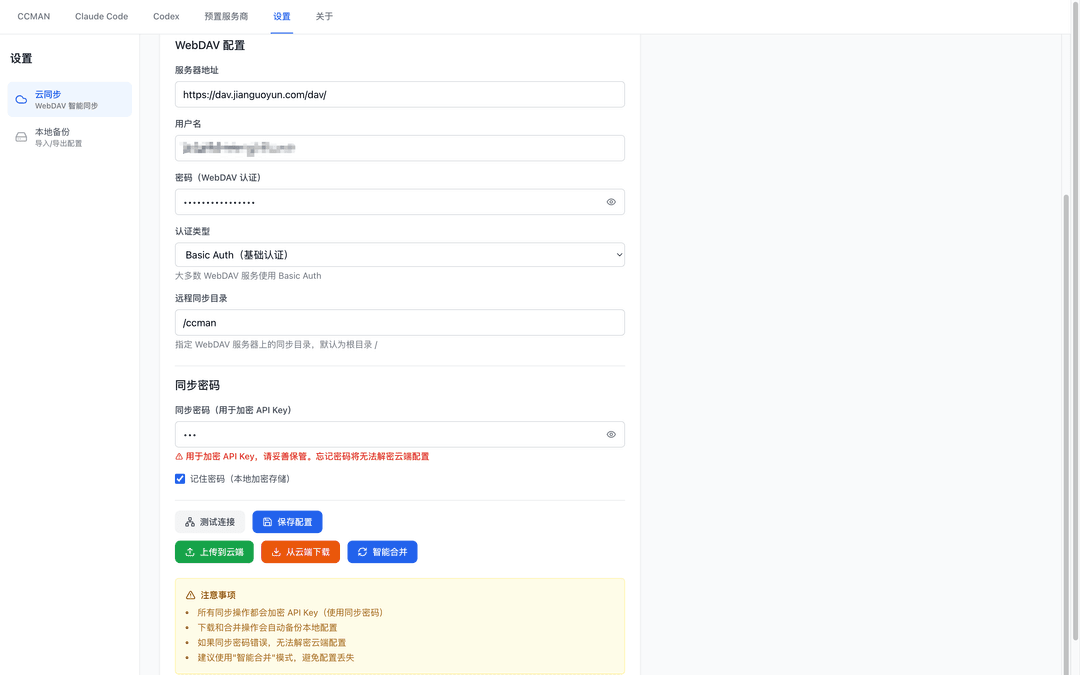
WebDAV 同步
ccman sync
ccman sync config
ccman sync test
ccman sync upload
ccman sync download
ccman sync merge
ccman sync status
WebDAV 同步目前覆盖 Codex / Claude / Gemini 配置,OpenCode 与 MCP 暂不参与同步。
非交互模式
ccman sync config \
  --webdav-url https://dav.example.com \
  --username alice \
  --password 'YOUR_WEBDAV_PASSWORD' \
  --remote-dir /ccman \
  --sync-password 'YOUR_SYNC_PASSWORD' \
  --remember-sync-password

ccman sync download --yes
ccman sync upload --yes
ccman sync merge
也可以用环境变量:
export CCMAN_WEBDAV_URL='https://dav.example.com'
export CCMAN_WEBDAV_USERNAME='alice'
export CCMAN_WEBDAV_PASSWORD='YOUR_WEBDAV_PASSWORD'
export CCMAN_WEBDAV_REMOTE_DIR='/ccman'
export CCMAN_SYNC_PASSWORD='YOUR_SYNC_PASSWORD'

ccman sync config
ccman sync download --yes
执行效果示例(WebDAV):
同步菜单
$ ccman sync

? 🔄 同步操作:
  ❯ ⚙️  配置 WebDAV 连接
    🔍 测试连接
    📤 上传到云端
    📥 从云端下载
    🔄 智能合并
    📊 查看同步状态
    ⬅️  返回上一级
config
$ ccman sync config

⚙️  配置 WebDAV 同步

? WebDAV 服务器地址: https://dav.example.com
? 用户名: alice
? WebDAV 密码: ********
? 认证类型: Basic Auth(基础认证)
? 远程同步目录: /ccman
? 同步密码(用于加密 API Key): ********
? 记住同步密码? (Y(y) / N(n))

✅ 配置保存成功

配置文件: ~/.ccman/config.json

? 是否立即测试连接? (Y(y) / N(n))

🔍 测试 WebDAV 连接...

✅ 连接成功

  URL: https://dav.example.com
  用户: alice
  远程目录: /ccman
  认证类型: Basic Auth
test
$ ccman sync test

🔍 测试 WebDAV 连接...

✅ 连接成功

  URL: https://dav.example.com
  用户: alice
  远程目录: /ccman
  认证类型: Basic Auth
upload
$ ccman sync upload

📤 上传配置到云端

配置信息:
  Codex 服务商: 2 个
  Claude 服务商: 1 个

⚠️  云端现有配置将被覆盖

? 确认上传? (Y(y) / N(n))

🔐 加密 API Key...
📤 上传到 WebDAV...

✅ 上传成功

远程文件:
  https://dav.example.com/ccman/.ccman/codex.json
  https://dav.example.com/ccman/.ccman/claude.json

💡 其他设备可通过 'ccman sync download' 获取配置
download
$ ccman sync download

📥 从云端下载配置

⚠️  将覆盖本地配置(自动备份)

? 确认下载? (Y(y) / N(n))

💾 备份本地配置...
📥 下载远程配置...
🔓 解密 API Key...

✅ 下载成功

本地备份:
  ~/.ccman/codex.json.backup.1768929300000
  ~/.ccman/claude.json.backup.1768929300000

💡 配置已更新,重新加载生效
merge
$ ccman sync merge

🔄 智能合并配置

分析本地和云端配置...

✅ 配置已智能合并并同步

备份:
  ~/.ccman/codex.json.backup.1768929480000
  ~/.ccman/claude.json.backup.1768929480000

合并规则:
  • 相同 ID:保留最新修改
  • 相同配置(URL+Key):保留最新修改
  • 不同配置:全部保留,自动处理 name 冲突
status
$ ccman sync status

📊 同步状态

WebDAV 配置:
  URL: https://dav.example.com
  用户: alice
  远程目录: /ccman
  认证: Basic Auth
  同步密码: ✓ 已保存

本地配置:
  Codex: 2 个服务商
  Claude: 1 个服务商
  最后同步: 2026/1/20 21:38:12

同步建议:
  💡 上传到云端: ccman sync upload
  💡 从云端下载: ccman sync download
  💡 智能合并: ccman sync merge
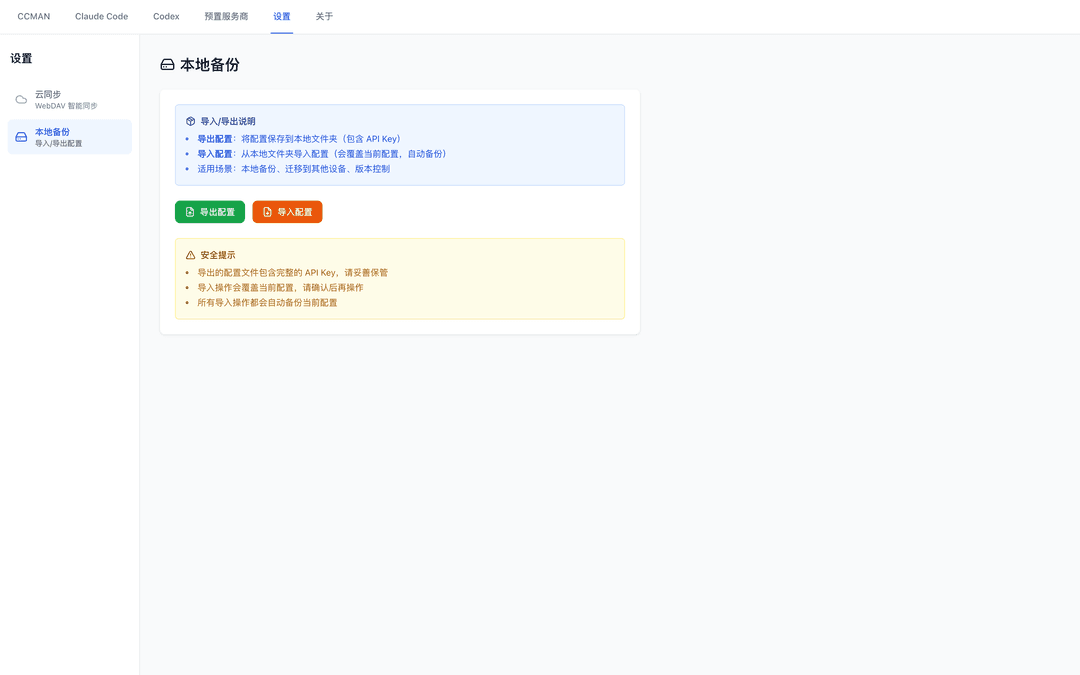
导入 / 导出
ccman export [dir]
ccman import [dir]
执行效果示例(导入 / 导出):
export
$ ccman export ~/backup/ccman

📦 导出配置

导出文件:
  codex.json  - Codex 配置
  claude.json - Claude 配置

目标目录: /Users/you/backup/ccman

⚠️  导出文件包含 API Key,请妥善保管

✅ 导出成功

已导出文件:
  ✓ codex.json
  ✓ claude.json

💡 导入命令: ccman import /Users/you/backup/ccman
import
$ ccman import ~/backup/ccman

📥 导入配置

⚠️  警告:导入将覆盖当前配置

源目录: /Users/you/backup/ccman

找到配置文件:
  ✓ codex.json
  ✓ claude.json

当前配置将被覆盖(自动备份)

? 确认导入? (Y(y) / N(n))

⚠️  最后确认:此操作将覆盖所有当前配置!

? 真的要继续吗? (Y(y) / N(n))

💾 备份当前配置...
📥 导入新配置...

✅ 导入成功

备份文件:
  /Users/you/.ccman/codex.json.backup.1768929720000
  /Users/you/.ccman/claude.json.backup.1768929720000

已导入文件:
  ✓ codex.json
  ✓ claude.json

💡 请使用 'ccman cx use' 或 'ccman cc use' 切换服务商
Claude 历史清理
ccman cc clean:analyze
ccman cc clean
执行效果示例(历史清理):
clean:analyze
$ ccman cc clean:analyze

📊 分析 ~/.claude.json

文件大小: 18.6 MB

项目统计:
  项目总数: 24
  历史记录总数: 862 条

历史记录最多的项目:
   96 条  .../work/projects/alpha
   88 条  .../work/projects/bravo
   77 条  .../work/projects/charlie
   65 条  .../work/projects/delta
   59 条  .../work/projects/echo

预计可节省空间:
  保守清理 (保留10条): 6.2 MB
  中等清理 (保留5条):  9.7 MB
  激进清理 (清空历史):  14.8 MB

💡 执行清理: ccman cc clean
clean
$ ccman cc clean

🧹 清理 ~/.claude.json

当前文件大小: 18.6 MB
项目数: 24, 历史记录: 862 条

? 选择清理方案:
  ❯ 保守清理 - 保留最近10条记录,清理缓存 (节省约 6.2 MB)
    中等清理 - 保留最近5条记录,清理缓存和统计 (节省约 9.7 MB)
    激进清理 - 清空历史记录,清理缓存和统计 (节省约 14.8 MB)
    自定义 - 自定义清理选项

? 确认执行清理?(会自动备份原文件) (Y(y) / N(n))

正在清理...

✅ 清理完成

清理前: 18.6 MB
清理后: 9.9 MB
节省空间: 8.7 MB (46.8%)

清理历史记录: 840 条
清理缓存: ✓

备份文件: /Users/you/.claude.json.backup-2026-01-20T21-45-00
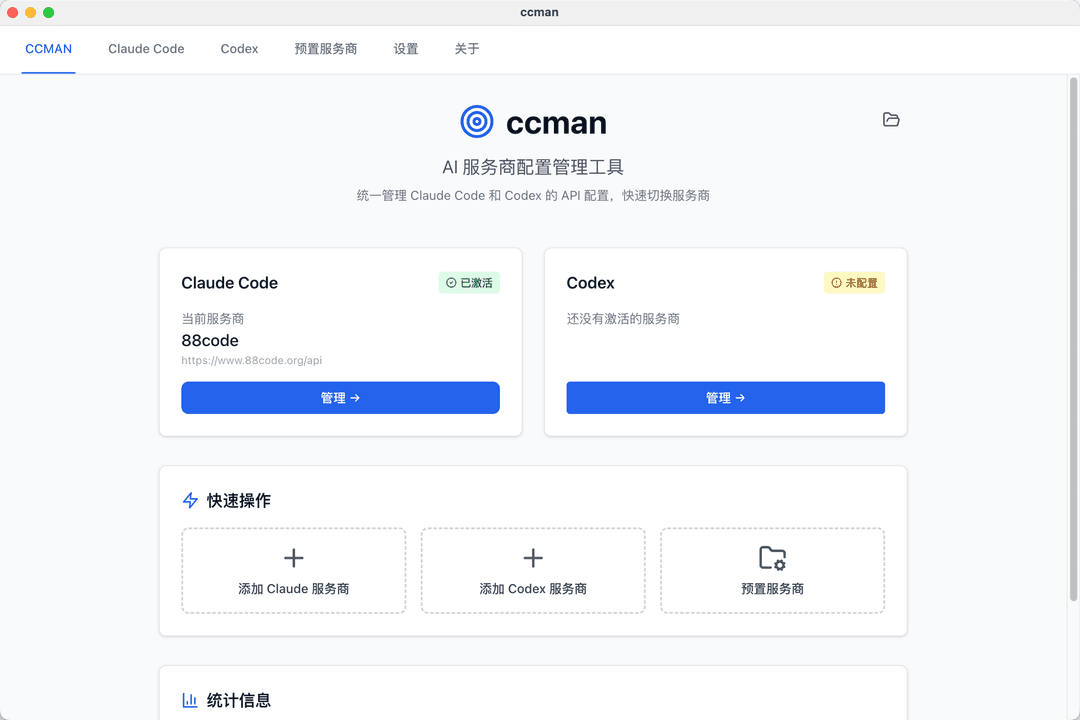
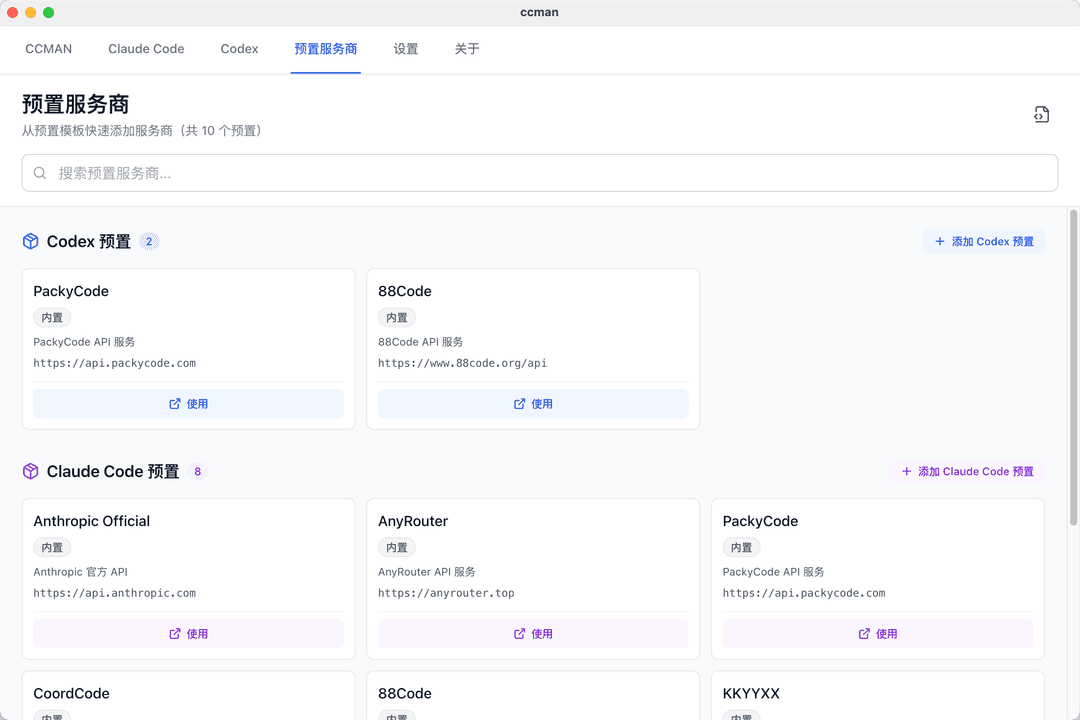
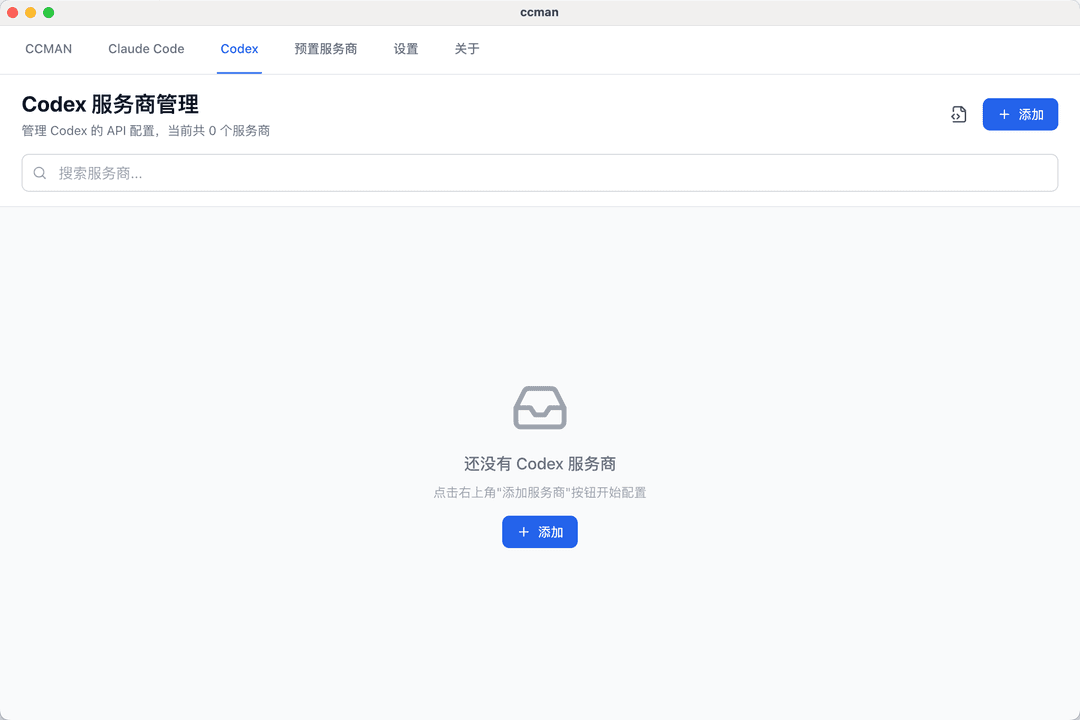
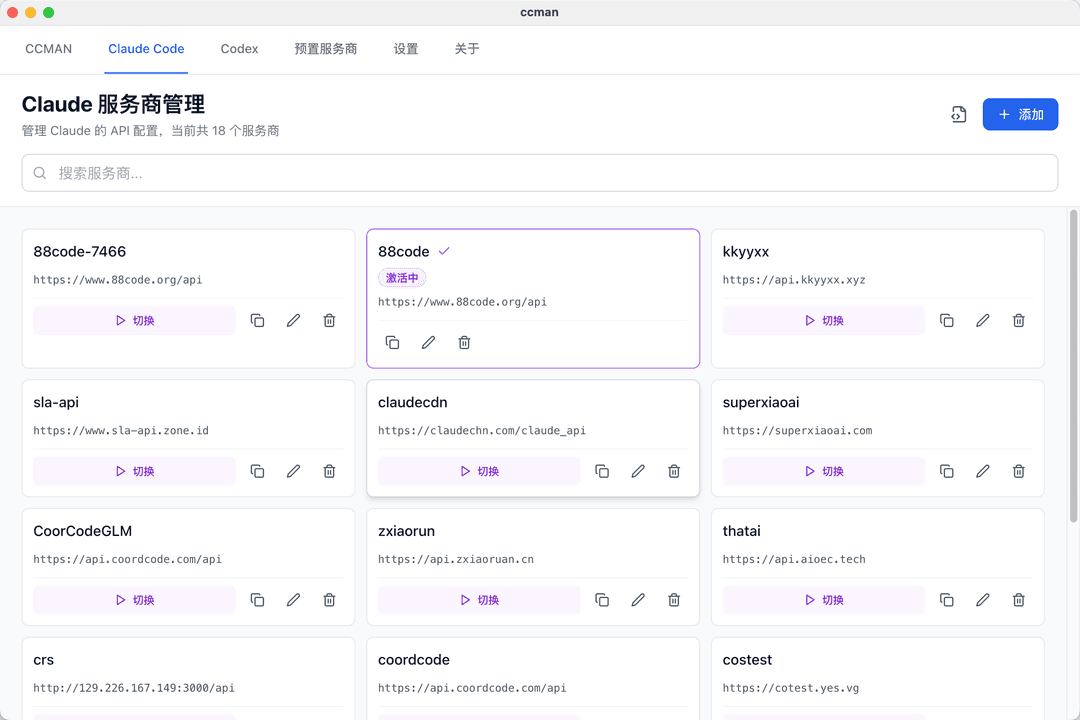
📸 界面截图
主界面
预置服务商
Codex 配置
Claude Code 配置
导入导出
WebDAV 同步
🧱 目录结构
packages/
  core/      # 核心逻辑(读写配置、预设、同步)
  cli/       # CLI 工具
  desktop/   # Desktop GUI (Electron)
  types/     # 共享类型定义
🛡️ 写入策略说明
- 常规管理命令(如
ccman cx/ccman cc/ccman gm/ccman oc/ccman openclaw):默认采用增量更新,尽量保留用户已有字段 - 快捷配置命令(如
ccman gmn/ccman gmn1/ccman gmncode):对所涉及工具执行覆盖式写入,确保快速落下已知可用配置 - Gemini 会写入
settings.json与.env - OpenCode 会写入
~/.config/opencode/opencode.json
🛠️ 开发与构建
pnpm install

# 启动 CLI(开发模式)
pnpm --filter ccman dev

# 启动 Desktop(可选)
pnpm --filter @ccman/desktop dev
构建全部包:
pnpm build
📄 License
MIT
// faq
What is ccman?
一个管理Claude Code + Codex API+GEMINI CLI + OPENCODE服务商配置的工具. It is open-source on GitHub.
Is ccman free to use?
ccman is open-source, so it is free to use.
What category does ccman belong to?
ccman is listed under devtools in the Claudeers registry of Claude-compatible tools.
// embed badge

[](https://claudeers.com/ccman)
// retro hit counter

[](https://claudeers.com/ccman)
// reviews
// guestbook
// related in Developer Tools
 🔓
🔓The agent harness performance optimization system. Skills, instincts, memory, security, and research-first development for Claude Code, Codex, Opencode, Curs…
 🔓
🔓Makes your AI agent think like the laziest senior dev in the room. The best code is the code you never wrote.
 🔓
🔓Use Garry Tan's exact Claude Code setup: 23 opinionated tools that serve as CEO, Designer, Eng Manager, Release Manager, Doc Engineer, and QA
 🔓
🔓AI coding assistant skill (Claude Code, Codex, OpenCode, Cursor, Gemini CLI, and more). Turn any folder of code, SQL schemas, R scripts, shell scripts, docs,…