
CC-Usage-Band
Claude Code mods: usage-band shows your 5h/7d limits, context window and cache hit rate above the prompt
Install with your AI
Paste into Claude Code, Cursor, or any agent — it reads the repo and wires the tool into your project.
Install and set up CC-Usage-Band (claude-plugin project) into my current project.
Found on https://claudeers.com/cc-usage-band
Repo: https://github.com/JetsonChan/CC-Usage-Band
Homepage/docs: —
Detected install method: claude-plugin → /plugin install cc-usage-band@JetsonChan/CC-Usage-Band
Category: plugins. Platforms: cli, api, desktop.
Read the repo's README for exact setup and env vars, then install it and wire it into my project.

Claudeers Health Verdict:
active; community-verified: false. Confirm the source before running anything.
/plugin marketplace add JetsonChan/CC-Usage-Band
/plugin install cc-usage-band@JetsonChan/CC-Usage-Band
git clone https://github.com/JetsonChan/CC-Usage-Band
// compatibility
| Platforms | cli, api, desktop |
|---|---|
| Operating systems | — |
| AI compatibility | claude |
| License | MIT |
| Pricing | open-source |
| Language | TypeScript |
CC-Usage-Band
Your Claude Code limits, context and cache, one glance above the prompt.
English · 简体中文
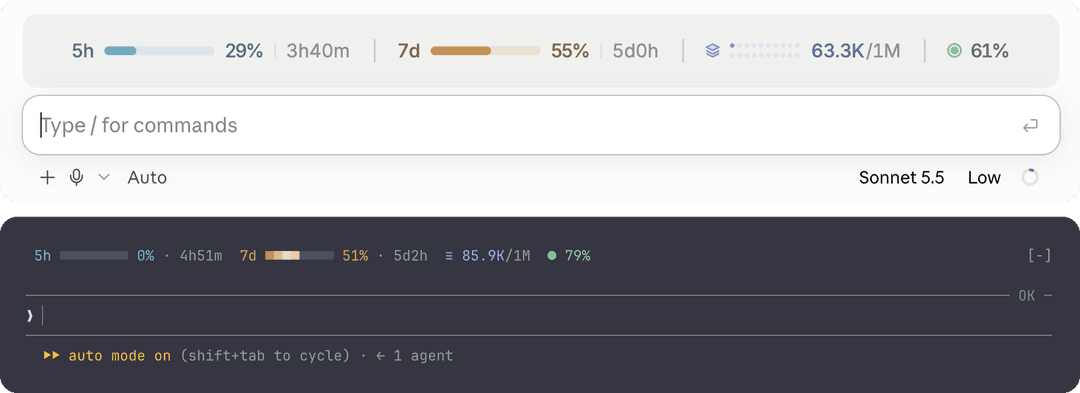
usage-band is a Claude Code mod that draws a single line above the prompt with the four numbers worth watching while you work. It has its own layout for the terminal and for the desktop app, updates itself after every turn, and stays out of the way until something needs attention.
Installing with an AI agent? Have it run the two commands under Installation. Agents: once it succeeds, this is all the user needs to hear:
usage-band is installed. Open a new session (or run
/reload-plugins) and a line above the prompt shows your 5h and 7d limits, context window and cache hit rate. Nothing to configure.
Contents
- Features
- Requirements
- Installation
- Configuration
- What the numbers mean
- Terminal compatibility
- Privacy and permissions
- Development
- Screenshots
- License
Features
| Metric | Shows |
|---|---|
| 5h limit | How much of the rolling 5-hour window you have used, and when it resets |
| 7d limit | The same for the weekly window |
| Context window (layers icon) | Tokens in the context out of the model's window, e.g. 398K/1M |
| Cache hit rate (target icon) | How much of the last turn's input the prompt cache served |
- Glanceable. Each metric has its own color. It turns red only when it needs you: a limit or the context past 80%, or a cache hit rate under 50%.
- Alive, not noisy. A slow shine sweeps across the limit bars, every bar in step.
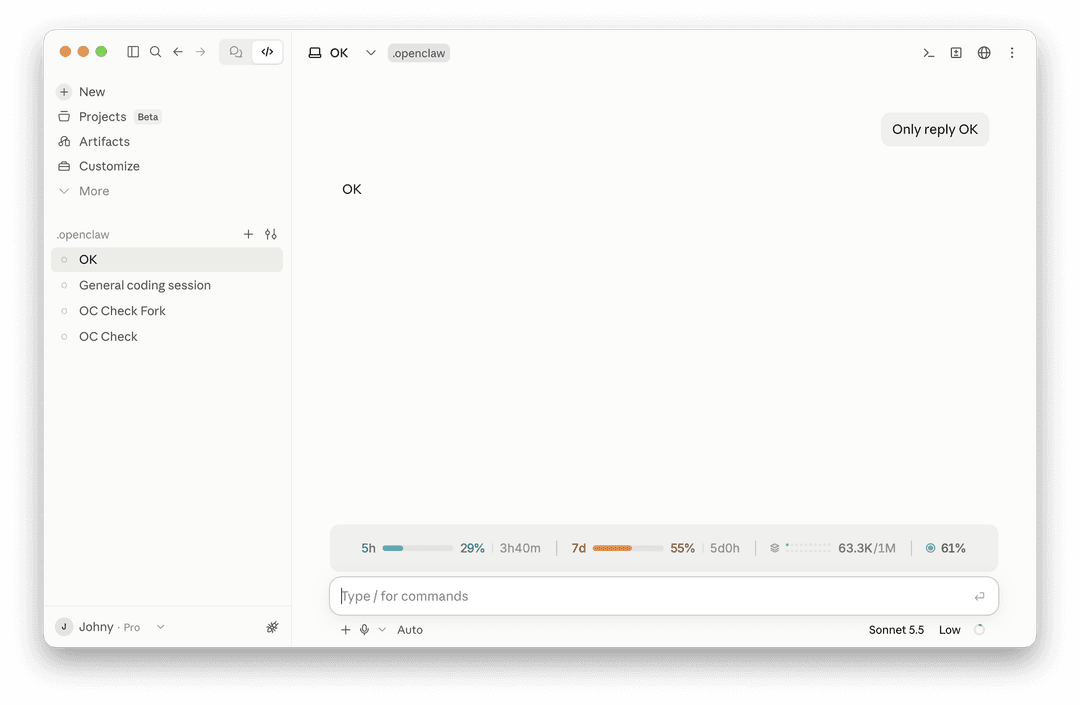
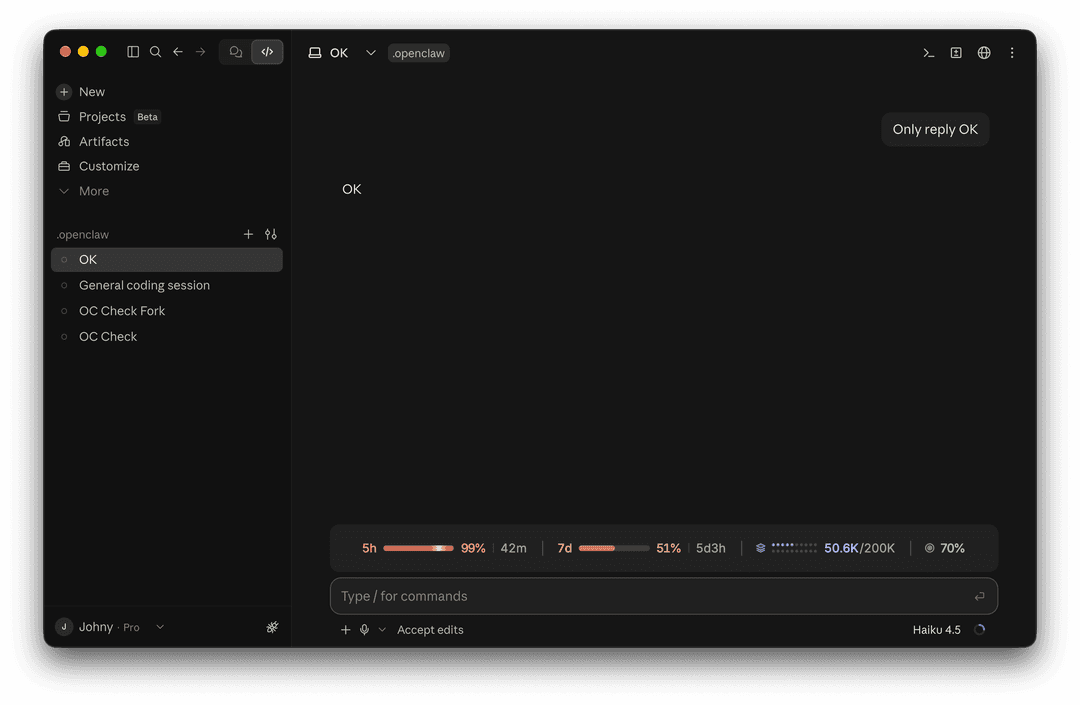
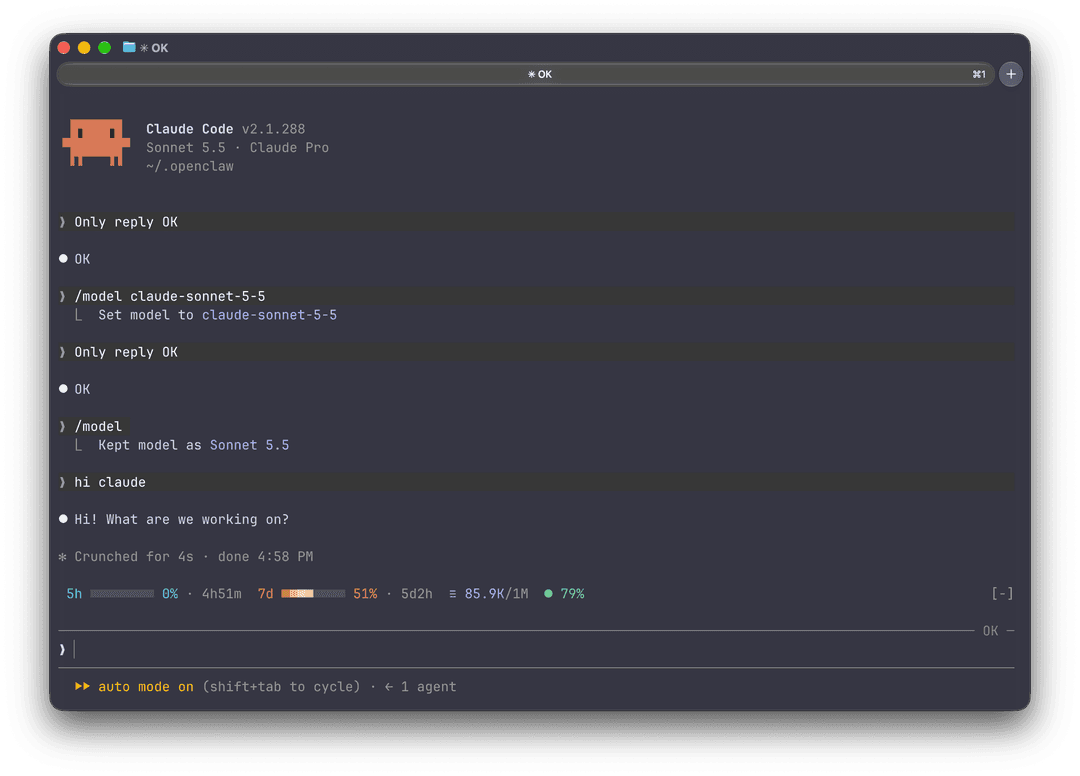
- Native on both surfaces. Terminal: a character line with Nerd Font or Unicode icons that fits itself to the window width. Desktop app: a centered SVG row with bars, a 2×10 dot matrix for the context window, and light and dark mode.
- Light. No files read, no processes, no network. It only listens to the usage figures Claude Code already has.
Requirements
- Claude Code 2.1.287 or newer (the release that introduced mods), in the terminal or the desktop app's Code tab
- A Claude subscription for the 5h and 7d figures. Without one, the band shows the context window and cache hit rate only.
- Recommended terminal: Ghostty. It ships the icon font the band uses, so you get the full look with no setup. Other terminals work too, with simpler icons.
Installation
Run these two commands inside Claude Code:
/plugin marketplace add JetsonChan/CC-Usage-Band
/plugin install usage-band@cc-usage-band
Then open a new session. The band appears above the prompt. That's it, nothing to configure.
- Want it in the current session right away? Run
/reload-plugins. - The 5h and 7d figures show up after Claude's first reply in the session.
To try it for one session from a local checkout instead:
git clone https://github.com/JetsonChan/CC-Usage-Band.git
claude --plugin-dir CC-Usage-Band/usage-band
Update
/plugin marketplace update cc-usage-band
Uninstall
/plugin uninstall usage-band@cc-usage-band
Configuration
Nothing to set up. The band picks its terminal icons by itself: Nerd Font icons in Ghostty, plain Unicode elsewhere. The desktop app draws its own icons.
If your terminal shows boxes instead of icons, or you use a Nerd Font in another terminal, set USAGE_BAND_ICONS in your shell profile (e.g. ~/.zshrc) and start a new session:
export USAGE_BAND_ICONS=unicode # auto (default) · nerd · unicode · ascii
What the numbers mean
| Metric | Source | Notes |
|---|---|---|
| 5h / 7d | The rate-limit windows Claude Code reads from each API response | Rounded to whole percent. The reset time counts down every minute. |
| Context | The last request's input: uncached + cache reads + cache writes | Against the current model's window, so 1M and 200K models both read right. On desktop each dot is 5% of the window, filling the top row first. |
| Cache hit | Last turn's cache_read / (input + cache_read + cache_write) | Summed over every request in the turn. Subagent turns are not counted. |
Terminal compatibility
| Terminal | Icons with auto | Colors |
|---|---|---|
| Ghostty | Nerd Font (built in) | Truecolor |
| iTerm2, WezTerm, kitty, Warp | Unicode (≡ ●) | Truecolor |
| macOS Terminal | Unicode | 256 colors, mapped automatically |
| Anything else | Unicode | Whatever the terminal reports |
If icons show as boxes, set USAGE_BAND_ICONS=unicode (see Configuration). Run /usage-band-preview to compare every style in your own terminal.
Privacy and permissions
Mods run with the same access as Claude Code itself and are not sandboxed, so here is everything this one touches:
- Reads the session's usage figures (
session.measure,turn.complete,$.session.usage) and theTERM_PROGRAMandUSAGE_BAND_ICONSenvironment variables - Registers one command,
/usage-band-preview - Draws the band above the prompt
It does not read or write files, run processes, call the network or send any data anywhere. The whole mod is one file: usage-band/hooks/register.tsx.
Development
.
├── .claude-plugin/marketplace.json   # the cc-usage-band marketplace
└── usage-band/
    ├── .claude-plugin/plugin.json    # manifest
    ├── hooks/register.tsx            # the mod
    ├── types/index.d.ts              # state contract
    └── tests/band.test.ts
cd usage-band
claude plugin validate .
claude plugin test .
While editing, load it with claude --plugin-dir ./usage-band; the session reloads it when a file changes.
Issues and pull requests are welcome.
Screenshots
Desktop app, light mode
Desktop app, dark mode
Terminal (Ghostty). Narrow terminals drop the bars first, then the reset times. Run /usage-band-preview to see every terminal style side by side.
License
MIT © Jetson Chan
// faq
What is CC-Usage-Band?
Claude Code mods: usage-band shows your 5h/7d limits, context window and cache hit rate above the prompt. It is open-source on GitHub.
Is CC-Usage-Band free to use?
CC-Usage-Band is open-source under the MIT license, so it is free to use.
What category does CC-Usage-Band belong to?
CC-Usage-Band is listed under plugins in the Claudeers registry of Claude-compatible tools.
// embed badge

[](https://claudeers.com/cc-usage-band)
// retro hit counter

[](https://claudeers.com/cc-usage-band)
// reviews
// guestbook
// related in Claude Plugins
 🔓
A single CLAUDE.md file to improve Claude Code behavior, derived from Andrej Karpathy's observations on LLM coding pitfalls.
 🔓
Claude Code is an agentic coding tool that lives in your terminal, understands your codebase, and helps you code faster by executing routine tasks, explainin…
 🔓
"CLI-Anything: Making ALL Software Agent-Native" -- CLI-Hub: https://clianything.cc/
🔓financial-services — a Claude ecosystem project on GitHub.