
cc-mods-enil
LINE inside Claude Code: the enil TUI as a Claude Code mod
Install with your AI
Paste into Claude Code, Cursor, or any agent — it reads the repo and wires the tool into your project.
Install and set up cc-mods-enil (claude-plugin project) into my current project.
Found on https://claudeers.com/cc-mods-enil
Repo: https://github.com/Unayung/cc-mods-enil
Homepage/docs: —
Detected install method: claude-plugin → /plugin install cc-mods-enil@Unayung/cc-mods-enil
Category: plugins. Platforms: cli, desktop, web.
Read the repo's README for exact setup and env vars, then install it and wire it into my project.

Claudeers Health Verdict:
active; community-verified: false. Confirm the source before running anything.
/plugin marketplace add Unayung/cc-mods-enil
/plugin install cc-mods-enil@Unayung/cc-mods-enil
git clone https://github.com/Unayung/cc-mods-enil
// compatibility
| Platforms | cli, desktop, web |
|---|---|
| Operating systems | — |
| AI compatibility | claude |
| License | MIT |
| Pricing | open-source |
| Language | TypeScript |
enil for Claude Code
在 Claude Code 裡用 LINE:enil 終端機 TUI 的移植,做成一個 Claude Code mod,開在 Claude Code 的面板裡。
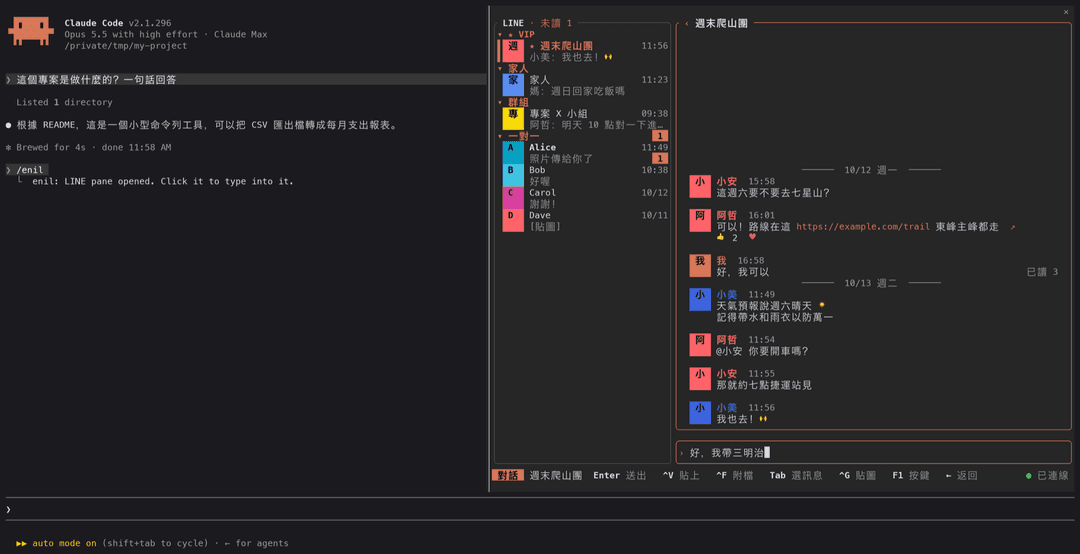
| 清單與預覽 | 選一則訊息按 r 回表情 |
|---|---|
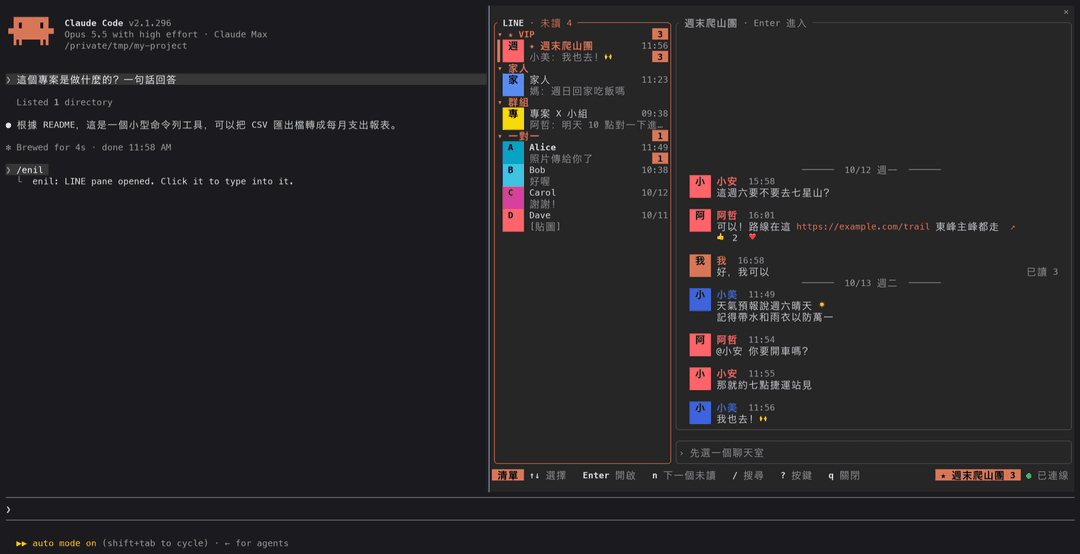 | 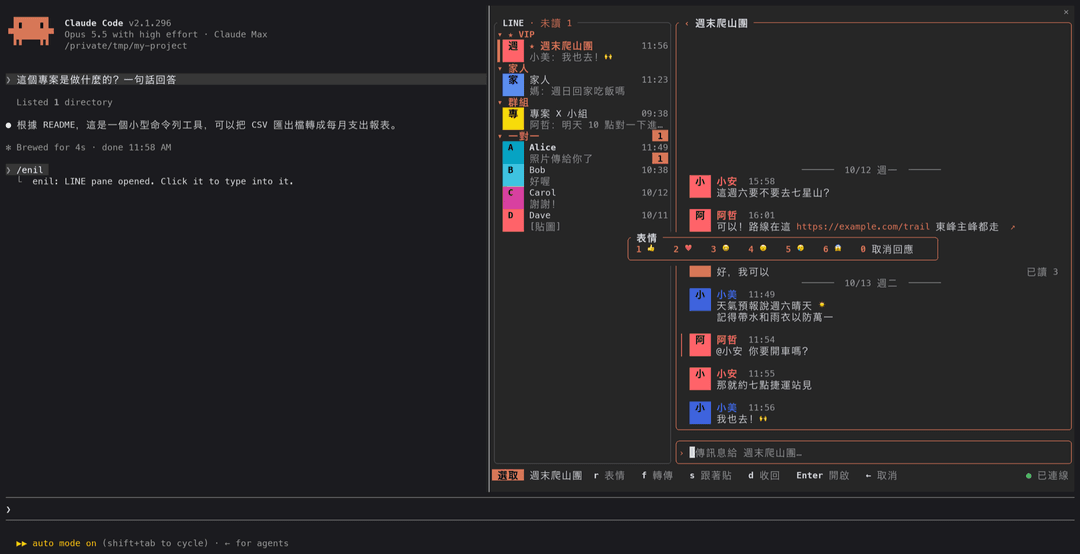 |
截圖是真的 Claude Code 跑這個 mod(/enil 打開的面板停在右邊),聊天內容是假的 daemon 給的範例資料。大頭貼在這裡是名字的第一個字;終端機支援 kitty 圖片協定時會是照片。
- 聊天室清單:分區(★ VIP → 自己的分類 → 群組 → 一對一)、未讀數、預覽,游標停下來右邊直接預覽
- 對話:日期線、發話者顏色、大頭貼、圖片、貼圖、已讀、@你、表情統計、連結 ↗
- 回覆、附檔(路徑補完、剪貼簿、拖檔案進來)、貼圖選單、@ 提及
- 選一則訊息後:表情回應、收回、轉傳、跟著貼、開附件(圖片在面板裡看、語音直接播)
- 搜尋全部聊天室與好友、搜尋訊息存檔(比 LINE 保留的兩週更早的也找得到)
- VIP、分類、收合狀態、最近的貼圖跟 TUI 共用同一份(存在 daemon 那台)
- 主題:跟著 Claude Code、目前的 Omarchy 主題、終端機;daemon 那台裝著的每一個 Omarchy 主題(官方的與自己裝的,例如 Tokyo Night、Catppuccin);15 個內建主題與 slk 格式的自訂主題
- 新訊息的 toast、桌面通知、狀態列的未讀數
需要什麼
這個 mod 不碰 LINE 協定。它是 enil daemon 的另一個消費者,跟 TUI 走同一個 unix socket。
| 東西 | 在哪台 | 用途 |
|---|---|---|
| Claude Code 2.1.296 以上 | 你用 Claude Code 的那台 | 跑這個 mod |
| enil daemon,已登入 | 本機或別台 | LINE 本身 |
| Node.js | daemon 那台 | mod 用 node -e 跟 socket 講話(daemon 本來就需要 node) |
ImageMagick(magick) | daemon 那台 | 大頭貼、照片、貼圖轉成 PNG;沒有的話顯示文字標示 |
| ssh 免密碼登入 | daemon 在別台時 | ssh <主機> true 不必輸入密碼就能連上 |
| kitty 圖片協定的終端機(kitty、Ghostty、WezTerm) | 你這台 | 畫圖;其他終端機顯示文字標示 |
daemon 只能在一台機器上跑(LINE 的登入會把另一台踢掉),所以常見的用法是 daemon 留在家裡那台,筆電上的 Claude Code 透過 ssh 用它。
安裝
claude plugin marketplace add Unayung/cc-mods-enil
claude plugin install enil@cc-mods-enil
或在 Claude Code 的提示字元輸入:
/plugin install enil --marketplace Unayung/cc-mods-enil
daemon 在別台的話,到 /config 把 Daemon host 設成那台的 ssh 主機名稱(~/.ssh/config 裡的 Host),然後開一個新的 session。
使用
/enil          打開 LINE 面板
/enil close    關掉
先用滑鼠點一下面板:Claude Code 的規矩是點過才把鍵盤交給面板。按鍵跟 TUI 一樣,面板裡按 ?(聊天時 F1)看完整說明。
| 鍵 | 做什麼 |
|---|---|
| ↑ ↓ j k、Enter | 選聊天室、打開 |
| ←(輸入框空的時候)、點標題的 ‹ | 回清單 |
| Tab ⇧Tab | 選一則訊息,再按 r 表情、d 收回(按兩次)、f 轉傳、s 跟著貼、Enter 開啟 |
| / 、Ctrl-S | 搜尋聊天室、搜尋訊息 |
| Ctrl-G、Ctrl-F、Ctrl-V | 貼圖、附檔、貼上剪貼簿 |
| n、Ctrl-N | 下一個有未讀的聊天室 |
| Ctrl-P、c 或 Ctrl-T | VIP、分類 |
| Ctrl-B、Ctrl-Y | 清單寬窄、換主題 |
| q | 關掉面板 |
讓 Claude 幫你擬訊息
跟 Claude 說「幫我跟小安說 週六改成八點集合」,它會用這個 mod 的 draft 工具:打開 LINE 面板、切到那個聊天室、把訊息放進輸入框。它不會送出,你看過、要改就改,在面板裡按 Enter 才送。
- 名字對到好幾個聊天室時,Claude 會列出來問你是哪一個
- 工具只會擬稿:送出一定是你在面板裡按的 Enter
設定
/config 裡的 enil:
| 選項 | 值 | 預設 |
|---|---|---|
| Daemon host | daemon 那台的 ssh 主機;空白=這台 | 空白 |
| Toast on new messages | all、vip、off | vip |
| Toast seconds | 秒數 | 6 |
| Desktop notification | all、vip、off(走你在 Claude Code 設定的通知管道;開好幾個 session 也只發一次) | vip |
| Unread in status line | statusline、off | statusline |
| Images | on、off | on |
跟 TUI 不一樣的地方
都是 Claude Code 面板的限制:
-
Esc 送不進面板。 Claude Code 把 Esc 留給自己(交還鍵盤),面板收不到。回清單用 ←(輸入框空的時候)或點標題的 ‹;浮層用
q或在空的輸入欄按 Backspace 關掉。 -
滑鼠滾輪不會捲訊息。 用 PgUp/PgDn。
-
沒有真的游標,畫成反白的一格,所以輸入法的候選字視窗不會跟著走。
-
有些 Ctrl 鍵可能被 Claude Code 先拿走(Ctrl-B、Ctrl-T、Ctrl-G、Ctrl-S 等,看你的按鍵設定)。
-
動態貼圖只顯示第一格。
-
在 tmux、zellij、herdr 這類多工器裡看不到圖:Claude Code 偵測不到圖片支援。如果多工器會把 kitty 圖片轉送出去,在
~/.claude/settings.json強制打開:{ "env": { "CLAUDE_CODE_FORCE_TERMINAL_IMAGES": "1" } }
怎麼運作
Mod 的環境沒有 socket,只能起行程。每個請求起一次 node -e <bridge> req(daemon 在別台時前面加 ssh),把一行 JSON 交給 daemon 的 unix socket,印出第一行回應就結束;推送用同一個 bridge 的 sub 模式常駐。ssh 用 ControlMaster 共用一條連線,睡眠醒來時卡住的共用連線 20 秒內判死、自動重開。
畫面是一個 Client(hooks/app.tsx),照 TUI 的做法畫進一張格子再交出去;圖片在 daemon 那台用 ImageMagick 轉成 PNG,由 hooks 模組疊在畫面算好的位置上。VIP、分類、收合、最近的貼圖直接讀寫 daemon state 目錄裡 TUI 用的那幾個檔。
這個 mod 不在 system prompt 裡加任何東西。它給模型一個工具 draft(見上面「讓 Claude 幫你擬訊息」),只能把字放進面板的輸入框,不能送出、也讀不到你的訊息;你的 LINE 訊息不會進到對話裡。
用之前要知道
跟 enil 本身一樣:這不是官方支援的用法,協定是逆向來的;訊息會真的送到真人手上。細節看 enil 的 README。
移除
claude plugin uninstall enil@cc-mods-enil
claude plugin marketplace remove cc-mods-enil
附件下載的快取在 ~/Library/Caches/enil-mod/(macOS)或 ~/.cache/enil-mod/(Linux)。
開發
claude --plugin-dir plugins/enil     # 從這份 checkout 載入
claude plugin validate plugins/enil
claude plugin test plugins/enil      # 測試用假的 daemon,不會連到 LINE
更新紀錄
0.3.1
- 主題選單不再重複:Omarchy 主題用原本的名字(Tokyo Night,不是「Omarchy · Tokyo Night」);內建主題跟 Omarchy 主題是同一個的(Tokyo Night、Catppuccin Mocha、Gruvbox Dark…)只留 Omarchy 那份,全部照字母排。之前存著的選擇會換成對應的那個。
0.3.0
- Omarchy 主題:Ctrl-Y 的主題選單列出 daemon 那台裝著的每一個 Omarchy 主題(
~/.local/share/omarchy/themes與~/.config/omarchy/themes,同名時自己裝的優先),不只目前用的那個。 - 修:新版 Omarchy 主題的
colors.toml用顏色名稱(red、dark_foreground…)而不是color0–color15,之前次要文字、警告、錯誤的顏色都讀不到。兩種寫法現在都認。 - 主題的選取色太亮、上面的字會看不見時,改用背景調亮一點。
0.2.0
- 讓 Claude 幫你擬訊息:新的
draft工具。跟 Claude 說「幫我跟某某說…」,它會打開 LINE 面板、切到那個聊天室、把字放進輸入框,由你按 Enter 送出(Claude 自己不會送)。名字對到好幾個人時會先問你是哪一個。 - 修:面板剛打開、還沒按過任何鍵時,每次重畫都會把畫面狀態重設(例如剛放進去的擬稿會不見)。
- 修:打字時狀態列還一直顯示「點一下面板開始操作」。
- 修:空的輸入框,游標蓋掉提示字的第一個字。
0.1.0
- 第一版:enil TUI 的清單、對話、回覆、貼圖、搜尋、VIP、分類、主題,在 Claude Code 面板裡。
License
MIT
// faq
What is cc-mods-enil?
LINE inside Claude Code: the enil TUI as a Claude Code mod. It is open-source on GitHub.
Is cc-mods-enil free to use?
cc-mods-enil is open-source under the MIT license, so it is free to use.
What category does cc-mods-enil belong to?
cc-mods-enil is listed under plugins in the Claudeers registry of Claude-compatible tools.
// embed badge

[](https://claudeers.com/cc-mods-enil)
// retro hit counter

[](https://claudeers.com/cc-mods-enil)
// reviews
// guestbook
// related in Claude Plugins
 🔓
A single CLAUDE.md file to improve Claude Code behavior, derived from Andrej Karpathy's observations on LLM coding pitfalls.
 🔓
Claude Code is an agentic coding tool that lives in your terminal, understands your codebase, and helps you code faster by executing routine tasks, explainin…
 🔓
"CLI-Anything: Making ALL Software Agent-Native" -- CLI-Hub: https://clianything.cc/
🔓financial-services — a Claude ecosystem project on GitHub.