
cc-master
Turn any Code Harness session into a long-horizon master orchestrator — pick the right dynamic-workflow paradigm and keep the main thread productively advanc…
Install with your AI
Paste into Claude Code, Cursor, or any agent — it reads the repo and wires the tool into your project.
Install and set up cc-master (claude-plugin project) into my current project.
Found on https://claudeers.com/cc-master
Repo: https://github.com/nemori-ai/cc-master
Homepage/docs: —
Detected install method: claude-plugin → /plugin install cc-master@nemori-ai/cc-master
Category: plugins. Platforms: cli, api, web.
Read the repo's README for exact setup and env vars, then install it and wire it into my project.

Claudeers Health Verdict:
slowing; community-verified: false. Confirm the source before running anything.
/plugin marketplace add nemori-ai/cc-master
/plugin install cc-master@nemori-ai/cc-master
git clone https://github.com/nemori-ai/cc-master
// compatibility
| Platforms | cli, api, web |
|---|---|
| Operating systems | — |
| AI compatibility | claude |
| License | NOASSERTION |
| Pricing | open-source |
| Language | TypeScript |
cc-master
中文见 README_zh.md。
License: source-available for noncommercial use only. The public license does not permit reselling this project or using it as a company product or commercial service. See Licensing.
Give it a big goal — and a budget. Then go do something else.
cc-master turns a supported coding-agent session into a project lead for long-running work. You bring the idea and make the handful of calls that truly need you; it helps break the work down, run independent pieces in parallel, track progress and quota, and verify the result against an explicit goal. The board survives context resets and session handoffs, so the work can continue without relying on one conversation's memory.
And there's real machinery behind the warmth: it can simulate the schedule thousands of times to estimate when you may ship and which step is most likely to slip; it surfaces machine-wide cached quota posture so the orchestrator can adjust pace with explicit evidence; and Claude Code can use an authorized account pool when that host supports it. Codex, Cursor, and kimi-code never auto-switch accounts. These are decision aids and operational guardrails, not a guarantee that a provider limit, estimate, or delivery date will never surprise you.
You stop being the one who has to watch everything.
But make no mistake — this is not "make a wish and the AI does it all." Taste, design, direction — the calls only you can make stay yours; what it takes off your plate is just the breakdown, scheduling, babysitting, and accounting that would otherwise bury you. It even teaches the AI to stop and ask you when it should — cc-master's skills are full of philosophy and method for when to pull the human back in, handing judgment back to you rather than making the call for you. At bottom it does one thing: in the age of AI-assisted coding, it reallocates your attention to where it's actually worth spending.
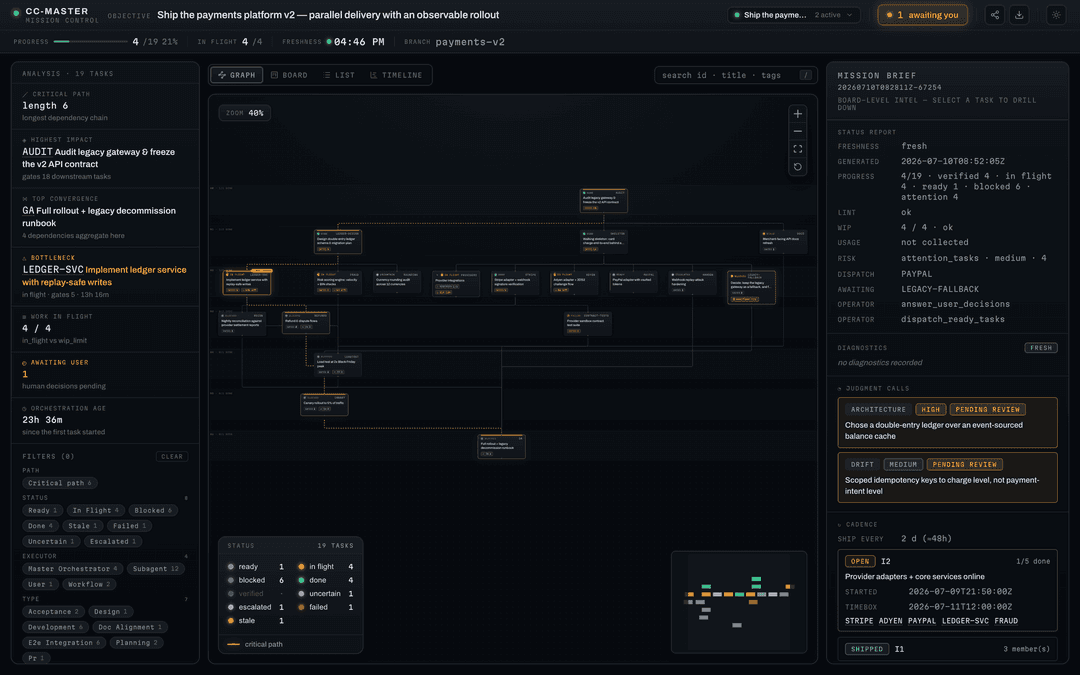
/cc-master:as-master-orchestrator turn my idea into something that works
One line starts a durable plan. The orchestrator can keep several workers moving and return with a decision package when judgment or new authority is genuinely yours.
That first line is treated as source evidence, not pasted in as the execution goal. Before it builds the task graph, the orchestrator rewrites the request into a short, testable Goal Contract and asks only about ambiguities that would materially change the outcome, scope, acceptance, constraints, or authority. For a complex or long-lived goal, it stores the full context as a versioned Goal Brief linked from the board and checks its hash on resume. If the goal changes, it creates a new revision and re-checks the plan instead of quietly drifting.
Is this you?
- 🚀 You have ideas, but you're not an engineer. You can say what you want — but a thing that takes days and pulls in a dozen threads, you can't babysit it to the finish. What you're missing is a reliable project lead. That's what this is.
- 🔧 You're an engineer, but you don't want to be "the manager." You'd rather solve the hard technical problem than break work down, schedule it, do the accounting, and ride herd on a pile of tasks. It takes the management off your plate so you can stay in your craft.
- 🧭 You lead a team. You want to be ten of yourself. It carries the drudge-work scheduling; you set direction and make the big calls.
Three different people, one missing piece: a mind that can manage the thing to the finish — and do the math.
What it actually does for you
Hand a big job to a plain AI and you'll find out fast: it loses the plot mid-conversation and forgets what it was doing; it can only do one thing at a time and you have to spoon-feed it; it dives in head-first and might burn your whole month's quota in one go; and it either pesters you every three sentences or quietly goes off the rails — then tells you it's "basically done" when it isn't.
cc-master takes all of that off your hands, like a project lead who can actually do the math:
- 🧩 Break it down, put a crew on it. It splits your big goal into ordered steps and runs the ones that can go at once in parallel. And it doesn't split blindly — it works out which chain decides when the whole thing finishes (the critical path) and leans on that.
- 🌐 Use the whole machine as a worker pool. The orchestrator is not confined to its origin harness: it can inventory installed Claude Code, Codex, Cursor IDE, Cursor Agent, and kimi-code surfaces, inspect a target CLI's real help, and explicitly run a session-bound worker through
ccm worker. The origin session still owns the decision and independently verifies the result. - 🔮 It tells you when you'll finish before it starts. It runs thousands of simulations and gives you odds — "50% chance Wednesday, 95% chance Friday" — and flags which step is most likely to slip. That used to be a project manager with a spreadsheet for an afternoon. Now it's one command, milliseconds.
- 💰 It makes budget decisions visible. Cached machine-wide posture and selected-target usage advice help it choose a pace; missing, stale, or unknown signals stay unknown. If spending authority or headroom is unclear, it should slow down or ask rather than invent certainty.
- ⚡ It manages limits instead of ignoring them. On Claude Code, account switching is decided by cc-master itself under an existing policy, or run on your explicit instruction — never something the orchestrator grants itself. Codex paces against its 7-day hard window (rolling 24 hours is advisory); Cursor uses its subscription billing period; and ccm reads kimi-code's managed rolling 5-hour and 7-day usage windows. Codex, Cursor, and kimi-code do not auto-switch accounts.
- 🧠 It keeps a durable ledger. The board records the goal revision, tasks, decisions, and registered runtime agents across context resets and explicit session handoffs. A resume still reconciles live evidence; durability does not mean every child process survives the handoff.
- 🙋 It only asks you about the things that matter. Small calls it makes itself; only when something genuinely needs you does it stop, lay out the context, and wait for your word.
- 🏁 It has an explicit completion gate. Before it wraps, it checks the current Goal Contract revision point by point: is every piece actually done, did it ask you everything it should have, and did anything quietly die in the background? A terminal worker is evidence, not automatic task acceptance.
The intended experience is one clear idea at the start, then a small number of well-framed calls along the way. Real work can still surface failures, unavailable providers, or decisions that need you.
Watch it work, start to finish
You drop one line: "Translate my app into 6 languages." Then you go to sleep.
- It figures out the order first: the strings have to be pulled out and the framework wired up before any language can be translated. So it does the groundwork, then fans out all 6 languages at once.
- Groundwork gets the better (pricier, steadier) AI; the translations get the cheap one — saving money without cutting quality. It does the math wherever the math matters.
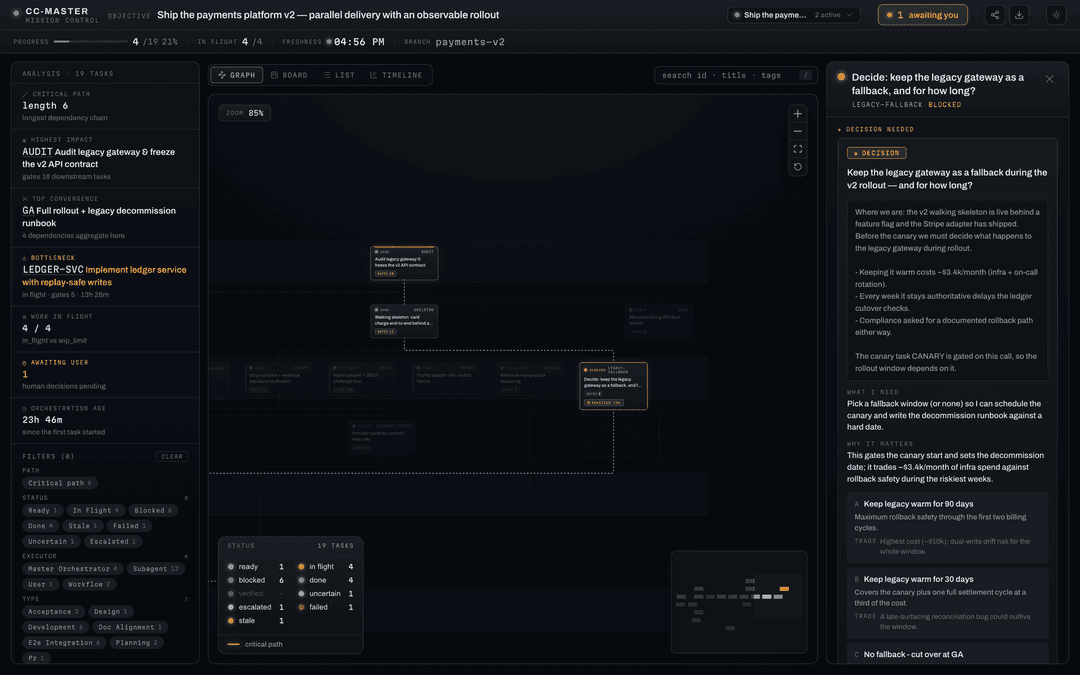
- Halfway through, a question only you can answer comes up: "Product terms — translate them, or keep them in English?" It notes it for you and moves on, while every other language keeps going.
- As it runs, quota gets tight — cached posture and selected-target advice tell it to slow down; on Claude Code an already authorized account policy may offer another account, while Codex, Cursor, and kimi-code stay on their current login.
- When you come back, the board shows what finished, what was independently checked, and whether your product-term decision is still blocking acceptance.
Start to finish, you said one sentence and made one decision.
When not to use it
A one-or-two-line fix you can knock out in ten minutes? Just do it — don't bring in the "project lead," that's overkill and it'll be slower. This is built for the kind of goal that's too big for one person to track, takes days, and runs many threads at once. The bigger, messier, and longer the job, the more it's worth.
What it actually is (for the curious)
cc-master is a multi-agent-harness plugin system built from three things: a thin layer of orchestration logic (teaching the AI how to be the lead), an engine that does operations-research forecasting and pacing, and harness adapters that project that logic into the command, prompt, skill, hook, and settings surfaces each agent host actually supports.
The source follows a paragoge-style plugin/src -> plugin/dist/<host> model: shared runtime skills live in canonical source, hooks are modeled as host-independent product contracts with host-native implementations, and each harness gets its own adapter artifact. The plugin version line is shared; release assets are split by harness, for example cc-master-plugin-claude-code-<version>.zip, cc-master-plugin-codex-<version>.zip, cc-master-plugin-cursor-<version>.zip, and cc-master-plugin-kimi-code-<version>.zip.
We keep a clear line between "what it does today" and "what we're still building." Current adapters include Claude Code, Codex, Cursor, and kimi-code, while the global ccm process boundary exposes the same machine-wide inventory, cached quota posture, model-policy view, raw worker wrapper, and Agent Registry to every origin. The kimi-code adapter ships the distributed skills, host-native namespaced commands, and core orchestration hooks; ccm can read its managed rolling usage windows, but the adapter has no custom subagent roles, Workflow equivalent, batch-boundary event, account pool, external statusline, or mid-flight pacing hook. Cursor IDE plugin and Cursor Agent CLI are separate surfaces: installing or authenticating one does not prove the other is available. Board and registered-agent status live in ccm and its read-only web viewer. The current product boundary lives in the Feature Manual; the cross-harness capability model is the longitudinal maturity and target-design ledger — the README deliberately reproduces neither.
The current cross-harness worker is intentionally narrow: ccm worker help resolves the installed target CLI's real agent-command help; ccm worker run is the raw, zero-board-side-effect transport; and ccm worker dispatch wraps one local session-bound run with Agent Registry create/bind/link/terminal bookkeeping so the actor can appear in the Web Viewer. Dispatch is synchronous, so the caller still owns the outer background handle, and it never marks the board task accepted. This is not automatic routing or fallback, a normalized provider API, a durable daemon, or a safety certification. Likewise, ccm agent remains the observability registry and does not itself spawn workers. Model-policy entries are candidates and advisories until live qualification and admission evidence says otherwise.
For contributors: edit plugin/src, not plugin/dist. Skills use SAP (canonical/ plus adapters/<host>/strategy.yaml); hooks use PHIP (_manifest/, _hosts/<host>/, and implementations/<host>/). Regenerate adapters with:
bash scripts/sync-plugin-dist.sh                  # Claude Code adapter
bash scripts/sync-plugin-dist.sh --host codex     # Codex adapter
bash scripts/sync-plugin-dist.sh --host cursor    # Cursor adapter
bash scripts/sync-plugin-dist.sh --host kimi-code # kimi-code adapter
Before pushing source changes that affect the plugin, install the repo hook once with bash scripts/install-git-hooks.sh. It runs bash scripts/check-plugin-dist-sync.sh before every push and blocks if plugin/dist needs to be regenerated and committed.
Project meta-skills live in .claude/skills. Codex discovers repo skills from .agents/skills, so keep the Codex projection in sync with:
bash scripts/sync-codex-skills.sh
Harness compatibility notes live in design_docs/harnesses/. That directory is the local, corrected source for the paragoge-derived adapter model plus the current Claude Code, Codex, Cursor, and kimi-code facts.
Get started
One command installs both pieces — the ccm engine and the cc-master plugin. The two version independently (ADR-022): the plugin ships under bare vX.Y.Z tags, ccm under ccm-vX.Y.Z tags, on separate release tracks. The installer resolves the latest of each line:
# install the latest of each line (plugin + ccm)
curl -fsSL https://raw.githubusercontent.com/nemori-ai/cc-master/main/install.sh | bash

# …or pin a specific version of either line — each flag is optional and
# independent; whichever you omit resolves to the latest of that line:
curl -fsSL https://raw.githubusercontent.com/nemori-ai/cc-master/main/install.sh | bash -s -- \
  --ccm-version ccm-v0.23.0 --plugin-version v0.22.0

# pin just one line, leave the other on latest (e.g. hold ccm, take latest plugin):
curl -fsSL https://raw.githubusercontent.com/nemori-ai/cc-master/main/install.sh | bash -s -- --ccm-version ccm-v0.23.0

# target a harness explicitly, or fan out to every installed supported harness:
curl -fsSL https://raw.githubusercontent.com/nemori-ai/cc-master/main/install.sh | bash -s -- --harness claude-code
curl -fsSL https://raw.githubusercontent.com/nemori-ai/cc-master/main/install.sh | bash -s -- --harness cursor
curl -fsSL https://raw.githubusercontent.com/nemori-ai/cc-master/main/install.sh | bash -s -- --harness kimi-code
curl -fsSL https://raw.githubusercontent.com/nemori-ai/cc-master/main/install.sh | bash -s -- --all-harnesses
It detects your OS and architecture, downloads the right ccm binary and puts it on your PATH, then detects installed harnesses and distributes the matching adapter package to each supported target. Before installing either downloaded asset, it fetches that release's SHA256SUMS and verifies the asset by exact filename; a missing manifest, missing entry, or digest mismatch stops the install. Claude Code installation uses the claude CLI (≥ v2.1.195). Codex installation registers a local Codex marketplace/plugin entry for this local adapter; command entrypoints are exposed as skills (for example $cc-master-as-master-orchestrator ...). Cursor installation publishes the adapter at ~/.cursor/plugins/local/cc-master through the local plugin surface. kimi-code installation copies the adapter into $KIMI_CODE_HOME/plugins/managed/cc-master/ and registers it in installed.json (a managed-dir install; no TUI step needed). The installer requires Node.js 22 or newer in every mode, including pinned and CC_MASTER_INSTALL_LOCAL offline installs, plus unzip and a SHA256 tool (sha256sum, shasum, or openssl); online installs also need curl or wget. Each harness adapter may additionally need that harness's own CLI/config directory to be present. The ccm engine is a hard prerequisite — without it the plugin won't start an orchestration — which is exactly why the installer puts it in place first.
Checksum failures are treated as release integrity failures, not as prompts to bypass verification. Retry the install; if it still fails, inspect the GitHub release assets before proceeding. CC_MASTER_INSTALL_LOCAL remains offline: it verifies <local-dir>/SHA256SUMS when present, otherwise it explicitly trusts the local directory without contacting GitHub.
Rather do it by hand, or run from source? Clone the repo, generate the adapter you want with
bash scripts/sync-plugin-dist.sh --host <harness>, then install that adapter through the harness-native route. Claude Code can point atplugin/dist/claude-code; Codex should be registered through a local marketplace that points atplugin/dist/codex(with only skill/hooks packaged there); Cursor can copyplugin/dist/cursorto~/.cursor/plugins/local/cc-master; kimi-code can copyplugin/dist/kimi-codeto$KIMI_CODE_HOME/plugins/managed/cc-masterand add acc-masterentry toinstalled.json. You'll still needccmon your PATH — downloadccm-<os>-<arch>from the latestccm-v*release's Assets, rename it toccm,chmod +x, and drop it in~/.local/bin.
Moved your harness config? CLAUDE_CONFIG_DIR still controls Claude Code's own settings, credentials, and transcript project files; CODEX_HOME controls Codex's home. cc-master's runtime state is harness-neutral: boards, versioned Goal Briefs, account registry, file vault, and quota sidecar live under ${CC_MASTER_HOME:-$HOME/.cc_master} unless you pass --home.
Cursor install
curl -fsSL https://raw.githubusercontent.com/nemori-ai/cc-master/main/install.sh | bash -s -- --harness cursor
ccm is still a hard prerequisite (the installer places it first). The Cursor IDE adapter lands at ~/.cursor/plugins/local/cc-master; reopen an IDE Agent session after install so hooks/rules pick up. The separately installed cursor-agent CLI is a distinct headless worker and quota surface. Both use a subscription billing-period signal for pacing, but neither may infer the other's installation, login, entitlement, or quota, and neither auto-switches accounts.
Status line (automatic · Claude Code)
On Claude Code, cc-master ships its own status line — a context progress bar plus your 5h / 7d quota usage, color-coded by how full each is. The first time you run any ccm command, cc-master configures it for you automatically (it writes statusLine.command in your global settings.json). The same status line also feeds the 5h / 7d quota signal that powers forecasting and pacing on that host.
Heads-up: this overwrites your existing statusLine (your original is backed up first). To put yours back: ccm statusline uninstall (restores your original and stops cc-master from re-installing). To disable the auto-install entirely, set CC_MASTER_NO_AUTOINSTALL=1.
Cursor does not use this 5h/7d status line for pacing — it reads the dashboard billing-period window via ccm usage advise under CC_MASTER_HARNESS=cursor.
Now hand it a goal through your harness's entrypoint:
# Claude Code
/cc-master:as-master-orchestrator <your goal>

# Codex
$cc-master-as-master-orchestrator <your goal>

# Cursor (Agent chat slash command)
/as-master-orchestrator <your goal>

# kimi-code (namespaced plugin command)
cc-master:as-master-orchestrator <your goal>
Everyday use
The handful of commands you'll actually type. The in-session entrypoint is harness-specific; ccm … always runs in your terminal.
- Start / resume — Claude Code:
/cc-master:as-master-orchestrator <goal>or/cc-master:as-master-orchestrator --resume; Codex:$cc-master-as-master-orchestrator <goal>or$cc-master-as-master-orchestrator --resume; Cursor:/as-master-orchestrator <goal>or/as-master-orchestrator --resume(reopen the Agent session after install so hooks/rules load); kimi-code:cc-master:as-master-orchestrator <goal>orcc-master:as-master-orchestrator --resume. Fresh runs frame and check a Goal Contract before creating tasks; resume checks the current revision and Goal Brief before dispatch. - Discover the machine —
ccm harness list --machine-wide --jsonlists supported harnesses and their separate execution surfaces.ccm quota status --machine-wide --jsonreads their cached quota posture without refreshing providers. - Choose a model role —
ccm model-policy show --task <task-taxonomy> --jsonpresents the shared O / T1 / T2 / T3 role view and evidence; candidate entries are advisory, not certified or automatically selected. - Inspect / run a worker —
ccm worker help --harness <codex|claude-code|cursor-agent|kimi-code>reads the installed target's real agent-command help. Useccm worker runfor raw zero-board-side-effect transport; useccm worker dispatch --board … --task … --idempotency-key …when the actor must be registered, linked, and visible while it runs. Both forward target-native arguments; ccm does not invent provider flags or a fallback chain. - See registered workers —
ccm agent list --jsonshows the board's runtime roster and lifecycle evidence;ccm web-viewer opencan tail the transcript evidence that a registered harness exposes. Registration and terminal state improve observability; they never mark the parent task accepted. - Status —
ccm status-report show. Generates the shared JSON-backed board status report for CLI and the web viewer. - View —
ccm web-viewer open. Opens the live plan as a read-only graph in your browser; lifecycle commands areccm web-viewer start/open/status/stop/restart(OS-assigned port by default; survivesccm upgradewhen the service was already wanted). - Discuss — Claude Code:
/cc-master:discuss <decision>; Cursor:/discuss <decision>; Codex:$cc-master-discuss <decision>; kimi-code:cc-master:discuss <decision>. Use it when a decision is waiting on you. - Bulk discuss — Claude Code:
/cc-master:bulk-discuss; Cursor:/bulk-discuss; Codex:$cc-master-bulk-discuss; kimi-code:cc-master:bulk-discuss. Walks every decision waiting on you in one sitting, inside the orchestrator's own session: each one explained in plain language (no bare node ids), with option cards to pick from. Your answers are collected, summarised for a final look, then reconciled into the board in a single pass.--list-onlyjust shows how many are queued. - Stop — Claude Code:
/cc-master:stop; Codex:$cc-master-stop; Cursor:/cc-master-stop(Cursor's built-in/stopis unrelated); kimi-code:cc-master:stop(namespaced, so it does not collide with any built-in). Wraps up and archives the board; you can resume later. - Handoff — Claude Code:
/cc-master:handoff-to-new-session; Codex:$cc-master-handoff-to-new-session; Cursor:/handoff-to-new-session; kimi-code:cc-master:handoff-to-new-session. Use it before moving the run to a fresh session. - Retro — Claude Code:
/cc-master:retro; Codex:$cc-master-retro; Cursor:/retro; kimi-code:cc-master:retro. Read-only retrospective on an in-progress or archived board — writes a lessons-learned document into the project itself (not the board, not GitHub). - Distill — Claude Code:
/cc-master:distill <retro-path...>; Codex:$cc-master-distill <retro-path...>; Cursor:/distill <retro-path...>; kimi-code:cc-master:distill <retro-path...>. Turns a retro's candidate lessons into real project assets (discipline-doc note, skill, workflow, or subagent) — always gated by a single user-approved plan and collected via a feature-branch PR (or a draft directory for non-git projects). Never touches the board orccm. ccm account add|list|switch <email>— on Claude Code, build and steer a pool of backup accounts so an authorized policy can switch when one window runs low. You run these in your terminal; tokens stay token-blind and never reach the AI's context. Codex, Cursor, and kimi-code have no account autoswitch.
Running several orchestrations at once? Every live board in your home is one click away in the viewer:
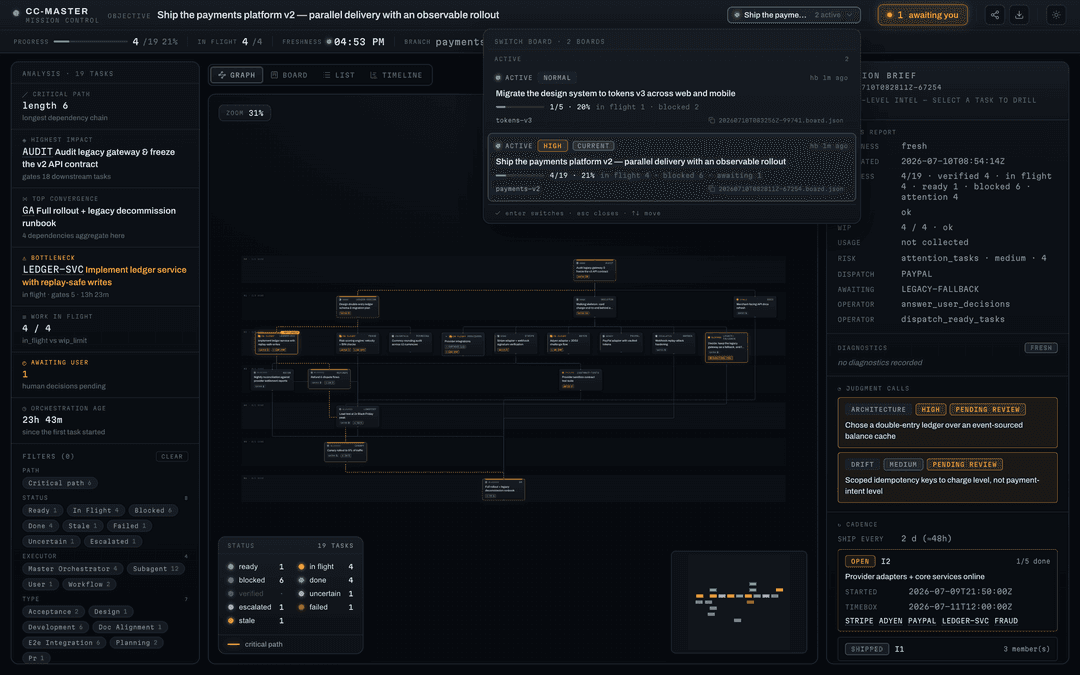
That's the everyday set. The full command surface (every
ccmnamespace and flag) is in the command catalog; what's shipped vs. still on the way is in the Feature Manual.
Go deeper
- Everything it can do, with honest status → Feature Manual
- Cross-harness maturity levels, historical slices, and target design → Capability model
- Contributors / architecture, start here →
AGENTS.md - Full design →
design_docs/spec.md
Acknowledgements · License
Standing on the shoulders of those who came before: Claude Code (Anthropic), claude-code-workflow-creator, superpowers, claude-code-workflow-orchestration.
Source-available under the PolyForm Noncommercial License 1.0.0. Commercial use is not permitted by the public license. See the licensing guide and name and trademark policy. © 2026 cc-master contributors.
// faq
What is cc-master?
Turn any Code Harness session into a long-horizon master orchestrator — pick the right dynamic-workflow paradigm and keep the main thread productively advancing across compaction and sessions.. It is open-source on GitHub.
Is cc-master free to use?
cc-master is open-source under the NOASSERTION license, so it is free to use.
What category does cc-master belong to?
cc-master is listed under plugins in the Claudeers registry of Claude-compatible tools.
// embed badge

[](https://claudeers.com/cc-master)
// retro hit counter

[](https://claudeers.com/cc-master)
// reviews
// guestbook
// related in Claude Plugins
 🔓
🔓A single CLAUDE.md file to improve Claude Code behavior, derived from Andrej Karpathy's observations on LLM coding pitfalls.
 🔓
🔓Claude Code is an agentic coding tool that lives in your terminal, understands your codebase, and helps you code faster by executing routine tasks, explainin…
 🔓
🔓"CLI-Anything: Making ALL Software Agent-Native" -- CLI-Hub: https://clianything.cc/
🔓financial-services — a Claude ecosystem project on GitHub.