
browser-harness
Browser Harness | Self-healing harness that enables LLMs to complete any task.
Install with your AI
Paste into Claude Code, Cursor, or any agent — it reads the repo and wires the tool into your project.
Install and set up browser-harness (claude-plugin project) into my current project.
Found on https://claudeers.com/browser-harness
Repo: https://github.com/browser-use/browser-harness
Homepage/docs: https://browser-harness.com
Detected install method: claude-plugin → /plugin install browser-harness@browser-use/browser-harness
Category: automation. Platforms: api, web.
Read the repo's README for exact setup and env vars, then install it and wire it into my project.

Claudeers Health Verdict:
active; community-verified: false. Confirm the source before running anything.
/plugin marketplace add browser-use/browser-harness
/plugin install browser-harness@browser-use/browser-harness
git clone https://github.com/browser-use/browser-harness
// compatibility
| Platforms | api, web |
|---|---|
| Operating systems | — |
| AI compatibility | claude |
| License | MIT |
| Pricing | open-source |
| Language | Python |

Browser Harness ♞
Connect an LLM directly to your real browser with a thin, editable CDP harness. For browser tasks where you need complete freedom.
One websocket to Chrome, nothing between. The agent writes what's missing during execution. The harness improves itself every run.
Try browser-harness in Browser Use Cloud or paste the setup prompt into your coding agent.
  ● agent: wants to upload a file
  │
  ● agent-workspace/agent_helpers.py → helper missing
  │
  ● agent writes it                         agent_helpers.py
  │                                                       + custom helper
  ✓ file uploaded
You will never use the browser again.
Setup prompt
Paste into Claude Code or Codex:
Install or upgrade browser-harness to the latest stable version with uv using Python 3.12, register the skill from `browser-harness skill`, and connect it to my browser. Follow https://github.com/browser-use/browser-harness/blob/main/install.md if setup or connection fails.
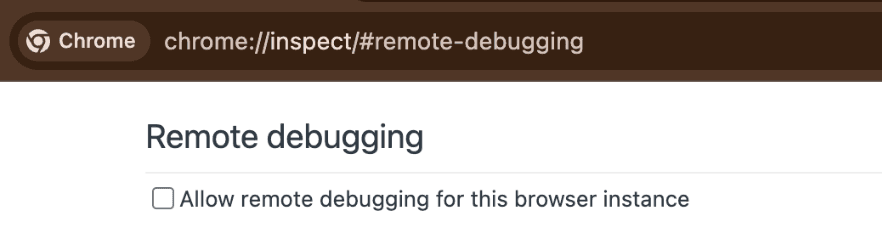
The agent will open chrome://inspect/#remote-debugging. Tick the checkbox so the agent can connect to your browser:
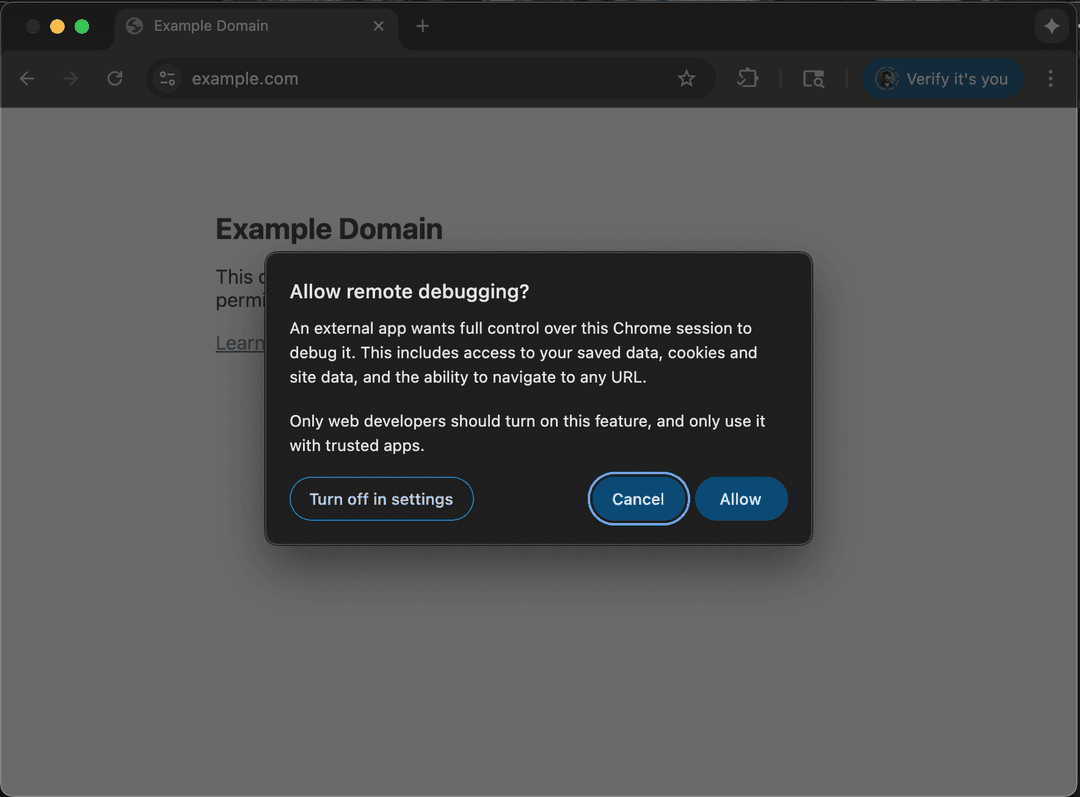
Click Allow when the per-attach popup appears (Chrome 144+):
See agent-workspace/domain-skills/ for example tasks.
Free Browser Use Cloud browsers
Stealth, sub-agents, or headless deployment.
Browser Use Cloud free tier: 3 concurrent browsers, proxies, captcha solving, and more. No card required.
- Grab a key at cloud.browser-use.com/new-api-key
- Or let the agent sign up itself via docs.browser-use.com/llms.txt (setup flow + challenge context included).
Architecture (~1k lines across 4 core files)
install.md— first-time install and browser bootstrapSKILL.md— day-to-day usagesrc/browser_harness/— protected core package${XDG_CONFIG_HOME:-~/.config}/browser-harness/agent-workspace/agent_helpers.py— helper code the agent edits${XDG_CONFIG_HOME:-~/.config}/browser-harness/agent-workspace/domain-skills/— reusable site-specific skills the agent edits
Plain browser-harness helper calls attach to the running Chrome/Chromium CDP endpoint. For isolated automation, launch Chrome yourself with --remote-debugging-port and pass BU_CDP_URL, or use a Browser Use cloud browser.
Development
From a checkout, use ./browser-harness to run the current working tree without activating a virtualenv or depending on the globally installed command:
./browser-harness <<'PY'
print(page_info())
PY
Normal agent-facing docs should keep using browser-harness; the ./browser-harness launcher is only for local repo testing.
Contributing
PRs and improvements welcome. The best way to help: contribute a new domain skill under agent-workspace/domain-skills/ for a site or task you use often (LinkedIn outreach, ordering on Amazon, filing expenses, etc.). Each skill teaches the agent the selectors, flows, and edge cases it would otherwise have to rediscover.
- Skills are written by the harness, not by you. Just run your task with the agent — when it figures something non-obvious out, it files the skill itself (see SKILL.md). Please don't hand-author skill files; agent-generated ones reflect what actually works in the browser.
- Open a PR with the generated
domain-skills/<site>/folder copied into this repo'sagent-workspace/domain-skills/examples — small and focused is great. - Bug fixes, docs tweaks, and helper improvements are equally welcome.
- Browse existing skills (
github/,linkedin/,amazon/, ...) to see the shape.
If you're not sure where to start, open an issue and we'll point you somewhere useful.
Domain skills
Set BH_DOMAIN_SKILLS=1 to enable domain skills from the agent workspace. This repo's agent-workspace/domain-skills/ directory contains examples to contribute via PR.
The Bitter Lesson of Agent Harnesses · Web Agents That Actually Learn
// faq
What is browser-harness?
Browser Harness | Self-healing harness that enables LLMs to complete any task.. It is open-source on GitHub.
Is browser-harness free to use?
browser-harness is open-source under the MIT license, so it is free to use.
What category does browser-harness belong to?
browser-harness is listed under data in the Claudeers registry of Claude-compatible tools.
// embed badge

[](https://claudeers.com/browser-harness)
// retro hit counter

[](https://claudeers.com/browser-harness)
// reviews
// guestbook
// related in Automation & Workflows
 🔓
🔓 🔓
🔓The API to search, scrape, and interact with the web at scale. 🔥
🔓🌐 Make websites accessible for AI agents. Automate tasks online with ease.
 🔓
🔓Taste-Skill - gives your AI good taste. stops the AI from generating boring, generic slop
// compare browser-harness with
// built by
2 of its contributors also build on official projects — claude-code, claude-cookbooks, claude-plugins-official, inspector
→ see how browser-harness connects across the ecosystem