
broglow
Desk traffic light for AI coding agents: menu-bar app, terminal dashboard and DIY ESP32-C3 lamp for Claude Code, Codex, opencode and Copilot CLI.
Install with your AI
Paste into Claude Code, Cursor, or any agent — it reads the repo and wires the tool into your project.
Install and set up broglow (git-clone project) into my current project.
Found on https://claudeers.com/broglow
Repo: https://github.com/BroGlow/broglow
Homepage/docs: https://broglow.github.io/broglow/
Detected install method: git-clone → git clone https://github.com/BroGlow/broglow
Category: automation. Platforms: cli, api, desktop, web.
Read the repo's README for exact setup and env vars, then install it and wire it into my project.

Claudeers Health Verdict:
active; community-verified: false. Confirm the source before running anything.
git clone https://github.com/BroGlow/broglow
// compatibility
| Platforms | cli, api, desktop, web |
|---|---|
| Operating systems | — |
| AI compatibility | claude |
| License | MIT |
| Pricing | open-source |
| Language | Rust |
BroGlow
A local session monitor for Claude Code, opencode, Codex and GitHub Copilot CLI, with a menu-bar app, terminal dashboard and optional ESP32-C3 status lamp. The lamp, connected over USB or Bluetooth LE, shows working, idle and needs-input states.
You can install and configure BroGlow before you build or get a lamp. The app and terminal dashboard already show your local agent sessions and their status without any hardware; add a lamp whenever you're ready.
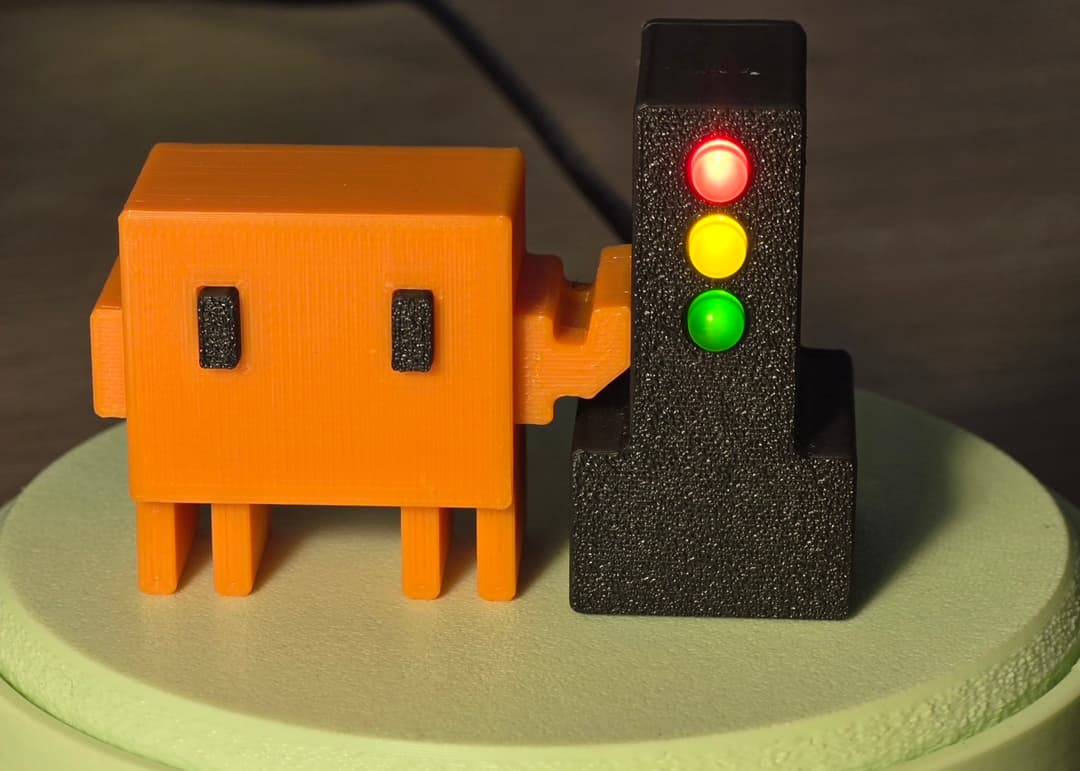
Read the guide on the website: install, build the lamp, connect Codex and fix problems.
Maintained by Suren Khorenyan. Copyright notices are in LICENSE.
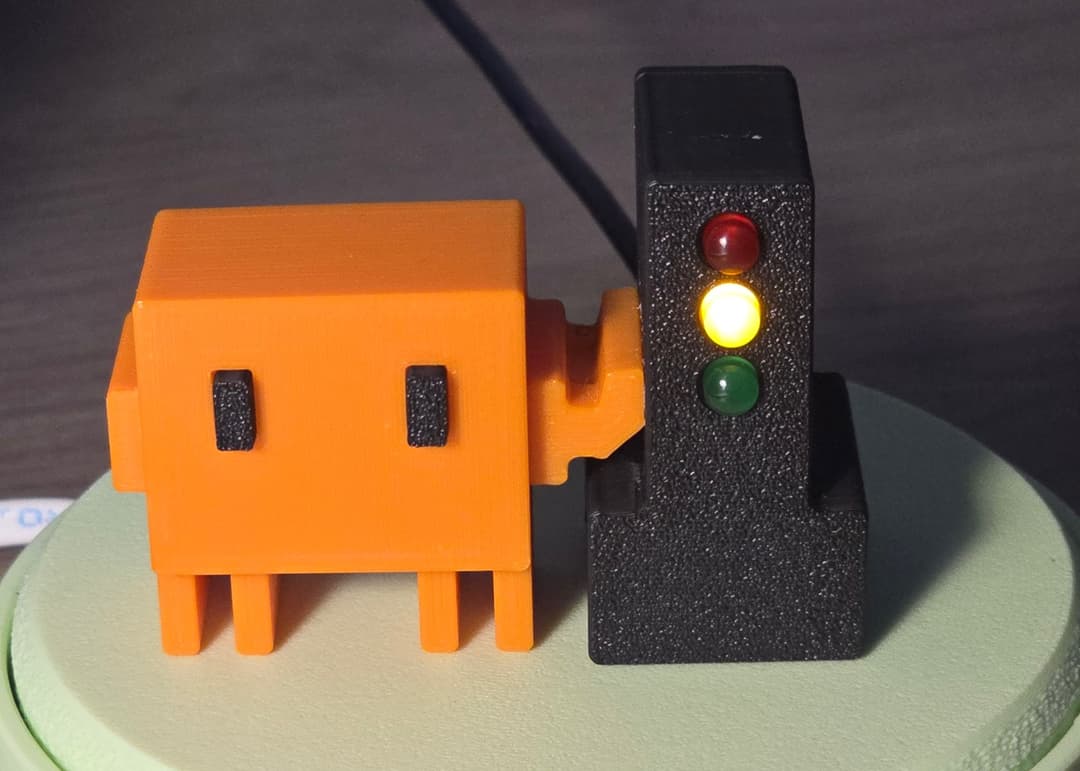
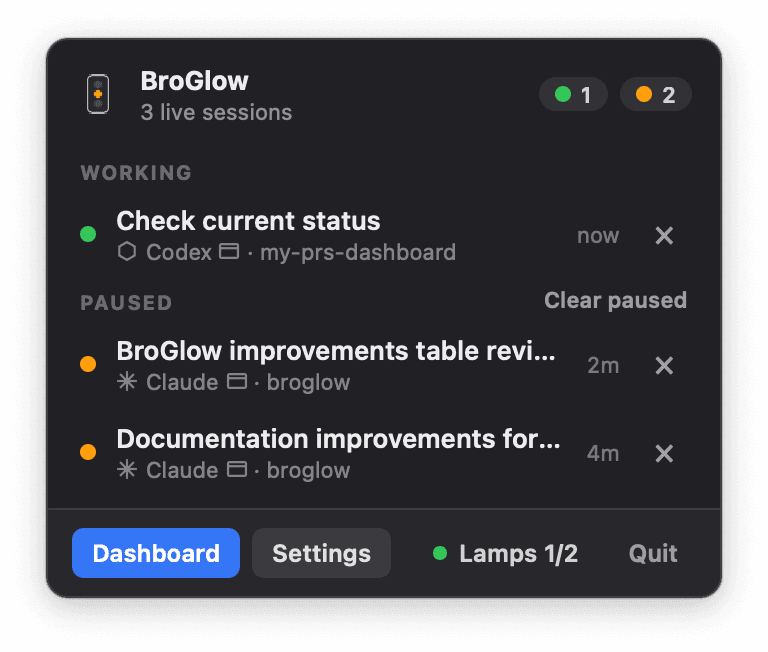
How BroGlow differs from ClawLight
BroGlow is a separate, independently maintained application inspired by ClawLight. Most of the app has been rewritten, with a substantially redesigned interface and expanded capabilities:
Sessions
| What's better | What you gain |
|---|---|
| Open the right conversation | Click a session to land in its Claude desktop chat, Codex desktop task or terminal window. |
| Real session names | Sessions carry Claude's own titles and renamed Codex tasks instead of "Session abc123". |
| Agent and host at a glance | Each row shows which agent is working (Claude, Codex, opencode, Copilot) and where (desktop app, terminal, IDE). |
| Group by project | Sessions sit under one heading per working directory; same-named folders are told apart. |
| Improved status handling | Working, idle and needs-input states follow what the agent is doing more closely, for Claude and Codex alike. |
| Clear paused sessions | Remove clutter in one click while keeping active work and approval requests visible. |
Lamp
| What's better | What you gain |
|---|---|
| Wireless lamp connection | Put the lamp anywhere in Bluetooth range; no data cable to the Mac. |
| Plug in, paired | A new USB-attached lamp pairs itself on macOS; Add lamp retries manually. |
| Lamps managed one at a time | Name or forget one lamp; the others stay connected, with status for each. |
| Brightness with live preview | Adjust each lamp to a comfortable level and see the result before saving. |
| Identify a lamp | A three-pass scan on the selected lamp shows which one it is. |
| Safe firmware flashing | One locked toolchain flashes and backs up the board the same way on every machine. |
Install and upkeep
| What's better | What you gain |
|---|---|
| Homebrew install | brew install broglow/tap/broglow, then broglow install; upgrades the same way. |
| Upgrades that don't break | Config writes are atomic, a failed macOS upgrade rolls back, dotfile symlinks survive, uninstall removes every hook. |
| Track token usage | Opt-in view of your plan's 5-hour and weekly percentages and today's tokens, Claude and Codex together. |
| 120 fps popover | The menu-bar interface renders at your display's full refresh rate. |
Build and docs
| What's better | What you gain |
|---|---|
| Print the enclosure, swap the mascot | The mascot holds on by magnets: attach any mascot you like and change it anytime. |
| Interactive assembly guide | Rotate and zoom the separated parts. |
Bluetooth lamp features (including naming, brightness and Identify) and direct opening of desktop sessions are macOS-only.
Start here
- Install or update: installation guide (Homebrew), alternative installations (Mac package, source, Windows, Linux), or let your coding agent follow the agent runbook.
- Connect a flashed lamp: pair once.
- Build and wire the ESP32-C3 lamp: wiring guide.
- Print the enclosure: get the models on Printables or MakerWorld, then follow printing and assembly. The mascot holds on by four Ø3×2 mm N52 magnets (two in the mascot, two in the traffic light) and can be swapped for any mascot.
- Something not working: troubleshooting.
For a new or unflashed C3, follow the flashing and backup instructions.
| Platform | Package | Lamp |
|---|---|---|
| macOS | App, C3 firmware and manuals | USB or Bluetooth LE |
| Windows | Tray app and CLI; no installer, firmware or manuals | USB |
| Linux | Build from source | USB |
GitHub Releases also provide the enclosure as a separate download.
Install
On macOS, the quickest route is Homebrew, followed by the required broglow install,
which registers the hooks in your coding agents, installs the app and starts it at login:
brew install broglow/tap/broglow
broglow install
To install a specific release instead, use broglow/tap/broglow@VERSION, for example
brew install broglow/tap/[email protected]; brew prints how to put it first on your PATH.
Alternatively, download the full Mac package for your architecture and its matching .sha256
file from Releases. Follow the
checksum and installation steps.
Builds are not signed with a Developer ID or notarized by Apple; the manual describes
macOS's normal per-app approval flow.
On Windows, extract broglow-vVERSION-x86_64-pc-windows-msvc.tar.gz from Releases
into a permanent folder (for example, tar -xf <file> in PowerShell).
In PowerShell from that folder, run .\broglow.exe install to register hooks,
enable startup at login and launch the tray app. .\broglow.exe menubar launches
the graphical tray interface directly; .\broglow.exe opens the terminal dashboard.
To build the app from a source checkout instead (Rust 1.90+):
cargo install --locked --path .
"$HOME/.cargo/bin/broglow" install
On Linux, install the system development libraries
before compiling; the tray's GTK 3 bindings have known advisories. On Windows, use the Rust MSVC
toolchain, run cargo install --locked --path ., then broglow install.
No board is flashed by app installation.
On macOS, press ⌘ Space, search BroGlow and press Return to open its
controls. The app lives in ~/Applications/BroGlow.app.
You can also run open "$HOME/Applications/BroGlow.app". In Terminal, broglow
opens the optional terminal dashboard once ~/.cargo/bin is on
PATH.
Connect your coding agents
Installation always registers Claude Code hooks and adds hooks for other agents it detects. Details per agent: Connect your coding agents.
| Agent | Setup note |
|---|---|
| Claude Code | Hooks in ~/.claude/settings.json. |
| opencode | Installed plugin; restart running sessions. |
| Codex | Codex >= 0.144; approve hooks via /hooks. Connect Codex. |
| GitHub Copilot CLI | Installed hooks; restart sessions open during installation. |
Cloud tasks and ordinary ChatGPT conversations do not trigger this Mac's local hooks.
Use it
Click the menu-bar or tray icon for sessions. On macOS, Lamps adds a lamp (USB-assisted Bluetooth setup), names it or adjusts its brightness; multiple saved lamps work independently. On Windows and Linux, the lamp is connected over USB. Session × hides a row until new activity; the conversation stays in its coding app.
broglow --version               Identify the installed release
broglow                         Open the terminal dashboard
broglow ble pair                Set up a flashed C3 over USB and pair it over Bluetooth (macOS)
broglow ble status              Check whether status reaches the lamp
broglow dashboard-button show   Show terminal-dashboard buttons in the tray app
broglow uninstall               Remove hooks, autostart, the app (macOS) and all BroGlow data
Needs input always wins (red); in Settings (macOS and Windows) choose whether mixed working and idle sessions show yellow or green.
Contributing
Bug reports, ideas, documentation improvements and code contributions are welcome. See the contributing guide to get started.
License
MIT. Release packages include third-party notices: the licenses of the Rust crates the app is built from and the Rust standard library notices; Mac packages also list the firmware's linked libraries and their licenses. See the media policy for project images.
// faq
What is broglow?
Desk traffic light for AI coding agents: menu-bar app, terminal dashboard and DIY ESP32-C3 lamp for Claude Code, Codex, opencode and Copilot CLI.. It is open-source on GitHub.
Is broglow free to use?
broglow is open-source under the MIT license, so it is free to use.
What category does broglow belong to?
broglow is listed under automation in the Claudeers registry of Claude-compatible tools.
// embed badge

[](https://claudeers.com/broglow)
// retro hit counter

[](https://claudeers.com/broglow)
// reviews
// guestbook
// related in Automation & Workflows
 🔓
 🔓
The API to search, scrape, and interact with the web at scale. 🔥
 🔓
🌐 Make websites accessible for AI agents. Automate tasks online with ease.
 🔓
Taste-Skill - gives your AI good taste. stops the AI from generating boring, generic slop