
awa-video-reel
Free Claude Code skill that edits your short videos to match what you say: effects, captions, cards, music, sound and website b-roll.
Install with your AI
Paste into Claude Code, Cursor, or any agent — it reads the repo and wires the tool into your project.
Install and set up awa-video-reel (release-binary project) into my current project.
Found on https://claudeers.com/awa-video-reel
Repo: https://github.com/Awa67572/awa-video-reel
Homepage/docs: —
Detected install method: release-binary → inspect the README
Category: other. Platforms: api, web.
Read the repo's README for exact setup and env vars, then install it and wire it into my project.

Claudeers Health Verdict:
unknown; community-verified: false. Confirm the source before running anything.
Grab the latest release asset from GitHub.
# download a build from https://github.com/Awa67572/awa-video-reel/releases
git clone https://github.com/Awa67572/awa-video-reel
// compatibility
| Platforms | api, web |
|---|---|
| Operating systems | — |
| AI compatibility | claude |
| License | MIT |
| Pricing | open-source |
| Language | Python |
awa-video-reel
A free, open-source Claude Code skill by Awa K. Penn that edits your short videos so every visual and sound lands on the words you say. MIT licence.
New to this? Follow the step-by-step guide (PDF).
The full source code is in the awa-video-reel folder on this page, so you can read every file before you install anything. The zip is that same folder.
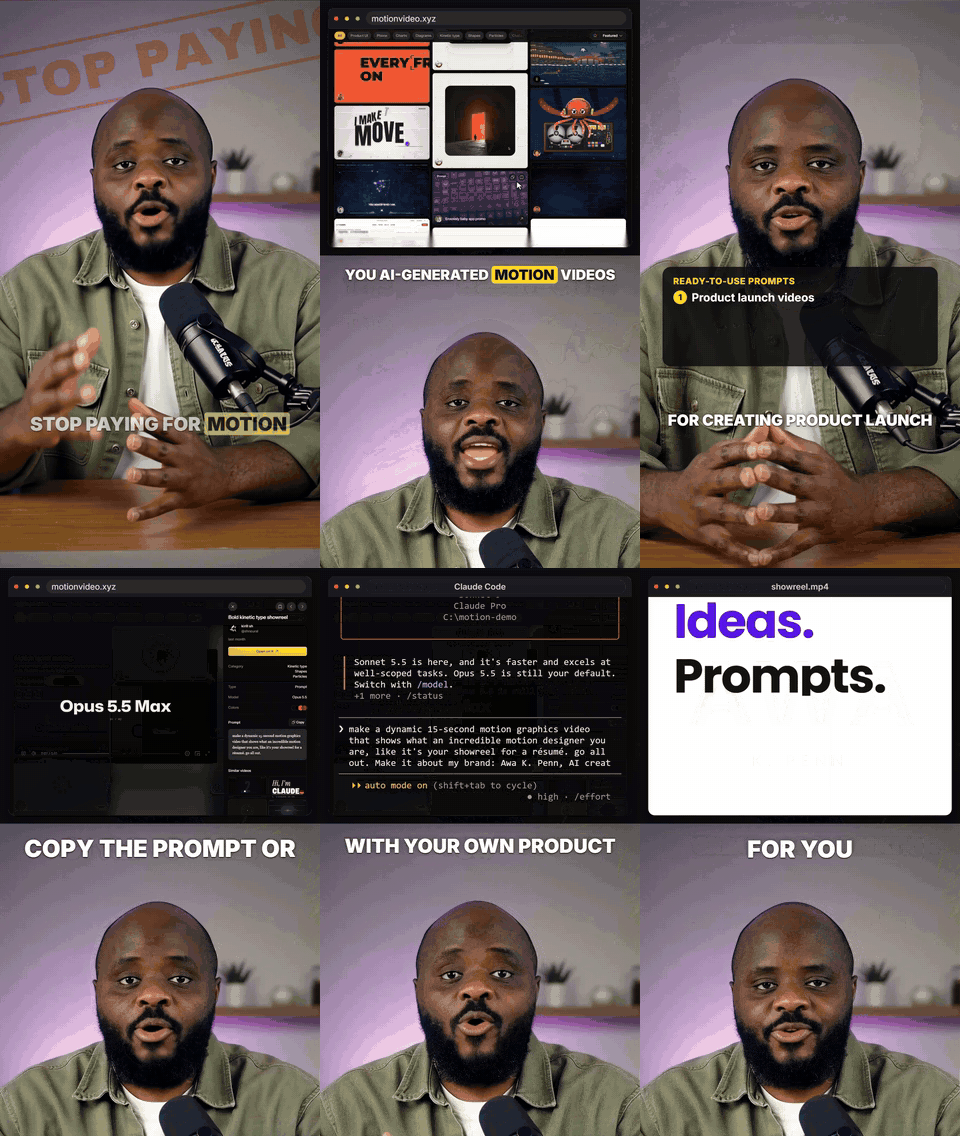
What it does
Drop in a video (up to 1 minute) and type /awa-video-reel. It adds:
- face-tracked effects (stamps, toggles, phone fans, checklists and more)
- captions with your keywords highlighted, plus title, stat, list and call-to-action cards
- punch-ins, a slow push and an optional cinematic look
- music that dips under your voice, and a sound on every change
- website b-roll: mention a site and it asks if you want it recorded, then opens it in Chrome and scrolls and clicks with a visible cursor
- the follow-through: copy a prompt on the site, paste it into a real Claude Code window with your details typed in, then the result playing
- an optional "Follow for more" card with your handle
It shows you the plan first and renders only after you say yes. You get two MP4s: one with music, one without.
What's in the code
| Folder | What it is |
|---|---|
SKILL.md | The instructions Claude follows, step by step |
scripts/ | The editing pipeline: setup.sh (first-run install), prepare.sh (checks and transcribes your video), broll.py (b-roll), hf_build.py (captions, cards and layout), mix.py (music and sound), render.sh (puts it all together) |
recorder/ | record.mjs records a website in your Chrome. claude_session.mjs and render_cast.mjs record and replay the Claude Code window |
remotion/ | The intro and "Follow for more" cards |
effects/ | The face-tracked effects engine (MIT licence in effects/LICENSE) |
music/ and sfx/ | Free music and sound effects, with their credits |
What it does on your computer:
- Your video is transcribed and edited on your own machine, with ffmpeg, Python, HyperFrames and Remotion.
- The first run installs its tools from PyPI and npm: numpy, OpenCV, Pillow, MediaPipe and faster-whisper; Puppeteer, xterm.js and Remotion. You can see the lists in
effects/requirements.txt,recorder/package.jsonandremotion/package.json. - Website b-roll opens sites as a logged-out visitor. It never signs in, buys or submits anything.
- The Claude Code b-roll only pastes, types and presses Enter. It never approves anything, so nothing runs.
Install (3 steps)
- Download and unzip
awa-video-reel.zip. - Copy the
awa-video-reelfolder into~/.claude/skills/. - Restart Claude Code, drag in a video and type
/awa-video-reel.
Or open Claude Code and paste: "Install the skill in this folder: [path to the unzipped folder]. Follow its INSTALL.md."
Prefer to take it straight from the source? Click Code → Download ZIP on this page (or run git clone https://github.com/Awa67572/awa-video-reel), then copy the awa-video-reel folder inside it into ~/.claude/skills/.
You also need Google Chrome (or Edge), Node.js 20+, Python 3.11 or 3.12 and ffmpeg. The full list and tips are in INSTALL.md.
Licence
awa-video-reel is open source under the MIT licence: use it, change it and share it, free, including for commercial work. Keep the licence notice with any copy.
The bundled parts keep their own licences: the effects engine is MIT too (effects/LICENSE), the music and sound effects are listed with their licences in their CREDITS.md files, and each font has its licence file next to it.
Credits
Effects engine: MIT licence (effects/LICENSE). Captions, cards and b-roll layout: HyperFrames by HeyGen. Cards: Remotion. Sound effects: Pixabay (sfx/CREDITS.md). Music: CC0 and one CC BY track (music/CREDITS.md). Fonts: each with its own licence file next to it.
Learn AI for free in my newsletter: awa-newsletter.beehiiv.com/subscribe
// faq
What is awa-video-reel?
Free Claude Code skill that edits your short videos to match what you say: effects, captions, cards, music, sound and website b-roll.. It is open-source on GitHub.
Is awa-video-reel free to use?
awa-video-reel is open-source under the MIT license, so it is free to use.
What category does awa-video-reel belong to?
awa-video-reel is listed under other in the Claudeers registry of Claude-compatible tools.
// embed badge

[](https://claudeers.com/awa-video-reel)
// retro hit counter

[](https://claudeers.com/awa-video-reel)
// reviews
// guestbook
// related in Other
 🔓
 🔓
Anti-AI-slop design skill for Claude Code, Cursor, and Codex.
 🔓
Huashu Design · HTML-native design skill for Claude Code · Claude Code 里 HTML 原生的设计 skill · 高保真原型 / 幻灯片 / 动画 + 20 设计哲学 + 5 维评审 + MP4 导出 · Agent-agnostic
 🔓
Open source Ghostty-based macOS terminal with vertical tabs and notifications for AI coding agents. Built for multitasking, organization, and programmability.