
auto-motion
Automated SRT-to-motion workflow with Codex, Claude Code, and HyperFrames
Install with your AI
Paste into Claude Code, Cursor, or any agent — it reads the repo and wires the tool into your project.
Install and set up auto-motion (git-clone project) into my current project.
Found on https://claudeers.com/auto-motion
Repo: https://github.com/vibe-motion/auto-motion
Homepage/docs: —
Detected install method: git-clone → git clone https://github.com/vibe-motion/auto-motion
Category: other. Platforms: cli.
Read the repo's README for exact setup and env vars, then install it and wire it into my project.

Claudeers Health Verdict:
slowing; community-verified: false. Confirm the source before running anything.
git clone https://github.com/vibe-motion/auto-motion
// compatibility
| Platforms | cli |
|---|---|
| Operating systems | — |
| AI compatibility | claude |
| License | — |
| Pricing | open-source |
| Language | HTML |
简体中文 | English
auto-motion
auto-motion 是一个把字幕稿自动拆分成多段 MG 动画镜头,并拼接成竖屏视频的工作流模板。你只需要准备 transcription.srt,然后让 Codex 执行 PROMPT.md 中的任务说明;Codex 会按字幕语义拆镜头,逐个调用 Claude Code 生成单镜头动画,最后用 FFmpeg 拼接出 final.mp4。
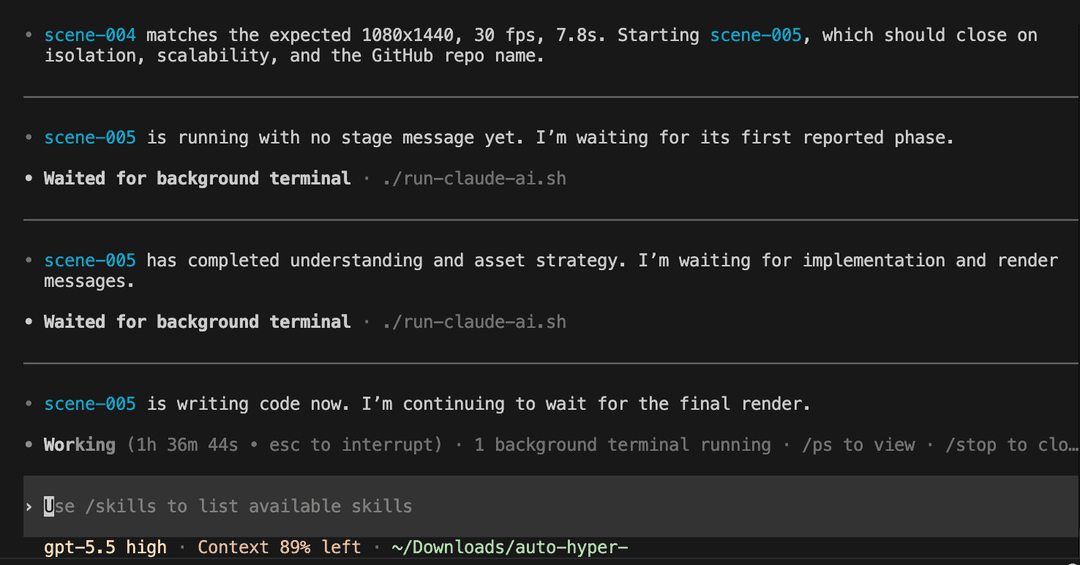
运行证据
下面是一段真实运行过程截图:多镜头任务已经连续运行 1 小时 36 分钟,Codex 正在等待 Claude Code 完成后续镜头的代码实现和渲染。
架构
1. 调度层:Codex + PROMPT.md
PROMPT.md 定义整个自动化流程:
- 读取当前目录的
transcription.srt。 - 按语义把字幕拆成连续、完整覆盖总时长的镜头。
- 为每个镜头创建
scenes/scene-001、scenes/scene-002等独立目录。 - 从
exampleFolder复制运行模板和 HyperFrames 相关技能。 - 顺序调用 Claude Code 生成每个镜头的动画 MP4。
- 检查镜头时长和产物规格,并用 FFmpeg 拼接为
final.mp4。
2. 执行层:Claude Code + run-claude-ai.sh
exampleFolder/run-claude-ai.sh 是单镜头执行模板。Codex 会为每个镜头填写:
SCENE_IDSCENE_DURATION_SECONDSSCENE_TEXTOUTPUT_FILEFULL_TRANSCRIPT_PATH
脚本使用 claude -p 非交互式调用 Claude Code,并要求 Claude Code 输出固定阶段消息。原始日志、错误日志和用户可读进度分别写入镜头目录中的:
claude-<scene>.stream.jsonlclaude-<scene>.stderr.logclaude-<scene>.user.log
3. 动画层:HyperFrames
exampleFolder/.claude/skills/ 中包含 HyperFrames 相关技能。Claude Code 会基于这些技能编写 HTML 动画项目,并渲染 1080x1440、30fps、静音、无音轨的 MP4。
4. 验收层:auto-test
auto-test/run.sh 提供端到端测试入口。它会创建临时工作区,复制测试字幕和模板,调用 Codex 执行完整流程,然后用 auto-test/validate.sh 检查:
- Claude Code 阶段消息是否完整。
- 单镜头 MP4 和
final.mp4是否存在。 - 视频是否为 1080x1440。
- 帧率是否约为 30fps。
- 时长是否接近字幕总时长。
- 是否没有音轨。
前提条件
请先确保本机已经安装并登录以下工具:
- Codex CLI
- Claude Code
- Node.js 22 或更高版本
- FFmpeg 和 FFprobe
jq- 可联网环境,用于 Claude Code 搜索素材、安装依赖或下载品牌视觉资产
可以用下面的命令做基础检查:
codex --version
claude --version
node --version
ffmpeg -version
ffprobe -version
jq --version
快速开始
1. 准备字幕文件
把 SRT 字幕文件放到仓库根目录,并命名为 transcription.srt:
cp /path/to/transcription.srt ./transcription.srt
2. 执行自动生成流程
在仓库根目录运行:
codex exec \
  --cd . \
  --sandbox danger-full-access \
  --ask-for-approval never \
  - < PROMPT.md
Codex 会读取 PROMPT.md,拆分字幕、创建镜头目录、逐个调用 Claude Code,并最终生成:
scenes/
  scene-001/
    scene-001.mp4
    claude-scene-001.stream.jsonl
    claude-scene-001.stderr.log
    claude-scene-001.user.log
  scene-002/
    scene-002.mp4
final.mp4
3. 查看结果
最终视频在仓库根目录:
open final.mp4
测试
运行内置端到端测试:
bash auto-test/run.sh
测试产物会写入 auto-test/.tmp/。该目录已被 .gitignore 忽略。
目录说明
.
├── PROMPT.md                    # 主流程任务说明
├── transcription.srt            # 输入字幕文件
├── exampleFolder/
│   ├── run-claude-ai.sh          # 单镜头 Claude Code 调用模板
│   └── .claude/skills/           # HyperFrames 相关技能
├── auto-test/
│   ├── run.sh                    # 端到端测试入口
│   ├── validate.sh               # 视频产物校验脚本
│   └── transcription.srt         # 测试字幕
└── final.mp4                     # 生成后的视频交付文件
注意事项
- 同一时间只运行一个 Claude Code 调用,不并行渲染多个镜头。
- 每个镜头必须完整覆盖字幕时间轴,镜头时长总和应等于字幕总时长。
- 若某个镜头失败,优先查看对应目录下的
stderr.log、stream.jsonl和user.log。 - 如果视频规格不一致,应先统一转码后再拼接。
// faq
What is auto-motion?
Automated SRT-to-motion workflow with Codex, Claude Code, and HyperFrames. It is open-source on GitHub.
Is auto-motion free to use?
auto-motion is open-source, so it is free to use.
What category does auto-motion belong to?
auto-motion is listed under other in the Claudeers registry of Claude-compatible tools.
// embed badge

[](https://claudeers.com/auto-motion)
// retro hit counter

[](https://claudeers.com/auto-motion)
// reviews
// guestbook
// related in Other
 🔓
🔓 🔓
🔓Anti-AI-slop design skill for Claude Code, Cursor, and Codex.
 🔓
🔓Open source Ghostty-based macOS terminal with vertical tabs and notifications for AI coding agents. Built for multitasking, organization, and programmability.
 🔓
🔓Huashu Design · HTML-native design skill for Claude Code · Claude Code 里 HTML 原生的设计 skill · 高保真原型 / 幻灯片 / 动画 + 20 设计哲学 + 5 维评审 + MP4 导出 · Agent-agnostic