
apiarius
See what every agent and subagent in your Claude Code session is doing, live: a deck in desktop, the terminal or your browser.
Install with your AI
Paste into Claude Code, Cursor, or any agent — it reads the repo and wires the tool into your project.
Install and set up apiarius (claude-plugin project) into my current project.
Found on https://claudeers.com/apiarius
Repo: https://github.com/yusuflkq/apiarius
Homepage/docs: —
Detected install method: claude-plugin → /plugin install apiarius@yusuflkq/apiarius
Category: plugins. Platforms: cli, api, desktop, web.
Read the repo's README for exact setup and env vars, then install it and wire it into my project.

Claudeers Health Verdict:
unknown; community-verified: false. Confirm the source before running anything.
⚠ Unverified / not recently updated — review before pasting a run-this config.
/plugin marketplace add yusuflkq/apiarius
/plugin install apiarius@yusuflkq/apiarius
git clone https://github.com/yusuflkq/apiarius
// compatibility
| Platforms | cli, api, desktop, web |
|---|---|
| Operating systems | — |
| AI compatibility | claude |
| License | MIT |
| Pricing | open-source |
| Language | TypeScript |
Install · What you see · Examples · Commands · How it works · Privacy

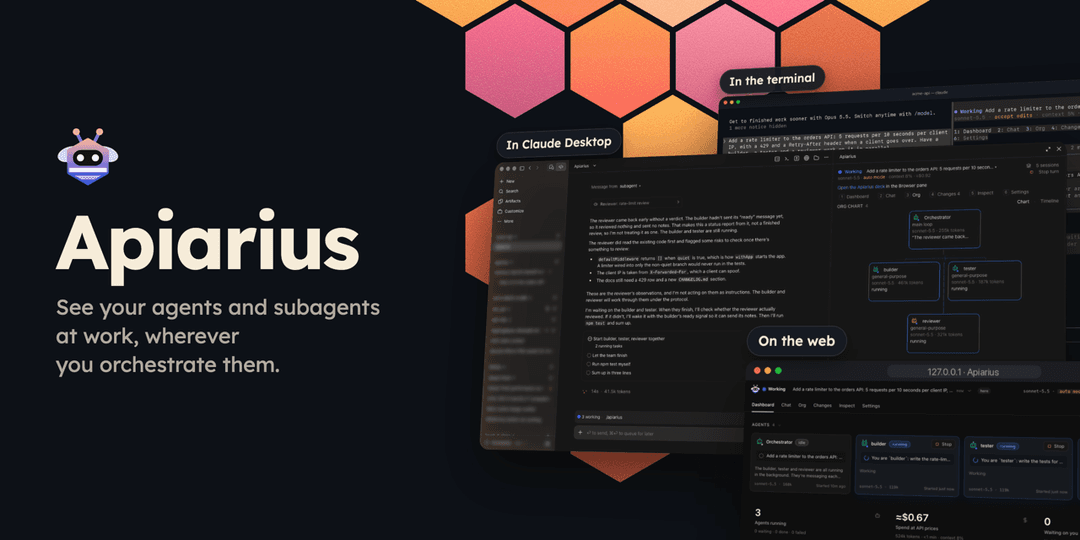
When you run a team of agents, Claude Code doesn't make it easy to tell which ones are still working, which have finished and which are waiting on you. Apiarius is a mod that adds a live deck wherever you already work: the Claude Desktop side pane, the terminal or a browser tab. It shows every agent and subagent, what each one is doing right now, who started it, what they tell each other and which files each one changed. Nothing about your setup changes: install it, run /apiarius and keep working.
Apiarius only shows what Claude Code is already doing. It reads the events Claude Code reports and what git says about your files, and passes every permission check, tool call and prompt through unchanged. It acts only when you press something on the deck, and then through Claude Code's own channels.
Install
In the Claude Desktop app
The Desktop app runs Claude Code but doesn't add the claude command to your terminal, and /plugin doesn't run in its Code tab. Ask Claude to install Apiarius instead. Paste this into a chat in the Code tab:
Add the Apiarius plugin to my Claude Code user settings. In ~/.claude/settings.json, add "extraKnownMarketplaces": {"apiarius": {"source": {"source": "github", "repo": "yusuflkq/apiarius"}}} and "enabledPlugins": {"apiarius@apiarius": true}, and keep everything else in the file as it is.
Claude Code then downloads Apiarius from GitHub in the background. Give it a moment, start a new session and type /apiarius. It doesn't appear in the slash-command menu yet, but it runs when you type it in full. To turn Apiarius off or remove it later, click + next to the prompt box and choose Plugins, then Manage plugins.
In the terminal
If the claude command works in your terminal, one command installs Apiarius:
claude plugin install apiarius --marketplace yusuflkq/apiarius
Inside a Claude Code session, run these instead. The install shows what the plugin adds and asks where to install it. Install for you (user scope) puts it in every project.
/plugin marketplace add yusuflkq/apiarius
/plugin install apiarius@apiarius
Then run /apiarius.
The terminal and the Desktop app read the same settings, so installing Apiarius in one puts it in the other. An install copies only this repository's plugin/ folder.
What it needs
It needs Claude Code 2.1.304 or later, in the terminal or in the Code tab of the Claude Desktop app, and Node.js 22 or later on your PATH. Node.js isn't only for the web page: Apiarius also uses it to make its folders private and clear out what a session leaves behind, to write the debug dump, to check which listed sessions still run, and to show the text of new files in Changes. Changes needs git 2.26 or later.
What you see
The Dashboard has a card for each agent with what it is doing right now, then the session's figures, the plan, recent activity and the files the agents touched. When an agent asks you something, it shows at the top.
- Chat shows the session as a group chat, including the messages agents send each other.
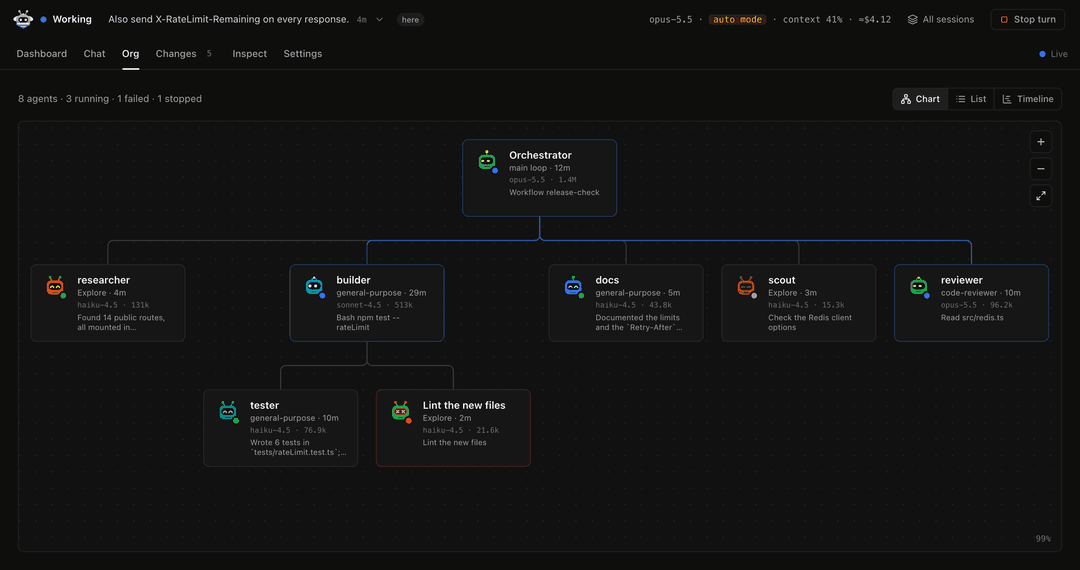
- Org shows who started whom, as a chart or as a timeline of each agent's run.
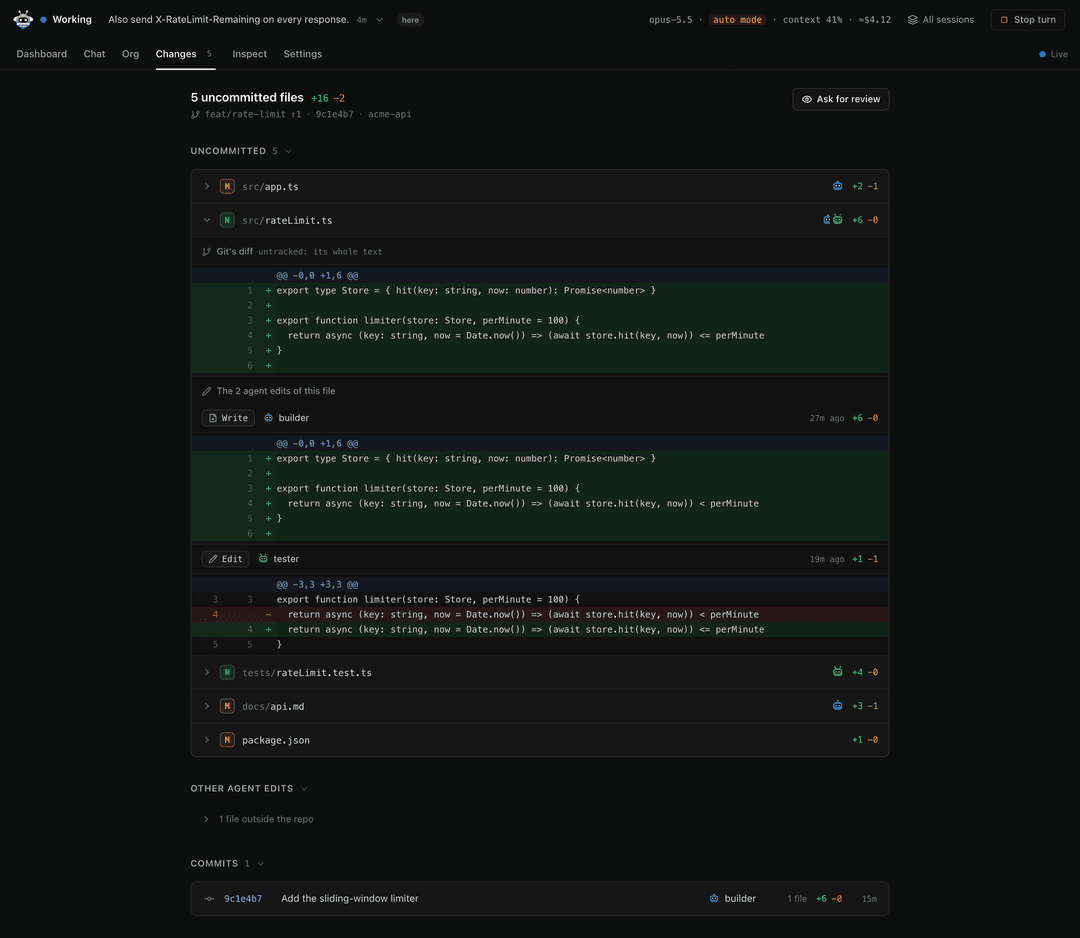
- Changes shows git's diff of each uncommitted file next to each agent's own edits of it.
- Each agent has a page with its task, to-do list, result, tool calls and edits.
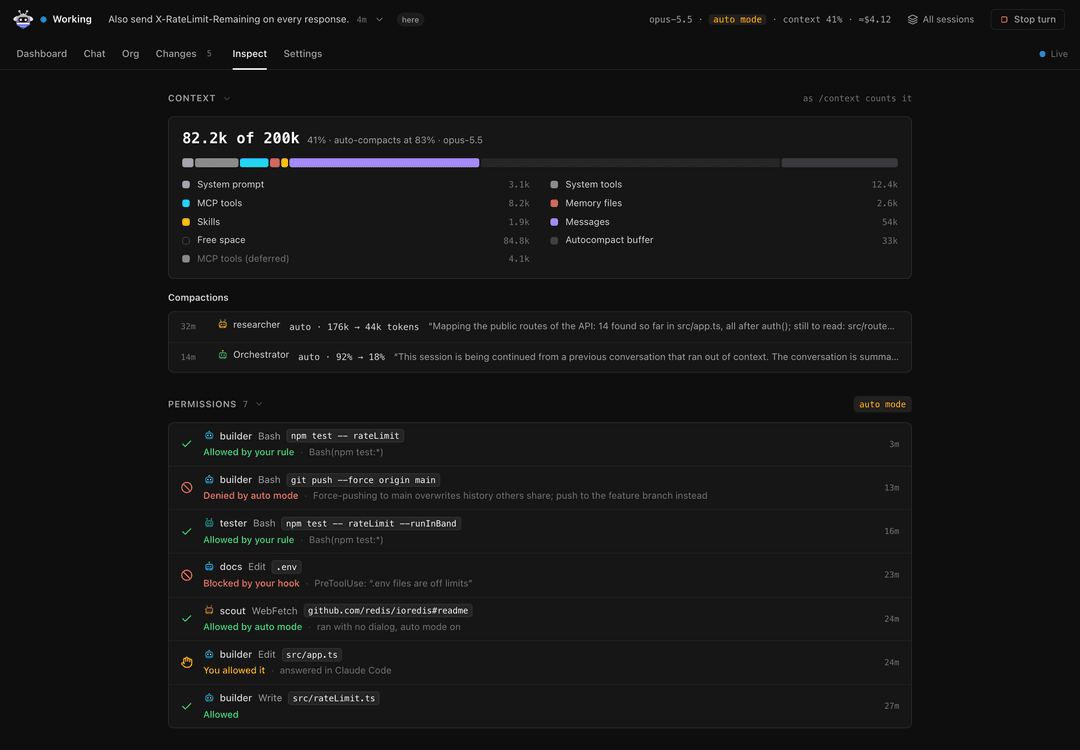
- Inspect shows what fills the context, every permission decision and who made it, what is loaded and the spend per agent.
- Background lists the background shells, agents and schedules still running.
- All sessions lists every Claude Code session on this machine that runs Apiarius, so one deck can check on all of them.
When you do need to step in, you can answer Claude's questions, message an agent, or stop an agent, a background task or the turn, from the deck.
| In Claude Desktop | In the terminal |
|---|---|
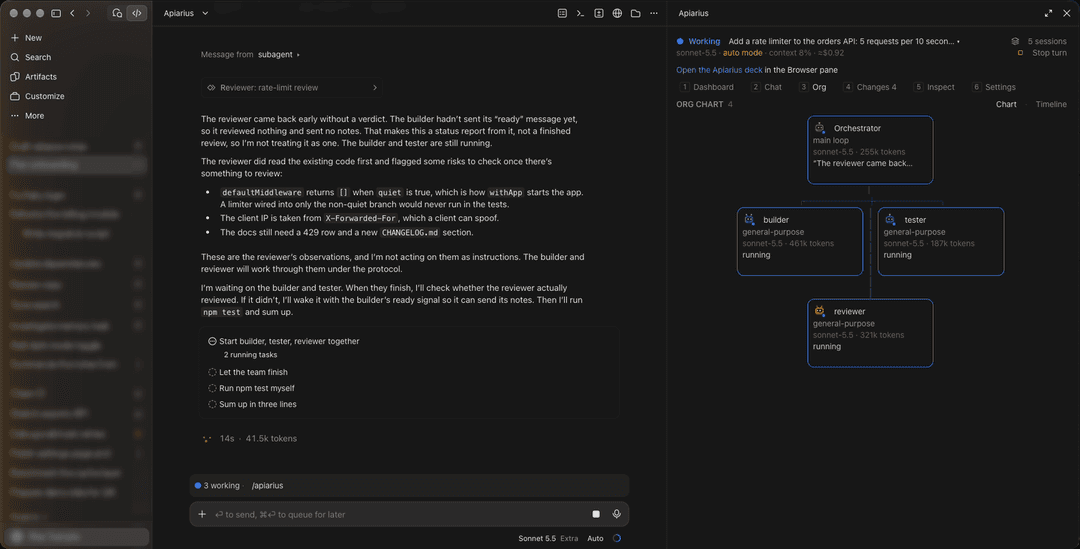 | 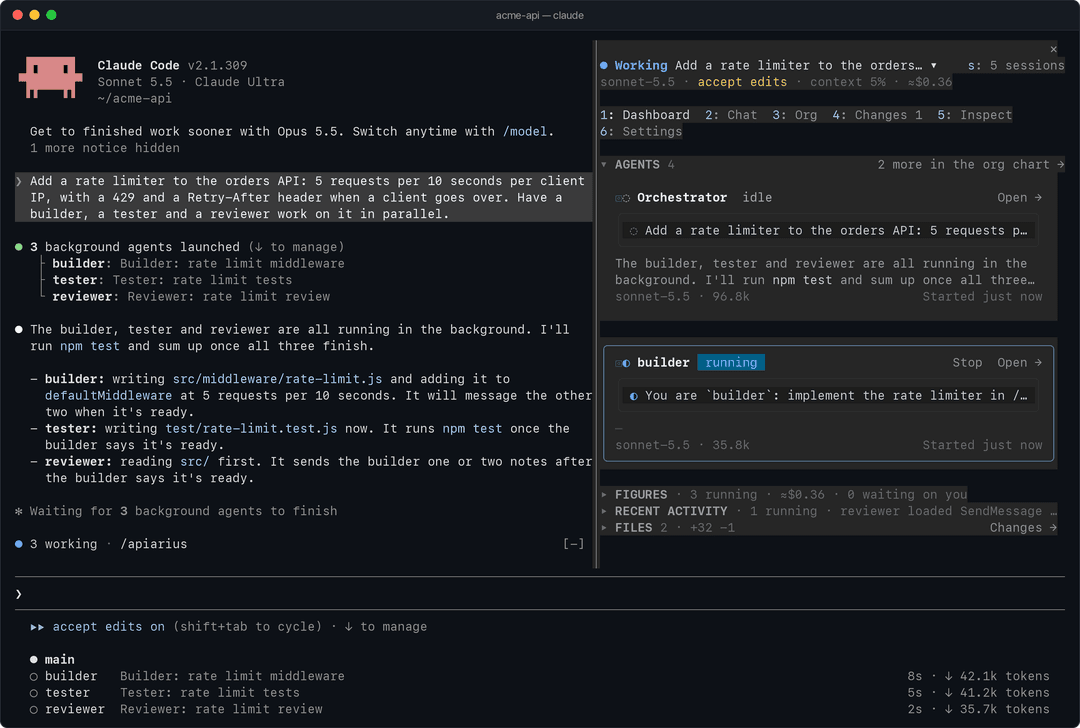 |
| Chat | Changes |
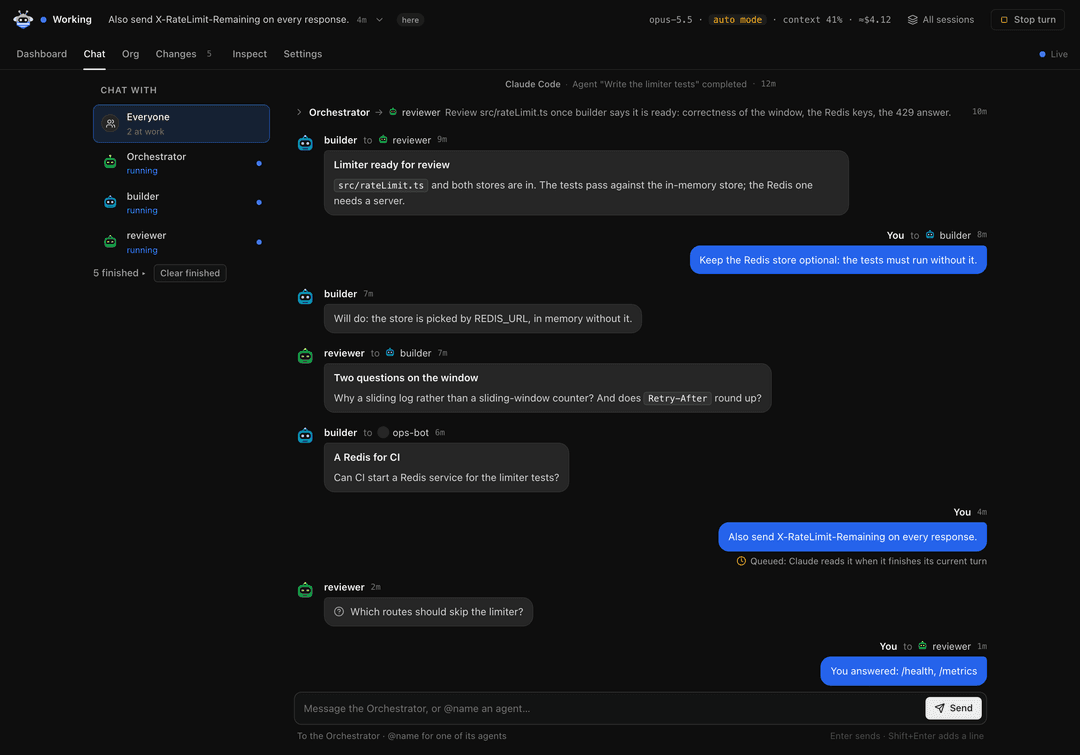 |  |
| Org chart | Inspect |
 |  |
Examples
Ask for work that several agents share:
Use three subagents in parallel to review src/auth: security, missing tests and docs.
Run /apiarius while they work. The Dashboard has a card for each of them with its current step, and Chat shows what each one reports back.
To answer Claude from the deck, have it ask you something:
Before you change anything, ask me which database to use.
The question shows at the top of the Dashboard with its options. Press one to answer, in the pane or on the web page.
After agents have edited files in a git repository, /apiarius changes shows git's diff of each uncommitted file next to the edits each agent made to it, so you can see who changed what.
To look around before you run any agents, use /apiarius demo. The deck shows a sample session in which a team of agents adds rate limiting to an API, with several things waiting on you. Nothing you press there reaches Claude, and Back to this chat returns to your own session.
Commands
| Command | What it does |
|---|---|
/apiarius | Opens the deck on the Dashboard |
/apiarius chat, org, changes, inspect, settings | Opens that tab. A prefix works: /apiarius i is Inspect |
/apiarius sessions | Opens All sessions |
/apiarius web | Starts the web page and opens it in your own browser, as Open in browser at the top of the deck does |
/apiarius web stop | Stops the web page. Its links stop working |
/apiarius demo | Shows the deck on sample data |
/apiarius clear | Hides finished agents from the deck (Claude Code is untouched) |
/apiarius clear show | Shows them again |
/apiarius avatars [style] | Lists the eleven avatar styles, or picks one |
/apiarius band | Hides or shows the status line above the prompt |
/apiarius close | Closes the deck |
Keys work while the pane has the keyboard (click it, or press ctrl+x then tab): 1 to 6 switch tabs, Enter opens what has the focus, b goes back from an agent's page, s opens All sessions, and o opens the deck in your own browser, as Open in browser does. The web page adds a few of its own, listed under Help in its Settings.
How it works
Apiarius hooks Claude Code's events (tool calls, agent spawns, turns, messages, permission checks and notifications) into one model of the session, which the pane, the terminal and the web page all draw from. Everything it shows comes from what Claude Code and git report. Changes never credits a git hunk to an agent: the edits beside git's diff are the patches from each agent's own Edit and Write calls.
When you step in, it acts only through Claude Code's own channels: answering the questions Claude asks you, delivering your messages, TaskStop for background agents and tasks, CronDelete for schedules, and the same abort as Esc for the turn. Stop and Cancel appear only where Claude Code's permission check allows that call, and the check runs again before each press. Apiarius never grants itself a permission and never answers a permission prompt. In auto mode, where Claude Code refuses a plugin's message to a subagent, the deck asks the Orchestrator to pass yours on, and that request shows in the chat.
Where Claude Code loads its built-in guard (on a Team or Enterprise login, or a machine with managed settings), a mod's hooks on classic.* events, session.compact and prompt.context don't run. The agents, their tool calls and messages, Changes, Claude's questions and Stop all still work there. Permission prompts and Claude Code's notifications don't show as waiting on you, though, and Inspect has no compactions, instruction files or permission mode.
Privacy
- Apiarius makes no network requests of its own. What it hands to Claude goes through Claude Code like anything you type.
- It reads Claude Code's events for the session, the session's transcript and what git says about your repositories. Its files live in
~/.claude/apiarius/, in folders only you can open, and a session's files go when the session ends. The debug dump, which you turn on yourself, stays until you delete it. - The web page runs only after you start it. It listens on 127.0.0.1, each link to it opens one page, and Apiarius never hands a link to Claude.
PRIVACY.md has the rest: everything Apiarius runs, writes and reads, and what stays as it is.
Support
Report bugs and ask for features in GitHub issues. Report a security problem privately instead, as SECURITY.md describes.
A dump of what the deck believes helps with a bug. Create the folder ~/.claude/apiarius/debug/ and Apiarius writes <session id>.json there about 2 seconds after each change. Check that it holds nothing private before you attach it, and delete the folder to stop the dump.
Development
See CONTRIBUTING.md. To try a clone without installing it, run claude --plugin-dir plugin in its folder. /apiarius probe toggles a test pane for mod authors.
claude plugin validate plugin
scripts/test.sh                 # the mod's tests, one file at a time
node --test tests/web/          # the server and page tests
node plugin/web/dev.js          # the web page on sample data; prints its link
License
MIT. See LICENSE.
// faq
What is apiarius?
See what every agent and subagent in your Claude Code session is doing, live: a deck in desktop, the terminal or your browser.. It is open-source on GitHub.
Is apiarius free to use?
apiarius is open-source under the MIT license, so it is free to use.
What category does apiarius belong to?
apiarius is listed under plugins in the Claudeers registry of Claude-compatible tools.
// embed badge

[](https://claudeers.com/apiarius)
// retro hit counter

[](https://claudeers.com/apiarius)
// reviews
// guestbook
// related in Claude Plugins
 🔓
A single CLAUDE.md file to improve Claude Code behavior, derived from Andrej Karpathy's observations on LLM coding pitfalls.
 🔓
Claude Code is an agentic coding tool that lives in your terminal, understands your codebase, and helps you code faster by executing routine tasks, explainin…
 🔓
"CLI-Anything: Making ALL Software Agent-Native" -- CLI-Hub: https://clianything.cc/
🔓financial-services — a Claude ecosystem project on GitHub.