
apfelkern
Apfel: Claude-Code-Skill, der Arbeitsdialoge im Browser gegen Apples Human Interface Guidelines prüft und die Befunde mit Birne als technisches Blatt zeichne…
Install with your AI
Paste into Claude Code, Cursor, or any agent — it reads the repo and wires the tool into your project.
Install and set up apfelkern (claude-plugin project) into my current project.
Found on https://claudeers.com/apfelkern
Repo: https://github.com/rdo2hellowelt/apfelkern
Homepage/docs: —
Detected install method: claude-plugin → /plugin install apfelkern@rdo2hellowelt/apfelkern
Category: plugins. Platforms: cli, web, mobile.
Read the repo's README for exact setup and env vars, then install it and wire it into my project.

Claudeers Health Verdict:
unknown; community-verified: false. Confirm the source before running anything.
⚠ Unverified / not recently updated — review before pasting a run-this config.
/plugin marketplace add rdo2hellowelt/apfelkern
/plugin install apfelkern@rdo2hellowelt/apfelkern
git clone https://github.com/rdo2hellowelt/apfelkern
// compatibility
| Platforms | cli, web, mobile |
|---|---|
| Operating systems | — |
| AI compatibility | claude |
| License | MIT |
| Pricing | open-source |
| Language | HTML |
apfelkern
English · Deutsch
┌──────────────────────────────────────────────────────────────────────────────┐
│  ●  APFEL                                                Drawing No. APF-01  │
│     reviews work dialogs against Apple's design rules, live.       Rev A     │
├──────────────┬──────────────┬──────────────┬─────────────────────────────────┤
│  ENGINE   8  │  CHASSIS  15 │  BRAKES   10 │  33 checks · 6 rules            │
│  Speed       │  Navigation  │  Unsaved     │  3 states: as-is · house 1:1    │
│  Latency     │  Layout      │  changes     │            · plus               │
│  Feedback    │  Forms       │  Undo        │  Benchmark: your profile        │
├──────────────┴──────────────┴──────────────┴─────────────────────────────────┤
│  Never measured by eye. Every finding has a source. Türlich.                 │
└──────────────────────────────────────────────────────────────────────────────┘
Apfel is a Claude Code skill that reviews the browser dialogs people work in: input masks, tables, forms, saving. Not a taste opinion but a test bench. Every finding can be checked, in the code or along the click path, and names its source: the line in the code, the page at Apple, the reference dialog in your own house.
"12 px #999 on white, 2.85:1" instead of "hard to read". Numbers, not adjectives. That's the whole trick.
Apfel speaks German. Its reports, commands and profiles are in German; the terms in italics below are the words you'll see in the output. A short German README is in README.de.md.
What it checks
A dialog is a car. You don't check whether you like the paint, you check whether it drives, steers and brakes.
| Assembly | Asks | For example |
|---|---|---|
| Engine (Motor) · 8 | Does the dialog respond right away? | Loading state on the button, placeholders instead of layout jumps, no artificial delays, animations ≤ 300 ms |
| Chassis (Fahrwerk) · 15 | Can you find your way? | Sidebar, label/field split, pick instead of type, numbers right-aligned, contrast ≥ 4.5:1, visible focus |
| Brakes (Bremse) · 10 | Can work get lost? | Every way out of unsaved changes asks first, confirmations only for the irreversible, errors as a sentence instead of a raw response body |
Brakes come first. Lost work weighs more than a sluggish button.
Three states side by side
Every station of the dialog comes as a contact sheet (Kontaktabzug), like a photographer's proof sheet:
 as-is (Bestand)     │ house 1:1 (Haus 1:1)          │ plus · Brakes, Chassis
 ────────────────────┼───────────────────────────────┼─────────────────────────
 the old dialog,     │ the same function in the look │ house 1:1 with extras,
 as it runs today    │ of your house standard        │ effort S · M · L
What goes into house 1:1 is decided by a fixed order of six rules, not by gut feeling. Function follows the old dialog, look follows the house standard, anything beyond that is an extra. When it's unclear, the finding says "decision" (Entscheidung), cites both sources, and the team decides.
What a finding looks like
| No | Assembly | As-is | House 1:1 | plus | Effort | Code location | HIG page |
|---|---|---|---|---|---|---|---|
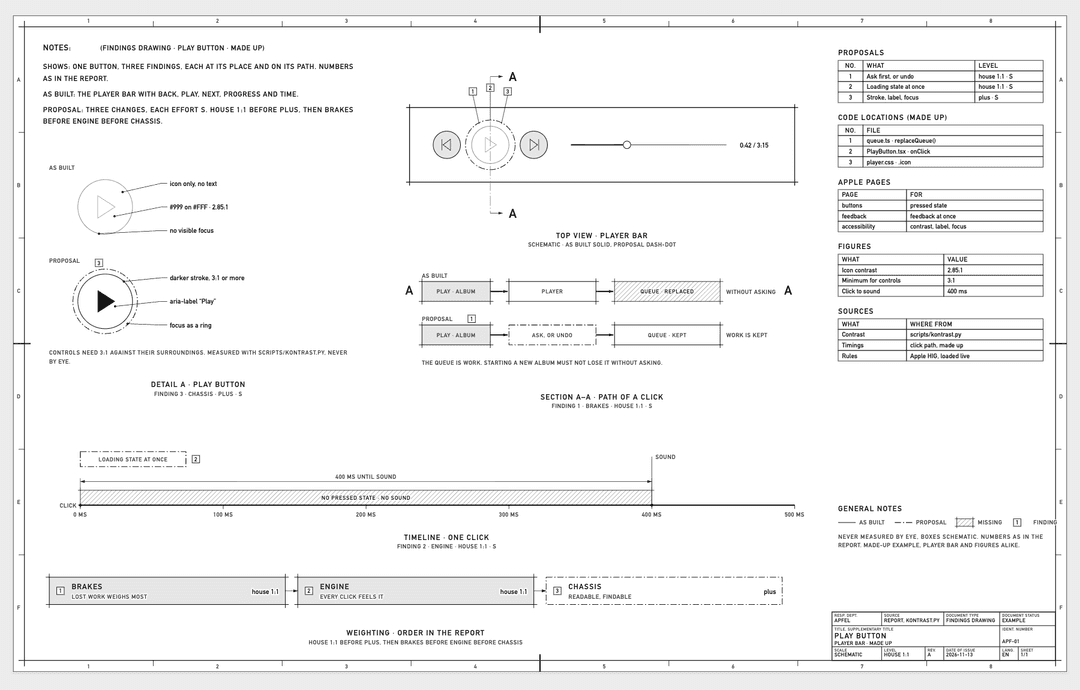
| 1 | Brakes | asks before leaving | Sidebar leaves without asking. Rule 1, guard like HAUS:bausteine/useVerlassenSchutz.ts | same as house 1:1 | S | NEU:src/dialoge/auftrag/Auftrag.tsx | feedback |
| 2 | Chassis | new | same as as-is | Total count above the table, low-hanging, work masks §2 | S | NEU:src/dialoge/auftrag/Liste.tsx | lists-and-tables |
From the made-up "Kundenkartei" (customer file) app that ships as an example
(skills/apfel/profile/beispiel.md), translated here.
Commands
| You type | Apfel does |
|---|---|
apfel | Greeting and menu: known project, your own project, profiles, feeling lucky |
apfel <dialog> | Full review with a contact sheet per station |
apfel kurz <dialog> | Short: verdict, numbers and the top three suggestions |
apfel zeichnung <dialog> | Review plus a findings drawing (Befundzeichnung): one technical sheet after DIN, drawn with Birne, which ships inside this plugin |
apfel profil | View, create, check and swap profiles |
apfel erklären | Builds a page from SKILL.md that shows how Apfel works |
apfel verbessern | Suggests changes to the skill, from what came up during a run |
Drag screenshots of the dialog into the terminal and Apfel judges by the picture too. Without screenshots it runs "code only" and collects whatever can only be seen in the running dialog under open for the click path (Offen für den Klickweg).
Profiles: your house standard
Apple's rules apply to everyone. What applies to your project lives in a profile: one Markdown file with a reference dialog, boundaries, and one code location per topic ("this is how our address dialog saves"). 15 base topics, add your own.
apfel profil → create → four questions → Apfel finds the code locations itself
             → shows the profile → saves it only after a yes → checks it
- Your own profiles live in
~/Documents/Apfel/profile/, not in the skill. They stay private and survive every update. - In a team: put
.apfel/profil.mdinto the project repo. Everyone measures against the same standard, and changes go through merge requests like any other code. - Without a profile Apfel still reviews, against Apple's rules and its own checks, and asks once whether there's a reference dialog.
scripts/profil_pruefen.pytells you whether every code location still exists on the ref. Profiles age, files move.
Principles
- Read only. Apfel never changes code in the reviewed project. No checkout, no installing, no running the project's scripts.
- Apple live, never copied. Each page of the Human Interface Guidelines is fetched as Markdown from developer.apple.com when needed and read verbatim, never stored. The repo holds only page names.
- Apple translated, not transplanted. The HIG talk about macOS and iOS. A translation table says what of that applies in the browser. Liquid Glass stays out.
- Nothing from the net gets executed. The scripts are local, Python standard library only.
- Don't overdo it. A good dialog gets a short report. Twenty findings are not a goal.
Install
As a plugin (recommended, with updates), in Claude Code:
/plugin marketplace add rdo2hellowelt/apfelkern
/plugin install apfel@apfelkern
As a plain skill, without the plugin:
git clone https://github.com/rdo2hellowelt/apfelkern ~/apfelkern
cp -R ~/apfelkern/skills/apfel ~/.claude/skills/apfel
Then start claude in any project and type apfel. Results and your own profiles land in
~/Documents/Apfel/, never in the reviewed repo and never in the plugin.
Needs: Claude Code, Git, Python 3 (python3, on Windows py), network access to
developer.apple.com. Tested on macOS; notes for Windows are in the skill.
Under the hood
apfelkern/
├─ .claude-plugin/        plugin.json · marketplace.json · icon.png
├─ .github/workflows/     birne-abgleich: the Birne copy must match birnenkern 1.1.0
├─ docs/                  example images for this README, icon source
└─ skills/apfel/
   ├─ SKILL.md            §0 start · §1 subject · §2 states · §3 checks
   │                      §4 extras · §5 report · §6 profiles · §7 explainer
   ├─ profile/            vorlage.md · beispiel.md · LIESMICH.md
   ├─ references/         hig-seiten · arbeitsmasken · bewegung
   ├─ scripts/            kontrast.py        WCAG contrast, opacity included
   │                      profil_pruefen.py  every code location against Git
   │                      zufall_hig.py      "feeling lucky"
   │                      erklaeren.py       explainer page from SKILL.md
   ├─ assets/             templates: report · explainer
   ├─ evals/evals.json    11 test cases: when it triggers, when it doesn't
   ├─ QUELLEN.md          origin, date and license of every source
   └─ LICENSE · LICENSES/
└─ skills/birne/         the small Birne (birnenkern 1.1.0, black and white)
Thanks
Apfel stands on shoulders, all MIT, all in skills/apfel/LICENSES/:
- taste-skill by Leonxlnx: rules for tables, forms and states
- emilkowalski/skills by Emil Kowalski: feedback and motion
- dimensional-drawing by enesozturk: drawing style of the findings drawing
What was deliberately left out, and why, is in skills/apfel/QUELLEN.md.
License
MIT, © 2026 Hans M. See LICENSE.
Apfel is an independent project and not affiliated with Apple Inc. "Apple" and "Human Interface Guidelines" are trademarks of Apple. Apfel links to their pages but does not redistribute them.
Gebaut mit Stolz bei hellowelt. Proud of it? Türlich. Türlich Türlich Digga.
// faq
What is apfelkern?
Apfel: Claude-Code-Skill, der Arbeitsdialoge im Browser gegen Apples Human Interface Guidelines prüft und die Befunde mit Birne als technisches Blatt zeichnet. Zahl statt Adjektiv.. It is open-source on GitHub.
Is apfelkern free to use?
apfelkern is open-source under the MIT license, so it is free to use.
What category does apfelkern belong to?
apfelkern is listed under plugins in the Claudeers registry of Claude-compatible tools.
// embed badge

[](https://claudeers.com/apfelkern)
// retro hit counter

[](https://claudeers.com/apfelkern)
// reviews
// guestbook
// related in Claude Plugins
 🔓
A single CLAUDE.md file to improve Claude Code behavior, derived from Andrej Karpathy's observations on LLM coding pitfalls.
 🔓
Claude Code is an agentic coding tool that lives in your terminal, understands your codebase, and helps you code faster by executing routine tasks, explainin…
 🔓
"CLI-Anything: Making ALL Software Agent-Native" -- CLI-Hub: https://clianything.cc/
🔓financial-services — a Claude ecosystem project on GitHub.