
animated-sticker-studio
给 AI 一张角色图,做一整套真的会动的表情包。Claude Code / Codex skill
Install with your AI
Paste into Claude Code, Cursor, or any agent — it reads the repo and wires the tool into your project.
Install and set up animated-sticker-studio (claude-skill project) into my current project.
Found on https://claudeers.com/animated-sticker-studio
Repo: https://github.com/fantuan-lab/animated-sticker-studio
Homepage/docs: —
Detected install method: claude-skill → # copy this skill into .claude/skills/animated-sticker-studio/
Category: other. Platforms: cli.
Read the repo's README for exact setup and env vars, then install it and wire it into my project.

Claudeers Health Verdict:
unknown; community-verified: false. Confirm the source before running anything.
# copy the skill dir into your project:
# .claude/skills/animated-sticker-studio/   (or ~/.claude/skills/animated-sticker-studio/ for all projects)
git clone https://github.com/fantuan-lab/animated-sticker-studio
// compatibility
| Platforms | cli |
|---|---|
| Operating systems | — |
| AI compatibility | claude |
| License | MIT |
| Pricing | open-source |
| Language | Python |
动态表情包工坊 · Animated Sticker Studio
给 AI 一张角色图(或者一句描述),它帮你做一整套真的会动的聊天表情包:设计台词和动作、画出每一帧、加文字和小特效,按微信 / Telegram / LINE 等平台的上架规格导出,自动压到体积上限以内,自己检查一遍,再打包给你。
Claude Code、Codex 和其他能跑脚本的 AI 编程助手都能用。
示例:饭团猫 · 24 张
原创角色。这一套已经用本 skill 导出的微信版本,提交到微信表情开放平台审核(2026-11-05)。
一次生成:1 张设定图 + 3 张动作图集,共调用 4 次出图接口,没有手工修图。下面是微信表情开放平台规格(240×240,每张 ≤500KB)的成品。
第 1–16 张:单张姿势,加程序动效。第 17–24 张:逐帧动画,手真的在挥,眼泪真的在流,哈欠真的打出来。
 001-收到 |  002-好耶 |  003-抱抱 |  004-早安 |  005-在吗 |  006-哈哈哈哈 |
 007-委屈 |  008-生气了 |  009-我想想 |  010-加油 |  011-谢谢老板 | 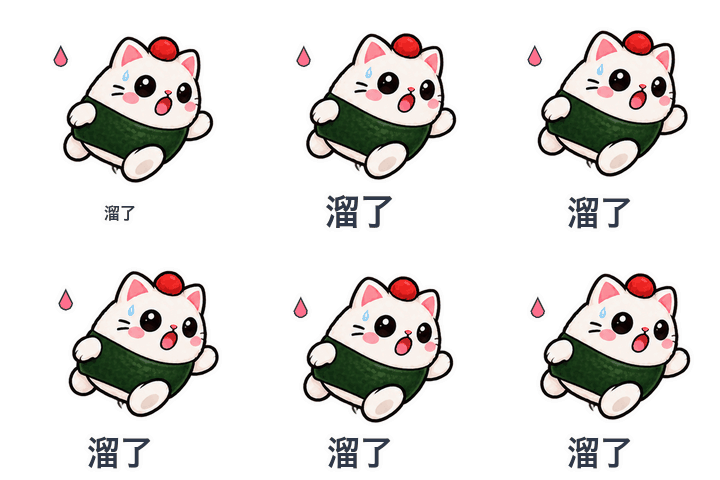 012-溜了 |
 013-震惊 |  014-摸鱼中 |  015-好的 |  016-冲鸭 |  017-拜拜 |  018-鼓掌 |
 019-打字中 |  020-干饭 |  021-点赞 |  022-哭哭 |  023-困了 |  024-比心 |
同一套图导出的四个平台版本,全部通过规格检查
| 平台 | 规格 | 本套最大 / 平均体积 | 上限 |
|---|---|---|---|
| 通用 GIF | 320×320 GIF | 702KB / 578KB | 1MB(建议值) |
| 微信表情开放平台 | 240×240 GIF + 120 缩略图 + 透明封面和图标(无描边、无文字) | 442KB / 368KB | 500KB |
| Telegram 视频贴纸 | 512×512 WebM VP9 透明 | 128KB / 94KB | 256KB |
| LINE 动态贴图 | 320×270 APNG,12 帧,播 2 遍 | 298KB / 270KB | 300KB |
和 pixel-gif-sticker-pack 比,好在哪
WoYun520/pixel-gif-sticker-pack 是个不错的项目,示例很多,这个 skill 就是在读完它的代码之后做的。主要多做了这些:
| pixel-gif-sticker-pack | 动态表情包工坊 | |
|---|---|---|
| 角色本身会不会动 | 不会。每张只有一张静态图,靠平移、摇晃、挤压动起来(它的文档原话:They do not generate new character poses inside a loop) | 会。可以给一张表情画 2–4 个关键帧(挥手、鼓掌、打字、吃饭、哭、打哈欠……),再叠加程序动效 |
| 程序动效 | 16 种 | 22 种,都是无缝循环;跳跃、惊吓这类动作出框时会自动缩小这一张 |
| 文字动效 | 静态 | 5 种:弹出、逐字打出、波浪、抖动、静态 |
| 小特效 | 16 个像素图标 | 17 个矢量图标,任何尺寸都清晰;像素风下自动变成像素样式 |
| 画风 | 只有像素风 | 平滑插画风 + 像素风 |
| 导出平台 | 320×320 GIF 一种 | 通用 GIF、微信表情开放平台、Telegram、LINE、Discord、Slack、WhatsApp,各自的尺寸、格式、帧数、时长和体积上限 |
| 体积控制 | 不控制(示例每张约 400KB) | 每个平台自动降颜色、质量或帧数,直到低于上限,并记录用了哪档参数 |
| 平台附带图 | 无 | 微信缩略图、封面、图标,LINE main/tab,Telegram 和 WhatsApp 的图标 |
| 出图 | 只能用 Codex 自带的出图工具 | 支持自带工具(打印提示词),也内置 hiapi 和任意 OpenAI 兼容接口 |
| 抠图 | 图集必须已经是透明背景;格子不齐要手填像素坐标 | 自动去掉纯色背景和“假透明”棋盘格;按像素块识别每个角色,格子不齐也能切;每张图集出一张带编号的对照图 |
| 字体 | 必须手动传字体路径 | 自动找系统中文字体,并检查每个字都能显示 |
| 重复检查 | 只查完全相同的图 | 用感知哈希找“几乎一样”的姿势,并分组提示 |
| AI 怎么检查动画 | 导出 MP4(AI 看不了视频) | 生成动作检查图:每张拆 4 帧并排,白底和深色底交替,AI 能直接看出动作、出框和白边 |
| 给人看的预览 | 分类网页 | 离线网页:白底、深色模式、透明格、像素放大四种背景,还有“放进聊天里”的样子 |
| 适用助手 | Codex | Claude Code、Codex,以及其他能跑 Python 的助手 |
怎么用
安装
Claude Code:把这个文件夹放到 ~/.claude/skills/animated-sticker-studio/,或者直接对 Claude 说:
帮我安装这个表情包 skill:https://github.com/fantuan-lab/animated-sticker-studio
Codex:放到 ~/.codex/skills/animated-sticker-studio/(agents/openai.yaml 已经写好)。
需要 Python 3 和 Pillow(pip install Pillow)。导出 Telegram 版本或 MP4 预览还需要 ffmpeg。
做一套
把角色图发给 AI,再说一句:
用 animated-sticker-studio,拿这张图里的角色做 16 张会动的中文表情包,要上架微信表情开放平台。
也可以说“做 24 张打工人专用的”“用我自己的台词”“像素风”“再出一份 Telegram 版”。没有图也行,描述一下角色,它会先画一张设定图给你确认。
出图接口(三选一)
- AI 自带出图工具(比如 Codex):不用配置。
- hiapi:设置环境变量
HIAPI_API_KEY。用 gpt-image-2,1K 透明背景,一张图集约 $0.04。还没有账号的话,可以用我的邀请链接注册:https://hiapi.ai/invite/fantuan - OpenAI 或兼容网关:设置
OPENAI_API_KEY,可选OPENAI_BASE_URL、OPENAI_IMAGE_MODEL。
想自己跑脚本?
# 1. 写 manifest.json(格式见 references/manifest.md,台词参考 references/phrases.md)
# 2. 出图集
python3 scripts/gen_atlas.py manifest.json --provider hiapi
# 3. 切图,然后看 atlases/*.index.png,确认编号和台词对得上
python3 scripts/cut_atlas.py manifest.json
# 4. 渲染、导出、检查、打包
python3 scripts/build_pack.py manifest.json out --platform wechat,telegram --mp4
不想花钱出图,可以直接重建本仓库的示例(切好的图已经放在仓库里):
cd examples/onigiri-cat
python3 ../../scripts/build_pack.py manifest.json out --platform generic,wechat
文件结构
SKILL.md                给 AI 看的工作流程
scripts/gen_atlas.py    写提示词、调用出图接口
scripts/cut_atlas.py    去背景、切图、生成编号对照图
scripts/build_pack.py   渲染、按平台导出、压缩、检查、预览、打包
scripts/sticker_core.py 动效、图标、文字、描边
references/             清单格式、平台规格、台词库
examples/onigiri-cat/   饭团猫示例:设定图、图集、切好的图、成品 GIF
注意
- 平台规格按 2026 年 11 月的公开要求整理,提交前以平台后台为准。微信上架还要准备横幅图和版权材料,这部分只能你自己来。
- 参考图会发给你选的出图服务。请只用你自己的角色,或者已经拿到授权的角色。
开源许可
// faq
What is animated-sticker-studio?
给 AI 一张角色图,做一整套真的会动的表情包。Claude Code / Codex skill. It is open-source on GitHub.
Is animated-sticker-studio free to use?
animated-sticker-studio is open-source under the MIT license, so it is free to use.
What category does animated-sticker-studio belong to?
animated-sticker-studio is listed under other in the Claudeers registry of Claude-compatible tools.
// embed badge

[](https://claudeers.com/animated-sticker-studio)
// retro hit counter

[](https://claudeers.com/animated-sticker-studio)
// reviews
// guestbook
// related in Other
 🔓
 🔓
Anti-AI-slop design skill for Claude Code, Cursor, and Codex.
 🔓
Huashu Design · HTML-native design skill for Claude Code · Claude Code 里 HTML 原生的设计 skill · 高保真原型 / 幻灯片 / 动画 + 20 设计哲学 + 5 维评审 + MP4 导出 · Agent-agnostic
 🔓
Open source Ghostty-based macOS terminal with vertical tabs and notifications for AI coding agents. Built for multitasking, organization, and programmability.