
AI-status-light-Claude-Code-Cursor-Codex
A physical traffic-light status indicator for Claude Code, Cursor, and AI coding agents
Install with your AI
Paste into Claude Code, Cursor, or any agent — it reads the repo and wires the tool into your project.
Install and set up AI-status-light-Claude-Code-Cursor-Codex (git-clone project) into my current project.
Found on https://claudeers.com/ai-status-light-claude-code-cursor-codex
Repo: https://github.com/Z060049/AI-status-light-Claude-Code-Cursor-Codex
Homepage/docs: —
Detected install method: git-clone → git clone https://github.com/Z060049/AI-status-light-Claude-Code-Cursor-Codex
Category: other. Platforms: cli.
Read the repo's README for exact setup and env vars, then install it and wire it into my project.

Claudeers Health Verdict:
slowing; community-verified: false. Confirm the source before running anything.
git clone https://github.com/Z060049/AI-status-light-Claude-Code-Cursor-Codex
// compatibility
| Platforms | cli |
|---|---|
| Operating systems | — |
| AI compatibility | claude |
| License | MIT |
| Pricing | open-source |
| Language | Python |
Status-light (Claude Code, Cursor, Codex)
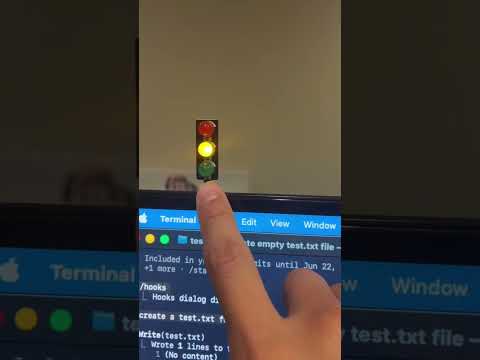
Click to watch the 30-second demo on YouTube
A small desk traffic light that mirrors what your AI coding agent is doing.
- Yellow (breathing) — the agent is working
- Green — task completed
- Red — a tool call failed
Works with Claude Code, Cursor, and Codex.
What you need
- ESP32 dev board — Amazon
- Mini traffic-light LED module (jumper wires included) — Amazon
- A USB data cable for the ESP32-to-Mac connection (charge-only cables won't show a serial port)
- A Mac (Linux/Windows should also work, but macOS is what's tested)
Here's the full hardware setup once everything is connected:

Setup
-
Install Arduino IDE. Download from arduino.cc/en/software. In Boards Manager, install
esp32by Espressif Systems (version 3.0 or newer). -
Wire it up. Connect the LED module to the ESP32:
Module ESP32 GNDGNDRGPIO16YGPIO17GGPIO18
-
Upload the firmware. In Arduino IDE, open
firmware/esp32-traffic-light/esp32-traffic-light.ino, select Board: ESP32 Dev Module and the matching Port (something like/dev/cu.wchusbserial...), then click upload. -
Clone this repo and run the installer.
git clone https://github.com/Z060049/traffic-light-ESP32-Claude-Cursor-Codex.git ~/Projects/status-light
cd ~/Projects/status-light
./install.sh
The installer adds hooks to Cursor and Claude Code, sets up a
lightshell alias, and remembers your ESP32's serial port. -
Test it. Open a new terminal and run:
light thinking   # yellow breathing
light done       # green
light error      # red
light off        # all off
Then start a Cursor or Claude Code session — the light will follow it.
// faq
What is AI-status-light-Claude-Code-Cursor-Codex?
A physical traffic-light status indicator for Claude Code, Cursor, and AI coding agents. It is open-source on GitHub.
Is AI-status-light-Claude-Code-Cursor-Codex free to use?
AI-status-light-Claude-Code-Cursor-Codex is open-source under the MIT license, so it is free to use.
What category does AI-status-light-Claude-Code-Cursor-Codex belong to?
AI-status-light-Claude-Code-Cursor-Codex is listed under automation in the Claudeers registry of Claude-compatible tools.
// embed badge

[](https://claudeers.com/ai-status-light-claude-code-cursor-codex)
// retro hit counter

[](https://claudeers.com/ai-status-light-claude-code-cursor-codex)
// reviews
// guestbook
// related in Other
 🔓
🔓 🔓
🔓Anti-AI-slop design skill for Claude Code, Cursor, and Codex.
 🔓
🔓Open source Ghostty-based macOS terminal with vertical tabs and notifications for AI coding agents. Built for multitasking, organization, and programmability.
 🔓
🔓Huashu Design · HTML-native design skill for Claude Code · Claude Code 里 HTML 原生的设计 skill · 高保真原型 / 幻灯片 / 动画 + 20 设计哲学 + 5 维评审 + MP4 导出 · Agent-agnostic