
ai-html-annotation
Agent Skill for the full HTML prototyping workflow: generate, edit, review and deliver with Claude Code, Codex and Cursor.
Install with your AI
Paste into Claude Code, Cursor, or any agent — it reads the repo and wires the tool into your project.
Install and set up ai-html-annotation (claude-plugin project) into my current project.
Found on https://claudeers.com/ai-html-annotation
Repo: https://github.com/Lisuiwen/ai-html-annotation
Homepage/docs: https://lisuiwen.github.io/ai-html-annotation/
Detected install method: claude-plugin → /plugin install ai-html-annotation@Lisuiwen/ai-html-annotation
Category: skills. Platforms: cli, api, web, mobile.
Read the repo's README for exact setup and env vars, then install it and wire it into my project.

Claudeers Health Verdict:
active; community-verified: false. Confirm the source before running anything.
/plugin marketplace add Lisuiwen/ai-html-annotation
/plugin install ai-html-annotation@Lisuiwen/ai-html-annotation
git clone https://github.com/Lisuiwen/ai-html-annotation
// compatibility
| Platforms | cli, api, web, mobile |
|---|---|
| Operating systems | — |
| AI compatibility | claude |
| License | MIT |
| Pricing | open-source |
| Language | JavaScript |
AI HTML Annotation
AI-assisted HTML annotation and prototyping toolkit for Claude Code, Codex, Cursor, and other coding agents.
Annotate, review, screenshot, and iterate native HTML prototypes on the real DOM. AI HTML Annotation combines reusable UI packs, DOM-bound annotations, AI-ready review context, element-to-source inspection, and reproducible multi-state screenshots in a zero-dependency workflow.
Most prototype workflows fail after the mock looks “good enough”:
- Screenshots have no DOM, so an AI has to guess structure and drifts on every change.
- Review comments live in docs or chat—“move this left”—and never map cleanly to an element.
- Specs, review notes, and source stay disconnected, so verifying a fix is slow.
AI HTML Annotation reconnects that loop with native HTML: build pages from a UI pack, annotate and review on the real DOM, copy instructions to an AI, and jump from a locked element back to source. The page is the deliverable, not just a picture of one.
Experimental 0.x · zero npm dependencies · MIT · Changelog
Install
Agent Skills / skills.sh
Use the open Agent Skills CLI for Claude Code, Cursor, Codex-compatible workflows, and other supported agents:
npx skills add https://github.com/Lisuiwen/ai-html-annotation --skill html-prototype-build
The skills.sh leaderboard discovers public skills automatically from real CLI installs; no separate submission manifest is required.
Claude Code Plugin Marketplace
Add this repository as a Claude Code marketplace, then install the plugin:
/plugin marketplace add Lisuiwen/ai-html-annotation
/plugin install ai-html-annotation@lisuiwen-agent-skills
The Claude plugin points directly at the canonical skills/html-prototype-build/ directory, so the project keeps a single Skill source instead of maintaining a duplicate copy.
See it first
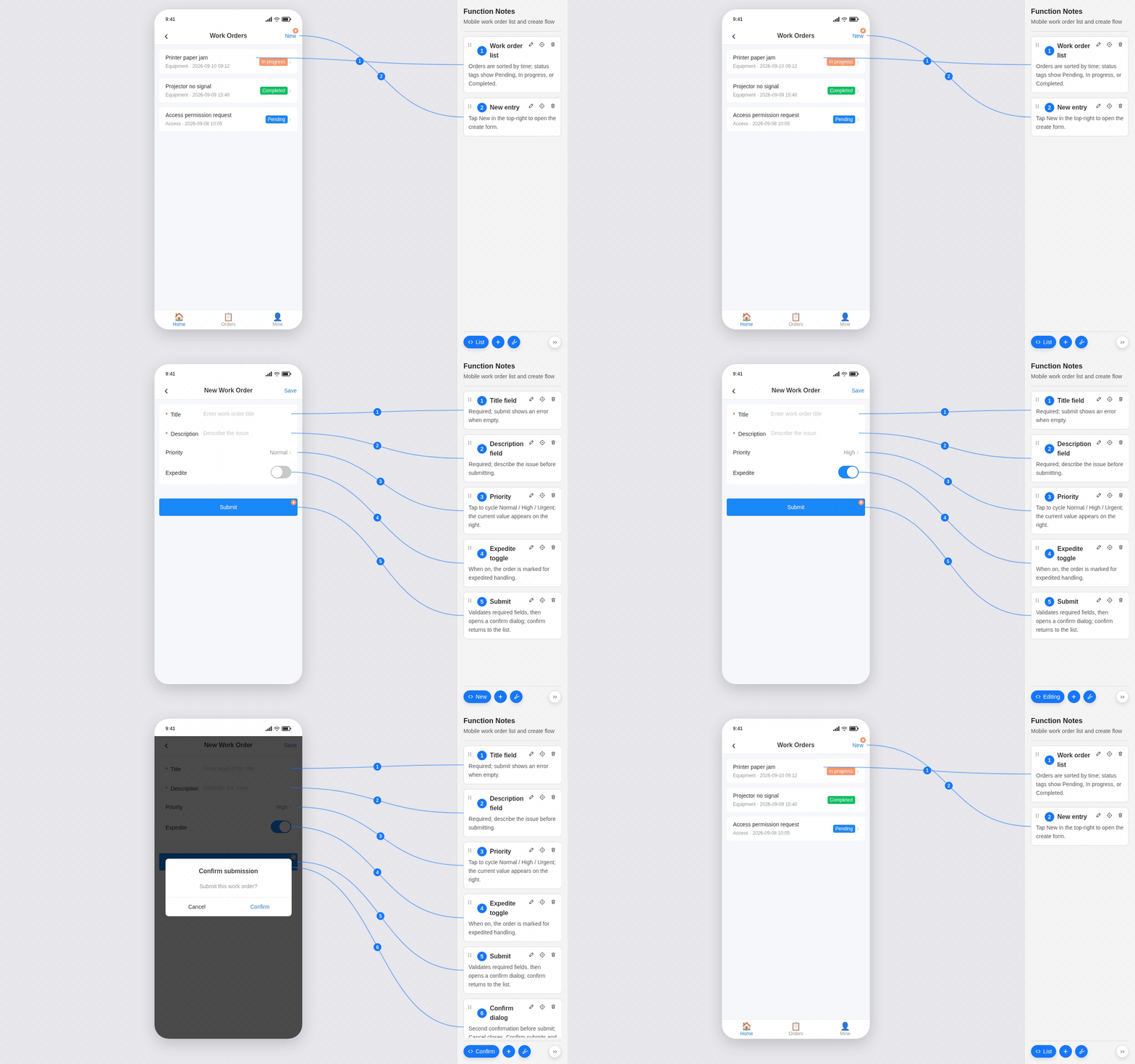
1. Sidebar: create, edit, delete, and switch scenarios
Viewer keeps formal notes in a right-hand panel. You can add, edit, delete, and browse annotations, switch them by page scenario, and follow SVG connectors to the matching modules—all on the same page.
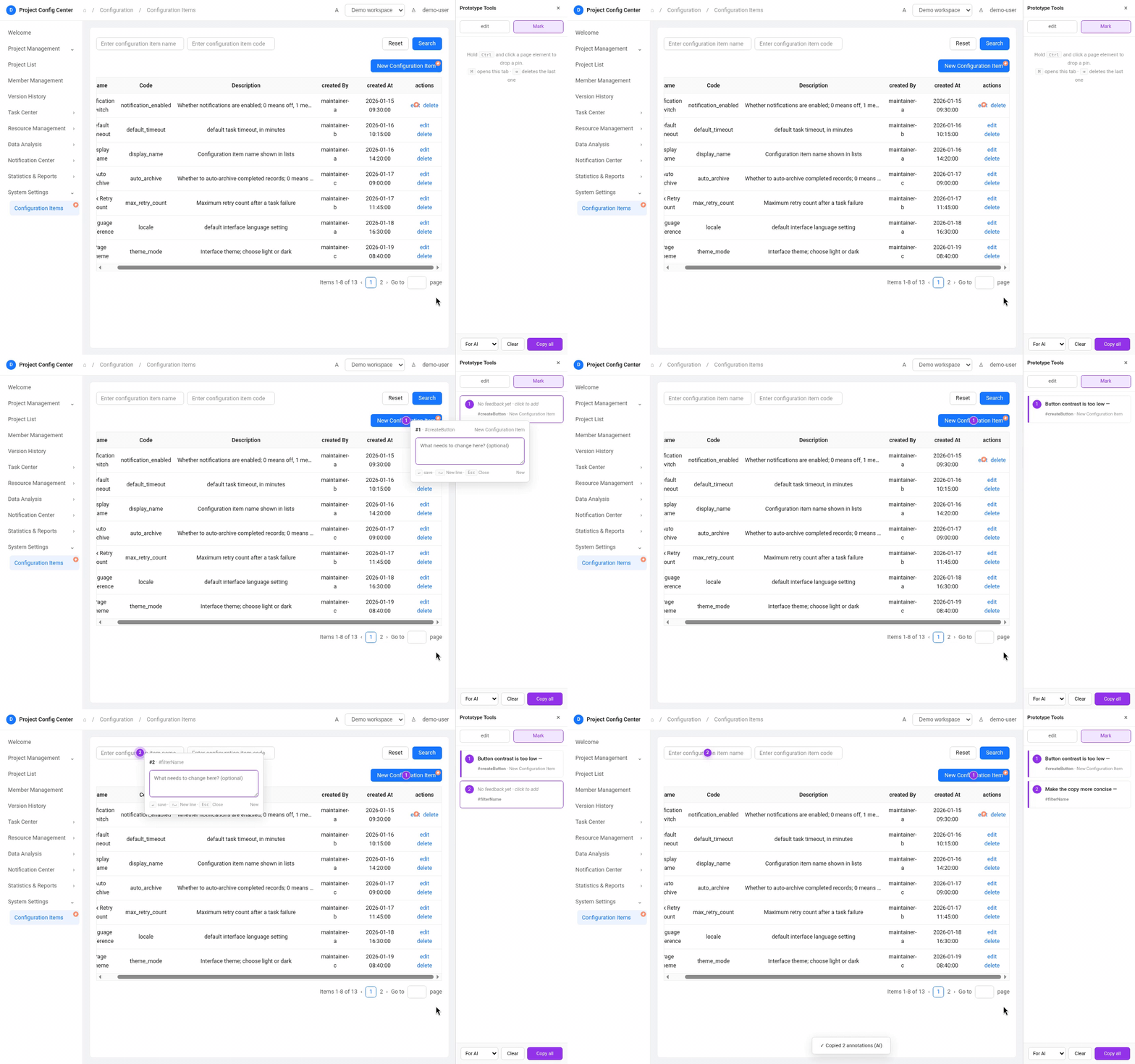
2. Author tools: edit the page or pin feedback for AI
Author Tools bundles Direct edit and Mark in one panel. Hold Ctrl (macOS: ⌘) and click an element to tweak styles or copy and save changes back to source HTML, or switch to Mark to drop removable review pins. Collect notes, then use Copy all → For AI to export selectors plus element HTML snapshots as editable context for an agent.
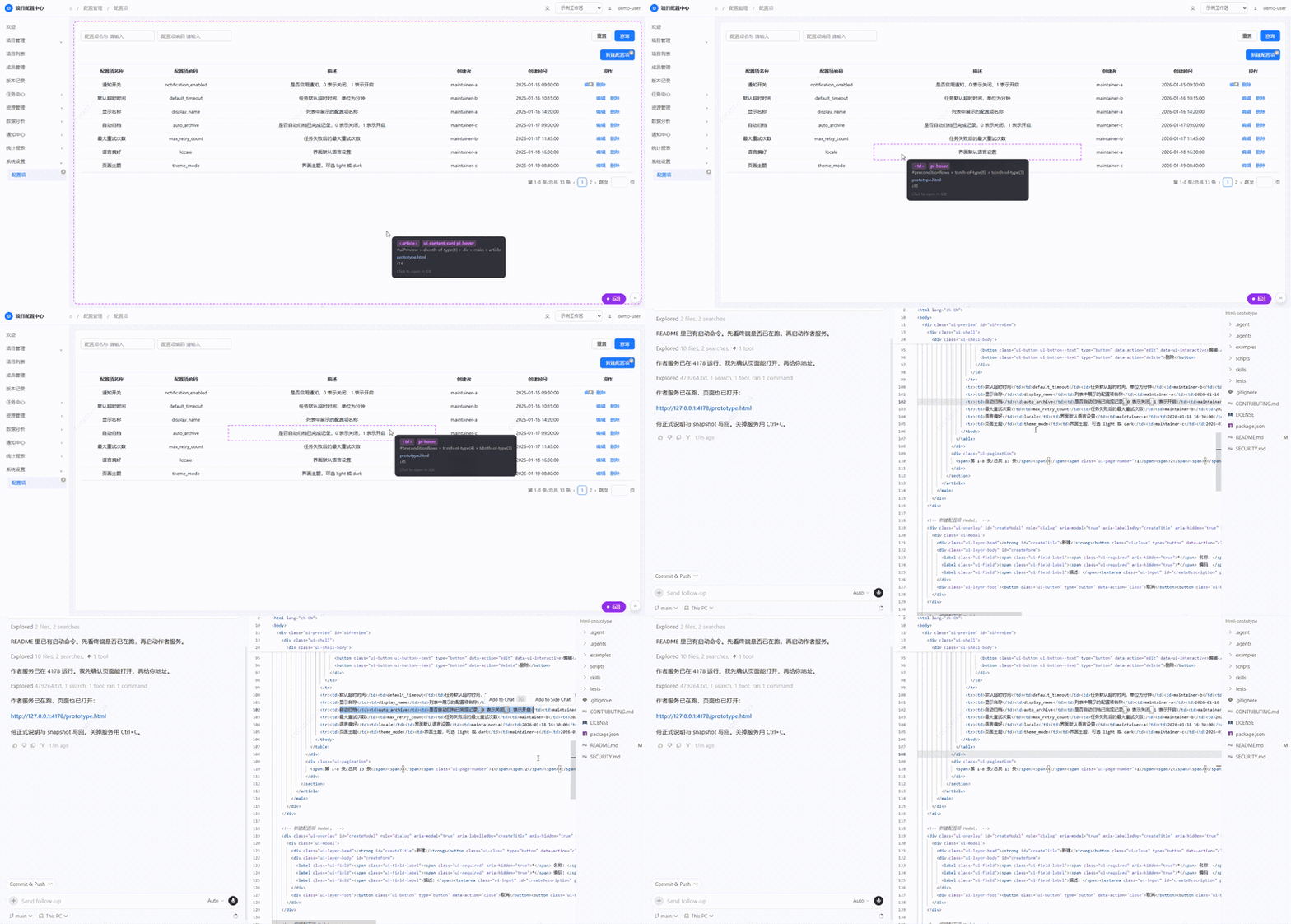
3. Inspector: lock an element and open its source
Hold Alt + Shift and hover a page element to see its selector; click to open that location in your local IDE—less searching and guessing in the file tree.
Why it matters
Annotations bound to real elements
Formal notes are not sticky labels on a screenshot. They are structured data in notes.snapshot.js. Viewer renders copy, anchors, SVG connectors, and interaction state onto the live page so every note maps back to a concrete DOM target.
Stable pages from a reusable UI pack
Compose pages from a local UI pack with shared tokens, components, and patterns. That reduces invent-from-scratch drift when an agent builds admin-style screens, and keeps later prototypes visually consistent.
Direct edits on the real DOM
Direct edit loads only in the localhost authoring session. Hold Ctrl (macOS: ⌘) and select an element to preview style or copy changes in the browser, then save them back to prototype.html through the authoring server—without hand-editing selectors or hunting through the file tree for every tweak.
Executable review context
Mark shares the same Author Tools panel. Review pins can be copied or cleared without polluting the formal page. Exports carry stable selectors, element HTML snapshots, and reviewer notes—context an agent can act on.
Jump from the page to source
A localhost authoring server on 127.0.0.1 edits notes, rebinds anchors, supports Direct edit and Mark, and opens source. Authoring chrome stays separate from the formal deliverable, so prototypes stay light and portable.
One state model, many outputs
PrototypeViewers owns product state. The same prototype supports in-page review and scenario screenshots (scenarios) that emit clean PNGs without annotation chrome. create, edit, empty, linked, and other states stay explicit, reproducible, and batchable.
Clean deliverables
Formal prototypes keep semantic DOM, stable anchors, the read-only Viewer, and render logic only. Mark, Direct edit, Notes editor, Inspector, and the local authoring server are authoring tools loaded outside the source HTML.
What you get
A typical prototype task yields three coordinated outputs:
- Self-contained handoff package — a named directory with
AGENTS.md, native HTML, and supporting files;AGENTS.mddirects coding agents to annotations and screenshots rather than prototype implementation - Reusable state definitions — snapshot notes and
scenariosas a stable baseline for later edits - Multi-state screenshots — batch PNGs for create / edit / empty / linked views without the notes rail, connectors, or author tools
Direct edit and review pins stay in the authoring layer. Screenshots and formal files stay clean.
How it fits together
Native HTML
   │
   ├── Viewer: formal notes, scenario switching, SVG connectors
   ├── Direct edit / Mark: in-page style edits, review pins, selectors, element snapshots, Copy for AI
   ├── Inspector: lock elements, show selectors, open source
   └── Screenshot: scenario-based clean page captures
This fits admin consoles, config pages, and interaction prototypes that change often: authors can edit styles on the page, product marks issues for AI, and return to source quickly to verify.
Scope
This is an AI-assisted HTML annotation and prototyping toolkit—not a production component library, not a Figma replacement, and not a third-party design-system implementation. It fits best when you need to:
- turn UI materials into openable HTML quickly;
- review on the real page and hand precise feedback to an AI;
- iterate structure, copy, and state while keeping reproducible screenshots.
Where to go next
This root README covers install and product overview only. Day-to-day usage lives with the Skill:
- Skill overview and collaboration model →
skills/html-prototype-build/README.md(English; 中文见 README.zh-CN.md) - Agent routing and hard constraints →
skills/html-prototype-build/SKILL.md - Task guides with commands (authoring, review, screenshots) →
skills/html-prototype-build/references/ - Walkthrough sample →
examples/minimal-notes-system
Skill references, UI pack contracts, and addon docs are in English; Chinese README pairs are available where noted above.
Distribution layout
.claude-plugin/marketplace.json  Claude Code marketplace catalog
skills/html-prototype-build/     Canonical Agent Skill source
examples/                        Runnable minimal prototype
media/                           README demo assets
scripts/                         Validation entry
tests/                           Runtime unit and contract tests
Inside the Skill, Runtime is organized by execution boundary: client/ for final browser runtime, author/ for browser authoring tools, server/ for the localhost Node service, and cli/ for standalone commands.
Security boundaries
runtime/server/index.mjsbinds to127.0.0.1only. Do not run authoring or screenshots against untrusted HTML or snapshot files.- Author write requests require same-origin localhost JSON; snapshot and source writes stay within the configured prototype workflow. Keep
skills/html-prototype-build/.envlocal for IDE selection; never commit it. - Direct edit and Mark are temporary Author Tools loaded only in the authoring session. Direct edit writes style and copy changes back to source HTML through the localhost server; Mark stores review context in page-scoped
localStorageand may copy it to the clipboard. Neither is injected into the source HTML or part of the formal deliverable. - Do not put real credentials, production data, personal information, or unauthorized brand assets in prototypes.
Contributing
This project is experimental 0.x; APIs and layout may change. See .github/CONTRIBUTING.md and .github/CODE_OF_CONDUCT.md. Report vulnerabilities privately per .github/SECURITY.md.
The UI pack is an original native-HTML visual simulation. It does not bundle third-party design-system code or official assets.
License
MIT. Third-party attribution is in NOTICE (html-mark credit and Apache ECharts).
// faq
What is ai-html-annotation?
Agent Skill for the full HTML prototyping workflow: generate, edit, review and deliver with Claude Code, Codex and Cursor.. It is open-source on GitHub.
Is ai-html-annotation free to use?
ai-html-annotation is open-source under the MIT license, so it is free to use.
What category does ai-html-annotation belong to?
ai-html-annotation is listed under skills in the Claudeers registry of Claude-compatible tools.
// embed badge

[](https://claudeers.com/ai-html-annotation)
// retro hit counter

[](https://claudeers.com/ai-html-annotation)
// reviews
// guestbook
// related in Claude Skills
 🔓
🔓An agentic skills framework & software development methodology that works.
 🔓
🔓 🔓
🔓💫 Toolkit to help you get started with Spec-Driven Development
 🔓
🔓AI coding assistant skill (Claude Code, Codex, OpenCode, Cursor, Gemini CLI, and more). Turn any folder of code, SQL schemas, R scripts, shell scripts, docs,…