
ytb-edit-kit
Skills and tools that let Claude Code or Antigravity edit your YouTube videos in code, in your own design system (HyperFrames)
Install with your AI
Paste into Claude Code, Cursor, or any agent — it reads the repo and wires the tool into your project.
Install and set up ytb-edit-kit (git-clone project) into my current project.
Found on https://claudeers.com/ytb-edit-kit
Repo: https://github.com/Mohcen56/ytb-edit-kit
Homepage/docs: —
Detected install method: git-clone → git clone https://github.com/Mohcen56/ytb-edit-kit
Category: mcp-servers. Platforms: cli, api, web.
Read the repo's README for exact setup and env vars, then install it and wire it into my project.

Claudeers Health Verdict:
unknown; community-verified: false. Confirm the source before running anything.
git clone https://github.com/Mohcen56/ytb-edit-kit
// compatibility
| Platforms | cli, api, web |
|---|---|
| Operating systems | — |
| AI compatibility | claude |
| License | MIT |
| Pricing | open-source |
| Language | Python |
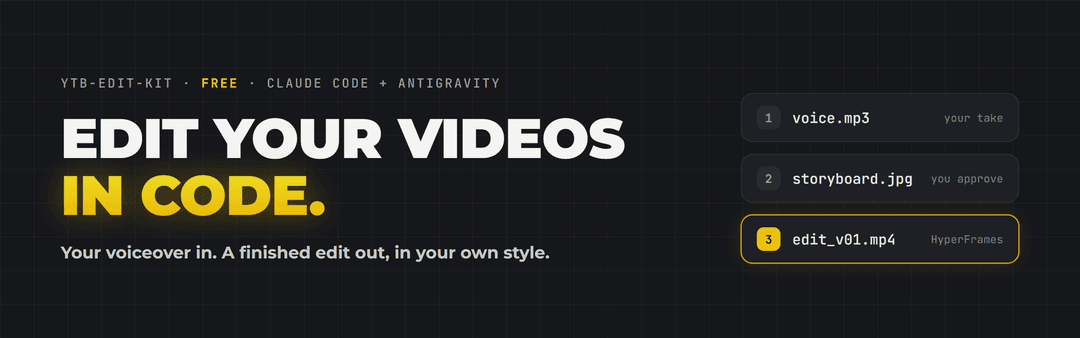
Give it your voiceover. Get back a finished YouTube edit, in your own style.
Skills and tools that let Claude Code, Codex, or Antigravity edit your videos in code: real screens, b-roll, GIFs, charts, diagrams and sound effects, every one landing on the word you say.
✦ How it works
| Step | What happens | |
|---|---|---|
| 1 | Your style | Say "build my design system". It asks you a few questions (colours, fonts, captions, sound, pace) and saves your answers. Every video after follows them. |
| 2 | Your voiceover | Drop your take and your screenshots or clips in, and say "edit this video". It times every word. |
| 3 | Storyboard first | You get one still per shot before anything renders. Change what you don't like. |
| 4 | Render + self-check | It renders with HyperFrames, then looks at its own frames and re-listens to the result before handing it over. |
| 5 | It learns | Every note you give ("no text on b-roll") is saved as a dated rule, so the next edit already follows it. |
Already made your brand (with another grill-me skill, a style guide, notes)? It finds it in your project and uses it. You won't be asked twice.
No design system yet? It suggests building one first (about 10 minutes). Say no and it edits in a clean neutral look you can replace any time.
✦ What it can put on screen
Word screens · real website and app screens with markers · full-screen b-roll · GIFs and memes · versus cards · bars and gauges · flow and node diagrams · maps · re-created chats and terminals. All recoloured to your brand. See every shot type in KINDS.md.
✦ Install
1. Install these first
- Python 3.10+ and FFmpeg (Windows:
winget install Gyan.FFmpeg· Mac:brew install ffmpeg) - Claude Code, Codex, or Antigravity
- HyperFrames, the free engine that renders the edits, from its source: github.com/heygen-com/hyperframes. Follow its own setup. This kit doesn't install it for you.
2. Get the kit
git clone https://github.com/Mohcen56/ytb-edit-kit
cd ytb-edit-kit
pip install -r requirements.txt
3. Start
Open the folder in Claude Code, Codex (AGENTS.md + .agents/skills/ are included), or Antigravity (tell it to read GEMINI.md first) and say:
build my design system
✦ Your first edit
- Add your own sound effects to
sfx/(names and tips in sfx/README.md). - Say "edit this video" and give it your voiceover and your files.
- Check the storyboard, give notes, get your MP4.
Prefer running it by hand?
python tools/edit_kit/new_video.py videos/my_video        # then put voice.mp3 in videos/my_video/audio/
cd videos/my_video/audio && python ../../../tools/transcribe.py voice.mp3 && python ../../../tools/tighten.py && cd ../../..
python tools/edit_kit/build.py videos/my_video             # after writing videos/my_video/shots.py
python tools/edit_kit/storyboard.py videos/my_video        # one still per shot, check before rendering
cd videos/my_video/project && npx hyperframes render . -o ../renders/my_video_v01.mp4
Only want captions for CapCut, Premiere or DaVinci? python tools/captions.py words_tight.json captions makes .srt + .ass.
✦ What's inside
Skills (.claude/skills/ and .agents/skills/)
| Skill | What it does |
|---|---|
design-system | Asks you questions, with visual previews, until you have your own colours, fonts, captions, sound and editing rules |
script-and-audio | Structures your script into visual beats and cuts/tightens your voiceover (with Whisper skipped-span checks) |
edit | Edits your video from your voiceover: storyboard first, then render, then it checks its own work |
about-me | Interviews you once so Claude always knows who you are, your audience and how you talk |
Tools (tools/)
| Tool | What it does |
|---|---|
transcribe.py | Word-by-word timing of your voiceover (local Whisper) |
tighten.py | Cuts long pauses and breaths, evens the loudness |
captions.py | .srt and styled .ass captions in your colours and font |
gif2mp4.py | Turns a GIF into a clean clip of a set length |
edit_kit/ | The engine: new_video.py, build.py, storyboard.py, final_check.py |
✦ Optional: let it hear
Claude can't hear audio on its own. earshot by Leon Lin (MIT) gives it ears: it picks sound effects, checks your mix and lines sound up with cuts. Install it from its repo, add it as an MCP server, and copy its skills/earshot folder into .claude/skills/.
✦ Rules it follows
- Your words stay yours. On-screen text uses your exact script words.
- It asks instead of guessing when a line, a file or a shot is unclear.
- Only media you have the rights to: your recordings, your screenshots, free stock, your own sound effects.
✦ Also free
ytb-research-skills: drop a YouTube link and it fills your ideas table, breaks videos down, finds outliers in your niche and helps write your scripts.
MIT license · see LICENSE
// faq
What is ytb-edit-kit?
Skills and tools that let Claude Code or Antigravity edit your YouTube videos in code, in your own design system (HyperFrames). It is open-source on GitHub.
Is ytb-edit-kit free to use?
ytb-edit-kit is open-source under the MIT license, so it is free to use.
What category does ytb-edit-kit belong to?
ytb-edit-kit is listed under mcp-servers in the Claudeers registry of Claude-compatible tools.
// embed badge

[](https://claudeers.com/ytb-edit-kit)
// retro hit counter

[](https://claudeers.com/ytb-edit-kit)
// reviews
// guestbook
// related in MCP Servers
 🔓
f.k.a. Awesome ChatGPT Prompts. Share, discover, and collect prompts from the community. Free and open source — self-host for your organization with complete…
 🔓
A cross-platform desktop All-in-One assistant for Claude Code, Codex, OpenCode, OpenClaw, Gemini CLI & Hermes Agent. Only official website: ccswitch.io
 🔓
🪨 why use many token when few token do trick — Claude Code skill that cuts 65% of tokens by talking like caveman
 🔓
An open-source AI agent that brings the power of Gemini directly into your terminal.