
xxd-notify
Bark-powered intelligent task notifications for Codex and Claude skills
Install with your AI
Paste into Claude Code, Cursor, or any agent — it reads the repo and wires the tool into your project.
Install and set up xxd-notify (claude-skill project) into my current project.
Found on https://claudeers.com/xxd-notify
Repo: https://github.com/nevertoday/xxd-notify
Homepage/docs: —
Detected install method: claude-skill → # copy this skill into .claude/skills/xxd-notify/
Category: skills. Platforms: cli, api.
Read the repo's README for exact setup and env vars, then install it and wire it into my project.

Claudeers Health Verdict:
unknown; community-verified: false. Confirm the source before running anything.
# copy the skill dir into your project:
# .claude/skills/xxd-notify/   (or ~/.claude/skills/xxd-notify/ for all projects)
git clone https://github.com/nevertoday/xxd-notify
// compatibility
| Platforms | cli, api |
|---|---|
| Operating systems | — |
| AI compatibility | claude |
| License | MIT |
| Pricing | open-source |
| Language | Python |
xxd-notify
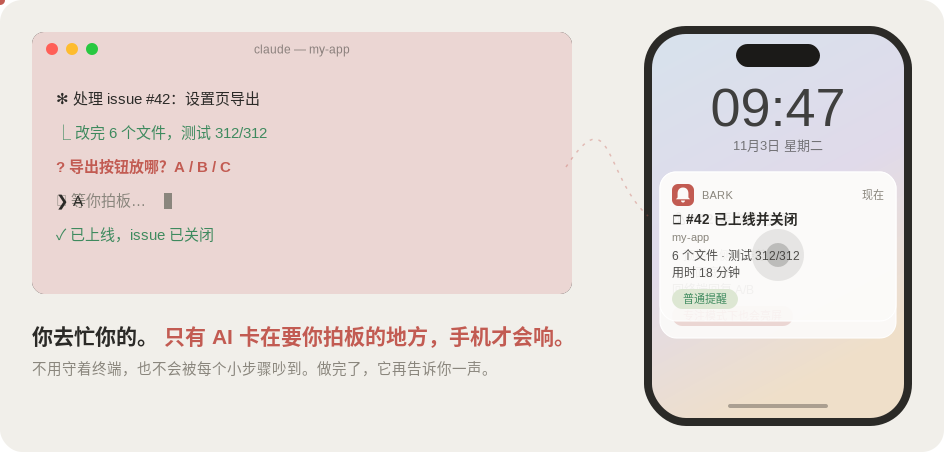
AI 需要你的时候,手机才响一下。
给 Claude Code、Codex 用的 Bark 通知 Skill:什么时候该叫你、叫你时说清楚要你做什么、网断了也送得到。
简体中文 · English
安装 · 什么时候响 · 好通知 · 用法 · 断网不丢 · 配置 · 常见问题
😵 为什么需要它
你让 Claude 跑一个要一个半小时的重构,然后每隔十分钟切回终端看一眼,什么别的事也没干成。终于决定去吃饭,回来发现它在第 3 分钟就停下来问你「导出按钮放 A 还是 B」,等了你 40 分钟。
于是你给它接上通知。结果它每一步都推:等待输入、任务完成、命令执行完毕……一个下午 23 条,你把它静音了。然后真正要你拍板的那一条,也一起被静音了。
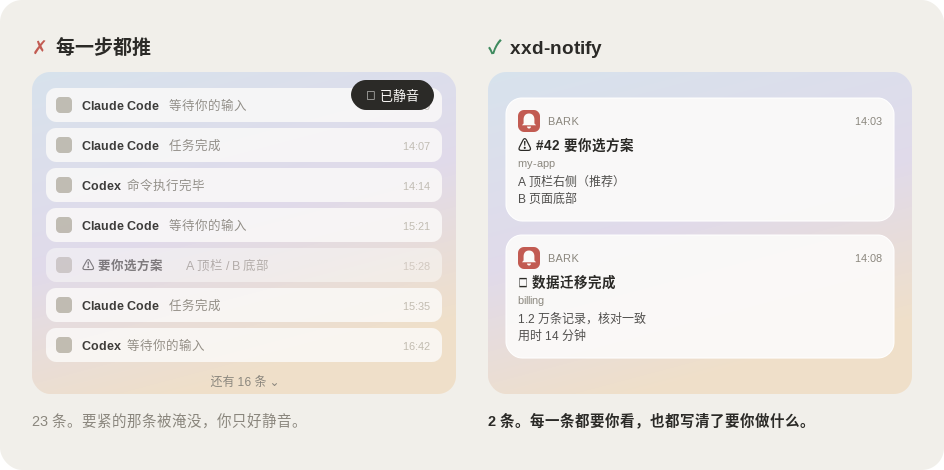
| 守着终端 | 每一步都推(Stop hook 等) | xxd-notify | |
|---|---|---|---|
| 什么时候叫你 | 你自己去看 | AI 一停就响,不管为什么停 | 只在要你拍板、失败、做完时 |
| 通知里写什么 | — | 「等待你的输入」 | 要你决定什么、推荐哪个、去哪看 |
| 专注模式 | — | 一视同仁 | 要你拍板的穿透专注,其余正常或静默 |
| 同一个问题 | — | 每次停都再响 | 只问一遍 |
| 网断了 | — | 这条就没了 | 重试、Mac 本机先弹、网好了补发 |
| 体积 | — | — | 一个 Python 文件,零依赖 |
⚡ 安装
先在 iPhone 上装 Bark(App Store 搜「Bark」),打开后复制里面的推送地址。
让 AI 帮你装(推荐)
把下面这段话发给 Claude Code 或 Codex:
帮我安装 xxd-notify:https://github.com/nevertoday/xxd-notify
克隆到 ~/.claude/skills/xxd-notify(如果我也用 Codex,再放一份到 ~/.codex/skills/)。
装好后告诉我在终端运行哪条 setup 命令,我自己粘贴 Bark 地址,不要让我把地址发在对话里。
一行命令
npx skills add https://github.com/nevertoday/xxd-notify --skill xxd-notify
# 或者:git clone https://github.com/nevertoday/xxd-notify ~/.claude/skills/xxd-notify
然后粘贴 Bark 地址:
python3 ~/.claude/skills/xxd-notify/scripts/xxd_notify.py setup
粘贴的内容不会显示,也不会留在命令历史里。在 Claude Code 里可以直接输入 ! python3 ~/.claude/skills/xxd-notify/scripts/xxd_notify.py setup。手机收到「🧪 Bark 连接正常」就装好了。
[!TIP] 只要 Python 3.8 及以上,不需要装任何依赖。macOS 和大多数 Linux 都自带 Python。
🔔 它什么时候会响
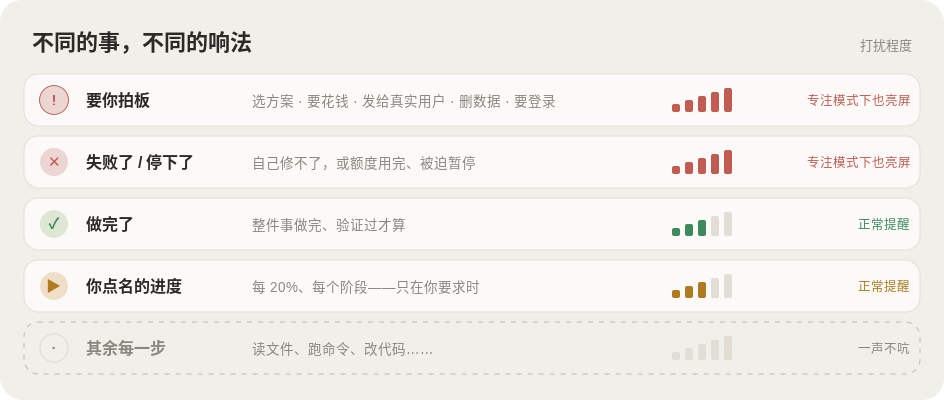
- 要你拍板:选方案、要花钱、给真实用户发邮件、删数据、需要登录或续费。用 Bark 的
timeSensitive级别,专注模式下也会亮屏,因为没有你,事情就停在那里。 - 失败了、停下了:自己修不了,或者额度用完被迫暂停。同样穿透专注模式。
- 做完了、你点名的进度:正常提醒。进度只在你要求时才发。
- 其余所有时候:一条都不推。
另外,你不开口它就不发。普通对话、普通任务,它不会自作主张去打扰你。
📱 一条好通知长什么样
| 一般的通知 | xxd-notify 发的 |
|---|---|
| 任务完成 | ✅ 数据迁移完成 1.2 万条记录,核对一致 用时 14 分钟 |
| 请处理 | ⚠️ #42 要你选方案 A 导出按钮放顶栏右侧(推荐) B 放页面底部 回终端回复 A/B · 点开通知直接看方案页 |
| 出错了 | ⏹️ 额度用完,任务已停 停在第 37/120 个文件 进度已保存,有额度后说「继续」即可 |
- 副标题自动写上项目名。同时开着五个会话,也知道该回哪一个。
- 第一行就是结论,在锁屏上扫一眼就够。
- 同一个问题只问一遍,不会每 10 分钟追着你响。
🧭 用法
直接跟 AI 说
装好以后不用记命令,在对话里说清楚什么时候叫你就行:
- 「把测试全部跑完,做完用 Bark 通知我,失败了也告诉我。」
- 「开 loop 逐个处理 issue。凡是需要我确认的时候(选方案、要花钱、给真实用户发邮件、删数据),先 Bark 我,写清楚要我确认什么、去哪里看。」
- 「这批 500 张图每完成 20% 告诉我一次,遇到异常马上叫我。」
- 「后台那个批处理帮我盯着,卡住了或者磁盘不够就提醒我,跑完也说一声。」
- 「Bark 好像没收到,查一下之前那条发出去没有。」
「需要我确认就叫我」这句只要在会话开头说一次,整个 loop 都有效。Skill 原文在 SKILL.md。
不用 AI 也能用
alias notify="python3 ~/.claude/skills/xxd-notify/scripts/xxd_notify.py"
| 命令 | 作用 |
|---|---|
notify run --title "跑测试" --tail 3 -- npm test | 包住任何长命令,结束时按退出码推 ✅ 或 ❌,退出码原样返回 |
notify watch --pid 12345 --log logs/latest.log --stall 30 | 盯着后台任务:进程结束推一条;日志 30 分钟不动提醒一次 |
notify watch … --disk / --min-free 15 | 磁盘低于 15G 提醒一次 |
notify send -s decide -t "要你选域名" -b $'A example.com(推荐)\nB example.ai' | 自己发一条;-s 决定前缀和打扰程度:decide fail stop done progress |
notify history | 每一条通知的送达情况 |
notify flush | 立刻补发没送到的 |
🛟 网断了也不丢
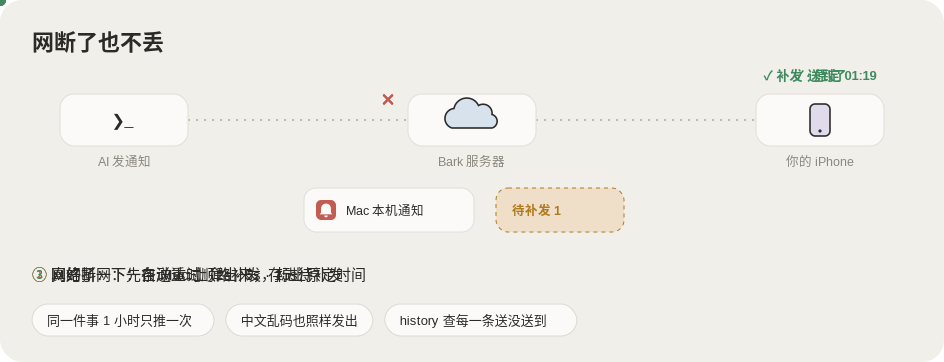
最需要叫你的时刻,往往网络也正好不稳:代理在切换、Wi-Fi 刚断。所以:
- 自动重试:失败后隔 2 秒、5 秒、15 秒各重试一次。
- 真的发不出去:先在 Mac 上弹一条本机通知,同时把消息存进待补发;下一条通知送达时顺路补上,并标明原定时间。
- 不会刷屏:同样的消息 2 分钟内只发一次,
--once能让同一件事一小时内只推一次。 - 中文不会让它发不出去:macOS 自带的 bash 3.2 会把紧跟在变量后面的中文弄坏,比如
$reason(,以前遇到这种字节整条通知就发不出去,现在照样能发出。
⚙️ 配置
notify config show                  # 查看配置(Key 会被遮住)
notify config set sound birdsong    # 改提示音
notify config set group "AI 任务"    # 改通知中心的分组
notify config set autoSubtitle 0    # 不要自动写项目名
notify test                         # 发一条测试通知
| 字段 | 作用 | 默认 |
|---|---|---|
sound | 提示音(Bark 里能试听) | birdsong |
group | 通知中心的分组 | AI 任务 |
level | 没写状态时的打扰程度 | 不填,按状态自动选 |
isArchive | 是否存进 Bark 历史 | 1 |
icon / url / badge / copy / autoCopy | 同 Bark 的同名参数 | — |
autoSubtitle | 副标题自动写项目名 | 1 |
环境变量和配置文件位置
- 配置文件在
~/.config/xxd-notify/config.json,权限为只有你自己能读写; XXD_BARK_CONFIG换配置文件的位置;XXD_BARK_ENDPOINT临时指定 Bark 地址(适合 CI);XXD_NOTIFY_SOURCE指定副标题;- 自建的 bark-server 也能用,局域网地址允许用 http。
在自己的脚本里调用:退出码
notify send -t "⚠️ 磁盘快满了" -b "/Volumes/Data 只剩 9G" --once disk-low || true
| 退出码 | 含义 |
|---|---|
0 | 已送达;或者和刚发过的重复,故意跳过了 |
3 | 还没运行 setup |
4 | Bark 拒收(多半是 Key 不对) |
5 | 重试后仍连不上,消息已存进待补发 |
退出码不为 0 的消息都存进了待补发,所以写 || true 不会丢消息。老的 scripts/bark_notify.sh --title … --body … 和 scripts/bark_config.py 照样能用。
❓ 常见问题
和 Claude Code 自带的 Stop hook 通知有什么不一样?
Stop hook 只要 AI 停下就响,不管它为什么停:做完了、卡住了,还是只是在等你回一句话。xxd-notify 由 AI 判断这次是不是真的需要你,并把要你做的事写在通知里。两者可以一起用。
会不会把我的代码发出去?
只发标题和几行正文,Skill 明确规定不能写 Key、密码、token、私密对话或大段原文。消息会经过 Bark 的服务器(api.day.app);介意的话可以自建 bark-server。
安卓能用吗?
Bark 只有 iPhone / iPad 版(Apple 芯片的 Mac 也能装),安卓暂时不行。
没收到怎么办?
先跑 notify history 看那条是「已送达」还是「待补发」。待补发的消息,在网络或 Key 修好后跑 notify flush 就会补发。
Key 泄露了怎么办?
Bark Key 等同于密码。它只存在你本机的配置文件里,不要写进 README、代码、Issue、截图或命令历史。setup 用隐藏输入,config show 会遮住 Key。泄露了就在 Bark App 里重置。
📦 项目结构
SKILL.md                     给 AI 看的规则:什么时候叫你、怎么写、不能写什么
scripts/xxd_notify.py        发送、重试、待补发、去重、run / watch / setup,只用 Python 标准库
scripts/bark_notify.sh       旧接口,照样能用
tests/                       用本地的假 Bark 服务器测试,不会推到你手机
assets/src/build_assets.py   生成 README 里的动画 SVG(中英两套)
assets/src/social.html       分享封面(GitHub 和 X 上的预览大图)
assets/src/make_gif.py       逐帧渲染出 GIF,再截出 social.png
python3 -m unittest discover -s tests       # 跑测试
python3 assets/src/build_assets.py          # 改了图里的文字后重新生成 SVG
python3 assets/src/make_gif.py              # 需要 Chrome 和 ffmpeg
assets/how-it-works.gif 是主动画的 GIF 版,用在不能播 SVG 动画的地方,比如推文、小红书、公众号。
🙌 致谢
推送靠 Bark,感谢 Finb 做了这么好用又开源的推送工具。
📄 License
// faq
What is xxd-notify?
Bark-powered intelligent task notifications for Codex and Claude skills. It is open-source on GitHub.
Is xxd-notify free to use?
xxd-notify is open-source under the MIT license, so it is free to use.
What category does xxd-notify belong to?
xxd-notify is listed under skills in the Claudeers registry of Claude-compatible tools.
// embed badge

[](https://claudeers.com/xxd-notify)
// retro hit counter

[](https://claudeers.com/xxd-notify)
// reviews
// guestbook
// related in Claude Skills
 🔓
An agentic skills framework & software development methodology that works.
 🔓
 🔓
💫 Toolkit to help you get started with Spec-Driven Development
 🔓
AI coding assistant skill (Claude Code, Codex, OpenCode, Cursor, Gemini CLI, and more). Turn any folder of code, SQL schemas, R scripts, shell scripts, docs,…