
xcode-mods
Xcode's build, tests, console and SwiftUI previews inside Claude Code
Install with your AI
Paste into Claude Code, Cursor, or any agent — it reads the repo and wires the tool into your project.
Install and set up xcode-mods (claude-plugin project) into my current project.
Found on https://claudeers.com/xcode-mods
Repo: https://github.com/artemnovichkov/xcode-mods
Homepage/docs: https://artemnovichkov.com
Detected install method: claude-plugin → /plugin install xcode-mods@artemnovichkov/xcode-mods
Category: mcp-servers. Platforms: cli, api, desktop, mobile.
Read the repo's README for exact setup and env vars, then install it and wire it into my project.

Claudeers Health Verdict:
unknown; community-verified: false. Confirm the source before running anything.
⚠ Unverified / not recently updated — review before pasting a run-this config.
/plugin marketplace add artemnovichkov/xcode-mods
/plugin install xcode-mods@artemnovichkov/xcode-mods
git clone https://github.com/artemnovichkov/xcode-mods
// compatibility
| Platforms | cli, api, desktop, mobile |
|---|---|
| Operating systems | — |
| AI compatibility | claude |
| License | MIT |
| Pricing | open-source |
| Language | TypeScript |
xcode-mods
Xcode's build, tests, console and SwiftUI previews inside Claude Code, built on the headless Xcode MCP server.
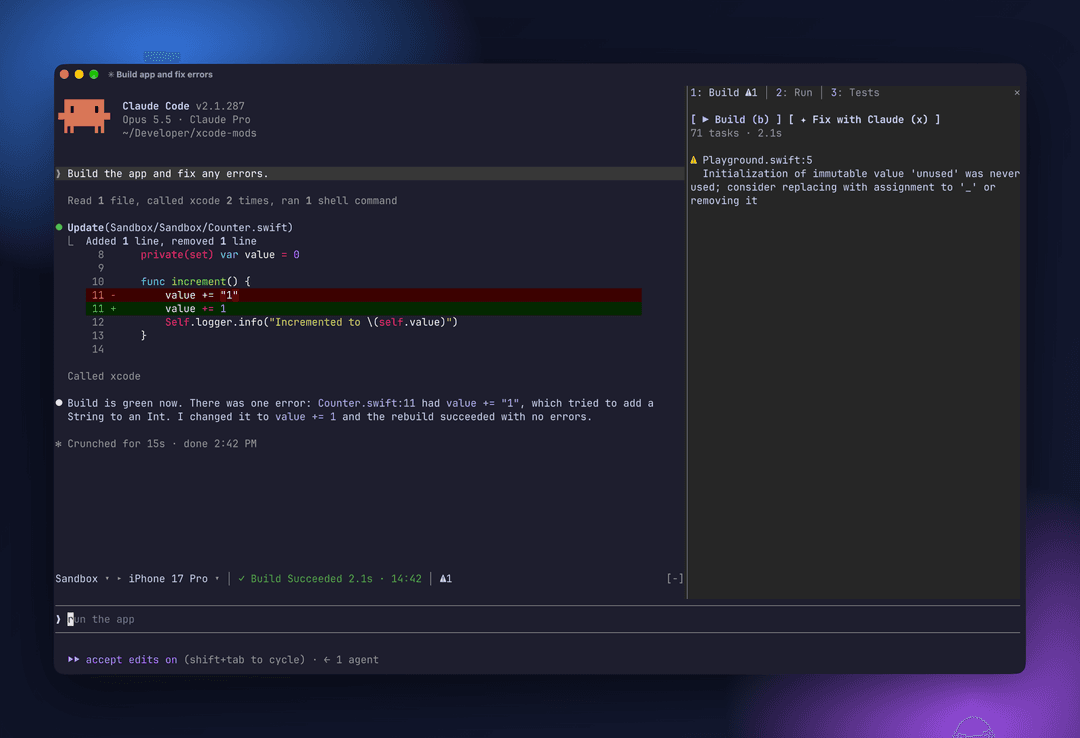
One Claude Code plugin that adds:
- a toolbar band above the prompt (scheme ▸ destination, activity, problem counters);
- an Xcode pane with Build · Run · Tests tabs;
- a Canvas pane that shows SwiftUI
#Previewsnapshots.
It picks up Claude's own Xcode tool calls too. When Claude builds, runs tests, launches the app or renders a preview, the result appears in the pane.
Requirements
- Xcode 27 or later with the MCP server in headless mode
- Claude Code 2.1.286 or later (mods support)
- To see previews in the terminal: a terminal with the kitty graphics protocol, such as Ghostty. The Claude desktop app works too.
Setup
-
Turn on Xcode's headless MCP server (once):
sudo xcrun mcp-server enable xcrun mcp-server status -
Add the server to Claude Code. The mods expect it to be named
xcode:claude mcp add --scope user xcode -- xcrun mcpbridge -
Allow the mods' Xcode calls in
~/.claude/settings.json. Without this rule, every build or refresh asks for permission:{ "permissions": { "allow": ["mcp__xcode"] } } -
Install the plugin:
/plugin marketplace add artemnovichkov/xcode-mods
/plugin install xcode-mods@xcode-mods
Open Claude Code in a folder with an .xcodeproj or .xcworkspace (up to 3 levels deep). The band appears above the prompt. In other folders the plugin stays hidden and doesn't register any commands.
Usage
| Command | What it does |
|---|---|
/xcode | Open the Xcode pane |
/build | Build the active scheme |
/tests [filter] | Run all tests, or only those whose Target/identifier contains the filter |
/run | Build and run on the active destination, then stream the console |
/stop | Stop the running app |
/preview [file.swift] | Render a #Preview into the Canvas pane. Without an argument, uses ContentView.swift, or the first file with #Preview. |
Toolbar band
The band above the prompt works like Xcode's toolbar:
Sandbox ▸ iPhone 17 Pro │ ✓ Build Succeeded 1.4s · 14:02 │ ⚠1 ✗2
- Scheme ▸ destination. Pickers; a change switches them in Xcode too.
- Activity. What runs now (
◐ Building 3s · Compile ContentView.swift,◐ Testing,◐ Launching,● Running Sandbox), or the last result with its time (✓ Build Succeeded,✗ Tests Failed,■ Sandbox stopped). - Counters.
⛔errors,⚠warnings,✗failed tests. Click one to open the matching tab.
The band also shows Claude's own builds, test runs and launches.
Notifications
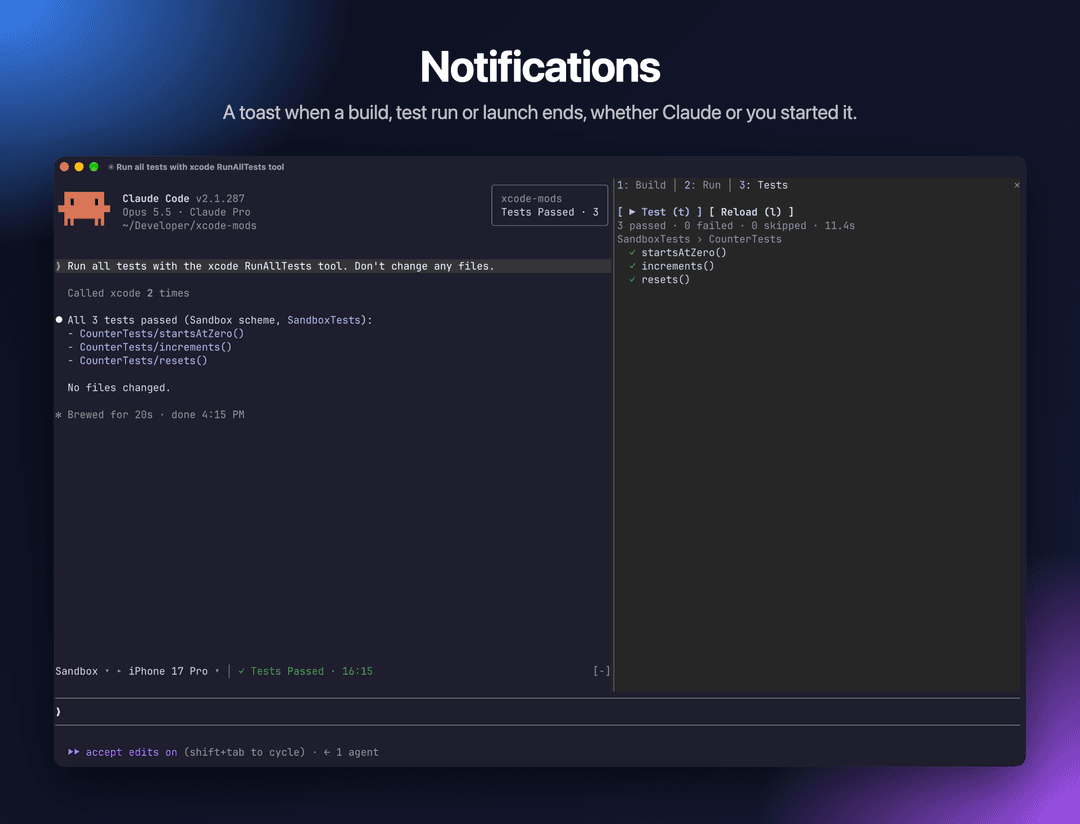
A toast pops up in the top right corner when an action ends, whether you or Claude started it:
Build Succeeded · 2 warnings,Build Failed · 3 errorsTests Passed · 12,Tests Failed · 2 failedRun FailedPreview ready: /preview to show, when the window is too narrow to open the Canvas pane by itself
Build & Issues
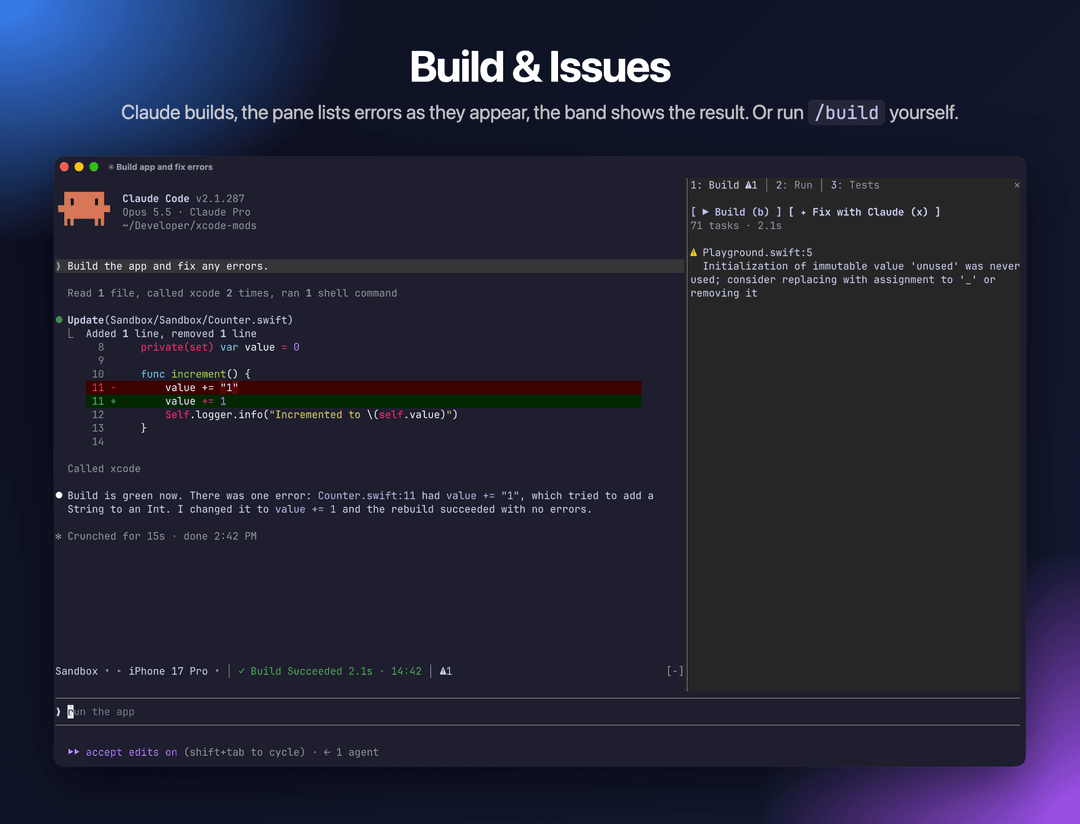
Live progress while the build runs, then errors and warnings. Click a file name to open that line in Xcode.
Keys: b build · x send the issues to Claude to fix
Tests
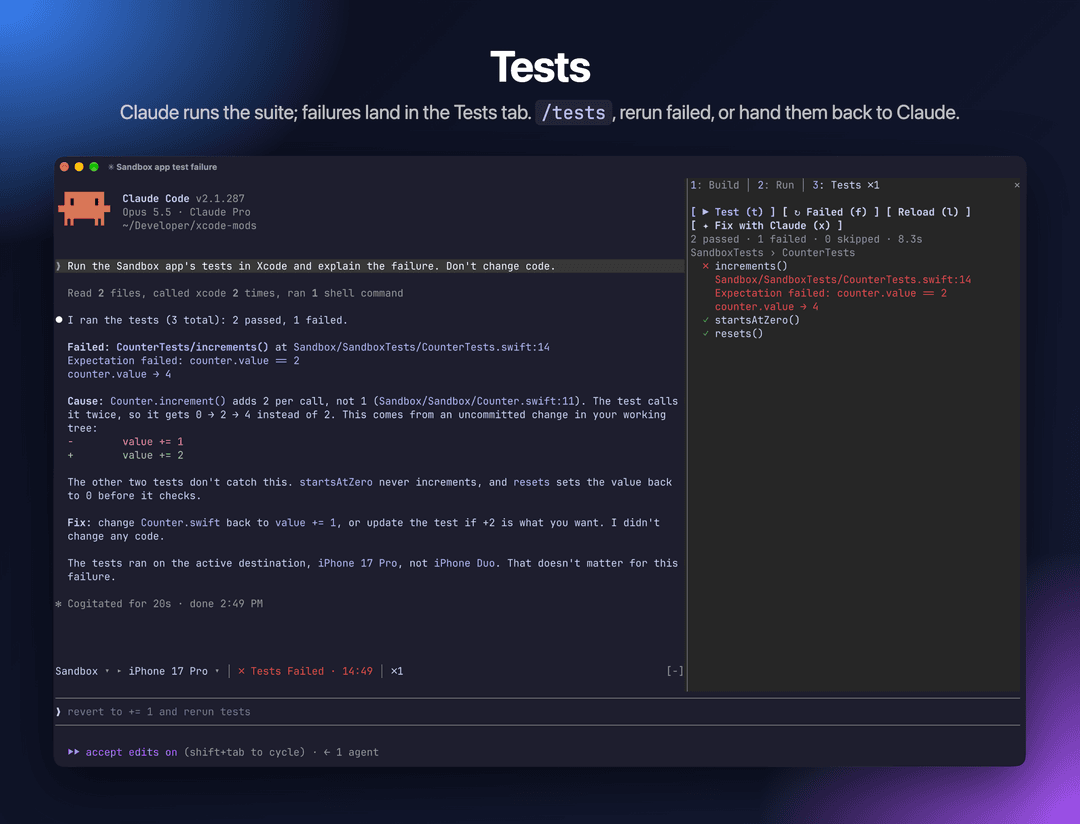
Tests are grouped by target and suite, with failures first and their messages shown inline. Click a test to run only that test.
Keys: t run all · f rerun failed · l reload the list · x ask Claude to fix the failures
Run & Console
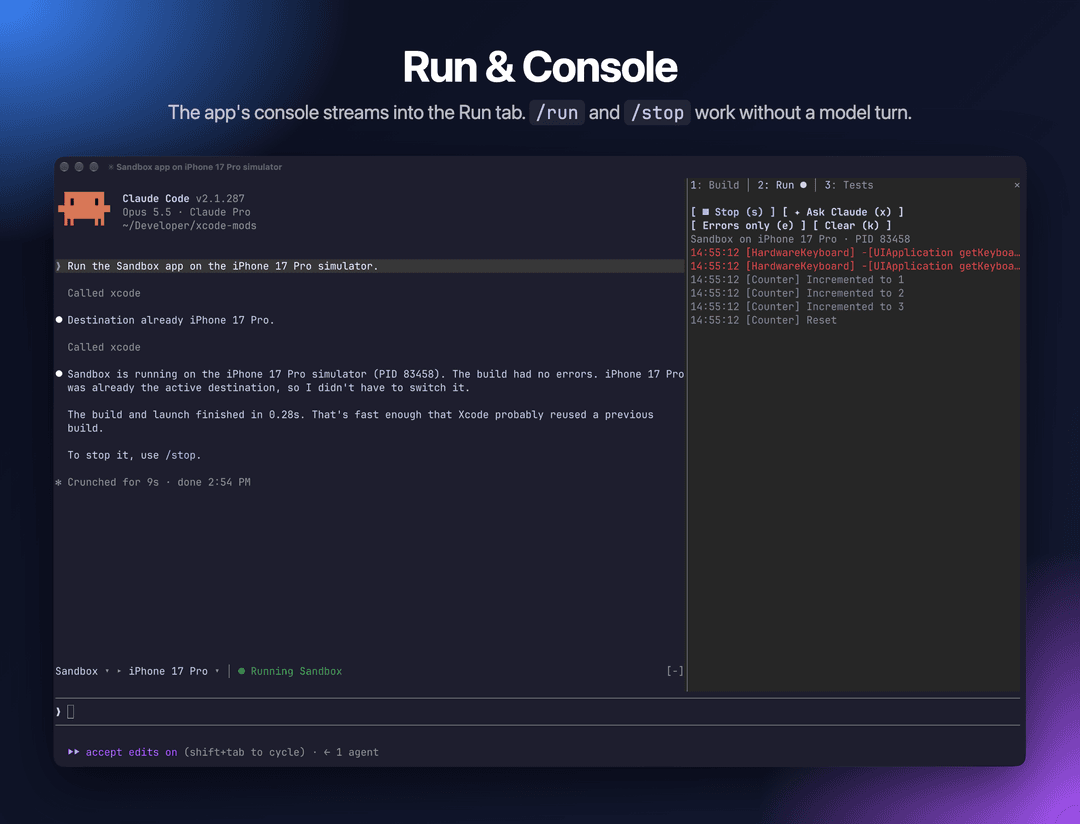
The app's stdout and OSLog stream in while it runs.
Keys: r run · s stop · e errors only · k clear · x ask Claude about the console
SwiftUI Preview
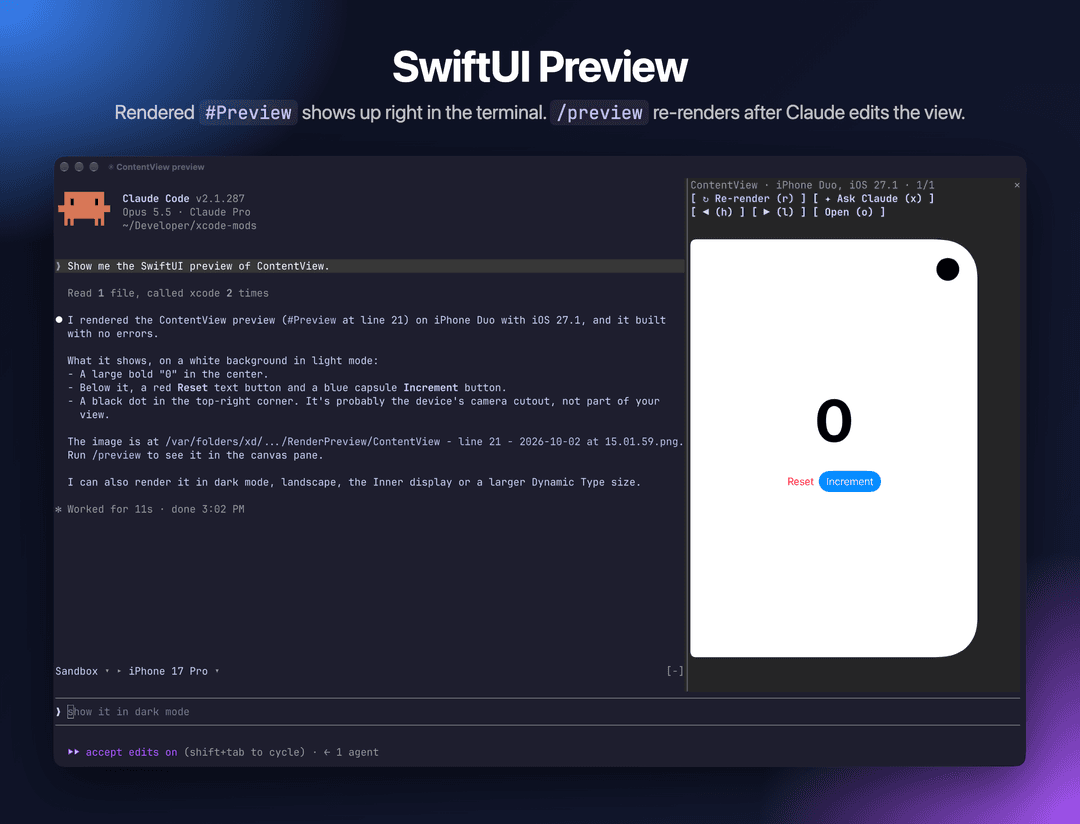
Keeps the last 10 snapshots. Once you have rendered a preview, it re-renders after Claude edits a Swift file that contains #Preview.
Keys: r re-render · h/l previous/next · o open the PNG · x ask Claude to review the layout
Switch tabs with 1 2 3.
Troubleshooting
- The band says
Xcode MCP server "xcode" not connected. Run/mcpand check that thexcodeserver is connected. Check thatxcrun mcp-server statusreports it as enabled. - Every action asks for permission. Add the
mcp__xcodeallow rule from Setup. - The first preview takes a minute or more. Xcode builds the preview host on the first render. Later renders are fast.
- The preview always renders on the same simulator. Xcode picks the preview device itself, and the MCP server doesn't let you choose it yet.
- No image in the Canvas pane. Your terminal doesn't support the kitty graphics protocol. The pane shows the PNG path instead; press
oto open it.
Development
mods/xcode-mods/hooks/register.tsx   # entry: wires both modules
mods/xcode-mods/hooks/build.tsx      # toolbar band + Build · Run · Tests pane
mods/xcode-mods/hooks/canvas.tsx     # SwiftUI preview pane
Sandbox/                             # test iOS app (XcodeGen: project.yml)
.mcp.json                            # xcode MCP server for this repo
To run the plugin from source with hot reload:
claude --plugin-dir mods/xcode-mods
Claude Code writes the mod API types into mods/xcode-mods/.claude-plugin/types/ (git-ignored) when it loads the plugin with --plugin-dir, so start a session that way once before type-checking with tsc -p mods/xcode-mods.
To check and test the plugin:
claude plugin validate mods/xcode-mods
claude plugin test mods/xcode-mods
Sandbox is a SwiftUI counter app with Swift Testing tests. Playground.swift holds an intentional warning; edit it to break the build. After editing project.yml, regenerate the project with cd Sandbox && xcodegen.
Author
Artem Novichkov, https://artemnovichkov.com/
License
The project is available under the MIT license. See the LICENSE file for more info.
// faq
What is xcode-mods?
Xcode's build, tests, console and SwiftUI previews inside Claude Code. It is open-source on GitHub.
Is xcode-mods free to use?
xcode-mods is open-source under the MIT license, so it is free to use.
What category does xcode-mods belong to?
xcode-mods is listed under mcp-servers in the Claudeers registry of Claude-compatible tools.
// embed badge

[](https://claudeers.com/xcode-mods)
// retro hit counter

[](https://claudeers.com/xcode-mods)
// reviews
// guestbook
// related in MCP Servers
 🔓
🔓f.k.a. Awesome ChatGPT Prompts. Share, discover, and collect prompts from the community. Free and open source — self-host for your organization with complete…
 🔓
🔓A cross-platform desktop All-in-One assistant for Claude Code, Codex, OpenCode, OpenClaw, Gemini CLI & Hermes Agent. Only official website: ccswitch.io
 🔓
🔓🪨 why use many token when few token do trick — Claude Code skill that cuts 65% of tokens by talking like caveman
 🔓
🔓An open-source AI agent that brings the power of Gemini directly into your terminal.