
wisp
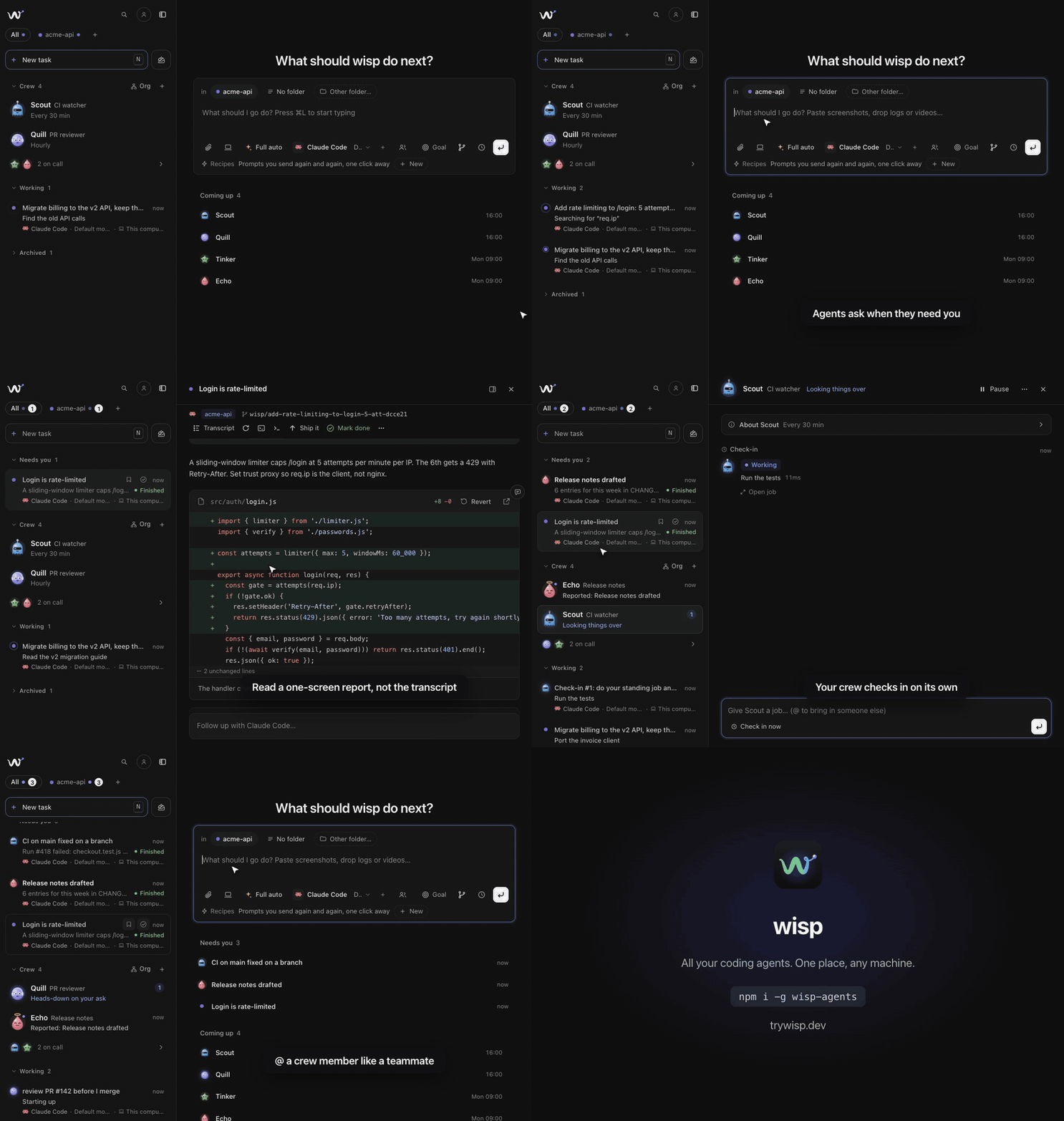
Run Claude Code, Codex and other coding agents in parallel, in the background, and read a one-screen report instead of the transcript.
Install with your AI
Paste into Claude Code, Cursor, or any agent — it reads the repo and wires the tool into your project.
Install and set up wisp (npm project) into my current project.
Found on https://claudeers.com/wisp
Repo: https://github.com/WispAgents/wisp
Homepage/docs: https://trywisp.dev/
Detected install method: npm → npm install wisp-agents
Category: devtools. Platforms: cli, api, desktop, web, mobile.
Read the repo's README for exact setup and env vars, then install it and wire it into my project.

Claudeers Health Verdict:
unknown; community-verified: false. Confirm the source before running anything.
npm install wisp-agents
git clone https://github.com/WispAgents/wisp
// compatibility
| Platforms | cli, api, desktop, web, mobile |
|---|---|
| Operating systems | — |
| AI compatibility | claude |
| License | MIT |
| Pricing | open-source |
| Language | JavaScript |

wisp
Send coding agents off. Read what they did.
Launch coding agents in the background, skip the transcript, and read the presentation they hand back when they finish.
Quick start · Website · wisp Cloud · Features · Agent board · My Stuff · CLI · Integrations · Shortcuts · Architecture · Adding a harness · Roadmap
Quick start
No computer to keep on? Open grid.trywisp.dev, sign in with GitHub or Google and you get your own wisp on a server, with nothing to install. See wisp Cloud.
Requirements: macOS, Linux, or Windows; Node.js ≥ 20 for the npm, npx, curl and Homebrew installs (the desktop download needs none); and at least one harness installed and signed in: Claude Code (
claude), Codex (codex), opencode (opencode), Cursor CLI (cursor-agent), Antigravity CLI (agy), Grok Build (grok), or GitHub Copilot CLI (copilot, with a Copilot plan). No CLI? The ChatGPT desktop app is enough for Codex on macOS and Linux, and the Claude desktop app for Claude Code on macOS and Windows once you've opened its Code tab and signed that CLI in once: wisp uses the CLI each app ships when the command isn't on PATH. Override a binary path withWISP_CLAUDE_BIN,WISP_CODEX_BIN,WISP_OPENCODE_BIN,WISP_CURSOR_BIN,WISP_ANTIGRAVITY_BIN,WISP_GROK_BIN, orWISP_COPILOT_BIN.
npx wisp-agents                          # open the wisp desktop app
npx wisp-agents "fix the flaky auth test" # launch a task in the current folder
npx wisp-agents --browser                # or use it in the browser → http://localhost:4477
The first run downloads the desktop app's window from this version's release (the shell alone, a few MB, checked against SHA256SUMS.txt) into ~/.wisp/desktop/; offline, or with no build for your computer, wisp opens in the browser instead.
Or install it globally to get the wisp command everywhere. Pick one:
curl -fsSL https://trywisp.dev/install.sh | bash   # macOS or Linux: checks Node 20+, then npm install -g wisp-agents
npm install -g wisp-agents                      # any OS with Node 20+
brew install wispagents/tap/wisp-agents         # Homebrew: the CLI + browser mode
brew install --cask wispagents/tap/wisp         # Homebrew: the desktop app (macOS 13.3+)

wisp "fix the flaky auth test"
The Homebrew formula (wisp-agents) and cask (wisp, the app) live in WispAgents/homebrew-tap (the release workflow bumps it from packaging/homebrew). install.sh honors WISP_VERSION to pin a release (curl -fsSL https://trywisp.dev/install.sh | WISP_VERSION=0.58.0 bash).
Or download the desktop app (no Node needed, it updates itself; macOS 13.3 or later). The builds aren't signed yet, so on a Mac the one-liner is the easy way: curl doesn't quarantine what it downloads, so macOS opens it without asking.
curl -fsSL https://trywisp.dev/install.sh | bash -s -- --app # macOS: wisp.app into /Applications, checked against SHA256SUMS.txt
| macOS | Windows | Linux |
|---|---|---|
| Apple silicon · Intel | x64 · Arm | AppImage: x64 · Arm — .deb: x64 · Arm |
Every build is on the latest release, with SHA256SUMS.txt. Until they're signed: a .dmg from the browser makes macOS say it can't verify wisp; click Done, then System Settings → Privacy & Security → Open Anyway. On Windows, SmartScreen may say it protected your PC: More info → Run anyway. On Linux the .deb is the smooth one; an AppImage needs chmod +x. The app updates from the same releases: Update to … in its top bar downloads the new build, swaps it in and reopens wisp (a .deb updates by installing the new .deb).
Release channels. Stable is what everything above installs. Two more come out of the same pipeline, like TypeScript's next or Neovim's nightly:
| Channel | What it is | npm | Desktop app |
|---|---|---|---|
| Stable | Releases | npm install -g wisp-agents | latest release |
| Beta | Previews of the next release (0.58.0-beta.1) | npm install -g wisp-agents@next | its prerelease |
| Nightly | main, built every night its full test suite passes (0.44.3-nightly.20261028.317) | npm install -g wisp-agents@nightly | nightly release (releases/download/nightly/<name>) |
Set Settings → General → Updates to the one you want, and Update to … follows it. Beta and nightly also take a stable release once it's newer, so they never leave you behind; switching back to stable waits for the next release rather than going back a version. WISP_VERSION=next or WISP_VERSION=nightly picks one in install.sh (--app too, for nightly). Homebrew only has stable releases.
From source:
git clone https://github.com/WispAgents/wisp.git
cd wisp

# Browser mode, with nothing to install:
node bin/wisp.js           # → http://localhost:4477

# Desktop app (needs Rust):
npm run dev:tauri
On first launch, the Welcome to wisp session shows a live gallery of every presentation block.
Development
npm run dev        # desktop app (Tauri): live reload for web/, relaunch on server/ and desktop/ changes
npm run dev:web    # browser mode, restarts the server when server/ changes
Why wisp?
Agent transcripts are long, and you rarely need them. wisp runs agent harnesses (Claude Code, Codex, opencode, Cursor, Antigravity, Grok, and GitHub Copilot) on your projects in the background. When an agent finishes, it hands you a short, animated presentation: diffs, test results, commits, flows, and decisions. The session then waits in your queue.
From there you can follow up, answer its questions, take it over in your terminal, or mark it done.
 you ──▶ "fix the flaky auth test" ──▶ agent works in the background
                                              │
 you ◀── hero · diff · tests · next steps ◀───┘   (no transcript to read)
Features
| Fire and forget | Launch a task from the UI or from any folder with wisp "…". Each folder becomes a project. |
| Start from an issue | New task's Issue button lists the project's open GitHub issues (and the Linear issues assigned to you, with a Linear connector); pick one and the prompt says Fix #123, with its link and text. |
| Presentations, not transcripts | Agents end with structured blocks that render as an animated, skimmable report. |
| The full transcript, if you want it | Off by default. Settings → General → Full transcript, or a card's Transcript button (V), shows the agent's messages and every step on a timeline. Click a step to see its output or diff. The presentation still renders as blocks at the end. |
| Live questions | Agents get an ask_user tool, so they can pause mid-run. Your answer goes straight back to the running agent. |
| Real diffs | Edits come from the agent's own tool calls, so diff blocks show what actually changed. |
| A queue | Sessions sort into Needs you, Working (with a live one-line status), and Done. Archive what you don't need to see. |
| Follow-ups that interrupt | A follow-up sent mid-run interrupts the agent and resumes it with your message. Turn on Queue to wait for the run to finish instead; queued messages can be cancelled. To ask without interrupting, start with /btw (/btw did you update the docs too?): a separate read-only run answers on a copy of the conversation, and the agent keeps working. |
| Command palette | ⌘K / Ctrl+K fuzzy-searches sessions, projects, and actions. |
| Crew | Named agents with a face, a role, a schedule and a memory that keep working for you: they check in, report when something changed, take jobs in parallel and answer to @Name in any prompt. Org charts who hands work to whom, and you change it there. See Crew. |
| My Stuff | A shelf for what agents make: pictures, docs, code, links and small web apps, kept when the worktree goes. Ask “save that to my stuff”, @ a thing in any prompt, launch apps inside wisp, and Publish one to a public link on your wisp Grid. See My Stuff. |
| Goals | Say what done means and wisp checks it after every round, sending the task back until it holds. See Goals. |
| Auto | The default harness: wisp picks the harness, model and thinking level per task from what worked before, and learns from merges, 👍 / 👎 and follow-ups. See Auto. |
| Any harness | Claude Code, Codex, opencode, Cursor CLI, Antigravity CLI, Grok Build, or GitHub Copilot CLI. Pick the harness, model and thinking level together in the launcher; both are remembered per harness. Each card shows the harness it ran on. |
| Changed-harness warning | wisp remembers each harness's program (where it is, its size, sha256 and version). When that changes, the task and Settings → Agents say so (Codex changed since 2 Nov: 0.1.2 → 0.1.3) with Trust this version: an update in the same folder is a plain line, another folder or the same version with other bytes is a warning. Turn on Ask before running a changed harness and a run waits for Trust and start or Skip this run. |
| Ask before a repo runs its own programs | A repo can ship hooks (.claude/settings.json), MCP servers (.mcp.json) and worktree setup that run on your machine; Claude Code starts them without asking when it runs headless, in any mode, Plan included. Before the first run in such a repo, and after one of them changes, wisp lists each hook, server, helper and setup step with its command and Open file: Trust and start, Run without them or Skip this run. Not in Full auto, which runs them unasked. It shows what a repo would run, not whether that's safe. Settings → Privacy (on by default). |
| Take over | Resumes the harness's own session (claude --resume <id>, codex resume <id>, …) in the project folder, in a terminal inside wisp by default (macOS and Linux). Settings → General → Take over in can open it in a terminal app instead: Terminal, iTerm, Ghostty, Warp, cmux, kitty, WezTerm, GNOME Terminal, Konsole, Alacritty, Windows Terminal, PowerShell, or a custom command. |
| Attachments | Paste screenshots or drop images, video, logs, or PDFs into the launcher. |
| Learns as you go | After a session goes quiet, a background retro records your preferences and the agent's lessons (a mistake and the way that worked), globally and per project. Later runs get them in their prompt. See Learning. |
| One task, several folders | ⌘-click a second project in the launcher (or its +) and one agent works in both, e.g. the API and the web app that uses it. Each git repo gets its own worktree, and Ship it opens a PR in each. |
| A worktree per task | In a git repo each task gets its own worktree and branch from origin/main, so parallel agents never collide. It brings what git ignores: the files .worktreeinclude lists (gitignore-style; without one, the root's .env files), and runs the repo's setup from .wisp/worktree.json ({ "setup": ["npm ci"] }) or Cursor's .cursor/worktrees.json, with ROOT_WORKTREE_PATH set, or Conductor's .conductor/settings.toml or conductor.json, with Conductor's env vars (its run script is what Preview offers). Add "run": "npm run dev" (and optionally "port": 5173) and the side panel's Preview runs the app from the worktree and shows it beside the task, with an element picker for the reply box. |
| Ship it | One click commits, pushes and opens the PR. The card follows CI and reviews; Merge squash-merges and syncs your local main. |
| Review by another harness | Before you merge, a different agent checks the PR: Codex reviews Claude Code's work, Claude Code reviews Codex's, on the plans you already have. It reads the diff against the base and lists what it would fix, and the project's tests run again on the PR's head. The PR row says N issues, Tests fail or Reviewed, each finding has Send to agent, and Merge's confirmation says what it found. Settings → General → Review by another harness (off by default). |
| Clash warnings | Two active tasks (Working or Needs you) in one repo changing the same files are flagged on both cards, with the files, before you ship or merge either. When merging both would really conflict (checked with git merge-tree, uncommitted edits included), the warning says so and names the conflicting files. |
| Delegate | Give the lead agent a team on other harnesses and other machines (e.g. Claude Code hands tests to Codex ×3 and a refactor to Claude on your GPU box). It delegates through a delegate tool; their edits land in its worktree. See Delegate. |
| .env values stay off screen | When a task shows a .env or .env.* file (its diff, the agent's edits, cat .env output), the values read KEY=••••. Reveal shows that one view. The server masks them before they reach the page, so screen shares, the phone app and wisp Grid never show them; the agent still reads the file. Settings → Privacy → Hide .env values. |
| Checkpoints & rollback | Every turn is snapshotted first. Restore to before any turn, revert a single file, or re-run a command block from the presentation. |
| Split view | Tasks in a sidebar, the open one beside it with room to read, and the prompt box as home. On a wide window the task's details (harness, branch, its PR with Merge, the actions) sit in a column beside it that stays put as you scroll. J / K move through tasks with each one open; [ hides the list. Drag the sidebar's edge to resize it. Under 900px, and on the phone, the list fills the screen and a task opens as a page of its own with Back. |
| Compare | Run one task on two harnesses side by side, and keep the better run. |
| Hand a refused task to another model | When an agent turns down legitimate work (a usage-policy refusal, or a short I can't help with that from a run that changed nothing), the task offers Hand to on another company's model: one click sends the prompt, its files and the turns so far. Never automatic, and never another account of the same harness. |
| Hand-offs keep your rules | When a task goes to another harness (after a refusal, at a usage limit, or when you pick another one for a follow-up), the new agent's first turn opens with What still holds: the lines from your messages that rule something out or narrow it (don't touch the migrations, only change server/auth, no new dependencies) and the task's Done when. The thinking level carries over in the new harness's terms (Claude Code max becomes Codex xhigh). |
| Agent board | One live board of every task, across every harness, account, machine and crew member: Working, Needs you, Review and Done, with Done and Follow up on each card. Allowance board keeps each account's usage windows on screen and shows what each period cost. Both are panes: apps pinned on home or beside your tasks, and you can have an agent make your own. See Agent board and panes. |
| Spells | Change wisp itself while it runs: ask for a floating button that opens your PRs, a panel with your tool stats, a block agents can use in their reports, a different prompt box, quick replies, buttons on cards, a new look. An agent writes it as a spell; you try it in the window and keep it. Share one as a file, and turn any of them off to put wisp back as it was. See Spells. |
| Recipes & triggers | Saved prompts with {params} (wisp run release 0.58.0), run by hand, on a schedule, when CI fails, or when an issue is labelled. |
| Usage | Every finished turn carries a receipt (38k tokens · 71% cache · 3% of weekly), says Past your plan when it was billed beyond the plan, and names the subagents that ran and which model wrote the output. Settings → Usage adds spend, success rate and questions per project and per harness · model, how much of each Claude Code and Codex plan window is left, and which subagents used it. See Usage. |
| wisp Cloud | Your own wisp on a server, at grid.trywisp.dev: sign in with GitHub or Google and your agents keep working after you close the laptop. Use it from the browser, from wisp on your computer (Machines), from the Android app or as an app on your iPhone's Home Screen, and add your own computers to it so the phone and your other computers reach them with no SSH. Or run your own grid with npx wisp-agents grid init. See wisp Cloud. |
| Sign in from wisp | Settings → Agents signs Claude Code, Codex and GitHub in for you: a link and a code, no terminal. For opencode Zen and Go, paste your API key there. The model picker only offers the agents you're signed in to. |
| Work and personal accounts | Have your own Claude or Codex plan and your employer's? Add both in Settings → Agents and pick which one a task runs on. Each keeps its own limits; when one runs out, wisp asks what to do and never switches on its own. See Your agent accounts. |
| Phone | Questions and finished tasks on ntfy or Telegram; answer from there, or start a task with /new. |
| Permission modes | Choose Plan (read-only), Edits (file edits auto-accepted), or Full auto (no permission prompts, the default) for each launch. Shift+Tab in the prompt cycles modes. In Edits mode, anything the permissions block comes to you: Claude Code waits for Allow / Always / Deny, and the other harnesses show an Allow & retry card. |
| Integrations | An MCP server (wisp mcp), an agent skill, a scriptable CLI, a JS SDK, an OpenAPI-described HTTP API, and webhooks. Hand tasks to wisp from Claude Code, Codex, opencode, Cursor, scripts or CI. |
| No runtime dependencies | The server uses only Node built-ins. The desktop app is a small Tauri shell around the same server. |
CLI
The CLI talks to a running wisp, or starts one if none is running. It works from any folder:
wisp                              # open wisp (or focus the running one)
wisp "fix the flaky auth test"    # launch a task in this folder (it becomes a project)
wisp add [path]                   # add a folder as a project (default: cwd)
wisp add <repo-url>               # clone a repo (GitHub URL, git@…, any git URL) into ~/code, then add it
wisp --mode plan "audit deps"     # permission mode: plan | edits | auto
wisp --agent codex "add a test"   # harness: claude | codex | opencode | cursor | antigravity | grok | copilot
Scripting (every command takes --json):
wisp "add a test" --wait          # block until it finishes, print the presentation as markdown
wisp ls --state running,waiting   # list sessions
wisp show <id>                    # state + latest presentation
wisp wait <id>                    # until it finishes or asks you something
wisp reply <id> "also do X"       # follow up (answers a pending question; --mode, --agent, --model to switch)
wisp btw <id> "did you do X?"     # ask on the side without interrupting the run; prints the answer
wisp stop <id>
wisp ship <id> [--draft]          # commit, push and open a PR for a worktree task
wisp merge <id>                   # squash-merge its PR, fast-forward your local main
wisp run release 0.58.0            # run a recipe; values fill its {params} (or version=0.58.0)
wisp recipes                      # list recipes
wisp usage [--days 7]             # spend and outcomes
wisp computer on [--grid HOST]    # add this computer to your wisp Grid (signs in with a code first); off, or no word for its status
wisp mcp                          # MCP server for other agents and editors
wisp skill install                # install the wisp skill for Claude Code (--agent all for Codex/opencode too)
| Option | Description |
|---|---|
--port, -p N | Port to use (default 4477, or WISP_PORT) |
--mode, -m | plan · edits · auto |
--agent, -a | claude · codex · opencode · cursor · antigravity · grok · copilot (default: the agent last picked in the launcher) |
--model · --effort | Model id and thinking level for the launch |
--cwd, -C DIR | Project folder (default: the current one) |
--also DIR | Another folder the same task works in; repeat for more (each git repo gets its own worktree and PR) |
--wait, -w | Wait for the run to finish or ask, then print the presentation |
--no-worktree | Edit the folder in place instead of a fresh worktree (default in git repos: a worktree) |
--compare a[:model],… | Also run the task on these harnesses, each in its own worktree |
--try subagents=haiku|sonnet|task · --try skills=off | Run the task twice on --agent claude, the second run with that changed, each in its own worktree; Compare says what differed |
--json | Machine-readable output |
--browser, -b | Use the browser instead of the desktop app |
--no-open | Just run the server; open nothing |
--version, -v | Print the version |
npm install -g wisp-agents(ornpm linkfrom a clone) putswispon yourPATH. Without installing, usenpx wisp-agents …with the same arguments.
Integrations
wisp is a local server, and the app is just one client of it. Other agents, editors and scripts can launch tasks into the same queue and read the presentations back. Full reference: docs/integrations.md.
claude mcp add wisp -- npx -y wisp-agents mcp   # Claude Code can now delegate with wisp_launch / wisp_wait / wisp_reply
wisp skill install --agent all                  # teach Claude Code, Codex and opencode when and how to use wisp
import { WispClient } from 'wisp-agents';
const wisp = await WispClient.connect();
const s = await wisp.launch({ prompt: 'fix the flaky auth test', cwd: '/path/to/repo' });
console.log((await wisp.wait(s.id)).state, (await wisp.presentation(s.id)).markdown);
- MCP (
wisp mcp):wisp_launch,wisp_wait,wisp_get,wisp_reply,wisp_list,wisp_stop,wisp_agents, andwisp_crew,wisp_crew_add,wisp_crew_edit,wisp_crew_removefor your crew. Config snippets for Claude Code, Codex, opencode, Cursor and Claude Desktop are in the docs. - Skill (
skills/wisp/SKILL.md): when to delegate, how to brief, and to pass a waiting agent's question on to you instead of answering it. - HTTP API:
GET /api/openapi.json. The new routes are/api/health,/api/sessions/:id/wait(long-poll),/api/sessions/:id/presentation(blocks + markdown), and filters on/api/sessions. - Discovery: the running server writes
~/.wisp/server.json(url,port,pid,version). - Webhooks:
PATCH /api/config {"webhooks":[…]}. wisp POSTssession.finishedandsession.waitingwith the presentation as markdown. - Webhook triggers (Settings → Automations → Webhook triggers, off by default): a trigger can start a task when something outside calls its secret URL,
POST /api/hooks/<token>. When a webhook is called: the JSON or form body fills the prompt ({{body.ref}},{{text}}), optionally signed with an HMAC sha256 secret. When someone mentions wisp in Slack: the URL is your Slack app's Events API request URL (signing secret checked, one channel, an optional keyword). When a Linear issue is created: a Linear webhook (Linear-Signature checked, an optional label). At most one task per trigger every 30 s; the editor lists the last five calls. On this computer the URL is local, so put a tunnel in front; on wisp Cloud it's public.
Keyboard shortcuts
| Key | Action |
|---|---|
⌘ K / Ctrl K | Command palette: fuzzy-search sessions, projects and actions |
N · ⌘ L / Ctrl L | New task (focus the launcher; ⌘ L works from anywhere) |
⇧ Tab | Cycle permission mode (in the launcher) |
⌘ ↵ | Launch and keep the launcher open for the next task |
↑ / ↓ | Bring back the tasks you launched before, newest first (in an empty launcher) |
J / K | Move down / up through the queue |
O / ↵ | Open or collapse the focused session |
/ | Reply to the focused session |
1–9 | Pick an option in a pending question |
T | Take over (in wisp, or the terminal app from Settings) |
S | Ship it: commit, push and open a PR (worktree tasks) |
⇧ R | Rerun with another harness, model or thinking level |
E | Mark done and jump to the next session that needs you (it opens if you were reading this one) |
A | Archive / unarchive |
M | Rename |
⌫ | Delete |
V | Switch between the full transcript and the presentation |
C | Collapse all |
U | Back to top (also Home) |
[ | Hide / show the task list |
? | Show all shortcuts |
Esc | Close, blur, or collapse |
File paths in presentations open in your editor. VS Code, Cursor, Zed, and JetBrains IDEs are supported; pick one in Settings.
Architecture
web/ (UI) ⇄ HTTP + SSE ⇄ server/ ── adapters/claude.js   ── claude -p --output-format stream-json
                                 ├─ adapters/codex.js    ── codex exec --json
                                 ├─ adapters/opencode.js ── opencode run --format json
                                 ├─ adapters/cursor.js   ── cursor-agent -p --output-format stream-json
                                 ├─ adapters/antigravity.js ── agy --output-format stream-json
                                 ├─ adapters/grok.js     ── grok --output-format streaming-messages-json
                                 ├─ adapters/copilot.js  ── copilot --output-format json (prompt on stdin)
                                 └─ mcp-ask.js  (ask_user MCP tool, injected per run)
wisp/
├── bin/
│   └── wisp.js            # CLI: starts the server or talks to the running one
├── server/
│   ├── index.js           # startServer: wires the pieces below together
│   ├── http/              # route table, JSON responses + SSE, static UI
│   ├── routes/            # one file per API area: sessions, ship, settings, automations, machines, …
│   ├── services/          # shared by routes and background jobs: launch, ship, auto, uploads, phone, …
│   ├── util.js            # small shared helpers (errors, ids, quoting, atomic JSON writes)
│   ├── openapi.js         # OpenAPI document for the public API (test/routes.test.js keeps it in sync)
│   ├── client.js          # JS SDK (wisp-agents/client), used by the CLI and MCP server
│   ├── mcp-wisp.js        # `wisp mcp`: wisp as tools for other agents
│   ├── render.js          # presentation → markdown
│   ├── runner.js          # session lifecycle, follow-ups, event normalization
│   ├── checkpoint.js      # per-turn git checkpoints, file revert, rollback
│   ├── proc.js            # cross-platform spawn, and running a block's command
│   ├── protocol.js        # system prompt + ```wisp block parser (markdown fallback)
│   ├── mcp-ask.js         # ask_user MCP server
│   ├── store.js           # JSON-file persistence in ~/.wisp
│   ├── git.js             # worktrees, Ship it, PR status and merge (git + gh)
│   ├── recipes.js         # saved prompts with {params}
│   ├── triggers.js        # cron schedules and GitHub watchers
│   ├── remote.js          # phone: ntfy and Telegram, out and back
│   ├── machines.js        # other computers: SSH, a tunnel to wisp there, relayed sessions
│   ├── machines/          # known hosts (ssh config, Tailscale) and the bootstrap script
│   ├── usage.js           # spend and outcomes
│   ├── terminal.js        # "take over" in your terminal
│   ├── welcome.js         # the gallery session
│   └── adapters/
│       ├── index.js       # adapter registry + contract
│       ├── common.js      # shared spawn/JSONL plumbing, labels, diff capture
│       ├── claude.js      # Claude Code adapter
│       ├── codex.js       # Codex CLI adapter
│       ├── opencode.js    # opencode adapter
│       ├── cursor.js      # Cursor CLI adapter
│       ├── antigravity.js # Antigravity CLI adapter
│       ├── grok.js        # Grok Build adapter
│       └── copilot.js     # GitHub Copilot CLI adapter
├── skills/wisp/SKILL.md   # agent skill: how other agents use wisp
├── web/                   # vanilla JS UI, native ES modules, no build step
│   ├── index.html
│   ├── css/               # one stylesheet per area (tokens, base, feed, blocks, modals, …), linked in order
│   └── js/
│       ├── app.js         # boot, top bar, routing
│       ├── core/          # state, api, event bus, DOM helpers
│       ├── ui/            # toasts, dialogs, popovers, keyboard hints
│       ├── features/      # feed, turns, composer, launcher, settings, ship, machines, …
│       └── {blocks,md,diff,fuzzy,palette}.js   # presentation blocks and their helpers
└── desktop/               # desktop app: a Tauri shell (src-tauri/, Rust) and the server on a bundled Node
    ├── entry.mjs
    └── src-tauri/
- Protocol (
server/protocol.js): a system prompt tells agents to work autonomously and to end with a fencedwispJSON block of presentation blocks. The parser reads that block, and falls back to plain markdown if it is missing. - Adapters (
server/adapters/): one file per harness. An adapter turns a run into normalized events (session,tool,change,text,result, …) and provides aresumeCommandfor take over. - State lives in
~/.wisp(override withWISP_HOME): one JSON file per session, plusconfig.json,uploads/, andshots/(copies of images and videos agents showed).
Presentation blocks
hero · markdown · steps · stats · files · tree · diff · code · tests · commits · graph · terminal · compare · flow · chart · checklist · callout · image · video · preview · map · question · actions · next
Adding a harness
- Copy
server/adapters/claude.js. - Implement
detect(),run(), andresumeCommand(). The full contract is documented at the top ofserver/adapters/index.js. - Register the adapter in
server/adapters/index.js.
If the harness has no system-prompt flag, prepend systemPrompt to the first prompt (withProtocol in common.js). If it supports MCP, pass mcpServers through so that ask_user works and set askTool to the name the agent sees; set askTool: null if it can't, and agents will ask with a question block instead.
Roadmap
- Claude Code adapter
- Live
ask_userquestions - Desktop app (Tauri)
- Codex adapter
- opencode adapter
- Cursor CLI adapter
- Antigravity CLI adapter
- Grok Build adapter
- GitHub Copilot CLI adapter
- wisp Cloud / wisp Grid: your own wisp on a server, sandboxed per user, with desktop and phone sign-in
- Your own computers on the grid: reached from the phone and other computers with no SSH or open port
- Sign in to Claude Code, Codex and GitHub from wisp
- More than one account per harness (Claude Code, Codex), picked per task
Auto
Auto is the default harness: wisp picks the harness, model and thinking level for each task. Its "model" is a goal: Balanced (the default), Cheap or Best. Balanced and Best both run frontier models (Opus, GPT-5.6 Sol or Terra, Gemini 4 Argon) when you have one installed and allowed; what sets them apart is how hard the agent thinks. Balanced runs a model as its makers ship it (Opus at medium in Claude Code), or one level up where the benchmarks say it pays (Sonnet runs at medium in Claude Code but scores 15 points more at high). Best thinks at high, and at x-high only once that has earned its 2.5× cost on your tasks. Cheap runs at low (or minimal) on whichever model does the job for least. A harness or model without levels runs at its default; for models with the level in their name (Antigravity's gemini-4-argon-high) the goal picks the variant the same way.
You see the pick before you send. With Auto selected, the launcher shows what it will run (Opus · Medium) and updates as you type. Click it to see why (your usual for UI tasks (212 of yours), 87% expected from public benchmarks), what else it weighed, and a model it would suggest. Pick another one there and the task runs on that, and Auto learns from the change. Never pick … for UI tasks is one click. What you were shown is what runs.
How it picks: every harness · model · thinking level you have installed is an option (claude:opus:high). claude:, claude:opus and claude:opus:medium are one run under three names and share one record. For the kind of task (bug, feature, UI, tests, refactor, docs, release, question) Auto keeps an estimate of how often each option does it well. The estimate starts from public benchmarks: Anthropic's effort sweeps, SWE-bench, Terminal-Bench and CursorBench results, each model and level placed against Claude Code's default (scripts/priors-sources.json lists every number with its source; node scripts/priors.mjs rebuilds server/router-priors.json). Then it counts your own outcomes: merged PR (best), closed PR, 👍 / 👎, rollback, then how the run ended, less a bit for each follow-up you needed.
It starts from what you pick yourself. Every task you launch on a harness of your choosing is a vote, per kind of task. The first time it runs, Auto reads the tasks you already have. Your habit counts for up to 25 points of chance, so Auto runs what you would have picked unless the record says something else is clearly better. When something else looks better but isn't your habit, Auto suggests it instead of running it. A run you picked yourself also teaches the record, at half weight. Replayed over the maintainer's 327 hand-picked launches, Auto now picks the same harness, model and level 94% of the time (it was 1%): node scripts/auto-replay.mjs runs the same check on yours.
It weighs the best value for the goal after expected cost and time. Previews and important: true launches (API, SDK) take the best-known option; other launches draw from each estimate (Thompson sampling), so options with little data now and then get a turn. Options that keep failing a kind of task are left out of it. A model's record at one level counts half at its other levels.
New harnesses and models: when a CLI or model shows up (after an install or a Re-check), it's on probation. Auto suggests it rather than running it unasked, and a new version (say a new Sonnet) starts from its family's record. Settings → Auto has Learn from your picks, turns suggestions and trying new models off, limits which harnesses Auto may use, and marks single models Never or Prefer (also per kind of task, claude:sonnet@ui). It shows what Auto learned and where its starting numbers come from; Forget clears what it learned.
Compare runs get different picks. A delegate set to Auto is picked on its first task and keeps that harness (on its own machine, from what that machine has). A launch on a machine is picked here, from the harnesses that machine reported, and that machine's outcomes come back to the same router. All of it stays in ~/.wisp/router.json. Usage stats only add which goal, kind of task, size, tier and level were used, whether the pick was exploring, previewed or suggested something, and which harness you switched to when you changed a preview. Never the prompt.
Around the run, Auto can do a few more steps:
- Scout (bigger tasks): a cheap model looks around the repo, read-only, and the agent gets the files that matter and the test command, which it runs itself.
- Hand over: the run errored. A run that thought at low or medium goes again at high on the same model first (one at high, at x-high): Anthropic measured low with the failures rerun at high solving 97% for $0.17 a task, against 95% for $0.29 with everything at high. Otherwise the task runs again on a stronger tier (small → everyday → frontier). Either way it runs in its own worktree, next to the first run.
A harness that says it's at its limit (session or usage limit, rate limit, no credit) isn't failing the task. Auto rests it until the limit resets, doesn't count the run against it, and moves the task to the best pick that can run now. A Codex model at capacity is treated the same way: that model rests for 10 minutes, other Codex models still run, and the task says … is at capacity · moving to …. Best always runs frontier models only; it falls back to the strongest you have only when no frontier model is installed. Balanced runs on the strongest tier that can run now, whatever the record of the weaker models: frontier, or everyday (Sonnet, never Haiku) while every frontier model is at its limit or when you have none. The benchmark estimates count for at most 8 tasks each (4 when they rest on a predecessor model), so your own outcomes soon outweigh them. 3. Best of two (goal Best, off by default): two picks work side by side; a cheap model reads both diffs, and the better run is marked Pick.
Each step's outcome feeds the router: losing a best-of-2 counts a little less. Your own follow-up stops whatever Auto was about to do next. Settings → Auto turns each step on or off and sets the test command per project.
The benchmark behind the priors is in bench/.
Goals
Give a task a Done when line and wisp checks the work after every round: it runs the project's tests, then a cheap read-only model reads the diff. Until the goal holds, the task goes back to the agent with what's missing and the next step. There's no cap on rounds: you hear about it once, when it's met, can't be met or stalls.
- Set one: turn on Goal in the prompt box and write the condition (all tests pass and the login page works on a phone). On a running or finished task, type
/goal <condition>in the reply box (/goalalone opens it,/goal dropdrops it), or use Set goal… in More, the right-click menu or ⌘K. - The check: the agent's own report counts as a claim, not evidence. A met needs passing tests and evidence from the diff, and the checker can also rule the goal impossible (missing access, a contradiction, a decision only you can make). Two rounds in a row that change nothing, or get the same next step with no progress, pause it as stalled.
- What you see: a band on top of the task with the goal, a progress bar and how much the last round moved it, the round (Round 3) and the last check in the checker's words. The row shows a ring and the round. The task stays in Working through every round and notifies you once, at the end. Pause goal, Resume goal and Drop goal are in the band and the menus.
- Any harness: the agent is told its goal every turn. A task Auto hands to a stronger model takes the goal along. Stop pauses it; a follow-up of yours keeps it and it's checked again after your turn.
API: goal: { text } on POST /sessions (a prompt that is just /goal … works too), PUT /sessions/:id/goal, PATCH /sessions/:id/goal with { "action": "pause" | "resume" }, DELETE /sessions/:id/goal.
Your agent accounts
wisp runs the official, unmodified CLIs (claude, codex, …) on your computer, or on your own box in wisp Cloud. You sign in with each CLI's own sign-in (claude auth login, codex login). wisp never sees your password, and never reads, copies or sends your login tokens: they stay in the CLI's own folder and keychain. Your use stays under your agreement with each provider (for Claude, Anthropic's Consumer Terms for Pro and Max, or the Commercial Terms for Team, Enterprise and API keys; for Codex, OpenAI's Terms of Use or your workspace's agreement) and counts against your own plan's limits. wisp doesn't pool accounts, resell access or let several people share one login. For heavy or automated use (CI, many agents around the clock), the providers ask you to use an API key; wisp supports both.
Work and personal accounts (Claude Code and Codex): if you have your own plan and a seat your employer gave you, add the second in Settings → Agents → Add another Claude account, as personal or work. It signs in with the CLI's own sign-in into a folder of its own (~/.wisp/accounts/<harness>/<id>, set as CLAUDE_CONFIG_DIR / CODEX_HOME); settings, skills, MCP servers and transcripts are shared with your first account, the login never is. Pick the account for a task in the runner picker's Account row; wisp remembers your pick per harness. When an account reaches its usage limit, the task asks what to do: wait for the reset, continue on another of your accounts (with a warning when that moves a conversation between work and personal), hand it to another agent, or get extra usage from the provider. wisp never switches accounts on its own. Only add accounts that are yours, and check your employer's rules before you use a work account on personal projects or the other way round. Guide: Use your work and personal Claude Code accounts.
Two accounts, three computers, one task list
Add your second Claude Code or Codex account once (above), add your other computers in Machines, and every task from every account and every computer lands in the same list. The runner picker's Run on says where a task goes and its Account row which account runs it there; a machine has its own accounts, so the row lists what's signed in on that computer. A task can span several projects (Several folders), and Runs on moves a task to another computer with its branch and uncommitted work. Each account keeps its own limits: when one runs out, the task asks before it moves anywhere. Guide: Several Claude Code accounts and computers in one task list.
Worktrees and shipping
In a git repo, every launch (except Plan mode) runs in its own git worktree under ~/.wisp/worktrees/, on a branch named wisp/<task>-<id> made from the remote's default branch (origin/main, fetched first; HEAD when there is no remote). Uncommitted changes in your own checkout are not carried over, and dependencies aren't shared: the agent is told to install what it needs. The card shows the branch, and Take over opens the worktree.
Ship it (S) commits whatever is uncommitted (the message is drafted from the presentation as a conventional commit; edit it before shipping), pushes the branch and runs gh pr create. You need the GitHub CLI signed in. From then on the card follows the PR every minute: checks (✓ / running / failing), the review decision, merged or closed. Merge runs gh pr ready for drafts and gh pr merge --squash --match-head-commit <sha>, so a branch that moved since you looked is never merged, then fast-forwards your local base branch (git merge --ff-only, or a ref update when it isn't checked out) and removes the worktree and branch. If a ruleset requires a review, Merge waits for the approval like gh does.
Review by another harness. Turn on Settings → General → Review by another harness and, once a task's PR is open, a harness other than the one that wrote it (or the one you pick by name) reviews each new head: it reads the diff against the base with the branch checked out, lists findings by severity, and the project's tests run again. The PR panel lists each finding with Send to agent and Review again; Merge's confirmation says when the PR isn't reviewed or what the review found, and Merge stays possible. The review runs on that harness's signed-in account and never switches accounts; past Automations stop at it waits. See Get a second agent to review your agent's PR.
Compare (the vs button next to the harness picker) launches the same task on a second harness. Both get their own worktree and show up as one task in the feed, with a row per run; Compare on the task shows them side by side, and Keep this archives the others and deletes their worktrees.
Several folders. A task can span projects: ⌘/Ctrl-click (or Shift-click) another project chip in the launcher, or use the + on its corner or in the project list. The agent starts in the first folder and gets the others as extra working directories (--add-dir for Claude Code and Codex; the rest are told the paths). Each git repo gets its own worktree on the task's branch name, the card reads api + web and lists under either project's filter, and Ship it commits, pushes and opens a PR per repo with changes, each noting the others. Merge all squash-merges them in order and syncs each local base branch. From the CLI or API: wisp "…" --also ~/code/web, "also": ["~/code/web"] on POST /sessions, or also on the wisp_launch MCP tool. wisp fixes merge conflicts only on the first repo's PR, and checkpoints and rollback cover the first folder.
Turn worktrees off in Settings → Worktree per task, with the launcher's Worktree / In place toggle, or per launch (--no-worktree, "worktree": false).
Coming from Google Jules (read-only from 11 November 2026, closed on 31 December)? Moving off Jules maps its tasks, setup scripts, environment variables and scheduled tasks onto wisp.
Coming from Conductor (Cloud read-only from 13 November 2026, shut down on 20 November)? Moving off Conductor says what to export and maps its workspaces, scripts and routines onto wisp, with what has no equivalent. Add the project to wisp and it offers the worktrees Conductor left in that repo: Bring in makes each a task right where it is, with its uncommitted changes and its Claude chat, and wisp never removes one.
Weighing Claude Code Projects? wisp vs Claude Code Projects sets them side by side from Anthropic's docs: Projects splits the work into Claude cloud threads for you and has the Claude phone apps; wisp runs Claude Code, Codex, Copilot and opencode on your machine with your own skills, MCP servers and settings, and holds automations at a line below each plan's limit.
Delegate
The launcher's Delegate button gives the lead agent a team it can hand parts of the task to (the API calls them subagents). The lead gets a delegate tool on wisp's MCP server, and its harness's own subagent tool is switched off, so every helper is one you picked. Add as many members as you like. Each member has:
- Where it runs. With the lead (the default) works in the lead's folder and sees its edits as they happen. Pick this computer or one of your machines to put it elsewhere: the GPU box for the heavy refactor, a fast desktop for the test suite.
- Harness, model and thinking level from what's installed where it runs, so each machine can use its own model.
- A name (
@tester), and a Use for note that tells the lead when to pick it ("writing and running tests", "long refactors"). - ×N copies that take tasks in parallel (
Codex ×3→codex#1…codex#3).
The top of the popover shows the lead and where it runs; click the place to move it. Add delegate asks where the new one goes when you have machines. Save as preset keeps a team for later, and the follow-up box has the same button to change the team between turns.
// faq
What is wisp?
Run Claude Code, Codex and other coding agents in parallel, in the background, and read a one-screen report instead of the transcript.. It is open-source on GitHub.
Is wisp free to use?
wisp is open-source under the MIT license, so it is free to use.
What category does wisp belong to?
wisp is listed under devtools in the Claudeers registry of Claude-compatible tools.
// embed badge

[](https://claudeers.com/wisp)
// retro hit counter

[](https://claudeers.com/wisp)
// reviews
// guestbook
// related in Developer Tools
 🔓
The agent harness performance optimization system. Skills, instincts, memory, security, and research-first development for Claude Code, Codex, Opencode, Curs…
 🔓
Makes your AI agent think like the laziest senior dev in the room. The best code is the code you never wrote.
 🔓
AI coding assistant skill (Claude Code, Codex, OpenCode, Cursor, Gemini CLI, and more). Turn any folder of code, SQL schemas, R scripts, shell scripts, docs,…
 🔓
Use Garry Tan's exact Claude Code setup: 23 opinionated tools that serve as CEO, Designer, Eng Manager, Release Manager, Doc Engineer, and QA