
windows-to-wsl2-screenshots
Automate Windows screenshots for Claude Code workflows in WSL2. Take screenshots (Win+Shift+S, Win+PrintScreen, Snipping Tool) and instantly get file paths…
Install with your AI
Paste into Claude Code, Cursor, or any agent — it reads the repo and wires the tool into your project.
Install and set up windows-to-wsl2-screenshots (git-clone project) into my current project.
Found on https://claudeers.com/windows-to-wsl2-screenshots
Repo: https://github.com/jddev273/windows-to-wsl2-screenshots
Homepage/docs: —
Detected install method: git-clone → git clone https://github.com/jddev273/windows-to-wsl2-screenshots
Category: devtools. Platforms: cli.
Read the repo's README for exact setup and env vars, then install it and wire it into my project.

Claudeers Health Verdict:
active; community-verified: false. Confirm the source before running anything.
git clone https://github.com/jddev273/windows-to-wsl2-screenshots
// compatibility
| Platforms | cli |
|---|---|
| Operating systems | — |
| AI compatibility | claude |
| License | MIT |
| Pricing | open-source |
| Language | Shell |
Windows-to-WSL2 Screenshot Bridge
🚀 Auto-save Windows screenshots to WSL2 and paste paths directly into Claude Code, VS Code, or any application that uses WSL2
⭐ Star this repo if it helps you!
This tool was created to solve the annoying workflow of taking screenshots in Windows and getting them into Claude Code in WSL2. It automatically saves your screenshots and copies the file path to your clipboard so you can just Ctrl+V into Claude Code, VS Code, or any application that needs file paths.
What it does
- Take screenshot (Win+Shift+S, Win+PrintScreen, etc.)
- Auto-saves to
~/.screenshots/in WSL2 - Auto-copies path to clipboard
- Paste into Claude Code, VS Code, or any app that uses WSL2 with Ctrl+V
Perfect for Claude Code workflows, VS Code documentation, or any development scenario where you need to quickly share screenshots.
Requirements
- Windows 10/11 with WSL2
- Any WSL2 distribution (Ubuntu, Debian, etc.)
- Works with Windows Terminal (from Microsoft)
Installation
gh repo clone jddev273/windows-to-wsl2-screenshots
cd windows-to-wsl2-screenshots
source screenshot-functions.sh
check-screenshot-monitor
Usage
# Start the automation
start-screenshot-monitor

# Check if running
check-screenshot-status

# Stop when done
stop-screenshot-monitor
Now just take screenshots and paste paths directly into Claude Code, VS Code, or any application thae uses WSL2!
🎬 Demo
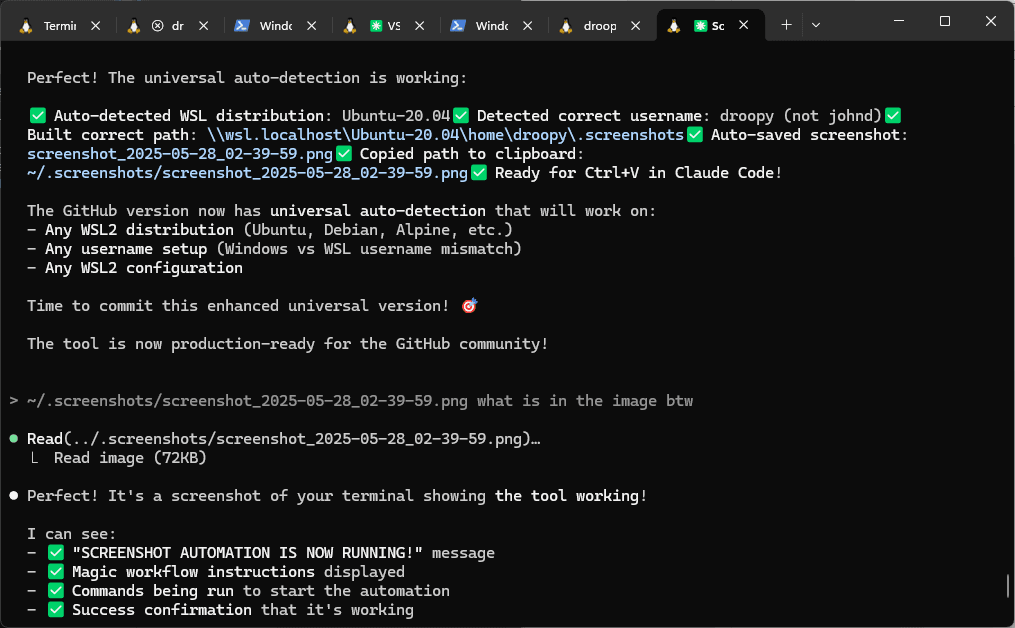
The tool automatically detects screenshots, saves them, and copies the path to your clipboard - ready for instant pasting into Claude Code, VS Code, or any application that uses WSL2!
Troubleshooting
Clipboard not working?
- Use Windows Terminal instead of basic Ubuntu terminal
- Basic WSL terminals have clipboard sync issues
Monitor not starting?
# Check the log
cat ~/.screenshots/monitor.log
Notes
- Tested on one system so far (mine) - your results may vary
- Created specifically for Claude Code workflows
- Works great with VS Code, documentation tools, any WSL2 application
- Uses PowerShell ExecutionPolicy Bypass - required for the automation to work, only affects this specific script
- Polls for clipboard changes was the simplest solution, you could bump up the time from 500ms if wanted.
- Developed with Claude Code - if you need customizations or run into issues, try asking Claude Code to help modify the scripts!
Created by Johann Döwa | Made with ❤️ for the Claude Code community
// faq
What is windows-to-wsl2-screenshots?
Automate Windows screenshots for Claude Code workflows in WSL2. Take screenshots (Win+Shift+S, Win+PrintScreen, Snipping Tool) and instantly get file paths copied to clipboard for pasting into Claude Code (Terminal or running in VS Code). No more manual save/copy/paste!. It is open-source on GitHub.
Is windows-to-wsl2-screenshots free to use?
windows-to-wsl2-screenshots is open-source under the MIT license, so it is free to use.
What category does windows-to-wsl2-screenshots belong to?
windows-to-wsl2-screenshots is listed under automation in the Claudeers registry of Claude-compatible tools.
// embed badge

[](https://claudeers.com/windows-to-wsl2-screenshots)
// retro hit counter

[](https://claudeers.com/windows-to-wsl2-screenshots)
// reviews
// guestbook
// related in Developer Tools
 🔓
🔓The agent harness performance optimization system. Skills, instincts, memory, security, and research-first development for Claude Code, Codex, Opencode, Curs…
 🔓
🔓Makes your AI agent think like the laziest senior dev in the room. The best code is the code you never wrote.
 🔓
🔓Use Garry Tan's exact Claude Code setup: 23 opinionated tools that serve as CEO, Designer, Eng Manager, Release Manager, Doc Engineer, and QA
 🔓
🔓AI coding assistant skill (Claude Code, Codex, OpenCode, Cursor, Gemini CLI, and more). Turn any folder of code, SQL schemas, R scripts, shell scripts, docs,…