
web-image-skill
不依赖模型的多模态能力,用 HTML/CSS 渲染生成图片的 Claude Code skill · 32 套风格 · 20+ 尺寸预设 · 零依赖导出 PNG
Install with your AI
Paste into Claude Code, Cursor, or any agent — it reads the repo and wires the tool into your project.
Install and set up web-image-skill (claude-skill project) into my current project.
Found on https://claudeers.com/web-image-skill
Repo: https://github.com/whyubel1eve/web-image-skill
Homepage/docs: —
Detected install method: claude-skill → # copy this skill into .claude/skills/web-image-skill/
Category: skills. Platforms: web.
Read the repo's README for exact setup and env vars, then install it and wire it into my project.

Claudeers Health Verdict:
active; community-verified: false. Confirm the source before running anything.
# copy the skill dir into your project:
# .claude/skills/web-image-skill/   (or ~/.claude/skills/web-image-skill/ for all projects)
git clone https://github.com/whyubel1eve/web-image-skill
// compatibility
| Platforms | web |
|---|---|
| Operating systems | — |
| AI compatibility | claude |
| License | MIT |
| Pricing | open-source |
| Language | JavaScript |
web-image
用前端渲染生成图片。 不依赖模型的多模态能力,也不绑定特定 agent —— 任何能写 HTML/CSS 的模型(DeepSeek、Claude、Kimi、GPT…)配任何能读文件的 coding agent (Claude Code、Codex、OpenCode、Cursor、Cline…)都能用。
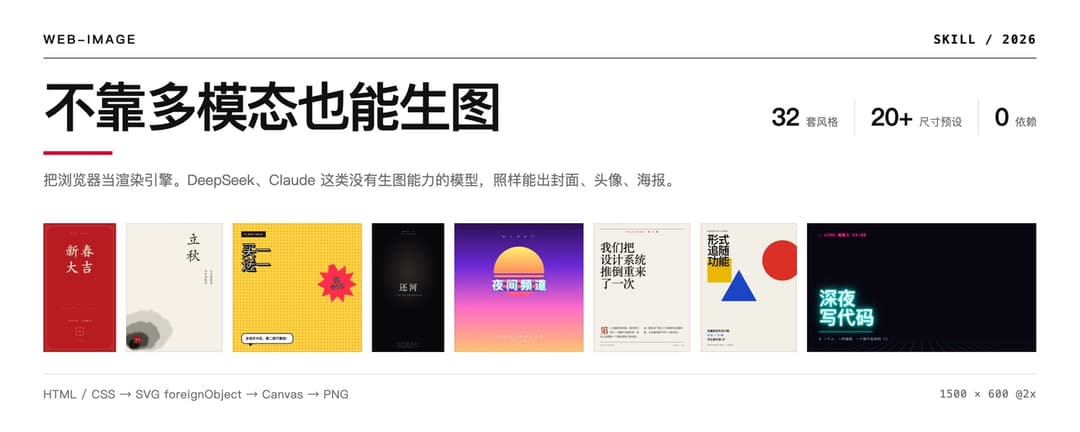
32 套预设风格开箱即用,想要别的直接说 —— 描述一个参照物("像 A24 电影海报"、 "八十年代香港霓虹招牌"、"我们品牌是莫兰迪色系"),AI 会把它拆成一套可执行的设计规则再实现出来。
解决什么问题
市面上的生图 skill 大多依赖模型自身的多模态能力,对 DeepSeek 这类很强但不能生图的模型完全失效。
这个 skill 换了条路:把浏览器当渲染引擎。用 HTML/CSS 精确描述画面,导出成真实像素的 PNG。 产物可复现、可微调、可版本管理——而不是一次性的随机结果。
代价是:做不了照片级内容(人像、风景、材质渲染),那仍然需要真正的图像模型。 强项是排版驱动的图——封面、头像、卡片、Banner、数据图、海报、代码图。
风格:32 套预设,也可以自己描述
预设的 32 套
每套都有明确出身和签名手法——那一招才是辨识度所在,配色只是入场券。 用的时候直接点名:「用工程蓝图风格做张公众号封面」。
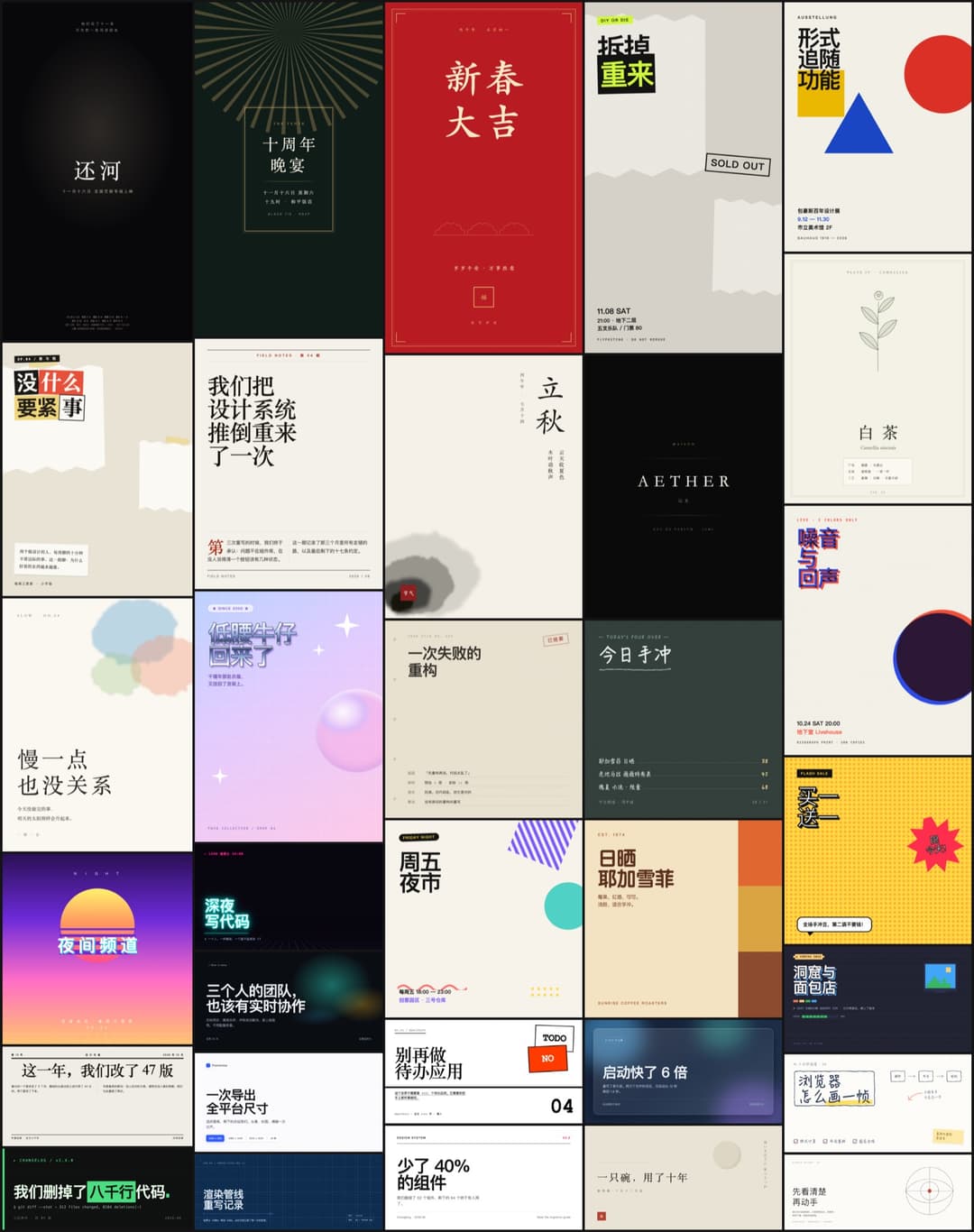
完整列表
| 分组 | 风格 |
|---|---|
| 印刷传统 | 瑞士国际主义 · 杂志编辑部 · 报纸 · 工程蓝图 · 档案手稿 |
| 艺术运动 | 包豪斯 · 装饰艺术 · 双色印刷 Riso · 粗野主义 · 孟菲斯 · 拼贴 |
| 东方 | 日式侘寂 · 中式水墨 · 国潮 |
| 手作纸感 | 手绘 · 黑板 · 水彩 · 博物图鉴 |
| 流行文化 | 美漫波普 · 像素 8-bit · 千禧 Y2K · 蒸汽波 · 霓虹赛博 · 街头海报 |
| 影像商业 | 电影海报 · 复古未来 70s · 极简线条 · 玻璃拟态 · 终端 · 极光 · 奢侈品 · 极简产品 |
每套还标了「常用画幅」——风格和画幅是配套的,你不指定尺寸时它按这个来。
想要预设之外的风格,直接描述
32 套是起点,不是上限。 说一个参照物就行:
"像 A24 电影海报那样"
"八十年代香港霓虹招牌"
"我们品牌是莫兰迪色系 + 圆润无衬线"
"《POPEYE》那种日式杂志内页"
"《银翼杀手 2049》的橙色沙尘"
AI 会按 references/styles.md 里的四步法把参照物拆成一套可执行的规则:
| 步骤 | 干什么 |
|---|---|
| 1. 取 4 个色 | 底色 / 主文字 / 次要文字 / 一个重音色。数出来超过 5 个说明还没看准 |
| 2. 定字体反差 | 哪一对在打架?衬线 vs 等宽、900 vs 300、全大写宽字距 vs 常规 |
| 3. 找签名手法 | 这个风格独有的那一招是什么?一条线?一种错位?一个形状?找不到就别动手 |
| 4. 定留白比例 | 35% / 55% / 70%,三选一 |
拆完就照 design.md 里的中文排版、构图和纹理配方实现——和预设风格走的是同一条流水线,
质量不会因为"不在库里"而打折。
你也没指定风格的话,它会按内容气质报 3~4 个候选让你挑,而不是默认套一个。
两条导出通道
| 页内按钮 | scripts/shot.mjs | |
|---|---|---|
| 原理 | 克隆节点 → 内联 computed style → SVG foreignObject → canvas | 本机 Chrome headless 渲染后截图 |
| 依赖 | 无 | 本机 Chrome / Chromium / Edge |
| 速度 | 单张即时 | ~1.5s/张,默认 3 并发 |
| 适合 | 边调边看、复制到剪贴板 | 出最终稿、批量、CI |
两条通道读同一份 HTML。SVG 滤镜、mix-blend-mode、background-clip:text、
writing-mode 竖排、clip-path 都已实测支持。
安装
这个 skill 不绑定任何特定 agent —— 它本质上就是一组 Markdown 说明 + 两个 Node 脚本。
只要你的 agent 能读文件、能跑 shell,把 SKILL.md 送进它的上下文就能用。
方式一:让你的 agent 自己装(推荐)
把下面整段发给 Claude Code / Codex / OpenCode / Cursor / Cline / 任何 coding agent:
帮我安装 web-image skill:

1. 克隆到你的技能目录(你比我清楚该放哪):
   git clone --depth 1 https://github.com/whyubel1eve/web-image-skill.git <你的技能目录>/web-image
   - Claude Code 放 ~/.claude/skills/web-image
   - 其他 agent 放到你自己的 skills / rules / prompts / 扩展目录
   - 如果你没有技能目录机制,放到项目里任意位置,然后把 SKILL.md
     的路径写进你的 AGENTS.md / .cursorrules / CLAUDE.md 之类的常驻配置里

2. 读一遍 web-image/SKILL.md,那是入口:里面有生图流程,
   以及 references/ 下四份参考文档各自该在什么时候读。不用一次读完全部。

3. 检查依赖并告诉我结果:
   - node -v            (批量出图和拼版脚本需要,没有也能用页面里的导出按钮)
   - Chrome / Chromium  (精确出图通道需要,没有则只用页内导出)

4. 自检:node web-image/scripts/shot.mjs web-image/examples/styles.html --only swiss
   能生成 PNG 就算装好了。
方式二:安装脚本
curl -fsSL https://raw.githubusercontent.com/whyubel1eve/web-image-skill/main/install.sh | bash
脚本会自动探测已有的技能目录、检查 Node 和 Chrome、并真的渲染一张图做自检。 指定目录:
curl -fsSL .../install.sh | bash -s -- ~/.config/your-agent/skills
# 或 clone 下来后: ./install.sh ~/my/skills
探测不到已知目录时它会装到当前目录,不会瞎猜路径。
方式三:手动
git clone --depth 1 https://github.com/whyubel1eve/web-image-skill.git ~/.claude/skills/web-image
换成你的 agent 对应的目录即可。
各家 agent 怎么接
| Agent | 怎么接 |
|---|---|
| Claude Code | 放进 ~/.claude/skills/web-image/,自动识别 SKILL.md |
| 有技能/插件机制的 | 放进它的技能目录,入口指向 SKILL.md |
| 只有常驻配置文件的 ( AGENTS.md / .cursorrules / .clinerules 等) | 仓库放任意位置,在配置文件里加一行:生图任务参考 <path>/web-image/SKILL.md |
| 纯对话式的 | 把 SKILL.md 内容直接贴进对话;需要时再贴对应的 references/*.md |
依赖:Node.js(可选,用于批量出图和拼版)、Chrome/Chromium(可选,用于精确出图)。 两个都没有时,仍可用画板页面里的导出按钮——那条通道是零依赖的纯浏览器实现。
用法
# 看 32 套风格样张(每套用它最擅长的画幅 + 真实场景文案)
open ~/.claude/skills/web-image/examples/styles.html

# 批量精确出图
node ~/.claude/skills/web-image/scripts/shot.mjs out/index.html --scale 2

# 把出好的图拼成一张总览(justified 打包,各列等高,底部不留空洞)
node ~/.claude/skills/web-image/scripts/contact.mjs out/png/*.png --cols 5 --label
结构
SKILL.md              流程与风格协商
references/
  styles.md           32 套风格:出身 · token · 签名手法 · 常用画幅
  formats.md          20+ 尺寸预设 + 各平台安全区 + 打印换算
  scenes.md           17 种场景配方:结构 · 文案字数上限 · 翻车点
  design.md           中文排版 · 构图 · 高级感技法 · 纹理配方 · AI 味清单
  export.md           两条通道对比 · 硬限制 · 图片内嵌 · 排错表
assets/               工作台外壳 + 零依赖导出引擎
scripts/              shot.mjs 精确出图 · contact.mjs 拼版
examples/             多画幅范例 + 32 套风格样张
一些实现细节
- 导出引擎把节点的 computed style 逐条内联进 SVG
foreignObject,只写与标签默认值不同的属性以控制体积,并单独把::before/::after提取成 class 规则——否则伪元素会在快照里全部丢失。 shot.mjs不等 Chrome 退出。Chrome 常因拉起 GoogleUpdater 之类的孙进程而迟迟不退,改成轮询产物文件、大小稳定即收工,单张从 45s 降到 1.5s。- 有机形状(墨迹、水彩、毛边)用 SVG
feTurbulence+feDisplacementMap打散规整形状的边缘。border-radius+blur只会得到一个模糊的椭圆。 - 中文排版不要用
max-width:…ch控制折行——ch是字符 "0" 的宽度,一个汉字约占 2ch,算出来差一倍,很容易折出孤字。
License
MIT
// faq
What is web-image-skill?
不依赖模型的多模态能力,用 HTML/CSS 渲染生成图片的 Claude Code skill · 32 套风格 · 20+ 尺寸预设 · 零依赖导出 PNG. It is open-source on GitHub.
Is web-image-skill free to use?
web-image-skill is open-source under the MIT license, so it is free to use.
What category does web-image-skill belong to?
web-image-skill is listed under skills in the Claudeers registry of Claude-compatible tools.
// embed badge

[](https://claudeers.com/web-image-skill)
// retro hit counter

[](https://claudeers.com/web-image-skill)
// reviews
// guestbook
// related in Claude Skills
 🔓
🔓An agentic skills framework & software development methodology that works.
 🔓
🔓 🔓
🔓💫 Toolkit to help you get started with Spec-Driven Development
 🔓
🔓AI coding assistant skill (Claude Code, Codex, OpenCode, Cursor, Gemini CLI, and more). Turn any folder of code, SQL schemas, R scripts, shell scripts, docs,…