
wacrew
Open-source WhatsApp AI automation: inbox sorted by wait time, replies in your own voice with human-paced delivery, client CRM, live 2D office and an MCP ser…
Install with your AI
Paste into Claude Code, Cursor, or any agent — it reads the repo and wires the tool into your project.
Install and set up wacrew (git-clone project) into my current project.
Found on https://claudeers.com/wacrew
Repo: https://github.com/sumioshi/wacrew
Homepage/docs: https://wacrew.com.br
Detected install method: git-clone → git clone https://github.com/sumioshi/wacrew
Category: mcp-servers. Platforms: cli, api, web, mobile.
Read the repo's README for exact setup and env vars, then install it and wire it into my project.

Claudeers Health Verdict:
unknown; community-verified: false. Confirm the source before running anything.
git clone https://github.com/sumioshi/wacrew
// compatibility
| Platforms | cli, api, web, mobile |
|---|---|
| Operating systems | — |
| AI compatibility | claude |
| License | Apache-2.0 |
| Pricing | open-source |
| Language | TypeScript |

WACrew
An AI that answers your WhatsApp in your own voice, so clients talk to you, not to a bot.
It sorts every group and chat by who has waited longest, writes with your punctuation and rhythm,
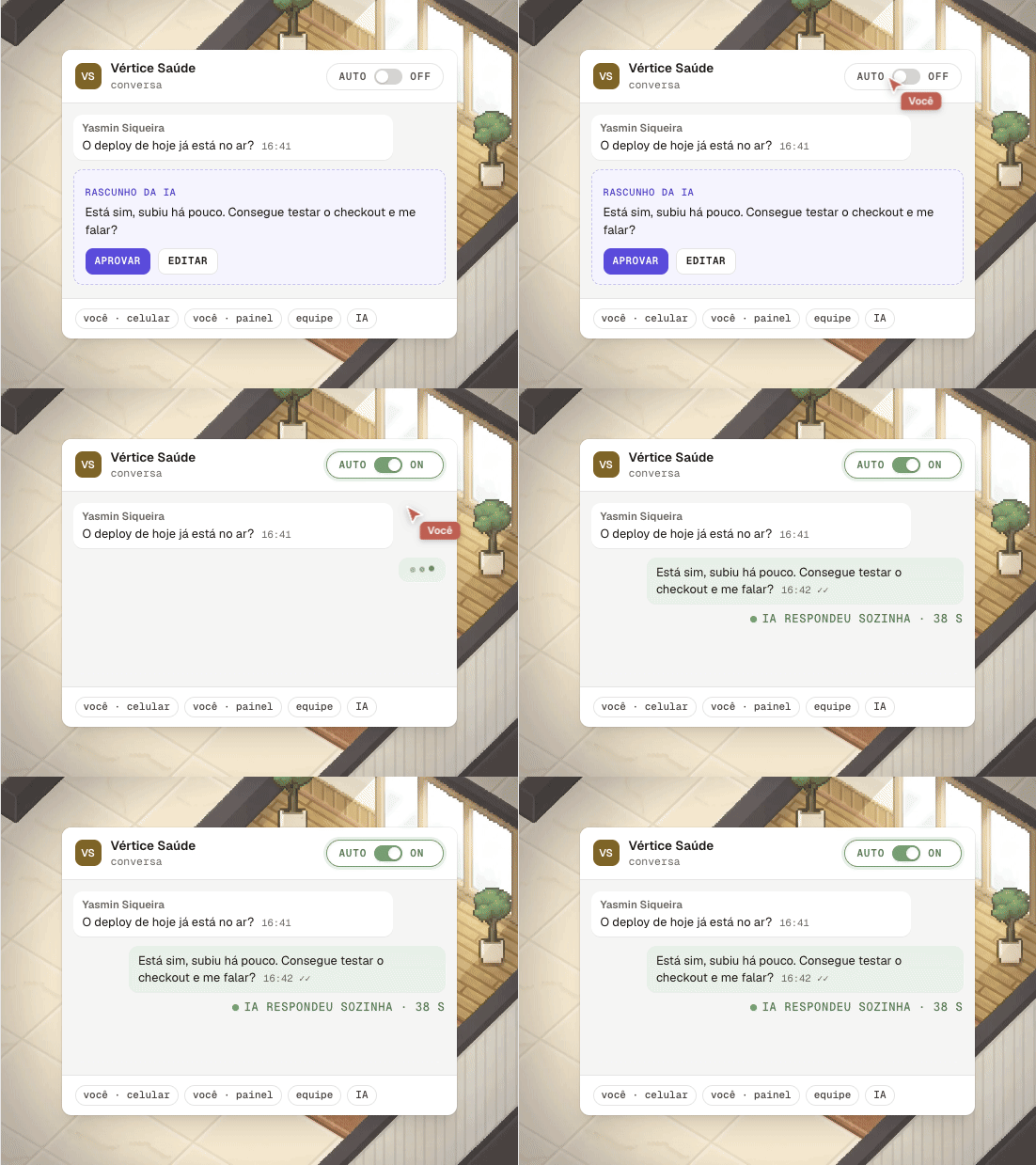
and delivers at a human pace. You approve each reply or leave a chat on auto.
Open source, self-hosted, with an MCP server so Claude Code, Cursor or Codex can work the chats too.


One click on Railway, a VPS with 20% off on Hostinger (referral links that help fund the project), or run it on your machine.

wacrew.com.br · Leia em português · ⭐ If WACrew helps you, a star helps others find it.
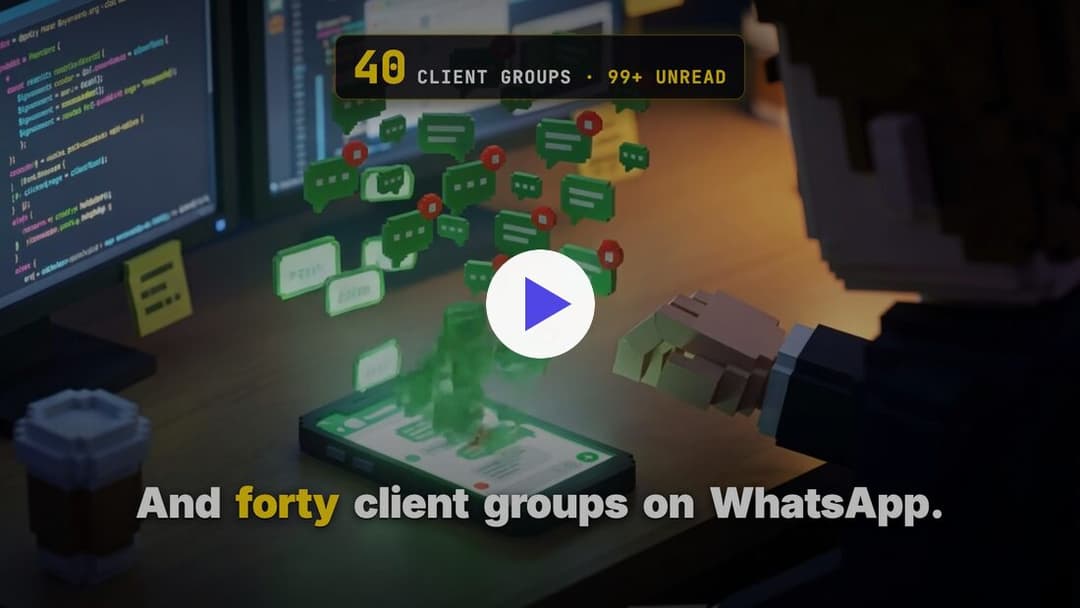
▶ Watch the 55-second video
Why
If you sell or deliver work over WhatsApp, you know the scene: forty client groups, a four-minute voice note in the middle of a thread, the bug screenshot lost in the scroll, and the client who wrote three days ago that nobody saw.
A chatbot does not fix that. Canned answers read like a robot, clients notice, and the relationship cools down. WACrew works differently:
- Nobody waits. Every group and chat goes into one queue, oldest wait first, with voice notes already transcribed.
- It sounds like you. Replies follow your punctuation, openings and rhythm, measured on your own messages, and pass a review that blocks robotic tells before they leave.
- It moves like a person. Read receipt, typing, pauses between bubbles, and it stops if the client writes again or you answer from your phone.
- You stay in charge. Confirm mode is the default: nothing goes out without your OK. If a client asks whether it is AI, it does not lie; it stops and hands the chat back to you.
The engine that makes it read like a person:
| 2 | 25+ | 60 | ~30 s |
|---|---|---|---|
| writing skills: your voice and client conduct | code rules that block robot tells | history messages read before replying | median until typing starts in a live chat |
What it does
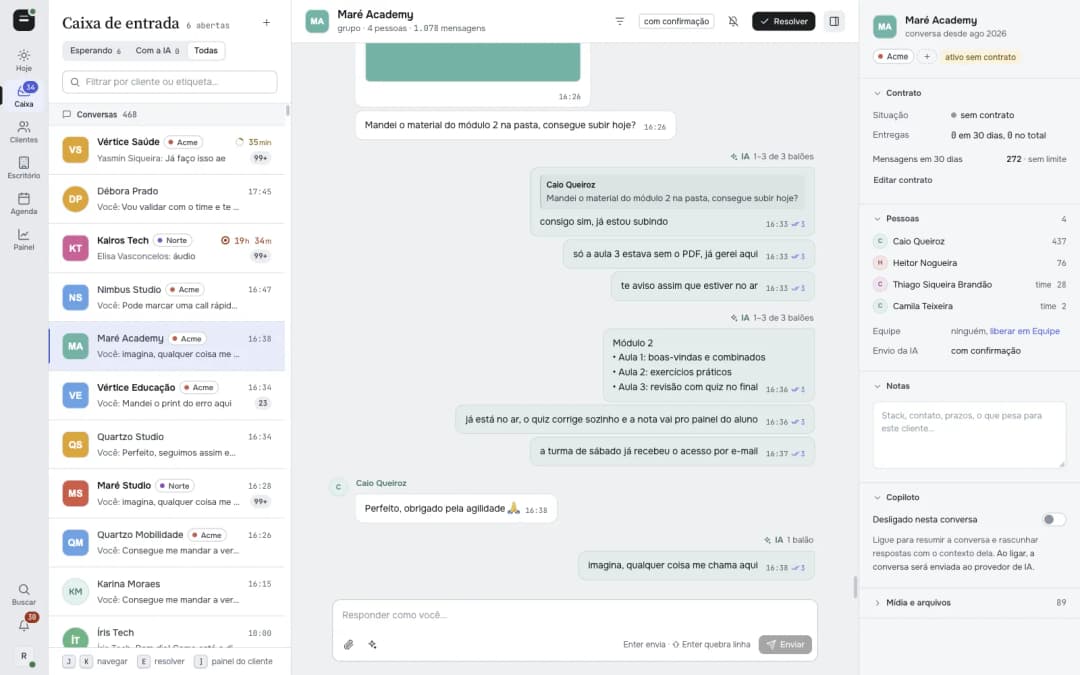
Nobody waits. Every group and direct chat lands in one queue sorted by waiting time. A client's group and their private chats show up together, back-to-back messages collapse into one block, and voice notes arrive transcribed.
Writes like you, delivers like a person. The AI reads the history and writes with your punctuation, openings and rhythm, measured on your own past messages. Before anything leaves, a deterministic review blocks robot clichés, repeated apologies and duplicate bubbles (the generic part of it is also a standalone library, botsmell). Delivery comes with read receipt, typing indicator and pauses, and it stops on its own if the client writes again or you answer from your phone.
You stay in control. In Confirm mode (the default) nothing is sent without your OK. Autonomous mode is turned on per chat. Every message records who wrote it: you on the phone, you on the panel, a teammate, or the AI.
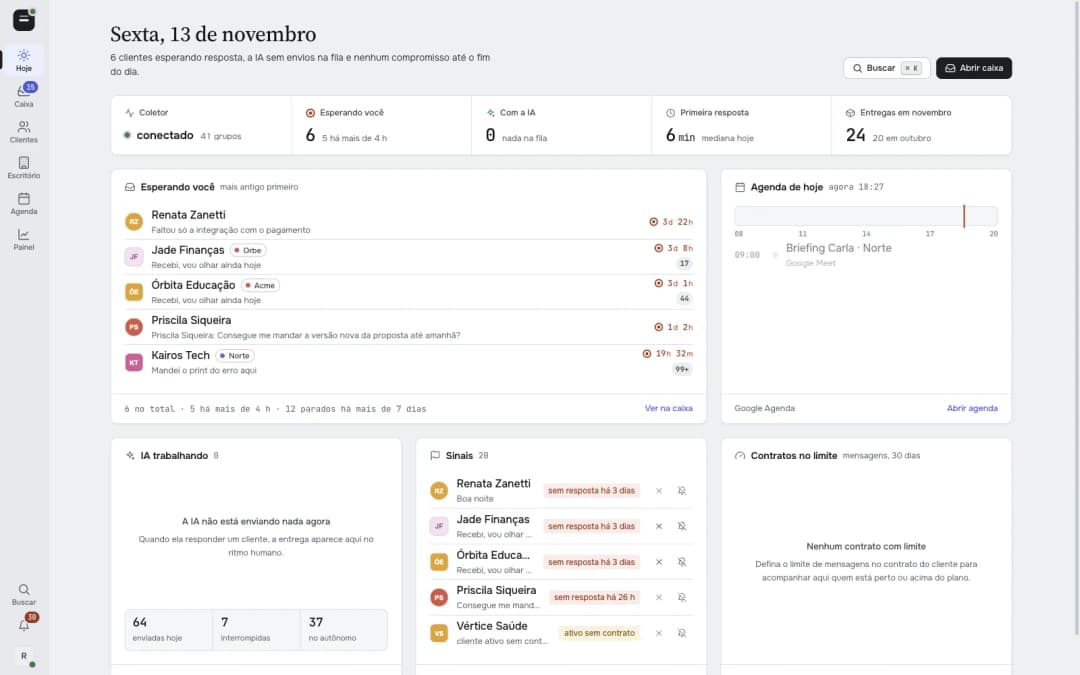 Today. Who is waiting and for how long, what the AI is doing, signals and today's agenda. | 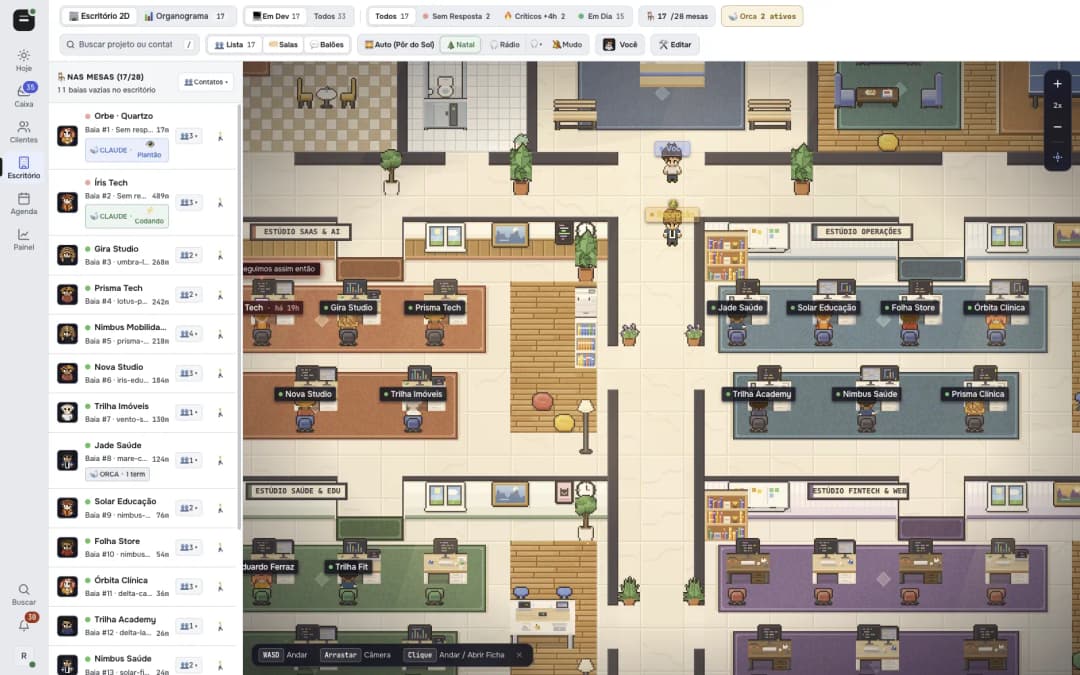 2D office. One desk per project. When a client writes, the desk turns red right away, with sound. |
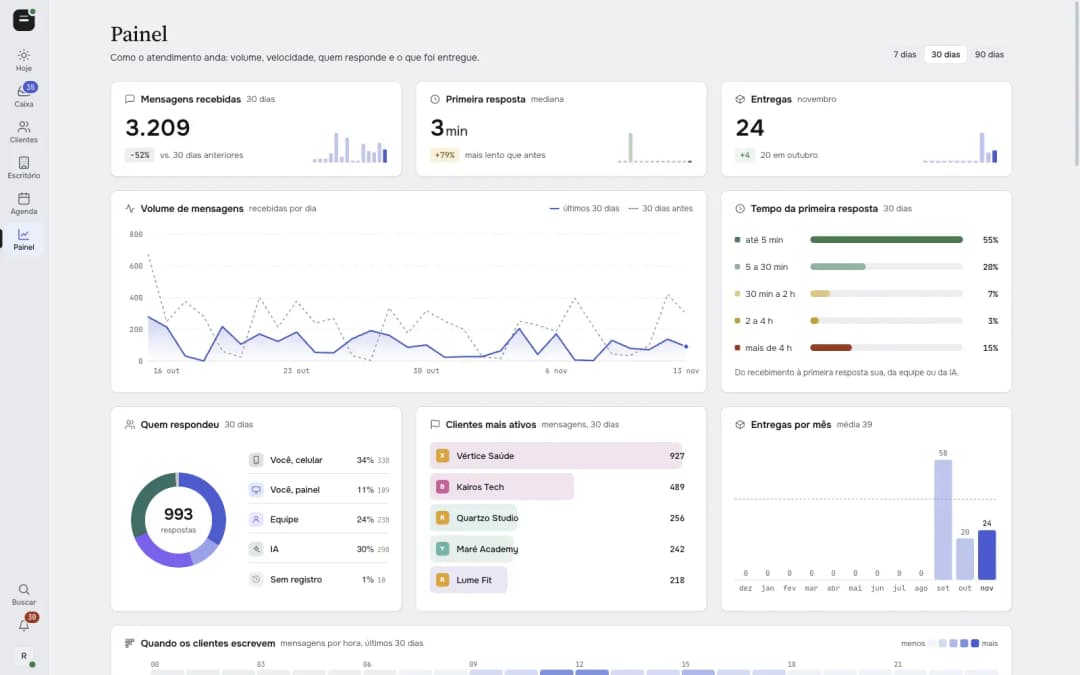 Dashboard. Volume, first-reply time, who answered, busiest clients and deliveries per month. | 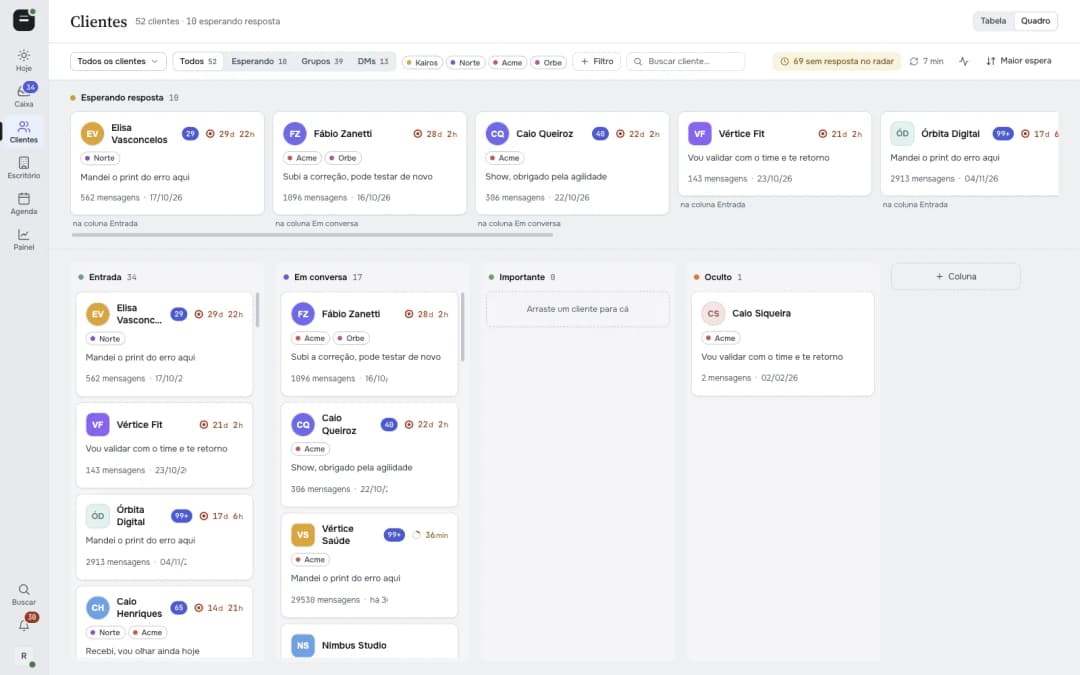 Clients. Table and board views with contract, deliveries and waiting time per client. |
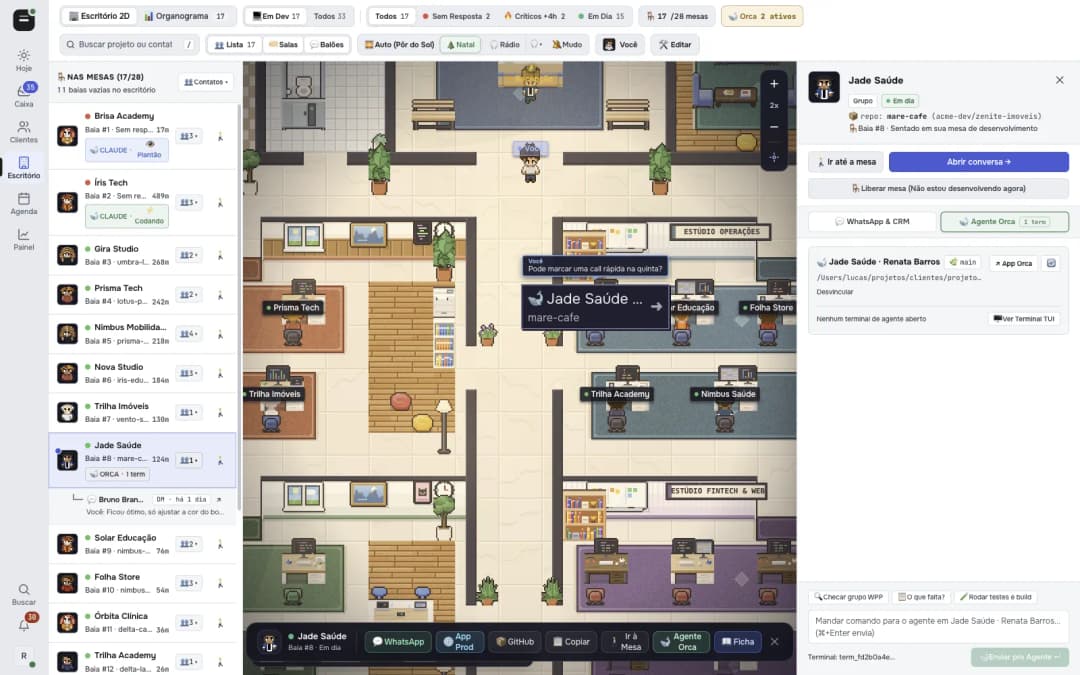 Agent bridge (optional). If you use Orca, the client drawer shows the coding agent working on that project's repo and lets you send it commands. | 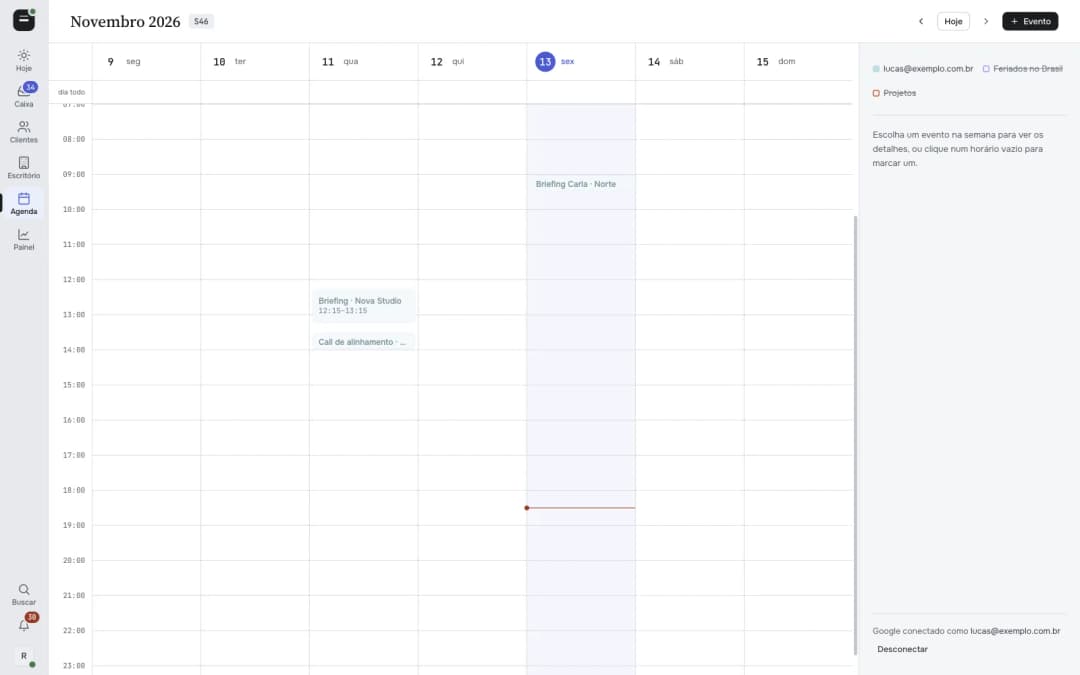 Calendar. Your Google Calendar inside the panel, editable by you or by the AI. |
More screens in docs/screenshots/: org chart, team access, notifications, project links, settings and the command palette.
How it works
                          ┌────────────────────────────┐
  WhatsApp ─► collector ─►│  data/<chat>/              │◄─► web panel (Next.js, :3000)
  (Baileys)   (daemon)    │  messages.jsonl + media    │
                          │  transcripts, notes, state │◄─► MCP server (your coding agent)
                          └─────────────┬──────────────┘
                     transcriber (MLX on Apple Silicon, or an API)
- Collector (
src/): a Baileys daemon (WhatsApp Web multi-device, no browser). Baileys is isolated behind ports and adapters insrc/whatsapp/. It writes every message, reaction and media file todata/<chat>/and runs the delivery queue that sends replies at a human pace. - Panel (
web/): Next.js 16 + React 19. Inbox, conversation view, clients, dashboard, calendar, team, 2D office, settings. Live updates over SSE. - MCP server (
web/mcp/server.ts): 37 tools over the same data, for Claude Code, Codex, Antigravity, Gemini CLI, Qwen Code or any MCP client. - Transcriber (
transcriber/): Whisper large-v3 via MLX, loaded on demand and released when idle. Off a Mac, setTRANSCRIBE_BACKEND=openrouter. - Local or cloud. Run everything on your machine, or deploy the collector and panel 24/7 with the included
Dockerfile(arailway.jsonis provided). The local MCP can read straight from the cloud panel (WAC_MCP_REMOTE=1), downloading media on demand.
Quick start
Requirements: Node.js 20+, ffmpeg, and a WhatsApp account to pair. Local transcription needs Apple Silicon (uv tool install mlx-whisper).
git clone https://github.com/sumioshi/wacrew && cd wacrew
npm install && npm --prefix web install
cp .mcp.json.example .mcp.json
npm run dev          # collector + panel + transcriber + notifier
Open http://localhost:3000/config, scan the QR code (WhatsApp › Linked devices › Link a device), pick the groups to follow and mark who is on your team. The session is saved in auth/ and reconnects on its own.
Run it 24/7 on a VPS. WACrew only records what arrives while it is running: if your computer is off, messages from that period never reach the history or the queue. The repo ships a docker-compose.yml with a persistent volume for the WhatsApp session and data:
cp .env.example .env   # set PANEL_USER and PANEL_PASS
docker compose up -d
Referral links: you get a discount or credits, and the project earns a commission that helps keep it maintained. On Railway the template sets up the volume, the login and a generated password for you.
Other clouds. Run the prebuilt image ghcr.io/sumioshi/wacrew or build the Dockerfile on any host with a volume at /data. Set PANEL_USER and PANEL_PASS to protect the panel with login; without them the panel is open, which is only fine on localhost.
MCP tools
The server is registered by .mcp.json (project scope). Claude Code and Qwen Code read it and ask for approval on first use.
From npm, without cloning. With the panel running on a VPS, add the MCP to any client with wacrew-mcp:
claude mcp add wacrew -e WAC_CLOUD_URL=https://your-panel.example.com \
  -e WAC_CLOUD_USER=admin -e WAC_CLOUD_PASS=change-me -- npx -y wacrew-mcp
Antigravity plugin. The repo is also an Antigravity plugin, with the MCP and the skills (plantao, autonomo, link-whatsapp, comunicacao-cliente):
agy plugin install https://github.com/sumioshi/wacrew
It installs turned off. Open /plugin (or Customizations in the editor), turn on WACrew and fill in the panel URL, login and password; other accounts go in the URL field after a space, as below. To add only the MCP, flags go before the name:
agy mcp add -e WAC_CLOUD_URL=https://your-panel.example.com \
  -e WAC_CLOUD_USER=admin -e WAC_CLOUD_PASS=change-me wacrew npx -y wacrew-mcp
More than one WhatsApp. One server can talk to several panels. Add the others in WAC_CONTAS as name=https://login:password@address, separated by spaces (or put them after the main address in WAC_CLOUD_URL). Every tool then takes an optional conta parameter, and the agent picks the account per call. WAC_CONTA_NOME names the default one:
claude mcp add wacrew -e WAC_CLOUD_URL=https://work.example.com \
  -e WAC_CLOUD_USER=admin -e WAC_CLOUD_PASS=change-me -e WAC_CONTA_NOME=work \
  -e WAC_CONTAS="personal=https://admin:[email protected]" -- npx -y wacrew-mcp
| Area | Tools |
|---|---|
| Read | listar_grupos, ler_mensagens, buscar, listar_contatos, caixa_de_entrada, novidades, resumo_do_dia, ler_notas, estado_triagem |
| Media | transcrever, ver_imagem, ver_video, assistir_video, ler_documento |
| Reply | preparar_resposta, revisar_texto, responder, responder_midia, editar_mensagem, reagir, status_envio, cancelar_envio, gerar_voz |
| Triage and CRM | marcar_resolvido, silenciar_grupo, anotar, etiquetar, alertar_chat, definir_modo, definir_contrato, registrar_feature, dashboard, editar_perfil |
| Calendar | agenda_ver, agenda_marcar, agenda_editar, agenda_apagar |
Highlights:
buscarfinds text inside transcripts too.ver_imagemandver_videohand the media to the model, which is handy for bug screenshots.assistir_videohas a Gemini model watch a video with its audio, attached or from a link.responderreturns a ticket. The message leaves later at a human pace: seconds in a live chat, minutes to hours in a cold one. The ticket is interrupted if the client writes or you answer by hand.status_enviotracks it andcancelar_enviocancels it.gerar_vozmeasures how you write from the messages you typed yourself (what the automation sent is left out) and returns a ready voice skill for your agent, split into work and personal.preparar_respostareturns your recent style and what the client left open. Pass 2 or 3candidatostoresponderand the least out-of-character one is sent.
Tool names are in Portuguese because the project started in Brazil. Descriptions are clear enough for any model.
Configuration
Everything has a default. Copy .env.example to .env and adjust what you need.
| Variable | What it does |
|---|---|
PANEL_USER, PANEL_PASS | Panel login. Required when the panel is reachable from the internet. |
OPENROUTER_API_KEY | Posture check before sending, video watching and API transcription. |
COPILOT_PROVIDER, ANTHROPIC_API_KEY, COPILOT_OPENAI_API_KEY | The in-panel copilot (Anthropic or any OpenAI-compatible API). |
TRANSCRIBE_BACKEND | mlx (local, default on a Mac) or openrouter. |
WAC_MCP_REMOTE, WAC_CLOUD_URL, WAC_CLOUD_USER, WAC_CLOUD_PASS | Point the local MCP and sync at your cloud panel. |
WAC_NOME_OPERADOR, WAC_SKILL_VOZ | Your first name and the voice skill the AI loads before writing. |
GOOGLE_CLIENT_ID, GOOGLE_CLIENT_SECRET | Calendar and Google sign-in. |
CONTROL_TOKEN | Bearer token for the external control API. |
DATA_DIR, AUTH_DIR, LOG_LEVEL | Where data and the session live, and log verbosity. |
There is also a public REST API documented in docs/api-v1.md.
What gets stored
data/<chat>/
  messages.jsonl     one line per message (the AI's "database")
  reactions.jsonl    emoji reactions
  log.md             the same conversation, human-readable
  audio/ video/ image/ document/ transcripts/
data/, auth/, .env and groups.config.json are git-ignored. Never commit them.
Read this before using it
- This is not the official WhatsApp API. WACrew links to your account as one more device, through Baileys. It is built to answer people who already talk to you. Bulk messaging and cold outreach can get your number banned.
- No old history. Capture starts when you pair the number.
- Sending is real. The panel and the control API send messages as you. Keep them on localhost or behind login.
- WACrew is an independent project, not affiliated with WhatsApp or Meta.
Contributing
If WACrew saves you time, consider sponsoring the project. It pays for the hours that keep it maintained.
Issues and pull requests are welcome.
npm test            # Vitest
npx tsc --noEmit    # typecheck
Shared logic between the panel and the MCP lives in web/lib/. See CONTRIBUTING.md.
Sponsors
WACrew is free and open source. Sponsors keep it maintained and get their name or logo here.
License
Apache 2.0 © Rodrigo Sumioshi. See NOTICE.
// faq
What is wacrew?
Open-source WhatsApp AI automation: inbox sorted by wait time, replies in your own voice with human-paced delivery, client CRM, live 2D office and an MCP server for Claude Code and Codex.. It is open-source on GitHub.
Is wacrew free to use?
wacrew is open-source under the Apache-2.0 license, so it is free to use.
What category does wacrew belong to?
wacrew is listed under mcp-servers in the Claudeers registry of Claude-compatible tools.
// embed badge

[](https://claudeers.com/wacrew)
// retro hit counter

[](https://claudeers.com/wacrew)
// reviews
// guestbook
// related in MCP Servers
 🔓
f.k.a. Awesome ChatGPT Prompts. Share, discover, and collect prompts from the community. Free and open source — self-host for your organization with complete…
 🔓
A cross-platform desktop All-in-One assistant for Claude Code, Codex, OpenCode, OpenClaw, Gemini CLI & Hermes Agent. Only official website: ccswitch.io
 🔓
🪨 why use many token when few token do trick — Claude Code skill that cuts 65% of tokens by talking like caveman
 🔓
An open-source AI agent that brings the power of Gemini directly into your terminal.