
vim-claude-code
Claude CLI integration for Vim, enabling AI-powered coding workflows.
Install with your AI
Paste into Claude Code, Cursor, or any agent — it reads the repo and wires the tool into your project.
Install and set up vim-claude-code (release-binary project) into my current project.
Found on https://claudeers.com/vim-claude-code
Repo: https://github.com/rishi-opensource/vim-claude-code
Homepage/docs: —
Detected install method: release-binary → inspect the README
Category: devtools. Platforms: cli, api, web.
Read the repo's README for exact setup and env vars, then install it and wire it into my project.

Claudeers Health Verdict:
slowing; community-verified: false. Confirm the source before running anything.
Grab the latest release asset from GitHub.
# download a build from https://github.com/rishi-opensource/vim-claude-code/releases
git clone https://github.com/rishi-opensource/vim-claude-code
// compatibility
| Platforms | cli, api, web |
|---|---|
| Operating systems | — |
| AI compatibility | claude |
| License | MIT |
| Pricing | open-source |
| Language | Vim Script |
vim-claude-code
AI-powered coding, inside Vim. No context switching.
vim-claude-code brings Claude Code directly into your editor. Fix bugs, write tests, review diffs, generate commits, and refactor code — all without leaving Vim.
One keypress opens Claude in a split panel. Another hides it. Your session persists across toggles. Claude edits your files; your buffers reload automatically. You stay in flow.
Why vim-claude-code?
Most AI coding tools pull you out of your editor — into a browser, a chat window, or a separate terminal. vim-claude-code keeps everything inside Vim:
- No copy-pasting — commands automatically capture your visual selection or current function
- No tab switching — Claude runs in a managed split, toggled with a single key
- No blind edits — every file change Claude proposes shows up as a reviewable diff before anything is written to disk
- No workflow interruption — buffers reload automatically when Claude modifies files
Demos
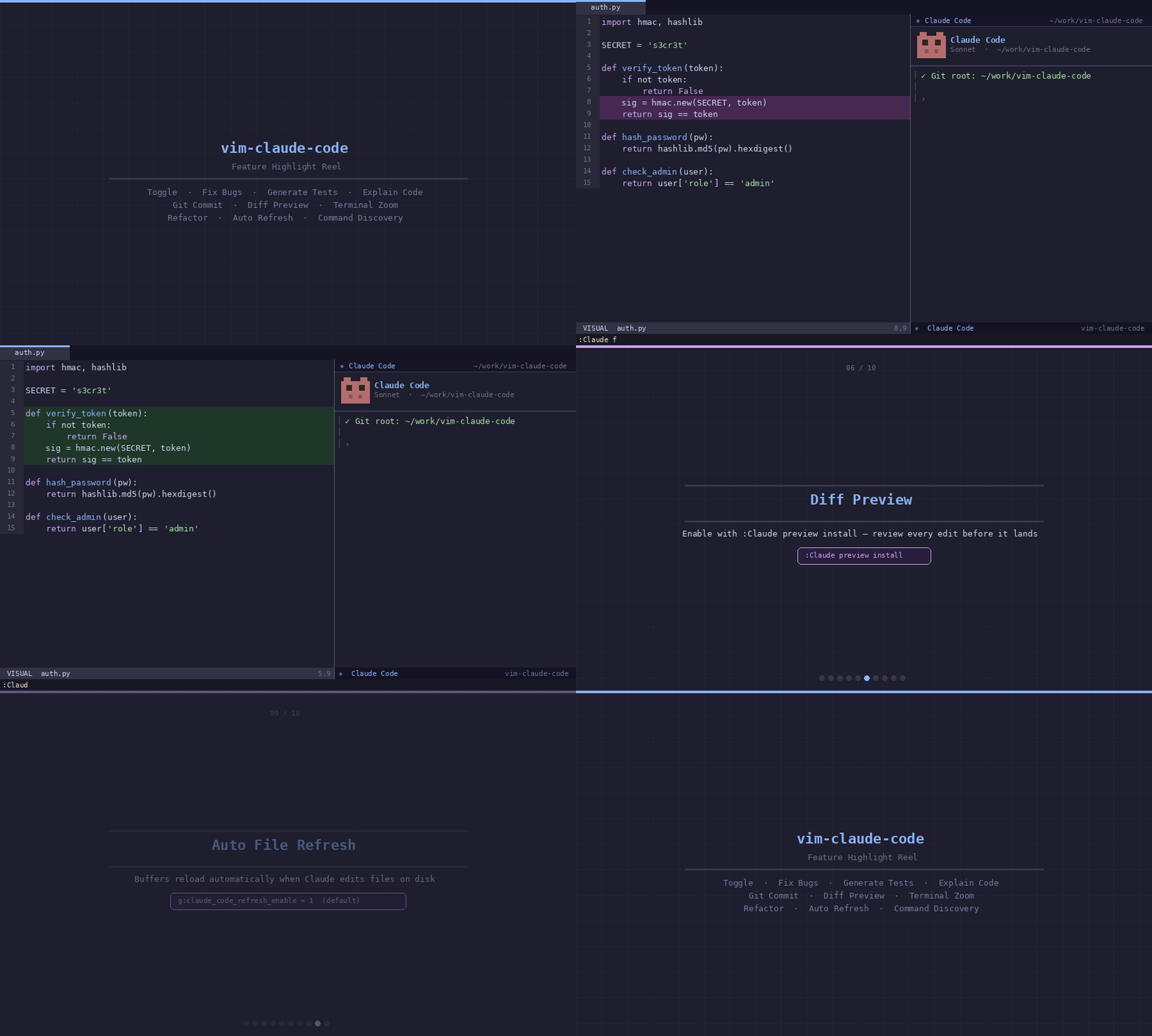
Toggle, fix bugs, generate tests, explain code, git workflows, diff preview, terminal zoom, and more — all from within Vim. See DEMO.md for individual feature walkthroughs.
Features at a Glance
Stay in Flow
- One-key toggle —
<C-\>opens and hides Claude. Session persists across toggles. - Terminal Zoom — Maximize Claude to full-screen with
<C-w>z, tmux-style. Restore your split instantly. - Auto file refresh — Buffers reload when Claude edits your files. No manual
:eneeded. - Multiple layouts — Right split (default), bottom, top, left, floating popup, or dedicated tab.
Context-Aware Commands
- Selection-aware — Commands use your visual selection when active, otherwise detect the current function automatically.
- 22 sub-commands — Explain, fix, refactor, test, document, commit, review, rename, optimize, debug, and more. All tab-completable.
- Git-aware — Claude starts at your repo root. Separate sessions per repository.
Review Before Claude Writes
- Diff preview — Every file edit Claude proposes opens a side-by-side diff tab. Review what changes, then accept or reject. You stay in control.
Full Git Workflow
- Commit messages — Generated from your staged diff, with conventional commit support.
- Code review — Claude reviews your current diff with configurable strictness and security checks.
- PR descriptions — Generated from your branch changes without leaving the editor.
Requirements
- Vim 8+ compiled with
+terminal - Claude Code CLI installed and in
$PATH - Optional:
+popupwinfor floating window mode - Optional:
python3for diff preview (:Claude preview)- Note: In Windows, there is a default python3 that redirects to the Windows Store.
Run
Claude doctorto check if you have a valid python3 installation. If you have Python 3, but your installation uses python.exe as the executable, create a python3 symlink.
- Note: In Windows, there is a default python3 that redirects to the Windows Store.
Run
Installation
Stable release — v1.4.1 Pin to the latest stable release using the examples below, or omit the tag to always track
main.
vim-plug
" Always track latest
Plug 'rishi-opensource/vim-claude-code'

" Pin to stable release
Plug 'rishi-opensource/vim-claude-code', { 'tag': 'v1.4.1' }
Vundle
Plugin 'rishi-opensource/vim-claude-code'
Vundle does not support tag pinning. To pin manually after install:
cd ~/.vim/bundle/vim-claude-code && git checkout v1.4.1
pathogen
git clone --branch v1.4.1 https://github.com/rishi-opensource/vim-claude-code.git ~/.vim/bundle/vim-claude-code
Native packages (Vim 8+)
mkdir -p ~/.vim/pack/plugins/start
git clone --branch v1.4.1 https://github.com/rishi-opensource/vim-claude-code.git ~/.vim/pack/plugins/start/vim-claude-code
Quick Start
1. Open Claude:
:Claude
" or press <C-\>
2. Run a health check:
:Claude doctor
This reports [OK] / [FAIL] for every dependency and tells you exactly what to fix.
3. Explore commands with tab completion:
:Claude <Tab>
The Claude session persists — toggling with <C-\> hides and restores the same session.
Commands
Terminal
Open, hide, and manage the Claude terminal session.
| Command | Description |
|---|---|
:Claude | Toggle the Claude Code terminal |
:Claude continue | Toggle with --continue (resume last conversation) |
:Claude resume | Toggle with --resume (interactive conversation picker) |
:Claude verbose | Toggle with --verbose (detailed logging) |
Code Intelligence
Commands work on your visual selection when active, or auto-detect the current function.
| Command | Flags | Description |
|---|---|---|
:Claude explain | --brief, --detailed | Explain selected code or current function |
:Claude fix | --apply, --safe | Fix bugs and correctness issues |
:Claude refactor | --extract, --simplify, --optimize, --rename | Refactor code |
:Claude test | --framework {name}, --edge-cases | Generate unit tests |
:Claude doc | --inline, --markdown | Generate documentation |
Git Workflow
From staged diff to commit message to PR description — without opening a browser.
| Command | Flags | Description |
|---|---|---|
:Claude commit | --conventional, --amend | Generate commit message from staged diff |
:Claude review | --strict, --security | Code review on current diff |
:Claude pr | Generate PR description |
Architecture & Planning
Think through larger problems with Claude before writing code.
| Command | Description |
|---|---|
:Claude plan | Generate an implementation plan for the current file |
:Claude analyze | Analyze for complexity, performance, and security issues |
Workflow Utilities
Direct in-editor actions — apply suggestions, debug errors, rename symbols, or zoom the terminal.
| Command | Description |
|---|---|
:Claude rename | Suggest better variable/function names |
:Claude optimize | Optimize code for performance |
:Claude debug | Analyze the error on the current line |
:Claude apply | Apply Claude's last suggestion to the file (prompts for confirmation) |
:Claude zoom | Toggle full-screen (zoom) mode for the Claude terminal |
Meta
| Command | Description |
|---|---|
:Claude chat | Send a free-form message with current file context |
:Claude context | Preview what context will be sent to Claude |
:Claude model [name] | Switch model (sonnet, opus, haiku) |
Utility
| Command | Description |
|---|---|
:Claude version | Show plugin version, Vim version, Claude CLI version, and terminal support |
:Claude doctor | Health check: verifies Claude CLI, Git, terminal support, and Vim version |
Reviewing Claude's Edits — Diff Preview
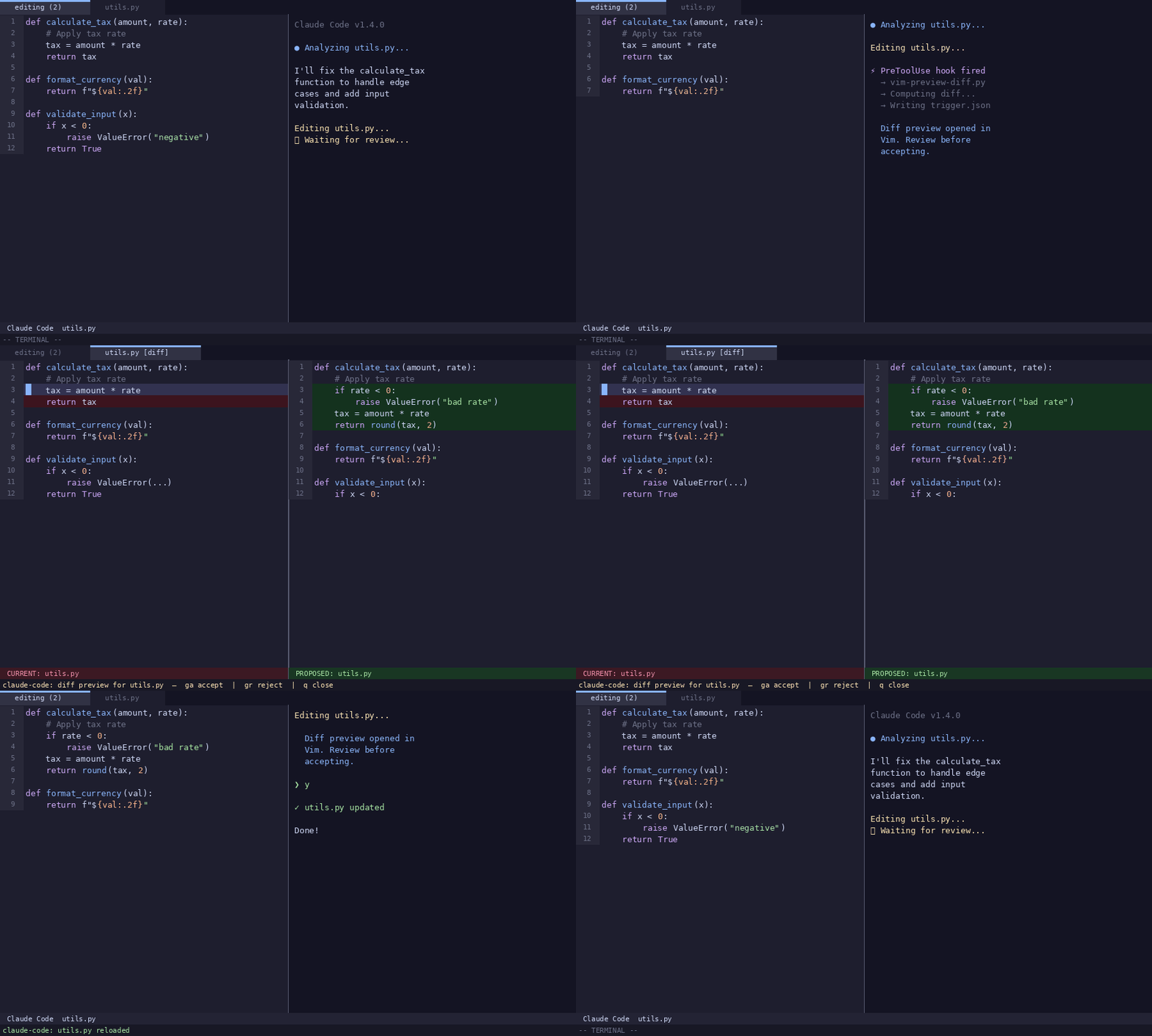
When Claude proposes changes to a file, a side-by-side diff tab opens automatically before anything is written to disk:
[current file] │ [proposed changes]
Review exactly what Claude wants to change, then use these keys in the diff tab:
| Key | Action |
|---|---|
ga | Accept — send y to Claude, apply the change |
gr | Reject — send n to Claude, discard the change |
q | Close the diff tab without responding |
Enable diff preview for your project:
:Claude preview install
This registers Claude Code hooks in .claude/settings.local.json. To auto-enable on every Vim startup:
let g:claude_code_diff_preview = 1
Diff preview commands:
| Command | Description |
|---|---|
:Claude preview install | Register diff preview hooks in .claude/settings.local.json |
:Claude preview uninstall | Remove diff preview hooks |
:Claude preview close | Manually close an open diff tab |
:Claude preview status | Show diff preview status and dependency checks |
Requires python3. Uses Vim +clientserver for instant diffs when available, falls back to polling.
Full-Screen Focus — Terminal Zoom
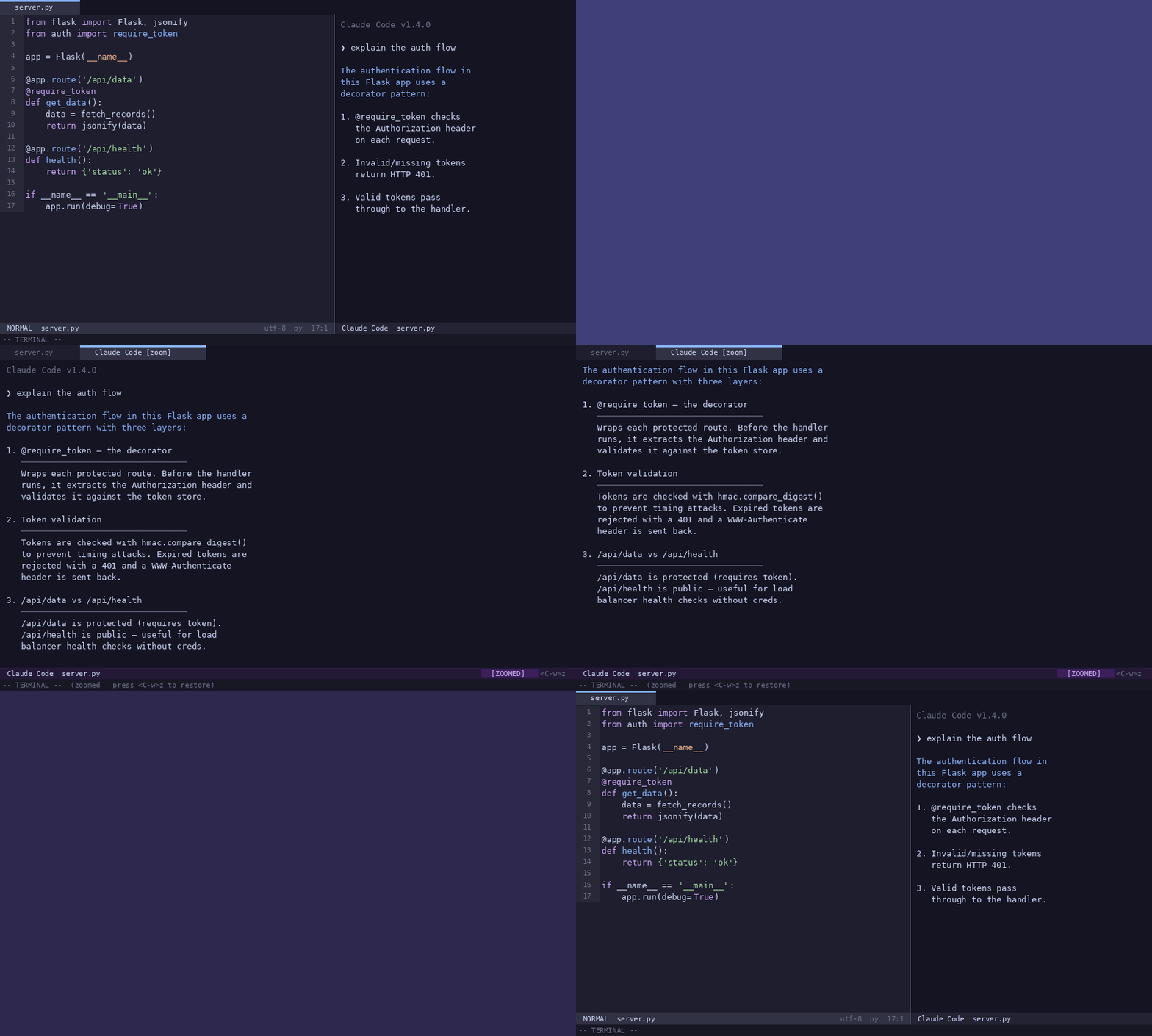
Working through a complex problem? Press <C-w>z inside the Claude terminal to maximize it full-screen — just like tmux's zoom. Press again to restore your split layout.
This is especially useful when Claude is generating a long response and you want to read it without distractions.
" Customize the zoom key
let g:claude_code_map_zoom = '<C-w>z'
Keymaps
Default keymaps
| Mode | Key | Action |
|---|---|---|
| Normal | <C-\> | Toggle Claude Code terminal |
| Normal | <Leader>cC | Toggle with --continue |
| Normal | <Leader>cV | Toggle with --verbose |
| Terminal | <C-\> | Hide Claude Code terminal |
| Terminal | <C-w>z | Zoom Toggle: Maximize or restore terminal |
| Terminal | <C-v> | Paste: Paste system clipboard content |
| Terminal | <C-h/j/k/l> | Navigate to adjacent window |
Extended keymaps (g:claude_code_map_extended_prefix + key)
| Key | Command | Key | Command |
|---|---|---|---|
<Leader>ce | explain | <Leader>cG | commit |
<Leader>cf | fix | <Leader>cR | review |
<Leader>cr | refactor | <Leader>cp | pr |
<Leader>ct | test | <Leader>cP | plan |
<Leader>cd | doc | <Leader>ca | analyze |
<Leader>cn | rename | <Leader>cD | debug |
<Leader>co | optimize | <Leader>cA | apply |
<Leader>cc | chat | <Leader>cx | context |
<Leader>cm | model |
Visual mode: <Leader>c + e/f/r/t/d/n/o operate on the selection.
To disable all default keymaps:
let g:claude_code_map_keys = 0
let g:claude_code_map_extended_keys = 0
Window Layouts
Set g:claude_code_position to match your preferred workflow:
| Value | Layout |
|---|---|
'right' | Vertical split on the right (default) |
'bottom' | Horizontal split at the bottom |
'top' | Horizontal split at the top |
'left' | Vertical split on the left |
'float' | Floating popup (requires +popupwin) |
'tab' | Dedicated tab page |
" Bottom split at 30%
let g:claude_code_position   = 'bottom'
let g:claude_code_split_ratio = 0.3

" Floating popup
let g:claude_code_position    = 'float'
let g:claude_code_float_width  = 0.85
let g:claude_code_float_height = 0.85
let g:claude_code_float_border = 'double'
Configuration
| Variable | Default | Description |
|---|---|---|
g:claude_code_command | 'claude' | CLI executable |
g:claude_code_position | 'right' | Window layout |
g:claude_code_split_ratio | 0.4 | Terminal size (0.0–1.0) |
g:claude_code_enter_insert | 1 | Auto-enter Terminal mode on focus |
g:claude_code_hide_numbers | 1 | Hide line numbers in terminal |
g:claude_code_hide_signcolumn | 1 | Hide sign column in terminal |
g:claude_code_use_git_root | 1 | Start Claude at git root |
g:claude_code_multi_instance | 1 | Separate session per git repo |
g:claude_code_map_keys | 1 | Register default toggle keymaps |
g:claude_code_map_extended_keys | 1 | Register <Leader>c* keymaps |
g:claude_code_map_toggle | '<C-\>' | Toggle key |
g:claude_code_map_zoom | '<C-w>z' | Zoom key |
g:claude_code_map_paste | '<C-v>' | Paste key |
g:claude_code_map_continue | '<Leader>cC' | Continue key |
g:claude_code_map_verbose | '<Leader>cV' | Verbose key |
g:claude_code_map_extended_prefix | '<Leader>c' | Prefix for all extended keymaps |
g:claude_code_refresh_enable | 1 | Auto-reload changed buffers |
g:claude_code_refresh_interval | 1000 | Polling interval (ms) |
g:claude_code_refresh_notify | 1 | Notify on buffer reload |
g:claude_code_float_width | 0.8 | Popup width fraction |
g:claude_code_float_height | 0.8 | Popup height fraction |
g:claude_code_float_border | 'rounded' | Border style |
g:claude_code_model | '' | Claude model override |
g:claude_code_debug | 0 | Enable debug logging to message area |
g:claude_code_diff_preview | 0 | Auto-start diff preview polling on Vim startup |
g:claude_code_bracketed_paste | 1 | Enable bracketed paste mode support |
g:claude_code_terminal_start_delay | 300 | Delay (ms) before attaching to Claude terminal |
Buffer-local b:claude_code_* overrides take precedence over g: variables.
Troubleshooting
Run the health check first:
:Claude doctor
This reports [OK] / [FAIL] for each dependency and tells you exactly what to fix.
E117: Unknown function — Run :helptags ALL then restart Vim. Ensure the plugin directory is on your runtimepath.
Terminal does not open — Verify vim --version | grep +terminal. The plugin requires Vim compiled with +terminal.
Claude not found — Ensure claude is in $PATH: which claude.
File changes not detected — Check g:claude_code_refresh_enable is 1 and that autoread is not globally disabled in your vimrc.
Debug logging — Enable verbose output to diagnose issues:
let g:claude_code_debug = 1
All internal events (dispatch, terminal launch, git calls, refresh) will be printed to the message area.
For full in-editor documentation, run :help claude-code.
License
MIT — see LICENSE.
Changelog
See CHANGELOG.md for full details. This project uses semantic-release for automated versioning. See doc/RELEASING.md for details.
// faq
What is vim-claude-code?
Claude CLI integration for Vim, enabling AI-powered coding workflows.. It is open-source on GitHub.
Is vim-claude-code free to use?
vim-claude-code is open-source under the MIT license, so it is free to use.
What category does vim-claude-code belong to?
vim-claude-code is listed under devtools in the Claudeers registry of Claude-compatible tools.
// embed badge

[](https://claudeers.com/vim-claude-code)
// retro hit counter

[](https://claudeers.com/vim-claude-code)
// reviews
// guestbook
// related in Developer Tools
 🔓
🔓The agent harness performance optimization system. Skills, instincts, memory, security, and research-first development for Claude Code, Codex, Opencode, Curs…
 🔓
🔓Makes your AI agent think like the laziest senior dev in the room. The best code is the code you never wrote.
 🔓
🔓Use Garry Tan's exact Claude Code setup: 23 opinionated tools that serve as CEO, Designer, Eng Manager, Release Manager, Doc Engineer, and QA
 🔓
🔓AI coding assistant skill (Claude Code, Codex, OpenCode, Cursor, Gemini CLI, and more). Turn any folder of code, SQL schemas, R scripts, shell scripts, docs,…