
video-recap-skills-plus
Clip any video into a narration recap with claude code skill|用claude code skill把任何视频剪辑成中文解说视频,支持剪映导出
Install with your AI
Paste into Claude Code, Cursor, or any agent — it reads the repo and wires the tool into your project.
Install and set up video-recap-skills-plus (claude-plugin project) into my current project.
Found on https://claudeers.com/video-recap-skills-plus
Repo: https://github.com/ops120/video-recap-skills-plus
Homepage/docs: —
Detected install method: claude-plugin → /plugin install video-recap-skills-plus@ops120/video-recap-skills-plus
Category: plugins. Platforms: cli, api.
Read the repo's README for exact setup and env vars, then install it and wire it into my project.

Claudeers Health Verdict:
slowing; community-verified: false. Confirm the source before running anything.
/plugin marketplace add ops120/video-recap-skills-plus
/plugin install video-recap-skills-plus@ops120/video-recap-skills-plus
git clone https://github.com/ops120/video-recap-skills-plus
// compatibility
| Platforms | cli, api |
|---|---|
| Operating systems | — |
| AI compatibility | claude |
| License | MIT |
| Pricing | open-source |
| Language | Python |
video-recap-skills
中文 · English
在 claude code 仅需一句话把视频剪辑成解说视频。 本地只要 ffmpeg 加小米 MiMo Token Plan 的 API Key,不用 GPU、不用下载模型,macOS / Linux / Windows 均可运行。
演示
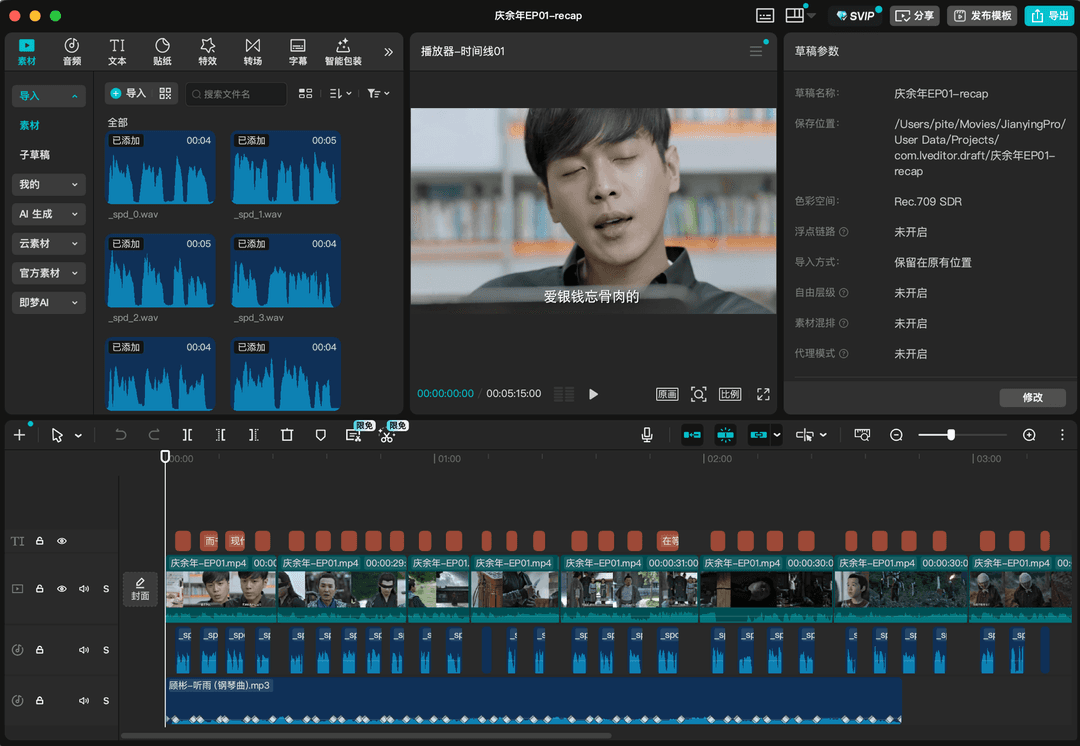
成片之外,还能一键导出剪映草稿手动精修,原片、解说、BGM、字幕:
这是什么
flowchart LR
    video(["视频"]) --> understand["① 理解<br/>场景 · ASR · VLM"]
    research["背景调研 · 可选"] -.-> understand
    understand --> script["② 写稿<br/>Agent"] --> voiceover["③ 配音<br/>MiMo TTS"] --> assemble["④ 组装<br/>混音 · 字幕"] --> output(["Recap"])
    understand -. 剪辑模式 · 先剪后配 .-> cut["剪辑<br/>先剪成片"] -.-> script
    classDef io fill:#4f86c6,stroke:#3a6298,color:#fff;
    classDef stage fill:#eef6ff,stroke:#4f86c6,color:#1f2937;
    classDef opt fill:#f3f4f6,stroke:#9ca3af,color:#475569;
    class video,output io;
    class understand,script,voiceover,assemble stage;
    class research,cut opt;
为什么用它
- 一个 key 跑全程。 ASR、VLM、TTS 全走小米 MiMo,本地除了
ffmpeg没别的依赖。 - 该查资料时先查。 片名/剧情明确或 brief 提示素材偏薄时,把人物关系、剧情背景存进
background_research.json,VLM 才更容易认出谁是谁。 - 解说成块,原声也成块。 解说一段段连着讲、整块一次配音,段间留白把精彩原声整段放回满音量——大致七三开。
- 先剪后配,画面对齐。
--edit-mode cut先把长视频剪成成片,再对着成片写解说,时间轴天然对齐。 - 多视频也能剪,分析可复用。 一次传多个视频,按
source_id选段剪成一个成片;每个视频的分析沉淀为文件系统素材库,下次grep复用、不重算。 - 能接着在剪映里改。 可选导出 schema-driven 的多轨剪映草稿,原片、解说、BGM、字幕各占一轨;ffmpeg 仍是最终成片的判定标准。
安装
① 装插件——在 claude code 里添加本仓库为插件市场并安装:
/plugin marketplace add worldwonderer/video-recap-skills
/plugin install video-recap-skills@video-recap
也可以跳过命令,直接对 Claude Code 说:
安装这个插件:https://github.com/worldwonderer/video-recap-skills
② 装 ffmpeg(不用 pip install:纯标准库 + PATH 上的 ffmpeg,Python 3.10+):
brew install ffmpeg                        # macOS
sudo apt install ffmpeg                     # Debian/Ubuntu
choco install ffmpeg                        # Windows(或 scoop / winget install ffmpeg)
字幕默认烧进画面,需要带 libass(subtitles 滤镜) 的 ffmpeg——上面这些包基本都自带。如果你的 ffmpeg 没编 libass,开跑前会立刻报错并提示(也可以加 --no-burn-subtitles 输出未遮黑条的 MP4 + .srt 外挂字幕)。用 python3 skills/video-recap/scripts/recap.py --doctor 自检。
③ 配 MiMo API Key(一个 key 同时驱动 ASR / VLM / TTS;先在 platform.xiaomimimo.com 注册获取):
export MIMO_API_KEY=your-mimo-key
# tp-* 的 Token-Plan key 会自动连集群,可选 cn | sgp | ams:
export MIMO_TOKEN_PLAN_CLUSTER=cn
按量付费的 sk-* key 默认走 https://api.xiaomimimo.com/v1。其它都有默认值;想分别配 key/URL 或改模型、音色、响度、字幕等,可见
配置手册。
在其他 Agent 工具里用(opencode / Codex / OpenClaw)
引擎是纯 Python + ffmpeg + 一个 MiMo key,与具体 Agent 无关,所以也能在别的 Agent CLI 里跑。先备齐共同前置:PATH 上有 ffmpeg、设好 MIMO_API_KEY、Python 3.10+(同上)。
-
Codex CLI(已验证)——直接读本仓库的
.claude-plugin/marketplace.json:codex plugin marketplace add worldwonderer/video-recap-skills codex plugin add video-recap-skills@video-recap(仓库 push 后可用
owner/repo形式;本地可用codex plugin marketplace add ./video-recap-skills。) -
OpenClaw(已验证)——直接导入 Claude 插件包。克隆本仓库后,把参数指向克隆出的目录运行:
openclaw plugins install ./video-recap-skills6 个 skill 会成为原生、可自动触发的技能(
openclaw skills list可见)。 -
opencode(按其文档,未在本机实测)——opencode 自动发现
.claude/skills/.agents/skills/.opencode/skills下的 skill。克隆本仓库后,把skills/暴露到其中之一即可:mkdir -p .claude && ln -s ../skills .claude/skills # macOS / Linux # Windows:先建 .claude\skills 目录,再把 skills\* 复制进去
各 Agent 跑脚本的工作目录不一定是 skill 目录;每个
SKILL.md顶部的「Running the scripts」说明了如何用绝对路径调起(脚本用__file__自定位)。 别重复注册:同一套 skill 经多条发现路径(仓库skills/、~/.agents/skills拷贝、各 Agent 的安装缓存)同时注册,会命名冲突或重复自动触发——只启用一条。
怎么用
把视频丢给它,顺手给点视频背景:
给 /path/to/video.mp4 做个解说。这是《庆余年》第一集,主角是范闲。
它会分析视频、照背景写解说,产出带字幕的 recap_<名>.mp4。
把 /path/to/long.mp4 剪成十分钟左右的解说短片,字幕压进画面。
背后是编排器把几个阶段串起来跑,中间停下来让 Agent 写解说(剪辑模式会停两次:先写 clip_plan.json 挑片段,剪成成片后再对着成片写 narration.json)。第一次跑前可先自检环境:
多视频剪辑 MVP 只支持剪辑模式:
python3 skills/video-recap/scripts/recap.py ep1.mp4 ep2.mp4 --edit-mode cut --target-duration 10m --work-dir work_dir_multi_story
它会在 work_dir_multi_story/sources/<source_id>/ 分别沉淀每个源视频的理解产物,在项目级 multi_source_manifest.json 里记录 source_id → source_path,并要求 clip_plan.json 的每个片段写明 source_id。
可选素材库也是纯文件系统,方便以后 grep 复用已分析素材:
python3 skills/video-recap/scripts/recap.py ep1.mp4 --edit-mode cut \
  --material-library-dir .video-materials --save-materials

grep -R "范闲" .video-materials

python3 skills/video-recap/scripts/recap.py ep1.mp4 ep2.mp4 --edit-mode cut \
  --material-library-dir .video-materials --use-materials
素材库只保存 JSON/MD 小文件和追加式 materials_index.jsonl,不复制原始媒体、不建数据库、不做 embedding/语义搜索。
python3 skills/video-recap/scripts/recap.py --doctor
英语视频→中文配音 · 保留原音色
把英文视频翻译成中文,并用原说话人的音色配音(克隆,而非固定音色),画面不变。这与「解说」不同:解说在原声上叠加中文评述,配音则把原始台词替换成忠实翻译的中文。和解说一样用自然语言触发:
把 /path/to/english.mp4 翻译成中文配音,保留原说话人的声音。
它先做英文识别、按句切分、取一段参考音,然后停下来让 Agent 逐句写中文译稿;继续运行即用 mimo-v2.5-tts-voiceclone 克隆原音色逐句配音,按原句时间轴贴合(只在会超出下一句时才压速,绝不整体提速,避免人声比画面提前结束),整轨替换后输出 dub_<名>.mp4。v1:单说话人、整轨替换(暂不保留背景音乐)。
架构
| Skill | 职责 | 输入 → 输出(work_dir 契约) |
|---|---|---|
| video-understanding | 场景检测 · 抽帧 · ASR(mimo-v2.5-asr)· VLM(mimo-v2.5)· 时间轴融合 · 生成 brief(--consolidate 索引默认开) | 视频 → scenes / asr_result / vlm_analysis / silence_periods / timeline_fusion / agent_narration_brief.md |
| video-script | 写作规则(SKILL.md)+ 评审(LLM 评委)+ lint/校验 | brief + 索引 → narration.json |
| video-cut | 片段计划 → 拼剪成片(剪辑模式先剪后配,解说按成片时间轴写,无需重映射) | clip_plan.json + 视频 → edited_source.mp4 |
| video-voiceover | 合成解说音频(MiMo TTS,mimo-v2.5-tts) | narration.json → tts_segments/ + tts_meta.json |
| video-assemble | 混音 · 压低原声 · 渲染字幕 · 多轨时间线(可选导出剪映) | 视频 + tts_meta → recap_<名>.mp4 + subtitles.srt/.ass + timeline.json |
| video-recap | 编排器 + --doctor | 视频 → recap_<名>.mp4 |
输出
recap_<名>.mp4:成片(固定输出名,每次运行原地覆盖)。subtitles.srt(默认烧录字幕,同时产出subtitles.ass;--no-burn-subtitles关闭)work_dir/narration.json:解说脚本(narration_lint.json时间诊断、narration_review.md评审意见)work_dir/agent_narration_brief.md:给 Agent 的时间和场景 briefwork_dir/vlm_analysis.json·asr_result.json·silence_periods.json·timeline_fusion.json:理解产物work_dir/clip_plan.json·edited_source.mp4·recap_phase.json:剪辑模式产物(解说在成片时间轴上写,recap_phase.json记录剪/配进度供断点续跑)work_dir/multi_source_manifest.json·work_dir/sources/<source_id>/:多视频 cut 的来源清单与每个源视频的理解产物<material-library-dir>/materials/<material_id>/material.json|material.md·materials_index.jsonl:可选素材库,方便grep -R查找/复用已分析素材work_dir/timeline.json·work_dir/assembly_manifest.json·tts_segments/·tts_meta.json:多轨时间线、渲染记录与 TTS 音频
自带原声字幕(可选,更准)
解说块之间的原声留白会把【原声台词】烧成字幕(用 「」 和解说区分开)。默认这份字幕由 Agent 校对、ASR 兜底——但 ASR 时间偏粗,偶尔会和原声对不上。想要更准,直接放一份字幕文件到 work_dir,它会作为首选来源:
work_dir/user_subtitles.json:[{"start": 秒, "end": 秒, "text": "台词"}],按成片时间轴直接使用;或包一层{"timeline": "source", "lines": [...]}用原片时间轴,系统按剪辑计划自动映射到成片。work_dir/user_subtitles.srt/.ass:默认按原片时间轴解析并映射到成片。
优先级:你的字幕文件 › Agent 校对的 original_subtitles.json › ASR 兜底。来源准确时按句精确落到对应留白,不再用粗略的估时。
参考文档
- 各 skill 的契约:每个
skills/<skill>/SKILL.md(写作规则在 video-script 的 SKILL.md 里) - 数据结构 · 配置手册 · 多轨时间线 / 剪映导出
- 背景调研指南 · VLM prompt 模板
致谢
- linux.do
- 剪映草稿导出参考了 pyJianYingDraft、capcut-mate(均 Apache-2.0)的草稿结构。
- 剪映导出的 schema / builder / writer 分层参考了 duoec/duo-video 的设计思路。
许可
MIT,见 LICENSE。
Plug-fork by PiteChen
本仓库是 worldwonderer/video-recap-skills 的功能扩展 fork。原作者归属与协议不变(上游 LICENSE 与致谢段已完整保留),下面只列出在本 fork 上新增的内容;使用方式、目录结构、命令、API 与上游完全一致,所有改动通过环境变量或新增参数启用,且都有对应默认值。
本 fork 新增的功能
- 字幕位置贴合原视频字幕行 —— 新增
--subtitle-y-top/--subtitle-y-bot与SUBTITLE_Y_TOP/SUBTITLE_Y_BOT,把新字幕严格落在原视频字幕的同一 Y 坐标;默认仍贴底,不传则行为与上游一致。 - 声纹克隆配音 ——
video-voiceover新增--voice-ref(含recap.py透传),切到 MiMomimo-v2.5-tts-voiceclone克隆参考音频音色;不传则行为与上游一致。 - 半透明字幕遮罩 —— 新增
SUBTITLE_MASK_OPACITY(默认 0.6);上游为全黑,本 fork 默认半透,遮罩下层画面可见。 - 遮罩仅在 narration 时段启用 —— 用 ffmpeg
drawbox enable='between(t,s,e)'让遮罩只在解说时段显示,留白时段画面纯净、原字幕自然显示。 - 音频方案 B:配音时静音原声 ——
SPEECH_DUCKING_VOLUME=0.0/ZONE_DUCKING_VOLUME=0.0(上游分别为 0.2 / 0.12),适合 voice clone 等不希望克隆声与原声叠加的场景。 - 字幕测量工具 —— 新增
tools/measure_subtitle.py:随机抽帧 + 启发式检测 + 网格标注 + 交互式确认,用来读取原视频字幕带的精确 Y 像素范围。 - demo 截图 —— 新增
demo/字幕演示1.png、demo/字幕演示2.png展示贴源字幕 + voice clone 配音效果;B 站成片示例见 BV1LrTd6ME31。 - GitHub 工程规范 —— 新增
.gitattributes规范行尾(LF / CRLF),README.md/README.en.md末尾追加本说明段,原文内容未做任何修改。
怎么用(本 fork 新增能力)
和上游一样,把视频丢给 Agent 顺手给点上下文就行。下面是本 fork 新增能力的自然语言触发方式;想完整掌握上游用法,请看 上游用法段。
① 字幕压到原视频字幕行 + 半透明遮罩
你不用关心坐标,Agent 会自动调
tools/measure_subtitle.py(默认抽 50 帧、画网格、读图确认),把原视频字幕带的 Y 像素范围自动测出来。你只要告诉 Agent"字幕和原视频字幕位置一致"就行:
给 /path/to/video.mp4 做个 3 分钟解说。这是闪婚题材短剧。
字幕和原视频字幕位置一致,半透明遮罩,原声在留白时段满音量放出来。
Agent 看到"字幕和原视频字幕位置一致"会自动跑
tools/measure_subtitle.py拿到坐标、加--subtitle-y-top/bot;看到"半透明遮罩 / 原声在留白时段满音量"会自动用本 fork 的默认环境变量。不传任何 fork 新参数,行为与上游完全一致。
② 用参考音色克隆配音
用 /path/to/voice-ref.wav 的音色给 /path/to/video.mp4 配音,做 3 分钟解说。Agent 看到参考音频会自动加
--voice-ref /path/to/voice-ref.wav并切到mimo-v2.5-tts-voiceclone。
③ 全套都开:字幕贴源 + 半透明 + 时段遮罩 + 静音原声 + voice clone
用 /path/to/voice-ref.wav 的音色给 /path/to/video.mp4 配音,3 分钟解说。
字幕和原视频字幕位置一致,半透明遮罩。
配音时把原声压到静音,留白时段原声满音量放出来。剪辑模式先剪后配。
Agent 会自动调
tools/measure_subtitle.py测坐标、加--voice-ref、用上全部 fork 默认值。
④ 只想要解说、不用任何 fork 新功能 —— 不需要多说任何话,按 上游用法段 触发即可,行为与 worldwonderer/video-recap-skills v0.3.3 一致。
安装
直接对 Claude Code 说:
安装这个插件:https://github.com/ops120/video-recap-skills-plus
// faq
What is video-recap-skills-plus?
Clip any video into a narration recap with claude code skill|用claude code skill把任何视频剪辑成中文解说视频,支持剪映导出. It is open-source on GitHub.
Is video-recap-skills-plus free to use?
video-recap-skills-plus is open-source under the MIT license, so it is free to use.
What category does video-recap-skills-plus belong to?
video-recap-skills-plus is listed under plugins in the Claudeers registry of Claude-compatible tools.
// embed badge

[](https://claudeers.com/video-recap-skills-plus)
// retro hit counter

[](https://claudeers.com/video-recap-skills-plus)
// reviews
// guestbook
// related in Claude Plugins
 🔓
🔓A single CLAUDE.md file to improve Claude Code behavior, derived from Andrej Karpathy's observations on LLM coding pitfalls.
 🔓
🔓Claude Code is an agentic coding tool that lives in your terminal, understands your codebase, and helps you code faster by executing routine tasks, explainin…
 🔓
🔓"CLI-Anything: Making ALL Software Agent-Native" -- CLI-Hub: https://clianything.cc/
🔓financial-services — a Claude ecosystem project on GitHub.