
Vesalius
A map of your codebase for Claude Code: an on-device code graph with an MCP server, a CLI, a Mac app and a VS Code extension.
Install with your AI
Paste into Claude Code, Cursor, or any agent — it reads the repo and wires the tool into your project.
Install and set up Vesalius (release-binary project) into my current project.
Found on https://claudeers.com/vesalius
Repo: https://github.com/haplollc/Vesalius
Homepage/docs: —
Detected install method: release-binary → inspect the README
Category: mcp-servers. Platforms: cli, api, mobile.
Read the repo's README for exact setup and env vars, then install it and wire it into my project.

Claudeers Health Verdict:
active; community-verified: false. Confirm the source before running anything.
Grab the latest release asset from GitHub.
# download a build from https://github.com/haplollc/Vesalius/releases
git clone https://github.com/haplollc/Vesalius
// compatibility
| Platforms | cli, api, mobile |
|---|---|
| Operating systems | — |
| AI compatibility | claude |
| License | — |
| Pricing | open-source |
| Language | Swift |

Quick start · The five tools · Is Claude using it? · Benchmark · How it compares · Mac app · FAQ
When you ask an AI coding assistant about your project, something like "what breaks if I change this?", it works the way a new teammate would on their first day: search for a name, open a file, search again, open another file, and slowly piece the answer together. Every one of those steps costs time and tokens, and on a real codebase they add up fast. Vesalius gives your assistant a map instead. It reads your repository once, right on your Mac, and remembers how everything connects: which file uses which, who calls what, where a feature actually lives. Then Claude Code can ask it directly and get answers with exact file and line references, usually in one call instead of a chain of searches. In our benchmark that cut the tokens Claude Code spent answering real questions about real codebases roughly in half, and a blind AI judge scored the answers about the same. A map is useful to people too, so Vesalius also comes as a Mac app and a VS Code extension for exploring code yourself. Vesalius itself never uploads your code.

Quick start
brew install haplollc/tap/vesalius
vesalius setup
That's it. Open Claude Code in any project and ask the way you normally would. It picks the right tool on its own:
Who calls
SessionStore.save, and what would I have to update if I renamed it?
Where are in-app purchases handled?
Are there any circular imports under src/?
What's in PaymentService.swift?
Most answers come back in one call, with file:line evidence. Claude still opens or greps files when it wants to check something, just far less: in our benchmark, 2.65 search, read and shell calls per question instead of 7.2.
Here is setup in Vesalius's own repository:
$ vesalius setup
Setting up Vesalius 2.1.0 (/opt/homebrew/bin/vesalius)

  ✓ Claude Code: registered for every project
      claude mcp add --scope user vesalius -- /opt/homebrew/bin/vesalius mcp
  ✓ Claude Code: now runs Vesalius's read-only tools without asking
      mcp__vesalius__* in permissions.allow, ~/.claude/settings.json
  ✓ Claude Code: connected
  – Codex: not installed
  ✓ Indexed Vesalius: 256 files in 3.6 s

Next: start Claude Code in a project (in a session that's already open, run /mcp), then ask, for example:
  Who uses Theme, and what would I have to change to rename it?

  vesalius doctor          checks the connection any time
  vesalius stats           shows what Claude asked Vesalius
  vesalius setup --undo    reverses all of this
What setup changes, and nothing else:
- It registers
vesalius mcpwith Claude Code for every project (claude mcp add --scope user), and with Codex when thecodexcommand is installed. - It adds
mcp__vesalius__*topermissions.allowin~/.claude/settings.json, so Claude Code runs the five read-only tools without asking. The rest of that file stays as it was, and--no-permissionsskips this step. - It indexes the repository you're in, so the first answer doesn't wait.
It never writes to your repository, your CLAUDE.md or your hooks. --dry-run shows the plan first, and
vesalius setup --undo reverses it.
You need a Mac with Apple silicon on macOS 15 or later, and Claude Code or another MCP client.
Build from source (Xcode 26)
git clone https://github.com/haplollc/Vesalius.git
cd Vesalius
scripts/install-cli.sh        # builds a release binary and installs it to ~/.local/bin
vesalius setup
The first build downloads SwiftSyntax and ArgumentParser (about 47 MB) and compiles SwiftSyntax in release mode, so it
takes several minutes: about 6 on an M2 in our runs, more on a busy machine. If ~/.local/bin is not on your PATH,
the script prints the line to add to your shell profile. To install somewhere else, pass a folder:
scripts/install-cli.sh ~/bin.
Register it by hand, or with another client (team-shared, a pinned repository, Codex, Cursor)
# What setup runs for Claude Code
claude mcp add --scope user vesalius -- vesalius mcp

# Share it with your team through .mcp.json instead. Each person approves it once when they next start Claude Code;
# until then `claude mcp list` shows "⏸ Pending approval".
claude mcp add --scope project vesalius -- vesalius mcp

# Always serve one repository, wherever Claude Code is started
claude mcp add --scope user vesalius -- vesalius mcp --repo ~/code/your-app

# Load every Vesalius tool on demand instead of two up front (see VESALIUS_MCP_PROFILE under Configuration)
claude mcp add --scope user vesalius -e VESALIUS_MCP_PROFILE=lean -- vesalius mcp
A new registration in the same scope needs the old one removed first: claude mcp remove --scope user vesalius.
Codex reads ~/.codex/config.toml (setup uses codex mcp add when that command is installed):
[mcp_servers.vesalius]
command = "vesalius"
args = ["mcp"]
Cursor reads ~/.cursor/mcp.json:
{ "mcpServers": { "vesalius": { "type": "stdio", "command": "vesalius", "args": ["mcp", "--repo", "/path/to/repo"] } } }
Any other MCP client that speaks stdio can run vesalius mcp --repo /path/to/repo; leave out --repo only if the
client starts servers in your project folder. If a client can't find vesalius, give its full path,
/opt/homebrew/bin/vesalius. The Mac app's Settings › Agents can also register Vesalius with Claude Code and Codex.
Where it helps
- Before a risky change. "What breaks if I rename this?" lists the callers, including type-inferred uses a text search would miss, the files to edit and the tests to run, with a check on how complete that list is.
- In a codebase you didn't write, or wrote a year ago. See its shape, its health, its hotspots and where to start, before reading a single file.
- When an agent does the digging. Claude Code asks Vesalius first and greps far less, so it spends fewer tokens and fewer turns getting to an answer of about the same quality.
- When you want the code to stay healthy. A health score with every deduction explained, dependency cycles, oversized files, possibly unused code, each with its evidence.
The five tools Claude gets
| Tool | Ask it… | What comes back |
|---|---|---|
usages | who calls X? what uses this file? what breaks if I rename X? | Its uses as file:line + code, grouped by the function they sit in, including uses only type inference can see, minus same-name lookalikes, plus a completeness check. With change: rename | signature | remove: the edit list and the tests to run. |
feature_map | where are purchases handled? how is data persisted? | The core types and functions grouped by role, with their decisive lines, framework and I/O calls, config and environment links, and call sites: a map that points straight at the right files and lines. |
outline | what's in this file, type or function? | Declarations with signatures and line ranges, first doc sentences and calls in order, at about a fifth of the tokens of reading the file. |
architecture | how is this project put together? | Targets and their product types, packages, folders, dependency direction, cycles and cross-target links, from the project files plus the code graph. |
dependency_cycles | do we have circular imports? | Every cycle in scope with each edge's import line and where the imported names are used, plus what was scanned, so "no other cycles" needs no re-check. |
usages and feature_map are loaded up front, which adds about 900 tokens to Claude Code's context in every session
where Vesalius is registered (cached after the first request, and already counted in the benchmark totals). The
other three wait behind Claude Code's tool search until they are needed. Every tool is read-only.
This is exactly what Claude sees, because the command line prints the same text as the MCP tool:
$ vesalius usages RepositoryEngine.ensureFresh
@discardableResult public func RepositoryEngine.ensureFresh(options:progress:) async throw…  VesaliusKit/Sources/QueryEngine/RepositoryEngine.swift:201-210 · method · target QueryEngine
3 callers in 3 files (VesaliusCommands 2 · VesaliusMCP 1) · complete: "ensureFresh" occurs 10×: 3 resolved to the target, 1 declaration, 2 strings (DebugCommands.swift:21,76), 4 non-source (README.md); 0 unresolved
RepositoryEngine (owner type) is used by 59 other files
VesaliusKit/Sources/VesaliusCommands/SetupCommand.swift
  func Setup.run() :39-215  type doc: "vesalius setup: one command from installed to answering Claude Code's questions, and --undo to reve…"
    186 │ let summary = try await engine.ensureFresh { progress.update($0) }
VesaliusKit/Sources/VesaliusCommands/VesaliusCommand.swift
  func GlobalOptions.engine() :75-86  "Opens the engine and brings the index up to date unless --no-refresh."
    82 │ if let summary = try await engine.ensureFresh(progress: { printer.update($0) })
    called by: runTool(_:_:full:) :100 · Watch.run() :270 · DebugCompleteness.run() DebugCommands.swift:31 · +22
VesaliusKit/Sources/VesaliusMCP/IndexCoordinator.swift
  private func IndexCoordinator.start(engine:force:) :88-105  "Starts a refresh off the actor (indexing must not hold up other calls' cache checks) and waits for…"
    96 │ let summary = force ? try await engine.index(options: options) : try await engine.ensureFresh…ptions: options)
    called by: prepare() :49 · reindexNow() :65
Is Claude using it?
The most common complaint about tools like this is that the agent never calls them. So Vesalius keeps a local tally:
vesalius stats shows what Claude asked in the repository you're in. When the answer is "nothing", vesalius doctor
starts the server the way Claude Code would and checks every link from the command to the index. Here are the stats
after four questions to Claude Code, one of which didn't call Vesalius:
$ vesalius stats
Vesalius usage · Vesalius · last 30 days

  tool          calls   tokens   per answer   typical time
  feature_map       1      590          590         249 ms
  outline           1      318          318          45 ms
  usages            1     1.0k         1.0k         147 ms
  total             3     1.9k          644         147 ms

  Last call just now; all over MCP.
  Completeness checks passed: 2 of 2.
  Tokens are what Vesalius sent, estimated at 4 characters each, not what it saved; docs/benchmark
  measures the savings. Typical time is the median.
  Other repositories: vesalius stats --all
The tally sits next to the indexes. For each call it records the repository path, the tool, the answer's size and time,
and whether its completeness check passed. It never records your questions, symbols or code. Set
VESALIUS_STATS=off to stop it, or run vesalius stats --reset to clear it.
Use it yourself
Everything Claude can ask, you can ask from a terminal. Add --json for scripts and --repo <path> to point at
another repository; every query refreshes the index first unless you pass --no-refresh.
| Command | What it answers |
|---|---|
vesalius usages <target> | who calls, uses, imports or depends on a symbol, file, folder or module |
vesalius feature-map "<question>" | where and how a feature is implemented |
vesalius outline <target> | what a file, type, folder or function contains |
vesalius architecture --v2 | the project's targets, packages and layers |
vesalius dependency-cycles | circular imports, optionally --path src/ |
vesalius ask "<question>" | ranked files, symbols and line ranges for a plain-English question |
vesalius impact <file or symbol> | blast radius: dependents, call sites, tests and risk |
vesalius health · diagnostics · hotspots · unused | the health score, its findings, the riskiest files, possibly dead code |
vesalius map | the clustered dependency map, by modules, folders, files or symbols |
vesalius query "<sql>" | read-only SQL against the index (--schema shows the tables) |
vesalius watch | keep the index current while you work |
vesalius doctor · stats | check the connection to Claude Code · what Claude asked |
vesalius --help lists every command, grouped by what it's for.
Real output: a type, a function, a feature, a question
All of these ran against Vesalius's own code. Long outputs are trimmed where marked.
$ vesalius usages IndexLocation
public struct IndexLocation: Sendable, Hashable  VesaliusKit/Sources/RepositoryIndex/IndexLocation.swift:29-152 · struct · target RepositoryIndex
27 uses in 10 files (Vesalius 1 · QueryEngine 1 · RepositoryIndex 1 · VesaliusCommands 4 · VesaliusMCP 1 · test 2); +2 files use it by type flow, never naming it; 46 member uses · complete: "IndexLocation" occurs 38×: 28 resolved to the target, 1 declaration, 2 comments (OutlineRenderer.swift:6,9), 7 non-source (README.md); 0 unresolved
Vesalius/App/AppModel.swift  via 172 │ return IndexLocation.allIndexed().filter { $0.exists && !known.contains($0.path) }
  canonicalRoot(_:) 69 (AppModel.handle)
[… 18 lines trimmed …]
Vesalius/Views/Settings/SettingsView.swift  via 101 │ let location = workspace.engine.location  [type-inferred via RepositorySettings.model → AppModel.workspace → Workspace.engine → RepositoryEngine.location: IndexLocation]
  directory 85 (RepositorySettings.body) · databaseURL 90 (RepositorySettings.body)
  removeIndex() 105 (RepositorySettings.body)
[… 7 lines trimmed …]
The SettingsView.swift line is the kind of use grep cannot find: the file never names IndexLocation, it reaches
it through four properties.
$ vesalius outline IndexingPipeline.run
func run(progress: @escaping @Sendable (IndexProgress) -> Void) async throws -> IndexSummary  VesaliusKit/Sources/QueryEngine/IndexingPipeline.swift:64-257 · in IndexingPipeline :30-450 · target QueryEngine · used by 2 files (1 app, 1 test)
flow IndexingPipeline.run(progress:)  VesaliusKit/Sources/QueryEngine/IndexingPipeline.swift:64-257
called by: RepositoryEngine.index(options:rebuild:progress:) VesaliusKit/Sources/QueryEngine/RepositoryEngine.swift:185
  72 │ let scan = try scanner.scan(isCancelled: { Task.isCancelled })  → RepositoryScanner.scan(isCancelled:) :201-203
  82 │ let directoryIDs = try store.syncDirectories(scan.directories)  → IndexStore.syncDirectories(_:) :153-173
  83 │ try store.setMeta("vendored_directories", VesaliusJSON.string(scan.vendoredDirectories))  → IndexStore.setMeta(_:_:) :106-108
  87 │ let stored = try store.storedFileStates()  → IndexStore.storedFileStates() :129-136
  111 │ try Task.checkCancellation()
  114 │ let prepared = try await prepare(batch, stored: reparseAll ? [:] : stored…tion: detection)  → IndexingPipeline.prepare(_:stored:detection:) :278-303
[… 18 lines trimmed …]
$ vesalius feature-map "how does incremental indexing work?"
feature: incremental, indexing
core  VesaliusKit/Sources/QueryEngine/IndexingPipeline.swift  public struct IndexOptions: Sendable :11-25
call sites: IndexOptions in 6 files (app 4, test 2) · complete: every file that names IndexOptions is listed
  Vesalius/App/Workspace.swift  reindex(initial:rebuild:)  185 │ options.scan.userExclusions = Preferences.exclusions(for: engine.root.path)
  VesaliusKit/Sources/QueryEngine/RepositoryEngine.swift  206 │ if try isOutdated || staleFileCount(options: options.scan) > 0
  VesaliusKit/Sources/VesaliusCommands/VesaliusCommand.swift  run()  222 │ options.scan.userExclusions = exclude
  VesaliusKit/Sources/VesaliusMCP/IndexCoordinator.swift  26 │ private let options: IndexOptions  ·34
[… 3 lines trimmed …]
$ vesalius ask "where does the app run Claude Code or Codex?" --limit 4
Most likely in VesaliusKit/Sources/VesaliusCommands/SetupCommand.swift (Setup.run, Setup.dryRun). Related code is concentrated in VesaliusKit/Sources/VesaliusCommands/ (2 of the top results). Also relevant: Vesalius/Views/AgentSheet.swift, Vesalius/App/AgentSession.swift.

1. VesaliusKit/Sources/VesaliusCommands/SetupCommand.swift:9-259  [1.00]  defines Setup.run (method), Setup.dryRun (property), Setup (struct)
[… 9 lines trimmed …]
$ vesalius dependency-cycles
0 import cycles in the repository: scanned 207 files, 58 import edges, 0 unresolved; 31 test files excluded
Swift: 0 module import cycles among 13 modules (32 module dependencies from 255 import lines) · Swift files in one module see each other without imports; reference loops are not import cycles
no strongly connected component in scope
Each of these answered in under half a second.
Does it actually help?

We asked headless Claude Code 20 real questions about 6 codebases, once with Vesalius attached and once without, on one pinned build (2.1.307) with the same model, prompt and read-only tools. One AI judge then graded each answer blind against a key verified in the code. With Vesalius, the typical question used 51% fewer tokens (95% CI 36% to 62% fewer; the geometric mean of per-question ratios, while plain means fell 44%, from 204k to 113k), took 43% fewer turns and finished 41% sooner. Answer quality showed no measurable change overall (−0.5 points on a 0–100 scale, 95% CI −1.6 to +0.8, with both setups near 97–98), though answers about where a feature lives scored 2.1 points lower (95% CI −4.2 to −0.4). Eight questions were held out: written after Vesalius 2 was designed, on two codebases whose questions and keys were never used to build it. On those it saved 44% (95% CI 12% to 65% fewer). The other twelve are the ones it was built against.
Tokens are everything Claude Code reported for a question: input, output, cache reads and cache writes over every
turn, subagents included, not the size of tool output. The runs without Vesalius had no Vesalius server or tools, and
their shell allowlist didn't include vesalius; none of their 20 transcripts ran it.
The first version taught us the most. Claude Code keeps MCP tools out of sight until it searches for them, and it almost never searched: round 1 used Vesalius in 2 of 24 runs, so that round's small token gap was mostly run-to-run noise. Vesalius 2 answers each kind of question with one sharper tool and loads the two most-asked ones up front. Claude used it in all 20 runs.
By kind of question, and where it did not win
| Kind of question | Questions | Tokens vs Claude Code alone | Quality (points) |
|---|---|---|---|
| Who depends on this file | 5 | −71% | +1.6 |
| Import cycles | 1 | −74% | +2.2 |
| Who calls this | 2 | −56% | −0.2 |
| What a change affects | 3 | −42% | −1.0 |
| Where a feature lives | 5 | −38% | −2.1 |
| Architecture | 2 | −33% | −1.2 |
| Where a symbol is used | 2 | −8% | −1.7 |
Vesalius used more tokens on 4 of the 20 questions (+2% to +19%). Quality moved by a point or more on 11 of them:
3 better and 8 worse. With one run and one judge per answer, single questions are noisy, which is why the intervals
above bootstrap over questions. The harness, the questions, the analysis and the full report are in
docs/benchmark, so you can run the same comparison on your own code. An exact rerun
needs more than this repository: three of the six codebases are our own private apps, and the answer keys and run
transcripts stay private so they cannot leak into future tool designs or training data. The judge's instructions are
published in grading_prompt.md.
Read the full benchmark write-up: the setup, the six codebases, all 20 questions with their numbers, exactly how answers were graded, and how to run it on your own code.
How it compares
Vesalius borrows ideas from a few excellent projects, and it isn't the right tool for everyone. Here is how it differs from the closest ones, as of October 2026:
| Vesalius | CodeGraph | graphify | context-mode | |
|---|---|---|---|---|
| What the agent gets | answers: uses grouped by function, rename edit lists with the tests to run, feature maps, outlines | one explore tool that returns source, call paths and blast radius | graph queries (query, path, explain) over code, docs and media | a sandbox and search for tool output, plus session memory after compaction |
| Call graph | Swift (resolved by type, via SwiftSyntax), TypeScript, JavaScript and Python; 13 more languages without calls | 30+ languages (tree-sitter) | about 40 languages (tree-sitter) | none: it indexes output, not code |
| Runs on | macOS 15+, Apple silicon | macOS, Linux, Windows | macOS, Linux, Windows | macOS, Linux, Windows |
| Leaves in your repository | nothing | a .codegraph/ folder | a graphify-out/ folder | nothing |
| Setup adds | an MCP entry and one permission rule | an MCP entry, a permission rule, a prompt hook and a CLAUDE.md block | a skill and a CLAUDE.md block; hooks in always-on mode | hooks on most tools, and skills |
| Network | none | anonymous telemetry (on by default) and an update check | an optional LLM pass over docs and media | an update check |
If you work on Linux or Windows, or mostly in languages Vesalius reads only lexically, CodeGraph or graphify will serve you better. context-mode and rtk shrink the output of commands and logs, which Vesalius doesn't touch, so either pairs well with it. semble adds fast semantic code search in any language, and mrw batches an agent's reads and edits.
The Mac app
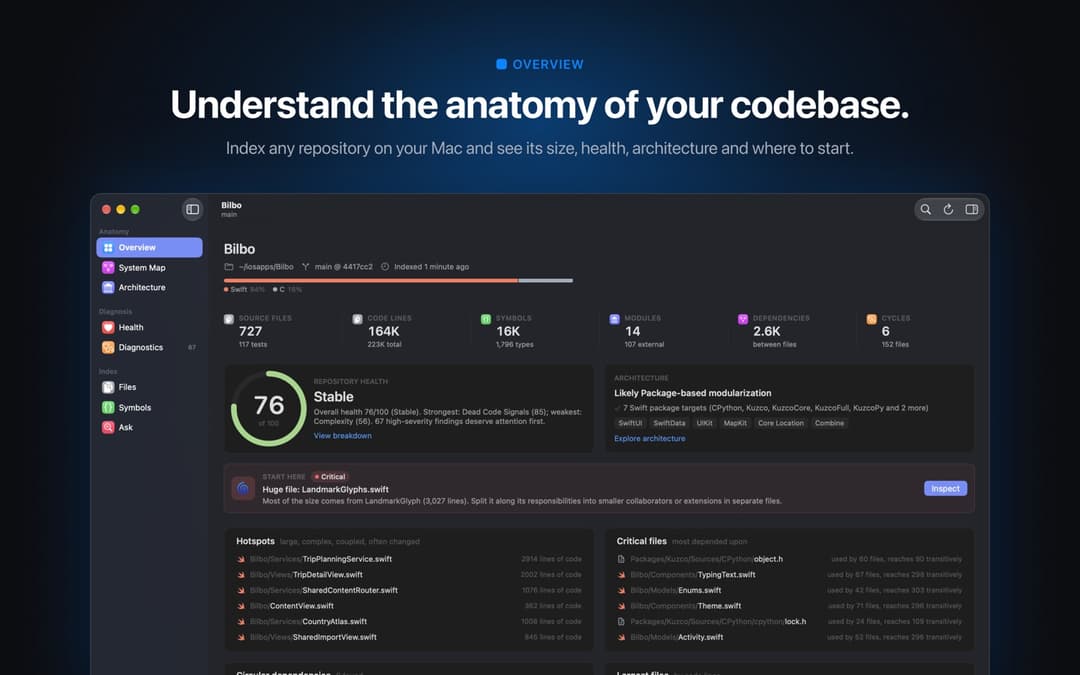 | 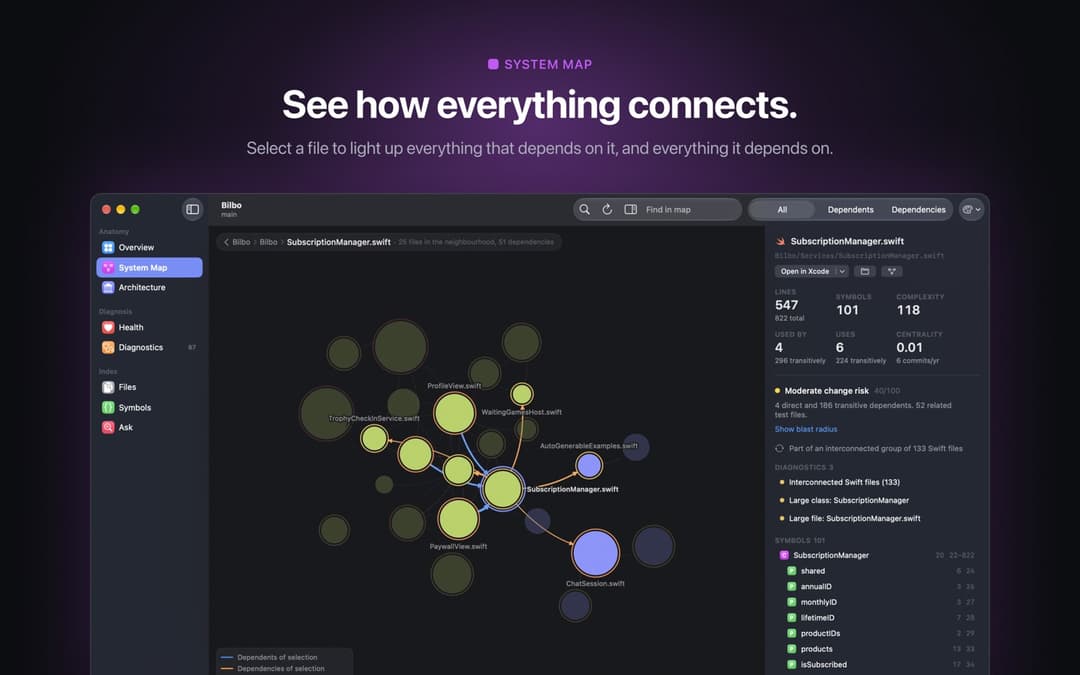 |
| Overview. Size, languages, health, architecture, a "start here" pick, hotspots and the files everything depends on. | System Map. The clustered dependency graph. Select a file to light up what it uses and what uses it; cycles are dashed. |
 | 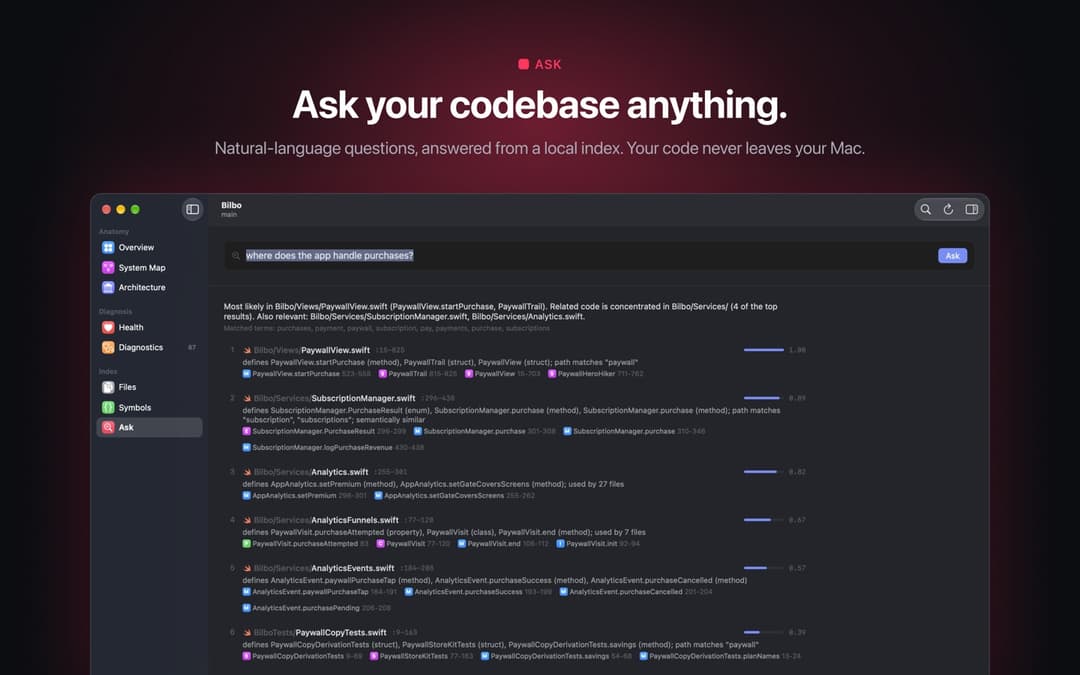 |
| Health. One score from eight categories, each deduction explained. Nothing is estimated by a language model. | Ask. Plain-English questions, answered from the index with ranked files and the symbols that matched. |
Open a repository with ⌘O or by dropping a folder on the window. After the first index the app keeps itself up to date as files change. Press ⌘K for the command palette, ⇧⌘F to ask a question, and select any file or symbol to see its blast radius in the inspector. When a finding deserves a fix, Improve with Claude Code or Codex… writes the prompt from the evidence, runs the agent in plan-only or edit mode, streams its transcript, then re-indexes and shows the health score before and after.
Build it: open Vesalius.xcodeproj in Xcode 26, choose your own team under Signing & Capabilities for both the
Vesalius and VesaliusUITests targets (the project ships with ours), and run the Vesalius scheme. Copy the built app
to /Applications if you want the app's Settings › Agents › Install for My User, which links ~/.local/bin/vesalius
to the app's own binary (replacing one from install-cli.sh) so the app and the command line share one index. Put
exclusions in a .vesaliusignore rather than the app's per-repository list, so Claude Code and the command line honour
them too.
VS Code
The extension puts the same answers next to your code:
- Health, Current File and Hotspots views in the activity bar
- findings in the Problems panel, and a CodeLens with reference counts and change risk
- Show Change Impact, Find References (Graph), Find Callers and Ask the Codebase… in the command palette
- a health score in the status bar, refreshed when you save
- on VS Code 1.101 and later, Vesalius registered as an MCP server for agent mode
Build and install it from this repository (it needs the vesalius command from the Quick start). The
code command needs VS Code's Shell Command: Install 'code' command in PATH once; otherwise install the .vsix from
the Extensions view.
cd vscode-extension
npm ci
npm run package                                 # compiles and writes vesalius-1.0.0.vsix
code --install-extension vesalius-1.0.0.vsix    # or Extensions › ⋯ › Install from VSIX… in VS Code
Privacy
- Vesalius never uploads your code. It makes no network requests and has no accounts or telemetry. The only downloads are the build's own dependencies.
- Vesalius never writes to your repository. Indexes live in
~/Library/Application Support/Vesalius/Indexes, or under$VESALIUS_HOMEif you set it. Delete a folder there, or use Settings › Repository › Delete Index… in the app. The one exception is an agent run you start from the app in Allow edits mode, which edits your working tree; choose Plan only to keep it read-only. vesalius statsreads a local tally of tool calls. For each call it records the repository path, the tool, and the answer's size and time, never questions, symbols or code. It sits next to the indexes, andVESALIUS_STATS=offstops it.- Semantic search uses Apple's on-device model (NaturalLanguage sentence embeddings). Nothing is downloaded.
- Vesalius's answers quote your code, and Claude Code sends what it reads, these answers included, to its model, exactly as it would after a grep. Agents started from the app use their own accounts the same way.
Configuration
Ignoring files. Vesalius honours .gitignore at every level, .git/info/exclude and git's default global ignore
file (~/.config/git/ignore, or $XDG_CONFIG_HOME/git/ignore; a custom core.excludesFile is not read), and skips
build output, dependencies and vendored third-party code by default. For anything else, add a .vesaliusignore
(same syntax) at the root or in any folder. This is the one to use for lasting exclusions: vesalius index --exclude
applies to that run only.
| Variable | What it does |
|---|---|
VESALIUS_HOME | Where indexes and the usage tally are stored (default ~/Library/Application Support/Vesalius) |
VESALIUS_REPO | The repository vesalius mcp serves, when you don't pass --repo |
VESALIUS_MCP_PROFILE | default (usages and feature_map up front), lean (every tool on demand) or full (adds repo_report: health, diagnostics, hotspots, unused code) |
VESALIUS_STATS | off stops the local tally behind vesalius stats |
VESALIUS_TRACE | Prints timing traces to stderr |
Which repository the server picks: --repo, then $VESALIUS_REPO (both used exactly as given), then the folder
Claude Code is working in ($CLAUDE_PROJECT_DIR), then the current directory. For those last two it serves the nearest
enclosing folder that already has an index, then the git root, then the folder itself. So starting Claude Code outside
any repository (your home folder, say) indexes that whole folder on the first question, and that index then wins for
every un-indexed project inside it; delete it from Indexes if that happens. The first line the server writes to
stderr names the repository it is serving.
Languages
| Language | How it is read | What you get |
|---|---|---|
| Swift | full syntax tree (SwiftSyntax) | declarations, calls, type uses, inheritance, property wrappers, #if branches, environment variables; references resolved by receiver type, scope and module, each with a confidence score |
| TypeScript, JavaScript (incl. JSX/TSX) | tree-sitter | declarations, ES module and CommonJS imports and exports, references, process.env reads |
| Python | tree-sitter | classes, functions, imports, __all__, references, os.environ reads |
| Objective-C, C, C++, Go, Rust, Java, Kotlin, Ruby, PHP, C#, Dart, Shell, SQL | lexical | files, imports, declarations and type references (no call graph) |
| Markdown, JSON, YAML, HTML (including Vue and Svelte components), CSS and other text | full-text search | found by ask and feature_map |
FAQ and troubleshooting
Claude Code doesn't seem to use it
Run vesalius doctor in the project. It checks the command and Claude Code's registration and connection. It also
starts the server as Claude Code would, to check that it answers, which repository it serves and how fresh that index
is. Finally it reports when the server was last called over MCP, and prints a fix for anything that's off.
vesalius stats shows what Claude asked. A project-scoped registration shows ⏸ Pending approval in
claude mcp list until you start claude in that folder and approve it, and in a session that was already open,
/mcp reconnects. If it is connected but unused, ask for it by name once ("use vesalius to find who calls X").
How do I remove it?
vesalius setup --undo removes the Claude Code and Codex registrations and, if setup added it, the
mcp__vesalius__* permission rule. Nothing else changes.
brew uninstall vesalius removes the program. Indexes and the usage tally stay in
~/Library/Application Support/Vesalius until you delete that folder.
It answered about the wrong folder
Started without --repo, the server serves the nearest enclosing folder that already has an index, then the git
root, then the folder itself, so an index on a parent folder (even your home folder) wins over a nested repository.
Pin it with vesalius mcp --repo /path, or set VESALIUS_REPO. The first line the server writes to stderr names the
repository it is serving.
error: … has not been indexed yet
You passed --no-refresh to a repository with no index. Run vesalius index, or drop --no-refresh and the query
will build the index first.
The VS Code extension can't find the command line tool
It looks at the vesalius.cliPath setting, then VESALIUS_CLI_PATH, then your PATH, ~/.local/bin,
/usr/local/bin and /opt/homebrew/bin, then a Vesalius.app in /Applications or ~/Applications. Install it with
brew install haplollc/tap/vesalius or set vesalius.cliPath. If Vesalius.app is in /Applications, Vesalius: Install Vesalius
CLI in the command palette links it for you.
How accurate is it?
Swift references are resolved from types, scope and modules rather than by the compiler, so each link carries a
confidence and only confident ones become graph edges. That is why usages ends its summary line with a completeness
check: how many textual occurrences of the name resolved to the target, how many are declarations or non-source
mentions, and which, if any, it could not resolve, so Claude knows which sites are left to check. Uses that never
spell the name (reflection, selectors, dynamic dispatch) are outside that count. Health rules are heuristics that
show their evidence; "unused" means no references were found, which can miss reflection, Interface Builder and
dynamic dispatch.
How big and how fast?
From our runs on an M2: Vesalius's own 256 files index in about 4 s into a 26 MB database, and a refresh with nothing
changed takes a fraction of a second. The six benchmark codebases took 2.7 s to 20.5 s for a first index (longer on a
busy machine), the largest with 16,000 symbols and 143,000 references. Once the index is warm, most answers take tens of milliseconds and a
feature_map about a second.
Under the hood
flowchart LR
  repo[("Your repository")] --> scan["Scan<br/>.gitignore-aware"]
  scan --> parse["Parse<br/>SwiftSyntax · tree-sitter"]
  parse --> link["Link references<br/>confidence-scored"]
  link --> db[("SQLite graph<br/>on your Mac")]
  db --> mcp["MCP server<br/>Claude Code, Codex"]
  db --> cli["vesalius CLI"]
  db --> app["Mac app"]
  db --> vsc["VS Code"]
The packages, the pipeline, storage and search
VesaliusKit (Swift package, shared by app, CLI, MCP)
├── VesaliusCore        models, result types, tokenizer, concept lexicon, JSON
├── RepositoryScanner   .gitignore engine, default + vendored-project exclusions, git metadata, module detection
├── LanguageAnalysis    Swift (SwiftSyntax), TypeScript/JavaScript + Python (tree-sitter), lexical fallback
├── RepositoryIndex     SQLite (WAL) + FTS5 schema, import resolution, reference linking
├── GraphEngine         SCCs, PageRank, depth, reachability, Louvain clustering, risk and hotspot scores
├── HealthEngine        17 rules, 8-category score, architecture inference, extraction suggestions
├── SemanticSearch      query parsing, concept expansion, on-device NLEmbedding, hybrid ranking
├── QueryEngine         RepositoryEngine facade: incremental pipeline, file watcher, every query
├── VesaliusRender      plain-text rendering and token budgets, shared by the CLI and the MCP server
├── VesaliusMCP         MCP server (JSON-RPC over stdio): five tools, profiles, lazy single-flight indexing, usage tally
├── VesaliusCommands    the `vesalius` CLI (ArgumentParser), with setup, doctor and stats; also linked into the app binary
└── VesaliusCLI         standalone `vesalius` executable
Vesalius (macOS app)     SwiftUI + AppKit: map canvas, inspector, palette, agent console
Indexing. Scan (respecting .gitignore at every level, .git/info/exclude, global excludes, .vesaliusignore,
build and vendor folders and vendored third-party projects), compare size and modification time and then content
hash, parse changed files in parallel, write per-file batches transactionally, detect modules (SwiftPM targets, Xcode
targets, npm workspaces, tsconfig paths, Python packages), resolve imports, re-link only the references affected by
changed names, rebuild edges for affected files, then graph metrics, health, vocabulary and on-device semantic
vectors. One unreadable or unparsable file never stops the run.
Storage. ~/Library/Application Support/Vesalius/Indexes/<repo>-<hash>/index.v4.sqlite, keyed by the canonical
repository path and named after the schema version, so older and newer builds keep separate files. The git root commit
is recorded, so a moved repository keeps its index.
Search. Each question becomes weighted terms: identifier splitting, stemming, a software-concept lexicon, completions from the repository's own vocabulary, and Apple's on-device word embeddings. For every concept, Vesalius takes the best of a direct or synonym match across FTS5 BM25 over files and symbols, path and type-name evidence and sentence-embedding similarity, then adjusts for coverage of the question, structural centrality and one hop of graph propagation. Structural questions go straight to the graph.
References. TypeScript, JavaScript and Python references resolve through explicit import bindings, including
barrel re-exports, namespace and default imports, relative imports and __init__ packages. Swift has no per-file
imports, so references resolve by enclosing type, receiver type, module and name uniqueness, each with a confidence;
only links at 0.5 or above become graph edges.
Development
Vesalius.xcodeproj         macOS app + UI tests (scheme: Vesalius)
Vesalius/                  app sources (SwiftUI + AppKit)
VesaliusUITests/           end-to-end UI tests
VesaliusKit/               Swift package: engine, CLI, MCP server, tests
vscode-extension/          VS Code extension
scripts/install-cli.sh     build and install the CLI
docs/benchmark/            the Claude Code benchmark: harness, questions, analysis, reports
docs/readme/               this README's images (make_images.py redraws the cards from the benchmark results; needs Chrome)
docs/brand/                the animated logo mark
.vesaliusignore            exclusions used when Vesalius analyses itself
(cd VesaliusKit && swift test)      # 323 tests, including end-to-end runs of the real binary over the CLI and MCP
xcodebuild test -project Vesalius.xcodeproj -scheme Vesalius -destination 'platform=macOS'
(cd vscode-extension && npm ci && npm test)   # a real VS Code against the CLI in VesaliusKit/.build (downloads VS Code once)
The UI tests launch the real app on a generated repository and drive it. macOS needs automation mode enabled once
for that: sudo automationmodetool enable-automationmode-without-authentication.
License and credits
Copyright © 2026 Haplo, LLC. All rights reserved, except the VS Code extension in
vscode-extension, which is MIT licensed.
Vesalius builds on tree-sitter and its TypeScript, JavaScript and Python grammars
(MIT, vendored with their licenses under VesaliusKit/Sources/CTreeSitter*, including tree-sitter's Unicode/ICU
notice), and on swift-syntax and
swift-argument-parser (Apache 2.0).
vesalius setup, doctor and stats borrow ideas from CodeGraph,
rtk, semble and
context-mode, and the way the benchmark reports its weak spots owes a lot to
mrw. The first spark was
a post from Dashbit.
It is named after Andreas Vesalius, whose De humani corporis fabrica (1543) mapped the human body from what he could actually see. This tries to do the same for code.
Made by Haplo
// faq
What is Vesalius?
A map of your codebase for Claude Code: an on-device code graph with an MCP server, a CLI, a Mac app and a VS Code extension.. It is open-source on GitHub.
Is Vesalius free to use?
Vesalius is open-source, so it is free to use.
What category does Vesalius belong to?
Vesalius is listed under mcp-servers in the Claudeers registry of Claude-compatible tools.
// embed badge

[](https://claudeers.com/vesalius)
// retro hit counter

[](https://claudeers.com/vesalius)
// reviews
// guestbook
// related in MCP Servers
 🔓
f.k.a. Awesome ChatGPT Prompts. Share, discover, and collect prompts from the community. Free and open source — self-host for your organization with complete…
 🔓
A cross-platform desktop All-in-One assistant for Claude Code, Codex, OpenCode, OpenClaw, Gemini CLI & Hermes Agent. Only official website: ccswitch.io
 🔓
🪨 why use many token when few token do trick — Claude Code skill that cuts 65% of tokens by talking like caveman
 🔓
An open-source AI agent that brings the power of Gemini directly into your terminal.