
usage-meter
macOS menu-bar meter for Claude plan limits (5-hour, weekly, per-model), history, pace and notifications. Nothing leaves your Mac: no data collected, no logi…
Install with your AI
Paste into Claude Code, Cursor, or any agent — it reads the repo and wires the tool into your project.
Install and set up usage-meter (git-clone project) into my current project.
Found on https://claudeers.com/usage-meter-2
Repo: https://github.com/Echo14091409/usage-meter
Homepage/docs: —
Detected install method: git-clone → git clone https://github.com/Echo14091409/usage-meter
Category: data. Platforms: cli, api, desktop, web, mobile.
Read the repo's README for exact setup and env vars, then install it and wire it into my project.

Claudeers Health Verdict:
unknown; community-verified: false. Confirm the source before running anything.
git clone https://github.com/Echo14091409/usage-meter
// compatibility
| Platforms | cli, api, desktop, web, mobile |
|---|---|
| Operating systems | — |
| AI compatibility | claude |
| License | NOASSERTION |
| Pricing | open-source |
| Language | Swift |
Usage Meter
macOS (12 Monterey or later, Apple silicon and Intel), plus an experimental Windows version (below). A menu-bar icon for your Claude plan limits and your Claude Code token use. (Usage meter for OpenAI etc. are under development and will appear soon)
It uses only what Claude Code itself provides on your Mac: no claude.ai cookies, no private web endpoints, no API calls of its own.
Nothing leaves your Mac
- No data is collected. There is no analytics, no telemetry, no crash reporting, no automatic update check and no sync.
- The app never goes online by itself. The one exception is the Check for updates button: only when you press it, the app downloads one public file from this repository on GitHub to read the latest version number. Nothing about you or your usage is sent. You can check with
grep -rn "URLSession\|URLRequest" App/: the only matches are inApp/Updates.swift. - It never holds a login. It does not read Claude Code's saved token or any browser cookie. It runs the
claudecommand and reads what that prints. - The only thing that talks to the internet is Claude Code itself
- Everything the app keeps (readings, history, settings) stays in
~/Library/Application Support/Usage Meteron this Mac. - Needs Claude Code installed and signed in with a Claude plan; with an API key there are no plan limits.
What it shows
| Section | Source | Notes |
|---|---|---|
| Plan limits: 5-hour and weekly % used, reset times | 1. Refresh and the automatic checks: Claude Code's own /usage command, run headless (claude -p "/usage" --output-format json). It is a local command: no message to a model, 0 tokens. 2. Claude Code's documented status line field rate_limits (docs) after each reply in a terminal session, so the numbers also move while you work | Pro, Max and Ultra plans. Numbers are dated by when they were reported and greyed out after 20 minutes. |
| Weekly, Fable only (or another model the plan limits separately): % used, reset time | The same /usage report | The row is hidden on plans without a model-specific limit. The status line does not carry this figure, so it only changes at a check. |
| Weekly limit used per day (7-day chart, whole account) | Each limit reading is saved to ~/Library/Application Support/Usage Meter/history.json; a day's bar is how much the weekly % rose that day | 1% steps. Days of the current week before the first reading are estimated (≈): the week's % at that point, split by Claude Code activity on this Mac (API price ratios). Earlier weeks show –. Use while the Mac is off lands on the next day it checks. |
| Pace (under each limit, and in History) | The window's average rate so far, carried to the reset: "on pace for 55%" or "full by Sat 14:20 at this pace" | No figure in the first tenth of a window or when the numbers are out of date. |
History… window: the limits over time (24 hours / 7 days / 30 days), an hour-of-day grid for the last 14 days with a few plain facts, Claude Code use per project folder, and the "What's contributing" part of Claude Code's /usage report | The saved readings (history.json, 60 days; 5-hour and model figures since 0.9.0), the session logs, and contributing.txt saved at each check | Everything stays on this Mac. Project shares are a rough cost weight from the logs, not the plan %. |
| Notifications (off until you turn them on) | The same readings | When a limit passes a level you pick (50, 70, 80 or 90%) and at 100%; optionally when it is on pace to run out before the reset (from 30% used), and when a limit you were warned about has reset. For the 5-hour, weekly and model limits of every account, each once per limit window. |
| Claude Code tokens: last 5 h, today, 7 days, per model | Claude Code's session logs in ~/.claude/projects | Includes cached input, so totals are large. Anthropic calls the log format internal, so this part can break after a Claude Code update. |
The gauge needle in the menu bar follows the 5-hour figure, with the % beside it while it is fresh.
How it compares with other Claude usage meters (open source and paid): docs/COMPARISON.md.
Screenshots
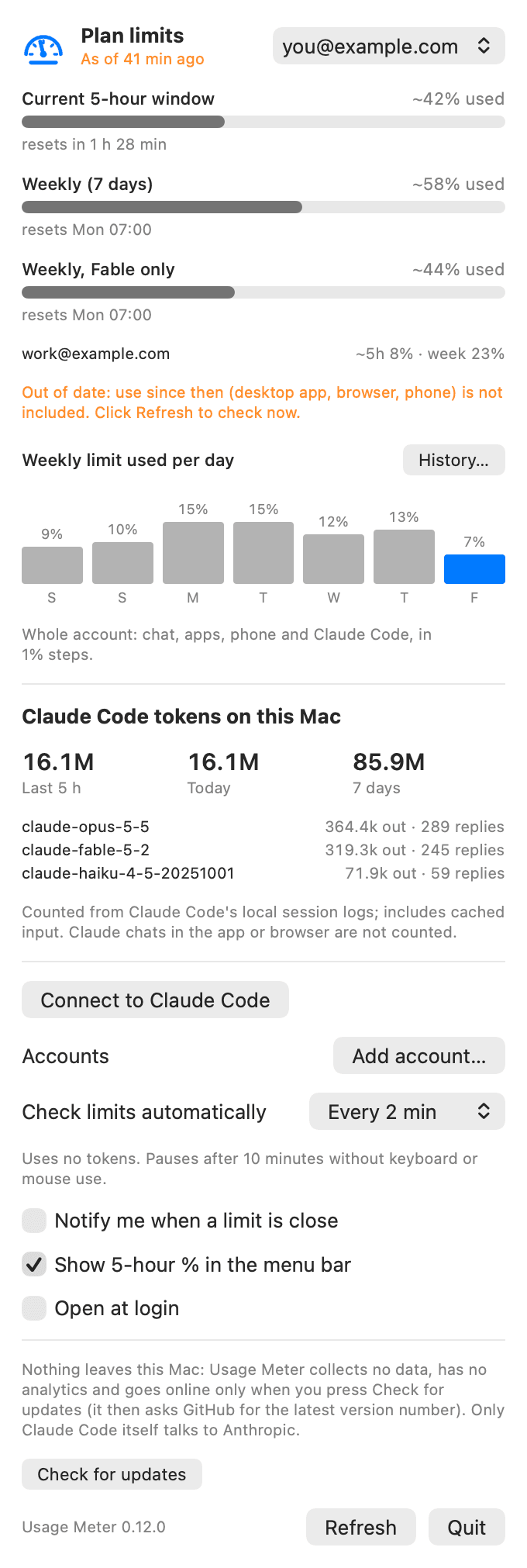 | 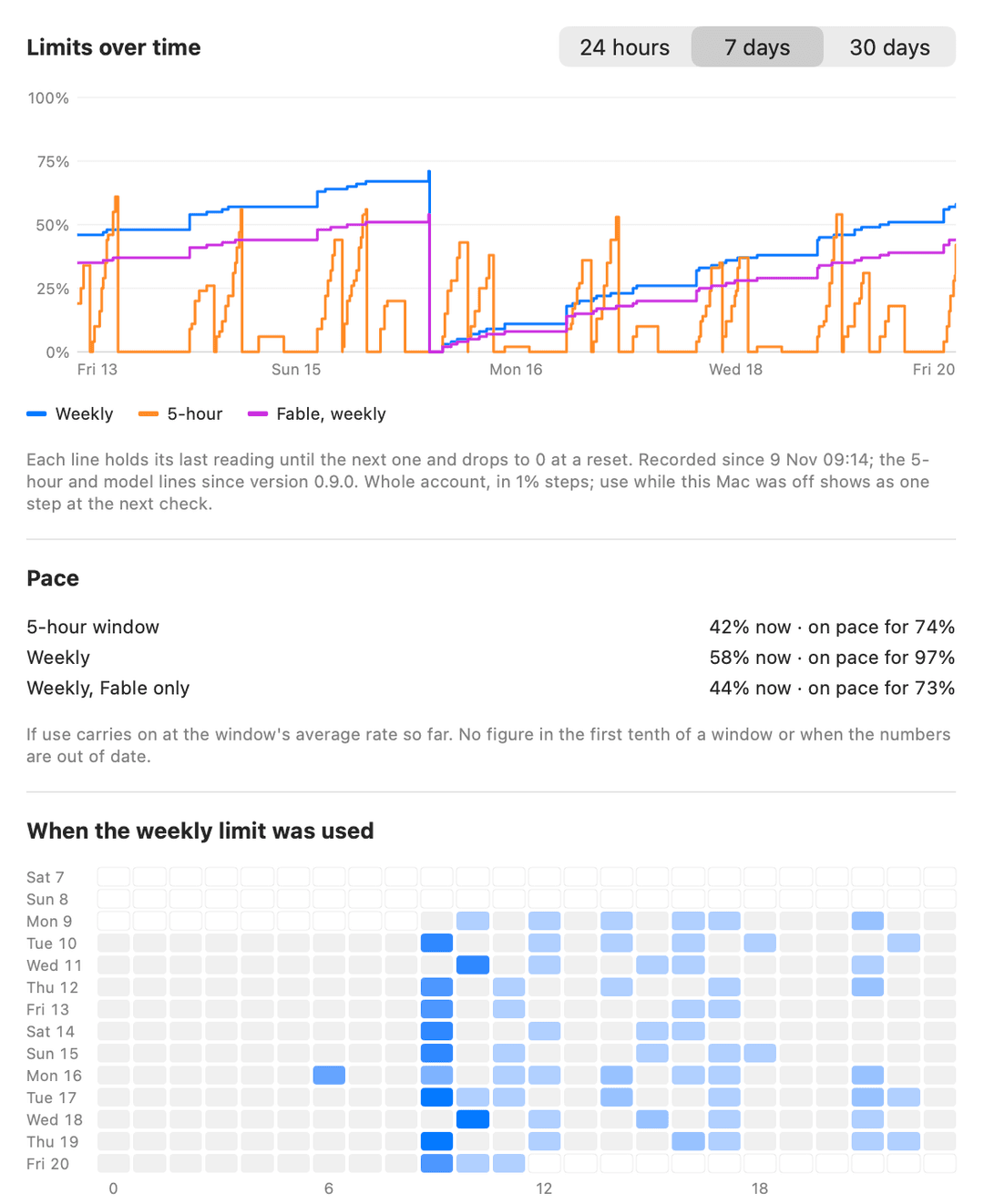 The whole History window |
Install
Needs Xcode or the Command Line Tools (xcode-select --install). No other dependencies. zsh build.sh test runs the tests.
Paste this into Terminal. It downloads this repository into a usage-meter folder, then builds and installs the app:
git clone https://github.com/Echo14091409/usage-meter.git
cd usage-meter
zsh build.sh install
The last command builds a universal app, copies it to /Applications and opens it. To update later, run git pull in that folder and zsh build.sh install again. Check for updates at the bottom of the panel tells you whether there is a newer version; it never checks by itself. Then, in the panel, click Connect to Claude Code: it adds a statusLine entry to ~/.claude/settings.json (a backup is kept as settings.json.bak-usage-meter). It will not replace a status line you already have.
Windows (experimental)
A tray version for Windows 10 and 11 lives in windows/. It asks Claude Code the same way (claude -p "/usage", no tokens) and, like the Mac app, makes no network connections and collects nothing.
Start it: download this repository (Code › Download ZIP), unzip it, and double-click windows\Usage Meter.cmd. There is nothing to install or build: it is one PowerShell script, UsageMeter.ps1, which you can read before running. Claude Code must be installed and signed in with a Claude plan.
- Tray icon with the 5-hour % in it; hover for the 5-hour, weekly and model figures.
- Click it for a panel with each limit, its reset time and its pace. Right-click for Refresh, how often to check (Off / 2 / 5 / 15 / 30 min; pauses after 10 minutes without input), notifications and their level, Start with Windows, and Quit.
- Readings are saved to
%APPDATA%\Usage Meter\history.jsonin the same format as on the Mac. - Not in it yet: the History window and charts, several accounts, live updates from the status line, token counts.
- The launcher uses
-ExecutionPolicy Bypassfor that one run only; no system setting is changed. "Start with Windows" adds a shortcut to your Startup folder and removes it when you untick it. powershell -ExecutionPolicy Bypass -File windows\UsageMeter.ps1 -Onceprints one line (5h 12% | week 33% | Fable 30%) and exits;-SelfTestruns its tests.
Why "experimental": its tests run on a real Windows machine on every change (reading the report, pace, notification rules, the history file, building the tray icon and panel, and one full check against a stand-in for Claude Code), but it has not yet been used day to day on a Windows desktop. Reports are welcome.
Several accounts
Click Add account… in the panel. Usage Meter makes a separate Claude Code login for that account inside its own data folder and opens Terminal on Claude Code's sign-in (claude auth login); you sign in in the browser as usual, and the account appears in the panel a few seconds later, named by its email. There are no folders to create and nothing to configure.
- The picker at the top chooses which account the panel, the menu bar and History show. The other accounts each get a one-line summary (
5h 12% · week 40%); click it to switch. - Every check reads all accounts. Each account keeps its own history.
- Your main Claude Code login is not touched: an added account lives in
~/Library/Application Support/Usage Meter/accounts/<id>/claude, which Claude Code uses because the app setsCLAUDE_CONFIG_DIRfor its own calls only. - Remove this one… signs that extra login out and moves its folder to the Trash.
- The status line connection (live updates while you work in a terminal) is for the main account; added accounts update at each check.
This is for accounts that are yours, for example a personal and a work plan. Check Anthropic's terms before using several subscriptions to get around one plan's limits.
Open
- Click the icon in the menu bar, or
- open Usage Meter from Spotlight (⌘ Space), Finder or Launchpad: the panel opens even if the app is already running.
- Open at login starts it quietly in the menu bar (macOS 13+).
How it works
-
Refresh and each automatic check run
claude -p "/usage" --output-format json --strict-mcp-config --setting-sources "" --no-session-persistence(no MCP servers, no settings, nothing saved; about 1.5 s) and read these lines from itsresulttext:Current session: 11% used · resets Nov 20 at 10:49am (Europe/Rome),Current week (all models): 31% used · …,Current week (Fable): 29% used · …. The text is not a documented format, so it may change./usageprints resets to the minute and sometimes a minute early (6:59am one time, 7am the next), so when an exact reset time is already known (from the status line) and is within two minutes, that one is kept. -
UsageMeter --statuslineis the status line command Claude Code runs. It reads Claude Code's JSON from stdin, saves the limits to~/Library/Application Support/Usage Meter/limits.jsonand prints a short line (Opus · 5h 42% · 7d 71%). The time of the session's last reply, from its transcript, dates the numbers, so an idle session cannot overwrite fresher ones. -
The app reads that file and the session logs every 30 seconds (only changed log files are re-read).
Other options: --check-update (the same check as the button, from Terminal), --fetch-limits (the Refresh check from Terminal, all accounts), --background (start without opening the panel), --screenshot out.png [dark], --screenshot-history out.png [dark], --set-hook on|off, --version; UM_HOME=<dir> redirects the settings and snapshot paths for testing.
Planned or suggested
- ChatGPT plan limits, next to the Claude ones
- Desktop widgets.
- Extra-usage and credit figures, where Claude Code reports them.
Uninstall
Click Disconnect in the panel, quit the app, and delete /Applications/Usage Meter.app and ~/Library/Application Support/Usage Meter.
Licence
Copyright © 2026 Echo14091409. Licensed under Creative Commons Attribution-NoDerivatives 4.0 (CC BY-ND 4.0) — see LICENSE.
- You may use it, read the source, and share unchanged copies, as long as you credit the author and link the licence.
- You may not publish or distribute a modified version.
- You can still change it for your own use on your own machine; you just cannot pass the changed version on.
The source is public so that anyone can check what the app does. This is "source available", not an open-source licence. Bug reports and suggestions are welcome as issues.
// faq
What is usage-meter?
macOS menu-bar meter for Claude plan limits (5-hour, weekly, per-model), history, pace and notifications. Nothing leaves your Mac: no data collected, no login held, never online by itself (only a manual update check); it only asks Claude Code.. It is open-source on GitHub.
Is usage-meter free to use?
usage-meter is open-source under the NOASSERTION license, so it is free to use.
What category does usage-meter belong to?
usage-meter is listed under data in the Claudeers registry of Claude-compatible tools.
// embed badge

[](https://claudeers.com/usage-meter-2)
// retro hit counter

[](https://claudeers.com/usage-meter-2)
// reviews
// guestbook
// related in Data & Analytics
 🔓
Marketing skills for Claude Code and AI agents. CRO, copywriting, SEO, analytics, and growth engineering.
 🔓
Wrap Antigravity, ChatGPT Codex, Claude Code, Grok Build as an OpenAI/Gemini/Claude/Codex compatible API service, allowing you to enjoy the free Gemini 3.1 P…
 🔓
Apache Airflow - A platform to programmatically author, schedule, and monitor workflows
 🔓
CLI tool for configuring and monitoring Claude Code