
usage-guard
Proactive 5h usage guard for Claude Code (macOS). Pause before extra wallet on long batch/subagent runs. Account-level window visibility. /usage-guard skill…
Install with your AI
Paste into Claude Code, Cursor, or any agent — it reads the repo and wires the tool into your project.
Install and set up usage-guard (release-binary project) into my current project.
Found on https://claudeers.com/usage-guard
Repo: https://github.com/shirley-xue-2025/usage-guard
Homepage/docs: https://github.com/shirley-xue-2025/usage-guard#install-macos
Detected install method: release-binary → inspect the README
Category: skills. Platforms: cli, api, desktop, web.
Read the repo's README for exact setup and env vars, then install it and wire it into my project.

Claudeers Health Verdict:
slowing; community-verified: false. Confirm the source before running anything.
Grab the latest release asset from GitHub.
# download a build from https://github.com/shirley-xue-2025/usage-guard/releases
git clone https://github.com/shirley-xue-2025/usage-guard
// compatibility
| Platforms | cli, api, desktop, web |
|---|---|
| Operating systems | — |
| AI compatibility | claude |
| License | MIT |
| Pricing | open-source |
| Language | Python |
usage-guard
Opt-in proactive usage guard for long Claude Code sessions (macOS — Desktop Code tab and CLI). Monitors the account 5-hour window (default pause at 90%) and, optionally, the weekly limit (default pause at 98%) — either can trigger a checkpoint before you hit the wall.
Arm with /usage-guard before long batch, subagent, or overnight work — especially when the shared window is already partly used. An external daemon reads your usage (zero session tokens), sets PAUSE before limits, sends macOS notifications, and you resume with /usage-guard resume after reset — without chat reminders that get queued behind subagents.
Latest: v0.2.0 — weekly limit monitoring (opt-in), extra usage wallet in status, install-path fixes.
Who is this for?
- Long Claude Code sessions that burn the 5-hour window quickly (batch jobs, subagents,
/loop, multi-session arcs) - Work that starts when usage is already high — arm gives account-level visibility, not just this chat's view
- Weekly limit nearly full while the current session still looks safe (e.g. 60% session, 97% weekly) — enable weekly monitoring in config
- Subagent / batch work where mid-session chat messages stay queued
- You want to pause near 90% (5h) or 98% (weekly) and avoid extra usage wallet charges at 100%
- macOS — Claude Desktop Code tab or Claude Code CLI
- You can arm once per session (
/usage-guard) — no per-project setup
Also used on heavy model runs (e.g. Fable when available). Same 5-hour wall either way.
Proactive vs reactive: claude-auto-retry resumes after you hit the wall. usage-guard tries to pause before it.
Why this exists
On long runs, chat messages queue while subagents work — so "stop at 90%" reminders never land in time. Hitting 100% can burn extra usage wallet. Stop buttons may not fully halt subagents. Each chat only sees its own usage; the daemon reads account-level usage (same OAuth API as Desktop Settings): the shared 5-hour window and optional weekly bar. A session that "looks" fine at 58% can already be at 94% on the 5h window — or at 97% weekly while the session meter still shows 60%. This tool uses an external control file + upfront session contract instead of mid-run chat.
How it works
/usage-guard  →  arm daemon  →  ~/.usage-guard/control.json
                                      ↑
Session (cooperative)  ←── read state at safe checkpoints only
  - before each subagent batch
  - after each unit completes
  - on /loop guard ticks
| Layer | Role | Tokens |
|---|---|---|
| Daemon | OAuth usage poll (5h + weekly + extra wallet), adaptive schedule, notifications | 0 |
| Skill | Arm, checkpoint rules, /loop timetable | Minimal reads |
Pause rule: PAUSE when either limit hits its threshold (defaults: 5h ≥ 90%, weekly ≥ 98% if enabled). Resume when both are clear. See pause_reason in control.json (five_hour, weekly, or both).
Install (macOS)
git clone https://github.com/shirley-xue-2025/usage-guard.git
cd usage-guard
chmod +x install.sh
./install.sh
export PATH="$HOME/.local/bin:$PATH"   # add to ~/.zshrc if needed
usage-guard doctor
Updating
Active development — we ship fixes frequently from real session dogfood.
cd usage-guard          # your clone
git pull
./install.sh            # refreshes skill + CLI (git pull alone is not enough)
usage-guard doctor      # checks credentials + shows update notice if available
doctor compares your installed version to the latest GitHub release (cached 24h). Set USAGE_GUARD_NO_UPDATE_CHECK=1 to skip.
One-time: enable usage reads (Desktop-only users)
OAuth tokens may not exist until Claude Code CLI login:
npm i -g @anthropic-ai/claude-code
claude login
usage-guard doctor   # expect ✓ Usage API
See docs/TROUBLESHOOTING.md. Release notes: docs/releases/.
Use
Desktop Code tab
- Open your project in the Code tab
- Run:
/usage-guard your long task description(type manually if it does not appear in the slash picker) - Approve the arm script when prompted — arm waits for the first usage poll before returning
- Let it run — watch Terminal:
usage-guard status
After reset (new session OK)
/usage-guard resume
CLI
Same /usage-guard skill after install (shared ~/.claude/skills/).
Commands
usage-guard doctor          # credentials + usage API (5h, weekly, extra wallet)
usage-guard arm             # start daemon + session
usage-guard status          # state, %, weekly, checkpoint, pause_reason
usage-guard disarm          # stop daemon
usage-guard poll            # one-shot usage fetch
Mock mode (no OAuth)
cd usage-guard
PYTHONPATH=. python3 -m usage_guard arm --mock-percent 91 --force
PYTHONPATH=. python3 -m usage_guard status
PYTHONPATH=. python3 -m usage_guard disarm
Configuration
Optional ~/.usage-guard/config.json:
{
  "threshold_pause": 90,
  "threshold_warn": 85,
  "weekly_enabled": false,
  "weekly_threshold_pause": 98,
  "weekly_threshold_warn": 95,
  "weekly_pause_within_hours": 5,
  "cooldown_margin_seconds": 60
}
Weekly limit (opt-in): set "weekly_enabled": true to PAUSE when the account weekly utilization (Desktop → Settings → Usage → "All models") reaches weekly_threshold_pause (default 98%), even if the 5-hour window is still low. Either limit can trigger PAUSE; both must clear before RUN resumes. Set weekly_pause_within_hours (e.g. 5) so weekly only pauses when the weekly reset is that soon — if weekly is 99% but reset is days away, you stay RUN (5h guard still applies). Omit or set null to pause at threshold regardless of reset time. The OAuth API exposes one weekly number (seven_day) — not per-model Sonnet/Opus bars separately.
Example — dogfood session (screenshot)
This image is from a real Claude Code session, not part of this README.
Config in use: weekly_enabled: true, weekly_threshold_pause: 98, weekly_pause_within_hours: 5.
What happened: the 5-hour window had just reset (4%). Weekly was 99%, so the guard entered COOLDOWN with pause_reason: weekly — the agent stopped dispatching new subagents even though the session window looked safe.
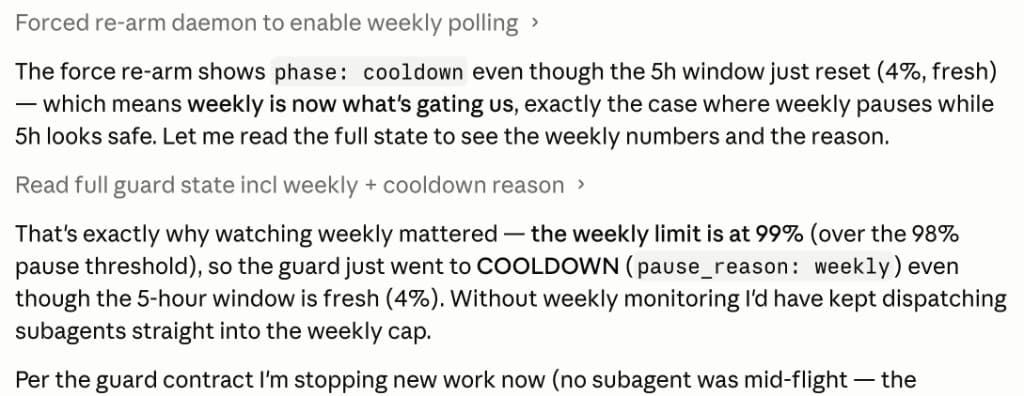
Transcript (accessibility)
Forced re-arm daemon to enable weekly polling

The force re-arm shows phase: cooldown even though the 5h window just
reset (4%, fresh) — weekly is now what's gating us.

That's exactly why watching weekly mattered — the weekly limit is at 99%
(over the 98% pause threshold), so the guard went to COOLDOWN
(pause_reason: weekly) even though the 5-hour window is fresh (4%).
Without weekly monitoring I'd have kept dispatching subagents straight
into the weekly cap.
Honest limits
- Cooperative — session must follow skill rules; we brief up front, not mid-run inject
- Cannot force-stop a running subagent; prevents new work after PAUSE
- Checkpoints — progress safety depends on frequent writes to
checkpoint.json - Force quit — use
/usage-guard resumein a new session; checkpoint is on disk - Extra wallet at 100% — guard aims to pause at 90%; cannot stop Desktop if session ignores PAUSE
Disclaimer
Not affiliated with Anthropic. usage-guard is an independent community tool.
- Reads usage via the same OAuth usage endpoint used by tools like
cu— this is not a documented public API and may change without notice. - Pause/resume is best-effort and cooperative; it does not modify Claude Desktop or guarantee you avoid extra usage charges.
- You are responsible for how you use your Claude subscription.
Related tools
| Tool | When to use |
|---|---|
| usage-guard (this repo) | Proactive pause at 5h (~90%) and/or weekly (~98%), checkpoints, resume after reset |
| claude-auto-retry | Reactive auto-continue after limit message |
ai-usage-monitors cu | Check current 5h % in terminal (no guard) |
Many people use usage-guard + claude-auto-retry together: pause early when possible; auto-continue if you still hit 100%.
Contributing
See CONTRIBUTING.md. Bug reports: use the issue template.
License
MIT — see LICENSE. Copyright (c) 2026 Shirley Xue.
// faq
What is usage-guard?
Proactive 5h usage guard for Claude Code (macOS). Pause before extra wallet on long batch/subagent runs. Account-level window visibility. /usage-guard skill + daemon. Not affiliated with Anthropic.. It is open-source on GitHub.
Is usage-guard free to use?
usage-guard is open-source under the MIT license, so it is free to use.
What category does usage-guard belong to?
usage-guard is listed under skills in the Claudeers registry of Claude-compatible tools.
// embed badge

[](https://claudeers.com/usage-guard)
// retro hit counter

[](https://claudeers.com/usage-guard)
// reviews
// guestbook
// related in Claude Skills
 🔓
🔓An agentic skills framework & software development methodology that works.
 🔓
🔓 🔓
🔓💫 Toolkit to help you get started with Spec-Driven Development
 🔓
🔓AI coding assistant skill (Claude Code, Codex, OpenCode, Cursor, Gemini CLI, and more). Turn any folder of code, SQL schemas, R scripts, shell scripts, docs,…