
tyran
A task conductor for Claude Code that gets better the more you use it. Multi-agent orchestration with an evidence contract that BLOCKS instead of asking, gat…
Install with your AI
Paste into Claude Code, Cursor, or any agent — it reads the repo and wires the tool into your project.
Install and set up tyran (claude-plugin project) into my current project.
Found on https://claudeers.com/tyran
Repo: https://github.com/jjanczur/tyran
Homepage/docs: https://jjanczur.github.io/tyran/
Detected install method: claude-plugin → /plugin install tyran@jjanczur/tyran
Category: automation. Platforms: cli, api, web.
Read the repo's README for exact setup and env vars, then install it and wire it into my project.

Claudeers Health Verdict:
active; community-verified: false. Confirm the source before running anything.
/plugin marketplace add jjanczur/tyran
/plugin install tyran@jjanczur/tyran
git clone https://github.com/jjanczur/tyran
// compatibility
| Platforms | cli, api, web |
|---|---|
| Operating systems | — |
| AI compatibility | claude |
| License | Apache-2.0 |
| Pricing | open-source |
| Language | JavaScript |
📖 Documentation · Getting started · Videos · Architecture · Releases
The more you use it, the better it gets.
What Tyran is
Your most expensive model just renamed a variable. In the same chat, it judged an authentication boundary.
One chat, one model, every job — that is why the bill is high and the work gets worse. The context fills up, the plan is somewhere in the scrollback, and "the tests pass" is a sentence rather than something you can check.
You didn't install a tool. You hired a manager. You describe the work once; he interviews you until the goal is unambiguous — batches of at most four questions, each with his recommendation — turns the plan into tickets on a board, and hands each piece to a dedicated subagent with fresh context and a model tier matched to how hard that piece actually is. A good manager doesn't put a principal engineer on a grep: a scout reads the repo on the cheap tier, implementers take one story each on their own branch, the reviewer can never bless a patch it wrote, and security review always gets the strongest tier — a floor no cost profile or flag can lower.
That is a cost lever and a quality lever at the same time. The conductor holds the plan and never accumulates its agents' transcripts, which is where the tokens in a long session actually go; and an agent that never saw the last six failed attempts cannot inherit them, so the second opinion is a real one.
Nothing you say is lost. Remember something halfway through a run and say it — it doesn't land in the scrollback, it becomes a ticket. Every decision, spawn, report, merge and open question is appended to a journal committed to your repo, so a restart, a compaction and a colleague on another branch all read the same thing.
It learns your repo while it works. Setup reads how the repo is really
worked — stack, validation commands, how things get deployed — rather than
asking you to describe it. After every initiative the team runs a retrospective
on itself, and what it changes is Tyran, never your product code. The same
failure three times becomes knowledge pasted into every matching handoff; five
times and it becomes a rule in your CLAUDE.md, carrying the dates that earned
it. That knowledge does not only grow: entries the counters have written off
are retired on evidence, and two that say one thing are merged by appending a
third that supersedes both — the originals stay on disk, so an unwanted merge
is one file to delete. Most retros correctly change nothing.
All of it lands on one page — a board: what every agent is doing right now, which questions are waiting on you (answer them there and the run carries on), and what the work cost, in the tokens the platform itself reported, per model, per agent and per ticket. The conductor gets its own row, so its overhead never hides inside the total.
Underneath, a hook decides before the tool ever runs — none of this is a prompt asking nicely. A report with no raw command output is refused: it blocks silence, not forgery. Every write is classified against a policy file you own. And a commit carrying a secret is refused, even inside a markdown file. Mechanisms rather than instructions — which is the whole argument.
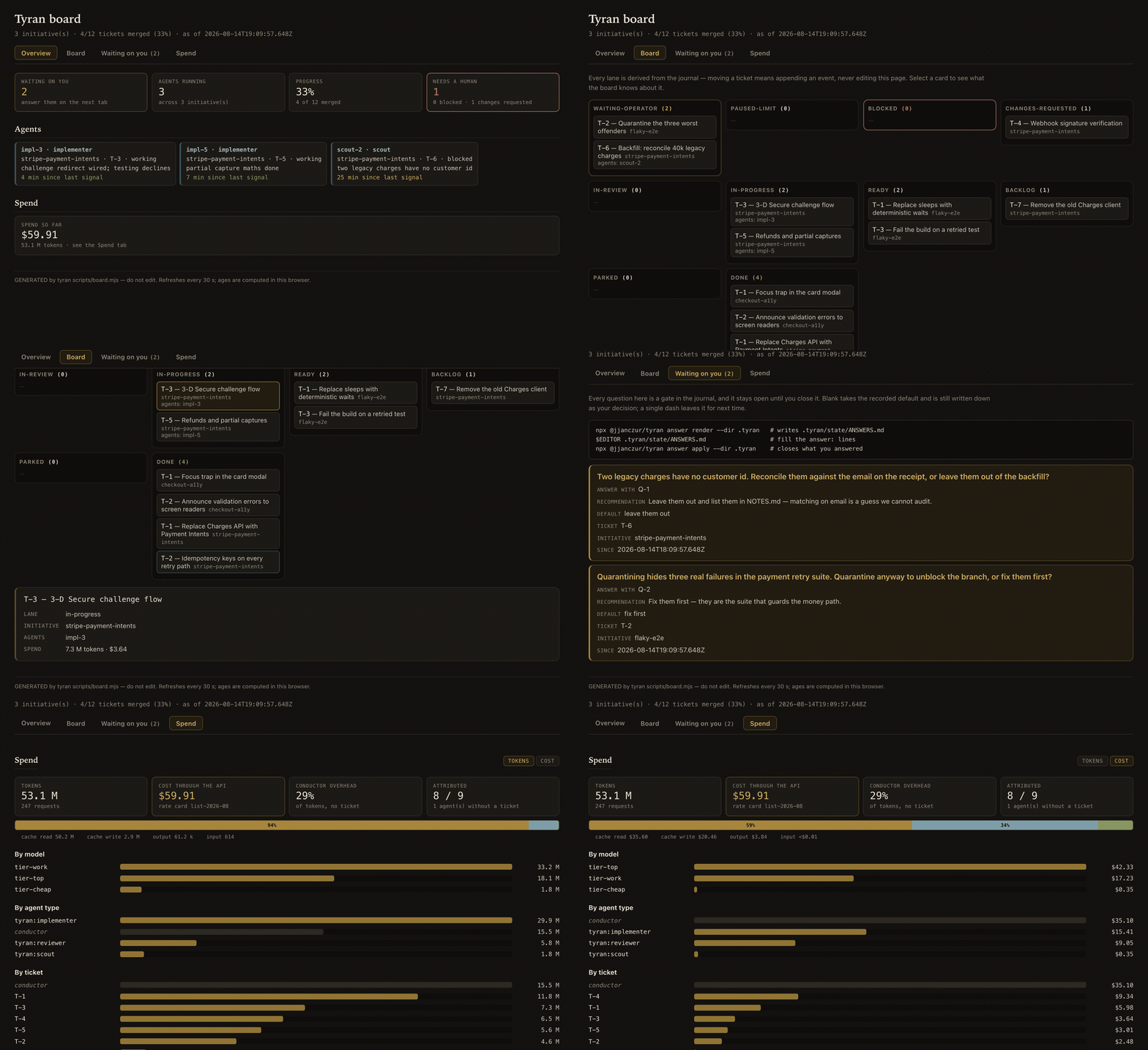
▶ Open the sandbox board — the real page with sample data, in your browser. Click the tabs, filter the lanes, select a card.
Watch it
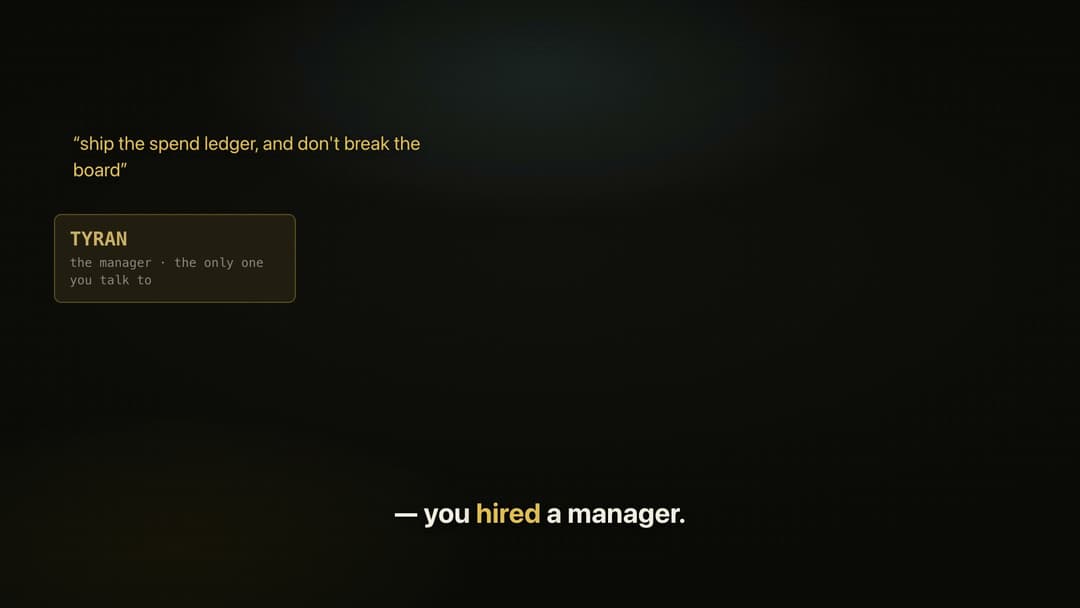 You Didn't Install a Tool — You Hired a Manager 3:20 · the whole argument, end to end |
 Your First Session 3:53 · install, run, read the board |
Three 60-second cuts too — the mistake · the board · the retro — and which to send when.
What it gives you
- Reports that carry evidence, or are refused. A
SubagentStophook rejects a report with no raw command output — measured on 55 real reports from this project's own agents: 53 pass, and both misses were not reports. It blocks silence, not forgery; the evidence gate is precise about the difference. - State you can read without a session. The journal is the single source of
truth;
STATE.md,PROGRESS.md,BOARD.md,board.jsonandboard.htmlare generated projections of it. - The routing table is one file. Model names appear in exactly one place; skills, agents and policies are written in role names, so a deprecation is a one-line edit. The expensive tier is reserved for security review, arbitration and final acceptance, and those two sit on a floor no cost profile or risk flag can cross.
- A spend ledger.
npx @jjanczur/tyran costreports what the work cost, in the tokens the platform itself reported, per model, per agent type and per ticket — read out of the transcripts Claude Code already writes. Dollars need no setup: the published list prices ship, so a fresh install shows what the run would have cost through the API, next to what your plan costs a month. Write a rate card only to override them. - It can run overnight, because the usage limit is a wind-down and not a crash. The platform's own behaviour at the limit is a cliff: calls start failing mid-flight and agents die between a write and its commit. Near the threshold Tyran instead checkpoints, commits the state files, schedules a resume and stops — then a watcher wakes at the window reset and continues the same session. Leave it working and read the board in the morning. Both windows were hit live while the feature was being built; the protocol that survived them is what shipped. See overnight mode.
Tyran vs. an ordinary session
The axis, not the winner — a comparison that can be made without guessing at anyone's internals.
| An ordinary agent session | Tyran | |
|---|---|---|
| Where execution state lives | the chat window, and it ends with the window | an append-only journal committed to your repo, with every human-readable file generated from it |
| What makes a report trustworthy | you read the claim | a hook refuses a report with no raw command output |
| Which model does which job | one model for the whole session | four tiers resolved from .tyran/config.yaml, per role, with a floor under the judgements everything downstream trusts |
| What happens after the work | nothing | a retrospective writes what this repo taught it back into this repo |
| What it adds to your install | — | zero runtime dependencies, no build step |
Tyran vs. other Claude Code orchestrators
Five rows of eleven, verified against those projects' code and public issue trackers (July 2026) rather than their READMEs. ✅ shipped and enforced · ⚠️ partial or prompt-only · ❌ absent or broken · 🎯 committed in the design, ships test-gated.
| Capability | Tyran | oh-my-claudecode | metaswarm | pilotfish | pro-workflow |
|---|---|---|---|---|---|
| Evidence contract that blocks: no raw command output → report rejected | ✅ | ⚠️ advisory¹ | ⚠️ prompt | ⚠️ prompt | ❌ |
| Execution state survives restart & compaction (journal + re-inject) | ✅ | ⚠️ | ❌² | ❌ | ⚠️ |
| Plugin update never destroys local learning (3 layers + delta agent) | 🎯 | ❌³ | — | — | ⚠️ |
Secret gate on commit/push with verified scan coverage, no --no-verify escape | ✅ | ❌ | ❌ | ❌ | ⚠️ |
Clean install: 2 commands, never writes into your ~/.claude | ✅ | ❌³ | ⚠️ | ❌ | ⚠️ |
¹ Their deliverable check is explicitly non-blocking. ² Their issues
#32/#33/#36: a crash loses loop state. ³ Open issues #3535/#3536: an update
deletes user files from ~/.claude. The other six rows — repo-specific
learning, cost tiers, independent review, context budget, safe parallelism, OSS
hygiene — and every footnote in full are in
the FAQ.
Worth knowing before tuning anything: cache reads were measured at roughly three quarters of a real session's cost, and the conductor's own context at between 44% and 86% of a tree's tokens — so the lever is context size and turn count, not the price of a model.
Install
One command, then one restart, then one paste:
curl -fsSL https://raw.githubusercontent.com/jjanczur/tyran/main/install.sh | sh
It checks Node, installs the plugin, installs the secrets scanner the write gate needs, and prints the prompt to paste after you restart — which runs setup and opens the dashboard in your browser.
Tyran refuses some things by default — reading a .env, writing outside the
repository, pushing past your autonomy class. If you would rather it did not,
boundaries: {preset: open} in .tyran/config.yaml relaxes all five at once,
and the dashboard's Settings tab has the switch. Secret scanning at commit and
push is not one of the five and cannot be turned off from there. See
configuration.
Or do it by hand, inside Claude Code:
/plugin marketplace add jjanczur/tyran
/plugin install tyran@tyran
/tyran:hello
Restart Claude Code afterwards — hooks and agents are read when a session
starts, so an install you have not restarted into is an install you are not
running. /tyran:hello is the smoke test. The only requirement is Claude
Code ≥ 2.1: the scripts ship with the plugin and Claude Code runs them, so
there is nothing to install and no version of anything else to match.
/plugin is a slash command a human has to type — the prompt that has Claude
Code install itself, the npm package for a shell or a CI job, updating and
uninstalling are all in
getting started.
Use it
/tyran:setup          # once per repo: scans it, writes .tyran/, installs /tyran
/tyran                # then describe what you want done
Setup infers your stack, your validation commands and your deployment autonomy
class from how the repo is actually worked, annotates every value with the fact
that produced it, and asks only about what it could not establish. /tyran
then interviews you, sizes the work, and either does it itself or drives the
roster — tyran:scout, tyran:implementer, tyran:reviewer, tyran:retro —
through it, stopping only at genuine decisions. Also /tyran:status,
/tyran:doctor, /tyran:retro.
Hit the brake at any time, from anywhere, without killing the session:
echo "wrong branch — hold everything" > .tyran/STOP
The dashboard
It is already running. /tyran:setup writes board: autostart: true, so
every session after it starts the dashboard if it is not up and prints the URL —
open that. The board is bound to loopback, re-rendered on every request, and
it reloads itself every 30 seconds.
The Settings tab is an editor for .tyran/config.yaml and the autonomy
policy — every knob with a sentence explaining it, your comments kept, and
loosening a boundary behind a second deliberate press. Setup turns it on;
board: write: false makes the board read-only, autostart: false stops it
starting at all.
From a plain shell — outside Claude Code, or in a script:
npx @jjanczur/tyran board --dir .tyran --detach   # starts it, prints the URL, returns
npx @jjanczur/tyran board --dir .tyran --status   # where is it, if anywhere
npx @jjanczur/tyran board --dir .tyran --stop     # ends it
--serve instead of --detach holds the terminal until Ctrl-C, which is what
you want only if you are a person at a prompt. --port <n> if 4173 is taken.
These are the one place a Node version matters, because npx runs the scripts
outside Claude Code and they need Node ≥ 22.
No terminal, no server: the same page is written to .tyran/state/board.html
after every agent, so you can just open the file —
open .tyran/state/board.html # xdg-open on Linux, start on Windows
— and inside a session you need neither command, because /tyran:status
regenerates the board and tells you where it is.
Five tabs, because the page answers five questions:
- Overview — what is waiting on you, agents running, progress, and what needs a human (blocked lanes and blocked agents); then the agent strip, stalest first, each chip carrying its last signal and what it said it would do next. Anything a journal could not account for is listed here rather than quietly dropped.
- Board — every ticket in exactly one of ten kanban lanes, strongest verdict first. Click a card for its initiative, agents, note, spend, and the files that initiative actually has on disk.
- Waiting on you — the open questions with their recommendations and recorded defaults, above the commands that answer them. The count sits in the tab label, so a pending question survives being on another tab.
- Spend — tokens, the amount under your rate card, the conductor's share, a composition bar across input / cache write / cache read / output, and three ranked charts (by model, agent type, ticket) with a tokens/cost toggle.
- Settings — what Tyran is configured to do, every knob with the sentence
that explains it. Read-only until you pass
--write, as above.
Spend is served rather than embedded, so it is the one thing missing when you open the file directly — the board says why, and covers the lanes, the drill-down and answering a question.
What ships
Fourteen skills and five agents. Six of the skills are the conductor's own
machinery, though commands rather than internals — /tyran:doctor runs on any
repo, initiative or not — and the other eight are standalone protocols.
| Skill | What it does |
|---|---|
run | the conductor — interviews, sizes, plans, delegates, merges |
setup | reads the repo and writes .tyran/config.yaml, provenance per value |
status | where an initiative got to, from the journal rather than from memory |
doctor | is any gate installed but unable to fire; is the state self-consistent |
retro | the anti-bloat curator that changes Tyran, never your product code |
hello | proves the plugin is installed and its paths resolve |
code-review | the dimensions a diff is read against, and the rule that you refute a finding before reporting it |
root-cause | reproduce first, one variable per experiment, exit by naming the mechanism |
browser-check | a UI pass that returns counts — console errors, failed responses, computed styles |
deslop | the optimization pass: delete before you add, behaviour pinned by a test that ran first |
pr-feedback | all three of GitHub's comment surfaces, a disposition for every comment |
fidelity-gate | build 1:1 against a frozen mockup, measured rather than eyeballed |
prompt-tuning | tune a non-deterministic output without chasing noise — noise baseline first |
skill-writing | what a skill has to earn before it ships, and the test that proves it fires |
Agents: tyran:scout (recon, read-only), tyran:implementer (one story, own
branch), tyran:reviewer (may fix what it finds, but editing forfeits
APPROVE — it can never bless its own patch), tyran:verifier (runs the
suite on the cheapest tier, reports raw counts, never fixes), tyran:retro. A skill is admitted only when something already asks
for the protocol by name, and every description is loaded into every session
whether the skill fires or not — so the combined length is capped and CI
enforces the cap (3868 of 5000 characters). What each one assumes, when it
fires and who invokes it, is in
skills and agents; the prompts
themselves are in skills/ and agents/. Behind all of
it: 1659 unit tests, run with node --test "tests/**/*.test.mjs".
Documentation
Everything below also reads as a site, with search and rendered diagrams: jjanczur.github.io/tyran.
| Getting started | install, first run, the command line, updating |
| Architecture | the four failures, the three layers, the hooks, the principles, the roadmap |
| Skills and agents · the roster | what each one assumes and who invokes it; the tier and effort table, the .tyran/STOP brake |
| Configuration | .tyran/config.yaml, cost profiles, the rate card, autonomy classes, boundaries: |
| Self-improvement | how Tyran learns your repo, and its guardrails |
| Journal · projections | the append-only event schema, and what is generated from it |
| The board · the spend ledger | lanes, answering a question, and what a run cost |
| Overnight mode · doctor | usage-limit pause and scheduled resume; the --state and --hooks checks |
| Hook runtime · evidence gate · policy gate | gates versus probes and why hooks fail open; the criterion and its limits; path classes and where each stops |
| FAQ | short answers, the comparison table, and where this came from |
| Contributing | the dev loop, the test commands, the enforced rules |
License
From Berlin with ♥ by two buddies — Jacek and Piotr.
// faq
What is tyran?
A task conductor for Claude Code that gets better the more you use it. Multi-agent orchestration with an evidence contract that BLOCKS instead of asking, gates written as hooks rather than prompts, and a retrospective that learns your repo's rules and tunes its own playbook.. It is open-source on GitHub.
Is tyran free to use?
tyran is open-source under the Apache-2.0 license, so it is free to use.
What category does tyran belong to?
tyran is listed under automation in the Claudeers registry of Claude-compatible tools.
// embed badge

[](https://claudeers.com/tyran)
// retro hit counter

[](https://claudeers.com/tyran)
// reviews
// guestbook
// related in Automation & Workflows
 🔓
🔓 🔓
🔓The API to search, scrape, and interact with the web at scale. 🔥
 🔓
🔓🌐 Make websites accessible for AI agents. Automate tasks online with ease.
 🔓
🔓Taste-Skill - gives your AI good taste. stops the AI from generating boring, generic slop